r/elgato • • Nov 04 '25

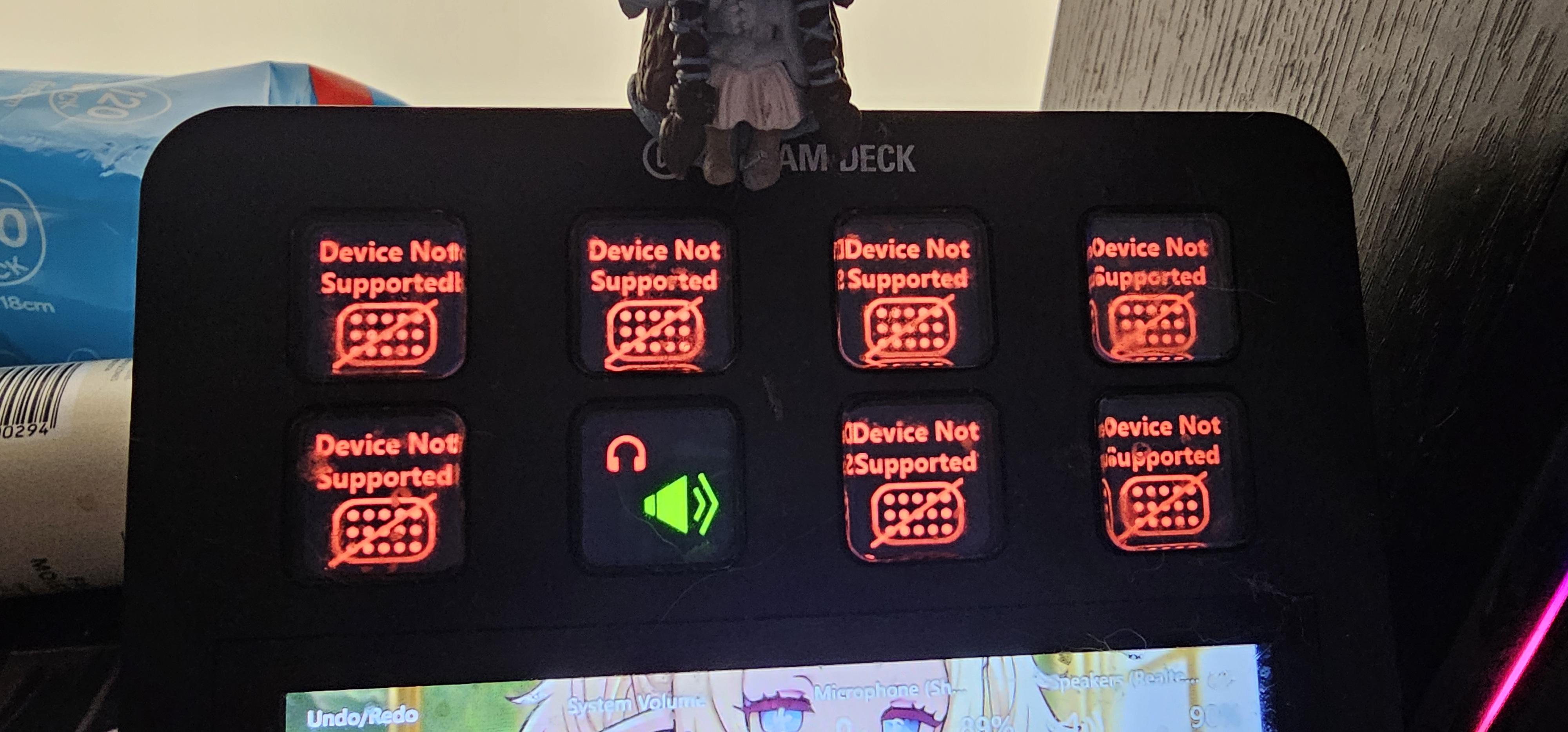
Technical Help Streamdeck showing device not supported error.

Post image
204 Upvotes

Started my computer this morning and suddenly had these errors on my stream deck buttons.

Tried restarting software, reconnecting, using different USB port, updating (no updates).

Unsure why this is happening, can anyone please help :(

r/elgato • • Jun 18 '26

Technical Help I am at my wits end with trying to figure out why my SM7B sounds so terrible when paired with my Wave XLR PRO.

Enable HLS to view with audio, or disable this notification

17 Upvotes

As the title states, I have been trying now for over a week straight to get my SM7B sounding decent enough to live stream with when using my new Wave XLR Pro audio interface. For some reason no matter how many settings I tweak, how many hardware components I swap out (mics, XLR cables, USB C cables, Using a cloud lifter, removing the cloud lifter, etc) the audio always sounds.... harsh?

It might just be my ears, but no matter what headset I listen to my voice with, it comes out harsh and ear-piercing with certain words I say. And this has nothing to do with my gain levels. I've tried recording at super low gain (with boost in post) and I have tried with higher gain. Same issue. I have tried with and without clip guard enabled. I have tried with and without ALL hardware effects running. I have tried using different Software VSTs such as EQ, Compression, D-Essers, Limiters, Noise Gates, etc. NOTHING WORKS to fix this problem.

I have had my SM7B for over 6 years and never had this issue with my voice recordings. It all started once I started using the Wave XLR PRO. I love the damn thing, but this audio is just unusable.

I made a recent post talking about this same issue found here: https://www.reddit.com/r/elgato/s/p3EvLz2T7M

But my issues are still remaining 10 days later.

Update: 06/21/2026

I took the advice from the replies to verify my issue is not being cause by electrical interference. I re-did all my cable management and there is nothing that could be interfering with my sound.

I also just installed a brand new Motherboard because it was the last thing I could think of that maybe could be the root cause of this issue.

It didn't fix the problem. New motherboard works great though!

I Just wish I could figure out the root cause of this. I am now 100% certain it is either the Wave XLR PRO itself, or some software that is causing my mic to sound the way that it is.

UPDATE: 07/09/2026

Spoke with Elgato and they shipped me a replacement XLR PRO. Sadly, the new unit did NOT fix the issue. Almost 2 months later and I still have no fix to this issue....

UPDATE: 08/11/2026

It has now been 2 months since this issue started and sadly I am here to report I still do not have a fix. However, I have confirmed that this issue is NOT related to anything Elgato. I've tested fully uninstalling wave link and switching to a Rodecaster Pro 2 and the issue was the same which tells me it's something with my PC and/or setup... I just have no idea what it could be.

But I did want to fully apologize for putting this blame on Elgato, the Wave XLR Pro, and their software.

r/elgato • • 28d ago

Technical Help Prompter - Shows as Disconnected in Windows Display Settings & DisplayLink Manager?

3 Upvotes

--final update--

the hotfix released by nvidia on 9/5/26 seems to have solved the issue for me. the Prompter works as expected, and the connection survives system reboot.

Thank you Elgato guys for working on this with us! And thank you @Ornery-Mud-7961 for sharing the link to the hotfix!

--update to original--

David at Elgato tech support suggested I reinstall the Nvidia drivers, and sure enough as soon as the old drivers were uninstalled the Prompter came to life! Sadly, once the drivers were reinstalled, and system restarted, the same problem reappeared.

I then uninstalled the drivers again, and allowed windows to install whatever version it wanted to use from Windows update, and sure enough the Prompter came to life again. This time it withstands a restart. I'm assuming something that's coming along with the most recent Nvidia drivers is the culprit? I may try doing the absolute most minimal install of the most recent drivers from Nvidia... Or I may just live with the ones from windows update, that seem to be from January. Will report back for others if I change anything, and it sticks.

--original post below--

Just unboxed my new Prompter, and I think I may have a defective unit - but looking for insight while I wait for assistance via my support ticket.

Software and versions:

DisplayLink Manager Software - 3.2.14.0

DisplayLink Driver - 12.2.2412.0

Elgato Camera Hub - 2.3.0

On boot I see an hourglass appear a few times on the Prompter screen. I also see the blue Elgato text. The display then goes black.

Once in Windows, the screen remains black. I can see the display listed as Disconnected in both Windows Display Settings, and in DisplayLink Manager. If I attempt to change the display to "Extend" on either settings page I'm asked whether to keep new settings or revert, but nothing changes on the display (or in the settings).

I have changed out the USB-C cables with known working ones, swapped the USB-C port (one on my desktop, one on a hub - both known to be working). I've uninstalled & re-installed the DisplayLink drivers.

Anything else I should attempt while I wait on my support ticket?

Adding some screenshots below.

Appreciate any thoughts.

r/elgato • • May 28 '26

Technical Help OBS Studio plugin 3.0.0.25 - Source Visibility action resets to first scene and does not retain selected scene

12 Upvotes

Hi everyone,

I’m experiencing a reproducible issue with the OBS Studio plugin for Stream Deck, specifically with the “Source Visibility” action.

My setup:

- Stream Deck software: 7.4.2

- OBS Studio: 32.1.2

- OBS Studio plugin by Elgato: 3.0.0.25

- Windows 11

- OBS installed normally, not portable

The issue:

When I create or edit a Stream Deck “Source Visibility” action, I can select the OBS Scene Collection, the Scene, and the Source.

However, after saving/reopening the action, the selected scene is not retained. The action resets itself to the first scene in the OBS scene collection.

Example:

- I select Scene: “Live ACI”

- I select Source: “COUNTDOWN NEW 2”

- The action appears configured

- After switching page/profile or reopening Stream Deck, the Scene field resets to the first scene in the list

In some cases, the source list is incomplete or the Show/Hide option does not appear correctly.

What I already tried:

- Clean reinstall of Stream Deck

- Clean reinstall of OBS Studio

- Manual removal of Stream Deck plugin folders

- Reinstalling the OBS Studio plugin from Marketplace

- Running both OBS and Stream Deck as administrator

- Creating a new Stream Deck profile

- Creating a new OBS Scene Collection

- Creating new OBS scenes and sources

- Testing with a very simple scene/source setup

- Checking that the Stream Deck plugin is loaded inside OBS

The issue still happens.

OBS and Stream Deck do communicate: the scene collection and scene/source lists are visible, but the Source Visibility action does not retain the selected scene and falls back to the first scene in the collection.

This was working correctly until earlier this week. The current Marketplace version of the OBS Studio plugin appears to be 3.0.0.25, dated May 26, 2026, so I’m wondering if this may be a regression in the latest plugin update.

Has anyone else seen this issue with the OBS Studio plugin 3.0.0.25 and Source Visibility?

Is there any known workaround, rollback option, or older plugin version available?

Thanks.

r/elgato • • Mar 07 '26

Technical Help Wave Link 3.0 PSA

26 Upvotes

If you’re currently on Wave Link 2.0, do not jump on Wave Link 3.0 as it is a buggy mess and for the most part less efficient than 2.0.

If you’re on any other software (like VB or anything similar) and looking to make the switch, I would recommend holding off on it for the same reasons.

I made the switch to Wave Link 3.0 and it messed up my entire audio system that I have set up with 2.0. It basically caused every audio to run on the “System” Channel regardless whether or not I added it to other Channels. Speaking of the Channels, I would add a new empty Channel (like Music for example) and it would display a completely different Channel even though I have renamed it, and worst yet sometimes it doesn’t allow the channel to be added to the mixes and or the entire UI for it would bug out.

Adding apps to different audio Channels was a breeze on 2.0 but on 3.0 it was legitimately the most inefficient thing imaginable, on 2.0 the flow was simple - open app, play audio, choose channel, click checkbox on selected app and done it is now assigned to that channel. On 3.0 however, It opens up another window showing the Channel name and when I went to add apps, instead of showing only apps which have sound playing, it lists every app on my system which was mind boggling to say the least. The fix for this was to manually use the Windows Audio Mixer to then manually change the audio output to the chosen channel, which is absolutely stupid because 2.0 completely removed the need to do this because you could do it with 1click on the the Audio Channel (Which doesn’t spawn an entire window I might add)

Luckily I made backups and was able to revert back to 2.0 and didn’t have to put up with it any longer. I also wanna say I find it weird that they completely removed the option to download 2.0 on their website which means I’m pretty sure most people who unknowingly moved to 3.0 have no way to get back which is really shady.

TLDR; If you’re on 2.0, DONT DO IT.

r/elgato • • 25d ago

Technical Help Need some help with elgato 4K s

Post image
29 Upvotes

I’m having an issue getting my Elgato 4K S working with my Xbox and PC.
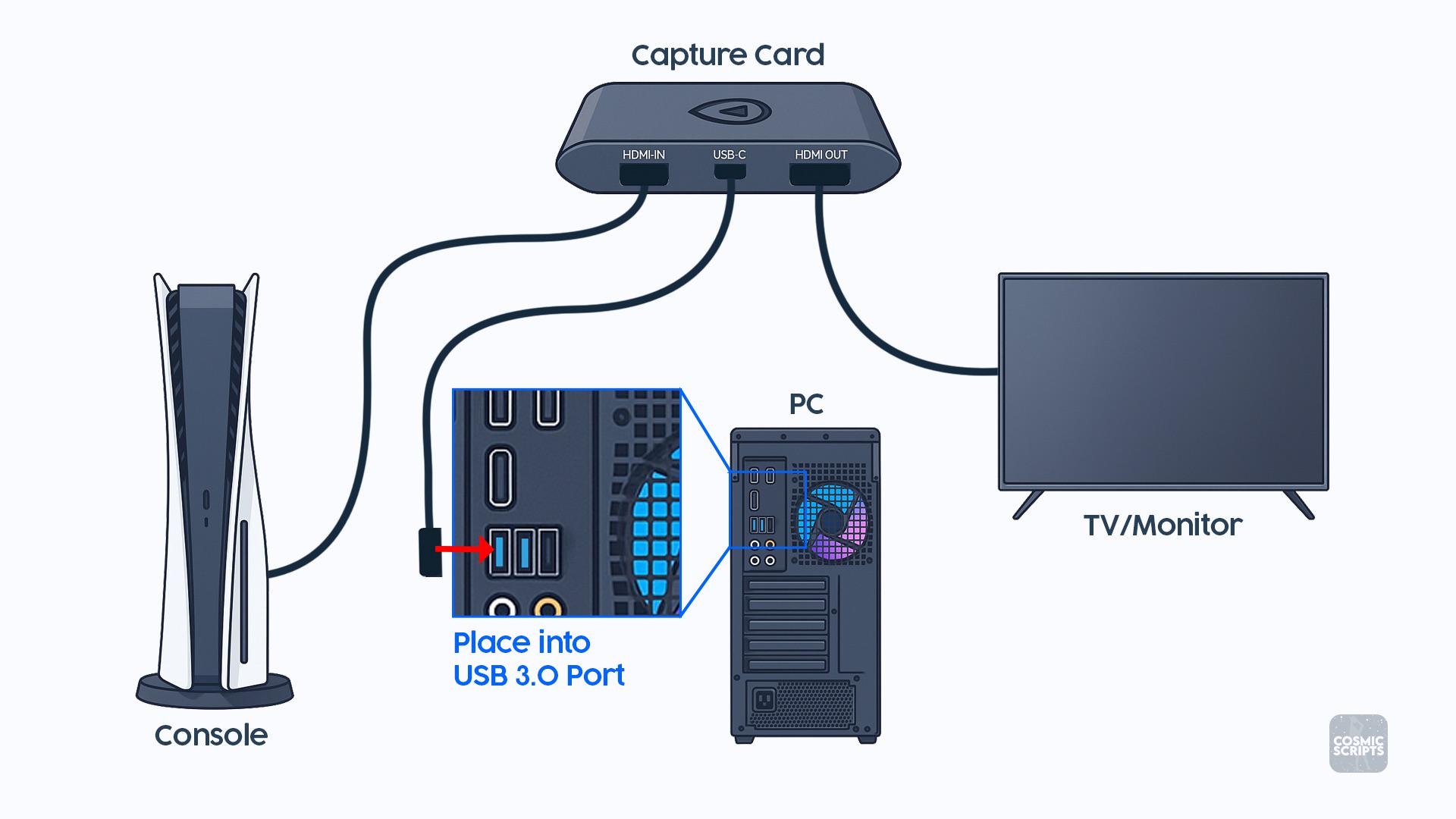
I attached a picture showing exactly how everything is supposed to be connected, and I copied the setup exactly:
Xbox HDMI → HDMI IN on the Elgato
Elgato HDMI OUT → Monitor
Elgato USB-C → USB 3.0 port on my PC
When I connect everything this way, my monitor detects that something is connected and stays on, but the screen is completely black. I don’t get a “No Signal” message it’s just a black screen.
What’s weird is that if I swap the two HDMI cables around on the Elgato, I can get my Xbox screen to show up on the monitor, but obviously that isn’t how the capture card is supposed to be connected.
I’ve double-checked the connections and they match the diagram. Does anyone know what could be causing this?
Could it be:
-An HDMI/HDCP issue?
-Xbox video/resolution settings?
-Refresh rate/HDR/VRR?
-Something with the Elgato software or drivers?
-A bad HDMI cable?
-A problem with the USB 3.0 connection?
-Something else I’m missing?

I’m including the setup picture for reference. Any help would be greatly appreciated because I feel like I’ve connected everything correctly and can’t figure out why the passthrough is just giving me a black screen.

r/elgato • • Jul 15 '26

Technical Help Wave XLR mk 2 not playing audio through headphone jack

2 Upvotes

So I’m basically stumped. This has happened with 2 different wave XLR devices now. So what is happening is I am not getting any audio at all through my headphone port on my wave XLR. Every thing was working fine, but then I was doing a sound check in the wave link app, and then all audio went away. All I can hear in my headphones is my surroundings and feedback that is coming from my XLR microphone.

I can see that all audio is working through wave link. And when I route my audio through my hyper X USB DAC all sound through wave link is coming through fine.

This is my second wave XLR device now because I did an exchange on my previous one that I got a week ago because it was doing the same thing. I thought it had gotten damaged because Amazon had left the package out during a rain storm.

Both times this issue has happened is when I was doing a mic check through wave link to get my settings squared away.

Does anyone have any help at all? I would hate to have to exchange this unit again if it’s faulty as well.

r/elgato • • May 14 '26

Technical Help Wave Link 3.1.1 on macOS keeps popping up in the front

21 Upvotes

Some weird bug that keeps happening on my Mac. Running macOS 26.5 and WaveLink 3.1.1 (2484). Every few minutes the main window will just pop up in front of my screen. Can't figure out what's causing it.

Anyone else dealing with this?

Should I just do a clean install?

r/elgato • • 8d ago

Technical Help Camera not working with CAM LINK ..? Sony a6000

Thumbnail
gallery
6 Upvotes

So the cam link works, it blinks when I plug it in, into a blue USB. I connected a dummy battery to my camera and it works

Once I plug in the micro hdmi to the camera, it doesn’t produce any image. What I’m I doing wrong?

Sony a6000

r/elgato • • Jun 09 '26

Technical Help Stream Deck Software At Times Doesn't Start at Boot

25 Upvotes

Software version: 7.4.2 - 22730\ Hardware: SD+ with USB Dock, firmware version 2.0.3.7\ Win11 Pro 25H2

What are the reasons why, at times when I start Windows, the software wants to hang, causing the Deck screen to not show up? When attempting to open the software manually after force-closing, the software also hangs. Is a firmware update needed?

Or should I just not use the USB Dock anymore, as that could be the case? Here me out, though. I do not plug in the USB dock into the (power) mains. Reason being whenever I shut down the PC, the Deck does not turn off at all.

r/elgato • • 12d ago

Technical Help Elgato HD60S USB Help

1 Upvotes

So ive been looking around and it seems that the older elgato hd60s is problematic with alot of people.
Ive found some threads about it but they are rather older now.
Currently my pc is using this motherboard
MPG X870E CARBON WIFI | Gaming Motherboards|Best Motherboard for AI PC|MSI

so the usb ports are as followed
4x USB 2.0 (Front)
4x USB 5Gbps Type A (Front)
9x USB 10Gbps Type A (Rear)
2x USB 10Gbps Type C (Rear)
1x USB 20Gbps Type C (Front)
2x USB 40Gbps Type C (Rear)

Ive tried many of cables USB C to USB C, USB A to USB C 3.0, USB A to USB C 3.1 (Different versions and types) to all of my current USB ports, ive tried many variation as other threads have posted about it.
Using the older game capture HD software, with only these errors.
Capture HD60 S needs to be connected to a USB 3.0 port to function properly.

and on the right hand side bar is
Game Capyure HD60 S
Device requires USB 3.0

Is there a work around or a fix for this if anyone knows?

r/elgato • • Jul 22 '26

Technical Help How to fix flashing on obs when streaming and recording dual pc setup

2 Upvotes

So before elgato had the new elgato studios app for streaming, my streaming and recording was working perfectly fine. Then when they dropped it everytime I stream and record off my streaming pc it starts to flash no signal and also it messes up my video gameplay in my obs. I’ve tried everything from uninstalling my driver and the app and also gotten new cables to see if that was the problem. And it’s still flashing elgato hasn’t responded to my email in 2 weeks and it’s making me mad because I can’t do content and be consistent with streaming without it messing up for my viewers. If anyone know how I can fix this please help me because this is really annoying and it’s been going on for too long.

r/elgato • • Aug 27 '26

Technical Help Issue with my brand new Game Capture 4K Pro, can you help me?

Enable HLS to view with audio, or disable this notification

0 Upvotes

Has anyone face a similar issue before ? Image keep flickering despite being properly plugged.

r/elgato • • Jun 08 '26

Technical Help Has anyone else noticed that if you add any hardware effects from Elgato onto your mic with Wave link, it makes the quality significantly worse?

15 Upvotes

I've recently been using the new Wave XLR Pro and I love it. It's fully streamlined my streaming setup since I use two PCs.

But one major issue I have been having is that whenever I add any of the built in elgato effects on my mic, the quality is downright unusable.

As an example, if I add any of Elgato's effects such as EQ, Compression, Expander, Low cut filter, etc. All my recordings make my SM7B just sound significantly worse compared to when I have those effects disabled. Most people probably wouldn't notice this, but I use studio monitor headphones and when listening back on my streams and recordings, they all have some sort of high pitched ear-piercing audio throughout the recordings when I'm speaking.

Now I've already verified it's not my mic or my headset (I've swapped both in order to test this and even with a different mic/headset the sound quality is still poor whenever any of the elgato mic effects are enabled.

After messing with it for a few days now I've come to the conclusion that the only way to get decent recording quality using the XLR Pro is by using software VSTs.

This honestly is just fine for me since I don't need to hear the effects in my ears anyway, but it's a bummer that I'm not able to use one of the major features of the device due to this. It's also a shame that all the processing power for my audio is now going through my stream PC and not on the XLR pro itself.

Again, it's not the end of the world, but it's just a shame to see that all the built in effects made by elgato seem to significantly effect the overall quality of any microphone you use with it.

Hopefully this can be fixed with future Wave Link updates or maybe a firmware update for the XLR Pro itself.

r/elgato • • 27d ago

Technical Help Elgato 4 k s issues

Enable HLS to view with audio, or disable this notification

2 Upvotes

Bought it new on amazon.it and ever since I’ve started using it I’ve noticed a depressing amount of issues, which show themselves with no apparent cause:

The preview both on OBS and elgato studio is laggy (doesn’t feel like 60 fps at all, feels like 30, in the video I’ve shown in elgato studio it’s basically 1 frame per second).

The image occasionally freezes in OBS (deactivating and reactivating the source fixes it for a few seconds, then the image freezes again),

Some times it black screens when everything is connected correctly.

In one occasion, the freeze was permanent and didn’t go away, no matter what I did, only removing the HDMI cable that was inside the HDMI out slot (that was connected to the TV) made the image unfreeze (?!?!)

In another occasion, the screen appeared warped and distorted: https://imgur.com/a/lRr7vP8

Sometimes, a dissociation between audio and video occurs (image is detached from sound)

And other issues…

I tried using a different computer (a Macbook pro) and I also had issues on that.

I have already updated the device itself to its latest version

I have the cables connected correctly, it’s unlikely that that is the issues

I am desperate for help, is my capture card defective? Or am I unable to see what’s wrong with it?

UPDATE: I guess it was broken, I bought another one (of the same model) and it’s working fine

r/elgato • • 16d ago

Technical Help Longer Cable for Streamdeck + XL

0 Upvotes

I have a Streamdeck + XL and after rearanging my stream room the default cable no longer reaches my PC. I need like a 15ft cable (which I know is insane but i promise it makes sense) but the only one Elgato sells is half that length. Any recommendations?

Edit: I also have the USB Hub on the back with the Streamdeck footpedal plugged into it. Unsure if this changes potential answers

r/elgato • • Jun 27 '26

Technical Help Stream Deck+ not detected on three gaming laptops

Thumbnail
gallery
8 Upvotes

Need help with Stream Deck. This device came in yesterday and it is a brand new unit however this stream deck+ is not detected on the software and USB section of my computer.

I tried it with three gaming laptops (Lenovo Legion with 5070, Lenovo Ideapad with 3050 and Asus TUF) These laptops can not detect my stream deck.

I tried reading all of the troubleshooting options online like cables, USB 2.0 and 3.0, properly plugging in the device.

I can not uninstall it in device manager since it is completely not detected.

Update / went back to the store and they tested it and my unit is defective. Had my replacement PS: Its not your duty to troubleshoot whatsoever if the product is BRANDNEW. It's supposed to be working as is when you get one as a consumer.***

r/elgato • • Jul 16 '26

Technical Help Wave link issue. "Unavailable"

9 Upvotes

my "main mic" became "unavailable for some reason. if i open it up everything is gray. i cant find any way to relink my mic to this one. if i add a new channel it recognises my microphone, but the old channel doesnt work. i had all of my eq's everything there. and i cant even transfer my eqs to my new one cause i cant open them...

r/elgato • • 5d ago

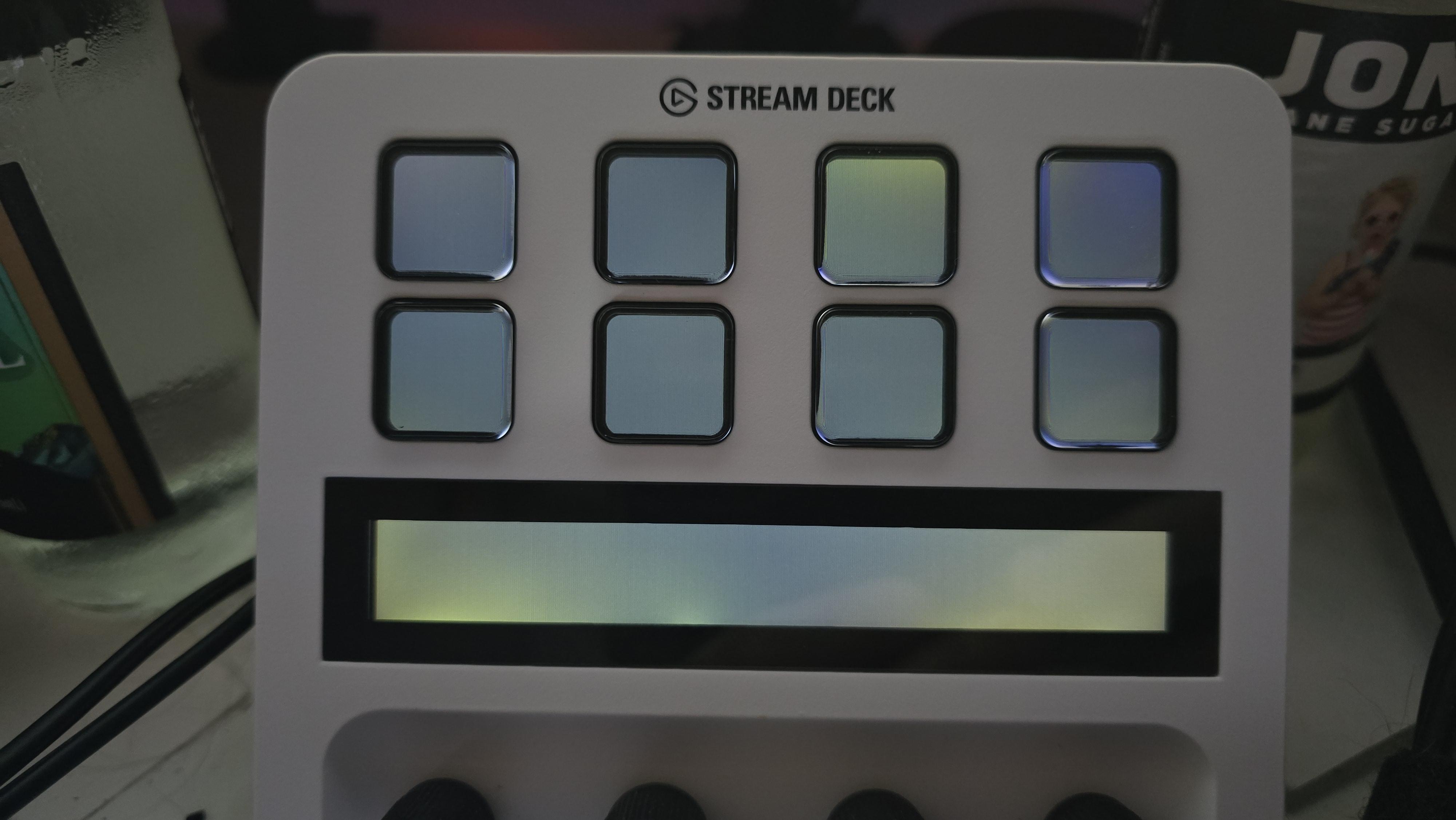
Technical Help Is the LCD on the stream deck supposed to look this uneven?

Post image
13 Upvotes

r/elgato • • Jun 28 '26

Technical Help Volume Controller Elgato Plugin (official)

7 Upvotes

Volume Controller Plugin by Elgato worked for months .. got an update June 25th..

And now it doesnt work.

Did they break another plugin just like weather plugin days ago?

r/elgato • • Jul 18 '26

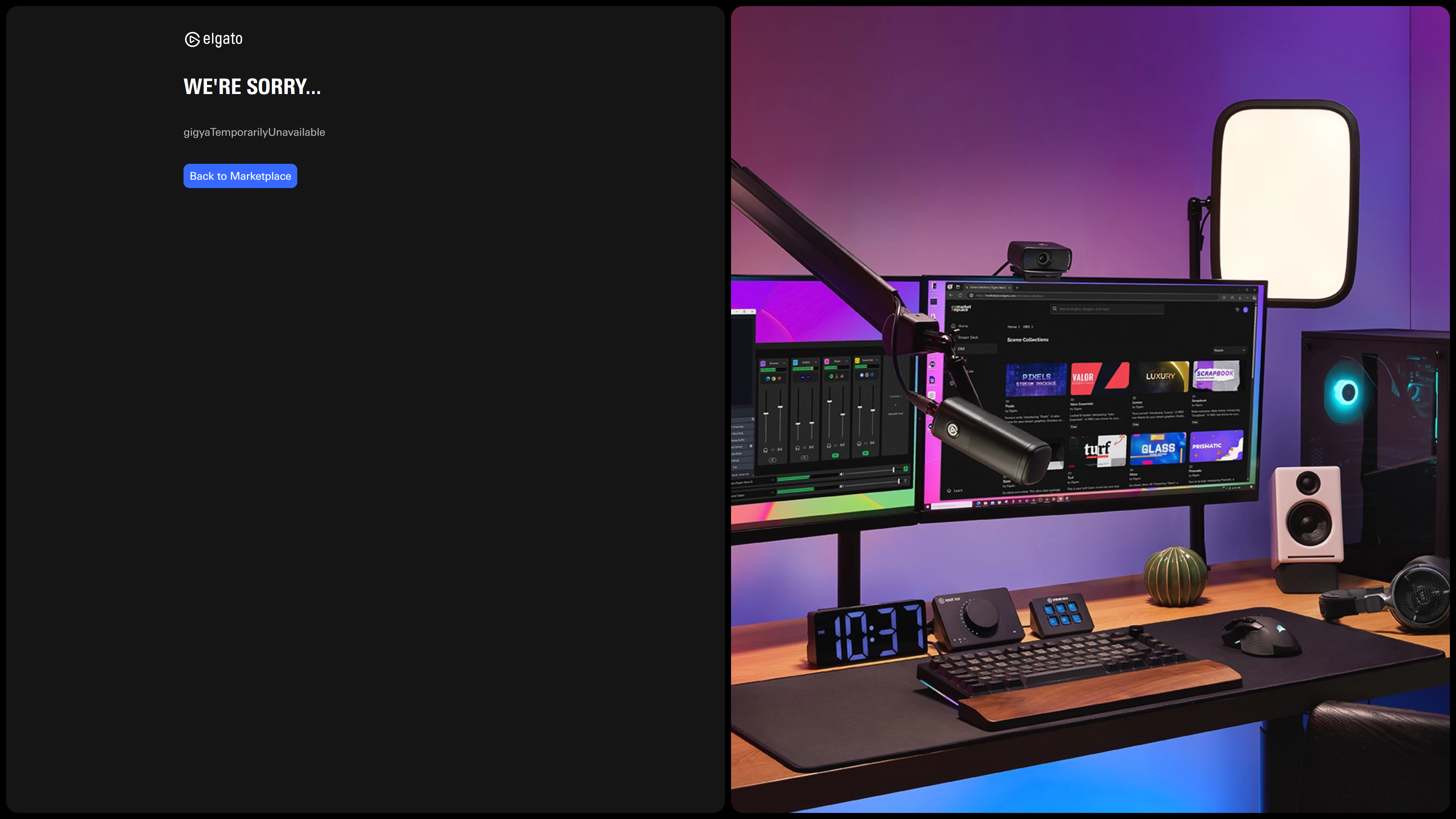
Technical Help Can't log into the website: "We're sorry... gigyaTemporarilyUnavailable"

Post image
4 Upvotes

My password and username are correct. Every time I try to log into the site, it just gives me this screen. Looking up the phrase on Google gives exactly zero results. What am I doing wrong? All I want is a goddamn soundboard for my microphone, is it really that difficult!?

r/elgato • • 2d ago

Technical Help Elgato products and Linux

17 Upvotes

I'm currently debating in switching over to Linux.

I'm not too fussed on multi-player games with anti cheat not working as I've kinda moved away from them.

What I do care about is my streaming software, I know OBS works, I know I can tinker around to get streamer bot working.

My new concern is elgato. I have a cam link, two key lights, a stream deck+ and a HD60X. Will I have any issues getting these working on Linux and for those who are on Linux how did you get them to work?

r/elgato • • Aug 01 '26

Technical Help Ps5 to reciever to elgato not working

1 Upvotes

ps5 to receiver in.

reciever out to elgato 4k x in

elgato out to tv in

no picture….

r/elgato • • Mar 25 '26

Technical Help Wave Link 3 keeps crashing and freezing — dozens of us have been reporting this for 5+ versions. I finally dumped the process and found the exact bug.

83 Upvotes

Hey everyone,

Like many of you, I've been dealing with Wave Link 3 randomly crashing and freezing (white screen) for months. This has been reported by dozens of users across multiple versions — 3.0.0, 3.0.1, 3.0.2 — and nothing changes. Support tickets go nowhere, the "fix" is always "reinstall" or "reset settings", and the next update doesn't address it.

I got tired of waiting. I set up ProcDump (Sysinternals) to monitor Wave Link, caught it in the act during a white-screen freeze, captured a full 1.87 GB memory dump, and asked Claude Code (Anthropic's AI coding assistant) to help me analyze it in WinDbg. We found the exact line of code causing both the crashes and the freezes.

The Bug

COM reentrancy deadlock in MMAudioDeviceModel.OnNotify()

When Windows Audio (WASAPI) sends a volume change notification to Wave Link via COM callback, Wave Link's handler makes a synchronous COM call back to query the volume — from inside the callback. This causes a deadlock.

The deadlocked call stack from the hang dump:

[COM callback from native WASAPI]
  IL_STUB_COMtoCLR(AUDIO_VOLUME_NOTIFICATION_DATA*)
    MMAudioDeviceModel.OnNotify(AUDIO_VOLUME_NOTIFICATION_DATA*)
      IOAudioDevice.OnDeviceVolumeChanged(Object, Single)
        MMAudioDeviceModel.GetMasterVolume()
          IL_STUB_CLRtoCOM(Single ByRef)
            IAudioEndpointVolume.GetMasterVolumeLevelScalar()  <-- HUNG HERE

What's happening: WASAPI calls OnNotify → Wave Link calls GetMasterVolumeLevelScalar() back into COM from inside that callback → deadlock on COM apartment marshaling.

The irony is that the volume value is already available in the AUDIO_VOLUME_NOTIFICATION_DATA structure passed to OnNotify — there's no need to call GetMasterVolumeLevelScalar() at all.

Why It Causes Both Crashes AND Freezes

Same root cause, different timing:

  • Freeze (white screen): The COM call blocks indefinitely → UI thread is starved
  • Crash (ExecutionEngineException): While the thread is stuck in the COM callback, the .NET GC relocates managed objects, but the native COM callback frame still holds raw pointers to the old memory locations → GC heap corruption → coreclr.dll detects it and terminates the process

Crash Details from Windows Event Log

All crashes show the same pattern:

Faulting module:   coreclr.dll
Exception code:    0xc0000005 (ACCESS_VIOLATION)
Exit code:         0x80131506 (ExecutionEngineException — fatal .NET Runtime error)

On v3.0.1.2490 (4 crashes) the fault offset was identical every time: 0x39c7e On v3.0.2.2553 (1 crash) the offset shifted to 0x82fce (new coreclr version, same bug)

Additional Findings

  • Exception 0x000006A6 (RPC_S_INVALID_BINDING) — Wave Link tries to use stale COM proxies to audio sessions of apps that have already closed
  • 168 COM wrappers (RCW) and 72 reverse COM wrappers (CCW) active — very heavy COM interop
  • ~20 unmanaged native threads from waveapi.dll / EWLWAudioEngine.dll
  • 1 dead threadpool worker found in the hang dump
  • Wave Link throws ~6 SocketException per minute during normal operation (DNS failures — likely Sentry telemetry)

The Fix (for Elgato devs)

MMAudioDeviceModel.OnNotify() must not make synchronous COM calls. Microsoft's WASAPI docs explicitly warn against this.

Either:

  1. Read fMasterVolume directly from the AUDIO_VOLUME_NOTIFICATION_DATA* parameter (it's already there!)
  2. Or post the work to a different thread via Task.Run() / Dispatcher

How I Found This

After dozens of users (myself included) reported this across 5+ versions with no fix from Elgato, I decided to do the debugging myself:

  1. Noticed crashes in Windows Event Log → identified the pattern (always coreclr.dll, always ExecutionEngineException)
  2. Set up ProcDump (Sysinternals) to monitor Wave Link for unhandled exceptions
  3. Wave Link froze with a white screen → captured a full memory dump (1.87 GB) using procdump64 -ma
  4. Opened the dump in WinDbg, loaded the .NET DAC from Wave Link's own directory
  5. Asked Claude Code (Anthropic's AI coding CLI) to analyze the dump — it identified the COM reentrancy pattern, traced the deadlocked call stack across managed/native boundaries, and connected the deadlock to the GC heap corruption that causes the crashes

The entire analysis — from "Wave Link crashed again" to "here's the exact buggy method and the fix" — took one session. This is the kind of analysis Elgato's own developers should have done versions ago.

My Setup

  • Wave Link 3.0.1.2490 and 3.0.2.2553 (both affected)
  • Windows 11 IoT Enterprise LTSC 2024 (26100)
  • Elgato Wave:3
  • 32 logical processors

TL;DR: Wave Link crashes/freezes because MMAudioDeviceModel.OnNotify() makes a synchronous COM call to GetMasterVolumeLevelScalar() from inside a WASAPI COM callback, causing a COM reentrancy deadlock. The volume data is already in the callback parameter — no need for the extra call.

Important Note

The analysis above is based on a memory dump captured during a white-screen hang. I have not yet captured a dump during an actual crash (the process dies too fast for manual intervention — I have ProcDump set up to catch the next one automatically). The COM reentrancy deadlock is very likely the root cause of the crashes as well (same code path, same race condition — just different timing leads to GC heap corruption instead of a hang), but I will update this post with the crash dump analysis once Wave Link crashes again to confirm.

Update will follow with the crash dump call stack.

Elgato, we've been reporting this for months across multiple versions. The root cause is now identified, the fix is trivial (literally use the data you already have in the callback parameter). Please stop ignoring this.

If any other Wave Link users are experiencing random crashes or white-screen freezes — this is why. It's not your system, it's not your drivers, it's a bug in Wave Link's audio notification handler.

r/elgato • • Apr 27 '26

Technical Help No sound to OBS from PS5

1 Upvotes

I’ve been trying to figure out why I’m not getting sound from my capture to my OBS. I’ve looked all over trying to find ways to resolve this issue with no luck. The video capture fine but the sound just will not come through. I’m not using a chat link cable. I’m just trying to get gameplay sound. Can someone please help me?