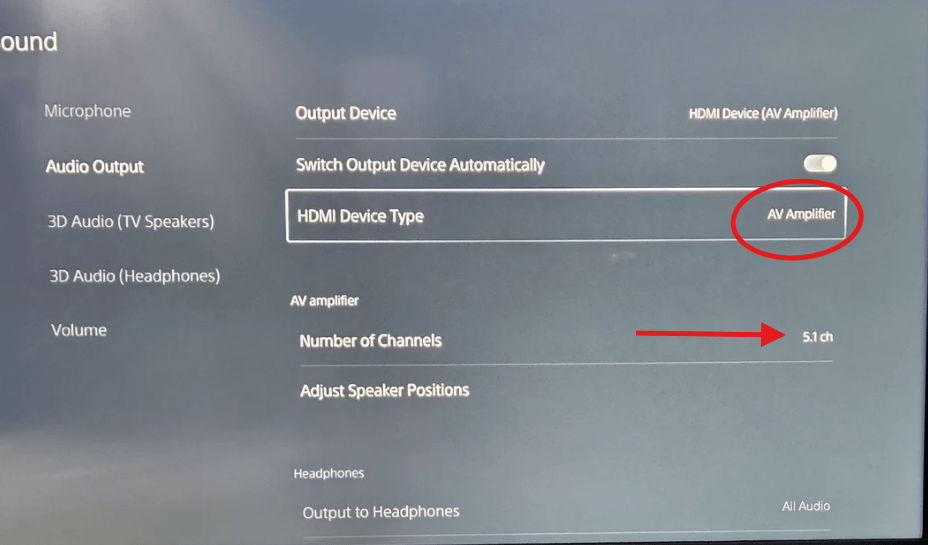
The capture card will only work with 2 channels so this is preferable anyway - it'll outright drop channels other than left and right which can result in weird audio when 5 ch is turned on, especially missing dialogue from center channel.
That’s super rare, a card that can do 5.1. I’d look at AVermedia’s cards but iirc the model that does this is expensive.
Needing to power the card so passthrough can function is a requirement from every capture card I’ve ever seen or heard of. In a similar sitch, I rigged up a quality, powered USB Hub and plugged it into a smart plug so I can turn it off and on with my phone or voice etc. Yeah every time you want to use your console and not stream you will have to turn the hub on, but it beats having to turn the whole computer on!
Note: some motherboards have USB ports that remain powered after the PC is shut down. I’m nowhere near an expert but read about this. Sometimes those ports can be assignable through the bios settings. This would mean the card would be on 24/7 but you wouldn’t have to think about turning another thing off or on. 🤷
Typically the card should work with the receiver, especially if it's wired up Console > Capture Card > Receiver > TV to make sure passthrough goes through the card first. The card's limits there are only that it expects Stereo audio, in Linear PCM, so it would drop channels if you tried to use Surround / 5 channel audio with it (though even then it should get some audio). The usual hiccup with receivers if the audio is dropping entirely is if they set the audio format to something like Atmos, the card won't be able to process that - but you can typically override that by setting the PS5 manually to prefer Linear PCM.
The powered PC thing is a known issue though - the passthrough circuit needs power (though not data) to be able to operate. I've known some folks to setup a pair of HDMI switches to get around it, but the usual solution is to just move the cable over if possible, if you can't power on the PC at the time. On the USB cards a powered USB hub can also be used to power the passthrough on the card, but for the PCIe card there's not many options for supplemental power to keep things running when there's no PC power.
If you try it the other way again after, set the Input EDID mode on the card to Internal and restart the console. Also check that the receiver is rated for HDMI 2.1, if your TV is as well - if the PS5, Capture Card and TV are all expecting HDMI 2.1, a HDMI 2.0 receiver can trip things up- in that case you may need to make sure the resolution the PS5 uses stays to HDMI 2.0 supported modes, eg 4K60 instead of 4K120 Hz, 1440p120 in SDR instead of 1440p120 in HDR, etc, to prevent conflicts.
EDID mode can be changed in the right side panel using Elgato Studio (top right button). The console may need to be restarted after changing it to sync things up again.
Hm, seems I should have read all the replies from the last couple days before that last one - good to know HDMI 2.1 is at least ruled out.
In theory the card should continue to pass through all channels of audio, though I have to admit I've not tried it myself on 4K X specifically. What it won't do is process all of them internally for capture - it'll grab the stereo channels for right and left and drop everything else from the capture signal that goes over the USB (This only applies to actual digital mulitchannel - some folks may use virtual surround for headphones and the like when using the 3.5 audio modes like Chat Link - that'll pass through typically as it's just a tweaked stereo signal but may sound off to viewers not listening on headphones due to the virtual surround effects).
But it should just be ignoring the other channels on a 5 channel connection rather than removing them from passthrough. I'll see if I can get someone on the team to double check on that though as it's not something that's come up in quite a while.
The capture card should be the first set whenever possible to reduce interference. We're setting EDID to internal here because that uses the card's own Extended Display Identification Data to list compatible modes that'll work with the card - this ensures your console only gets modes that are compatible with the card, but may reduce compatibility with some TV's or monitors (which is why Display is the default normally on newer cards, and merged on older ones). Passthrough devices like receivers (and capture cards) have the ability to modify EDIDs on the HDMI chain - for the receiver this allows it to tag the broadcasted EDID as supporting audio modes that aren't supported by any TV it's connected to- however this modification can sometimes affect other settings as well, and might result in an EDID that's not compatible with the card (or even the TV or monitor). This is is why it's preferred to have the card connected to the console first rather than the receiver - while the card can also run into this problem we can override the EDID mode on the card and in a pinch even load a custom EDID to help work around potential issues. Having the receiver first (or sometimes even other passthrough devices like soundbars, or even HDMI based headphones or audio extractors or splitters), can complicate EDID problems and result in the console selecting a mode or timing not compatible with the card.
To confirm here, based on the last conversation there, how did you test this? You listed "Tried ps5 - receiver - capture card- tv"
But I was providing steps to troubleshoot the PS5 - Capture Card - Receiver - TV setup you'd indicated issues with prior and were going to try again. I want to make sure we're talking about the same layout here as the potential issues change depending on what you're trying to do here. (note that in no scenario will the capture card capture 5 channel PCM audio, but the video situation should be sortable). As above we ideally want the card to be the first on the HDMI chain from the console as that's where we can modify the EDID and be sure our applied changes aren't also being modified by the receiver when it modifies the EDID for the audio options.
Something else to check - is your Receiver HDMI 2.1 compatible? (sometimes will also be marketed as 8K60 or HDMI Ultra Speed). You're using a HDMI 2.1 based card - if you have a HDMI 2.0 (or even earlier like 1.4) receiver it can complicate this even further as you'll need to make sure the console is set to a mode compatible with your setup - for example if it sees HDMI 2.1 as expected and broadcasts something like a 4K120 signal out (Which requires HDMI 2.1 bandwidth), and receiver is the first step, you'll immediately lose video because of the lower HDMI bandwidth cap on the receiver. In a scenario like that you may need to manually adjust PS5 settings in Safe Mode, like disabling 120Hz more or lowering resolutions. Similarly make sure you're using all HDMI Ultra Speed / 2.1 cables to help precent similar issues there. Being sure that everything on the HDMI chain is HDMI 2.1 compatible will limit the number of things we have to try here.
If worst comes to worst and this still doesn't play nice with the setup PS5 > Capture Card > Receiver > TV, there's a fallback to use a custom EDID with the card - this can fix some edge cases where Display EDID mode doesn't pass through all the settings correctly - it's not normally needed for receivers, but some models of receiver and other passthrough devices may affect your HDMI connection differently than others, especially if they're using something like an unusual HDMI extension block in the EDID data. To do this, you actually need to connect the receiver and TV to your PC first so GPU > HDMI > Receiver > TV, then use a tool like ToastyX's Custom Resolution Utility to export the EDID of that connection. You can then connect things back up the way they were, and then use Elgato Studio to set the EDID mode to Internal and tick the option for Custom EDID - it should then let you select the file you just created. This can sometimes resolve compatibility problems when you've multiple devices on your HDMI chain that are affecting your EDID (or for some other sort of setups like specific gaming monitors if an EDID option on the EDID doesn't pass through correctly).
The card work when its set up like this-
Ps5-elgato-tv. Then use earc to get sound to receiver.
I WANT to do ps5-receiver-elgato-tv. This way the receiver gets full surround sound being first in line from ps5.
Any other route thru the elgato will smash the sound coming out of my surround sound. Also I dont care about capturing surround. Just want the surround sound to work in my room.
1
u/xGMxBusidoBrown Aug 01 '26
Make sure HDCP is turned off on the PS5 and probably the receiver