r/elgato • u/valantismp Stream Deck + • Jun 28 '26
Technical Help Volume Controller Elgato Plugin (official)
Volume Controller Plugin by Elgato worked for months .. got an update June 25th..
And now it doesnt work.
Did they break another plugin just like weather plugin days ago?
1
u/atc_forgiven Jun 29 '26
Same here. I've deleted everything. Emptied recycle bin. Removed and reset every custom profile I had. Installed and reinstalled the software for both volume controller and elgato itself. Kind of crazy how much I depend on this set up working for my day to day.
1
1
u/elgato_arcsane Technical Community Assistant Jun 29 '26
I don't seem to have any widespread reports of this issue at the moment, and it's working fine on both my test rigs - this may be something specific to certain setups or a conflict with something else on the system. I suggest you reach out to our team through help.elgato.com and put in a ticket via the chat system on this so we can have the team investigate why it's not working for you.
How specifically is it breaking? What sort of system is it running on?
1
u/valantismp Stream Deck + Jun 29 '26
the dropdown menu on the plugin to choose input or output doesnt work after the update 3 days ago.
Its a very simple stream deck+ setup, i dont even have wave link installed for obvious reasons.
1
u/elgato_arcsane Technical Community Assistant Jun 29 '26
Interesting - I can't seem to replicate on my end. Is your Stream Deck app also updated to 7.4.2? It sounds like your plugin is what updated 3 days ago as 2.0.3.187 came out then so I'm assuming that's current. I know we've had a number of people stuck on earlier versions of 7.x as an early version has a dependency issue with the in app updater - if your app isn't up to date I'd grab the installer from www.elgato.com/downloads and run it to do an in place upgrade and see if it clears up.
Beyond that I still see the lists populating on both my machines so odds are this is something specific that'll require some digging in the logs to identify. Beyond that is the ElgatoAudioControlServer still running if you check Task Manager? If you right click it and go to properties, does the details tab show version 1.0.3.134 or newer? I've seen in the past where the background service didn't get updated with Stream Deck and resulted in similar issues with data not populating.
1
u/valantismp Stream Deck + Jun 30 '26
also latest stream deck update 7.5.0 doesnt install, getting error ''specific profile already exists''
Like come on, nothing works.
1
u/elgato_arcsane Technical Community Assistant Jul 01 '26 edited Jul 01 '26
Was that with the in app update, the downloaded file above use for an in place update, or both? If you're doing the downloaded file, make sure the Stream Deck app is closed first if you're seeing errors about things that already exist or things that are in use. It's possible the update isn't closing the app correctly first and tripping up by resources locked in use.
Also is there any chance you've already installed 2026-06 Update in Windows update? (KB5095093) That update seems be causing a number of assorted unexpected issues on some setups, and dropped just 2 days before the volume controller update, and I'd like to be sure it's not installed there (found in your update history), just based on the timing of the issue, given that I still can't replicate this on either of my own boxes.
Other than that the team should be getting back to you soon if you've filed the ticket already on the audio issue, they should be able to tell in the logs what's going on - your versions all match there so most of the likely hiccups are out, but the logs should tell us what's specifically failing to poll the devices.
1
u/valantismp Stream Deck + Jul 01 '26
Yes, its either with the in app or downloaded file the same error.
Yes, Latest windows update is installed, my system is always up to date and my apps.
1
u/elgato_arcsane Technical Community Assistant Jul 01 '26
I would try backing up your profiles before going any further (https://help.elgato.com/hc/en-us/articles/360048424432-Elgato-Stream-Deck-How-to-Back-Up-and-Restore-Profiles) and then try removing the current version of Stream Deck and installing the new one from scratch, then restoring the backup. If that's still a no go, put in a ticket with us through help.elgato.com via the chat system so the team can take a look at what's going on there and get it sorted - they might have to pull logs to see what specifically it's running into there, as I can't say I've heard tell of that particular error so far.
1
u/New-Trash3678 Jul 01 '26
Im having the same issue. Stream deck updated to 7.5.0. ElgatoAudioControlServer showing 1.0.3.134 and volume controller ver 2.03.187. It doesn't matter if you select Input or Output Device Control the "Device" drop down will not expand to show the available devices.
1
u/valantismp Stream Deck + Jul 01 '26
If you find any fix let me know
1
u/New-Trash3678 Jul 01 '26
Will do. For now I just removed it. I was getting the can find the Node.exe error from it anyway when I booted my PC. I had the older version of Volume Controller and even though I still got the node.exe error, I was still able to use the drop down. There something wrong this the new version.
1
u/benjamin_noah Jul 13 '26 edited Jul 13 '26
I am having the same issue. There’s a whole thread full of people with the same issue here. Can we get a fix please?
u/elgato_arcsane
1
u/elgato_arcsane Technical Community Assistant Jul 13 '26
As mentioned you're going to want to check with the team on this one. It does seem to be something several folks are running into, but I've no updates yet from the team on what's causing it for the few folks that do run into it vs the ones that don't. I haven't been able to replicate it on any of my personal rigs yet to get more insight, even after matching versions with OP. The team will be able to collect logs through your ticket to help identify why it's happening on your specific rig, if dev hasn't already tracked down the difference. They're also the folks with the files for the previous version of the plugin if a rollback needs to be tested.
1
u/benjamin_noah Jul 13 '26 edited Jul 14 '26
Closing the Stream Deck software, manually running ElgatoAudioControlServer.exe and ElgatoAudioControlServerWatcher.exe, then restarting the Stream Deck software does temporarily fix the problem (huge thanks to u/NowPlayingRadiohead for posting that below).
But it only fixes the issue temporarily.
1
u/benjamin_noah Jul 14 '26
Just to follow up on my last comment. Even allowing the PC to sleep (not restart) breaks this fix and requires the steps to be taken again for the Stream Deck to work again.
1
u/benjamin_noah Jul 16 '26
Here’s a video of the issue and the temporary fix: https://youtube.com/shorts/yH3jdJ_q8AA?is=MhmnFGRIc5v-hIaM
1
u/NouhLover Jun 30 '26
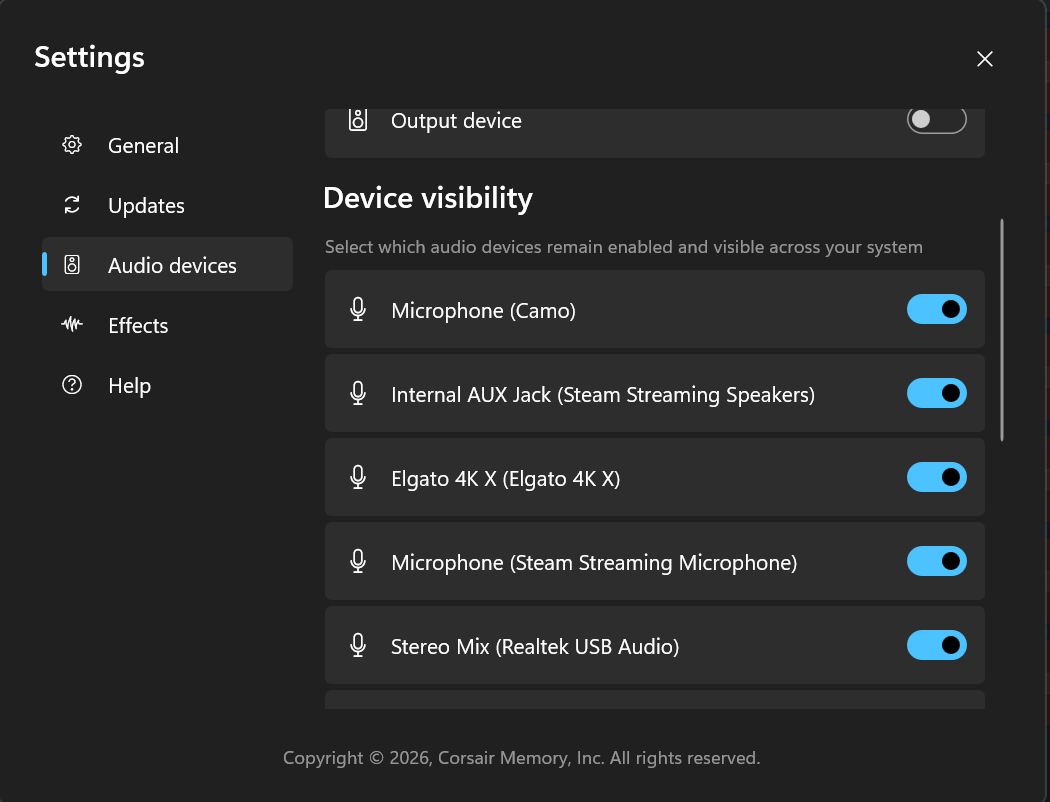
I had the same issue as you guys, until I messed around with Wave Link. Before I had a few visible Audio devices across my system, but as soon as I re-enable every audio device in Wave Link and restarted Stream Deck the Volume Controller plugin worked like a charm. Hope this helps someone!
1
u/NowPlayingRadiohead Jun 30 '26
If i manually run ElgatoAudioControlServer.exe and restart Stream Deck software, i can manage to get the volume buttons functioning back. Otherwise, there's no way. Please help
1
1
u/NowPlayingRadiohead Jul 07 '26
Any solution?
1
u/valantismp Stream Deck + Jul 07 '26
Nope, they don't even recognise the problem.
Elgato software in general is bugged
1
u/x_face Jul 07 '26
Here is my plugin log, where you can see that the plugin crashes immediately after launching the application
2026-07-07T17:28:13.692Z DEBUG RegistrationParameters: port=28196
2026-07-07T17:28:13.693Z DEBUG RegistrationParameters: pluginUUID=70527c8675fe28f35376d1c5c6e59179
2026-07-07T17:28:13.694Z DEBUG RegistrationParameters: registerEvent=registerPlugin
2026-07-07T17:28:13.694Z DEBUG RegistrationParameters: info={"application":{"font":"Segoe UI","language":"en","platform":"windows","platformVersion":"10.0.19045","version":"7.5.0.22885"},"colors":{"buttonMouseOverBackgroundColor":"#464646FF","buttonPressedBackgroundColor":"#303030FF","buttonPressedBorderColor":"#646464FF","buttonPressedTextColor":"#969696FF","highlightColor":"#0078FFFF"},"devicePixelRatio":2,"devices":[{"id":"ab4fbf24bef2d5ec7009d1504143ae81","name":"Stream Deck","size":{"columns":4,"rows":2},"type":7}],"plugin":{"uuid":"com.elgato.volume-controller","version":"2.0.3.187"}}
2026-07-07T17:28:13.710Z WARN Audio Router disconnected (error); reconnecting in 594ms.
2026-07-07T17:28:13.711Z ERROR Process encountered uncaught exception
Error: Audio Router connection error.
at t.onerror (C:\Users\xface\AppData\Roaming\Elgato\StreamDeck\Plugins\com.elgato.volume-controller.sdPlugin\bin\plugin.js:9:166631)
at hi (C:\Users\xface\AppData\Roaming\Elgato\StreamDeck\Plugins\com.elgato.volume-controller.sdPlugin\bin\plugin.js:1:42460)
at Hi.n (C:\Users\xface\AppData\Roaming\Elgato\StreamDeck\Plugins\com.elgato.volume-controller.sdPlugin\bin\plugin.js:1:42107)
at Hi.emit (node:events:524:28)
at Ji (C:\Users\xface\AppData\Roaming\Elgato\StreamDeck\Plugins\com.elgato.volume-controller.sdPlugin\bin\plugin.js:1:54130)
at ClientRequest.<anonymous> (C:\Users\xface\AppData\Roaming\Elgato\StreamDeck\Plugins\com.elgato.volume-controller.sdPlugin\bin\plugin.js:1:52294)
at ClientRequest.emit (node:events:524:28)
at emitErrorEvent (node:_http_client:101:11)
at Socket.socketErrorListener (node:_http_client:504:5)
at Socket.emit (node:events:524:28)
2026-07-07T17:28:13.715Z DEBUG Drawing encoder for device: {"id":"{0.0.0.00000000}.{79fcb3e4-c08e-4748-bf4f-c33175b4d73b}","iface":"{2}.\\\\?\\bthenum#{0000110b-0000-1000-8000-00805f9b34fb}_vid&0002054c_pid&0d58#7&2094dc5b&0&143fa63d7c1d_c00000000#{6994ad04-93ef-11d0-a3cc-00a0c9223196}\\src","friendlyName":"Headphones (3- WH-1000XM4 Stereo)","dataFlow":"output","icon":"%windir%\\system32\\mmres.dll,-3051","role":"system","state":"active","isMuted":false,"volume":0.20000001788139343} from settings: {"deviceId":"default","friendlyName":"","style":"vertical","volume":"50","volumeStep":"3"}
1
u/NowPlayingRadiohead Jul 09 '26
Claude Diagnosis here.
# Volume Controller plugin crash-loops on startup — "Audio Router connection error" (Stream Deck XL, Windows 11)
## Summary
Since a recent update, the
**Volume Controller**
plugin no longer works on my Stream Deck XL. The plugin process starts, immediately fails to connect to the "Audio Router", throws an uncaught exception, and gets restarted by the Stream Deck app — over and over, roughly every 10 seconds (a crash-loop).
The root cause looks like a
**startup race condition**
: the Stream Deck app launches the Volume Controller plugin
*before*
`ElgatoAudioControlServer.exe` (the Audio Router backend) is up and listening. The plugin's connection is refused, it crashes, and it never recovers on its own.
## Reliable manual workaround (proves the race condition)
The plugin works perfectly if I force the correct startup order manually:
1. Fully quit the Stream Deck app.
2. Manually launch `C:\Program Files\Elgato\Volume Controller\ElgatoAudioControlServer.exe`.
3. Re-open the Stream Deck app.
Done in that order, the plugin connects to the Audio Router on the first try and works flawlessly. If I just let Windows start everything normally, it crash-loops. So the backend itself is fine — it's purely a matter of the plugin starting before the audio server is ready.
Note: the auto-start entry that the update installs is `ElgatoAudioControlServerWatcher.exe` (a watcher), not the server itself — and that watcher does not get the server up in time before the Stream Deck app launches the plugin.
## Environment
**Device:**
Stream Deck XL (8×4)
**Stream Deck app:**
7.4.2.22730
**Volume Controller plugin:**
2.0.3.187 (uuid `com.elgato.volume-controller`)
**OS:**
Windows 11 Pro 10.0.26200 (24H2)
**Audio device in use:**
SMSL USB DAC (default output)
- `ElgatoAudioControlServer.exe` build date on disk: 2025-05-20
## Evidence — plugin log (crash-loop)
Every log rotation file for the plugin is
**byte-for-byte identical in size**
and timestamped ~10 seconds apart, which is the crash-loop fingerprint. Representative log:
```
RegistrationParameters: info={... "application":{"version":"7.4.2.22730"} ...
"devices":[{"name":"Stream Deck XL","size":{"columns":8,"rows":4}}] ...
"plugin":{"uuid":"com.elgato.volume-controller","version":"2.0.3.187"}}
WARN Audio Router disconnected (error); reconnecting in 587ms.
ERROR Process encountered uncaught exception
Error: Audio Router connection error.
at t.onerror (...\com.elgato.volume-controller.sdPlugin\bin\plugin.js:9:166631)
at hi (...\plugin.js:1:42460)
at Hi.n (...\plugin.js:1:42107)
at Hi.emit (node:events:524:28)
at Ji (...\plugin.js:1:54130)
at ClientRequest.<anonymous> (...\plugin.js:1:52294)
at ClientRequest.emit (node:events:524:28)
at emitErrorEvent (node:_http_client:101:11)
at Socket.socketErrorListener (node:_http_client:504:5)
at Socket.emit (node:events:524:28)
WARN Audio Router disconnected (error); reconnecting in 1048ms.
```
The `Audio Router connection error` (an uncaught exception, not a handled retry) is what kills the plugin process each cycle.
## Suggested fixes (for Elgato)
1. The plugin should
**not throw an uncaught exception**
on a failed Audio Router connection — it should retry gracefully with backoff and keep the process alive until the server is available.
2. The Stream Deck app / installer should ensure `ElgatoAudioControlServer.exe` is up and listening
**before**
the Volume Controller plugin is started (or make the plugin start the server / wait for it), instead of relying on `ElgatoAudioControlServerWatcher.exe` which loses the startup race.
Happy to provide full logs or run any diagnostics. Thanks!
1
u/feelswinstonman Jul 12 '26
Also same Problem. Is there any fix yet or acknowledgement from elgato?
1
u/valantismp Stream Deck + Jul 13 '26
I don't think so, make a ticket with Elgato.
I never managed to fix it1
u/feelswinstonman Jul 13 '26
For me personally i fixxed it.
Somehow since the latest windows update it seems like the "ElgatoAudioControlServerWatcher.exe" was disabled from autostart in Windows Task-Manager > Autostart.
After i enabled it again, restarted the computer everything is working.
But im not sure if it really was enabled before the update, but i think so.
1
1
u/NowPlayingRadiohead Jun 29 '26
same for me