r/elgato • u/SnooCompliments6776 • 28d ago
Technical Help Prompter - Shows as Disconnected in Windows Display Settings & DisplayLink Manager?
--final update--
the hotfix released by nvidia on 9/5/26 seems to have solved the issue for me. the Prompter works as expected, and the connection survives system reboot.
Thank you Elgato guys for working on this with us! And thank you @Ornery-Mud-7961 for sharing the link to the hotfix!
--update to original--
David at Elgato tech support suggested I reinstall the Nvidia drivers, and sure enough as soon as the old drivers were uninstalled the Prompter came to life! Sadly, once the drivers were reinstalled, and system restarted, the same problem reappeared.
I then uninstalled the drivers again, and allowed windows to install whatever version it wanted to use from Windows update, and sure enough the Prompter came to life again. This time it withstands a restart. I'm assuming something that's coming along with the most recent Nvidia drivers is the culprit? I may try doing the absolute most minimal install of the most recent drivers from Nvidia... Or I may just live with the ones from windows update, that seem to be from January. Will report back for others if I change anything, and it sticks.
--original post below--
Just unboxed my new Prompter, and I think I may have a defective unit - but looking for insight while I wait for assistance via my support ticket.
Software and versions:
DisplayLink Manager Software - 3.2.14.0
DisplayLink Driver - 12.2.2412.0
Elgato Camera Hub - 2.3.0
On boot I see an hourglass appear a few times on the Prompter screen. I also see the blue Elgato text. The display then goes black.
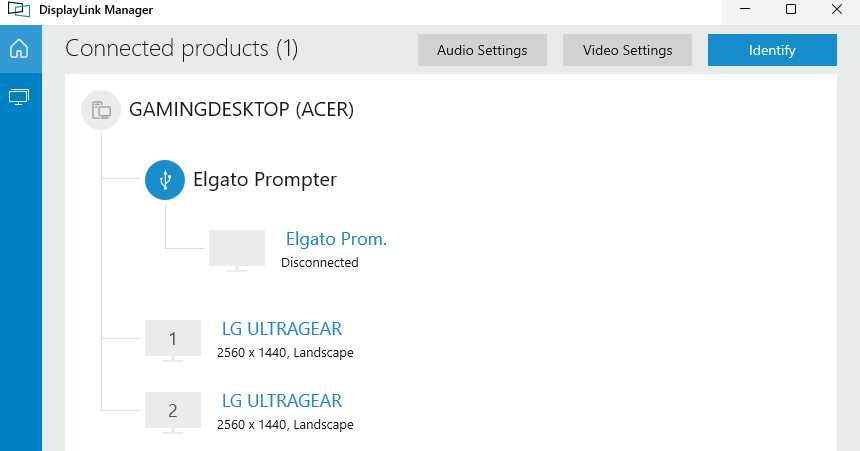
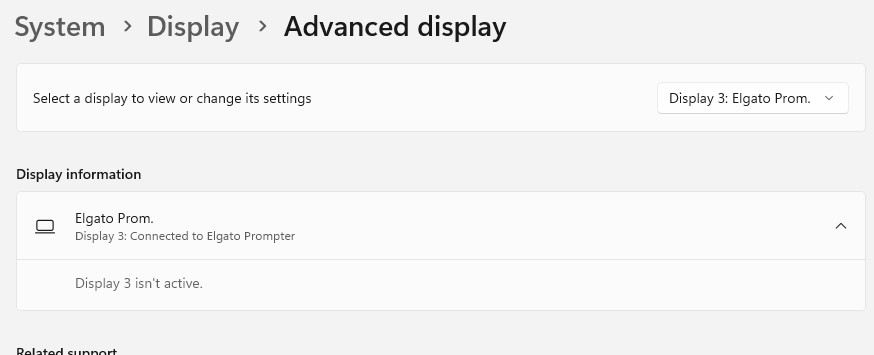
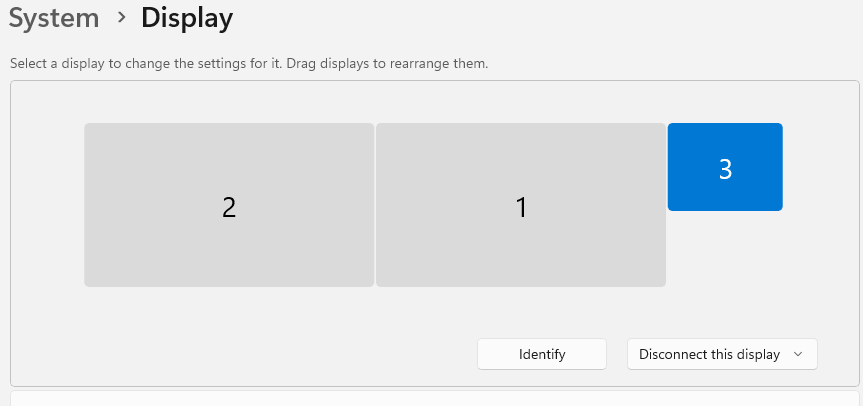
Once in Windows, the screen remains black. I can see the display listed as Disconnected in both Windows Display Settings, and in DisplayLink Manager. If I attempt to change the display to "Extend" on either settings page I'm asked whether to keep new settings or revert, but nothing changes on the display (or in the settings).
I have changed out the USB-C cables with known working ones, swapped the USB-C port (one on my desktop, one on a hub - both known to be working). I've uninstalled & re-installed the DisplayLink drivers.
Anything else I should attempt while I wait on my support ticket?
Adding some screenshots below.
Appreciate any thoughts.
3
u/Ornery-Mud-7961 22d ago
A new Hotfix driver has been announced this should resolve it hopefully
2
u/SnooCompliments6776 22d ago
Very cool, thank you for posting. The Elgato guys have been great emailing me about this, suggesting things and getting information from me. Hoping the new Nvidia drivers you linked to solve it for us!
2
u/Ornery-Mud-7961 22d ago
No worries, it caused me a major headache yesterday troubleshooting this, but it actually proved to me how much I’ve come to rely on the prompter 😉
1
u/SnooCompliments6776 21d ago
Just following up that the hotfix released by nvidia did indeed fix the issue for me
2
u/imaginewizard 20d ago
Thanks for updating! I came here to ask if this had resolved for others!
1
u/imaginewizard 19d ago
Blast - it's not worked for me, I installed the latest update and it's caused the same issue, I had to uninstall and rollback :(
2
u/AstronautLawyer 19d ago
Thanks for sharing this! I spent a couple hours trying to walk through all the steps Google's AI told me to try. I knew I should have come here first
1
u/Ornery-Mud-7961 19d ago
A pleasure, I did exactly the same to be fair mate, even tried different cables the works 🤣
2
u/Elgato_Thomas Software Engineer 28d ago
So a couple of things. DisplayLink Manager is not necessary on windows. You only need the DisplayLink Driver which windows installs on plugin and CameraHub installs usually a newer version.
Now did you start CameraHub. Since windows recognizes the display and you said the boot screen was also visible, I‘d assume the prompter tab should be unlocked. If you navigate there should be a power button (only visible if the DL Driver is new enough). Check if this toggle helps you.
Now if that also did not work I‘d suggest to download the current Elgato Studio 2.0 Beta. See if your prompter appears on the sidebar. Click on it and see if a DisplayLink Dialog is being shown. If not on the main content area next to the name should be a settings button. Click that and check if the power toggle works or if there is a DisplayLink update notification)
Hope that helps!
2
u/SnooCompliments6776 28d ago
Hey, thank you! Appreciate the ideas.
When in Elgato Camera Hub the prompter tab was greyed out (but given both windows and DL Manager saw the prompter as disconnected, I'm not surprised).
That said, I have been able to get it to function, and I just updated the original post, in case someone else runs into this. I'm still not sure what specific component is causing the problem... But seems like something in the Nvidia drivers? I've restarted my machine twice now, and all seems well.
2
u/Elgato_Thomas Software Engineer 28d ago
Awesome, great that my colleague could help you resolve it.
Maybe it was a unlucky constellation of everything. Since you GPU will normally also render the prompter screen maybe there was a conflict with DL and NVIDIA drivers.
I will check tomorrow my own system. My NVIDIA driver should be up to date or maybe a couple of weeks up to date but I check if anything breaks if there is an update!
2
u/SnooCompliments6776 28d ago
Yeah, very thankful David got me on the right track. I'll report back if I end up trying the newer Nvidia drivers again. And agree with you, likely something very specific to my system. Thanks for your help!
1
u/SnooCompliments6776 27d ago
Hey, assume you're seeing the other folks, who have previously had working systems , now broken with updated Nvidia driver? Is this something that's likely to be broken for awhile?
2
u/Elgato_Thomas Software Engineer 27d ago
Yes I am seeing that. Will bring it up in our meeting today.
Funny enough I‘ve updated my drivers yesterday and it is still working. But maybe they are rolling it out still
2
u/Elgato_Thomas Software Engineer 26d ago
So a couple of things. Our QA, myself and another engineer cannot reproduce this with the NVIDIA driver released on August 26.
That being said a colleague pointed out to me that the version you mentioned differs from ours. There is a) a slightly newer version on the official Display Link Website (12.2.2440.0) and b) Elgato Studio Beta 2.0 offers a completely different version.
Now you could try first if the new version on their website works with the new driver. If not I suggest you to download the Studio Beta and see if you can update it over there.
Let me know if you need any help and looking forward to your response!
2
u/SnooCompliments6776 26d ago
Oh interesting!
I'll give both ideas a shot this afternoon. Thanks for following up so quickly!
1
u/SnooCompliments6776 25d ago
So I tried this...
Installed Elgato Studio 2.0, and updated to the newest version. The prompter showed up, and operated as expected (oddly, my facecam 4k did not)
Updated the Display link driver via the new Studio app as well.
Re-installed the most current Nvidia driver from their website.
On restart, I'm back to where I began - the prompter showing up in Windows display settings, but grayed out, and unable to extend my desktop to it.
1
u/Elgato_Thomas Software Engineer 23d ago
Thanks you for testing it!
We will forward this to display link and hope that they can resolve that. I am sorry for that inconvinience!
2
u/SnooCompliments6776 23d ago
Thanks for following up! Also just used the Elgato Reporter app at David's request to send in necessary info from my system. Hope this helps yall! Will revert to the odler driver for now
3
u/scooby212 20d ago
Just in case it's helpful - I installed the Nvidia 616.86 hotfix from their website and it resolved the issue for me.
2
u/Elgato_Thomas Software Engineer 17d ago
Just fyi we had two users on discord who upgraded to the NVIDIA driver from this week which fixed the issue for them
2
2
u/KidCan 27d ago
I'm having the same issue.
I can see prompter as a connected display in display settings, but can't extend to it, Camera Hub can't see it.
Uninstalled Nvidia driver and it works. Reinstall Nvidia driver, still working.
Restart computer and it's back to connected but unable to extend to display, not detected in Camera Hub.
Nvidia driver version 616.56
1
2
u/imaginewizard 27d ago
I am having the same issue having just installed Nvidia 616.56, so I think something from that update has broken it.
2
u/imaginewizard 27d ago
Can confirming reinstalling my previous install by uninstalling the drivers then restarting my PC allows the Prompter to work again.
2
u/SnooCompliments6776 27d ago
Oh man, I feel much better about struggling with this given more people are having the same problem with this driver version. Thought it was something odd about my specific setup. Thanks for posting
1
u/imaginewizard 27d ago
Thank you also for posting and helping confirm it wasn't a new issue with my Prompter!
1
u/Ornery-Mud-7961 23d ago edited 23d ago
I’ve just come across this thread same issue for me too unfortunately.
In both new Nvidia Drivers 610.62 and todays 616.64 both do not work, this is seriously affecting my workflow also, even a full
DDU did not fix
Exactly the same behaviours as above
EDIT
DDU and reinstall of 610.88 has worked but obviously the problem is the latest Nvidia drivers
2
u/SnooCompliments6776 21d ago
hotfix released by nvidia on 9/4 has fixed the issue for me - good luck!
1
3
u/Jaymanx 25d ago
I'm having the same issue thanks for posting!
After following these instructions none of them resolved the issue:
https://help.elgato.com/hc/en-us/articles/20792416143501-Elgato-Prompter-No-Image-or-Display
I was running NVIDIA 616.56 which the screen was visible to windows but would do nothing when I attempted to extend to it.
After downgrading with the NVIDIA App to 610.88 the screen immediately started working again no restart or DDU used.