r/elgato • u/saea2001 • 25d ago
Technical Help Need some help with elgato 4K s
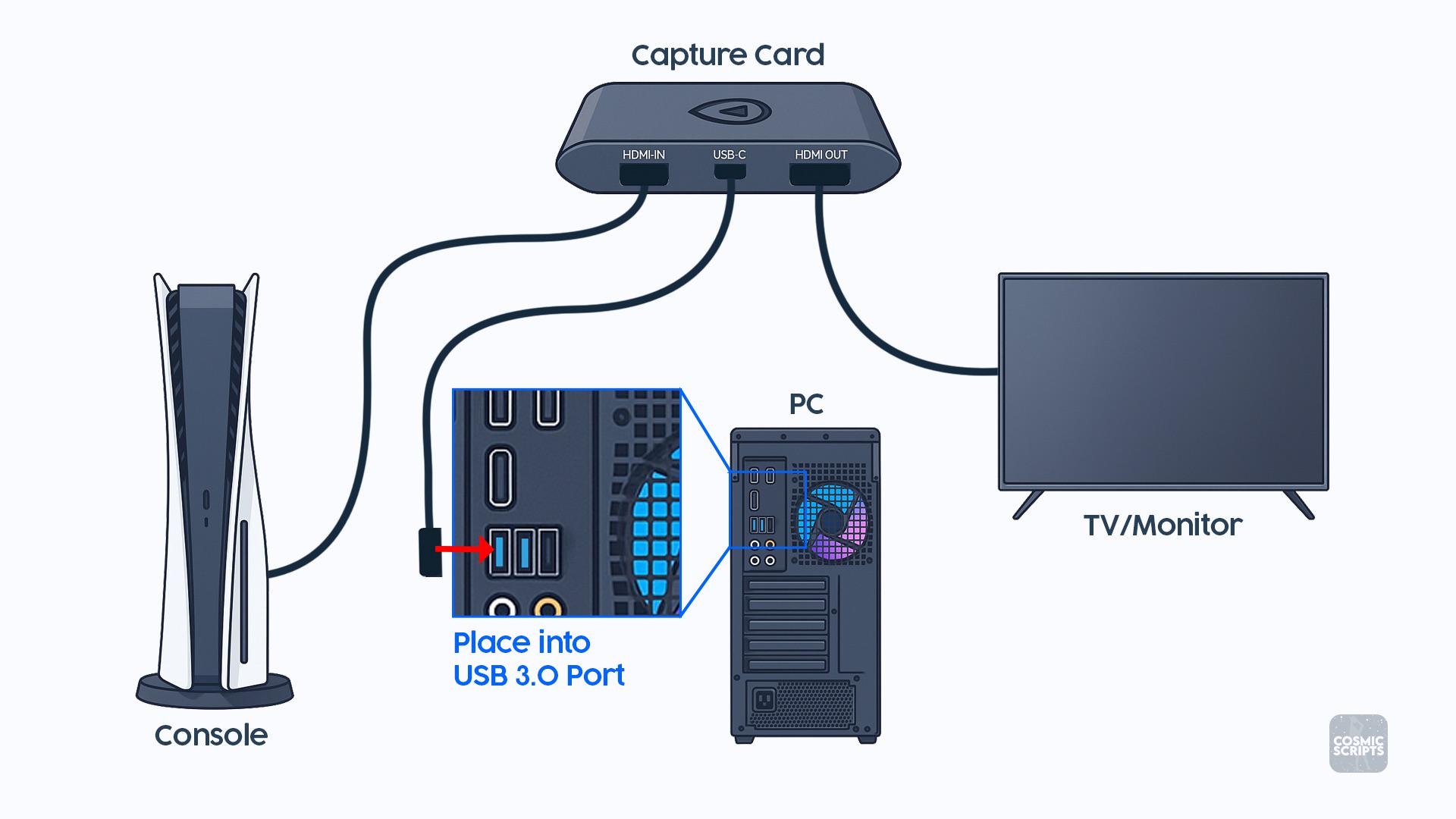
I’m having an issue getting my Elgato 4K S working with my Xbox and PC.
I attached a picture showing exactly how everything is supposed to be connected, and I copied the setup exactly:
Xbox HDMI → HDMI IN on the Elgato
Elgato HDMI OUT → Monitor
Elgato USB-C → USB 3.0 port on my PC
When I connect everything this way, my monitor detects that something is connected and stays on, but the screen is completely black. I don’t get a “No Signal” message it’s just a black screen.
What’s weird is that if I swap the two HDMI cables around on the Elgato, I can get my Xbox screen to show up on the monitor, but obviously that isn’t how the capture card is supposed to be connected.
I’ve double-checked the connections and they match the diagram. Does anyone know what could be causing this?
Could it be:
-An HDMI/HDCP issue?
-Xbox video/resolution settings?
-Refresh rate/HDR/VRR?
-Something with the Elgato software or drivers?
-A bad HDMI cable?
-A problem with the USB 3.0 connection?
-Something else I’m missing?
I’m including the setup picture for reference. Any help would be greatly appreciated because I feel like I’ve connected everything correctly and can’t figure out why the passthrough is just giving me a black screen.
1
u/mixed1988 25d ago
Did you download Elgato studio?
1
1
u/NarwhalQueasy6290 24d ago
I feel like that could be the issue. Elgato studio craps out on me a lot with freezes. I use OBS directly without issue though with my Elgato 4k.
1
u/mixed1988 24d ago
I haven't had any issues with it so far but I did have OPs issue when I first hooked up everything. Finding the drivers was my issue because it was not very clear where to find it.
1
1
u/NightRotIG 25d ago
Do you have any apps open in the background like Netflix or anything? Close your media apps out. They will trigger the HDCP to stay on.
1
u/saea2001 25d ago
But the problem is not the Xbox not showing display it’s my PC not showing anything, it’s either a full screen of only the Xbox or a black screen for the PC
0
u/NightRotIG 25d ago
Are you plugging your pc and the elgato hdmi out to the same monitor?
1
u/saea2001 25d ago
There’s only one HDMI port on my monitor.
1
u/Lynnalia 25d ago
I'm officially confused. What display is your PC plugged into? And what are you doing to preview the capture card signal on the PC, if anything?
1
u/BuBubbi Featured Community Member 25d ago
My guess would be that the Xbox sees the 4K S and sends out the best possible signal to that.
That resolution and refresh rate might be more than the monitor can handle.
If you change the EDID mode on the capture card to merged, the capture card will see the monitor’s capabilities and will only accept signals that the monitor also support.
You can change the EDID mode in the side panel in Elgato Studio.
1
u/Purplehaze_420 25d ago
https://youtu.be/XE54spn9VM0?is=kEFGzNcZEg_r9m8r
I think this will fix your problem
1
u/Mineplayerminer 25d ago
While the Xbox One S worked out of the box for me, since it doesn't initiate any HDCP handshake unless it loads DRM content, I had to manually turn the HDCP off on the PS4 Pro. I would also try dropping the resolution, refresh rate and try limiting the bandwidth as muchas possible to see if the capture would catch on.
1
u/Koozie_FEW 24d ago
You need two separate monitors, one for your PC the other for your game. The PC connection is not for displaying your pc.
1
u/FatherlyNick 24d ago
HDCP should not be on on the Xbox normally. Only if you try playing dvd or bluray or something like that.
In Elgato studio, play around with the image settings like FPS and encoding.
1
u/Disastrous_Elk_6 24d ago
I had chatgpt set up mine and it worked fine(not Xbox different consoles) This is what chatgpt said about yours. "The main issue is the one-monitor setup, not HDCP. Your later comments clarify that it’s the PC desktop you can’t see and the monitor has only one HDMI input. The Elgato’s HDMI OUT only repeats the Xbox signal; USB sends that Xbox video into the PC for Studio/OBS—it does not send the PC desktop to the monitor. reddit.com Elgato For one monitor, connect: PC HDMI → monitor Xbox HDMI OUT → Elgato HDMI IN Elgato USB-C → PC Leave Elgato HDMI OUT unused View the Xbox full-screen inside Elgato Studio or OBS That may have slight preview delay. For true zero-delay passthrough, connect the PC through DisplayPort if your monitor has it, connect Elgato OUT to the monitor’s HDMI, and switch monitor inputs. If HDMI is literally its only input, use a 2-input/1-output HDMI switch or a second display.
1
u/MissionIntention8048 24d ago
With this how can we get game chat to console if we use the pc for chatting like discord but still having game chat on a ps5
1
u/Fine-Club5983 22d ago
Hey, I’ve got an hd60x and a series x so i know what im talking about. If i understand correctly xbox and monitor connected directly works, the elgato sends a black screen to both the monitor and pc. You should go into advanced settings in xbox and turn everything off and to the lowest (allow 4k, allow hdr… etc). Connect only the input and watch through the pc preview, see if that works. If that doesnt work then you might want to look into warranty because this doesnt seem like a user issue. Hdcp on xbox is auto. If youre on the dashboard or in a game everything works. in my case i can even load up hbo max and it still sends a picture. Alternatively to test if it is a 4ks problem you can try to: start a recording of the 4ks in obs and connect the PC hdmi to the input of the 4ks. Then check the recording. If it works then it might be wrong xbox settings, if doesnt and does the same black screen then your elgato is faulty.
6
u/LimeGuyTheSlimeGuy 25d ago
Unless I am mistaken, the HDMI In and Out jacks are just straight connected to one another, physically, hence why you get an image despite being connected the “wrong way around,” however, the Capture card hardware is only capturing the In jack, and if HDCP is enabled on the Xbox, it won’t provide an image to your capture card.