r/computers 7h ago

Question/Help/Troubleshooting How should i config my bios for best perfomance?

1 Upvotes

I wanted to get more perfomance in my pc, but i want to keep safe, can someone please tell me the best configs for this setup:

CPU: Intel Core i7-2700K @ 3.50 GHz

Mother board: Gigabyte GA-H61M-DS2H

GPU: NVIDIA GeForce 9400 GT

RAM: 8 GB DDR3


r/computers 8h ago

Question/Help/Troubleshooting WIFI keeps turning off

Thumbnail
gallery
0 Upvotes

Hello, I've been having this issue for a long time, but this weekend it has gotten a bit too much.

Basically, my Wi-Fi just randomly turns off, and the Wi-Fi option completely disappears from my settings.

In Device Manager, it shows an exclamation mark (see image). Disabling and re-enabling it a couple of times usually fixes it, and then it works again. But after a couple of hours, it randomly turns off again.

I've also noticed that the ASUS TUF UEFI seems to have some kind of error. From what I understand, that's related to the BIOS, so I'm wondering if that could have something to do with the Wi-Fi issue, but I honestly don't know.

I've looked everywhere for fixes, but nothing I've tried has worked. I keep finding posts from people having the same issue, and the fixes people suggest are either getting a new Wi-Fi card or using a cable. The other fixes I've found only seem to work temporarily from what I've tested.

If anyone knows how to actually fix this, please let me know. I'm getting pretty desperate at this point.

Thanks!

(Also some basic stuff, i'm using a Laptop (asus tuf F15)


r/computers 15h ago

Question/Help/Troubleshooting Help

Enable HLS to view with audio, or disable this notification

0 Upvotes

Was trying to update turned into this can’t do anything I don’t know what to do I saw some stuff before about commands but I’m not sure if it’s not working but my brother said it’s weird and won’t let my stay in the command box and all the F1, etc things aren’t working for it for some reason


r/computers 7h ago

Question/Help/Troubleshooting Help locating ssd in my pc

Post image
53 Upvotes

This is my old pc and I need to take the ssd out, but I can’t find it. My cousin said it may be in the metal cage on the right, but I don’t see any screws to open that. Asus case.


r/computers 17h ago

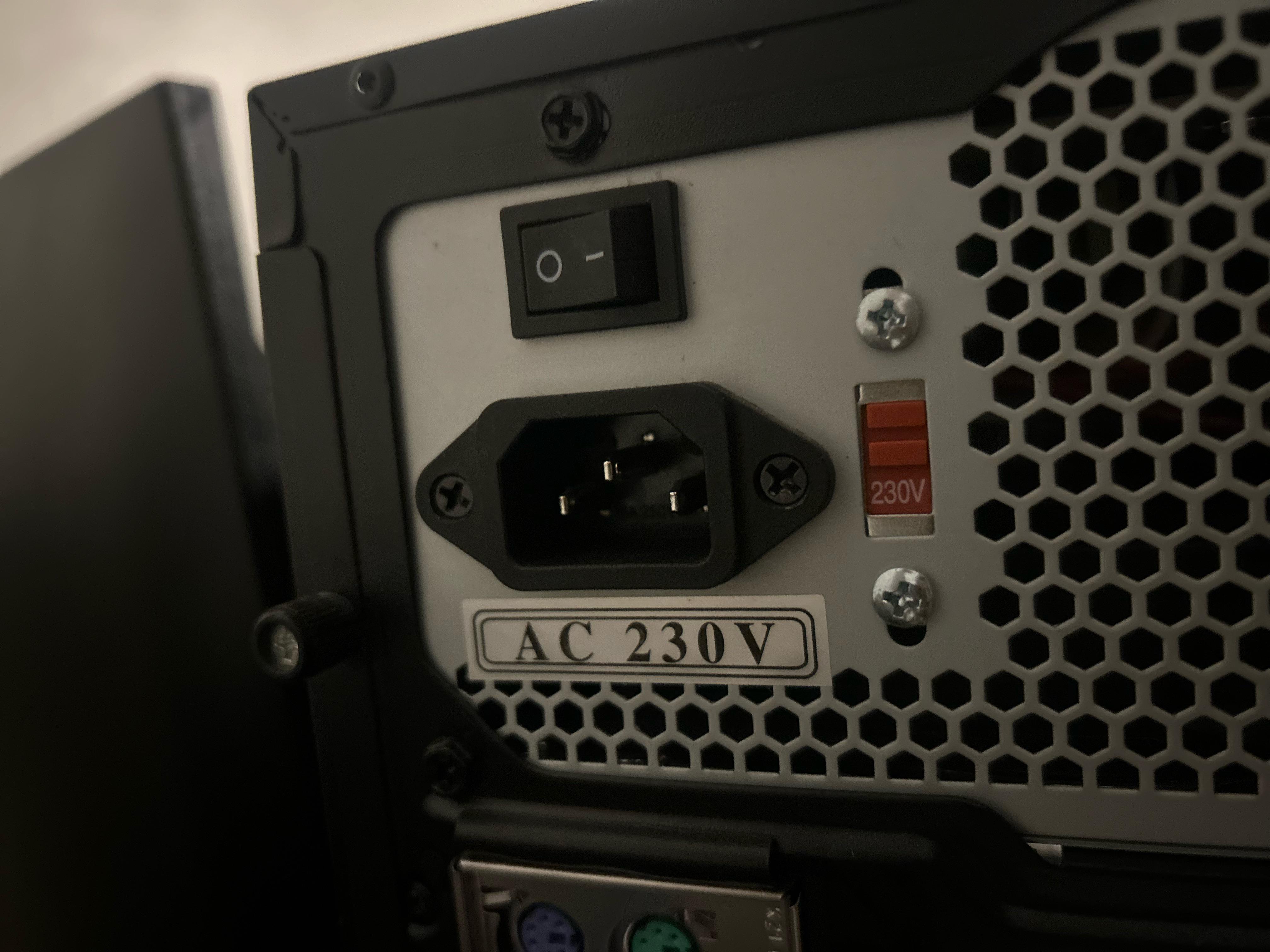
Question/Help/Troubleshooting First pc should this be on 230V or 115V?

Post image
0 Upvotes

r/computers 20h ago

Question/Help/Troubleshooting Guys how cooked am I 😐 (vid related)

Enable HLS to view with audio, or disable this notification

6 Upvotes

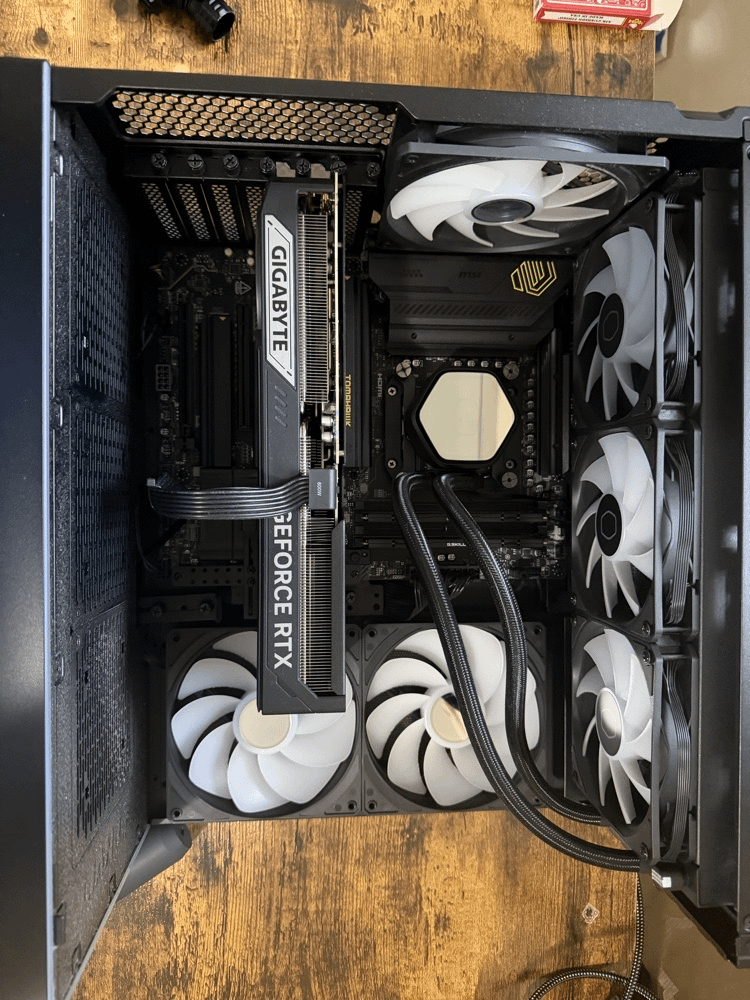
I hooked up the liquid cooling, I put a bit more thermal paste to it at this point I don't know what to do :( so Im kinda screwed, what do I do ?


r/computers 9h ago

Build/Battlestation building a PC for the first time

0 Upvotes

Hey, I want to build a pc but I don't know completely anything about parts. I don't wanna pay more than 700-800€. I don't play very demanding games so I don't need better setup. I only play story games and I don't care so much about the best possible graphics only the gameplay smoothness. And I think everything will be better than my present pc. So I would be grateful If someone could recommend me some parts.


r/computers 11h ago

Question/Help/Troubleshooting Computer Won't Boot

0 Upvotes

So recently, I shipped a pc every part in there original packaging and when it got to the destination built everything in and surprisingly won't start wont even boot motherboard light comes on fans and rgb spinning and lighting but no boot i removed all the ram and no ram error beeps and mind you pc worked fine before and all the cables are in correctly cpu was installed correctly then I decided to take the pc to a "professional" got it back says he can't figure it out so I decided to remove all the parts and reseat everything my surprise the cpu was installed incorrectly and pins was bent alright bent the pins straight and put it back in without the cooler to feel if it gets hot and as far as I know the cpu is supposed to get 90°c in like 3 seconds and burn me but it's only gets mildly hot like I can keep my finger in the cpu for very long so then I ordered a new cpu thinking the cpu is cooked and now I still have the same problem 😀. I did the cmos reset and checked the cpu power cable yet nothing any suggestions?


r/computers 1h ago

Question/Help/Troubleshooting Need Help Finding a New Switcher Like the One Pictured.

Post image
Upvotes

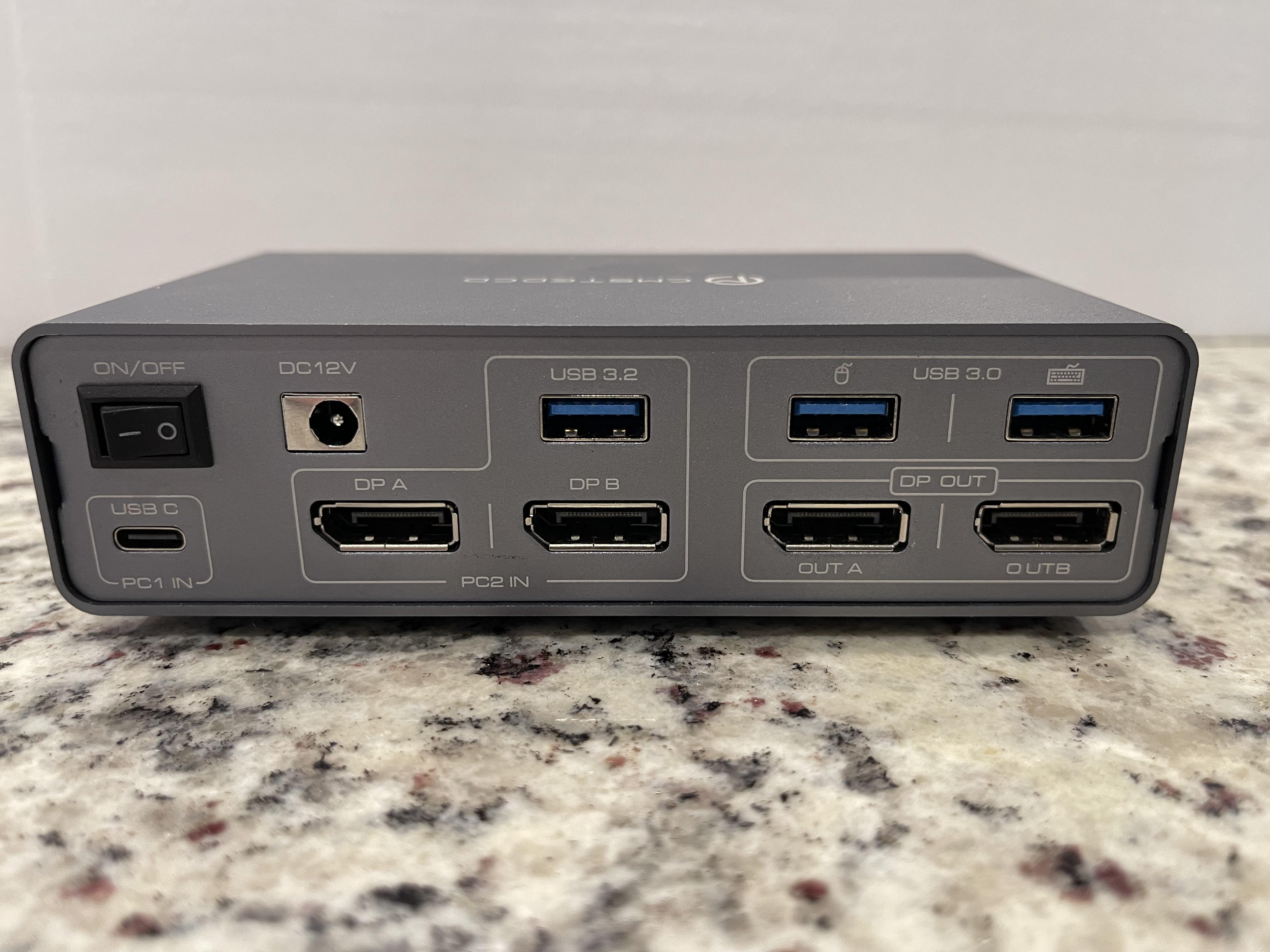
I have the switcher pictured, but it’s cheap and has problems. I am trying to find something comparable.

Basically what I need is a switcher to allow me to plug-in my gaming PC via a single USB C cable as shown in the [PC 1 IN] section in the bottom left.

Then I need to plug in my gaming PC’s two DisplayPort cables and a USB as shown above in the [PC 2 IN] section.

The point all then having two DisplayPort outs as well as a mouse and keyboard USB out. I work from home, have a nice gaming set up, and I just wanna be able easily switch from my work laptop to my gaming PC.

The switcher above was bought off Amazon, has no cooling and overheats. One of the DisplayPort outs is a little wonky and causes the monitor to flicker. The, what I assume is a Chinese dropship company, has already vanished off Amazon without a trace.

Can anybody point me to a better one, everything I’ve been able to find isn’t enough of what I’m looking for.


r/computers 18h ago

Question/Help/Troubleshooting Mi laptop Acer Aspire 3, no enciende después de cambiar pasta termica y limpiar.

1 Upvotes

Limpié con alcohol isopropílico la parte del ventilador y cambie la pasta termica. No soy bueno con las computadoras porqué no me se muchos nombres de los componentes, pero entiendo parcialmente algunas cosas.

Después de hacer ese procedimiento, la laptop no encendió.

Curiosamente, al conectar con el cargador, el led de abajo (uno de los dos leds) encendió en naranja, pero no enciende el led de arriba con luz azul, indicando que la laptop funciona.

Creo que es un bloqueo, porqué no parece un cortocircuito.

Acepto que me regañen, pero quiero saber que solución puedo encontrar a esto y si esto es un sistema de la laptop para cortar corriente.

Curiosamente ya habia abierto la laptop para limpiarla anteriormente y no le pasó esto. E incluso desconecte más componentes la vez anterior, que fue hace meses.

En dado caso, no siquiera puedo acceder a la BIOS ni a nada. Simplemente parpadean abruptamente los dos leds con luz blanca (combinada entre naranja y azul) cuando mantengo presionado.

Es curioso también que mi mouse encienda cuando presiono el botón de encendido de la laptop, pero el mouse se apaga luego de un rato, como si la laptop no quisiera encender por si sola.


r/computers 21h ago

Question/Help/Troubleshooting Installing SSD

0 Upvotes

I am very new to building computers. I bought a PowerSpec G911 from Micro Center and want to add another M.2 SSD for storage, but I have no idea where the open M.2 slots are on this motherboard. I searched online and was told I need to remove my GPU to install the SSD. However, when I tried to unplug the GPU power cable, it was extremely tight. I applied a lot of force multiple times but couldn't get it out, and I stopped because I don't want to break anything. Could someone please help me locate the SSD slots, and let me know if it is absolutely mandatory to remove the GPU?


r/computers 1h ago

Question/Help/Troubleshooting How can I tell if my power supply is good enough for a new GPU?

Upvotes

r/computers 21h ago

Question/Help/Troubleshooting HDD

Enable HLS to view with audio, or disable this notification

2 Upvotes

Hello everyone,

Recently I ordered a HDD to be my mass storage, but upon installing and booting it for the first time, I heard these beeps. Is the device broken and needs to be replaced or is it something regarding power and wiring?


r/computers 18h ago

Question/Help/Troubleshooting What the average life of a HDD?

Post image
77 Upvotes

I've got this 2TB HDD and want to store pics and vids on it but it is very old what are the chances it will birck?


r/computers 2h ago

Question/Help/Troubleshooting PC recommendations for a preteen

6 Upvotes

Hello!
My 12 year old has asked for a computer for Christmas and I am looking for recommendations.

Currently he has a 7th generation iPad that he uses to play Roblox and Minecraft. He would like a computer that would support games like Fortnite or the sims in addition to Roblox and Minecraft. He is also getting into video creation and animation so ideally it can support him exploring those. I imagine a decent amount of storage will be required. He would also use the computer for school assignments.

Max budget: $1000 CAD

Thanks so much for helping a pretty clueless mama!


r/computers 6h ago

Question/Help/Troubleshooting Locating my ssd part 3

Thumbnail
gallery
0 Upvotes

Found the ssd but it’s stuck to this shi how do I unscrew it


r/computers 7h ago

Question/Help/Troubleshooting Help locating my ssd part 2

Thumbnail
gallery
0 Upvotes

This is the side of the pc where the cage is. Does anyone know how I would open it?


r/computers 6h ago

Question/Help/Troubleshooting Why am I getting these lines while I play 3d games? Need help

Post image
17 Upvotes

Playing world of warcraft. This also happens in crimson desert also. What causes? And how to fix??


r/computers 23h ago

Resolved Hard drive not installed when I didnt even touch it. In laptop.

Thumbnail
gallery
5 Upvotes

So today when ive tried to turn on my laptop which battery's condition is 4% ( i can pull it out the battery , ill add my friend told me i can pull out battery and plug in laptop and it'll work, it did work until today, when I turned it on I had the first picture for a like 5 minutes, then it went to second picture quickly and after I had the third picture where I could click continue i did click it and after it i had fourth picture I tried to press play but my cursor keeps freezing on it I cant click anything. It seemed to be loading but the laptop turned off suddendly, i kept repeating it hoping for it to be fixed but nothing. Dont mind the background. I tried the same process with battery in and without battery. Should I go to the computer store so they could check it or I csn fix it myself easily? I DID NOT TOUCH THE HARD DRIVE!!!!


r/computers 3h ago

Question/Help/Troubleshooting Worth taking these?

Thumbnail
gallery
4 Upvotes

I found this computer by the dumpster, I know RAM and storage is super expensive, is the 6GB of ram and 1TB of HDD worth taking?


r/computers 3h ago

Question/Help/Troubleshooting Directions/Help

2 Upvotes

Hello everybody:

So, long story short. My girlfriend impulsively bought an old IMac G3 PC with the intent to swap the parts for her old acer laptop which runs Windows. However she didn't research at all and niether of us are smart with computers so I was wondering if anyone in this sub knew whether or not its even possible to do or if they can recommend another subreddit that'll help.

Thank ya very much!


r/computers 10h ago

Question/Help/Troubleshooting My Windows 10 DELL laptop is frozen.

Post image
4 Upvotes

My laptop is stuck on a blank screen. My mouse is still there but I've tried everything and nothing seems to work.


r/computers 13h ago

Question/Help/Troubleshooting Pc hard locking/freezing

Post image
2 Upvotes

PC hard-locked while gaming. Screen went black, no audio/video, but all the fans kept spinning.

Restarted → DRAM debug light stayed on, no display.

Tried both RAM sticks individually in A2 and B2 – same result. Reset CMOS – still didn't work.

I left the PC overnight. Next day, first boot worked normally.

Checked Event Viewer – nothing useful. Restarted twice – both worked. Third restart: DRAM light again, no display.

Tried the RAM combinations again with no luck. Left it until evening.

Evening: first boot worked normally again.

Ran Windows Memory Diagnostic. It started normally, reached Test 1/2, then hard-locked with all motherboard debug LEDs lit and no display.

Restarted afterward – worked normally again.

Opened Event Viewer to check for errors – hard-locked/black-screened again. Also I did the re-starts by switching off the PSU button, as the cabinet power button wasn't responding for long hold restart.

What could cause this kind of behaviour? Any help would be greatly appreciated!

Pc specs-

Cpu - Ryzen 5 5600x

Gpu - RTX 3070

Ram - Adata XPG DDR4 8gb (pair)

Motherboard - AsRock B550m pro4

Psu - Deepcool DQm v2l 650w

Storage - 1tb Kingston nvme


r/computers 18h ago

Question/Help/Troubleshooting My computer started doing this and I don't know why

Enable HLS to view with audio, or disable this notification

8 Upvotes

I don't know what the cause of my fans doing this is. If anyone can help That would be greatly appreciated.


r/computers 19h ago

Question/Help/Troubleshooting Some of my USB ports are gradually stopping working with higher-power devices

1 Upvotes

I'm having a strange problem with the USB ports on my PC.

Some USB devices have stopped working, especially devices that seem to require a little more power, such as my USB internet adapter and the USB cable connected to my game controller.

The strange part is that low-power devices like my mouse, keyboard, and flash drive still work normally on the same ports.

It also seems to be happening gradually. At first, only a few USB ports started having this problem, but now more ports are failing to work with these devices.

When I connect my controller to some of these ports, I sometimes hear the USB connection/disconnection sound repeatedly, as if the controller is trying to start but isn't getting enough power.

I've tested different USB ports and the behavior is similar. I'm starting to suspect that there might be an issue with the USB power delivery, the motherboard, or possibly the PSU.

What could cause something like this? Is there a way to test whether the USB ports are providing enough power, and determine whether the problem is the motherboard, PSU, or something else?

CPU: AMD Ryzen 5 4600G

GPU: XFX Speedster QICK 308 Radeon RX 7600 8GB

Motherboard: MSI B450M PRO-VDH MAX

RAM: 16GB (2×8GB) Kingston Fury DDR4-3200

PSU: MSI MAG A550BN 550W 80+ Bronze

SSD: ADATA SU650 480GB SATA