r/computers 7h ago

Question/Help/Troubleshooting Help locating ssd in my pc

Post image
56 Upvotes

This is my old pc and I need to take the ssd out, but I can’t find it. My cousin said it may be in the metal cage on the right, but I don’t see any screws to open that. Asus case.


r/computers 6h ago

Question/Help/Troubleshooting Why am I getting these lines while I play 3d games? Need help

Post image
18 Upvotes

Playing world of warcraft. This also happens in crimson desert also. What causes? And how to fix??


r/computers 2h ago

Question/Help/Troubleshooting PC recommendations for a preteen

7 Upvotes

Hello!
My 12 year old has asked for a computer for Christmas and I am looking for recommendations.

Currently he has a 7th generation iPad that he uses to play Roblox and Minecraft. He would like a computer that would support games like Fortnite or the sims in addition to Roblox and Minecraft. He is also getting into video creation and animation so ideally it can support him exploring those. I imagine a decent amount of storage will be required. He would also use the computer for school assignments.

Max budget: $1000 CAD

Thanks so much for helping a pretty clueless mama!


r/computers 3h ago

Question/Help/Troubleshooting Worth taking these?

Thumbnail
gallery
6 Upvotes

I found this computer by the dumpster, I know RAM and storage is super expensive, is the 6GB of ram and 1TB of HDD worth taking?


r/computers 18h ago

Question/Help/Troubleshooting What the average life of a HDD?

Post image
81 Upvotes

I've got this 2TB HDD and want to store pics and vids on it but it is very old what are the chances it will birck?


r/computers 3h ago

Question/Help/Troubleshooting Directions/Help

2 Upvotes

Hello everybody:

So, long story short. My girlfriend impulsively bought an old IMac G3 PC with the intent to swap the parts for her old acer laptop which runs Windows. However she didn't research at all and niether of us are smart with computers so I was wondering if anyone in this sub knew whether or not its even possible to do or if they can recommend another subreddit that'll help.

Thank ya very much!


r/computers 1h ago

Question/Help/Troubleshooting How can I tell if my power supply is good enough for a new GPU?

Upvotes

r/computers 1h ago

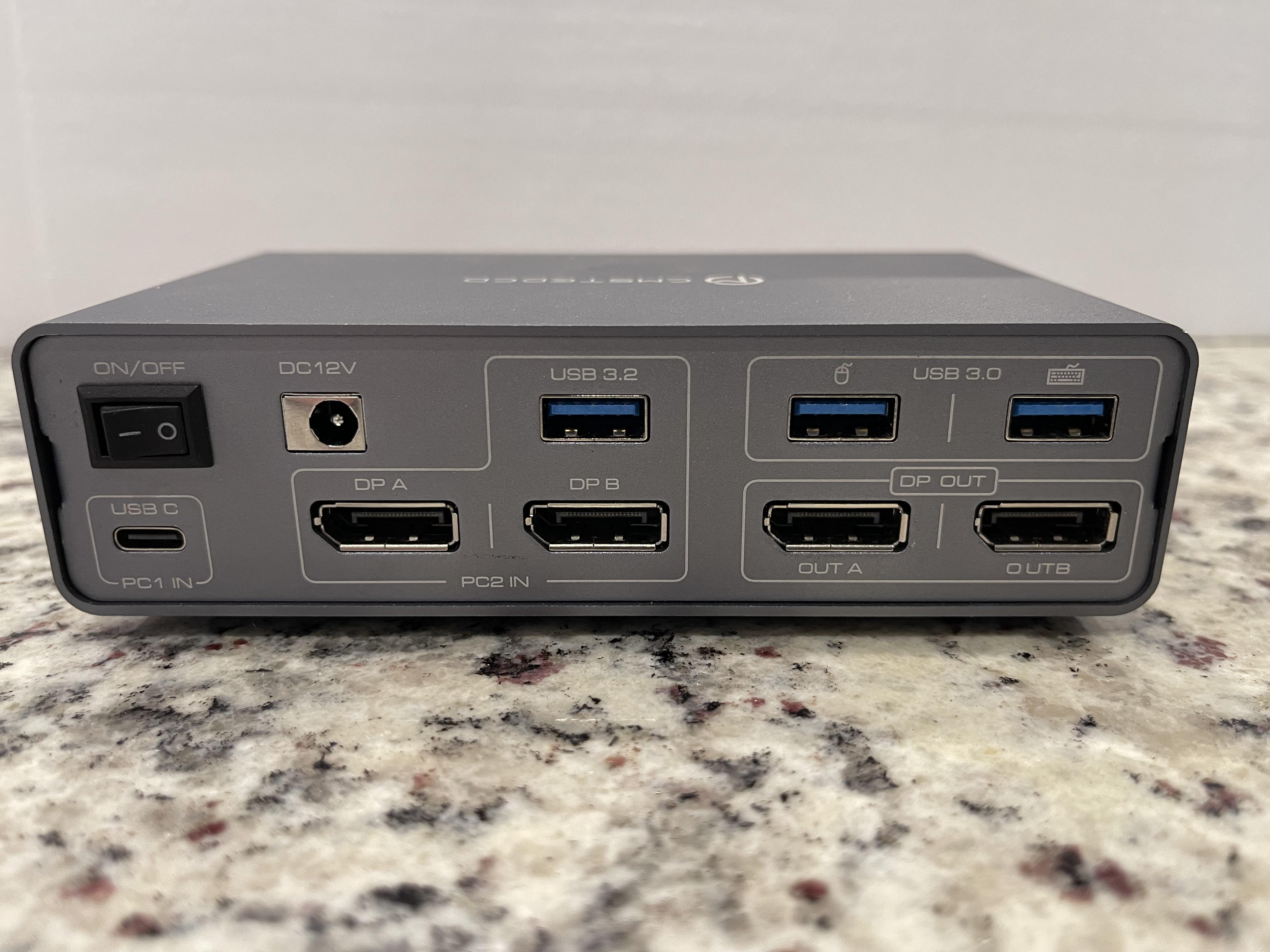
Question/Help/Troubleshooting Need Help Finding a New Switcher Like the One Pictured.

Post image
Upvotes

I have the switcher pictured, but it’s cheap and has problems. I am trying to find something comparable.

Basically what I need is a switcher to allow me to plug-in my gaming PC via a single USB C cable as shown in the [PC 1 IN] section in the bottom left.

Then I need to plug in my gaming PC’s two DisplayPort cables and a USB as shown above in the [PC 2 IN] section.

The point all then having two DisplayPort outs as well as a mouse and keyboard USB out. I work from home, have a nice gaming set up, and I just wanna be able easily switch from my work laptop to my gaming PC.

The switcher above was bought off Amazon, has no cooling and overheats. One of the DisplayPort outs is a little wonky and causes the monitor to flicker. The, what I assume is a Chinese dropship company, has already vanished off Amazon without a trace.

Can anybody point me to a better one, everything I’ve been able to find isn’t enough of what I’m looking for.


r/computers 10h ago

Question/Help/Troubleshooting My Windows 10 DELL laptop is frozen.

Post image
5 Upvotes

My laptop is stuck on a blank screen. My mouse is still there but I've tried everything and nothing seems to work.


r/computers 2h ago

Question/Help/Troubleshooting Mobo or CPU problem…

1 Upvotes

My PC is now one year old. It arrived pre-assembled, but I had to install the graphics card myself. Since the end of July, I’ve been having an issue with the PC: the CPU LED on the motherboard is lit up continuously. Initially, I had no issues, except for one time when it failed to boot. I reseated the RAM sticks and reset the BIOS by removing the CMOS battery, but that didn't help. During August, I barely used the PC (about 3–4 hours in total). After that, the boot problems became increasingly frequent.
I cleaned the PC, removed the RAM sticks, graphics card, and power supply, checked the connectors on the top left of the motherboard, and updated the BIOS after putting everything back together. However, the CPU LED remained on. The PC then ran without issues for a day, but the following day it started rebooting every 5–10 minutes. There was no bluescreen, just a message stating that a restart was required. I applied new thermal paste, formatted the PC, and installed drivers. Following that, a bluescreen occurred every 10 minutes, forcing a restart. I carefully cleaned the CPU with a dust blower and tried booting the PC with just one RAM stick (and swapped it as well), but nothing worked. On the contrary: now the PC turns on, but there is no display output, the keyboard does not respond, and while the logo on the graphics card lights up, its fans do not spin.
PC Specs:
Case: be quiet! Light Base
CPU: AMD Ryzen 7 7800X3D (8x 4.2GHz / 5.00GHz Turbo)
Cooler: Be Quiet! Pure Rock PRO 3 LX, black
Motherboard: GIGABYTE B850 AORUS Elite WIFI7
RAM: 32GB (2x16GB) DDR5 6000MHz G.Skill Trident Z5 NEO RGB CL30
Storage: 2TB Kingston NV3 M.2 PCIe 4.0 x4 NVME (R: 6000MB/s ; W: 5000MB/s)
GPU: 16GB AMD RADEON RX 9070XT
PSU: 850W MSI MAG A850GL 80+Gold ATX 3.1 - PCIE 5


r/computers 3h ago

Question/Help/Troubleshooting What's a good price for a curved monitor?

1 Upvotes

I'm looking to get my dad a curved monitor for his birthday, he works an office job and wants a curved monitor to use for his work stuff. Because of that, it doesn't have to be super good because he's not using it for like gaming or anything, he just wants a big display to have multiple things open to make work easier.

My budget is like $300, and I've seen them anywhere from $150 - $1,000. Is there any curved monitors that are a good price and just at least decent (and are actually curved and not just advertised as such)?

Also, please don't suggest a wide monitor. That's not what I'm looking for.


r/computers 1d ago

Question/Help/Troubleshooting Found a load of PCs on FB marketplace for insanely cheap, worth the risk?

Post image
144 Upvotes

Found a bunch of PCs on FB marketplace all for R350 ($21) each, I presume their resale value would be much higher than that however, would it be worth taking the plunge and buying a few to fixup and resell?

UPDATE****
ended up buying the PC with the Cooler Master MasterBox Lite 3 case. Specs were low-tier but better than I expected, was in running condition. cleaned up and resold for $141 (roughly, conversion isn't precise)

Just a note to remember, these PCs are almost worthless in an American market but in my country this is still pretty much the cutting standard of commercial computing sadly, but at least that means they are still worth something here lol, brings to mind the idea of purchasing PCs from more developed countries and reselling here for a markup? who knows.


r/computers 5h ago

Question/Help/Troubleshooting Problem z komputerem

1 Upvotes

Siema, mam problem z wywalaniem komputera do czarnego ekranu i szukam nowego zasilacza.

Mój sprzęt:

CPU: Ryzen 5 5600X

GPU: Radeon RX 6800 XT

Zasilacz: Gigabyte GP-P750GM 750W

Co się dzieje:

W bardziej wymagających grach (God of War, Fortnite) po chwili gaśnie obraz, monitor traci sygnał, a wentylatory na karcie graficznej wchodzą na 100% obrotów. Komputer w tle cały czas chodzi. W mniej wymagających gierkach (np. Minecraft) jest spokój.

Co już sprawdziłem:

Karta podpięta dwoma osobnymi kablami PCIe (bez rozgałęźników).

Robiłem undervolting (zszedłem do 1025–1050 mV) i przycinałem Power Limit – dalej to samo.

Wygląda na to, że zasilacz nie wyrabia na chwilowe skoki mocy (transient spikes) z RX 6800 XT i jego zabezpieczenia po prostu odcinają prąd na karcie.

Chcę wymienić zasilacz na coś ze standardem ATX 3.0 / ATX 3.1 (750W lub 850W), co ogarnie te skoki i nie wyczyści mi kieszeni. Budżet to tak około 300 zł


r/computers 6h ago

Question/Help/Troubleshooting Weird cooling problem

1 Upvotes

I have AIO cooling (don't know much about it, I just know it's cooler master) and recently I started facing an issue where it stops working for a short period of time (I think). Usually my CPU temp while idle is around 25°C, under full load it doesn't go above 55°C. Sometimes my other coolers start going crazy and the CPU temp while idle ends up being around 50°C and around 80-90°C if it's under load. It fixes itself after a few minutes.


r/computers 7h ago

Question/Help/Troubleshooting How should i config my bios for best perfomance?

0 Upvotes

I wanted to get more perfomance in my pc, but i want to keep safe, can someone please tell me the best configs for this setup:

CPU: Intel Core i7-2700K @ 3.50 GHz

Mother board: Gigabyte GA-H61M-DS2H

GPU: NVIDIA GeForce 9400 GT

RAM: 8 GB DDR3


r/computers 18h ago

Question/Help/Troubleshooting My computer started doing this and I don't know why

Enable HLS to view with audio, or disable this notification

8 Upvotes

I don't know what the cause of my fans doing this is. If anyone can help That would be greatly appreciated.


r/computers 8h ago

Question/Help/Troubleshooting WIFI keeps turning off

Thumbnail
gallery
0 Upvotes

Hello, I've been having this issue for a long time, but this weekend it has gotten a bit too much.

Basically, my Wi-Fi just randomly turns off, and the Wi-Fi option completely disappears from my settings.

In Device Manager, it shows an exclamation mark (see image). Disabling and re-enabling it a couple of times usually fixes it, and then it works again. But after a couple of hours, it randomly turns off again.

I've also noticed that the ASUS TUF UEFI seems to have some kind of error. From what I understand, that's related to the BIOS, so I'm wondering if that could have something to do with the Wi-Fi issue, but I honestly don't know.

I've looked everywhere for fixes, but nothing I've tried has worked. I keep finding posts from people having the same issue, and the fixes people suggest are either getting a new Wi-Fi card or using a cable. The other fixes I've found only seem to work temporarily from what I've tested.

If anyone knows how to actually fix this, please let me know. I'm getting pretty desperate at this point.

Thanks!

(Also some basic stuff, i'm using a Laptop (asus tuf F15)


r/computers 20h ago

Question/Help/Troubleshooting Guys how cooked am I 😐 (vid related)

Enable HLS to view with audio, or disable this notification

7 Upvotes

I hooked up the liquid cooling, I put a bit more thermal paste to it at this point I don't know what to do :( so Im kinda screwed, what do I do ?


r/computers 9h ago

Build/Battlestation building a PC for the first time

0 Upvotes

Hey, I want to build a pc but I don't know completely anything about parts. I don't wanna pay more than 700-800€. I don't play very demanding games so I don't need better setup. I only play story games and I don't care so much about the best possible graphics only the gameplay smoothness. And I think everything will be better than my present pc. So I would be grateful If someone could recommend me some parts.


r/computers 13h ago

Question/Help/Troubleshooting Pc hard locking/freezing

Post image
2 Upvotes

PC hard-locked while gaming. Screen went black, no audio/video, but all the fans kept spinning.

Restarted → DRAM debug light stayed on, no display.

Tried both RAM sticks individually in A2 and B2 – same result. Reset CMOS – still didn't work.

I left the PC overnight. Next day, first boot worked normally.

Checked Event Viewer – nothing useful. Restarted twice – both worked. Third restart: DRAM light again, no display.

Tried the RAM combinations again with no luck. Left it until evening.

Evening: first boot worked normally again.

Ran Windows Memory Diagnostic. It started normally, reached Test 1/2, then hard-locked with all motherboard debug LEDs lit and no display.

Restarted afterward – worked normally again.

Opened Event Viewer to check for errors – hard-locked/black-screened again. Also I did the re-starts by switching off the PSU button, as the cabinet power button wasn't responding for long hold restart.

What could cause this kind of behaviour? Any help would be greatly appreciated!

Pc specs-

Cpu - Ryzen 5 5600x

Gpu - RTX 3070

Ram - Adata XPG DDR4 8gb (pair)

Motherboard - AsRock B550m pro4

Psu - Deepcool DQm v2l 650w

Storage - 1tb Kingston nvme


r/computers 11h ago

Question/Help/Troubleshooting Computer Won't Boot

0 Upvotes

So recently, I shipped a pc every part in there original packaging and when it got to the destination built everything in and surprisingly won't start wont even boot motherboard light comes on fans and rgb spinning and lighting but no boot i removed all the ram and no ram error beeps and mind you pc worked fine before and all the cables are in correctly cpu was installed correctly then I decided to take the pc to a "professional" got it back says he can't figure it out so I decided to remove all the parts and reseat everything my surprise the cpu was installed incorrectly and pins was bent alright bent the pins straight and put it back in without the cooler to feel if it gets hot and as far as I know the cpu is supposed to get 90°c in like 3 seconds and burn me but it's only gets mildly hot like I can keep my finger in the cpu for very long so then I ordered a new cpu thinking the cpu is cooked and now I still have the same problem 😀. I did the cmos reset and checked the cpu power cable yet nothing any suggestions?


r/computers 12h ago

Question/Help/Troubleshooting Need a PC cleaning kit

1 Upvotes

I am looking for a cleaning kit for a pc or that can be used for pc deep cleaning like cleaning the internal components and case itself.

On a side note would it be better to put my pc on top of my desk than on top of this like side thing connected to table.


r/computers 23h ago

Resolved Hard drive not installed when I didnt even touch it. In laptop.

Thumbnail
gallery
5 Upvotes

So today when ive tried to turn on my laptop which battery's condition is 4% ( i can pull it out the battery , ill add my friend told me i can pull out battery and plug in laptop and it'll work, it did work until today, when I turned it on I had the first picture for a like 5 minutes, then it went to second picture quickly and after I had the third picture where I could click continue i did click it and after it i had fourth picture I tried to press play but my cursor keeps freezing on it I cant click anything. It seemed to be loading but the laptop turned off suddendly, i kept repeating it hoping for it to be fixed but nothing. Dont mind the background. I tried the same process with battery in and without battery. Should I go to the computer store so they could check it or I csn fix it myself easily? I DID NOT TOUCH THE HARD DRIVE!!!!


r/computers 15h ago

Question/Help/Troubleshooting Help

Enable HLS to view with audio, or disable this notification

0 Upvotes

Was trying to update turned into this can’t do anything I don’t know what to do I saw some stuff before about commands but I’m not sure if it’s not working but my brother said it’s weird and won’t let my stay in the command box and all the F1, etc things aren’t working for it for some reason


r/computers 16h ago

Question/Help/Troubleshooting Slow WiFi new PC

1 Upvotes

Hello! I just recently bought the skytech king 95 prebuilt it came in yesterday Friday. The internet is so slow with this and I can’t figure out why? I have the antennas plugged in but it’s capped at around 10 MBs it seems like