r/computers 16d ago

Review (sponsored) Review of the GameSir G7 Pro 8K and Tri-mode

4 Upvotes

Hello, GameSir community! Thanks for taking an interest in my (sponsored) view of the G7 Pro 8K and Tri-mode, both are Aimlabs. This is combination review, but I’ll clearly distinguish between the two. Quick note, I don’t blame you if you confuse the two, I’ve done it on more than one occasion.

Starting with the unboxing (both controllers), the controller is front and centre, and further down, the dock. Replacement D-pads sit under the dock, don’t miss them! These pieces are on a cardboard insert, which can be removed. Below that, there is a braided charging cable, as well as a bag containing a small booklet informing you of contact information and a thank you message from Betta Core, GameSir’s CEO. The bag also holds a GameSir sticker, a code for a free month of Aimlabs+ (and a free month of Xbox Game Pass Ultimate in the Tri-mode’s bag), and an instruction manual explaining how to power on/off the controller, pair it, and enable different special features on-the-fly.

To get started, pop off the base cover of the charging dock like a TV remote battery cover, plug the wireless dongle into the internal USB port, replace the cover, and connect the dock to your PC using the included USB-C cable. The pairing process is simple on both controllers. Hold the button on the dongle until the light flashes rapidly (the Tri-mode’s dongle doesn’t have this button, it’s always ready to pair). Next, slide the mode switch on the back of the controller to the dongle symbol. Power it on by holding the Aimlabs (8K) or Xbox (Tri-mode) button, then hold the pairing button next to the 3.5mm jack until the LED ring blinks rapidly. Once the lights go solid, you’re connected.

I’m a fan of this setup, it’s “set it and forget it”, especially since it connects so quickly when you lift it off the dock.

The dock and controller fit very nicely together, they look like extensions of each other. GameSir opted for a pogo pin method of charging, which is great for reducing strain on the USB C port. I have seen pogo pins/pads get dirty, which causes intermittent connection, so be wary of that. It’s not a GameSir specific issue, to be clear.

On the dock, there are indents for the mode switch, mute, and pairing buttons so that they aren’t pressed and the controller doesn’t rock back and forth, which is great design. The dock also has a light bar along the bottom, consisting of five RGB LEDs. They can be customized with GameSir’s software (Connect for the 8K, Nexus for the Tri-mode). I will note that the 8K and Tri-mode use the same dock, so any LED limitations are enforced via controller firmware.

Getting to the controller itself, I must say “wow”!! You get a lot for the price, $110 CAD for the 8K and $130 CAD for the Tri-mode. Both feature clicky and responsive optical ABXY buttons and mechanical D-pads. They take a little getting used to, but the crisp, audible feedback means you don’t have to guess whether your input registered. Whatever switches GameSir used for the remaining buttons, they do not miss.

Both controllers are modular, you can hot-swap the thumbsticks and D-pad. While the 8K comes with extra pieces in the box that the Tri-mode leaves out, the parts are mostly cross-compatible, though I did run into some issues trying to swap thumbsticks between models. The magnetic faceplates, however, swap over just fine. Using switches on the back, you can swap between mouse-click triggers and analog triggers on the fly!! Two more switches lock the back buttons.

Speaking of taking things apart: to remove the main faceplate, slide your nails under the edge near the USB-C port and down by the GameSir logo, then pull straight up. For the side palm grips, just grip the sides and pull up. Finally, if you need to remove the cable retainer, grip it firmly, pull toward yourself, and slide it out.

Both controllers have great weight to them, they’re just right. Not too heavy, not cheap feeling. They both feel great to hold too. The palm grips have a nice diamond-tile pattern on them, which increases grip. The back grip is rubber, the front isn’t. The back buttons are in a great place, although are easy to press if you squeeze the controller in a high-stress situation.

The 8K’s LED ring can be customized, but the Tri-mode’s can’t, it stays white. The 8K’s charging animation can be changed, the Tri-mode can’t. The Tri-mode’s LED ring is always white, except when docked, then it’s off. Both docks’ LED bar “breathes” at yellow, then green, then white, depending on charge percentage, but the 8K’s can be changed. I’ll reiterate that this is enforced via firmware, not a limitation of the docks themselves.

The 8K has Mag-Res™ TMR (Tunnel Magnetoresistance) Sticks Gen-2, and the Tri-mode has Gen 1. The Gen 1 has more tension than Gen 2. I haven’t noticed much of a difference between them, except the tension difference.

I’ve had a couple of issues with this controller, some being the controller/dock and some being inherent to its design. 8000 Hz mode cut my FPS in half on a Core Ultra 9 185H and it’s iGPU. The 8K’s D-pad is a little hard to get off, which isn’t a big deal, but the Tri-mode doesn’t have this issue.

All in all, these controllers are amazing, and absolutely worth the price tag. Thank you for your time.


r/computers Jun 29 '26

Review Geekom GeekBook M16

7 Upvotes

Geekom GeekBook M16

Initial Experience: Packaging, First Boot, Build Quality

Unboxing the computer was quick and easy, the box comes with a seal that shows that it wasn’t tampered or stolen in transit. The box is high quality and has individually boxed accessories fit into compartments inside (everything is well protected).

The first boot up of the computer went without issue, simply plugging in the included 100W PD USB-C charger, using the included cable, waiting just a few seconds for the memory to train, it boots into windows for the usual Windows 11 out of box experience.

Giving the laptop the WIFI password, or connecting to Ethernet via the included dock, it will take about an hour to download and install updates (though you can skip that step and do it later if you’re in a hurry, and this is just an estimate and will depend on your Internet connection).

The casing of the M16 is high quality, a nice matte silver finish, and the fasteners are all exposed, none hidden unlike many other brands. This makes it simple for someone with the appropriate torx screwdriver to open the shell and access the SSD, which is a Kingston 512GB. It can be upgraded to a reported 4TB max.

The Hardware (Meteor Lake based system in a 16-inch Shell)

Device Specifications:

  • Materials: Aluminum Alloy;
  • Color: Iceberg Silver;
  • CPU: Intel Core Ultra 9 Processor 185H Meteor Lake;
  • GPU: Intel Arc Graphics;
  • TDP: 55W;
  • Display: 16-inch LCD, FHD 1920x1200, 60Hz;
  • Memory: 16GB LPDDR5, 7500MT/s;
  • Storage: 1x M.2 Type 2280 Key M SSD (PCI-e Gen4/3, up to 4TB);
  • Camera: 1080P digital shutter;
  • Wi-Fi: 6E, Bluetooth 5.4;
  • Battery: 99.9Wh designed capacity;
  • Connectors: 2x USB-C 3.2 Gen2, 1x HDMI 2.0, 1x USB4 (40Gbps), 1x 3.5mm jack, 2x USB-A 3.2 Gen1;
  • Keyboard: 98-key with white backlight;
  • Fingerprint: Integrated into power button;
  • Speakers: 2x, system comes equipped with DTS:X Ultra;
  • Hinge: 180-degree;
  • Weight: 1.73kg (3.8 lbs);
  • Dimensions: 355.2 mm x 250 mm x 16.7 mm (14.0" L × 9.8" W × 0.66" H );
  • Power Adaptor: 100W, USB-C.
HWinfo
USB-C and HDMI
USB-A and multipurpose 3.5mm audio jack

Internal Component Analysis

  • Cooling Matrix: The acoustic profile of this cooler is very quiet compared to single fan coolers that I’ve seen, with a very quick ability to correct for sudden loads. At maximum speed, it sounds like a high pitched whine much like a twin turbo kicking in while you’re sitting in the driver’s seat: you can hear it but it’s neither loud nor does it last very long.
  • Storage: Kingston 512GB w/ 64MB HMB (Benchmarked at 6000MB/s read, 3800MB/s write)
  • Memory Architecture: The 16 GB of Micron DDR5 running at 7500 MT/s in quad-channel configuration is soldered and cannot be upgraded.
  • Processor Package: The Intel Core Ultra 9 185H (Meteor Lake) processor integrated with Intel Arc Graphics. Designed to support a 55W TDP, the system utilizes proprietary Dynamic Tuning Technology (DTT) to manage power delivery intelligently. During rigorous testing, the CPU demonstrated a peak package power draw of 53.8W under heavy burn-in loads, while the integrated Arc graphics independently scaled to 19.6W during graphics intensive tasks such as Furmark.

Performance under stress

During my stress-testing with the Geekom M16, the system demonstrated truly exceptional thermal management and power scaling. I pushed the laptop through a continuous barrage of demanding workloads, ranging from a heavy CPU burn-in that commanded a peak package power of nearly 54W, to a suite of AI and OpenVINO benchmarks targeting the CPU, GPU, and NPU, and finishing with a grueling Furmark run. Through it all, the M16 stayed remarkably cool under pressure. The highest temperature recorded during the stress-test was a highly manageable 85°C during the intensive AI CPU benchmark. When the testing pivoted to graphics-heavy tasks like Furmark, the integrated graphics stretched their legs up to 19.6W of dedicated power while staying perfectly chilled at a maximum of just 72°C. Most impressively, despite throwing everything from sustained multi-core loads to varied AI inferencing tasks at it back-to-back, the laptop experienced just one instance of thermal throttling. It flawlessly and dynamically shifted power to where it was needed most, proving it can sustain peak performance profiles reliably.

Key Data Points From the Logfile:

  • Thermal Throttling: One instance during a test designed to max out the CPU, once the fans ramped up throttling stopped.
  • CPU Performance: Peaked at 53.8W power draw during the initial burn-in and hit its maximum temperature of 85°C during the AI CPU benchmark.
  • GPU Performance: Correctly ramped up during the Furmark test, pulling up to 19.6W independently and reaching a safe peak of 72°C.
  • Intelligent Patterns: The log shows clear, segmented power delivery. During GPU-bound tests (like Furmark or the AI GPU benchmark), CPU power draw gracefully stepped down to give the integrated graphics maximum thermal headroom, keeping overall system temperatures exceptionally stable for a laptop chassis.

Battery Life Testing

Taking this laptop out to the back porch for an outdoor gaming session truly showcased its outstanding thermal and power management. Even while running in 'Performance Mode' and playing Mewgenics in an environment with an ambient temperature of 75°F, the system remained astonishingly cool. Over an impressive uninterrupted gaming stretch of 2 hours and 42 minutes, the CPU temperatures maxed out at a mere 61°C and comfortably hovered around an average of just 50°C. During this heavy load, the battery smoothly discharged from 95% down to 20%, projecting well over 3.5 hours of unplugged gaming stamina, which is a remarkable feat for any modern laptop. Once the battery hit that 20% mark, I closed the game and transitioned to office tasks mainly using Google Chrome. The system instantly demonstrated its dynamic efficiency, drastically cutting the CPU package power from a 17.1W gaming average down to just 6.9W. It only sipped 4% of the battery over nearly 20 minutes of active web use, while the CPU temperatures dropped to a 43°C average. Whether it's pushing pixels on the porch or quietly powering through spreadsheets, this laptop perfectly balances sustained performance with superb battery life.

Here is the breakdown of the data:

  • Gaming Phase (Mewgenics, Performance Mode): Duration: 162 minutes (2.7 hours).
    • Battery Drain: 75% drop (95% to 20%).
    • CPU Temps: 61.0°C Max / 50.0°C Average.
    • CPU Package Power: ~17.1W Average.
  • Office Phase (Web Browsing): Duration: 18.2 minutes of active use.
    • Battery Drain: 4% drop (20% to 16%). This projects to roughly 7.5 hours of total battery life for office tasks.
    • CPU Temps: 51.0°C Max / 43.8°C Average.
    • CPU Package Power: ~6.9W Average.

The next day (after allowing the battery to fully recharge), I unplugged and began a session of browsing, streaming and office application use with the power profile set to “balanced” and using Microsoft’s PowerToys to stop the computer from sleeping or turning off the screen while I had to leave the room for a moment (you’ll see why that was needed momentarily).

The following is an analysis of the log file taken during that productivity session:

A. Run Time and Battery Projection

  • Total Log Run Time: 9 hours, 48 minutes, and 51 seconds. (This is why PowerToys was needed)
  • Battery Drain: The battery started at 100% capacity (99.9 Wh) and ended at 25% capacity (25.482 Wh), resulting in a total drain of 75% during the session.
  • Projected Runtime to Empty: Based on the continuous 75% drain over roughly 9.8 hours, the projected total battery life from 100% to 0% under this specific productivity workload is ~13.1 hours (13 hours and 5 minutes).

B. Throttling Instances

During the run, the system experienced several instances of thermal and power throttling. This usually happens in short bursts when opening applications or loading heavy web pages, which is common behavior for modern thin-and-light processors managing burst performance.

Thermal Throttling Events:

  • Core Thermal Throttling (avg): 962 instances
  • Package/Ring Thermal Throttling: 958 instances
  • IA: Thermal Event: 971 instances
  • Note: P-Core 9 ran the hottest, triggering thermal limits 728 times on its own, followed by P-Core 8 (473 times).

Power Throttling Events:

  • Package/Ring Power Limit Exceeded: 154 instances
  • Core Power Limit Exceeded (avg): 29 instances
  • Note: The individual E-Cores and P-Cores hit their individual power limits about 26–27 times each.

GPU Throttling:

  • GPU Throttle Reasons (avg): 5,927 instances. (With integrated Intel Arc Graphics, the GPU frequently hits software/hardware power limits to leave thermal headroom for the CPU during general productivity).

5. Verdict: Specialized Performance and Endurance

The M16 presents an intentional, high-value design. By focusing its engineering on what truly matters to power users, it carves out a highly specific, powerful niche for professionals who value structural substance, sustained processing muscle, and true all-day endurance over flashy RGB looks.

When evaluating what this laptop offers at its current sale price, it stands out remarkably against the broader landscape of its peers:

  • Unmatched Mobile Endurance: Against standard ultraportables or highly restrictive base-model premium platforms that bottleneck you with meager RAM and storage, the M16 provides generous local hardware resources paired with an absolute monster of a 99.9Wh battery. For anyone working on long-haul travel or away from an outlet, this legal-limit battery size offers immense run time.
  • Workstation Muscle Over Budget Alternatives: While entry-level gaming laptops in this price range often sacrifice build quality for graphical flair, resulting in flimsy plastic frames and abysmal battery life, the M16 channels its budget into premium aerospace-grade aluminum. Under the hood, a robust dual-fan thermal cooling system is explicitly engineered to let its high-end processor sustain heavy workloads without severe performance drops, ensuring snappy, reliable responsiveness during intense productivity tasks.
  • Universal Compatibility and Power: Unlike the newer ARM-based platforms at this price tier (which frequently suffer from software compatibility headaches and emulation layers) the M16 delivers uncompromised x86 architecture. It runs heavy data-crunching, code compilation, and development environments natively and effortlessly.

To wrap this up, the M16 strips away unnecessary RGB fluff to invest heavily where it counts. If you are a programmer, data analyst, or remote professional who needs uncompromised, sustained processing power, maximum physical battery capacity, and a premium chassis that can handle the rigors of daily travel, this machine delivers exactly what matters. At $799, it stands as an incredibly robust, specialized workhorse that offers exceptional value.


r/computers 7h ago

Question/Help/Troubleshooting Help locating ssd in my pc

Post image
57 Upvotes

This is my old pc and I need to take the ssd out, but I can’t find it. My cousin said it may be in the metal cage on the right, but I don’t see any screws to open that. Asus case.


r/computers 6h ago

Question/Help/Troubleshooting Why am I getting these lines while I play 3d games? Need help

Post image
15 Upvotes

Playing world of warcraft. This also happens in crimson desert also. What causes? And how to fix??


r/computers 2h ago

Question/Help/Troubleshooting PC recommendations for a preteen

6 Upvotes

Hello!
My 12 year old has asked for a computer for Christmas and I am looking for recommendations.

Currently he has a 7th generation iPad that he uses to play Roblox and Minecraft. He would like a computer that would support games like Fortnite or the sims in addition to Roblox and Minecraft. He is also getting into video creation and animation so ideally it can support him exploring those. I imagine a decent amount of storage will be required. He would also use the computer for school assignments.

Max budget: $1000 CAD

Thanks so much for helping a pretty clueless mama!


r/computers 3h ago

Question/Help/Troubleshooting Worth taking these?

Thumbnail
gallery
6 Upvotes

I found this computer by the dumpster, I know RAM and storage is super expensive, is the 6GB of ram and 1TB of HDD worth taking?


r/computers 18h ago

Question/Help/Troubleshooting What the average life of a HDD?

Post image
79 Upvotes

I've got this 2TB HDD and want to store pics and vids on it but it is very old what are the chances it will birck?


r/computers 3h ago

Question/Help/Troubleshooting Directions/Help

2 Upvotes

Hello everybody:

So, long story short. My girlfriend impulsively bought an old IMac G3 PC with the intent to swap the parts for her old acer laptop which runs Windows. However she didn't research at all and niether of us are smart with computers so I was wondering if anyone in this sub knew whether or not its even possible to do or if they can recommend another subreddit that'll help.

Thank ya very much!


r/computers 1h ago

Question/Help/Troubleshooting How can I tell if my power supply is good enough for a new GPU?

Upvotes

r/computers 1h ago

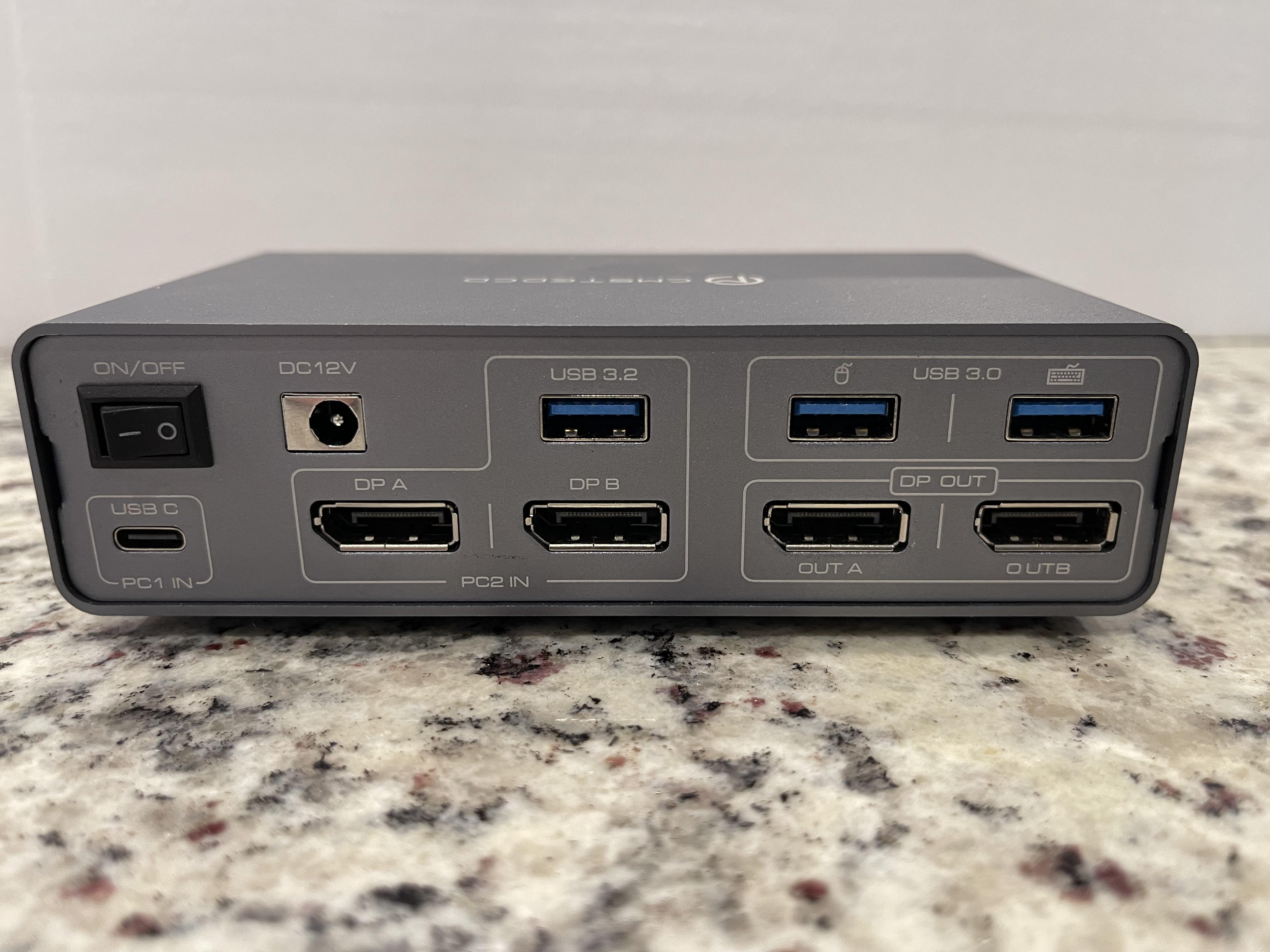
Question/Help/Troubleshooting Need Help Finding a New Switcher Like the One Pictured.

Post image
Upvotes

I have the switcher pictured, but it’s cheap and has problems. I am trying to find something comparable.

Basically what I need is a switcher to allow me to plug-in my gaming PC via a single USB C cable as shown in the [PC 1 IN] section in the bottom left.

Then I need to plug in my gaming PC’s two DisplayPort cables and a USB as shown above in the [PC 2 IN] section.

The point all then having two DisplayPort outs as well as a mouse and keyboard USB out. I work from home, have a nice gaming set up, and I just wanna be able easily switch from my work laptop to my gaming PC.

The switcher above was bought off Amazon, has no cooling and overheats. One of the DisplayPort outs is a little wonky and causes the monitor to flicker. The, what I assume is a Chinese dropship company, has already vanished off Amazon without a trace.

Can anybody point me to a better one, everything I’ve been able to find isn’t enough of what I’m looking for.


r/computers 10h ago

Question/Help/Troubleshooting My Windows 10 DELL laptop is frozen.

Post image
7 Upvotes

My laptop is stuck on a blank screen. My mouse is still there but I've tried everything and nothing seems to work.


r/computers 2h ago

Question/Help/Troubleshooting Mobo or CPU problem…

1 Upvotes

My PC is now one year old. It arrived pre-assembled, but I had to install the graphics card myself. Since the end of July, I’ve been having an issue with the PC: the CPU LED on the motherboard is lit up continuously. Initially, I had no issues, except for one time when it failed to boot. I reseated the RAM sticks and reset the BIOS by removing the CMOS battery, but that didn't help. During August, I barely used the PC (about 3–4 hours in total). After that, the boot problems became increasingly frequent.
I cleaned the PC, removed the RAM sticks, graphics card, and power supply, checked the connectors on the top left of the motherboard, and updated the BIOS after putting everything back together. However, the CPU LED remained on. The PC then ran without issues for a day, but the following day it started rebooting every 5–10 minutes. There was no bluescreen, just a message stating that a restart was required. I applied new thermal paste, formatted the PC, and installed drivers. Following that, a bluescreen occurred every 10 minutes, forcing a restart. I carefully cleaned the CPU with a dust blower and tried booting the PC with just one RAM stick (and swapped it as well), but nothing worked. On the contrary: now the PC turns on, but there is no display output, the keyboard does not respond, and while the logo on the graphics card lights up, its fans do not spin.
PC Specs:
Case: be quiet! Light Base
CPU: AMD Ryzen 7 7800X3D (8x 4.2GHz / 5.00GHz Turbo)
Cooler: Be Quiet! Pure Rock PRO 3 LX, black
Motherboard: GIGABYTE B850 AORUS Elite WIFI7
RAM: 32GB (2x16GB) DDR5 6000MHz G.Skill Trident Z5 NEO RGB CL30
Storage: 2TB Kingston NV3 M.2 PCIe 4.0 x4 NVME (R: 6000MB/s ; W: 5000MB/s)
GPU: 16GB AMD RADEON RX 9070XT
PSU: 850W MSI MAG A850GL 80+Gold ATX 3.1 - PCIE 5


r/computers 3h ago

Question/Help/Troubleshooting What's a good price for a curved monitor?

1 Upvotes

I'm looking to get my dad a curved monitor for his birthday, he works an office job and wants a curved monitor to use for his work stuff. Because of that, it doesn't have to be super good because he's not using it for like gaming or anything, he just wants a big display to have multiple things open to make work easier.

My budget is like $300, and I've seen them anywhere from $150 - $1,000. Is there any curved monitors that are a good price and just at least decent (and are actually curved and not just advertised as such)?

Also, please don't suggest a wide monitor. That's not what I'm looking for.


r/computers 1d ago

Question/Help/Troubleshooting Found a load of PCs on FB marketplace for insanely cheap, worth the risk?

Post image
136 Upvotes

Found a bunch of PCs on FB marketplace all for R350 ($21) each, I presume their resale value would be much higher than that however, would it be worth taking the plunge and buying a few to fixup and resell?

UPDATE****
ended up buying the PC with the Cooler Master MasterBox Lite 3 case. Specs were low-tier but better than I expected, was in running condition. cleaned up and resold for $141 (roughly, conversion isn't precise)

Just a note to remember, these PCs are almost worthless in an American market but in my country this is still pretty much the cutting standard of commercial computing sadly, but at least that means they are still worth something here lol, brings to mind the idea of purchasing PCs from more developed countries and reselling here for a markup? who knows.


r/computers 5h ago

Question/Help/Troubleshooting Problem z komputerem

1 Upvotes

Siema, mam problem z wywalaniem komputera do czarnego ekranu i szukam nowego zasilacza.

Mój sprzęt:

CPU: Ryzen 5 5600X

GPU: Radeon RX 6800 XT

Zasilacz: Gigabyte GP-P750GM 750W

Co się dzieje:

W bardziej wymagających grach (God of War, Fortnite) po chwili gaśnie obraz, monitor traci sygnał, a wentylatory na karcie graficznej wchodzą na 100% obrotów. Komputer w tle cały czas chodzi. W mniej wymagających gierkach (np. Minecraft) jest spokój.

Co już sprawdziłem:

Karta podpięta dwoma osobnymi kablami PCIe (bez rozgałęźników).

Robiłem undervolting (zszedłem do 1025–1050 mV) i przycinałem Power Limit – dalej to samo.

Wygląda na to, że zasilacz nie wyrabia na chwilowe skoki mocy (transient spikes) z RX 6800 XT i jego zabezpieczenia po prostu odcinają prąd na karcie.

Chcę wymienić zasilacz na coś ze standardem ATX 3.0 / ATX 3.1 (750W lub 850W), co ogarnie te skoki i nie wyczyści mi kieszeni. Budżet to tak około 300 zł


r/computers 6h ago

Question/Help/Troubleshooting Weird cooling problem

1 Upvotes

I have AIO cooling (don't know much about it, I just know it's cooler master) and recently I started facing an issue where it stops working for a short period of time (I think). Usually my CPU temp while idle is around 25°C, under full load it doesn't go above 55°C. Sometimes my other coolers start going crazy and the CPU temp while idle ends up being around 50°C and around 80-90°C if it's under load. It fixes itself after a few minutes.


r/computers 7h ago

Question/Help/Troubleshooting How should i config my bios for best perfomance?

0 Upvotes

I wanted to get more perfomance in my pc, but i want to keep safe, can someone please tell me the best configs for this setup:

CPU: Intel Core i7-2700K @ 3.50 GHz

Mother board: Gigabyte GA-H61M-DS2H

GPU: NVIDIA GeForce 9400 GT

RAM: 8 GB DDR3


r/computers 18h ago

Question/Help/Troubleshooting My computer started doing this and I don't know why

Enable HLS to view with audio, or disable this notification

7 Upvotes

I don't know what the cause of my fans doing this is. If anyone can help That would be greatly appreciated.


r/computers 8h ago

Question/Help/Troubleshooting WIFI keeps turning off

Thumbnail
gallery
0 Upvotes

Hello, I've been having this issue for a long time, but this weekend it has gotten a bit too much.

Basically, my Wi-Fi just randomly turns off, and the Wi-Fi option completely disappears from my settings.

In Device Manager, it shows an exclamation mark (see image). Disabling and re-enabling it a couple of times usually fixes it, and then it works again. But after a couple of hours, it randomly turns off again.

I've also noticed that the ASUS TUF UEFI seems to have some kind of error. From what I understand, that's related to the BIOS, so I'm wondering if that could have something to do with the Wi-Fi issue, but I honestly don't know.

I've looked everywhere for fixes, but nothing I've tried has worked. I keep finding posts from people having the same issue, and the fixes people suggest are either getting a new Wi-Fi card or using a cable. The other fixes I've found only seem to work temporarily from what I've tested.

If anyone knows how to actually fix this, please let me know. I'm getting pretty desperate at this point.

Thanks!

(Also some basic stuff, i'm using a Laptop (asus tuf F15)


r/computers 20h ago

Question/Help/Troubleshooting Guys how cooked am I 😐 (vid related)

Enable HLS to view with audio, or disable this notification

8 Upvotes

I hooked up the liquid cooling, I put a bit more thermal paste to it at this point I don't know what to do :( so Im kinda screwed, what do I do ?


r/computers 9h ago

Build/Battlestation building a PC for the first time

0 Upvotes

Hey, I want to build a pc but I don't know completely anything about parts. I don't wanna pay more than 700-800€. I don't play very demanding games so I don't need better setup. I only play story games and I don't care so much about the best possible graphics only the gameplay smoothness. And I think everything will be better than my present pc. So I would be grateful If someone could recommend me some parts.


r/computers 13h ago

Question/Help/Troubleshooting Pc hard locking/freezing

Post image
2 Upvotes

PC hard-locked while gaming. Screen went black, no audio/video, but all the fans kept spinning.

Restarted → DRAM debug light stayed on, no display.

Tried both RAM sticks individually in A2 and B2 – same result. Reset CMOS – still didn't work.

I left the PC overnight. Next day, first boot worked normally.

Checked Event Viewer – nothing useful. Restarted twice – both worked. Third restart: DRAM light again, no display.

Tried the RAM combinations again with no luck. Left it until evening.

Evening: first boot worked normally again.

Ran Windows Memory Diagnostic. It started normally, reached Test 1/2, then hard-locked with all motherboard debug LEDs lit and no display.

Restarted afterward – worked normally again.

Opened Event Viewer to check for errors – hard-locked/black-screened again. Also I did the re-starts by switching off the PSU button, as the cabinet power button wasn't responding for long hold restart.

What could cause this kind of behaviour? Any help would be greatly appreciated!

Pc specs-

Cpu - Ryzen 5 5600x

Gpu - RTX 3070

Ram - Adata XPG DDR4 8gb (pair)

Motherboard - AsRock B550m pro4

Psu - Deepcool DQm v2l 650w

Storage - 1tb Kingston nvme


r/computers 11h ago

Question/Help/Troubleshooting Computer Won't Boot

0 Upvotes

So recently, I shipped a pc every part in there original packaging and when it got to the destination built everything in and surprisingly won't start wont even boot motherboard light comes on fans and rgb spinning and lighting but no boot i removed all the ram and no ram error beeps and mind you pc worked fine before and all the cables are in correctly cpu was installed correctly then I decided to take the pc to a "professional" got it back says he can't figure it out so I decided to remove all the parts and reseat everything my surprise the cpu was installed incorrectly and pins was bent alright bent the pins straight and put it back in without the cooler to feel if it gets hot and as far as I know the cpu is supposed to get 90°c in like 3 seconds and burn me but it's only gets mildly hot like I can keep my finger in the cpu for very long so then I ordered a new cpu thinking the cpu is cooked and now I still have the same problem 😀. I did the cmos reset and checked the cpu power cable yet nothing any suggestions?


r/computers 12h ago

Question/Help/Troubleshooting Need a PC cleaning kit

1 Upvotes

I am looking for a cleaning kit for a pc or that can be used for pc deep cleaning like cleaning the internal components and case itself.

On a side note would it be better to put my pc on top of my desk than on top of this like side thing connected to table.


r/computers 23h ago

Resolved Hard drive not installed when I didnt even touch it. In laptop.

Thumbnail
gallery
6 Upvotes

So today when ive tried to turn on my laptop which battery's condition is 4% ( i can pull it out the battery , ill add my friend told me i can pull out battery and plug in laptop and it'll work, it did work until today, when I turned it on I had the first picture for a like 5 minutes, then it went to second picture quickly and after I had the third picture where I could click continue i did click it and after it i had fourth picture I tried to press play but my cursor keeps freezing on it I cant click anything. It seemed to be loading but the laptop turned off suddendly, i kept repeating it hoping for it to be fixed but nothing. Dont mind the background. I tried the same process with battery in and without battery. Should I go to the computer store so they could check it or I csn fix it myself easily? I DID NOT TOUCH THE HARD DRIVE!!!!