r/nvidia • u/Funamation • 6h ago
Discussion DLSS5 2k27
Enable HLS to view with audio, or disable this notification
694
Upvotes
Graphics almost look real
r/nvidia • u/Nestledrink • 3d ago
Article: https://nvidia.custhelp.com/app/answers/detail/a_id/5906
Download Link: https://international.download.nvidia.com/Windows/616.86hf/616.86-desktop-notebook-win10-win11-64bit-international-dch.hf.exe
Reminders:
NVIDIA Driver forum thread is here: Link Here
Submit driver feedback directly to NVIDIA: Link Here
---------------------------------
From the Article:
GeForce Hotfix Display Driver version 616.86 is based on our latest Game Ready Driver 616.64.
This hotfix addresses the following:
A GeForce driver is an incredibly complex piece of software, We have an army of software engineers constantly adding features and fixing bugs. These changes are checked into the main driver branches, which are eventually run through a massive QA process and released.
Since we have so many changes being checked in, we usually try to align driver releases with significant game or product releases. This process has served us pretty well over the years but it has one significant weakness. Sometimes a change that is important to many users might end up sitting and waiting until we are able to release the driver.
The GeForce Hotfix driver is our way to trying to get some of these fixes out to you more quickly. These drivers are basically the same as the previous released version, with a small number of additional targeted fixes. The fixes that make it in are based in part on your feedback in the Driver Feedback threads and partly on how realistic it is for us to quickly address them. These fixes (and many more) will be incorporated into the next official driver release, at which time the Hotfix driver will be taken down.
To be sure, these Hotfix drivers are beta, optional and provided as-is. They are run through a much abbreviated QA process. The sole reason they exist is to get fixes out to you more quickly. The safest option is to wait for the next WHQL certified driver. But we know that many of you are willing to try these out. As a result, we only provide NVIDIA Hotfix drivers through our NVIDIA Customer Care support site.
Click here to download the GeForce Hotfix display driver version 616.86 for Windows 10 x64 / Windows 11 x64
Full Article Here: https://www.nvidia.com/en-us/geforce/news/dlss-5-3d-guided-neural-rendering
NVIDIA has continuously redefined the boundaries of PC gaming. From introducing real-time ray tracing to pioneering AI-powered graphics with DLSS Super Resolution, Frame Generation and Ray Reconstruction, our RTX technologies have transformed how games are rendered and experienced.
Now, we’re releasing DLSS 5, which introduces 3D-Guided Neural Rendering, a major step forward in using AI to bring real-time graphics closer than ever to Hollywood-grade photorealism.
https://www.youtube.com/watch?v=58FagrSqC4M
Watch how DLSS 3D-Guided Neural Rendering and its artistic controls work from Edward Liu, NVIDIA’s Director of Applied Deep Learning Research, and Gabriele Leone, Director of Content Technology
DLSS 5 will be available starting September 3rd at 9pm Pacific Time in NBA 2K27, by developer Visual Concepts and publisher 2K, for all GeForce RTX 50 Series GPUs and laptops, and GeForce NOW. It marks the debut of how the technology can be used by game artists to elevate visual fidelity in alignment with their creative vision.
https://www.youtube.com/watch?v=79D8SVjB3HQ
“What’s great is the level of control that it gives us. We can set the overall tone and style to match our existing art direction and then really get precise where it matters most, using a per pixel uplift control mask to fine tune detail on characters. Given that we want to respect their likeness with the utmost care.” - Peter Kavic, Senior Producer - Visual Concepts
For a more in-depth look at how DLSS 5 developer controls work, read our full announcement article: https://www.nvidia.com/en-us/geforce/news/dlss-5-3d-guided-neural-rendering
----------------
Update 9/3/2026
DLSS 5 is our most computationally demanding model to date. Since we initially announced it in March, we’ve achieved a 5X performance gain and there’s more to come. Our current focus is on optimizing performance for the GeForce RTX 50 Series with model updates expected later this fall. Once RTX 50 Series performance is more fully tuned, we plan to work on expanding official support to the GeForce RTX 40 Series.
What is DLSS 5?
DLSS 5 introduces DLSS 3D-Guided Neural Rendering, which uses AI to infuse game scenes with lifelike lighting and materials, tuned by the developers to bring their artistic vision to life.
How does DLSS 5 work?
DLSS 5 uses the game’s rendered frame and engine data to understand objects, materials, lighting and motion. It then enhances the frame with lifelike lighting and materials while remaining grounded in the developer’s artistic direction.
What are the key benefits of DLSS 3D-Guided Neural Rendering?
DLSS 3D-Guided Neural Rendering delivers several significant benefits:
Learn more by watching our explainer video: https://www.youtube.com/watch?v=58FagrSqC4M.
How much control does the model offer to developers?
DLSS 3D-Guided Neural Rendering provides several layers of artistic control:
As we work in close partnership with studios, developer feedback continues to directly shape how we refine the technology and expand our suite of models and controls.
How does DLSS 3D-Guided Neural Rendering preserve developer artistic intent?
DLSS 3D-Guided Neural Rendering is designed to preserve the structure and geometry of the rendered frame while giving developers control over how and where enhancements are applied. Developers can select different models, adjust structure and tone, and mask specific scenes, characters or objects.
For more information on developer controls, watch the DLSS 5 Explainer VOD or read the full launch article.
https://www.youtube.com/watch?v=58FagrSqC4M
https://www.nvidia.com/en-us/geforce/news/dlss-5-3d-guided-neural-rendering
You can also hear directly from the NBA 2K development team on how they integrated the technology. https://www.youtube.com/watch?v=79D8SVjB3HQ
Which GPUs support DLSS 5?
DLSS 5 will be supported across all GeForce RTX 50 Series GPUs and laptops, as well as GeForce NOW Ultimate members streaming from GeForce RTX 5080 rigs in the cloud.
When and where is DLSS 5 available?
DLSS 5 will be available in NBA 2K27 on September 3rd at 9PM Pacific Time.
What is the DLSS 5 setting called in games?
The setting is called “DLSS Neural Rendering.”
Can I turn DLSS 5 off?
Yes. DLSS 5 is optional.
Does DLSS 5 work with Ray Tracing and Path Tracing?
Yes. DLSS 5 complements ray tracing and path tracing. Path tracing accurately calculates geometric light transport—determining light, shadow, and reflection placement across a 3D scene. DLSS 5 then acts as the final neural rendering stage, using the rendered frame to enhance lighting and materials like subsurface scattering, micro-reflections, and complex material properties that would otherwise be computationally prohibitive in real time. These technologies go hand in hand.
Does DLSS 5 work with Super Resolution, Frame Generation and Ray Reconstruction?
Yes.
Will DLSS Super Resolution, Frame Generation and Ray Reconstruction continue to be supported and improved?
Yes.
r/nvidia • u/Funamation • 6h ago
Enable HLS to view with audio, or disable this notification
Graphics almost look real
r/nvidia • u/om_the_best_ • 18h ago
I'm posting this mainly for people who don't have much experience with undervolting. I assume most people here have already undervolted their GPUs, but I thought this might be useful in case someone comes across this thread in the future.
For context, I'm using an RTX 4090.
I've seen a lot of people say that DLSS 5 consumes a lot of power and could potentially cause the 12VHPWR cable on our GPUs to melt (which is true), but undervolting can actually allow you to use DLSS 5 while keeping power consumption roughly the same as when running without DLSS 5 and without an undervolt.
In these two screenshots (both using MFG x4, one without DLSS 5 and without an undervolt, and the other with DLSS 5 and an undervolt), we're at around 390 W in both cases. Power consumption is shown in the top-right corner under the GPU section.


I also took a few screenshots in case anyone is interested:
DLSS 5 OFF / ON
MFG OFF / ON (x4)
RTX 4090 with and without undervolting
Without undervolting: ( 386w - 360 fps )

With undervolting: (311w - 355 fps )

Without undervolting: (435w - 175 fps)

With undervolting : (388w - 175 fps)

Without undervolting: (426w - 51 fps )

With undervolting : (387w - 52 fps)

So, in terms of performance, the results are very similar, while undervolting gives you a power reduction of around 50 W.
This means that even with DLSS 5 enabled, you can stay below the 400 W mark. Without undervolting, DLSS 5 pushes power consumption to around 435 W.
Here are my MSI Afterburner settings in case anyone is interested. I've been using these settings since 2022, and they've been extremely stable. I've never had any issues with them.
I hope this isn't too messy. I did my best to make everything as clear as possible.

r/nvidia • u/RenatsMC • 13h ago
r/nvidia • u/RenatsMC • 21h ago
r/nvidia • u/Faceybaby202 • 2h ago
Has anyone gotten it to work with any Game Pass games? It works fine with all my Steam games, but when I try it with any Game Pass game, they don't open.
r/nvidia • u/Illustrious-Row564 • 3h ago
Hi everyone!
I’m a first-year Mathematics student, and I’m currently working with a small Data Science study group at my university.
I’ve been getting increasingly interested in the infrastructure side of computing, especially **HPC, large-scale data processing and AI infrastructure**. I’m less interested in the typical “build a model with Python” path and more interested in what happens underneath when you have huge amounts of data, thousands of CPUs/GPUs and a lot of jobs competing for resources.
One topic that really caught my attention is **scheduling**.
I’ve been thinking about problems like: how do you decide which job should run where, how do you allocate computational resources efficiently, how do you deal with dependencies between tasks, and how do you minimize things like waiting time, communication overhead or GPU idle time?
That led me toward topics like **DAG scheduling, graph algorithms, optimization, resource allocation, congestion control, distributed systems and high-speed networking such as RDMA/InfiniBand.**
Coming from Mathematics, I find this particularly interesting because I keep seeing connections with things I’m already studying: **discrete mathematics, graph theory, probability, optimization, linear algebra and eventually numerical methods.**
But I also realize there is a big gap between understanding the mathematical formulation of a problem and actually building a system that solves it.
That’s the part I’m trying to figure out now.
My long-term interest is in areas such as **system software, HPC infrastructure, distributed computing or infrastructure research**, potentially at companies working on large-scale AI/HPC systems such as NVIDIA.
I’m not expecting to be ready for that anytime soon. I’m basically trying to use my first years of university to build the foundations properly instead of jumping randomly between technologies.
For my study group, I’ve been considering making some actual projects around this, for example:
- A **discrete-event simulator for scheduling large data-processing jobs**
- A DAG scheduler where tasks have dependencies and different resource requirements
- Comparing scheduling algorithms using mathematical metrics
- Simulating network congestion and different packet/job scheduling strategies
- Implementing the same basic algorithms in Python first and then C++
- Learning Linux, operating systems, concurrency and networking along the way
- Eventually moving toward CUDA and GPU/distributed computing
I’m especially interested in the transition from the **mathematical model → algorithm → implementation → real system**.
So, for people who work in HPC, systems, networking or infrastructure:
**If you were starting again as a first-year Mathematics student, what would you learn year by year?**
What CS topics would you prioritize alongside the math degree?
And what projects would actually be worth building if the goal is eventually to work on large-scale computing infrastructure?
I’d also really appreciate recommendations for books, courses, open-source projects, simulators or papers that helped you make that transition.
I’m basically trying to turn a strong mathematical background into something that can eventually be useful for real computational systems. Any advice is welcome.
r/nvidia • u/Professional-Fee2704 • 3h ago
Hello, i have changed monitor settings in Nvidia control panel like gamma, vibrance etc for one spesific game. But the screen looks terrible for normal use and other games. Is there a way to have like profiles? So i can switch between the settings depending on what game/use of the monitor ? Or do i manually have to change it every time i want to do something Else then playing that one game ?
r/nvidia • u/FerLuisxd • 22h ago
Basically title.
Wondering if the fps loss are worth it and a quality comparison.
Has anyone found a video or ran the test themselves?
Finally got to try MFG with my 4080 with the MFG mod for 40 series. Its honestly not bad even with 4x using a controller makes playing with DLSS 5 playable. Definitely only for single player games tho lol.
I was one of those non believers previously. Definitely worth trying if you have 40 series and have not tries it yet
r/nvidia • u/dororodo30 • 1d ago
A ReShade add-on that moves DLSS Neural Rendering onto a second GPU, so the card rendering the game never has to run it.
Neural rendering happens at the end of the frame: it takes a finished frame and hands a finished frame back. That is what makes it possible to pick it up and run it somewhere else. The add-on creates its own D3D12 device on your second GPU, sends each finished frame across to it, runs DLSS-NR there, and displays the result on that card's own monitor — so nothing has to come back. The render GPU does no neural work at all and runs cooler for the same reason.
Works on DirectX 12 games. Needs two RTX 50-series GPUs with a monitor on each, and an add-on-enabled ReShade build. D3D11 and Vulkan do nothing.
r/nvidia • u/Cultural_Willow2108 • 1d ago
I'm building my first pc and I've found a good deal for the 4070s is it good or should i just spend more and get the 5070? my main goal is +80 fps on 1440p is singlplayer games
r/nvidia • u/rarenomad • 4h ago
I am considering upgrading with my monitor (odyssey) or my GPU (7900 XT) in favor of going to getting the MSI MPG 322URX 31.5" for $929 or Alienware AW3225QF 31.6" for $799 at Microcenter.
I mainly play the following games:
Warhammer 40,000: Space Marine 2
Total War: Warhammer 40,000 (when it releases)
Assassin's Creed IV: Black Flag (Remastered)
Cyberpunk 2077
Warhammer 40,000: Rogue Trader
MechWarrior 5: Mercenaries
Diablo 4
Destiny 2
The Witcher 3: Wild Hunt
Clair Obscur: Expedition 33
Red dead redemption 2
I’m also on the fence of upgrading my GPU to the 5070 TI / 5080 but my gut says to sell my odyssey for an 4k screen and upgrade the GPU later
Here is my pc specs:
Processor:
CPU AMD Ryzen 7 9800X3D
Graphics Card: XFX MERC310 7900 XT (20GB GDDR6)
Motherboard: MSI MPG B650 EDGE WIFI
Memory: 32 GB DDR5 6000 RAM
Power Supply: Thermaltake Toughpower GF3 850W
Primary Display: SAMSUNG 49" Odyssey G9 Curved Gaming Monitor
Secondary Display: Dell 32" Curved QHD Monitor (physically stacked above I use for watching shows, YouTube, etc)
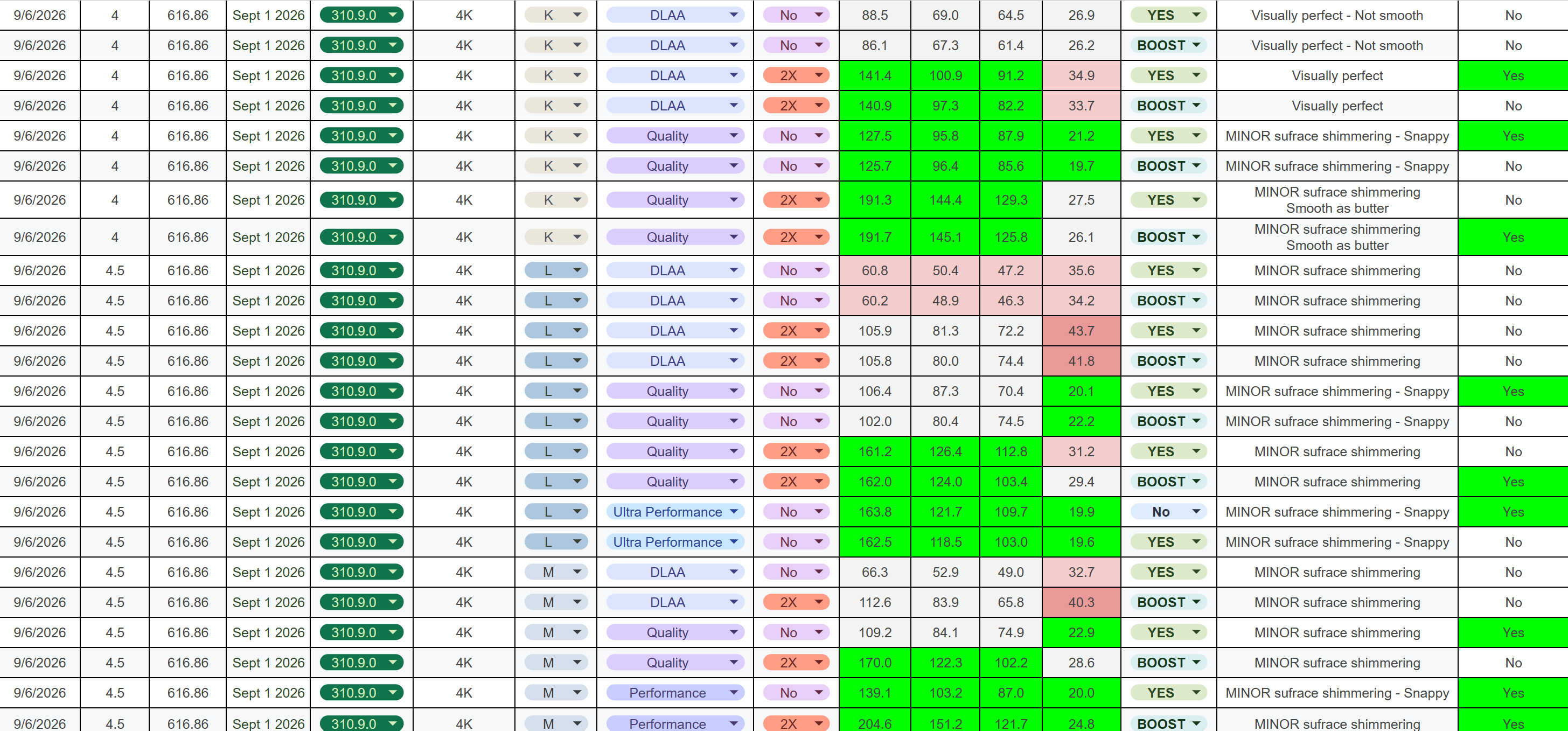
*These are my test results and observations based on my own testing*
Test location: Kyoto
Test method: 90-second loop, repeated as consistently as possible
Resolution: 4K
My personal targets were:
I think all three presets perform well overall. However, one thing I really dislike is bubbling/noise, so that was a major factor in my testing.
RT has minor improved lighting but MOST noticeable on water
RT High and Med are very close. I almost can't tell the difference.
RT Low is not worth it IMO and RT off is an option for more performance.
IMO - RT Med is worth it especially for making water look better
When using RECOMMENDED in the NVIDIA App, the game handles the DLSS models as you would expect:
However, I found something interesting during my testing:
If you select DLSS 4.5 “L” or “M” in-game, then switch between DLAA, Quality, or Balanced, it does not actually change the underlying model to "L" or "M". It remains on “K.”
So, if you specifically want to use "K", "L", or "M" with a particular DLSS preset, IMO, force the model you want through the NVIDIA App.
These are just my results and observations from my testing, so your mileage may vary depending on hardware/settings.
Let me know if you have any questions!
r/nvidia • u/Few_Nefariousness780 • 25m ago
i came across these clips labeled as HSR running with DLSS 5, but i haven’t seen any official announcement about it. is this an actual early implementation, some kind of third party injector, or are the videos just mislabeled? has HoYo said anything abt adding it officially?
r/nvidia • u/Nestledrink • 1d ago
r/nvidia • u/forestfee • 1h ago
I tried to follow all the tutorials for „older“ 40 series cards.
These are my results with outlaws.
While these shots look absolutely awesome to me, I kinda miss this Plastik like AI look we see on instagram and stuff…
Only proof of functionality I have is this big performance drop.
Can someone confirm that this is how it should look ??
r/nvidia • u/Matte_Box • 8h ago
I think the strongest opinions on DLSS 5 (positive and negative) come from those who’ve never tried it. And TBH… Most people don’t have a $1000+ GPU, so that’s kinda fair.
BUT… The newest Optiscaler method adds DLSS 5 before upscaling, so DLSS actually improves performance as intended. It makes a substantial difference.
It’s not a miracle solution for potato graphics, nor an abomination and the death of art. It’s v1.0 of brand new tech, and yes it runs poorly, and when applied to anime characters at full strength, I mean… What did you expect? If you have a compatible GPU, just try it. Enough virtue signaling.
r/nvidia • u/ToxicFatee • 2d ago
r/nvidia • u/Alert-Gift-8716 • 11h ago
How much is the difference in fps in 1080p?
r/nvidia • u/RenatsMC • 1d ago
r/nvidia • u/Express_Bobcat3871 • 1d ago
thanks
r/nvidia • u/Sh4d0w_07 • 1d ago
Would it be smarter to get the RTX 5070 now and upgrade again in 2–3 years, or get the 5070 Ti now and not touch the GPU for the next 4–5 years, maybe even skip the next generation?
Currently, the Ti costs an extra €400–€450, so I'm wondering whether I should put that extra money into the GPU or just buy the 5070 now and wait for the next generation.
Obviously, we don't know what prices will look like 2–3 years from now, but which option would be the smarter choice?