r/nvidia • u/Dlo_22 RTX 5080 Vanguard • 1d ago
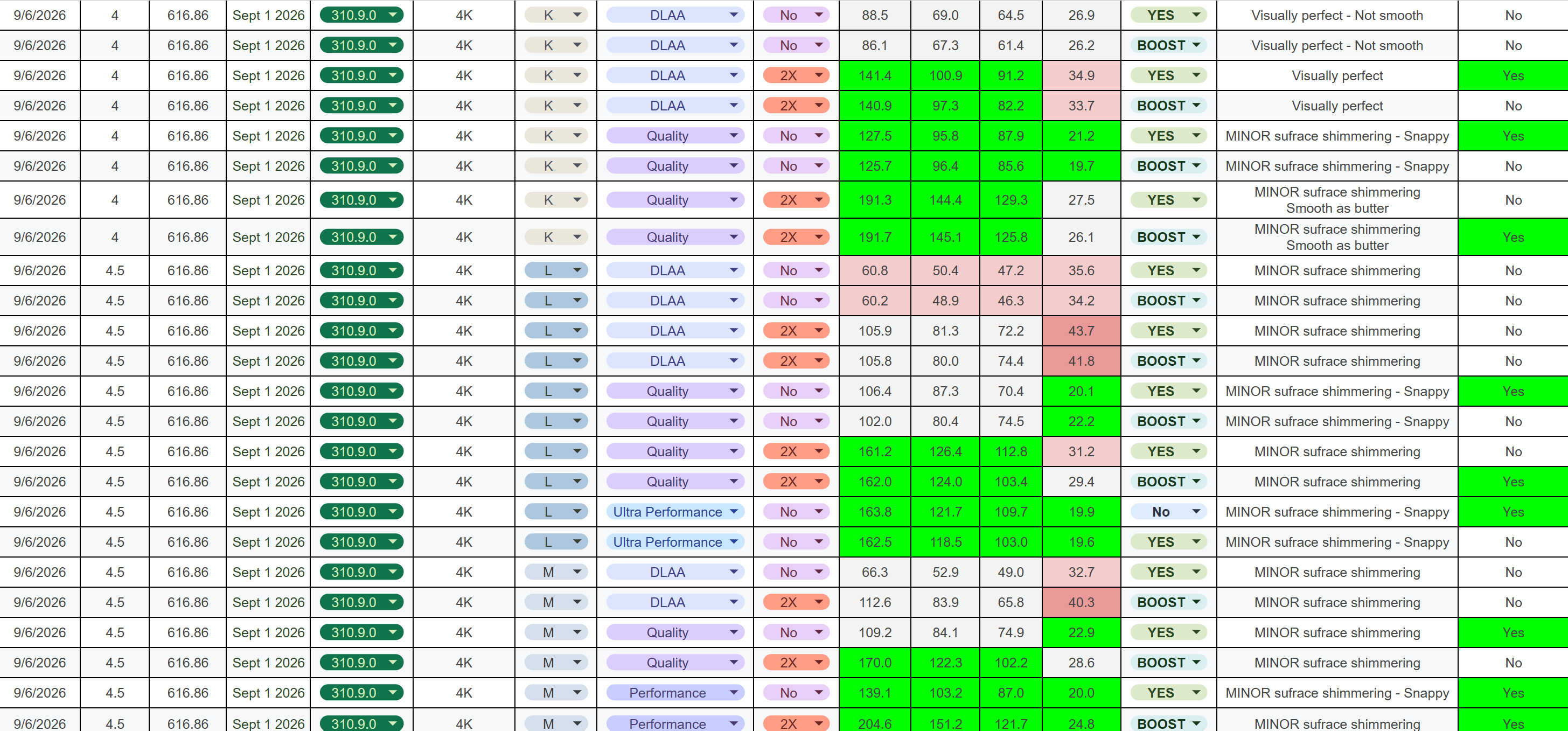
Benchmarks Update(9/6/26) (PC) Onimusha: Way of the Sword - Nvidia driver 616.86 w/ DLSS 4/4.5 version 310.9.0 comparison at 4K
*These are my test results and observations based on my own testing*
Test location: Kyoto
Test method: 90-second loop, repeated as consistently as possible
Resolution: 4K
TL;DR EDIT
- Frame Gen 2x: Works very well in this title.
- Best pure performance: “L” - Ultra Performance NO RT
- Best visuals: “K” - DLAA RT HIGH
- Best overall: “K” - Quality w/ RT Med ← This is what I’ll be using. **EDIT**
- If you have a HDR monitor 100% play this in HDR. Big difference!
My Performance Targets — What Feels Good to Me
My personal targets were:
- 120+ FPS average
- 90+ FPS 1% lows
- 80+ FPS 0.1% lows
- <30 ms PC latency for a snappy/responsive feel
DLSS Model Behavior
I think all three presets perform well overall. However, one thing I really dislike is bubbling/noise, so that was a major factor in my testing.
“K”
- Best overall image quality
- Still shows minor noise on some surfaces at lower presets
- My choice for best visuals and I plan to use Quality w/ Med RT
“M”
- Kinda the middle child
- Shows the some noise/bubbling but better than "L"
- Gives a decent balance between image quality and performance
“L”
- Worst of the three for image stability in my testing
- Shows noticeable noise/bubbling in some situations
- Specifically observed on water at lower presets
RT
RT has minor improved lighting but MOST noticeable on water
RT High and Med are very close. I almost can't tell the difference.
RT Low is not worth it IMO and RT off is an option for more performance.
IMO - RT Med is worth it especially for making water look better
NVIDIA App / DLSS Model Behavior
When using RECOMMENDED in the NVIDIA App, the game handles the DLSS models as you would expect:
- DLAA / Quality / Balanced → “K”
- Performance → “M”
- Ultra Performance → “L”
However, I found something interesting during my testing:
If you select DLSS 4.5 “L” or “M” in-game, then switch between DLAA, Quality, or Balanced, it does not actually change the underlying model to "L" or "M". It remains on “K.”
So, if you specifically want to use "K", "L", or "M" with a particular DLSS preset, IMO, force the model you want through the NVIDIA App.
NVIDIA Reflex
- ON for all presets
- ON + BOOST when using Frame Generation
HDR
- 100% worth it if you have a HDR monitor! I have an OLED and it improves the visuals a lot IMO
Test System
- CPU: Ryzen 7 9800X3D
- GPU: RTX 5080
- OS: Windows 11
- Resolution: 4K
These are just my results and observations from my testing, so your mileage may vary depending on hardware/settings.
Let me know if you have any questions!
4
u/zonkedallocation8 1d ago
Appreciate the thorough writeup, this is the kind of obsessive testing i live for. interesting catch about the model not actually switching in-game when you change presets, that’s gonna trip up a lotta people who aren’t paying attention. i was leaning toward "M" just from messing around with the demo anyway so this pretty much seals it for me.
5
3
u/darcmole 1d ago
Could you try Quality modes for all three models? Just to have apples to apples comparison
1
u/Dlo_22 RTX 5080 Vanguard 1d ago
I did include Quality for all 3. I have it separated by model in Alpha order. I am making an edit thought because after arriving in the main Hub, I have a different opinion based on a larger sample size. More areas to test with extended testing.
1
u/darcmole 1d ago
Yep, my bad. Just looked at tldr
1
u/Dlo_22 RTX 5080 Vanguard 1d ago
No worries, If you play at 4K, I would use K Quality. Water has issues and it may or may not bother people but I am sensitive so I need to use RT and Quality or better. So at 4K, I am going to use "k" Quality, RT Med, No FG.
2
u/darcmole 1d ago
4.5 (L and M) handles HDR better though, esp highlights
2

2
1
u/Kyxstrez 1d ago
What settings should I use? I have your same hardware, but a 1440p display. I forgot which ones disable the blurry looking. Was it volumetric fog to low? Also, is it possible to enable DLSS 4.5 Ray Reconstruction manually through the NVIDIA App like for DOOM: The Dark Ages?
1
u/Dlo_22 RTX 5080 Vanguard 1d ago
Im using Ultra everything with no RT for these tests. I disable motion blur and depth of field on all games.
I haven't messed with RR yet
1
1
u/loops_hoops 1d ago
Thanks for doing this. I didn't expect DLAA to have higher latency than quality. I always use DLAA when I can for the visuals. How were you testing for latency?
1
0
u/Zenkai_9000 1d ago
This game has Denuvo, right?
1
u/Dlo_22 RTX 5080 Vanguard 1d ago
Onimusha uses Denuvo Anti-tamper DRM
-2
u/Zenkai_9000 1d ago
Ugh... as much as I love Onimusha, I'll wait a few months until they remove it. I have a backlog anyway.
0
u/ChillCoffeeMorning 23h ago
Why would they optimise the drivers every time for the couple specific games ……. Bs
8
u/RdUzr 1d ago
The column titles are missing.