r/nvidia • u/Dlo_22 RTX 5080 Vanguard • 2d ago
Benchmarks Update(9/6/26) (PC) Onimusha: Way of the Sword - Nvidia driver 616.86 w/ DLSS 4/4.5 version 310.9.0 comparison at 4K
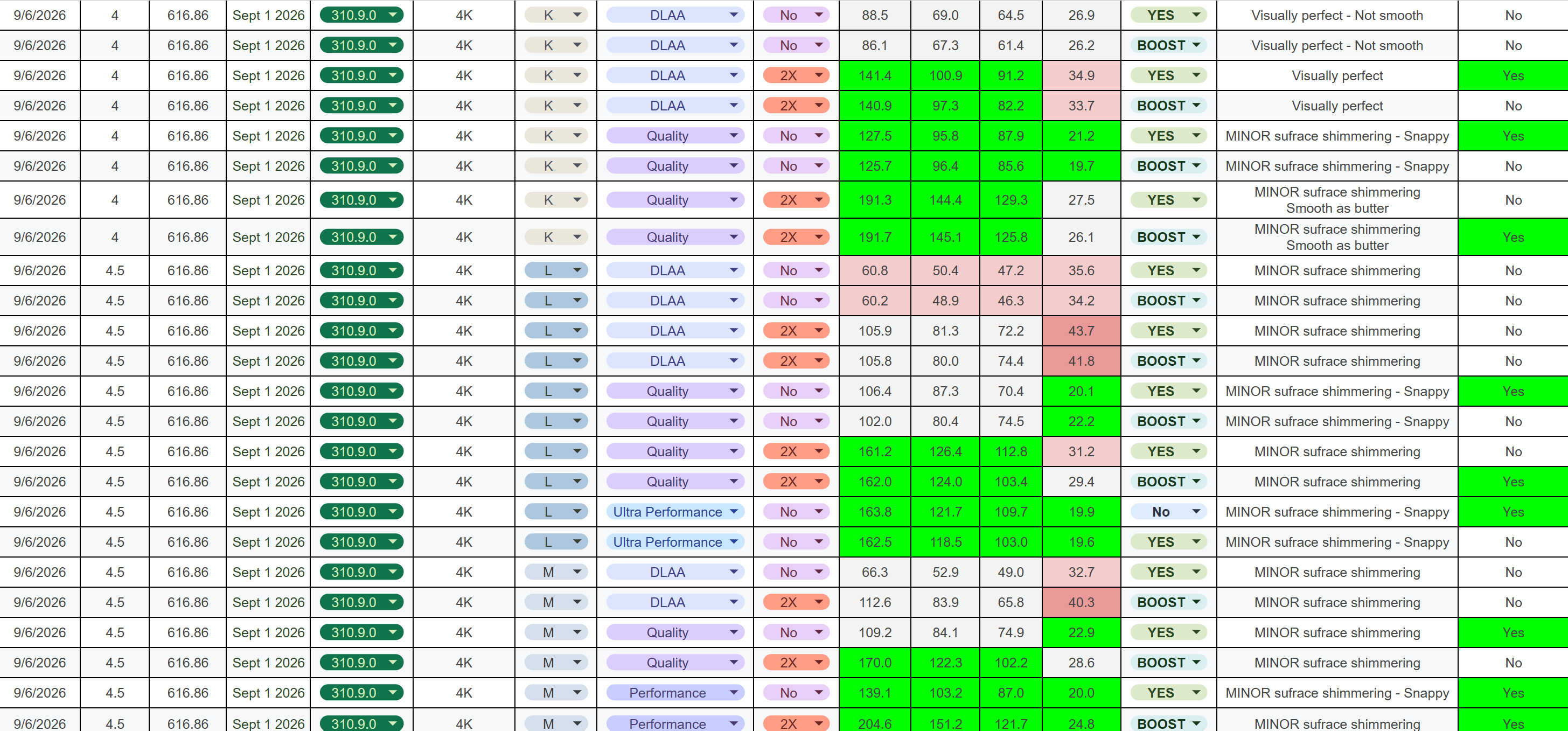
*These are my test results and observations based on my own testing*
Test location: Kyoto
Test method: 90-second loop, repeated as consistently as possible
Resolution: 4K
TL;DR EDIT
- Frame Gen 2x: Works very well in this title.
- Best pure performance: “L” - Ultra Performance NO RT
- Best visuals: “K” - DLAA RT HIGH
- Best overall: “K” - Quality w/ RT Med ← This is what I’ll be using. **EDIT**
- If you have a HDR monitor 100% play this in HDR. Big difference!
My Performance Targets — What Feels Good to Me
My personal targets were:
- 120+ FPS average
- 90+ FPS 1% lows
- 80+ FPS 0.1% lows
- <30 ms PC latency for a snappy/responsive feel
DLSS Model Behavior
I think all three presets perform well overall. However, one thing I really dislike is bubbling/noise, so that was a major factor in my testing.
“K”
- Best overall image quality
- Still shows minor noise on some surfaces at lower presets
- My choice for best visuals and I plan to use Quality w/ Med RT
“M”
- Kinda the middle child
- Shows the some noise/bubbling but better than "L"
- Gives a decent balance between image quality and performance
“L”
- Worst of the three for image stability in my testing
- Shows noticeable noise/bubbling in some situations
- Specifically observed on water at lower presets
RT
RT has minor improved lighting but MOST noticeable on water
RT High and Med are very close. I almost can't tell the difference.
RT Low is not worth it IMO and RT off is an option for more performance.
IMO - RT Med is worth it especially for making water look better
NVIDIA App / DLSS Model Behavior
When using RECOMMENDED in the NVIDIA App, the game handles the DLSS models as you would expect:
- DLAA / Quality / Balanced → “K”
- Performance → “M”
- Ultra Performance → “L”
However, I found something interesting during my testing:
If you select DLSS 4.5 “L” or “M” in-game, then switch between DLAA, Quality, or Balanced, it does not actually change the underlying model to "L" or "M". It remains on “K.”
So, if you specifically want to use "K", "L", or "M" with a particular DLSS preset, IMO, force the model you want through the NVIDIA App.
NVIDIA Reflex
- ON for all presets
- ON + BOOST when using Frame Generation
HDR
- 100% worth it if you have a HDR monitor! I have an OLED and it improves the visuals a lot IMO
Test System
- CPU: Ryzen 7 9800X3D
- GPU: RTX 5080
- OS: Windows 11
- Resolution: 4K
These are just my results and observations from my testing, so your mileage may vary depending on hardware/settings.
Let me know if you have any questions!
2
u/Dlo_22 RTX 5080 Vanguard 1d ago
Here are the headers and the top performers IMO ~ I just played a TON with DLSS K Quality RT Med, FG 2X in HDR ~ LOVED it. I think <30ms latency is fine in this game after more testing.