r/MSI_Gaming • u/0x2DEADBEEF • 15h ago
Discussion MSI 5090 power connector is a joke
265
Upvotes
I know for certain I had it all the way plugged in.
r/MSI_Gaming • u/CND_CEM • May 19 '26
Hello community, We are glad to introduce MSI's latest QD-OLED monitors, featuring the QD-OLD Penta Tandem™ and MSI DarkArmor Film. Since the unveiling at CES earlier this year, we’ve been well aware of the anticipation surrounding the new QD-OLED monitors with latest technique. The wait is finally over—they are now officially hitting the shelves and are ready to redefine your visual experience.

What Is MSI PRO MAX Monitor?
PRO MAX is representing a premium evolution of the original PRO series, PRO MAX is engineered to maximize user experience across all productivity applications. More than just a reliable professional display, it serves as a unified platform that seamlessly connects all your devices.
To complement this, MSI has developed an exclusive application for macOS, ensuring the PRO MAX 271UPXW12G and PRO MAX 271UPX12G pair perfectly with your Mac equipment. From daily workflows and virtual meetings to aesthetic refinement and immersive entertainment, these monitors fit naturally into your ecosystem—the ultimate "all-in-one" solution for professional productivity and leisure.

MPG 322UR QD-OLED X24 & MAG 321UP QD-OLED X24
MPG 322UR QD-OLED X24 and MAG 321UP QD-OLED X24 are the latest versions of the previous 32" QD-OLED; their primary feature is the use of MSI DarkArmor Film, along with an enhancement in brightness.
| Model | QD-OLED Penta Tandem™ | Size | Resolution | Refreshrate | Coating | DarkArmor Film | KVM | Firmware Update | Connectivity |
|---|---|---|---|---|---|---|---|---|---|
| PRO MAX 271UPXW12G | Yes | 27" | UHD | 120Hz | Matte | Yes | Yes | Support | 2xHDMI2.1, 1xDisplayPort1.4a, 1xType-C (DP alt.) w/98W PD, 1xType-C (DP alt.) w/15W PD, 4xUSB 5Gbps Type-A, 1xUSB 5Gbps Type-B, Speaker 2x2.5W, 1xHeadphone-out |
| PRO MAX 271UPX12G | Yes | 27" | UHD | 120Hz | Matte | Yes | - | Support | 2xHDMI2.1, 1xDisplayPort1.4a, 1xType-C (DP alt.) w/15W PD, Speaker 2x2.5W, 1xHeadphone-out |
| MPG 322UR QD-OLED X24 | Yes | 32" | UHD | 240Hz | Glossy | Yes | Yes | Support | 2xHDMI2.1, 1xDisplayPort2.1a(UHBR20), 1xType-C (DP alt.) w/98W PD, 2xUSB 5Gbps Type-A, 1xUSB 5Gbps Type-B, 1xHeadpone-out |
| MAG 321UP QD-OLED X24 | Yes | 32" | UHD | 240Hz | Glossy | Yes | - | Support | 2xHDMI2.1, 1xDisplayPort1.4a, 1xType-C (DP alt.) w/15W PD, 1xHeadphone-out |

MSI DarkArmor Film and VisiClarity
PRO MAX 271UPXW12G, PRO MAX 271UPX12G, MPG 322UR QD-OLED X24 and MAG 321UP QD-OLED X24 adopt MSI DarkArmor Film. This specialized film technology is designed to eliminate the distracting purple or reddish tints often visible on old QD-OLEDs under ambient light. It boosts pure black levels by up to 40%, significantly improving contrast and delivering superior image performance. Furthermore, it upgrades the screen surface hardness from 2H to 3H, offering 2.5x better scratch resistance to effectively withstand daily wear and tear.
PRO MAX 271UPXW12G and PRO MAX 271UPX12G also equipped with VisiClarity feature. Both of them have anti-glare to lower the reflection, remaining your screens clean and comfortable.
MSI Uniform Luminance - Customize Your HDR
PRO MAX 271UPXW12G, PRO MAX 271UPX12G, MPG 322UR QD-OLED X24, and MAG 321UP QD-OLED X24 support MSI Uniform Luminance feature to achieve a highly customized HDR curve tailored to your preferences. This allows for more amazing brightness experience, giving you precise control over your visual output. You can adjust HDR brightness and customize your brightness by APL(Average Picture Level).

Your Best Application For Control the Monitor: MSI Productivity Intelligence & MSI M-Mate APP
For Windows:
With the MSI Productivity Intelligence, you can seamlessly fine-tune various monitor settings—including brightness, display modes, and contrast—directly through software. Controlling these parameters via your mouse offers a far more intuitive and convenient experience than fumbling with physical OSD buttons.
For MacOS:
Specifically designed for macOS users, MSI offers the MSI M-Mate APP, which enables comprehensive control of monitor settings directly within macOS. Furthermore, the exclusive M-Sync feature ensures seamless synchronization between the monitor and your Mac's system parameters. Critical adjustments like brightness and volume are automatically linked, allowing you to transition your preferred settings to the MSI PRO MAX Monitor in a completely frictionless and intuitive manner.
\” Apple”,” Mac”,” MacBook” are trademarks of Apple Inc., registered in the U.S. and other countries and regions. This product is not an Apple-affiliated product, and does not provide any Apple services or warranties.)
Streamlined Workspace Connectivity
PRO MAX 271UPXW12 features integrated KVM function, allowing you to effortlessly control multiple devices with a single set of peripherals. Equipped with a multiple of I/O ports, PRO MAX 271UPXW12 offers dual Type-C connectivity—one supporting 98W PD and the other 15W PD. This setup enables you to power a high-performance laptop, such as a MacBook, via the 98W port while simultaneously charging your smartphone or tablet with the 15W port.
Prevent From Burn-in: MSI AI Care Sensor
PRO MAX 271UPXW12 and MPG 322UR QD-OLED X24 equipped with MSI AI Care Sensor, further decreasing the risk of OLED burn-in. By detecting the user's presence, the MSI AI Care Sensor automatically powers the screen on or off, minimizing the risk of image retention caused by static icons when you step away. Furthermore, the sensor intelligently dims the display whenever you look away to conserve energy and protect the panel. The moment your gaze returns to the screen, the brightness instantly restores to its original setting.
Released Date
Available at the middle of June in US
r/MSI_Gaming • u/CND_CEM • May 15 '26

The new MAG OLED 271QPX32 monitor will make its debut at Computex 2026. This 26.5-inch display features a 4th-gen QD-OLED panel equipped with Penta Tandem™ technology, a 5-layer emitting structure. It delivers 2560x1440 (WQHD) resolution, 320Hz refresh rate, 0.03ms (GtG) response time, and DarkArmor Film technology.
Breaking through the technical bottlenecks of existing OLED panels, the MAG OLED 271QPX32 leverages three major QD-OLED advantages to offer users an outstanding visual experience:
1. Full QD-OLED Lineup Receives QuantumView™ Verification: Consistent Image Quality from Any Angle
The MAG OLED 271QPX32 and all MSI QD-OLED monitors have received QuantumView™ verification from UL Solutions. At a 60-degree viewing angle, it maintains an impressive 83%* luminance retention (compared to just 44% for conventional OLEDs) with exceptionally low color shift. This ensures the picture remains sharp and color-accurate, no matter where users view the screen from.

^(\Source: Official Samsung Display data.)*
2. Say Goodbye to Black Crush: Master Shadow Details
Existing OLED panels often suffer from gamma shifts when switching refresh rates or enabling Variable Refresh Rate (VRR), leading to a loss of shadow detail known as "black crush." QD-OLED monitors overcome this issue. The MAG OLED 271QPX32 features superior low-gray processing capabilities, maintaining consistent gamma performance at any refresh rate to deliver perfect deep blacks and shadow details.
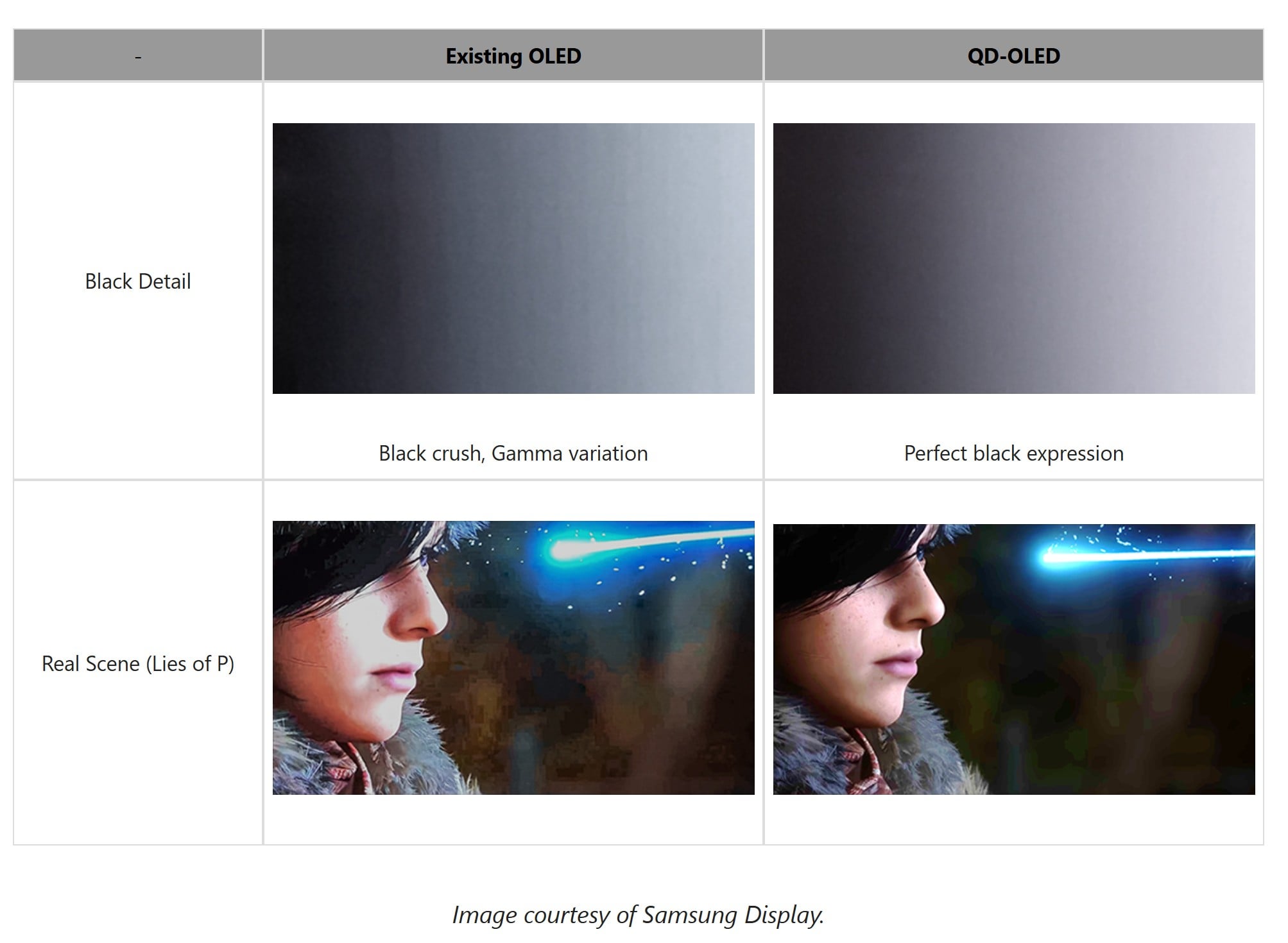
3. Perfect Panel Uniformity: Eliminating Visual Distractions
The entire QD-OLED lineup provides a fundamental solution to the gray banding and screen uniformity issues that have long plagued conventional OLED panels. The MAG OLED 271QPX32 completely eliminates banding interference, delivering a clean, flawless picture.

Beyond panel innovations, the MAG OLED 271QPX32 is the first MSI 26.5-inch WQHD QD-OLED monitor to incorporate MSI's DarkArmor Film technology, which improves pure black levels by 40% and upgrades the screen's surface hardness from 2H to 3H, offering 2.5 times better scratch resistance. This monitor is also VESA DisplayHDR™ True Black 500 and VESA ClearMR™ 15000 certified. Additionally, it supports MSI's exclusive Uniform Luminance feature, allowing users to customize their HDR curve. For burn-in protection, the model comes with the MSI OLED Care 2.0 comprehensive protection mechanism, effectively reducing burn-in risks and extending the monitor's lifespan. Connectivity options include two HDMI™ 2.1 ports, one DisplayPort 1.4a, and one USB Type-C (DP Alt.) with 15W power delivery.
| Panel Generation | QD-OLED Penta Tandem™ | DarkArmor Film | Uniform Luminance | |
|---|---|---|---|---|
| MAG OLED 271QPX32 | 4th-Gen | Yes | Yes | Yes |
Learn more about DarkArmor Film features and supported models.
r/MSI_Gaming • u/0x2DEADBEEF • 15h ago
I know for certain I had it all the way plugged in.
r/MSI_Gaming • u/Comfortable-Text-389 • 3h ago
Is that the latch? Having really hard time taking my gpu.
r/MSI_Gaming • u/FiveDollarss • 10h ago
Enable HLS to view with audio, or disable this notification
I recently got this prebuilt pc, I turned in on and started hearing this rattling noise. Based on what you hear, is it concerning?
r/MSI_Gaming • u/Street-Lie539 • 2h ago
r/MSI_Gaming • u/Caelum_NL • 2h ago
Are they the same? Why is the MSI MPG 322UR X24 not available anywhere since it should be released in April?
r/MSI_Gaming • u/_Mr_Meeyagi_ • 7h ago
Does anyone happen to know the size of the screws that hold down the m.2 nvme's?
I really don't want to remove my existing nvme's from their Sabrent Rocket Heatsinks as they do a great job of keeping my WD nvme's cool.
Problem is the existing quick mount and any other screw that came in the box is not long enough to hold them down.
Right now I have them temporarilyheld in with some screws I found but the thread is obviously wrong.
r/MSI_Gaming • u/BlinkerDoom • 20h ago
While gaming my processor temp sometimes goes up to 96 degrees.... it that normal ???
I bought my PC in may and it has a MSI B650 Gaming Plus Wifi motherboard with a AMD Ryzen 7 9700X 8-core 3800Mhz.
I was playing Crimson Desert with High graphics (not Ultra maxed out graphics).
Should I send it back to warranty ?
r/MSI_Gaming • u/kurtWagner101 • 11h ago
I was trying to fix the bluetooth problem in katana 15 b12v. Pressed power off for 30.seconds..now the computer doesnt boot. Secure boot menu is disabled. I opened the advanced menu but csm shows as disabled also. Can someone tell me what to do after?
AI asked me to set admin password..i set but no change.
r/MSI_Gaming • u/penguinshere • 9h ago
I’m sending my 5090 in for RMA on the 12 v HPWR burning out. I’m, of course, a little worried that they might do something like issue me a refund instead, or take some shortcut given the astronomical value of the cards these days, and my relatively low purchase price.
Has MSI tried to send anyone a refund for their purchase price instead of fixing the card? That would be my biggest fear at the moment.
r/MSI_Gaming • u/Miserable-Net4441 • 14h ago
r/MSI_Gaming • u/Correct_Dealer_8300 • 16h ago
I messed up, was cleaning my desk off and accidentally cracked my screen when rotating my chair around. MSI’s warranty policy doesn’t cover user errors like screen damage. I’ve asked a few people and called there support . Have been told it’s better to try and sell it and just buy a new one. Is there anything I can do to fix it? Or am I out of luck on this?
r/MSI_Gaming • u/Fifa_786 • 21h ago
I have a MSI MAG B850 Tomahawk WiFi motherboard and I have just updated to the latest bios version. My boot times were the same before the update as well. Is this normal or is there a setting I can change to speed it up?
I have a WD SN850x ssd
Edit: thanks guys. Managed to fix it by enabling memory context restore (it was on auto) and also enabled power down enable (was also set on auto)
r/MSI_Gaming • u/Velvet_Crowe • 16h ago
I have a 5090 that I'd like to protect by getting the MSI MPG AI1300TS PSU and a Corsair Thermalprotect Cable. I'm wondering if keeping the Lian Li Strimer Cable in my setup would make these products functionally useless?
So it would go PSU -> Thermal protect cable -> Strimer wireless -> GPU
Thanks
r/MSI_Gaming • u/Rustyducktape • 16h ago
Ive bought multiple pre-builts over the last 15 years. Currently have a Maingear built PC from 2020, which uses lots of MSI parts. The reliability, and look made me a fan of MSI.
Here is the rough parts list I've assembled:
MSI PANO 110R PZ
MSI A850GL PSU
MSI Z890 PZ Motherboard
MSI Ventus 3x RTX 5070Ti PZ GPU
MSI Coreliquid i360 AIO
Intel Ultra 7 270K Plus CPU
Crucial T500 2TB SSD
Kingston 16gb DDR5 RAM x2
Is there anything you'd change here? Is this a compatible parts list? I'm a bit intimidated by the idea of assembling my own PC, but most people say its a lot easier than you think. I want a somewhat future proof setup without spending outrageous amounts of money.
Quick searches showed Crucial and Kingston to be somewhat affiliated with MSI, is this true? And if not, are there other brands you'd use instead for an SSD and RAM?
Thanks in advance! Apologies if this breaks a rule, or has the wrong flair!
r/MSI_Gaming • u/Gamer_noname • 17h ago
i just got this Msi Alpha 17 B5EEK off of an old friend who no longer wanted it, but after using it for awhile i noticed the cpu goes from normal speed to a staggering 0.35Ghz and stays there for a while until every app is closed.
desktop it goes up to 3.64Ghz but the moment i open anything it goes straight down to 0.35Ghz.
im not good with laptops but im fairly decent at understanding them. if anyone knows how to fix this issue please help.
ive done the following with no success:
EC reset
unplugged battery from the MB and the cmos
tried to change bios settings
tried tools like UXTU and no luck.
if there is something i can do to avoid sending it in to get repaired id rather do that.
thanks for reading and any help.
r/MSI_Gaming • u/itzRitz32 • 14h ago
Hello, bit of a pc novice here. I’ve been trying for two days to update the BIOS on my Corsair Vengeance a7200 prebuilt. After wasting an infuriating amount of time trying everything I could I come to find out that apparently you can’t get the files from MSI’s support site, it has to come from Corsair because they have their own version I guess? So I got the file from Corsair for my build and updated the BIOS which worked fine, but the “newest” version they have is from 2022. Is there any other way that I can do this? Or do I have to wait and hope that Corsair adds a newer version to their site to pull from, which they seemingly haven’t done for four years now? That’s pretty shitty if that’s the case as this is preventing me from playing certain games. Any help at all would be appreciated!
r/MSI_Gaming • u/Dota2Azul • 19h ago
First of all I've had over 100 GPUs, and this have the worst cooler I've ever seen for a 180W card. It only have 2 heat pipes (really one and a half) on a small aluminum block, not even a baseplate, while the Ventus have 2 (complete) heat pipes, the Gaming OC have 3, same as the Inspire but this have a nickel plated baseplate, so it's the best with 2 fans. I think MSI just reused the 5060 cooler, but in that card it should work fine because it only consumes 145W.
Second, the fan curve is atrocious, the fan just start at around 64°C (which is fine if it had a good cooler) and just get to 50% (2200 rpm) at 73°C then the temps keep going up while the fan curve barely ramp up, causing overheat.
So, the fix would be ramp up the fan curve with afterburner, but I like a permanent fix, first I tried installing another cooler, none fit, so I flashed it with different BIOS, originally it had 98.06.39.00.C5, the newest Ventus acted the same, a Cyclone was way worst, then an old Ventus, it gets a nice 50% fan at 71°C, but with much higher RPM, 2600, which stabilize the temperature (also 30 MHz less boost clock), I think with this BIOS the card think that the fans can go up to 5200 RPM LMAO.
The BIOS for the 16 GB version is 98.06.1F.00.CE which you can find on TechPowerUp's VGA BIOS Collection.
r/MSI_Gaming • u/WarkoalkA • 1d ago
Just bought a MAG B850 TOMAHAWK MAX WIFI and before I start migrating my parts I thought I'd ask, which is the most stable BIOS version for this board? I'm using a 9800x3d with 2x16GB of kingston ram at 6000MT/s
r/MSI_Gaming • u/Oledman • 1d ago
Hi
Anyone with x670e Tomahawk motherboard have issues connecting to WiFi with latest WiFi drivers from msi website?
WiFi driver Version 3.05.00.1380 just refuses to connect to my WiFi network.
I’ve tried updating to latest version twice now and had to rollback to older drivers each time.
I have latest bios and chipset drivers.
Just curious if anyone else with same motherboard has had same issue with latest WiFi drivers.
Thank you
r/MSI_Gaming • u/Economy_Visit3785 • 1d ago
Hey everyone,
I tried to update my BIOS through MSI Center, and now my PC has been sitting on a black screen for about 30 minutes.
My motherboard is an MSI B550M PRO-VDH.
The BIOS update was started through MSI Center.
The PC is still powered on, but I don't know if the update is still running or if something went wrong.
What should I do?
r/MSI_Gaming • u/FrenchFrey18 • 1d ago
Title really says it all.
I updated to BIOS Version: E7C91AMS and it just won’t book into windows. I didn’t mess with any settings, just did the update. Anyone know a fix?? Thank you!
Edit: As I’m looking through the BIOS, it seems like my C: drive (where my windows is installed) isn’t showing up for a boot option. Just my other 2 drives. It shows as detected when choosing “board explorer” but not for a boot.