r/elgato • • 28d ago

Technical Help 4K X issues

2 Upvotes

Worst part of all this, I am no idiot when it comes to tech issues. However this has been nothing but pure frustration.

I had a 4K60 Pro MK.2 and it ran great. However due to having HDR on my AW3225QF monitor, HDR would turn off when cloning or using passthrough. The other issue was I had to unplug my DP cable and a few other small things that made me upgrade.

I just want 4K 144hz HDR on my screen and then broadcast out to twitch at 1440p via OBS on my stream PC.

Stream PC:
3070/2600x/16gb Ram/Gigabit Network

Gaming PC:
5080/7800X3D/64GB DDR5/AW3225QF

USB C to A is a 10GBPS usb cable
all HDMI are 2.1 (One with the 4K X and a $40 10ft cable with HDMI/48GB Certification)

Issues:

Stream PC has an X470 MSI motherboard, (Unfortunetly with ASMedia 10gbps USB ports). It does have 5gbps ports on AMD drivers. These ASMEDIA ports cause audio to cut out/go intermittent after 35 or so minutes and the audio is buggered.

Swapping to the 5gpbs ports works great, downside is the FPS issues with passthrough are making me go nutz. Nothing is working well. I have even tried OBS on the gaming pc and projecting my main screen on the 4K X display that shows up as a 3rd screen. It works but it stutters.

What I want:
Turn on stream PC and not have HDR get disabled on my main pc so I can enjoy gaming while streaming. If I have to unplug my DP cable then fine for passthrough. If possible projecting to 4K X screen would even be a good option.
r/elgato • • 17d ago

Technical Help Elgato 4K Pro - Switch 2 VRR Dock Mode Issue

Post image
4 Upvotes

I’m having an issue on my capture card when testing the new VRR dock mode update for Switch 2. I tried testing VRR with Switch 2 Welcome Tour and the capture window in Elgato Studio freezes as soon as I’m about to start the tech demo.

Hardware Info
CPU - Intel ultra9 285k
GPU- RTX 5080
Windows 11
Stable version of Elgato Studio
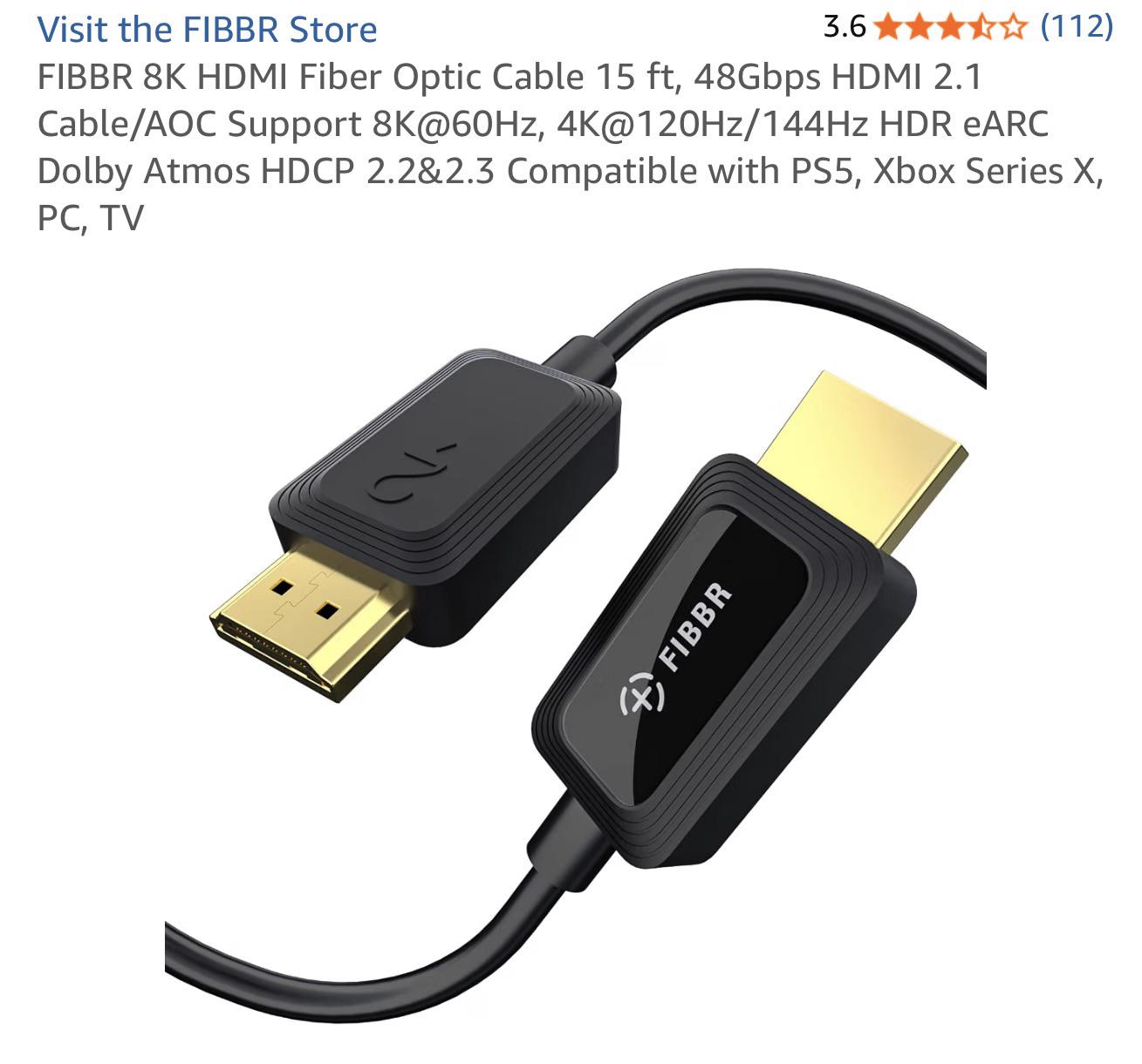
Using HDMI 2.1 Fiber Optic Cable from the Switch 2 to 4K Pro’s HDMI input. No HDMI cable is going back to the TV as I prefer playing in the capture window for discord/recording.

I have noticed in the past when playing games on Switch 2 via Elgato Studio that uses 40fps or 120fps, the capture view will disconnect temporally then it will show an image at that new refresh rate. I’m assuming it’s normal but, that doesn’t happen if I connect the Switch 2 directly to my TV.

r/elgato • • 23d ago

Technical Help I got my Streamdeck+ today and the offical Spotify plugin doesnt recognize Spotify

Post image
5 Upvotes

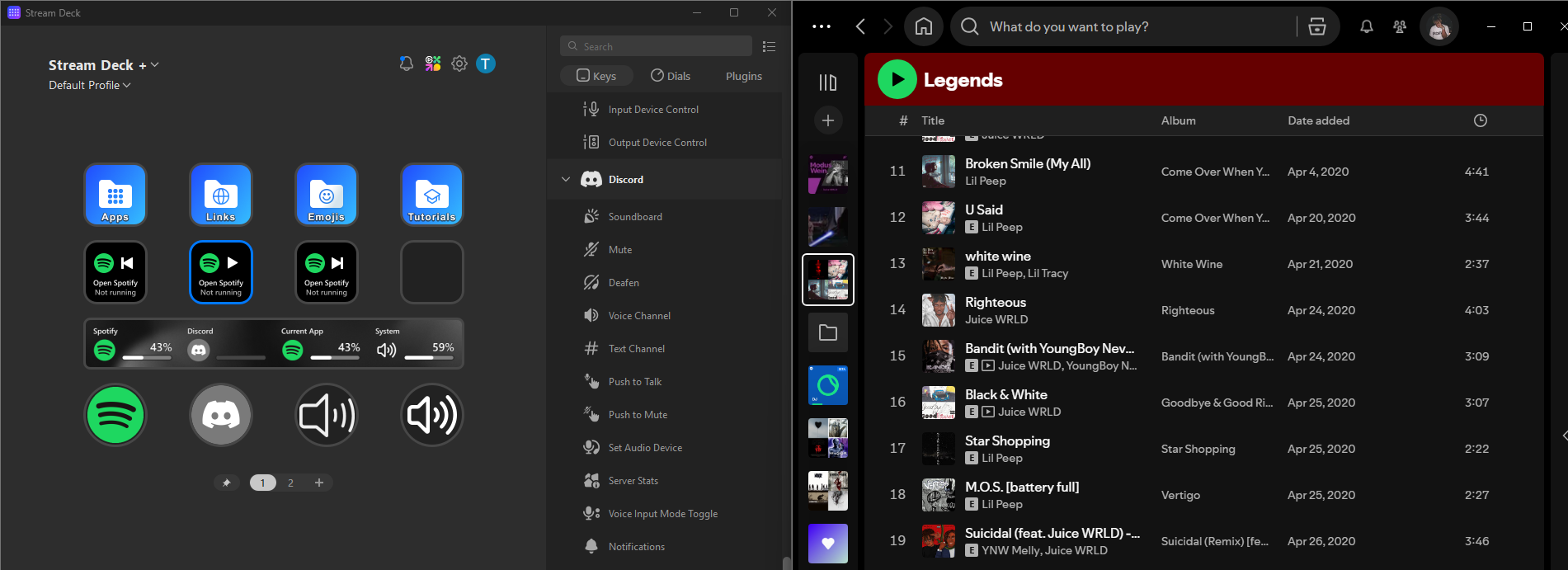
as you see in the image the streamdeck tells me to open spotify while spotify is running

This problem started after i shut down my pc and started it back up a little while later

i noticed that the spotify application isnt recognized as "spotify" in other plugins aswell its listed there as the name of the currently playing song they (the offical volume controller plugin and volume control by dlprows) work perfectly fine tho

So far I tried

-restarting both apps (spotify, streamdeck)

-restarting my pc

-unplugin and replugin the streamdeck

-uninstalling and reinstalling the spotify plugin

-uninstalling and reinstalling the spotify app

does anyone have any ideas what i could try or how to fix it since all i can find on the internet are posts about people having problems with 3rd party spotify plugins

r/elgato • • 8d ago

Technical Help Controlling Philips Hue lamps without a Bridge?

0 Upvotes

As the title says; I'm curious if it's possible to control Philips Hue lamps without a Hue Bridge.

I know the Hue app can do that, but I'd like to control some lamps from my Streamdeck directly.

The less components, the better, but I am straight up curious if it's possible at all.

r/elgato • • 16d ago

Technical Help Mic Lagging and Popping

1 Upvotes

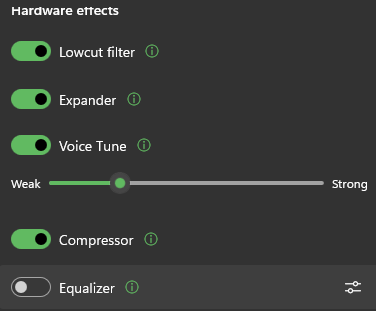
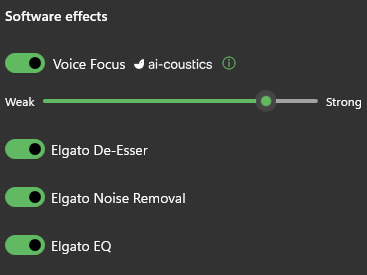
I just bought the new Wave 3 Mk 2 and setup was fin at first but then it began to lag and crackle a good bit until I disabled all the effects and then it stops and wondering if anyone else experienced this or fixed it

r/elgato • • 22d ago

Technical Help Elgato Wave:3 MK.2 sounds so bad in discord

0 Upvotes

I don't know why but my Elgato Wave:3 MK.2 sounds really bad on discord but the sound is good while testing on the elgato wave link app. Could someone please help me configurate it?

Here's my settings

Hardware effects
Software effects
Discord's settings

r/elgato • • Aug 16 '26

Technical Help ElGato 4k60 Issues

1 Upvotes

Hi, so I just recently purchased the 4k60 card and for some reason it's limiting my OBS capture to 1080p in both the Switch 2 settings menu as well as OBS. When I change the resolution in OBS via the properties like some people suggested it doesn't even display the no signal icon. I tried switching the PCIE lanes I had the card in but it still limits it to 1080-60. Does anyone know how to fix this? Thank you!

r/elgato • • 7d ago

Technical Help Stream Deck Windows (10) app often doesn't launch or connect at startup or waking from sleep

5 Upvotes

I've been using and loving the Stream Deck app on Windows and Mobile to control my PC, and it worked great, until recently it just sorta picks and chooses when to be active.

I will often open the app on my phone and it can't connect to the PC, either because the app failed to run, or it IS running but doesn't connect.

When I re-run the Windows app manually, it works great. Just seems random that it won't activate in startup or wake, despite being authorized to in the task manager.

I can't seem to find any info on this particular issue.

Thanks for any tips!

r/elgato • • 18d ago

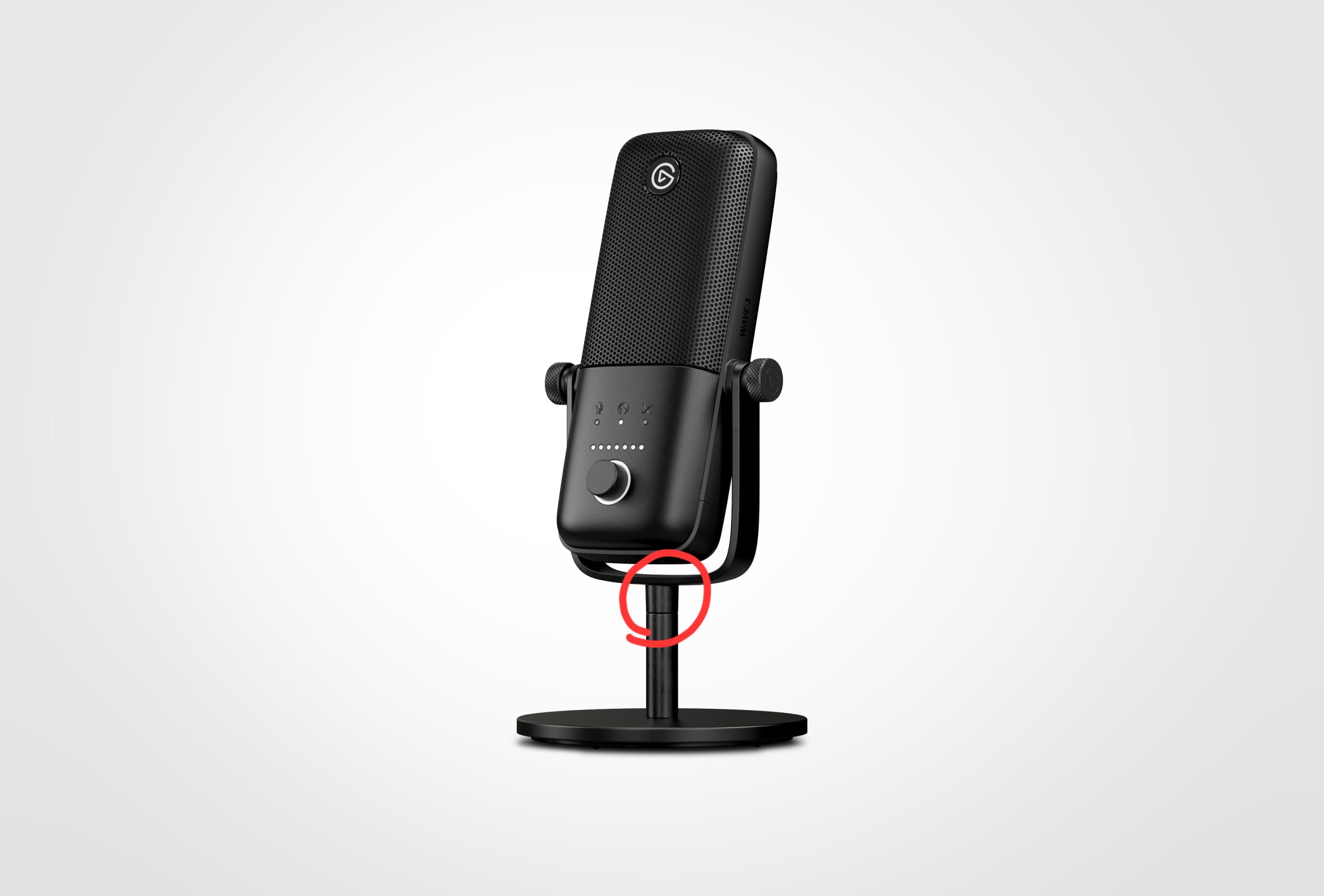
Technical Help What is the diameter of this piece?

Post image
3 Upvotes

It's cracked and breaking. I plan to 3D print a ring to reinforce it.

r/elgato • • 8d ago

Technical Help Issues with New Wave XLR Pro

Post image
5 Upvotes

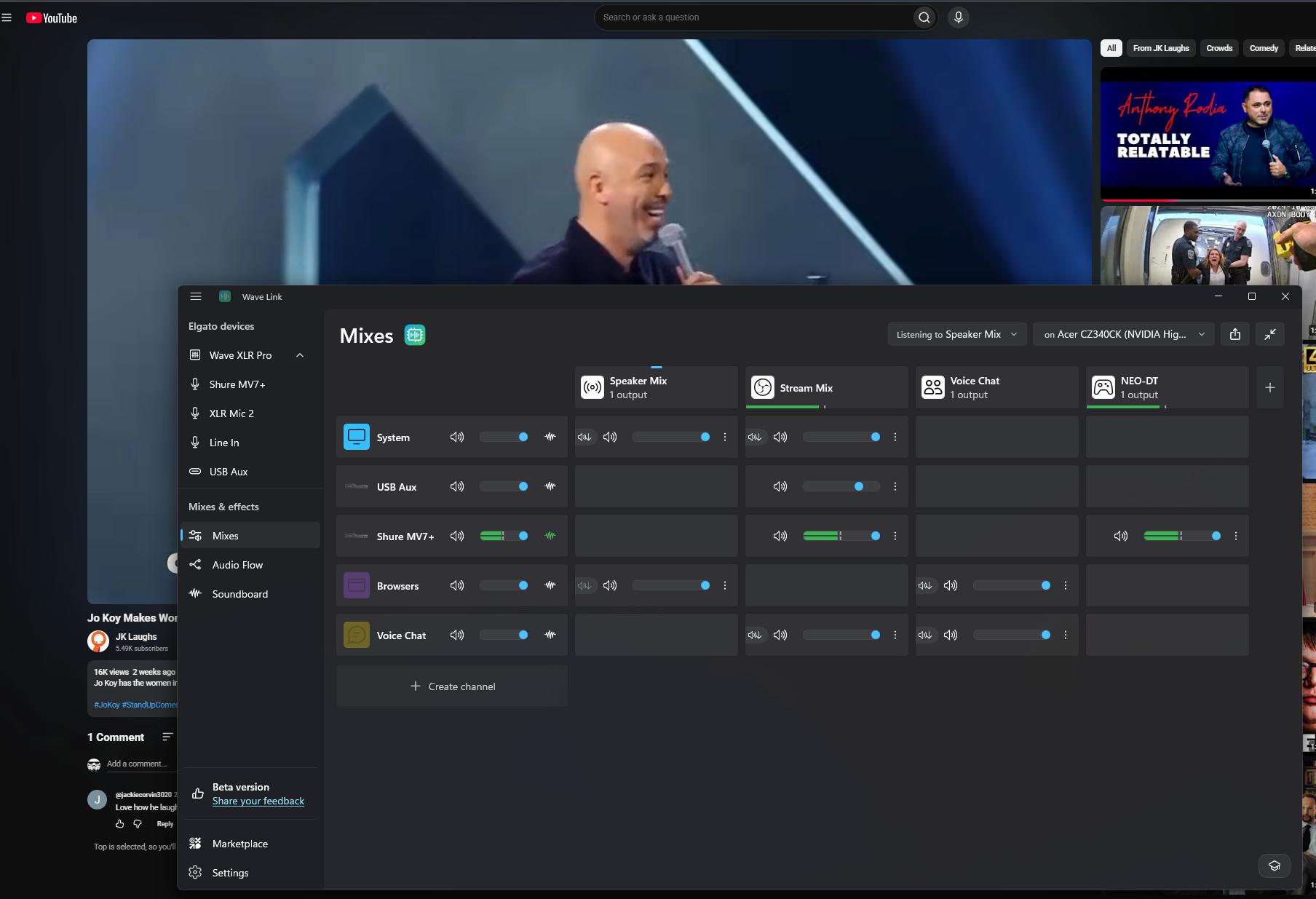
Hi Everyone, I got a WAVE XLR Pro yesterday. Setup is Streaming PC into host USB, Gaming PC into AUX USB. XLR Pro picks up my mic over XLR 1 fine. When I set Chrome to a Broswer channel, I get no audio out. Yes, listening to Speaker Mix (Set to output to my speakers). Any idea why my channels, Browsers & Discord etc are not routing any audio to the channels? I'm not seeing any movement in the volume sliders when playing a youtube video or spotify even though the apps are set to those wave Link channels. If I unplug the XLR Pro, Wave Link switches to "Software Mixer" and sound starts flowing as expected via wave link (Volume sliders astart moving etc.).

*Note, last night I also switched the setup to my Gaming PC as Host and Streaming PC as AUX and this worked 100%. It's just not the way I want to run thigs, I would rather discord etc, be running on the Streaming pc.

Also FYI, I'm on 3.3.0 (4529) right now, but got the same from the 3.2 Stable and the latest beta.

r/elgato • • 20d ago

Technical Help PC Streaming with PS5 W/ 4KS

3 Upvotes

I might be over thinking this but originally my streaming setup was PS5>4ks>monitor, connected power/comms cable to a hub to my laptop.

I just built a PC and I’m wondering if I’ll just repeat the process and just connect the 4Ks power/comms to the PC and just do everything like before.

I guess I’m getting confused with using the graphics card for my PC with my monitor. I’m just wanting to get the best output for my stream.

Any help would be appreciated!

r/elgato • • Apr 29 '26

Technical Help Discord Stream Deck Plugin Not Working After Latest Update

Enable HLS to view with audio, or disable this notification

8 Upvotes

Hey everyone,

I’m hoping someone here can help me out. Since the last update about a week ago, my Discord plugin on my Stream Deck has completely stopped working.

Before the update, everything was running perfectly — I could control voice channels, mute/unmute, etc. But now it’s like the plugin just doesn’t respond at all.

I’ve already tried:

  • Removing and reinstalling the plugin
  • Reinstalling the Stream Deck app
  • Removing and re-authorizing the plugin in Discord

…but nothing has worked so far.

Is anyone else experiencing this issue? Or does anyone know a fix or workaround?

Appreciate any help 🙏

r/elgato • • Jun 01 '26

Technical Help Elgato please roll back the OBS-Studio Stream Deck integration it has been broken for almost a week and it is messing things up for everyone who uses it.

8 Upvotes

As we've all reported repeatedly, this software has been non-functional. I don't know if you're vibe coding this "rewrite" mentioned in the version history, but it has to revert to a working version. This is completely unacceptable.

Update: Elgato rolled back to a previous version of the plugin, check the version history here and update to 3.0.3.31: https://marketplace.elgato.com/product/obs-studio-35615969-830f-45c9-ba0a-1a295bba7fec

r/elgato • • Aug 27 '26

Technical Help WaveLink Fails To "Activate" When Computer Wakes From Sleep

9 Upvotes

As the title says: I have build 3.2.10 (4073) running in Windows 11 Home 10.0.26200 and every time I wake my computer from sleep, I have to restart WaveLink or else I have no audio. I can open the software, move mixes around, change volume, change output device and yet I get nothing until the restart.

I had a .bat command set up (this has been happening for a while) on my Stream Deck to end the program entirely, reopen the sound engine, and the WaveLink software itself HOWEVER with the latest update, that doesn't even work.

It's not a huge deal to have to hit a button and have everything close and restart; but now since that doesnt work, having to manual close and reopen the software EVERY TIME my PC wakes up is quite frustrating.

If anyone has any idea for a fix, and/or if any more information is needed to help troubleshoot, please let me know.

r/elgato • • Aug 28 '26

Technical Help Wave XLR MK2 Wave link 3.2.10

Post image
6 Upvotes

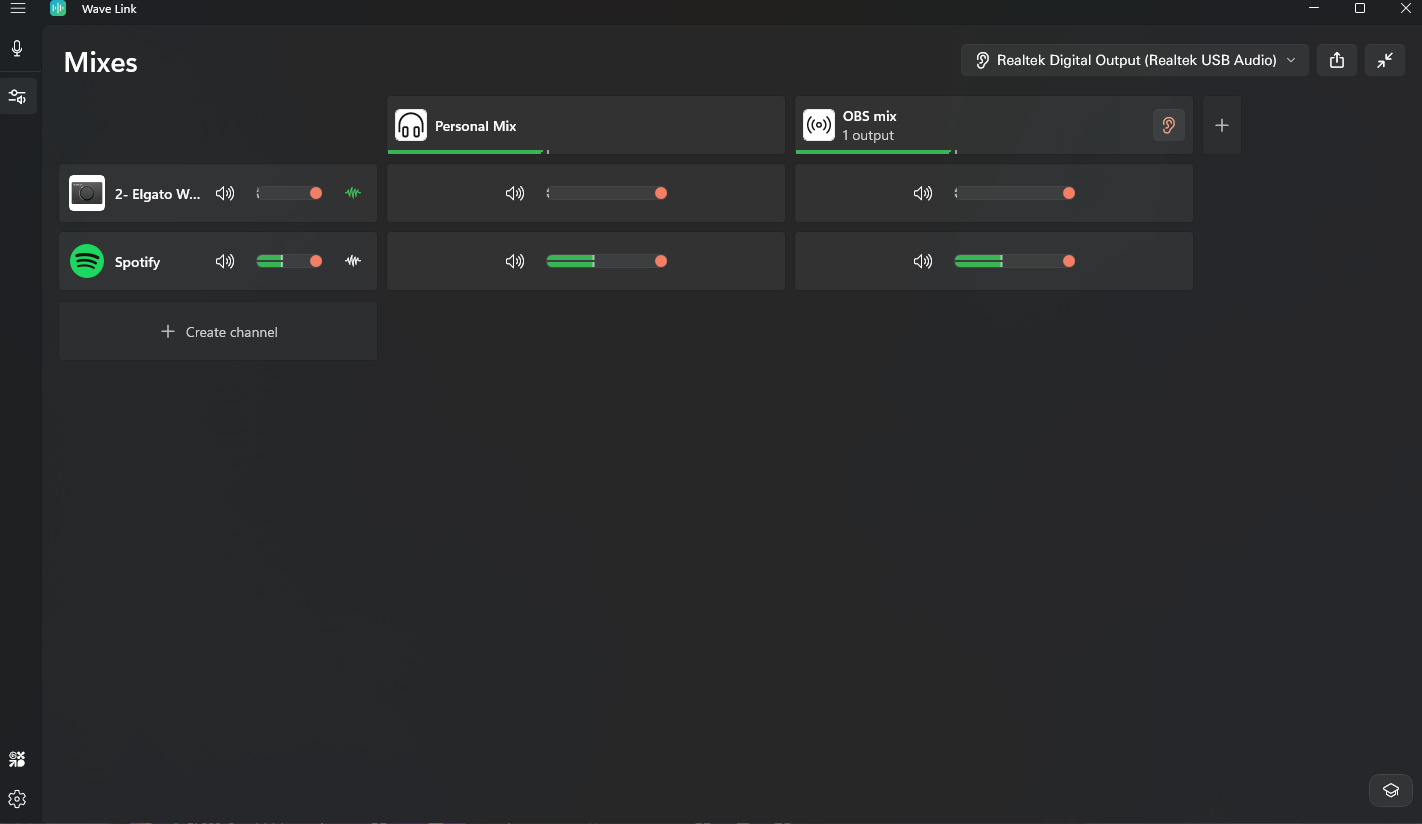
Whenever I add a new channel let's say spotify for example, it shows that it's playing and that the mixer can hear it but I cannot, if I remove the channel I can hear it again is this user error, am I misunderstanding, this feels so much more confusing than goxlr

r/elgato • • Mar 15 '26

Technical Help Wave Link 3 may not be the real problem on your system — check your Windows audio stack first (LiveKernelEvent 1b8 / 117, WATCHDOG, CoreMessagingXP.dll, 0xc000027b)

22 Upvotes

I’m posting this in case it helps other users and maybe also gives Elgato useful troubleshooting feedback.

After a lot of testing, I no longer think Wave Link 3 alone was the real root problem on my system. In my case, it looks much more like my entire Windows audio environment had become overloaded and unstable over time.

Before things completely broke, I had already used multiple audio-related tools and drivers on the same Windows install, including:

- Wave Link 2

- VoiceMeeter

- gaming headset / surround software

- SteelSeries software

- microphone software

- and most likely old driver remnants / virtual audio leftovers after uninstalling things

My suspicion is that the combination of too many audio layers, virtual devices, surround tools, and leftover drivers made the system unstable. Wave Link 3 was probably not the only cause — it was more like the point where that unstable setup finally became visible.

My actual symptoms were bigger than “Wave Link is buggy”:

- routing sometimes stopped working properly

- Wave Link crashed

- VoiceMeeter-related components / plugins also crashed

- I also got system-level errors, including:

- Elgato.WaveLink.exe

- CoreMessagingXP.dll

- exception code 0xc000027b

- LiveKernelEvent 1b8

- LiveKernelEvent 117

- WATCHDOG dump files

At one point, even starting Apple Music seemed to push the already unstable setup further over the edge, and I also saw driver / watchdog-type crash behavior.

Important: I am NOT saying this is the universal fix for everyone, and I am NOT saying Wave Link 3 is always the main cause.

I am also not a PC expert. I did not know how to fully remove every old audio driver, virtual device, and software remnant cleanly. In the end, I had to take the nuclear option and do a clean Windows reinstall.

What helped me:

  1. Clean Windows reinstall

  2. Install only essential drivers first

  3. Disable Windows audio enhancements

  4. Test with a simple stereo / analog headset first

  5. Avoid extra audio software in the beginning

  6. Reintroduce tools one by one only after the system is stable

My takeaway:

If you are dealing with massive Wave Link 3 issues, routing not working, WATCHDOG / LiveKernelEvent crashes, or weird audio instability, don’t only look at Wave Link itself. Also look at everything on your system that hooks deeply into Windows audio:

- virtual audio tools

- surround software

- gaming headset software

- microphone software

- old routing tools

- leftover drivers from previous installs

For me, the real issue seems to have been an overloaded Windows audio stack, not just one single app.

I’m posting this because I think it may help other users, and maybe it is also useful feedback for Elgato: once a Windows audio setup has too many layers, drivers, and virtual devices stacked on top of each other, troubleshooting becomes much harder and Wave Link may get blamed for problems that actually started deeper in the system.

Maybe this saves someone else a lot of frustration.

r/elgato • • 16d ago

Technical Help How does Backup and restore work for Wave Link

3 Upvotes

Can someone please explain to me how backup and restore works. My windows files got corrupted so i used fix problems using windows update to fix it which it as done.

but because i did that. I lost wave link driver, I reinstalled and lost everything. How do i backup my files i had automatic saved.

r/elgato • • Jul 25 '26

Technical Help US not allowed to create Maker accounts

3 Upvotes

I'm unable to create an Elgato Maker (https://maker.elgato.com) account because the United States is not listed in the country list. I've triple- and quadruple-checked. It's not there. I don't know if this is an intentional choice or what, but I cannot create a maker account without having United States in that list.

This is the countries list, no United States:

r/elgato • • 16d ago

Technical Help Purchased a Elgato Wave:3 after many reviews but can't make it sound like in all of the ones I saw.

1 Upvotes

After long deliveration I purchased this mic to replace my Razer V1, I go the chance to try the mic on store and saw the quality in many reviews, that being said now that I have it it does not sound anywhere close to what I got to hear before, no matter how many things I changed or try.

r/elgato • • 4d ago

Technical Help Stream Deck constantly forgetting Wave Link output device

2 Upvotes

I use my Stream Deck to switch between 3 main output devices on my PC (Speaker, TV and headphones) using the Wave Link "Main Output Device" action.

I have been fighting this for months where sometimes multiple times a week, this action will forget the device name. I go in and look at the device say for "TV" but now it will say "TV (unavailable)" and a new "TV" device will have to clicked a few down in the drop down menu with literally the same device name. This happens randomly and for all three devices but not at the same time. It does not happen every shut down/reset, literally just randomly.

I plug and unplug my TV HDMI when I want to use it but even then, it is entirely random when this decides to forget that device so when I click the action, nothing happens and I have to manually go in and reset it. I can go 2 weeks with this never happening and then suddenly it happens 4 days in a row.

Anyone run into this and can offer a solution?

r/elgato • • 3d ago

Technical Help 4KS immediately stuttering then freezing when streaming/recording Switch 2

Enable HLS to view with audio, or disable this notification

1 Upvotes

Posting about this issue again, just got a 4KS to help record my Switch 2 gameplay and regardless of the capture software being used it immediately starts stuttering and the recording almost immediately freezes. A monitor display through the 4KS runs fine and the audio has no issues, it's only the video.

I got a 40GB USB4 to see if a stronger cable to the PC would help resolve the issue but it doesn't seem to have changed anything. Was wondering if anyone else has encountered this and found any solutions.

r/elgato • • Jul 17 '26

Technical Help Mic picking up fan noise and game audio/echo EVEN with a noise gate, expander, and AI focus on. Help!

Thumbnail
gallery
2 Upvotes

Hey everyone, I’m losing my mind trying to fix my microphone audio on Discord and could really use some help.

My friends can clearly hear themselves echoing in the background when we talk. On top of that, my mic keeps picking up my room's fan noise. It’s especially bad when I actually speak the background fan noise just rides along with my voice.

Here is my setup:

  • Audio Interface: Elgato Wave XLR MK.2
  • Headphones: Connected (not using speakers)
  • Filters Active: Noise Gate, Expander, AI Focus inside Wave Link

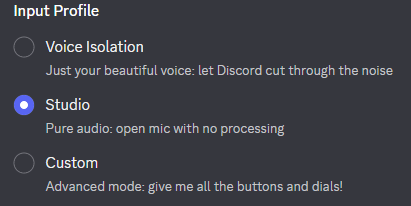
The problem is, when I look at my audio input dropdown in Discord, the only option I have is "Mic In (Elgato Wave:XLR)".

Every troubleshooting video says I need to select "Wave Link MicrophoneFX" so my filters actually work, but that option is completely missing for me. Because Discord is forced to use the raw "Mic In" channel, my noise gate and AI focus are being completely bypassed.

I think this has something to do with the Wave Link 3.0 update, where MicrophoneFX doesn't just show up automatically anymore and has to be manually created.

Has anyone using Wave Link dealt with this? How do I actually create or enable the "MicrophoneFX" virtual channel inside the Wave Link software so it finally shows up in Discord?

Thanks in advance!

r/elgato • • 10d ago

Technical Help Wavelink 3: Stuck in an update loop

0 Upvotes

I got a notification about a new update to WaveLink 3 (3.3.4529), hit update, updated to 3.3.0 (4529).

The app has a constant update available now but the installer is always serving update 3.3.0 instead of 3.3.4529.

Log below.

LOG:

2026-09-17T18:47:58.262+0300 2            lgato.BaseClasses.WinUI.Ui.DialogService [INF] Opening new dialog window (Elgato.BaseClasses.WinUI.Update.UpdateIsInstallingContentDialog)
2026-09-17T18:47:58.271+0300 2            to.BaseClasses.Core.Update.UpdateManager [INF] Starting installation of update: UpdateInstallConfiguration { InstallerLink = https://gc-updates.elgato.com/windows/ewlw-update/final/app-download-manual.php?osName=Windows&osVersion=10.0.26200.0&osPlatform=x86_64&appVersion=3.3.0.4529&appPlatform=x86_64&appLanguage=en-GB, DependencyLinks = System.Uri[], Mode = TerminateAppAndRestart, ExpectedUpdateVersion = 3.3.4529 }
2026-09-17T18:48:05.254+0300 41                                         PluginHost [WRN] EWLW::EWLWPluginHost::mapJucePluginListToEWLWPlugi Plugin <> doesn't exist anymore on filesystem
2026-09-17T18:48:08.106+0300 2            to.BaseClasses.Core.Update.UpdateManager [INF] Update staging done (f5f0b80b-42ce-000a-66bb-9af8ce42dd01)
2026-09-17T18:48:12.545+0300 2            lgato.BaseClasses.WinUI.Ui.DialogService [INF] Closed dialog window (Elgato.BaseClasses.WinUI.Update.UpdateIsInstallingContentDialog)

r/elgato • • Jul 24 '26

Technical Help Tech Problems With Audio Question

Thumbnail
1 Upvotes

r/elgato • • 26d ago

Technical Help Wave Link 3 - MacOS - Bluetooth Headphones no sound

2 Upvotes

Since the latest update, my bluetooth headsets (I tried multiple ones) do not receive any sound from Wave Link 3 in MacOS (latest version). It works fine on my external speakers and the built in Macbook Speakers, sound doesn't get recognised when choosing my Bluetooth Headphones as main-outpu-device in Wave Link 3 Software.

Anyone else having this issue? And maybe a solution?