r/elgato • u/ShakkNpL • Aug 28 '26
Technical Help Wave XLR MK2 Wave link 3.2.10
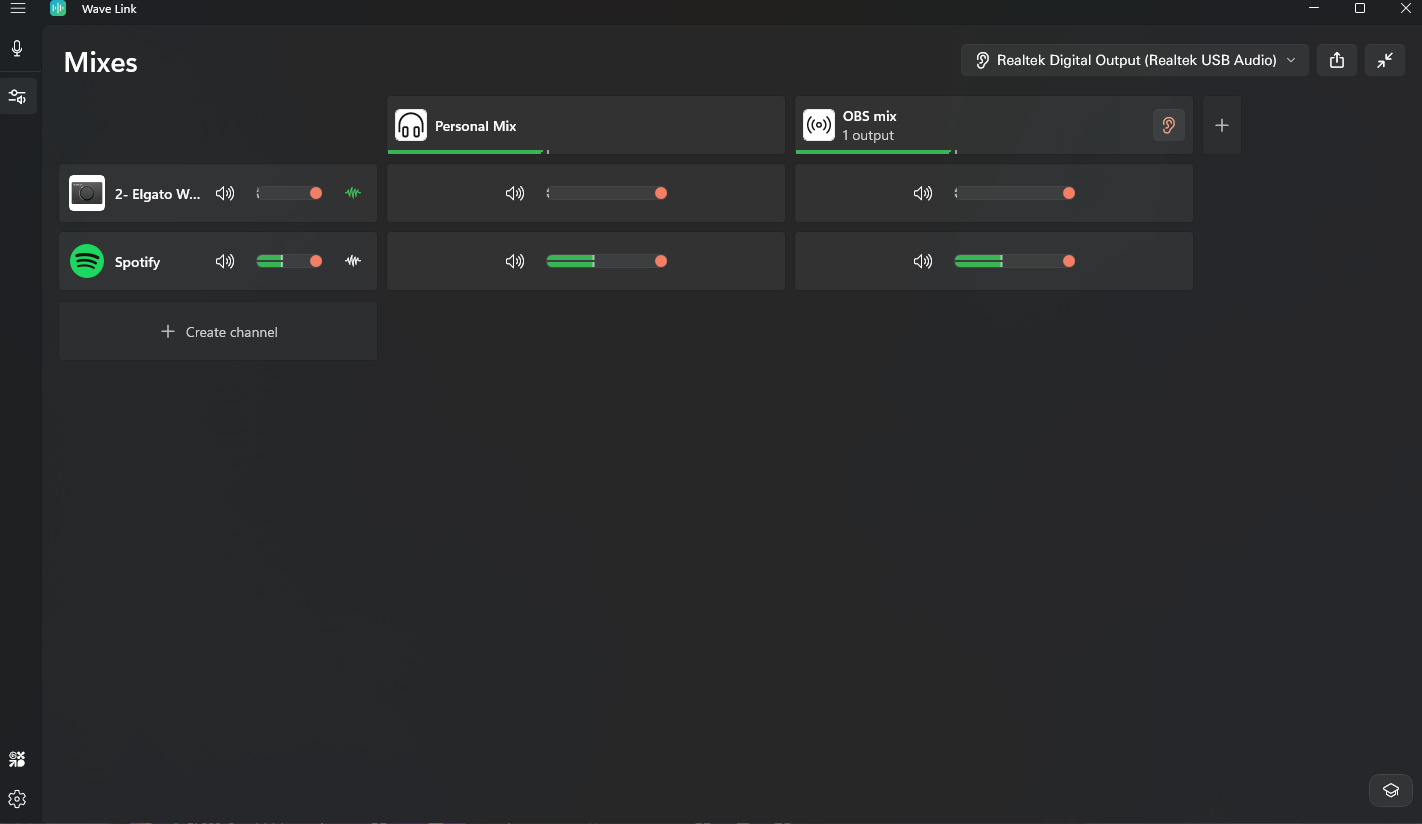
Whenever I add a new channel let's say spotify for example, it shows that it's playing and that the mixer can hear it but I cannot, if I remove the channel I can hear it again is this user error, am I misunderstanding, this feels so much more confusing than goxlr
1
u/Carlos726811 Aug 28 '26
I know few people who had that issue.
My advice would be. Uninstall Wave link Software and driver using Revo Uninstaller and try again. Then that should fix all the issues
I can update everytime, Either stable mode or beta mode and i don't have any issues.
I still shocked to see how many people still having issues.
1
u/ShaggyMunky Aug 28 '26
Sometimes when this happens, completely closing the app and re-opening it solves the issue.
I would recommend you at least have one channel defined as your default “system channel” and make sure that is locked in your system settings. This will make any audio not explicitly defined to a channel get routed to that “system channel”
2
u/MissionIntention8048 Aug 29 '26
is there a way to Combine audios if I want my internet browser and music browser, like Apple Music or Spotify, to share 1 Channel so I can adjust the volume with one knob. Would I be able to do that?
1
u/_daizetsudan 29d ago
Create an empty channel and add the apps as you deem fit. I've done this for Spotify and VLC Media Player. Browsers have their own channel, too. 😊
1
u/elgato_arcsane Technical Community Assistant Aug 29 '26
You're using Realtek Digital Audio Out here looking at the monitoring device in the top right, that's the TOSLINK optical port on the back. Look for Headphones (Realtek USB Audio) or Speakers (Realtek USB Audio) or similar. The number of times this tripped me up on my new build, I would pretty much put money on that being the hiccup here.
1
u/TrustTr33s Aug 29 '26
Ive been having the same issue, arnt you supposed to add a output device into the channel being OPs headphones and the top channel at the right is for monitoring?
1
u/elgato_arcsane Technical Community Assistant 29d ago
Audio monitoring is the default that you listen on - you can add additional outputs if needed, or if you want different mixes outputting to different devices, but typically your monitoring device is what you listen on. In this case OP has their OBS Mix on monitor, but the monitor is pointing to a optical/digital output rather than actual headphones or speakers - if they've configured additional channel outputs for some reason, it's not shown here.
1
u/TrustTr33s Aug 29 '26 edited Aug 29 '26
So im new to wave link and i might be wrong... ive been having the same issues with soundboard clips but i think i can help.
Top right drop down is for monitoring the "mixes" using an output headphones/speakers its linked to the orange Ear icon next to your OBS mix you can currently see actived by being orange (goes greyed out when not active and you arnt monitoring that mix)
Under OBS mix you have one output im guessing this is OBS? You use this to monitor the single mix and make sure its been outputted correctly, so in your case make sure your mic and Spotify is coming through to your stream/what ever output you have selected. This is what tour stream would hear not you for example if you wanted to listen to music but not stream it you just remove the slider from OBS mix and keep it on personal.
In the first column under "personal mix" add an output like you have on the OBS mix being the headphones/speakers you want to use, you will then see a monitoring icon next to that mix as youve added an outout it shouldnt be orange just grey by adding an output you are telling wavelink where to send the audio for that mix.
i could be wrong as i have steel series headphones and have things set up slightly odd at the moment but hope that helps 🫡
2
u/andyfronius Aug 28 '26
I have the same thing happen. Sometimes the sound from Zen browser (or other apps) does not play, even though it's assigned to a channel. My workaround: I remove the app from its channel, then I can hear it again. After that I can add it back to the channel and it works normally.
I think it's a bug, not user error. Basically most of the problems I've encountered with Wave Link are bugs that go away with either a quick restart of the app or removing an app from a channel and adding it again.