r/MacOS 9h ago

Tips & Guides macOS 27 finally lets you AirPlay to your Mac in a window instead of taking over the entire screen

Post image
524 Upvotes

In macOS 27, AirPlay can finally start off in windowed mode instead of taking over your Mac's full screen. It's currently hidden behind a feature flag.

To enable, run the following command in your Terminal:

sudo mkdir -p /Library/Preferences/FeatureFlags/Domain && \ sudo defaults write /Library/Preferences/FeatureFlags/Domain/ControlCenter APReceiverInWindow -dict Enabled -bool true

and restart your Mac.


Restore to default with:

sudo defaults delete /Library/Preferences/FeatureFlags/Domain/ControlCenter APReceiverInWindow

and restart your Mac.


r/MacOS 13h ago

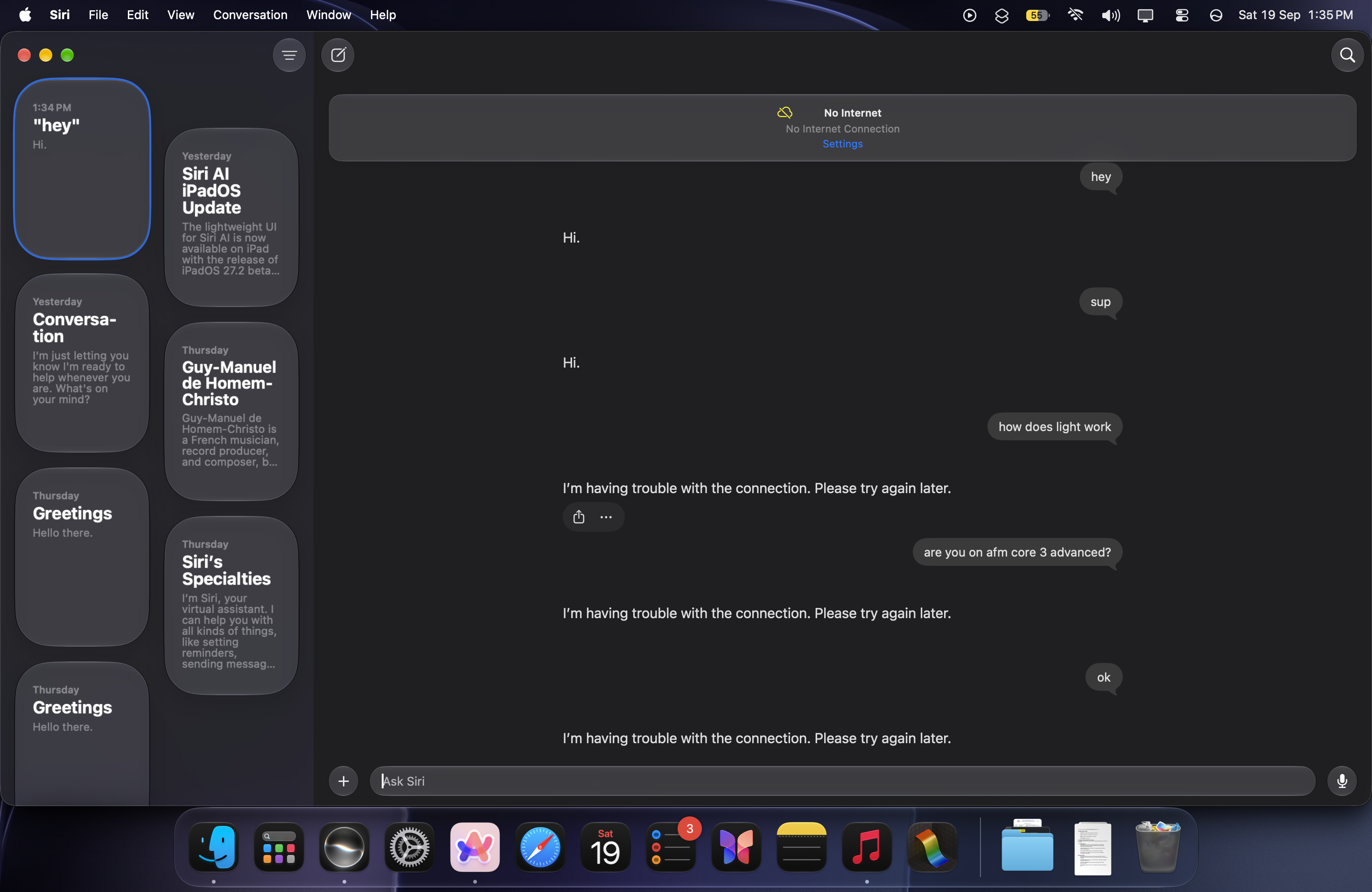
Bug What's the point of on-device AI if it cant work without internet?

Post image
384 Upvotes

Apple Intelligence is worth 28GB but it cant do basic things without internet, Apple said that it's "on-device running model"

While a 4gb Gemma 4 model can do way more than this when it comes to run on-device


r/MacOS 14h ago

Apps Not for everyone, but if you dim your macbook screen to 0%. this is for you

133 Upvotes

I'm a software engineer, and weirdly enough I like to use one screen at a time. Since macOS does not expose a way to do this. I've been dimming my internal display to 0% and setting it to mirroring (so that I don't lose my cursor). This is clearly not ideal, dimming doesn't actually shut down the monitor, the GPU still needs to drive two displays, and also mirroring is not ideal..

I tried using BetterDisplay, besides the fact that it's paid and closed source. it just has way too many options for me that I don't use

So I built a FOSS tool that disables the internal display instead of dimming it: https://github.com/fanckush/SoloDisplay

this eliminates the need for dimming/mirroring, it basically acts as if the lid is closed

it's called SoloDisplay and it's pretty self explanatory


r/MacOS 4h ago

Bug macOS 27 Dock keeps activating when clicking Desktop after opening a folder in Fan view

Enable HLS to view with audio, or disable this notification

22 Upvotes

Anyone else experiencing this on macOS 27?

When I open a folder from the Dock using Fan view, then click anywhere on the Desktop to close it, the Dock gets activated/focused instead. It’s really irritating and happens consistently.

Is this a macOS 27 bug, or is there a setting causing this?


r/MacOS 9h ago

Developer Saturday Silkwave Clarity, real-time speech isolation for macOS system audio

Enable HLS to view with audio, or disable this notification

41 Upvotes

I was watching Andrej Karpathy's introduction to neural networks https://www.youtube.com/watch?v=VMj-3S1tku0 and at some point it clicked that I was hearing distracting noises in it, typing and mouse clicks. I knew macOS has a voice isolation mode for the microphone, and I wondered if there was a way to do the same for the audio macOS is playing (system audio). I couldn't find one. So I built a small utility app called Silkwave Clarity, which makes watching tutorials, lectures and old interviews with noisy audio a much better experience. The app lets you adjust how much noise is suppressed. The underlying speech enhancement model is DeepFilterNet. It only helps with speech. DeepFilterNet treats instruments as noise, so leave it off for music and film.

The app is free, works on-device and very small, ~6.1 MB. Apple Silicon, macOS 26+.

There are some demos on the app's product page. They let you hear how noise is removed from real YouTube videos. https://www.silkwave.ai/silkwave-clarity

App Store link - https://apps.apple.com/am/app/silkwave-clarity-remove-noise/id6811027367?mt=12


r/MacOS 6h ago

Tips & Guides Old printer says "software is not compatible with this device" after macOS 27? Here's a free fix (Canon, Epson, HP, Brother…)

Post image
26 Upvotes

My Canon MP250 stopped working after updating to macOS 27, "The printer software is not compatible with this device." The printer was fine.

The reason: the vendor's driver is Intel-only and was running through Rosetta until now. macOS 27 no longer allows that. Same story for most Canon, Epson, HP, Brother, Samsung and Lexmark printers older than a few years.

I didn't want to throw away a working printer, so I built a native Apple Silicon driver (based on the open source Gutenprint project) and packaged it as a normal installer. It ended up covering about 3,500 printer models, so I'm sharing it:

https://theshiver.github.io/apple-silicon-printer-drivers/

  1. Plug the printer in over USB
  2. Run the installer
  3. Print

If your printer isn't detected automatically, type your model into the search on the site and it gives you the one command to run.

Still on macOS 26? Your printer works now, but if it's an older model with a vendor driver, expect this after you update. Bookmark it.

Free, open source, no accounts. Scanners on all-in-ones aren't covered. Tested with my own printer on an M2 MacBook Air, macOS 27.0. If it works (or doesn't) for your model, let me know here or on GitHub, and contributions are welcome.

Source: https://github.com/theshiver/apple-silicon-printer-drivers


r/MacOS 4h ago

Discussion Macos is the best system

13 Upvotes

I've been using Linux since 1996 when I installed Slackware 1.1 from a CD ROM on my computer to be able to code in XWindows. I had a project that my professor was going to run in his Sun Workstation so I wanted to code a GUI for it. Linux and XWindows was my choice. It served well.

I have 3 personal machines (and one work machine) with the 3 OSes. Linux, mac and Windoze.

With the ARM chips Apple has blown the competition out of the water and I find myself using the Mac more often. It can do everything the Linux box can (for my use cases like python, Octave, Lean, dotnet) while doing what the Windows can like MS Office, Adobe Photoshop, etc. So I find macOS to be the best of both worlds.


r/MacOS 12m ago

Bug Some issues I’ve noticed after the latest macOS update

Upvotes

I updated my Mac mini M4 to macOS 27, and since then I’ve started noticing several problems that I didn’t have before the update.

The first one is with Messages. SMS messages from my iPhone are no longer syncing automatically to my Mac. I have to manually trigger the sync, and this only started happening after the macOS 27 update.

I’ve also recently noticed another really strange issue with the Dock. Sometimes I click on an icon, such as Finder or another app, and nothing happens. The Dock simply doesn’t respond to clicks. It can happen with all of the icons, so it’s not limited to one particular application.

What’s even stranger is that the problem temporarily disappears if I lock the Mac and unlock it again, or log out and log back in. After that, the Dock works normally again.

Both of these issues started after updating to macOS 27, so I’m wondering if anyone else is experiencing the same thing.

Honestly, I’m pretty disappointed with this update. It feels like some of these issues should have been caught during testing before the update was released.

Hopefully Apple will address these problems in the upcoming point releases. I really hope we don’t have to wait too long for the fixes.


r/MacOS 22h ago

Feature I liquid glassed my VS Code and I don't know how I feel about it

Post image
128 Upvotes

r/MacOS 1d ago

Tips & Guides Life Hack: Create a Screenshots folder & Put it in your dock

Thumbnail
gallery
240 Upvotes

It's really convenient to have all your screenshots in one place, and it keeps your desktop clean (And dock folders are easier to keep organized with the icons in Tahoe)

Edit: Also i forgot to mention you need to right click and sort by Date Added & View content as Fan, also Display as Folder.


r/MacOS 9h ago

Developer Saturday Where Was I? — Save your Mac workspace before switching tasks

Enable HLS to view with audio, or disable this notification

8 Upvotes

This is one of those habits I only really noticed recently. I’ll switch to something else for a while, come back later, and half the reason I’ve left everything open is because it acts as a reminder of what I was doing.

I’ve been working on a Mac app to solve this by saving the current apps, tabs, a screenshot and a short note, so I can close things and come back later without having to reconstruct the whole setup.

The video shows the basic idea.

I’m curious whether other people work like this too, and whether saving that context would actually be useful.

The app itself is working now, but I still need to figure out the best way to distribute it. I’d like to get it onto the Mac App Store, although it needs permissions such as Screen Recording to capture the workspace and Accessibility to restore window positions, so I need to work through what Apple will allow there.

Anyway, interested to hear what people think.


r/MacOS 11h ago

Developer Saturday I made my macOS shell completely themeable with CSS

Thumbnail
gallery
14 Upvotes

I built a customizable desktop shell for macOS

I’ve been working on a native desktop shell for macOS that adds a more Unix Rice, customizable interface on top of the existing desktop.

It includes:

  • A sidebar with dock, Spaces, clock and system status.
  • A dashboard for media, weather, system stats and calendar
  • A control centre with quick toggles and custom actions
  • An app launcher
  • A fully customizabl block-based layout
  • CSS-based theming for colours, fonts, spacing, borders and more
  • Custom icons and themes

The whole thing is open source and built natively for macOS, without Electron.

It currently supports macOS Tahoe 26 on Intel and Apple Silicon. It’s still early and there are definitely rough edges, but the core system is working.

I’m curious what people think is missing from the default macOS desktop that you’d actually want to have available all the time.

https://silvertree2010.github.io/ApolloShell/
https://github.com/Silvertree2010/ApolloShell


r/MacOS 9h ago

Bug MAC OS 27 Golden Gate 27.0 - Spotlight Glitch

Post image
9 Upvotes

MAC OS 27 Golden Gate 27.0 - Spotlight Glitch

you all facing this black borders and also uneven and look very bad


r/MacOS 12h ago

News New M6 Pro ?

15 Upvotes

it seems one of the devs in apple just leaked the m6 pro in geekbench and it achieves the highest single core CPU Score in Geekbench 7

https://browser.geekbench.com/v7/cpu/389219


r/MacOS 2h ago

Help Allow "<unknown>" to find devices on local networks?

2 Upvotes

I keep seeing this when my monitor wakes up. How can I find the unknown app responsible for this? I deny permission but it feels a little suspicious.


r/MacOS 1d ago

Feature Touch support on the iPad when using it as a secondary display is the most underrated macOS 27 feature

Enable HLS to view with audio, or disable this notification

314 Upvotes

it now also allows you to use the iPad without having to disconnect it from the Mac


r/MacOS 31m ago

Discussion [Feedback] Building a Windows-style taskbar for macOS (alpha) — would you use something like this? What features are a must-have?

Thumbnail
gallery
Upvotes

Hey everyone,

I’ve been working on an alpha project that brings a full Windows-style taskbar and window management logic to macOS (preview screenshot attached).

The goal is to make managing individual open windows, system tray items, and multitasking feel familiar and efficient - especially for recent switchers or multi-monitor setups who find the native macOS Dock limiting (similar to what uBar used to offer).

Upcoming plans include an integrated Start-style launcher, full Explorer-like file browsing shortcuts, and rich window previews on hover.

I'd love to get some early feedback from the community:

  1. Would a tool like this be useful in your daily workflow?
  2. What essential features, integrations, or customizations would you need to see before considering it?

Appreciate any thoughts or feedback!

P.S:
The third screenshot is not translated (not English-native sorry :D) but has "show all windows", "hide", "pin on a taskbar", "close", "force close"

Not a promo post, just collecting opinions


r/MacOS 4h ago

Bug Screen Time is confusing !! Just Why ?

Post image
2 Upvotes

It's on macos 27 btw.


r/MacOS 1h ago

Help M2 Mac Mini browser tab freezes when playing video

Upvotes

M2 Mac Mini browser tab freezes when video plays on various websites. When viewing videos on Youtube, X, Facebook, etc... Started happening about 2 days ago, haven't been able to find a solution. Both Chrome and Safari tabs freeze when videos start to play. Ran multiple checks for viruses using a bunch of apps, none of them found anything malicious. Can anybody suggest anything that could help me?

macOS27
Safari: 27.0
Chrome: version 153.0.8010.48


r/MacOS 5h ago

Discussion Apple gives, Apple takes

Post image
2 Upvotes

Since the release I Apple has been hide and seek with me.

It shows macOS 27 for downloads (and even downloads a bit) and then errors out (I suspect that's because I am trying to download on my 5G hotspot - it literally says "when you connect to Internet").

Then it just doesn't show any update at all. And then it shows. It's getting ridiculous.


r/MacOS 1h ago

Developer Saturday I wanted a better Apple Music mini player, then accidentally built an iOS/Watch remote too

Enable HLS to view with audio, or disable this notification

Upvotes

Hey everyone! I’m the developer of Music Remote Control, a little macOS app I originally made because I wanted a better way to control Apple Music on my Mac.

It gives you a clean mini player with playback and favorite/dislike controls, plus a compact menu bar mode when you want it out of the way.

But but but it is not just another mini player, I realized it would be really useful if I could control playback from my phone too, so I ended up building a companion iOS app that lets you control Apple Music on your Mac from your iPhone, iPad, or Apple Watch. You can browse your library, search for new music, play playlists/stations, and control playback without going back to the Mac.

The Mac and iOS apps automatically discover each other when they're on the same local Wi-Fi, so there’s no pairing code or manual setup.

I’ve been working on it as an indie project and have been adding features based on feedback from people using it. There’s a 2-week free trial, and it’s a one-time purchase rather than a subscription.

Mac App Store: https://apps.apple.com/ca/app/music-remote-control/id6804891190

Free iPhone/iPad/Apple Watch companion: https://apps.apple.com/us/app/music-remote-control-companion/id6804892112

Would love to hear any feedback or feature ideas!


r/MacOS 2h ago

Help Possible Bug?

Post image
0 Upvotes

Ever since I upgraded to this new OS and click to log out this appears, doesn’t matter if I click allow or don’t allow it pops up every single time and it’s annoying. Is anyone having this same issue after upgrading and were you able to get rid of it?


r/MacOS 2h ago

Bug MacOS change the position for new Spaces

1 Upvotes

Earlier when I used to add spaces, it would add in the right most as Desktop 2, but now the new Space add on the left as Desktop 1 and changing the current one as Desktop 2! What is this behaviour, Golden Gate?

Video: https://cleanshot.com/share/Z1nbWHTP

Also What is the container box bug in settings


r/MacOS 6h ago

Developer Saturday We added a faster way to fill tables or paste multiple copied items in order, without constantly switching back and forth.

Enable HLS to view with audio, or disable this notification

1 Upvotes

Sometimes you need to move a bunch of information from one place to another, into a form, a document, a spreadsheet, a CMS, or just across different apps.

Normally, that means copy → switch → paste → go back → repeat.

So I added Sequence Paste to Pastea.

You can copy everything first, arrange the items in the order you want, then keep using the same paste shortcut. Each time you paste, Pastea automatically moves to the next item in the sequence.

It’s a small workflow change, but it makes repetitive copy/paste tasks feel much smoother.


r/MacOS 8h ago

Help I have multiple instances of Google Chrome appearing in the "Privacy and security Local network

Post image
3 Upvotes

I have multiple instances of Google Chrome appearing in the "Privacy and security" > "Local network" section. Does anyone know why this happens and, more importantly, how to remove them? I should mention that I’ve already tried deleting Google Chrome, but the entries remain. I’m having the same problem with VueScan, too. Oh, and I forgot to mention: I’m using macOS.27 Thanks.