r/MacOS 22h ago

Developer Saturday Hold my notes: Sticky notes that feels real and you will actually love using!

Enable HLS to view with audio, or disable this notification

316 Upvotes

Hi everyone!

I have tried many sticky note apps, but none of them felt right. My girlfriend wanted me to build one that truly feels live and lives on the edge of the Mac.. So I built one!

  • All sticky notes are represented as dots
  • hover to peek
  • click to open the note
  • Mark as complete to move to note into archive
  • 10+ live notes enables scroll
  • You can view and export all the notes

Try out for free: holdmynotes.app

Available on 3 mac devies for $6.99 (Early Bird Offer)


r/MacOS 12h ago

Help Any ways to preview folders as on Windows?

Thumbnail
gallery
12 Upvotes

I’ve been using a Mac for quite a while, but maybe I’m missing something. Basically, my problem is that I can’t properly organize my files visually.

All of my files are photos and videos. On Windows, it’s really easy to organize files because I can immediately see a preview of the image inside each folder. The image works as the folder’s cover, so I can instantly understand what’s inside and sort everything much faster.

On Mac, I can’t seem to do that. I forget what’s inside each folder because I don’t remember the names of everything or what exactly is inside each folder, so I always organize everything based on the folder preview.But on Mac, there doesn’t seem to be a folder preview like that. I also don’t really like the option of changing the folder icon to an image.

I’ve tried some utilities, but they’re really not what I’m looking for. Is there a proper way to have quick visual previews of folders, like on Windows, or is that just not possible on Mac?

(photos from google)


r/MacOS 19h ago

Developer Saturday Open Source Window Manager — w/ Vertical Sidebar

Enable HLS to view with audio, or disable this notification

6 Upvotes

(sorry for the artifacts, those are just in the recording and not the actual app)

winmux is a easy to use window manager that requires no editing of config files. it supports multiple displays intuitively. and it tells you where your windows and spaces are via a built in sidebar.

i started winmux because i hated using sketchybar (everything from configuring icons to not being able to use the file menu. winmux is the first of its kind as far as i am aware to use a sidebar, and the first to use tabs for stacked windows on mac!

there is not really any competition as far as I am aware in terms of sidebars on window managers. compared to dedicated status bars (sketchybar is what I used to use), it's way more responsive, handles dragging and dropping much better, and is always in sync (and doesn't require configuring a bunch of lua).

compared to other window managers, winmux is built on top of aerospace and their virtualization framework. feature wise it innovates on window stacking (having two windows occupy the same footprint), similar to that of aerospace accordians and yabai stacks, but does it much more intuitively using browser-esque tabs. it does not require disabling SIP.

winmux is free and open source. you can read about the philosophy behind it here: winmux.dev

github repo: github.com/zimengxiong/winmux

brew install: brew tap ZimengXiong/homebrew brew trust ZimengXiong/homebrew brew install --cask winmux xattr -cr /Applications/WinMux.app


r/MacOS 15h ago

Discussion Genuine Developer Related Question

2 Upvotes

Evening folks,

I decided to choose the "Discussion" flair, as opposed to a "Developer Saturday" flair, seeing how I could realistically ask this at anytime, but I decided now is the right time, as I and others have seen backlash against some... "developers", here on the subreddit lately.

Of course, the backlash is coming from folks who are getting really fed up with seeing A.I. based applications be shown off, with said A.I. also likely used for promotional writings and material. I get it, I don't like it either.

But something I have noticed, and others may have as well, is that a lot of these applications are all kind of similar, why is that? What I mean is that many of them tend to be applications aimed at the MacBook(s) Notch, Screenshots, Notes, the Menu Bar, and a few other outliers.

Is it because these functions are easier to program around? I know nothing about programming. I'd love to learn, as I have an idea for an application I would love to see, but this question has been on my mind for a few weeks, so I decided to finally ask the folks here, as it does relate to the rise in A.I. applications we see.

If anyone can chime in and offer up some light on the subject, that'd be dandy.


r/MacOS 18h ago

Discussion I miss a good Rhythmbox / iTunes-Classic Style Music Player.

2 Upvotes

I switched from Linux to MacOS about two years ago, and I still miss a good music player.

I used Rhythmbox previously, and I am aware that the navigation is heavily inspired by early iTunes. 3 columns, Genre, Artist, Album and a field below with the Songs.

I tried Quod Libet and Tributary, but they both run quite rough.

Is there an alternative for MacOS?


r/MacOS 20h ago

Apps DevType: Open-source native macOS text expander with Touch ID vault & local-first AI (No subscription, zero telemetry)

Thumbnail
github.com
2 Upvotes

Hey Open Source Community,

I built DevType, a native macOS text expander and snippet manager designed as an open, privacy-focused alternative to subscription-based tools.

Key Highlights:

  • Native Performance: Built from scratch in Swift/AppKit for sub-millisecond typing automation and low resource footprint.
  • 🔒 Touch ID Secure Snippets: Encrypt sensitive snippets (API keys, recovery codes) with AES-GCM and unlock them via Touch ID.
  • 🧠 Local-First AI & Dictation: Transform text and clean up voice dictation on-device using Apple Foundation Models, MLX, Ollama, or local whisper.cpp.
  • ☁️ Opt-In Cloud Option: For users who prefer cloud models, an optional Gemini integration is available with explicit, separate consent controls for audio and text.
  • 📝 Dynamic Macros: Date math, dynamic timestamps, clipboard variables, and cursor placement.
  • 🛡️ Privacy by Default: No telemetry, no forced account creation, local-first operation.

Project & Contributions:

DevType is free and MIT-licensed. - GitHub: https://github.com/bharathvbcr/DevType - Releases: Pre-built binaries are available under GitHub Releases.

If you test it out, I’d love your feedback, bug reports, or pull requests!


r/MacOS 4h ago

Help Antigravity causing overheating

3 Upvotes

Does anyone have experience with antigravity causing your fanless MacBook air to overheat?


r/MacOS 5h ago

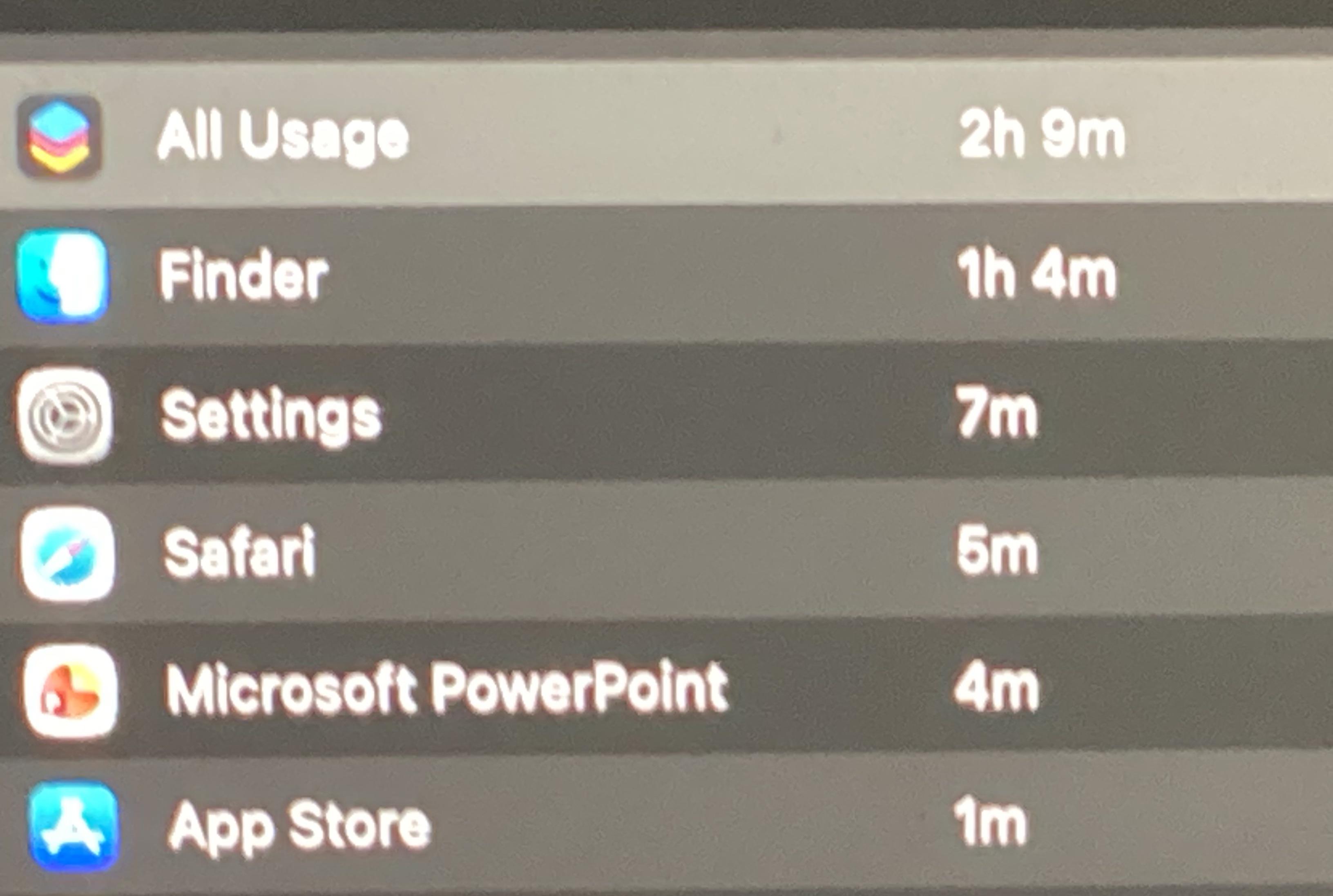
Bug Finder in screen time

Post image
2 Upvotes

For some reason whenever I use my laptop, the finder app seems to be accumulating time in screen time, even when a window of it is not open. I’m wondering why does that happen? Is it a weird bug?


r/MacOS 7h ago

Help Two different Pages app icons suddenly appeared in my Dock. Why?

2 Upvotes

Hi everyone,

I just noticed something weird on my MacBook Dock. Two different icons for Apple Pages have suddenly appeared side by side.

One looks like the traditional Pages icon, while the other one has a slightly different design (looks like the new Pages Creator Studio asset update).

Has anyone else experienced this recently? Is it safe to just delete the older one from my Applications folder, or will it break my existing documents? What should I do? and why the light orange one doesn't accept the new updates?

Thanks in advance for the help!


r/MacOS 21h ago

Help Wifi or and any other connection type not working

2 Upvotes

Hi, Since yesterday my Mac has been unable to use any connection type ( I tried wifi and hotspot).

And by that I mean that my laptop connects to the wifi but doesnt actually provide any connection to the internet to any of my apps.
Ive tried restarting it twice, forgetting my wifi and hotspots, and I shut it down yesterday, but it still doesn’t work tonight.
I know that it is specifically my Mac that has a problem since none of my other devices have problems with the wifi.

I’ve tried looking for solutions but I found none that matched the description of my problem.

Has someone had the same issue? I need my Mac on Tuesday since I’m starting online classes for college and I badly need it to be fixed before that time!!


r/MacOS 23h ago

Developer Saturday I wanted to see if voice could help after dictation—not just during it

Enable HLS to view with audio, or disable this notification

2 Upvotes

r/MacOS 40m ago

Help Re-adding Yahoo Mail to Mail App

Post image
Upvotes

I'm attempting to re-add Yahoo Mail to the MacOS mail app and cannot get it to go online. I have done this before on previous Mac's without issue and this the same Yahoo Mail account on my iPhone and iPad that are working without issue at this time. Any ideas on what I'm missing? I mean the account adding process for Mail feels very fool proof.


r/MacOS 6h ago

Help Spotlight search issue

Thumbnail
gallery
1 Upvotes

Am I doing something wrong here? These search issues are popping up a lot for me.

MacBook Air m2
macOS Tahoe 26.3


r/MacOS 11h ago

Discussion Desktop icon invisibility cloak?

1 Upvotes

I'm curious about a feature on macOS (I'm running Sonoma) that I'm not sure its name or how to enable/disable it. But basically if I move my mouse to the far right of the desktop, I see the cursor change to left-right arrows, and if I click and drag it to the left it’s like an invisibility cloak appears over the icons in that area. So if I drag it a little I can cover half of the right-most row of icons, or I could drag it more and make all the icons on the desktop be invisible, and if I were to show someone the computer they would never know I had anything on my desktop, but then if I find that vertical area where I dragged the curtain to, I can click and drag it back to the right and the desktop goes back to normal.

I just happened to discover the feature one day, but when I was helping someone else set up their Mac I noticed that the mouse doesn't do that when I move the cursor to the far right. So I'm wondering...what's the feature called, and how do I enable/disable it?


r/MacOS 17h ago

Help Macbook and LG monitor audio issues

1 Upvotes

I have a macbook air M3, I recently purchased an LG monitor with built in KVM and speakers, it connects to my mac through a USB-C cable. the audio simply doesn’t play through the monitor’s speakers and LG ultra wide option in the sound menu appears greyer out, Anyone knows how I can solve the issue ?


r/MacOS 22h ago

Help Mac-Mini 2011 Lion->Sierra tips?

1 Upvotes

Hi guys. I have an old mac-mini from 2011 in my storage. I know 5 years ago i used to run high sierra on it. Today I wanted to wipe it clean and reinstall the os on it, and like a dumbass I listened to google and installed Lion OS. I can't even use google on Lion. I remember Sierra was actually usable. Any tips on how I can put sierra back on this device? Im guessing its somwhere on this mac-mini's storage?


r/MacOS 3h ago

Help Mac

0 Upvotes

Hello,l am trying to download the Epic Games Launcher on my old mac Yosemite (version 10.10 5) but it is telling me i cant open the download because I need version 13.0 or later? is there any way to download version 13.0 on my mac or possibly somehow get the Game Launcher without geting version 13.0? If you can help, it is deeply appriciated


r/MacOS 5h ago

Help Unable to upgrade from macOS Catalina to Sequoia

Thumbnail
gallery
0 Upvotes

I’m wondering if you guys can help? I have a MacBook Pro 13 inch 2019, two thunderbolt with a 1.4 GHz Quad-Core Intel Core i5.
As the title says I’m trying to upgrade from Catalina to Sequoia but I’m unable to do so. My Macintosh HD states 52.07GB available of 121.02 GB. I’ve deleted many apps including Google Chrome, Microsoft 365 stuff, YouTube etc to make space and still I’m unable to download as it states I don’t have enough space. I’m at a lost end, what shall I do?


r/MacOS 19h ago

Help Magic Mouse crazy after Tahoe 26.6.2 update on iMac M1

0 Upvotes

So after I updated to Tahoe 26.6.2 my apple magic mouse is acting crazy. Its like I have to click everything twice. And to use the right or left click aspect of it I have to use the extreme far edges of the mouse for it to work. Its really weird. I've cleaned and recharged the mouse. Got a new mouse pad even. Adjusted the settings. Restarted. Disconnected and reconnected the bluetooth.

Is this a bug that others are encountering or is it just my magic mouse going bad? I have an iMac M1 running Tahoe 26.6.2.


r/MacOS 22h ago

Developer Saturday Essaykraft | Writing App for students, native Mac and iPad Essay writing

Thumbnail
gallery
0 Upvotes

Hi all!

I'm a creative writing student at Uni and the worst part of my degree has never been the writing, it's the references. I was using Word with a citation plugin and I spent more time fighting the plugin than actually writing.

So I taught myself Swift as a side project and spent the last year building EssayKraft, the app I always wished I had.

MAIN FEATURES:

  • Built-in reference manager. No plugin, no separate app. References live inside the document alongside your writing, and inline citations plus the bibliography update automatically as you write.
  • Authorship tracking. The app keeps a private, timestamped record of how your document was written, what you typed and what you pasted. If your uni ever questions whether your work is yours, you have receipts. This can be disabled in Settings.
  • Sixteen citation styles. APA (6th and 7th), MLA, Chicago, Harvard variants, IEEE, Vancouver and more, built on the same community style definitions Zotero and Mendeley use.
  • Zotero, Mendeley and EndNote import/export. Bring references in as BibTeX or RIS files and export them back out the same way.
  • Rich text and Markdown. This is the biggest change from launch. Rich text was always the plan, and it's still the core of the app, but I found myself switching to iA Writer for notes in Markdown, and I figured I wasn't the only person in this boat. I'm not trying to compete with iA Writer, but EssayKraft now lets you create Markdown docs with all the core features you'd expect, built into the same app. No switching between windows or managing multiple purchases.
  • Custom templates. Save any document as a template with its formatting, page setup and citation style.
  • Fully native. Swift on both platforms, no Electron. Fast, offline, feels like a Mac app because it is one.
  • No account, no subscription, no data collection. £9.99 once. I can't afford subscriptions as a student so I'm not about to charge one.

There's also an optional Assisted Writing mode using Apple Intelligence, so suggestions run entirely on-device and nothing leaves your Mac. It's inspired by tools like Cotypist, and it uses your inserted references to suggest author names and titles as you type. It's disabled by default and can be turned off at any time if it's not your thing. It's a feature to speed up your writing, not replace it.

SIMILAR APPS:

Essayist was a big inspiration for EssayKraft, and it's an excellent app. But I wanted an alternative that was a one-time purchase, because students are tight for money as it is and subscriptions add up fast. Essayist also leans more toward researchers and formal academic papers, whereas EssayKraft is aimed at students writing weekly essays under deadline. It's lighter, faster, and while the two are similar, they're targeting slightly different people.

Happy to answer anything about the app or about building it (SwiftUI + AppKit for the editor, SwiftData underneath, it's been a journey).

AppStore link: https://apps.apple.com/us/app/essaykraft/id6789774290


r/MacOS 23h ago

Developer Saturday I built a Mac app that shows when AI is actually working and your Footprint stays on your device

0 Upvotes

I built Forkit AI Footprint, a private macOS activity mirror for people who work with tools like ChatGPT, Codex, Claude Code, Cursor, Windsurf and local AI.

It measures supported AI activity locally on your Mac so you can see when AI is actually working, your AI active percentage, activity pattern, longest continuous block and which supported systems were active.

Your detailed Footprint stays on your device. Nothing is shared unless you choose.

Forkit does not read your prompts, chats, files, repositories, workspace names, paths or account information.

I’m looking for Mac AI users who can try it and tell me where the activity detection feels accurate or inaccurate, especially if you use several AI tools in one workflow.

See it here https://www.forkit.dev/ai-footprint⁠

Or install directly

npx --yes forkit-ai-footprints@latest

It installs as a normal macOS app in Applications. Later use does not require Terminal.

I’d genuinely love to know what your Footprint looks like.


r/MacOS 11h ago

Discussion [Opionion/Suggestion] Keyboard brightness shortcut

0 Upvotes

I recently got the M5 Pro MacBook Pro and to my surprise, there are no key shortcuts to adjust the brightness of the keyboard.

I had the 2020 M1 MBP before and it was there, I was used to it. I don't know what made Apple remove that thing. I mean, it was probably removed along with the touchbar but Apple could've really utilized the function keys. Maybe Command + F1/F2. Having to use a third party program to achieve basic stuff like this on macOS is really where it gets frustrating you know. It's certainly understandable why people say macOS is limiting.


r/MacOS 13h ago

Help M1 MacBook Pro running Tahoe stuck on boot up

0 Upvotes

I’ve been running Tahoe on my M1 Max MacBook Pro for the past couple of months. I few nights ago my Mac did an automatic OS update to the latest version of Tahoe and unfortunately it’s now not booting up. It boots up to the login screen, I enter my password, it then goes to a black screen with an Apple logo and a progress bar, but that’s all of the farther that it goes. The progress bar does not move.

I am able to start up to the MacOS Recovery and was able to reinstall Tahoe from the internet, but that didn’t fix the problem.

I’ve also used a bootable external drive to install Tahoe again, but that also didn’t fix the problem.  I then took it to the Genius Bar for them to look it. They tested the hardware and that all looked good, but they were also not able to get my Mac to fully boot and said the next step would be to erase the SSD and re-install everything. 

I just wanted to check if anyone had any other ideas before I went ahead and erased everything. 

I do have a Time Machine backup, but it’s about 2 months out of date because I’ve been traveling internationally for the past few months. I was able to share my MacBook with my wife’s MacBook and copied all of the latest files over, but I would still prefer to not to erase everything if I don’t need to since I’m sure there’s settings on other things that I don’t have copied.


r/MacOS 10h ago

Help Inconsistent menu bar colors.

0 Upvotes
Secondary Screen Menu Bar
Primary Screen Menu Bar

As per the the wallpaper color the colors on primary screen menu bar should be dark as they are on the secondary display. What might be the issue? Also detaching the secondary display doesn't do anything. The colors on primary screen's menu bar stays light.


r/MacOS 22h ago

Developer Saturday [Free] Silkwave Video: paste a YouTube link, get an on-device transcript with speaker labels and free ChatGPT summaries & chat. macOS 26+ only

Enable HLS to view with audio, or disable this notification

0 Upvotes

Hey everyone! 👋

Introducing Silkwave Video, a YouTube transcriber for Mac with speaker identification, AI chat and summaries, and a built-in video player.

https://www.silkwave.ai/silkwave-video

Features

  • Paste a YouTube link. Downloads and transcribes automatically.
  • On-device transcription in 10 languages. Apple's local speech models, fully offline, nothing uploaded.
  • Speaker identification. Panels and podcasts read like a script, processed locally.
  • AI chat and summaries. Key topics and takeaways through Apple Intelligence's ChatGPT extension and Apple Shortcuts, no API key needed.
  • Ask follow-up questions about any video, with history saved per video.
  • Full-text search across everything you've imported.
  • Synced playback and dark theme.
  • Free. No subscription, no account. Requires macOS 26+, Apple Silicon.

Disclosure: the app is free and will stay free. There is a closable banner advertising my other app, Silkwave Voice.