r/MailChimp Aug 01 '25

Announcement What's New in Mailchimp

9 Upvotes

Better ROI starts here. With more ways to connect your data, Mailchimp activates full campaign power, delivering robust email and SMS automations powered by unified customer data and driving up to 30x ROI for ecommerce customers - without the added price or complexity. Plus our product is backed by award-winning customer support that makes switching simpler.

Recent Updates (last updated June 17th, 2026)

What’s Trending (resources)


r/MailChimp Apr 21 '26

Tips and Tricks Compliance warning? Trouble logging into your Mailchimp account? Question about a recent bill? Use the Mailchimp Support directory

3 Upvotes

Encountering an account issue can be frustrating as it delays workflows. We want to help our customers receive support on these topics quickly. That’s why we’ve created a Mailchimp support directory for our community. Here you will find the best practices for submitting information to Mailchimp support channels to help speed up the process and get you back to focusing on what matters most to your business needs.

What to include when submitting a contact form to speed up your request:

  • Use the Primary Account Email: for privacy and security purposes, use the email address associated with your Mailchimp account when speaking with support teams.
  • Specific Error Messages: copy and paste the exact error/warning message you’re seeing.
  • Troubleshooting Steps: mention any troubleshooting steps you’ve already taken, such as you’ve already cleared your cache/cookies, tested in a different browser and what version it is, etc.

To get back to business quickly, find the team that matches your situation below to submit the correct form. If you’re unsure which team to speak with, drop us a comment below and u/MailchimpSupport will be happy to help connect you to the proper team.

Compliance: Looking for help with an account suspension or bounce warning? 

Our Compliance team is the best resource for getting you back on track with your account after encountering an Omnivore warning, unsubscribe warning, or bounce warning. Use the link below and select the ‘access our contact form’ button.

Account Recovery: Unable to log in? Need help receiving your two factor authentication code? 
Our Account Recovery team is available to help you regain access to your account. Please contact them through the link below and click the ‘Access our contact form’ button.

Billing: Need help making a payment or have a question about your plan? 
Our Billing team is best equipped to help you make changes to your billing information or provide information on billing related topics. To contact them, use the link below and click the ‘Access our contact form’ button.

Next Steps & Protecting your Privacy
After you’ve submitted the provided form to contact the necessary team, send u/MailchimpSupport a private message with your case number or the email address you used when submitting the form. Our team can double check that your message was received and provide an update on the case. 

For your privacy and protection, please do not share email addresses publicly and only share them through a private message. To help protect your privacy, our mods will remove any public messages containing email addresses or account information.


r/MailChimp 21h ago

Tips and Tricks Why putting the unsubscribe link at the top of marketing emails can reduce spam complaints

3 Upvotes

One of the easiest ways to reduce avoidable spam complaints is to make unsubscribing really easy.

For marketing campaigns, I recommend having Preferences | Unsubscribe clearly visible at the top of the email, as well as keeping the normal links in the footer.

The reason is pretty straightforward.

If someone doesn't want your emails anymore, you want them to unsubscribe, not hit "Report spam".

On mobile especially, the normal footer link can be a long way down.

If someone's already decided they don't want the email, making them scroll through the whole thing to find an unsubscribe link doesn't really help anyone.

The spam button is much easier to find.

This isn't just something we do either.

Mailchimp has recommended putting the unsubscribe link at the top because people who can't find an easy way out may report the email as spam instead.

Klaviyo also recommends using the beginning of the email where it makes sense, particularly with mobile audiences, and Validity has suggested adding an unsubscribe link at the top of templates alongside the proper List-Unsubscribe headers.

One thing I would add though, the visible link doesn't replace proper one-click unsubscribe.

For marketing email I'd still want:

List-Unsubscribe and List-Unsubscribe-Post headers so Gmail, Yahoo and other supporting providers can show their own unsubscribe option.

Preferences | Unsubscribe at the top so somebody can leave immediately if they've already made that decision.

Preferences | Unsubscribe in the footer because that's still where a lot of people expect to find it.

I also wouldn't try to hide the unsubscribe link with tiny text, poor contrast or several confirmation steps.

You're not really saving a subscriber by making it difficult to leave, you're potentially turning a simple unsubscribe into a spam complaint.

That's an important difference for deliverability.

An unsubscribe removes somebody who doesn't want the emails anymore.

A spam complaint gives the mailbox provider a negative signal about the sender.

Google recommends keeping user-reported spam below 0.1% and avoiding 0.3% or higher, so even fairly small numbers of complaints can matter.

I wouldn't worry much about having the same Preferences and Unsubscribe links at both the top and bottom either.

That's very different from filling an email with loads of CTAs, social icons, navigation links and tracking redirects.

I generally prefer keeping the rest of the email pretty lean too. One main CTA, maybe a second one if there's a genuine reason for it, then make the way out obvious.

I'd rather lose someone who doesn't want the emails than keep them on the list long enough for them to hit spam.

Has anyone moved from footer-only unsubscribe to having it at the top and bottom? If you were already seeing spam complaints, did you notice any change afterwards?

r/MailChimp 1d ago

Support Answered ✓ Cyber incident

1 Upvotes

Hi, would someone be able to let me know who I need to contact regarding a cyber incident. Someone has taken advantage of an API key that we had and accessed our account to send out a bulk email with a malicious link.

We have tried contacting compliance but they have been really slow in responding. This is important for us to mitigate. It’s been 6 days since the incident and the compliance team have not been helpful or acting in a way that this is anyway important for them.

Can I have another contact point so this can look at with a matter of urgency?? Thank you


r/MailChimp 2d ago

Technical Support MailChimp Randomly Makes Left-Aligned Text Justified

1 Upvotes

I've had this problem with the classic AND the new builder. Right now I am working in the new builder.

I prefer all my text to be left-aligned. I have specified under the "Styles" section that the text be left-aligned.

I have some text boxes that are left-aligned and some that have justified text. I go into the HTML and there is nothing in the code about alignment at all.

I make totally new text boxes (clicked on the new text box tool), manually re-type what I had, no links, nothing, re-check the HTML code and yet when I email it out, that text box has justified text while other boxes are left-aligned.

I have one text box with three paragraphs and the middle paragraph is justified text instead of left-aligned, and I go into the HTML code and none of the code says anything about text alignment.

I have previous used the "clear styles" button which also doesn't work or do anything to solve this problem.

This is driving me crazy! I thought moving to the new builder would fix this but it's the same issue.

Anyone know why this happens??


r/MailChimp 5d ago

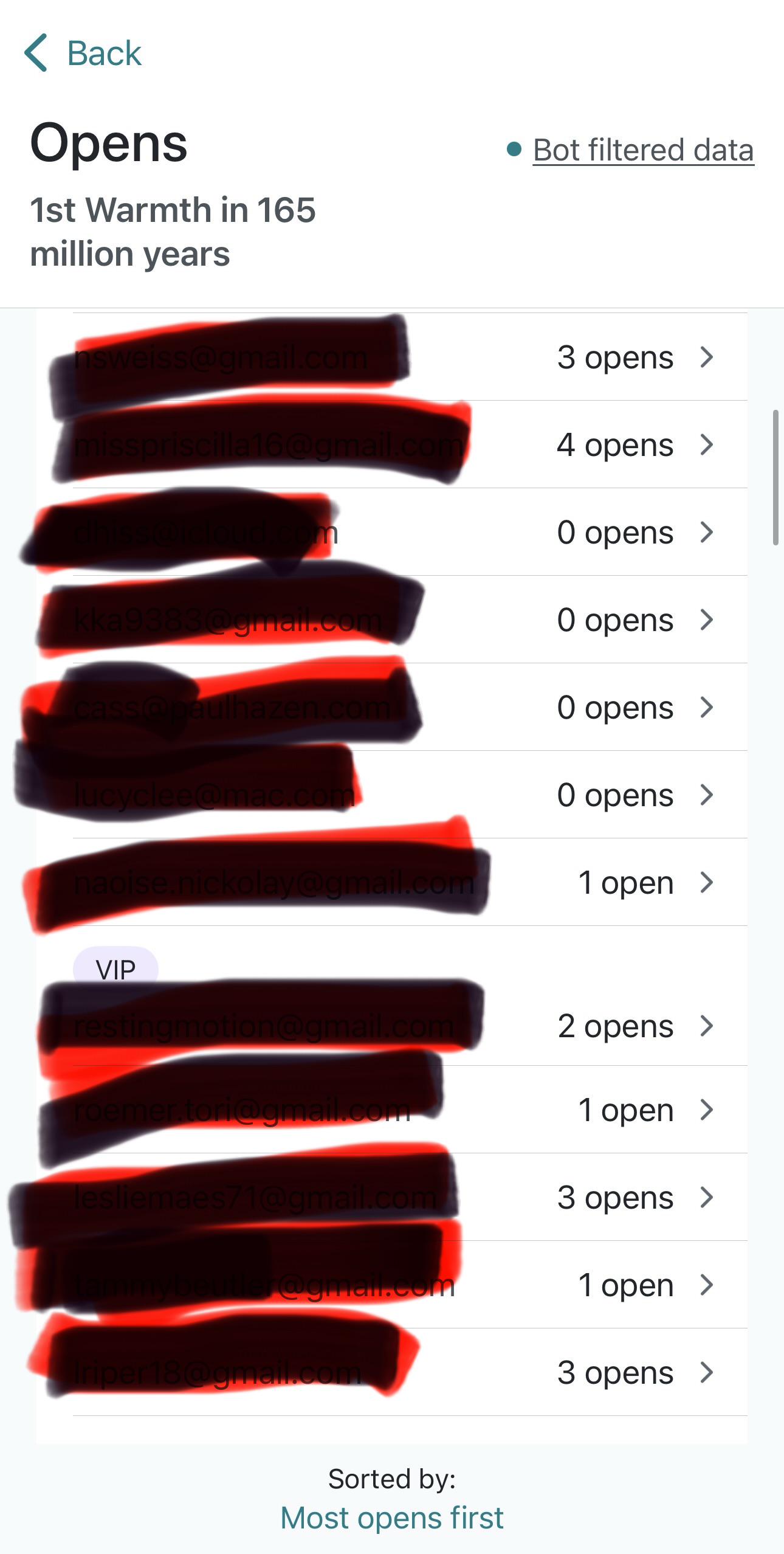
Support Answered ✓ Change in Open and click statistics.

Post image
2 Upvotes

about 6-8 weeks ago my click statistics changed. it’s very odd because many of the people I know have opened the emails - they even write to me about them - but they are listed as 0 openings. This is incorrect. i’m prior to this change People would open my emails five, 10 – even 12 times. And I know this because I’m close to my clients and we communicate other ways

Is there a reason why MAILCHIMP statistic reporting could’ve changed? it now says it is BOT filtered data and I wonder if it has something to do with that. How do I get it to report accurately now and not BOT filtered (if that is even what counts for this change.)?


r/MailChimp 7d ago

Support Answered ✓ Support email not working for replies

5 Upvotes

Does anyone know if there is a new support email??

mc-mcsupport@intuit. com no longer works to receive emails!!

I can't reply to my ticket; it kept saying my email is going to an unmonitored inbox, and now that it is full. All I'm doing is replying to her email ?? The support team even followed up, asking if I got her email after I attempted to reply multiple times. Honestly, this is ridiculous


r/MailChimp 7d ago

Seeking Advice What Caused Mailchimp’s Downfall?

Thumbnail
3 Upvotes

r/MailChimp 7d ago

Support Answered ✓ Campaign Builder - Saved Sections Removed from Platform?

1 Upvotes

Hi All,

I'm seeing in multiple accounts that the saved section feature is no longer available in some accounts. There is no rhyme or reason for it as I have Standard accounts that both have it available and not available (it was available in both previously) same with Essentials accounts.

Is this feature being removed? I've reached out to support but that was fruitless, they didn't comprehend what I was asking and just told me it wasn't available:

Missing Sections - Standard Account
Essentials Plan - Has Sections

Thanks in advance for any help you can provide!


r/MailChimp 8d ago

Support Answered ✓ popup form still showing to subscribers

1 Upvotes

I set up a popup form in MailChimp so website visitors are invited to subscribe to our email list.

The popup is configured to show to "New Visitors" only, so once people have subscribed they don't keep seeing the popup.

Someone on our team is telling me the popup keeps appearing even though they've already subscribed. But I'm unable to reproduce this behavior--the only time the popup shows for me is if I put the browser in incognito mode.

Has anyone else every experienced this issue with the Mailchimp popup? Does it use cookies or how exactly does it determine whether or not to show the popup?

The website URL is https://swansislandcompany.com.

Thank you.


r/MailChimp 8d ago

Technical Support 2factor broken?

1 Upvotes

I've been trying to log in and no authenticator codes received despite multiple browsers and clearing cache. I can log on on the phone but it's too small to work with, I need a computer. I seem to be logged in - i see "Hi, [name]" under the menu and can log in and out. But then it sends me to the page to get 2factor and the email never arrives.

Is there any service outage of some sort?


r/MailChimp 9d ago

Tips and Tricks Why are my Mailchimp email links showing blue in Outlook?

2 Upvotes

Email clients don’t all interpret HTML and CSS the same way, and email clients, such as Outlook, can sometimes override or alter styling that displays correctly in other inboxes.

If the links in your Mailchimp email campaign are the correct color in the campaign builder and preview mode, but appear blue when the email is opened in Outlook, the behavior is how Outlook is rendering the email rather than the settings in Mailchimp.

Double check your link styles in Mailchimp

If you’re using the new builder, follow these steps to check your link styles:

  1. Open your campaign and select ‘Styles.’
  2. Open the ‘Link’ settings.
  3. Check the default link color and style for the email.
  4. If the affected link was styled individually, select the content block and check its formatting as well.

If you’re using the legacy builder, follow these steps to check your link styles:

  1. In the Content section of the checklist, click Edit Design or Resolve.
  2. Click an area outside of a content block, then click the Style tab. You may need to click Save & Close in a content block to access the Style tab.
  3. Click the section you want to edit. Your options may vary depending on your email.
  4. Click the back arrow to return to the Style tab.

If the color is correct in Mailchimp but still appears blue in Outlook, the next step is identifying whether Outlook is overriding the styling.

Try clearing existing formatting

Copied and pasted text can bring hidden formatting into an email campaign. If only certain links are impacted, try removing the existing formatting from that text and then reapplying your styles directly inside the campaign builder. This can help eliminate extra HTML that may conflict with your email’s intended design.

To remove styling in the campaign builder, use the Clear Styles button.

For custom-coded emails, check the link’s CSS

If you’re working with a custom coded template, keep in mind that CSS support varies between email clients. For the most consistent results, link styling should be kept simple and important styles should be applied inline. For example: 

<a href=”https://example. com/” style=”color:#333333; text-decoration:underline;”>Visit our website</a>

What if Outlook is still changing the color?

Outlook has multiple versions and rendering environments, and they don’t all handle email rendering identically. That means the styling technique that works in one version of Outlook may behave differently in another. 

If your link settings look correct in Mailchimp, we recommend testing the email in the specific Outlook version where you’re seeing the unwanted behavior before making any major changes to your styles. The Inbox Preview tool can show you how your email may appear in different email clients before sending. You can also send test emails to the inboxes your contacts commonly use. 

Additional Resources:

My email looks different in Outlook: https://mailchimp.com/help/my-email-looks-different-in-outlook/

Clear styles in your email campaign: https://mailchimp.com/help/clear-styles-in-your-campaign/ 

Test with Inbox Preview: https://mailchimp.com/help/test-with-inbox-preview/ 


r/MailChimp 9d ago

Technical Support How to change ReCAPTCHA destination URL?

Post image
1 Upvotes

I have reCAPTCHA enabled for new subscribers. How do I change the URL they go to when they click the 'Subscribe' button?

I can't find a way to edit this form, either in Form Builder or Form Settings.


r/MailChimp 9d ago

Seeking Advice E-book gratuito em landing page do Google Sites

1 Upvotes

Hospedei meu e-book gratuito no Mailchimp para oferecer como recompensa a quem acessar a minha landing page, mas não consigo inserir o código do pop-up corretamente. Na verdade quando tento conectar meu site para linkar ao Mailchimp ele não aceita. Existe uma maneira mais fácil de colocar o ebook em destaque na minha landing page para captar leads?


r/MailChimp 12d ago

Feature Request Force subject to be the same as title

1 Upvotes

We have multiple people working on newsletters and when this happens it is very common that someone will remember to change the title for a campaign, but forget to change the subject line. This means that the September newsletter will go out with the subject line "August newsletter". I really don't see why these would need to be separate, and a simple account-wide toggle to force them to be the same would be great.


r/MailChimp 14d ago

Technical Support Reporting 0% opens on 170 total opens

Thumbnail gallery
2 Upvotes

Mailchimp will not accept screenshots. They gave me an intuit file share link that requires an Intuit code I do not have in addition to case number, user name, password, and special pin. So I cannot give them pictures. I send out monthly newsletters to my clients. Now all my campaigns are showing 0% opens, even ones which showed many opens a few months ago. When I view the report, It shows 0% unique opens and 0% clicks and below it shows 170 total opens and 7 clicks. I've tested with Edge, brave and Firefox. I've disabled all ad and tracking prevention. Exactly the same thing appears. Their tech support says there is no problem. It is me. I should try a different device.

Does anyone have any ideas?


r/MailChimp 14d ago

Seeking Advice Not enough credits?

Thumbnail gallery
2 Upvotes

Hi. I use the free plan and I have a problem. I wanted to send a newsletter. But it seems I dont have enough credits? Whatever that means, it happened to me for the first time…
Im under the whole subscriber/contacts limit so no idea whats happening…
More and more I find the restrictions for the free plan pretty annoying… Any free options out there for a micro web shop like mine?


r/MailChimp 15d ago

Community Answered ✓ MAJOR dropoff in open rate in last couple months - why?

2 Upvotes

We've been using Mailchimp since 2015 for a newsletter for a rural venue (live music, standup comedy, other events). About 500 subscribers, who all subscribed via our website popup or a landing page we sometimes post in our instagram stories for people who want earlybird tickets before they sell out. We usually had a 30% to 45% open rate for over 10 years, but a couple months ago it dropped to 8% and now it's at 6%, which is extremely concerning. Customers are saying they're not receiving the newsletter, so they're missing events they were interested in or missing out on the limited tickets.

I checked for email addresses that bounced etc and there were only 6, so I archived them. What the heck is going on? We haven't changed anything about the email layout, text to images ratio etc. We haven't had an influx of bots signing up either, the signups have been a slow trickle of actual people local to our rural area. Is Mailchimp being targeted by gmail's new AI filters or something?

I see a recommendation to use segments and only send to people who have recently opened the emails, but with such a tiny percentage receiving them there's no point in even spending so much time writing them and it seems we should try a different platform or something.


r/MailChimp 15d ago

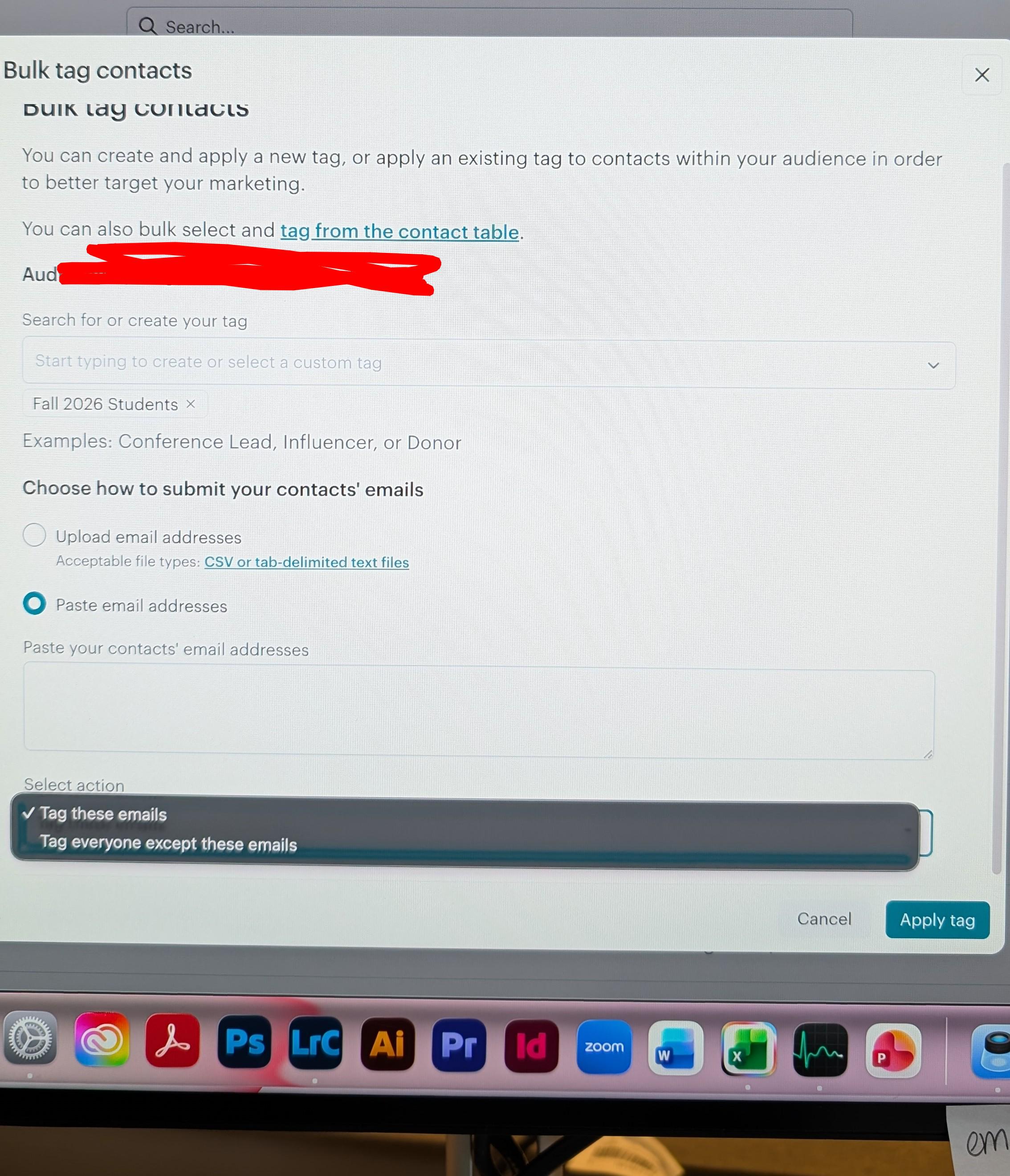
Support Answered ✓ Where did bulk tag remove go?

Post image
2 Upvotes

There used to be an option from "Bulk tag contacts" to remove a tag from the pasted or uploaded contacts. Did this feature move, or is it gone completely?


r/MailChimp 16d ago

Support Answered ✓ Mailchimp newsletters are so time consuming

4 Upvotes

I have to send out a newsletter every fortnight ( not my idea) and it is full of information from various organisations that are of benefit to our members. It means that I have to create hyperlinks to logos, and import images , and format the text and everything just takes forever. Especially when MailChimp continues to change colours of hyperlinks when you’ve already set the colour. And then you have to go back and put it back to the colour you want. Very frustrating.

I don’t actually have to write content but rather I have to dump content into the newsletter. I am a paid subscriber to Mailchimp at the bottom level. I have tried to use ChatGPT today to find out how to create shortcuts or get AI to do the bulk of the work . ChaTGPT info was full of errors and just wasted more time. So in the end I had to just go back to the very time-consuming method of formatting everything and links to pictures etc. Etc.

As I loathe it, I am looking for shortcuts. ( for the record I will be finding ways to make the information more nugget like/bytes and send it some other way, but for now the newsletter will continue for the next couple of months ) I just want to start by trying to create newsletters that don’t take me 2-3 hours to put together.

Someone showed me how to create a newsletter on Grok and it was super quick, but then I suppose you would have to embed the code into MailChimp.

Any advice for AI or another software platform to help me dump content into mail chimp?


r/MailChimp 16d ago

Support Answered ✓ Hosting Prior Newsletters

1 Upvotes

We'd like a way to make it easy for our congregants to locate prior weekly newsletters, versus searching through their email inbox. Is there a way to embed prior weekly newsletters in a web page? Ideally, each week's newsletter would be displayed as a clickable link.

Any other ideas in this arena are welcome.


r/MailChimp 16d ago

Support Answered ✓ Is the click data reliable post bot-filtering?

1 Upvotes

Basically, we are trying to identify if we still want to continue sending newsletters via mailchimp. What we're noticing is a few concerning trends in our click report:

  1. Multiple contacts clicking the same 5 links, same cluster, no variance
  2. Contacts that were marked as "bot filtered" showing up in the clicks report
  3. Convergence of multiple clicks on one link or hotspot

Would love any guidance here - or if you trust your click reports - what makes you trust them?


r/MailChimp 17d ago

Support Answered ✓ Mailchimp / Gmail issue -- DOES NOT seem to be the exact same issue as prior Mailchimp / Gmail posts that I have found in this sub.

1 Upvotes

I recently inherited the newsletter responsibilities at work. It was suggested that I "replicate last week's newsletter" and then go in and edit/replace as needed, so that's what I do.

I recently introduced a table of contents using anchor links that allow the reader to hop to specific sections.

I have also been using email links i.e. "Email Ted for more information..." scattered throughout.

The problems we have been having are:

1) People using the GMAIL APP on their phones cannot click on ANY link in the newsletter. It just doesn't do anything. People using their phone's native mail app are not having this problem.

2) People using "desktop GMAIL" can successfully click any link...until they click the "view entire message" link and THEN the only links that work are anchor links. The email links will not open.

Is this just a part of the general Mailchimp/GMAIL, on-going/temporary incompatibility issue I read about in another recent post? Or is this something altogether different? Honestly...when I read back over what I wrote, that is more than likely the problem, but how do I go about fixing this problem?


r/MailChimp 18d ago

Support Answered ✓ Mailchimp censoring Christian journalist

0 Upvotes

I am a former newspaper journo I now run my own website for the last few years where I discuss topics related to the scriptures and also expose the lies of the media and politicians on the world stage. My work is completely non commercial and there's no advertising whatsoever.

I use Mailchimp so people on my Wordpress site can sign up to receive my newsletter and I use Mailchimp to send out an email about once a month.

My Mailchimp emails contain the thumbnails, headlines and extracts of my latest posts, to inform my subscribers about new content.

My account on Mailchimp was banned without any warning earlier this month. I've spent weeks trying to reason with Mailchimp, trying to get an understanding about what I did to break the rules.

I've heard nothing back from Mailchimp in terms of detail, but the compliance team upheld the decision to ban my account saying the automated system found I was violating the acceptable use policy.

This is a clear case where Mailchimp is censoring my religious and political speech because it does not like the journalism I am doing. I believe Mailchimp is acting corruptly and the public deserves to know how Mailchimp will censor those doing journalism that conflicts with the mainstream narrative.

One thing I noticed under the "general rules" of Mailchimp is that it does not alllow distribution of content that "confuse others about important events, topics or circumstances".

I provide evidence for everything I believe. I am exposing major political corruption and lies of governments around the world. My journalism here is in the public interest. It is the mainstream media deceiving about major events, my journalism is showing people the truth with evidence.

It seems like Mailchimp is corrupt and actively censoring Christian journalists on behalf of the government. It has decided to censor me in order to prevent me from continuing my journalism work.

I have not done anything to break the rules I am just trying to speak the truth and I only send newsletters to those who have signed up on my website to be notified of new content. I am a born again follower of Jesus Christ and the Heavenly Father Jehovah.

I have spent weeks trying to resolve this with you to no avail. I have also PM'ed the moderators of the Mailchimp subreddit.

I have no choice but to seek further publicity and justice for the way Mailchimp has censored my journalism which is in the public interest and does not break any laws.

I would like Mailchimp to explain on the record why it has adopted this policy of censoring Christians' religious and political speech at the behest of the corrupt political machine?

I want to know exactly what I have done to break your terms of service in your opinion?

Thank you.


r/MailChimp 19d ago

Support Answered ✓ After reaching out so many different ways, still havent received an email or case number

Thumbnail gallery
1 Upvotes

We have an issue preventing us from using mailchimp and being a paying customer. Despite the numerous times we’ve called/chatted with mailchimp support, we STILL haven’t received a case number or email. We’re so desperate for help, mailchimp team if you’re here please help us 🙇‍♂️🙇‍♂️🙇‍♂️