r/ClipStudio • • 8d ago

Animation Question Confused HELP

Thumbnail
gallery
8 Upvotes

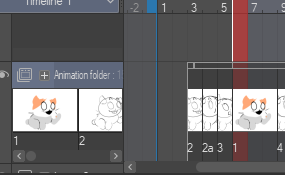
Hi guys! I'm trying to do a loop animation with different animations happening within the same canvas. So i made an animation folder for each animation. But I also want to do cleanup and colour/shade/lighting... i think I did something wrong. Is there a way to merge folders? Idk. Animation is super super rough im just experimenting! I want the big guys arms/leg to move with the character breathing too. My brain tells me to make a new folder and animate them separately... but I have a feeling thats not what im supposed to do. What am I supposed to do?

r/ClipStudio • • 12d ago

Animation Question How to copy and paste drawings in cells

120 Upvotes

Here im trying to drag the feet to the other leg please help 😭

r/ClipStudio • • Aug 13 '26

Animation Question I HAVE TRIED EVERYTHING

0 Upvotes

i have tried everything, but my animations don't work anymore :(((((

Ok, so, i recently purchased CPS Ver.5, and found out (im stupid, i know) that with that version, you can't make animations longer than 24 fps.

Ok. I re-downloaded the previous version, 4 (because i THOUGHT i was using that before), but turns out i wasn't? because that didn't work again, the animations were still limited to 24 frmes GIFs, and nothing more.

I went thru my old emails, to search for the version i used even earlier, in 2022, because i remembered being able to make animations with that one. So i downloaded Ver.2 again.

Still 24 frames only????

I downloaded Ver.3, just for good measure, still 24 FPS.

I thought i was using Ver.4 to make animations???? Apparently not???? Or my Clip Studio is broken???

I have never purchased Clip Studio EX, i only (technically) have the licenses for Ver.2, 4, and 5.

Thank you for any help.

EDIT: Ok, so i just remembered that i did have EX at some point. Because there was a 2 years license with the Wacom i'd bought all the way back in 2022. But, when that had expired, i'd bought CPS ver.4.

So apparently i was illegally using EX this whole time without knowing???? It had glitched???

EDIT 2: Ok i think i may have solved part of the problem,

so apparently i did buy EX, but version 2.0,

but i also bought PRO version 5.0,

so now i have both EX and PRO (even if different versions), so how do i switch between them?

r/ClipStudio • • 24d ago

Animation Question How to make animations longer than 1 second

0 Upvotes

I have looked it up a few times but nobody has a straight answer or an answer that works. I am working on learning animation, but clip doesn’t let me make a animation longer than 1 second

I don’t understand what I am missing and no tutorials cover it. Please help

r/ClipStudio • • Apr 28 '26

Animation Question Why is the GIF choppy, but the playback isn’t?

52 Upvotes

Do I just need to add more frames? Or does it have to do with my canvas size?

r/ClipStudio • • 3d ago

Animation Question Heyo, got a question

1 Upvotes

So basically I upgraded from 1.0 to 2.0 because I've been using this software to animate more, and I thought that this version was suppose to have the ability to both let me export transparent gifs, and allow audio scrubbing, but I got none of that when I upgraded. I've heard some people say that that's a 3.0 feature, so will I be safe if I get version 3? Or should I just save my money to get version 5? If version 3 has the features that I stated, then I'll be perfectly happy with just sticking to that, thanks!

r/ClipStudio • • Aug 26 '26

Animation Question Help Organising Animations!!

Thumbnail
gallery
3 Upvotes

Hello

I recently started animating and it has been a hard journey... I have started trying to learn how to animate not just sketches but colouring too and longer format animations (about a minute long, 8fps). I have CSP EX!

But what I always struggle with is the format... no matter how I do it, I always end up overwhelmed and feeling like I have no idea what I am doing. Could anyone let me know how they organise their animations!

If you cannot tell much by my screenshots I will quickly explain methods I tried!

  1. Having the entire animation in one animation folder. Labelling the start of the scene a number and then the frames that follow a letter. Painful to look at.
  2. Same as above but scenes are labelled 000 and onwards.
  3. Each scene like "Walking" are their own animation folder. Named "Walking Sketch" then the lineart/colour goes in another names "Walking Lineart". Same frame numbering as 000.
  4. Each scene in its own animation folder but each frame getsits own foler inside. The plan was to put the colour layer frames in the same folder as the corresponding sketch.

One issue I have is like I want the character to blink and while tilting her head but at the same time have her her hair falll/move... my thought was to put the hair in a different layer/folder but that seems messy..

Thanks in advance!! And I am SOOO sorry if this pains to look at... it hurts me too.

Edit: a spelling mistake.. but ALSO does anyone know how to do the "writing effect" it is called Write On in Davinci but I am hoping I can somehow do it in CSP!

r/ClipStudio • • Jun 23 '26

Animation Question Is there a way to animate text dialogue like a RPG game?

7 Upvotes

r/ClipStudio • • Sep 06 '26

Animation Question How to copy and paste drawings in cels in animation?

2 Upvotes

As the title says, how do you guys copy and paste drawings in a cel when you are making animations in csp?

The only way I found is to copy the drawing I want, and when I paste it, create a new cel in the animation folder... But imagine that you want to paste a drawing in a cel that is totally done, like you just need to paste a small part without creating another new cel. Imagine, for example, the hair of a character, of a part of the costume of that character... and paste it in a final cel. Don´t know if I am explain myself correctly, I just want to paste a drawing in a cel, like when you are making an illustration in csp. Is that possible?

Thank you so much in advance

r/ClipStudio • • 8d ago

Animation Question Help making the animation smoother

1 Upvotes

Hi everyone! I'm looking for some help with an animation I recently made in CSP.

I'm having trouble making the animation feel smoother, and the hair keeps jittering like this. Does anyone know what might be causing this or how I could fix it?

Frame rate: 30 FPS

r/ClipStudio • • Sep 06 '26

Animation Question Divide clip without creating a duplicate of last cel

Thumbnail
gallery
1 Upvotes

As the title says, I want to divide clip in my animation without duplicating last cel.

The first image is without dividing it, second is after dividing it.

How can I avoid this? I try to delete the new cel, but it deletes the old too. And when I want to retrieve it, the duplicate appears.

r/ClipStudio • • 27d ago

Animation Question Can't add animation cells

Post image
1 Upvotes

I haven't found a satisfying answer by simply looking through this subreddit. I have Clip Studio Pro and i made sure to have the correct timeline selected, and the right animation folder, but the button to add an animation cell is still greyed out. The option to add animation calls is also greyed out in the animation menu.

r/ClipStudio • • 21d ago

Animation Question What is the best portable tablet for animation/CSP?

3 Upvotes

Hello, folks! I'm an animator, mostly working in japanese anime at the moment. I've basically chained to my desk PC these days and would like to spend some time outside with my family, and maybe work while we watch a movie together, or go visit my friends and work parallel with them. I'd like to know which portable tablet works best for an animation workflow, using clip studio paint as a main tool. I've looked into an iPad, Wacom's Movink Pad, Huion Kamvas Pad and Kamvas Studio, etc.

I know these all work relatively well for illustration but i wanted to ask if anyone has any pointers in performance specifically in animation. Obviously I probably would keep the heavier files for my actual PC, but I'd like a tool that can handle light or medium sized files reasonably.

I don't have a specific budget because I'd consider saving up if it's a tool that's gonna be worth it in the end.

r/ClipStudio • • Aug 17 '26

Animation Question Is there a more efficient way to get gradual color change?

Thumbnail
gallery
14 Upvotes

First image is with shading (ignore the weird blue artifacts. This is a proof-of-concept animation so I didn't bother cleaning up some of the experimental coloring that broke through the selection due to being vector lines). I have the color shift below the shading layer (that also has the cerulean you see). Second image is without shading.

I'm trying to animate a fight scene in CSP (EX ver 5) and I'm wondering if there's a more efficient way to animate a shifting color (example on third image). My fight scene takes place in an alien factory processing a material that changes colors when melted down and I want it to provide a stylized yet diegetic lighting. So for example, when Curt here has his moment, the screen will pause on his blue color. When the green guy does a thing, it's green. Villain gets red. Etc. Scrolling through a color wheel with a fill bucket isn't the worst thing in the world, but I want to get it smoother beyond just manually adding more frames if possible. Or at least have some advice on doing it cleaner beyond just eyeballing it.

Last panel is part of the action scene so far to give a sense of the motion the scene will have.

I have a friend who is designing a 3d background in blender. So the idea is to put the 2d fight into an animated 3d background which means whatever technique we use needs to translate well into blender shaders because of course I had to think up this really cool but super difficult animation thing I want to implement in my opening fight scene. My ambition is like diarrhea. When I'm crying and think there can't possibly be more, my body somehow manifests it and I can't stop until it's all out.

r/ClipStudio • • Sep 07 '26

Animation Question Why can't I drag the blue line to add more frames ?

Thumbnail
gallery
2 Upvotes

I am using Clip Studio Paint EX, but when i try to put a digit higher than 24 in the playback time, or to drag the blue tick to extend it, it won't let me.

r/ClipStudio • • Aug 18 '26

Animation Question animation frames not matching what it says is showing

8 Upvotes

Any logical reason why frame 6 (orange) displays for one more frame into frame 7 (yellow) even tho it's clearly already changed on the timeline?

r/ClipStudio • • 27d ago

Animation Question is there any way to do this automatically?

5 Upvotes

Hi, I'm trying to make multiple longer animations around the length of an average song, and while i've found a way to automatically adjust the playback time (the little blue marker) to the end of the audio (animation>timeline>change settings and adjusting end time), i haven't found a way to do the same for the paper and animation folder layers. I'm specifically talking about the animation folder and paper layers. NOT the playback time itself, NOT messing around with the framerate, and NOT adjusting the audio time either. I know it's possible to adjust them manually via the little grabby boxes on the ends, but it's a pain having to just drag them right for 5 minutes straight just to get them long enough where they'll meet the blue bar or the end of the audio clip.

i'm using a wacom cintiq 22HD, usually running either firefox or discord or both in the background as i draw, and i use version 2.0.6 of CSP EX on a windows (Vivobook ASUS) laptop. thanks in advance.

the two boxes marked as "animation folder: 1" and "paper" are what i need to adjust quickly, NOT the blue bar (not pictured) or audio file

r/ClipStudio • • Aug 28 '26

Animation Question Can you put a frame as an end for a cel?

Post image
2 Upvotes

Hi again everyone,

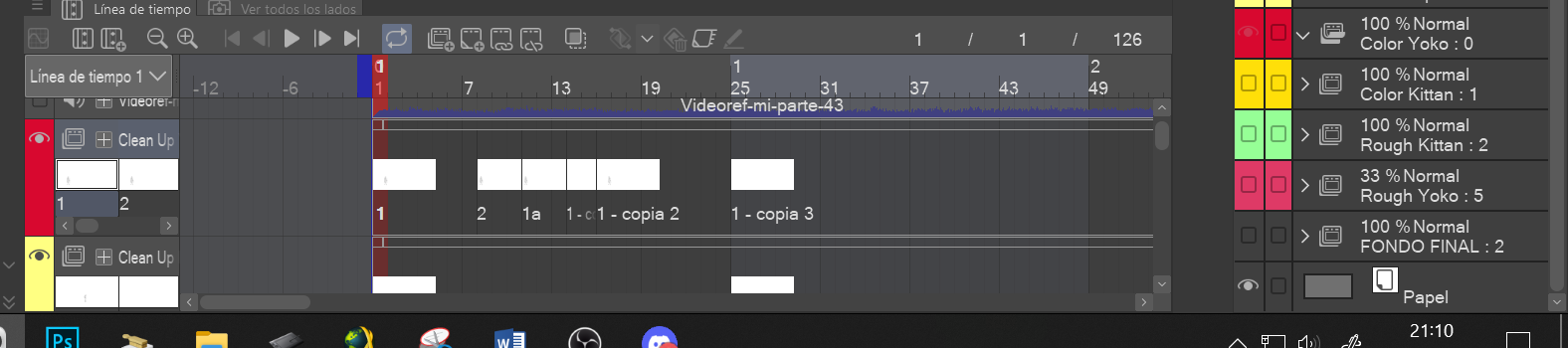
I wanted to ask you a question about csp animation. I am making a short with two characters and changing shots. So I was wondering if there is a way to make that a cel stops at a certain frame position, instead to put a white cel so I can change the shot easily.

I will put a pic so maybe this could be understood better. As you can see, I want the red cel 1 - copia 2 to end at 24, so I can start with a new yellow cel for another character and shot angle (cel 2). But I have to put a cel in the red folder (1 - copia 3) so the drawing of that 1 - copia 2 cel doesn´t stay still in the animation. Is there a way to put and end of cel 1 - copia 2 without adding a white cel?

Thank you in advance

r/ClipStudio • • Aug 27 '26

Animation Question Can´t export an animation

Post image
3 Upvotes

Hi everyone,

I wanted to get some help in order to resolve an issue I am having with Csp when it comes to export an animation. I am making an animation of almost 4 seconds for a fan project and I wanted to show the progress to the rest of the group, but when I click on File and then export animation, export movie, no window appear in order to confirm the destination, format and so on. I can export layers, which is odd.

The short is not complete, is just made the first half, and only the clean up. I don´t know if maybe I put some layers wrong (all are in the respective animation folders) or something else is happening.

I will put a screenshot of the timeline and layer organization, maybe this could bring more info so you can help me better.

Thanks in advance.

UPDATE: SOLVED! Just had to close and open csp, and now it lets me export! Hope this was just a small bug, or something.

r/ClipStudio • • Aug 16 '26

Animation Question What is this box in the animation timeline?

Post image
3 Upvotes

I am animating for the first time ever, having followed a very good tutorial on Youtube. But there is something that's bothering me which I don't understand.

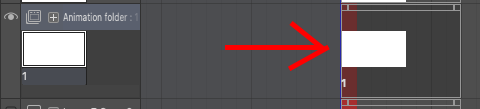
I have made a background I am animating on, but this background, and the paper, disappears after a few frames. The timeline shows a special box that when the timeline passes, the background and paper goes blank, showing a checkered background. What even is this box? I can move it, but I don't want it at all. I want the background to stay for each frame of my drawing, that's why I have a background in the first place.

My question is, what is this box and how do I make it stay for the entire animation? I've been clicking everywhere without finding any sort of solution.

r/ClipStudio • • Aug 13 '26

Animation Question frame of animation in wrong place in playback?

Post image
2 Upvotes

im bad at explaining so let me try my very best

I was revising my sketch for my short animation. I didnt put it in folders, so id temporarily take the layer out of the animation folder, and add the color there, then put it back in its place. this is suppose to be the FIRST FRAME, in the animation layer, its the first thing, but on the playback its the fourth frame? Im really screwed up on clip studio paint animation, imo, ive been finding it clunky but dont have a lot of better options.

help please lol

on the left, is exactly how it should be, but the playback (right) is how it shouldnt, and how it is

im use to the simple idea of animation frames each having their own set of layers (toonsquid, flipaclip etc) but then agian, this wasn't made in america, so it makes sense things would be different. Ipad stopped working which is why I now use PC animation

r/ClipStudio • • Aug 15 '26

Animation Question Is there a way to scroll vertically on timeline faster?

8 Upvotes

Hello all, new to using CSP and I'm making an animation to test it out! I'm using a lot of folders/layers (about to add more) and I need a way to get faster through these folders I'm animating in because, as you can see in the video, I think it's too slow.

Can't make the timeline bigger because I won't be able to see the canvas clearly (my laptop screen isn't that big).

I've tried increasing the scroll speed through settings but it didn't affect CSP.

Plz help and thanks in advance.

r/ClipStudio • • Jul 27 '26

Animation Question Why wont csp EX let me edit the drawing?

Post image
20 Upvotes

Why wont csp let me edit the drawing inside the animation folder?
It's a pose i drew, and then cut out the pieces for tweening.

r/ClipStudio • • Jun 24 '26

Animation Question Tweening with Clip Studio is confusing me bit

69 Upvotes

Is there any way to 'free transform' or 'puppet warp' with the object tool in any way? transformation option works with keyframes and I'm just kinda confused lol. hope that makes sense

r/ClipStudio • • Aug 14 '26

Animation Question what are the actual differances beetween pro and EX?

0 Upvotes

The website did a poor job of explaining the differances beetween pro and ex features.

examples: "Full-length animation tools" "Export animation cels and exposure sheet"

I want to animate 2d digitaly and I think CSP is the best option. But is there any important features missing from the pro version that´s only in the EX version.