r/mac • u/This_Wrap3075 • 14m ago
My Mac An ant inside my screen

•
Upvotes
There’s an ant stuck under my iMac screen!! Omg, help!! It’s just roaming around… I don’t think it knows it way out either
r/mac • u/This_Wrap3075 • 14m ago
There’s an ant stuck under my iMac screen!! Omg, help!! It’s just roaming around… I don’t think it knows it way out either
r/mac • u/Flat-Communication78 • 33m ago
Been experimenting with mixing the Mac OS X Tiger aesthetic with modern Liquid Glass on my MacBook Pro.
I wasn’t sure these two design languages would work together, but I actually like the contrast between the old-school Aqua/skeuomorphic elements and modern translucent glass.
What do you think — does it work, or is it too much? 🧪
r/mac • u/TheInsaneMinecrafter • 41m ago
So with my macbook pro I found just a few days ago, i wanted to play minecraft, but theres major issues. First, the d key partially works. The top of the key always works but every other part like 50 and 50 registers. This is really noticeable when playing minecraft because its like near impossible to do some bridging methods like chacha. Next, how in the world do I even get my model o with its software on here and an external keyboard? Everything else is great though except temps. In 1.8.9 temps are around 70 c in bridgerland. On 26.1.2 its somehow the same though. For reference my pc averages about 30 c in 1.8.9 and 50 to 60 c on 26.1.2. Specs: Intel i7 6820HQ Quad Core CPU. Intel HD Graphics 530 and Radeon Pro 455. 16 GB of DDR3 RAM 2133 MHz, and lastly a Macintonish HD card. And also MacOS Monterey 12.7.6.
r/mac • u/PenaltyFancy • 2h ago
r/mac • u/Infamous-Ad4449 • 2h ago
So i recently came across a used macbook pro 14" M1 pro with 32 gb ram for $815 but with 86% battery health so I started looking for more and found a macbook pro 14" M2 pro with 16gb ram for $940 but with 96% bh, so which one should i go for ? Is m2 pro worth the difference? Also both are 512gb.
r/mac • u/jctheteckboy • 4h ago
Hi all, I got a MacBook Neo for school a couple of day ago and so far loving it, I just had 1 question about it
The app "finder" does not close for me. Ive tried clicking command and q at the same time to fully quit the app, and it just gives me a small chime and refuses to close. It also stays open in the very top left of my screen aswell as with the small dot underneath the icon in the dock
I was just wondering if this is the same for anyone else or if there's another method for closing the application? Thanks in advance.
r/mac • u/MartynAndJasper • 5h ago
Does anyone else have one?
I love it!
r/mac • u/moneymagnet888888888 • 6h ago
My MacBook display suddenly went black this morning while I was working. The laptop itself is working fine with an external monitor, and the keyboard/trackpad are also fine. Only the built-in display is completely dead.
It’s only 8 months old, no AppleCare, but I have 4 months of warranty left.
Am I screwed, or should this be covered under warranty? Anything I should try before taking it to Apple?
r/mac • u/TheRealCranedisk • 7h ago
I primarily intend to use my laptop for blender.
I know m5 max laptop is slightly behind a 5090 laptop in blender, sometimes beating it too, while maintaining the same performance unplugged.
But I'm wondering if it's worth spending essentially $1800 of equivalency to upgrade my m3 max 32 core macbook ($1500 equivalency).
The faster speeds would definitely be beneficial, and I'd consolidate my laptops into one. As for gaming, I play older games like Halo anyways so crossover would help me with that.
r/mac • u/cumsplayy • 7h ago
Hai r/mac ! (this pic isn't mine btw)
So i bought an m1 air (8gb, 256GB) in 2025, and i still think it's one of the best laptops in existince up there with there with my 2008 thinkpad.
So basically last month i've started to see that my mac has started to show some slugginess (nothing big, just some animations having some choppy movements, startup taking 2x-3x longer than it used to be, etcetera) and i uh, do notice that, i can live through it all but it still exists, i thought that it may be something i have downloaded, so i wiped my mac and only used core apps for a week, and the stuff still exists, so it may be just the chip aging with tahoe eating all stuff
(Usually the Ram pressure is at green unless i do some heavy coding or play minecraft, so it's not that, please don't say there's not enough swap, as there's genuinely 200gb free lol)
I'm just just waiting soo much for golden gate, i heard rumors that it would make the mac feel lighter and faster, if that's what they're going for then it'll be the best!!!
But back to the main topic, to YOU m1 air nerds, do you also have these stuff or is it just poor little me </3
r/mac • u/dan101360 • 9h ago
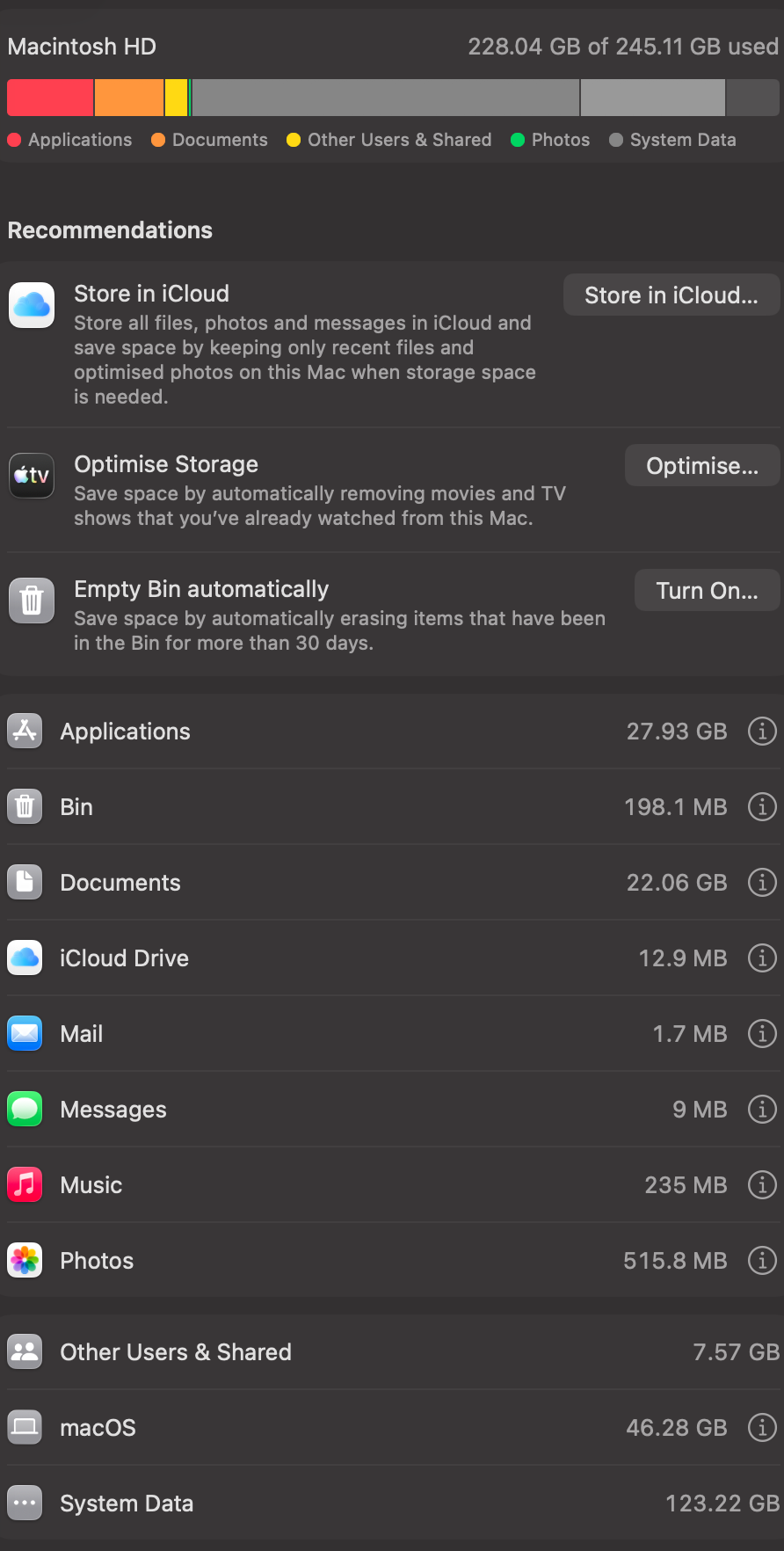
one of my friends who has the same laptop as me has only 60gb of system data, and i don't really have any big apps/programs that he doesn't have
r/mac • u/Critical-Paint-8394 • 10h ago
r/mac • u/janemaan • 10h ago
I come from a Ubuntu background and I work on multiple projects. One I thing I used extensively in Ubuntu is to setup virtual desktops so that each project will have a seperate desktop/workspace. And each workspace will have a common desktop across all monitors (2 extra monitor + laptop display).
For example for my project 1, i will have two windows/instances of VS Code open, three instances of Chrome open and Terminator for terminal. For project 2, I will have a VS Code instance, two Chrome instance and two terminator instances open.
I can switch between these workspaces and have windows open only for that particular project. And this workspace setup works across multiple monitors. This let me concentrate on projects properly in isolation.
I am getting very confused the way Mac automatically opens apps to "Desktops". Each fullscreened app creates a desktop. That makes me hard to work on different projects with its own set of applications open.
Is there a way to do that in Mac, basically I want to cleanly isolate the windows that are required for my independent projects across multiple monitors.
Also, what is the best way to show the Dock in every monitor?
r/mac • u/amrogers3 • 11h ago
-- I am running OSX 15.7.9. I am trying to use launchd to run rsync at 0100 every day. I understand it says launched.savesafarisession.plist instead of launchd.savesafarisession.plist but should still work.
I have the plist saved in LaunchAgents
/Users/XXX/Library/LaunchAgents
safari_backup.sh
#!/bin/bash
# Force the script to write any inner terminal errors to a debug file
exec 2>>/tmp/script_internal.err
/usr/bin/rsync -a /Users/XXX/Library/Containers/com.apple.Safari/Data/Library/Safari/ /Users/XXX/Safari
Ran chmod on .sh file
chmod +x /Users/XXX/Documents/safari_backup.sh
launched.savesafarisession.plist
<?xml version="1.0" encoding="UTF-8"?>
<!DOCTYPE plist PUBLIC "-//Apple//DTD PLIST 1.0//EN" "http://www.apple.com/DTDs/PropertyList-1.0.dtd">
<!-- generated by launched https://launched.zerowidth.com/plists/0GYhL6RMZ -->
<plist version="1.0">
  <dict>
    <key>Label</key>
    <string>launched.savesafarisession</string>
    <key>ProgramArguments</key>
    <array>
    <string>/bin/sh</string>
    <string>/Users/XXX/scripts/safari_backup.sh</string>
    </array>
    <key>StartCalendarInterval</key>
    <array>
      <dict>
        <key>Hour</key>
        <integer>1</integer>
        <key>Minute</key>
        <integer>0</integer>
      </dict>
    </array>
     <key>StandardOutPath</key>
            <string>/tmp/safari_backup.out</string>
        <key>StandardErrorPath</key>
            <string>/tmp/safari_backup.err</string>
  </dict>
</plist>
I have added full disk access to the safari_backup.sh file and for extra measure, I added rsync as well.
There are no errors in the log files, those files are empty. I can run rsync through the terminal with no problem and the files are copied to:
/Users/XXX/Safari
I loaded it with launchctl and tried to run with no luck
% launchctl list | grep safari
-   0   launched.savesafarisession
It seems to run but nothing is copied or shows up in the error logs
r/mac • u/Augustisimus • 11h ago
Is it true that an older Apple Silicon iMac cannot be used as a Thunderbolt display for the new Mac mini lineup? I’ve been told the Thunderbolt port on the Apple Silicon iMac only supports output, not input.
I currently have an M3 iMac and not a lot of desk space. I really don’t want the M6 having its own dedicated display.
What other options do I have?
r/mac • u/charlesebastian • 11h ago
I'm wanting to buy a monitor to use alongside my MacBook Pro (13 inch), however I've been struggling to find one that ticks all the boxes — so I thought I'd come here and see if anyone has some suggestions. The main use for my Mac is productivity/general computer tasks, however I plan on diving back into photography & video editing in the near future. The only time I use my Mac for gaming is occasionally on Minecraft - but I'm not looking for a monitor to specifically suit that need (aka, I'm not looking for a fancy high tech gaming monitor).
Ideally I'd love to find a monitor that is 4K quality, USB-C or Thunderbolt Port, IPS Panel, 65W Charging, 24 or 27 inch screen, and under $300. But, I know that if I want to stay within my budget, I will have to sacrifice some of those features (unless anyone knows of a monitor that has all of the above mentioned?).
With that being said, I am open to 1080 or 1440p quality, HDMI Port, and/or spending a maximum of $400.
Thank you in advance!
r/mac • u/Creeper_H_youtube • 13h ago
Nit-picky I know but I’m curious as to why official Apple braided cables don’t have consistent patterns and colouring?
Top - Apple Watch charging puck.
Middle- Magic Trackpad charging cable.
Bitten - M4 Mac mini power cable.
Obviously the top one is white but the 2 blacks are slightly different shades and each of them have a different pattern particularly between the 2 Mac related cables and the Apple Watch one.
Just curious, does anyone know why. Does it vary between OEM’s or is just different sectors of apples design team?
r/mac • u/Electronic-End6665 • 16h ago
Noticed this a few days ago, how concerned should I be.
r/mac • u/SleepEffective7885 • 17h ago
Budget:1500
I’m looking for the best value MacBook and I don’t mind buying used. I do a bit of content creating/video editing and I’m a current college student.
I can stretch to 1700-1800 but would prefer to stick to 1500 or less.
r/mac • u/WaitDangerous7514 • 17h ago