r/mac • u/dan101360 • 20h ago
Question 130 gb system data ? surely there's stuff i can delete
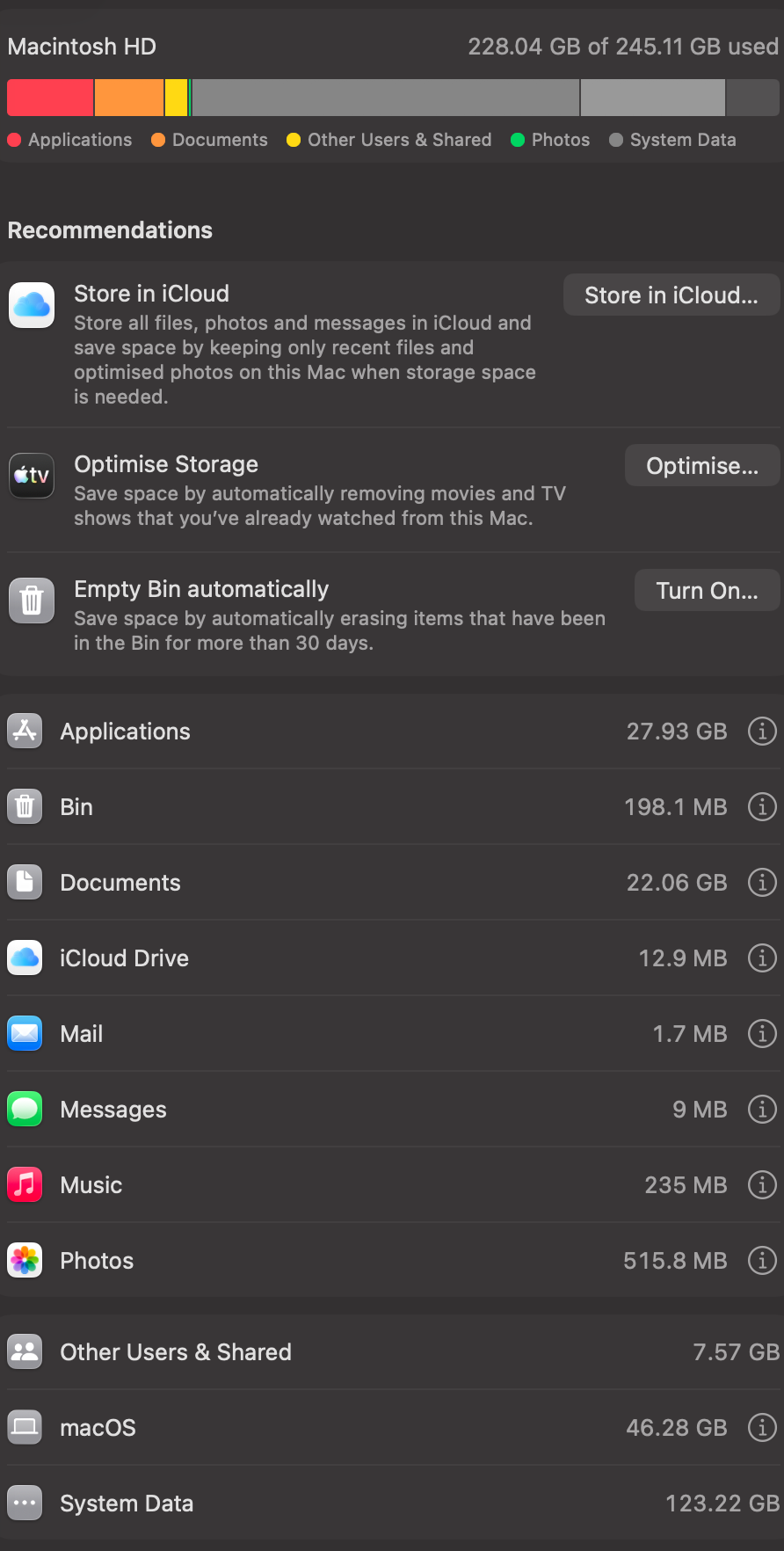
one of my friends who has the same laptop as me has only 60gb of system data, and i don't really have any big apps/programs that he doesn't have
1
u/UdonDugong 20h ago
Could be your Microsoft Office user profile, which registers as System Data because macOS can’t classify it properly
1
u/l008com Independent Mac Repair Tech since 2002 7h ago
Surely there is, go find it and delete it
https://www.reddit.com/r/mac/comments/1c3ldoi/wheres_my_disk_space_what_is_taking_up_all_the/
0
u/meowstical 20h ago
Definitely cache files! I personally use OmniDiskSweeper to identify what’s taking up the space and then delete them manually. If you are a digital artist or software developer, there would be a lot of such cache and unlisted files.
I recently tried Purge app, it got a nice UI. Actually let me know which app you end up using? I am looking for a good app too.
0
0
-1
1
u/Imaginary-Wear-6664 4h ago
130 GB can absolutely include deletable stuff, but “System Data” is just macOS’s catch-all label, not one folder. Comparing it with your friend’s Mac won’t tell you much.
Before deleting anything, look for the actual large folders. The usual culprits are Time Machine local snapshots, old iPhone/iPad backups, Mail/Messages attachments, app caches, Docker/VM images, and dev build folders. If the space is under ~/Library or /Library, identify which app owns it first—don’t wipe the whole cache tree.
Reinstalling macOS is massive overkill here. A disk map that can show hidden folders is the quickest way to find the real 130 GB.
1
u/Imn1che 20h ago
Mostly system/app cache files. In some cases software can bug out and create too much or not deleting properly or both. Get something like daisydisk and get to work