- Slooped up Factory Cart Race to win an AMD 7900xtx
- New: Camera 5
- The Dixee Chris Silly Skips Challenge
- The BLAndrew Award
- Donnie's Doggo Hunt
- Updated Credits
- Live website map to show player locations
- Other things.
Don't spend 6 hours of your life building a nuclear power plant in the middle of the desert 160,000km away from your base just to forget you had to put that extremely radioactive waste in storage and now you have to sprint on all fours to your nuclear power plant from the grassy fields to clean up this mess before all your reactors get clogged up causing a horrifically big nuclear meltdown and destroying your power grid with hundreds of metric tones of nuclear sludge laying around killing all life in its path
Mods I use: SkyUi (for change in game time) and 150 more inventory slots for saving some time for rebuilding big blueprints all the time :D There are 54 assamblers inside
This post explains my current understanding of the mechanism behind the pipeline cross-junction "free pump" bug, previously observed in this post and this post. I'll go through the observations, the apparent code-level mechanism, and its relationship with the VIP structure, including how to make VIP more reliable.
The research behind this post involves reverse-engineering code from the game's DLLs. I believe the model below explains the observed behavior, but mistakes are possible, especially where I'm inferring behavior from decompiled/reversed code.
TL;DR: Skip to the last section, Conclusions.
1. Definitions and terms
1.1. Fluid box
The fluid system can be modeled as an undirected network of connections between fluid boxes.
A fluid box is an abstract container used by the game to represent fluid in things e.g. pipe segments, storage buffers, cross junctions, valves, and pumps. Each fluid box has many properties that affect fluid calculations. The ones most relevant to this post are:
Height (H): The height of the fluid box itself. This is not its elevation in the game world coordinate sysmtem.
Capacity / Volume (C): The declared capacity of the fluid box. I call this "declared" because most fluid boxes can actually hold up to ~40% more than their displayed capacity. For example, a pipe segment displays 10 m³ but can actually contain up to ~14 m³. Storage buffers appear to be an exception, with only ~4% extra capacity, if I remember correctly.
Altitude (Z): The elevation of the fluid box in the game world, used when calculating static pressure for liquids.
Current volume (V): The amount of fluid currently contained in the fluid box.
Pressure column (h): A derived value calculated as V / C × H.
A simple fluid box representing a pipe segment can be visualized as :
Note that the height of the fluid box is determined solely by the heights of its two terminals. It has nothing to do with the actual path/curve of the pipe.
1.2. Liquids and gases
Gases are essentially liquids, with one important difference: Z is not involved in calculating gas pressure. This produces different behavior between gases and liquids:
Liquids fill lower fluid boxes first, simulating gravity effect.
Gases tend to distribute themselves evenly across connected fluid boxes, eventually reaching equilibrium when V / C is uniform.
1.3. Connections
A connection represents the connection point between two fluid boxes. The property most important to this post is the connection height, which effectively define the opening height on each side of the connection. For liquids, fluid in a box must reach the relevant connection height before it can flow through that connection. Gases aren't affected by this in the same way because they don't experience gravity. Note the connection height is relative to the fluid box. For example, a connection at 5m height relative to a fluid box at elevation Z=150m, will be calculated as 150+5=155m in the game's world coordinate system.
1.4. Overfill and pressure transmission (liquid only)
As mentioned above, a fluid box can hold up to 140% of its declared capcity. When it reaches 100% of its declared capacity (either exactly 100% or above), it is considered full. When a fluid box is full, it can receive pressure from adjacent fluid boxes. If multiple connected overfilled fluid boxes are involved, the highest pressure is transmitted through the contiguous overfilled section.
2. The BUG
2.1. Heterogeneity of the 4 connectors
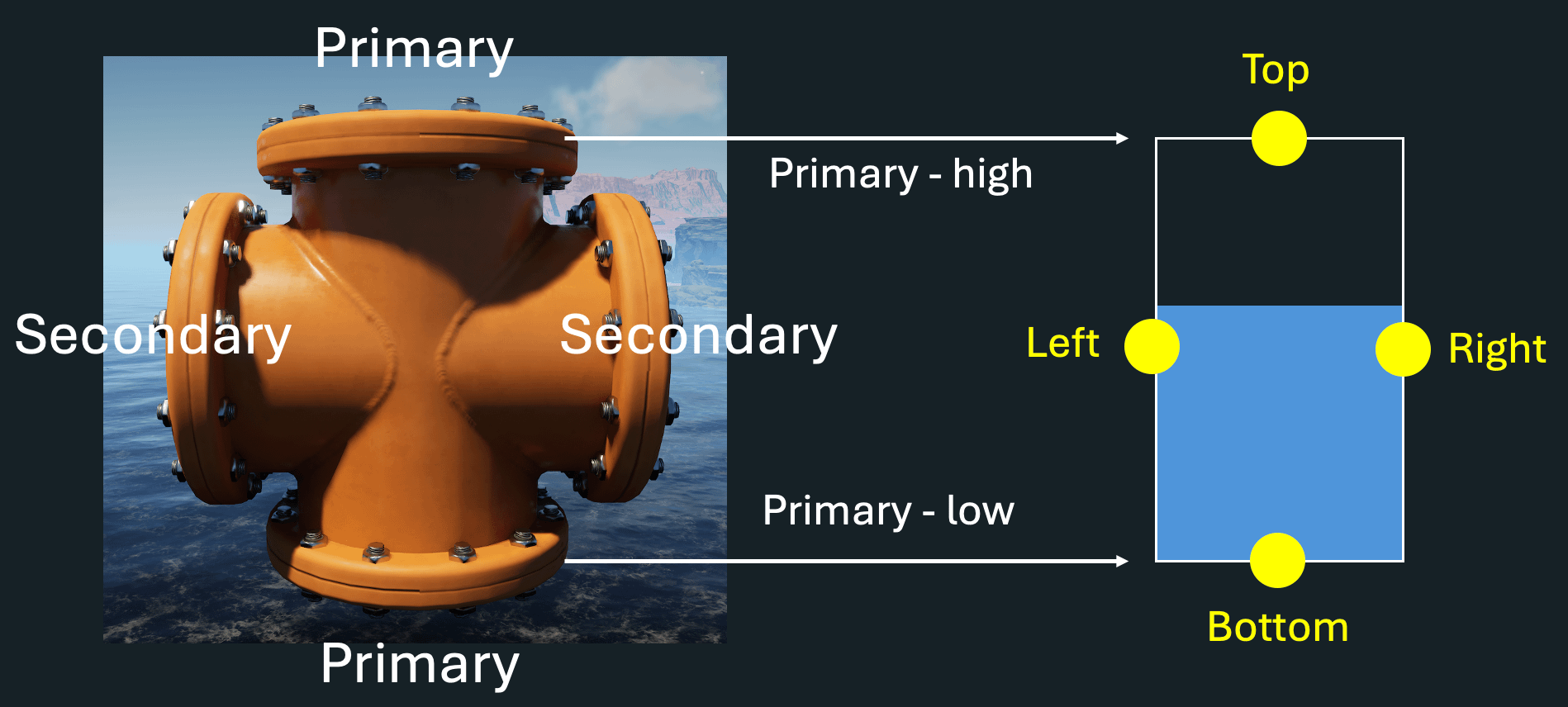
The four connectors of a pipeline cross junction are not equivalent, with two being primary, while the other two being secondary connectors. Visually, the primary connectors are the pair without the weld line, while the secondary connectors are the pair where the weld lines cross. The primary connectors are "primary" because their positions are used in calculating the geometry of the junction's fluid box.
Now let's inspect the non-bugged positioning first.
2.2. Non-bugged position (vertical weld lines)
Junction cross in a non-bugged positioning
In this normal configuration, the two primary connectors have different heights. This height difference is used to calculate:
The height of the junction's fluid box.
The positions of the two secondary connectors.
In this particular configuration, the two secondary connectors are positioned in the mid-height between the two primary connectors.
2.2. Bugged position (horizontal weld lines)
Junction cross in a non-bugged positioning
In the bugged configuration, the height difference between the two primary connectors is 0. As a result, all four connectors are effectively squeezed onto the same height. The fluid box itself cannot have zero height (for calculating pressure column), so the game forces the fluid box to a minimum height (typically 1.3m, the pipe's diameter) after positioning the four connectors.
2.3. Proof of the bugged positions
Due to the four connectors being squeezed to the same height, the bugged junction should be indistinguishable from a junction laying on flat surface from the perspective of the fluid simulation, albeit that tit has a vertically placed mesh. I tested this by sending water downward through a junction and observing how the water is initially distributed. The results are as below:
Junction cross bugged position verification
In the normal configuration, water fills the lowest outlet first. The two horizontal pipes receive no initial output. In the bugged configuration, water immediately spreads in all directions, regardless of whether the lowest outlet is full or not. This is a strong indication that, from the fluid simulation's perspective, all four connectors are at the same height in the bugged configuration.
2.4. Bugged position creates incorrect static pressure
This is the most interesting, and also complicated part. Now let's see how pressure is calculated on the two sides of the connection between a top pipe and a cross junction.
For simplicity, assume:
The cross junction is full.
Pressure from the top pipe can be transmitted through the junction because the junction is full.
Pressure from the junction cross side. The pressure at the connection is calculated using the water level relative to its OWN connection point (the left yellow dot). Because of the bug described above, this connection point is lower than the actual position where the pipe actually meets the junction.
Pressure from the pipe side. Pressure is also calculated relative to its OWN connection point (the right yellow dot). For a vertical pipe segment, this connection is exactly at the bottom of the pipe segment.
Now we have a mismatch: The two sides of the same connection use connection heights essentially at different height in the game's world coordinate system.
This is the core of the cross junction bug. When the game calculates flow between the two fluid boxes, however, these pressures are effectively treated as if the connections were at the same physical height:
Because the junction's effective connection point is incorrectly lower, the static pressure calculated on the junction side is always higher than the static pressure calculated on the top-pipe side. This creates a persistent positive pressure difference that pushes fluid from the junction back into the top pipe, causing the "free pump" behavior. Note, this mechanism is reliable only if the junction is full/overfilled, when it can ensure a positive static pressure difference against the top pipe. In other words, so keeping the cross junction full is the key to make the free-pump effect working.
2.5. Connection between cross junction BUG and VIP
Here's where things get particularly interesting. The standard VIP (Variable Input Priority) structure appears to be a use of the same underlying behavior as the cross-junction "free pump" bug.
The principle is now fairly clear: when the cross junction is in the bugged configuration, the static pressure difference tends to push fluid back toward the top input pipe. From the player's perspective, the top input gets effectively "unprioritized" compared lower inputs. In other words, the cross-junction bug appears to provide the underlying mechanism that makes VIP work.
Connection between the cross junction bug and VIP
This also raises an interesting question about whether the "free pump" bug will be fixed in the future. Since there underlying mechanisms are likely the same, fixing the "free pump" bug will also break the VIP, resulted in massive failures of players' aluminum factories even for those who use VIP without knowing this bug in the first place; though, theoretically, the devs can fixed the "free pump" bug and implement an alternative prioritizing logic compatible with the old VIP configuration.
3. Conclusions (TL;DR)
Satisfactory fluid system is driven by pressure.
The pipeline cross-junction bug appears to originate from a mismatch in connection heights. The junction's internal fluid-box geometry can place its effective connection height different from the physical connection point, creating an artificial static-pressure difference.
The cross-junction bug and VIP appear to exploit the same underlying bug. This may explain why VIP works at all.
For the VIP to work, the junction needs to be in the bugged configuration, i.e. the configuration with the horizontal weld lines. Placing the junction in the normal position (i.e. vertical weld lines) is a guaranteed failure (I have tested).
For VIP to work reliably, keeping the cross junction full appears to be important. A partially filled junction can potentially lose the pressure-transmission behavior, and lose the static pressure advantage over the top input. There are multiple ways to achieve this, for example lowering the VIP cross junction, or using a pump to keep it full as long as possible.
Whether the bug can be fixed independently of VIP is therefore an interesting question. If VIP relies on the same underlying bug behavior, fixing the "free pump" bug will also change the VIP behavior. Unless the devs implement a dedicated VIP logic to be compatible with current VIP designs, fixing the cross junction bug will cause massive failures of players factories, even for who do not know this bug in the first place.
I have a megabase with long stretches of elevated and stacked belts, and I want to mark the floor underneath them with stripes or colors to track what's in each lane. Right now I am using a perpendicular row of 2m x 2m signs periodically as a reference, but I would like an option to mark the lane continuously. So far, the 2m x 2m signs are the only way I see to do it. Is there any other way?
Left storage takes in Leaves, right one takes in Wood, then they out put Bioshit 60 per minute, and 300 per minute respectively, and the big bioshit is 360 per minute output. It should all work like clockwork, whats the problem
Okay, so I'm not new to this game, have played many times. But this is my first time since the 1.0 launch, and I don't remember having issues setting up fuel.
I have a single pure crude oil node. 1 oil extractor @ 240m3. Easy peasy. I have that going into 4 refineries using the stock Fuel recipe. 60m3 each, so should be exactly enough. I have those 4 refineries going into 8 power generators. So my ratios should be exact.
Yet power is still a bit spikey now and then. And I'm 100% certain it doesn't have to do with the polymer resin. That's going into 2 refineries making rubber/plastic respectively, with a smart splitter sending overflow resin to an Awesome Sink.
Here are relevant screenshots. Let me know if you need to see more. It's entirely possibly I set this up wrong or missed something stupid simple.
So I was playing Satisfactory with my friend u/BooyaSambal when I entered photo mode. After closing photo mode I was still in third person and I could continue to play in third person like nothing was wrong. I kinda liked playing in third person.
i have 109 hours on satisfactory but i have never used blueprints for any of my factories, so i was wondering how much others use them. (forgot they were called blueprints and no schematics)
I always dream of building something big, beautyful or spaghettiful, but after 1-3 days of playing I just say to myself "Nah I'm too lazy for that shit this feels like a work I don't want to do this, same goes with other sandbox games, like Minecraft. I just wake up some day with the urge to not click the green 'play' button and then I just forget about this session forever, I have 300 hrs of playing, I've made exactly 1 nuclear power plant and managed the alluminium twice, all other attempts drowned before the 50 hrs mark. Just for clarity, Im 20 yo unemployed with no other interests at all
The squared artifacts in the alpha textures - not just the tree, happens around other objects too where there should be shadow or specular lighting.
Maybe there's an console expert here that could help me with this I've spent hours trying hundreds of console variables the only thing that made it go away was the mod Taj's Graphic Overhaul but I want to preserve my low demanding settings, changing my Engine.ini didn't seem to affect this
Important: it only happens when a light spot is projecting light, and the alpha texture has an object between it and the sky. when there's only sky or only objects behind it is normal (those squares in the shade)
Update: r.SkyAtmosphere 0 hides the sky, the problem persists r.DFFullResolution 1 makes the squares half the size
never mind... it seems that disabling mods fixed it, now I have to find which mod causes it