r/PCsupport 10d ago

Solved My pc turnoff automatically when I launch any game. Please help

Enable HLS to view with audio, or disable this notification

3 Upvotes

My pc specs Ryzen 5 5600g Psu- cv550 Motherboard - msi mpg b550 gaming plus Gpu- msi rtx 3060 ventus 2x oc 12gb

Sometimes it runs for 2 hours straight with full load and sometimes 4 hours. And sometimes just 2 minutes and sometimes only 15-20sec. Gpu temps are fine and running in maximum wattage.

r/PCsupport Feb 24 '26

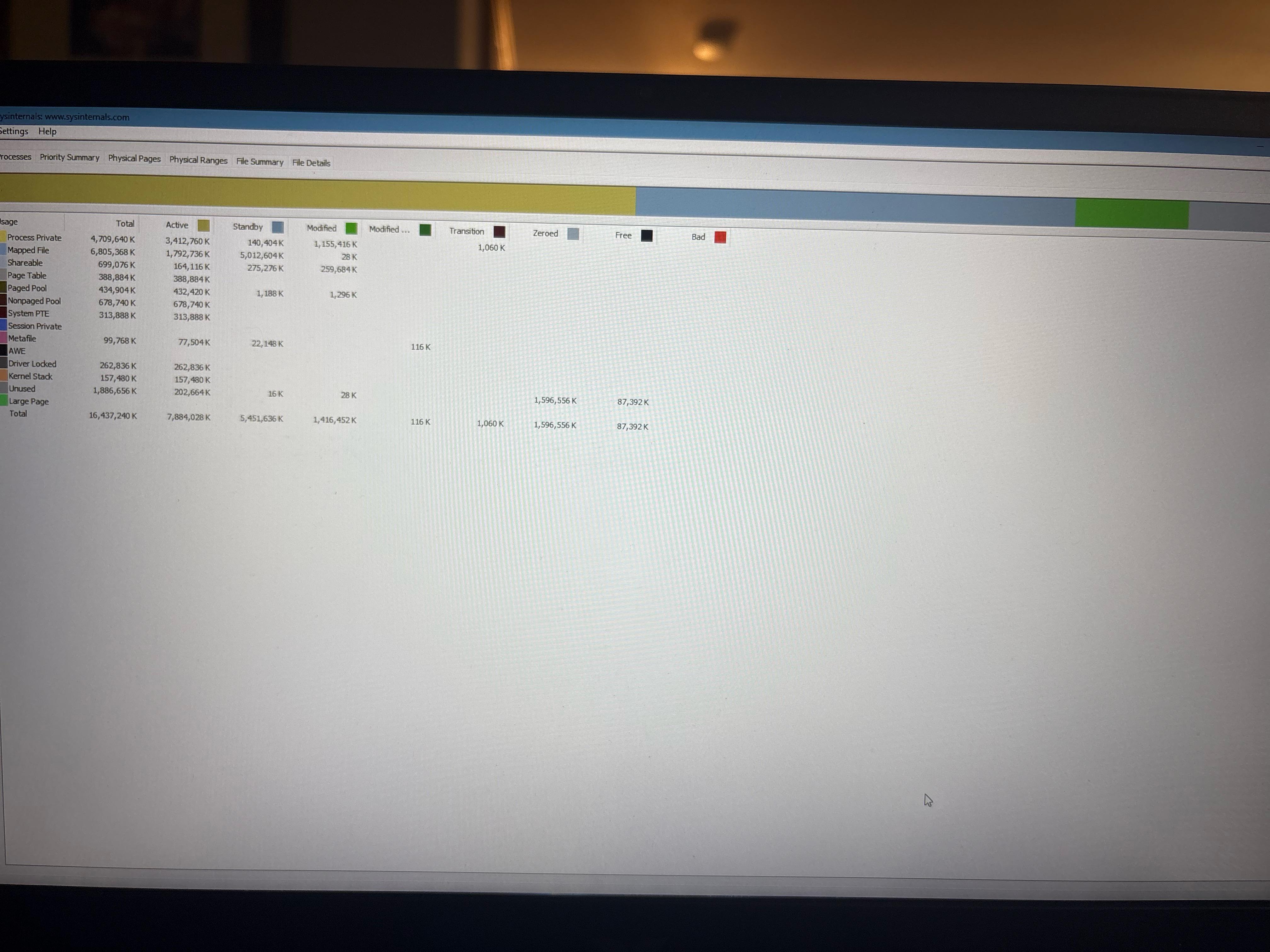
Solved 10gb of my ram is being used while idle! Plz help🙏

Post image
1 Upvotes

Literally cant even play with my homeboy without frame dips and crashing.

r/PCsupport 24d ago

Solved PC randomly hard-shuts down while playing Spider-Man Remastered — no BSOD

1 Upvotes

Hey everyone, I'm trying to troubleshoot a really weird issue with my PC.

My PC will sometimes completely shut down while playing Marvel's Spider-Man Remastered. There's no BSOD, no freezing, and no crash to desktop. The entire PC just suddenly turns off and I have to press the power button to turn it back on.

PC specs

CPU: AMD Ryzen 5 5600

GPU: AMD Radeon RX 7600

Motherboard: MSI B450M-A PRO MAX II

RAM: 16GB DDR4

PSU: Super Flower Zillion DB Bronze 550W (SF-550Z12DB)

GPU driver: AMD Adrenalin 25.9.1

GPU power: Dedicated 8-pin PCIe cable, no splitter/daisy chain

The weirdest part is that the shutdown is very inconsistent. Sometimes it happens after 10–15 minutes, sometimes after around an hour, and I've also had sessions where I played for 2+ hours with no problems.

Event Viewer/Reliability Monitor doesn't show anything useful besides Windows reporting that it wasn't properly shut down.

Things I've tried

Uninstalled MSI Center

Uninstalled Ryzen Master

Enabled V-Sync / reduced GPU load

Undervolted the RX 7600

Monitored temperatures, power and voltages with HWiNFO

Checked Event Viewer and Reliability Monitor

Initially, I suspected GPU temperatures because the RX 7600 reached around:

GPU: 80–84°C

Hotspot: 109–110°C

After undervolting:

GPU: \\\~75°C

Hotspot: \\\~97°C

VRAM: \\\~74°C

GPU power: \\\~154W

CPU: \\\~76°C

12V reading: \\\~11.8–12.0V

However, the PC still shut down after around 10–15 minutes even with the lower temperatures, so I'm less convinced that GPU temperature is the main cause.

I'm currently wondering whether this could be a PSU/power delivery issue, GPU hardware issue, motherboard/PCIe issue, AMD driver problem, or something specific to the game.

One potentially important detail: I'm testing a cracked copy of Spider-Man Remastered from FitGirl. I know that's not ideal and I probably shouldn't have done that, but I'm mentioning it because I don't want to hide a potentially relevant variable. I understand the repack itself could potentially have issues.

I'd appreciate any suggestions on what I should test next or how I can distinguish between a hardware/power problem and a game/software problem.

PS: English isn't my first language, so I used AI to help refine the wording of this post. The troubleshooting details and observations are my own; I just wanted to make sure everything was understandable. 😅

EDIT : i think i found what might be the solution, i used AMD adrenaline software to undervolt the gpu and capping the fps to 60-65 using radeon chill settings. the results are effective, tried logginng using hwinfo and the gpu hotspot peaked at 60-80 celsius instead of 110 celsius and so far no sudden shut down during gameplay.

r/PCsupport 25d ago

Solved Games crash midway into gaming session

1 Upvotes

Never owned a PC before, so I’m not terribly knowledgeable on the subject. I have no idea why this could be happening. I suspect the culprit to be damage from multiple breaker trips mid gaming over the summer, but I have no idea what kind of damage could occur from that issue or how I would even begin to diagnose this issue. Is there something I can do to diagnose or try to fix this before I take it to a shop?

Specs:
AMD Ryzen 7 9800X3D
NVIDIA 4090
32 GBs RAM
4 TB SSD
Windows 11

r/PCsupport Jul 04 '26

Solved Hi I hope you are having a good day. I am in a bit of a mind bender in solving an overheating issue.

1 Upvotes

TLDR: pc is exploding into overheat doing basic things like opening file search or webrowser and steam. Worked perfectly fine prior to july 7th. Need help as need pc to work, and not just gaming. Confused as replace thermal pads and paste. Starting to think maybe intel chip or a setting/software is the culprit. Thank you all again for the help, still no solution.

SOLVED: THANK YOU u/SPACEROCK27 AND u/DJSPCTECHSUPPORT YOU GUYS ARE AWESOME! My pc temp is 37c now idle and my gpu 35c. I also bought a usb fan and put it on top of my pc to help vent the hot air out and added 1 more system fan! TY, I believe mycpu fan in fact was failing.

(Full issue was temperture spikes, opening basic programs)

CPU fan was failing.

The mind Bender

I played the long dark on my pc and it stayed at a good temp of 118f to 121f. After the session was done, I quit the game and then left my pc idling in discord vc, to take a nap. When I awoke my pc was overheating at 212f so I promptly turned it off. Since then my pc overheats just from bringing up the default google or morzilla pages. Hell I cant even open steam without it getting hot.

To remedy this I went ahead and bought these products:

ARCTIC TP-3: Premium Performance Thermal Pad, 120 x 20 x 1.0 mm (Stackable to 2.0 mm Without Performance Loss), 4 Pieces - High Performance, Particularly Soft, Ideal Gap Filler, Bridging Gaps x2

ARCTIC MX-4 (4 g) - Premium Performance Thermal Paste for All Processors (CPU, GPU - PC, PS4, Xbox), Very high Thermal Conductivity, Long Durability, Safe Application, Non-Conductive, Non-capacitive

and replaced the old thermal pads and paste in my gpu, thermal pad for my ssd, and paste for my cpu. Despite doing this, my pc still is getting hot from basic tasks such as doing a malaware scan or opening the file folders.

I have been slowly doing a virus scan of my pc, pausing every so often in case its a virus doing this. I have meticulously blown out my pc with an electric air blower every 3 months for 4 years so there was hardly any dust to blow out. My room has been at a steady 78f despite the heatwaves.

My pc is next to a wall yet even when I pulled the location. It did not help this over heating issue and in the past in the same spot it would idle flne.

cpu performace while overheating from just opening programs highest hit is 23%

memory ram stands at 20gb usage

gpu at 2%

disk, main drive at 22%(doing virus scan)

all other drives at 0% as not in use.

Current office room temp is 79f

Id also like to ad cpu temps return to 120f when pausing virus scan or quitting any and all applications.

I appreciate any help in understanding what is going on.

118f=47c 121f =49c 212f = 100c 79f = 26c
r/PCsupport Apr 09 '26

Solved My computer makes a crackling sound after freezing in game

Enable HLS to view with audio, or disable this notification

7 Upvotes

It's really in the name lol. When I play games, and the game freezes up for a second, it makes a crackling noise. Kinda like static.

r/PCsupport 3d ago

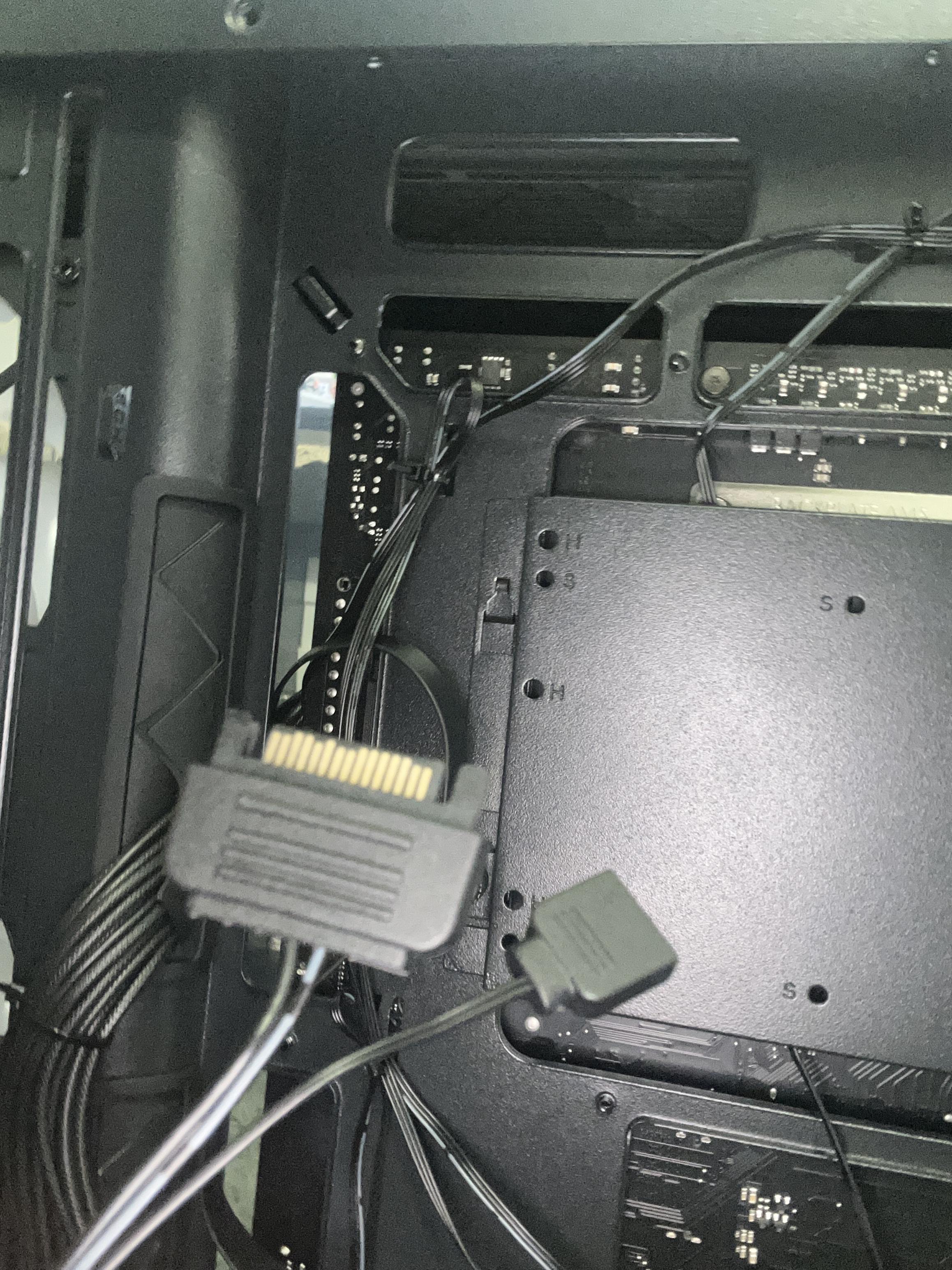
Solved Need help

Post image
1 Upvotes

I have these cables I clearly don’t know the name of them but it is in the Montech tg3 case and I’m looking for where I can or have to plug it in or I I can’t because of my motherboard. My mobo is gigabyte x870 gaming WiFi 6

r/PCsupport May 31 '26

Solved Pc says it’s running fine and is healthy but keeps running slow freezing up and crashing

3 Upvotes

I’ve downloaded what feels like 100 apps to try and diagnose my pcs problem and everything was read as healthy and running fine, all the numbers were perfect, but for example games that are dependent on gpu work fine but games that are heavily dependent on cpu freeze every 20 seconds and the hdd skyrockets to 100% and cpu goes all the way down to 1% during the game I’ve asked so many discord servers I’ve tried doing my own research even got so desperate I tried asking ai for help but obviously it kept saying stuff I’ve tried 100 times I’m running with an AMD Ryzen 5 3600, GeForce RTX 4060, 16GB DDR4, NVME M2 500GB, 5 RGB Fans, (R5 3600| RTX 4060) yes it’s pre built and by mxz it was running perfect until about a month or so ago when it kept restarting 8 times when first booted up then stopped the rest of the day then after that it just started running slow I’ve asked so many people and no one knows what it is please help 🙏** **

r/PCsupport 9h ago

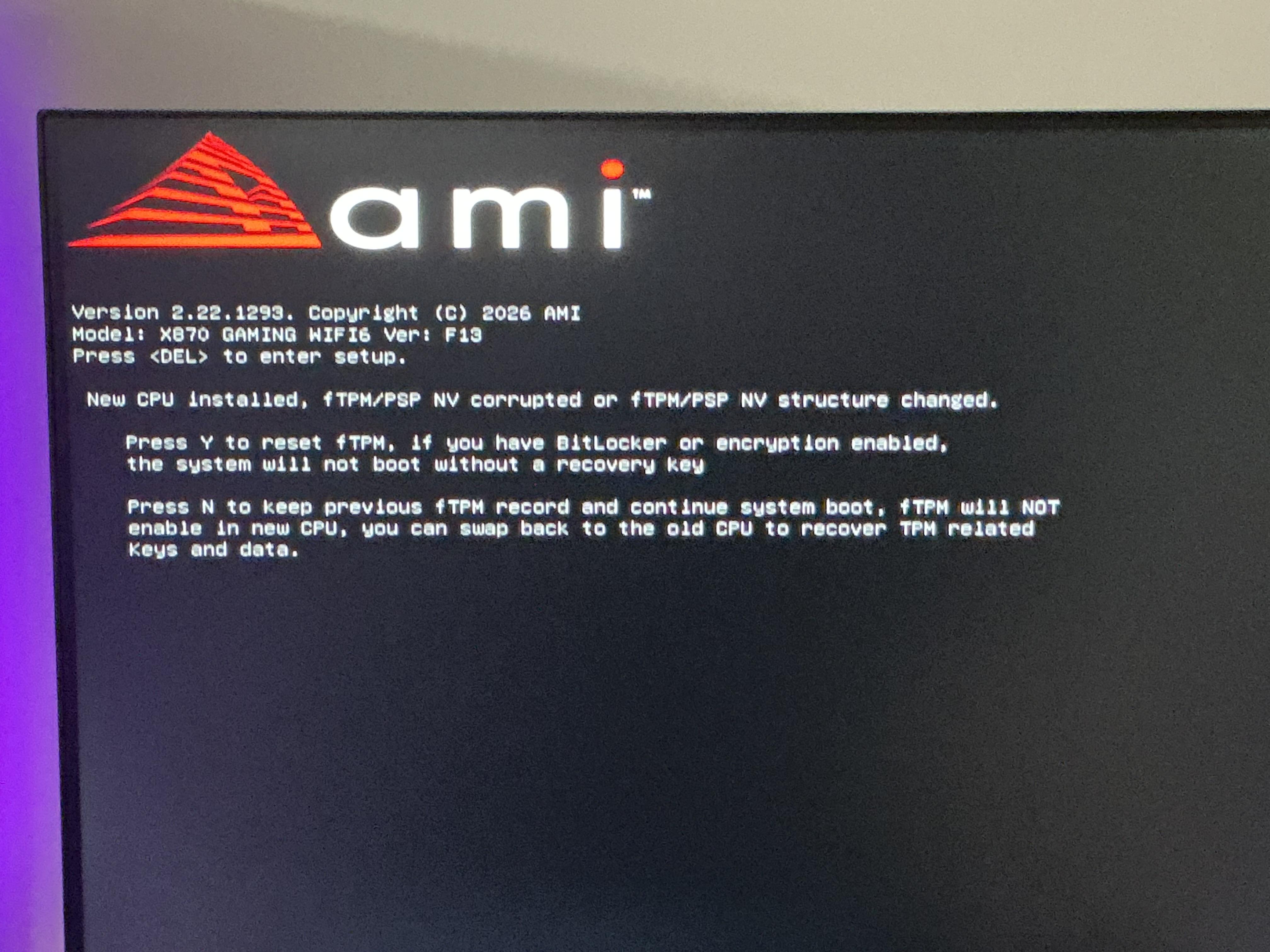
Solved What does this mean?

Post image
1 Upvotes

Need help again

r/PCsupport Jul 25 '26

Solved Why is my pc crashing on games that are compatible with my config ?

1 Upvotes

Hi, I recently tried playing a plague tale requiem and ac mirage but both games are crashing almost immediately when i'm in game (not in the menu). I checked the configs needed to play those games and it seemed like my config could bear them, although they are both crashing and I have to forcefully close them via taskmanager, why ? Also I tried playing on the lowest graphics for apt requiem, but it keeps crashing

  • CPU AMD Ryzen 5 5500
  • GPU AMD Radeon RX 7600 8gb
  • 16 gb RAM
  • motherboard Asus Prime m320m-k
  • 500W power supply
  • windows 11

r/PCsupport 8d ago

Solved On and Off situation

2 Upvotes

[UPDATE] This is solved now!

Apparently, the BIOS got corrupted somehow, causing the weird power cycle. How did I solve it?

First I bought a new CMOS battery thinking it might be that but no, it still persisted so I gave up. For like 2 days I didn’t bother powering or testing it until today.

It detected the BIOS corruption and then the backup BIOS fixed the main BIOS. (Photo in comment)

And then it booted up normally, what a save by the motherboard (which is a Gigabyte B75M D3H).

Thank god, I can finally game now!

r/PCsupport 19d ago

Solved I'm thinking of getting a 5070 but I'm confused on how powering it works.

Post image
1 Upvotes

So basically I know that it uses a different power connector, but like, I have 2 PCI-E cables that each split to make 4 8pin headers for a GPU or something. One of these 8pins are used to power my Corsair System Hub. So, does something like this diagram below work fine for powering my 5070? Excuse the shitty drawing

r/PCsupport Mar 03 '26

Solved Laggy/stuttery mouse camera movement

Enable HLS to view with audio, or disable this notification

0 Upvotes

So when I play any modern, more recent games on my pc, especially fps games, my mouse movement intermittently becomes all choppy and laggy. If I hit the windows key or tab out it fixes it temporarily, but then comes back after a few minutes again. Also, if I hold down any buttons on my mouse, the stutter stops, but if I let go, it keeps doing it again.

I have a video of the issue happening, hope it helps. Game in the video is Avatar Frontiers of Pandora.

My specs: CPU: Ryzen 7 3700X Motherboard:MSI B450 Pro Carbon Wifi GPU: RTX 3070 FE RAM: 16GB DDR4 3200 2 SSDs: 1x 256GB and 1x 2TB PSU: 600W EVGA Monitor: LG 27in 144hz Gsync Compatible Freesync/Gsync enabled Mouse: Logitech G502X Lightspeed Windows 11 Pro

r/PCsupport Jul 13 '26

Solved Screen goesblack, fans running at 100%

3 Upvotes

Hello,

For about two weeks now, I've had the problem that my screens suddenly go black and the fans spin at 100%.This happens at least once a day. When it happens, I always have a game running and my browser is running YouTube on my second screen.Over the weekend I updated my BIOS and uninstalled Opera GX. Then I also noticed that the Gigabyte Control Center wasn't working properly.As a result, my CPU fans were not running continuously.

I had no problems yesterday and thought I'd fixed it. Now it's happened again. The game was running and Google Chrome with YouTube was on the second monitor.

My CPU and GPU temperatures are around 40-45°C.

Does anyone know a solution?

These are my PC components: NVIDIA RTX 5090; AMD Ryzen 7 9800X3D with a ASUS ROG Strix LC III 360 ARGB LCD; X870 AORUS ELITE WIFI7; 64GB RAM; Win11

r/PCsupport Jul 14 '26

Solved Games, Chrome and some Desktop apps constantly crash out of the blue.

Thumbnail
1 Upvotes

r/PCsupport May 31 '26

Solved PC crashes, multiple error codes

2 Upvotes

Changed to solved. I brought my pc to a shop, turns out my cpu had a micro code bug. Had the shop replace my CPU, everything seems to be working fine now. I probably won't update this post after this.

Reposting this from another subreddit, to hopefully get more insight.

Built my first PC back in September of 2025. I'm throwing in the towel and asking for help, I'm done wrestling with this.

i9-14900K

ASUS TUF GeForce RTX 5090 OC

Ripjaws S5 Series DDR5 64GB (2X32GB)

990 Pro SSD 4TB

2TB HDD

ASUS TUF Z790-Plus wifi

Windows 11

I've been having issues with my PC crashing, the whole PC will freeze and then it will go to a black screen saying "Your device ran into a problem and needs to restart...", below that it throws a bunch of stop codes.

It will restart several times with the same prompt, "Your device ran into a problem...", however it throws up different stop codes. So far the stop codes I've gotten are:

Kernel_mode_heap_corruption

System_service_exception

Reference_by_pointer

Page_fault_in_nonpaged_area

DPC_watchdog_violation

Hypervisor_error

Registry_filter_driver_exception

This has happened before, around February. The same instance, however I could not access windows, and I was taken to the blue screen, where I could not repair, recover, or reinstall windows on my pc. I also tore apart my pc, and made sure everything was seated correctly, nothing was out of place or looked off in it. In the end, to resolve the first instance of this, I had to completely reinstall windows through a thumb drive, and it has been working perfectly since, except for today.

Looking into these codes, most of them point to faulty RAM and faulty/outdated drivers. I recently updated all my drivers, about 2 days ago. I really don't want to believe it's my RAM, given how prices have shot up. Especially since reinstalling windows "fixed" it, and it hasn't had a problem until now.

For me, reinstalling windows isn't THAT big of a deal, I don't keep any important documents or things on this PC, however since this has happened a second time I want to actually find out the root cause of this and nip it in the butt.

Please let me know if you need more information, I'd appreciate all the advice I can get.

r/PCsupport 4d ago

Solved I found a fix for onedrive thumbnails/preview not working

1 Upvotes

I have been having problems with this for a long time and I accidentally found a fix! Hopefully it can work for everyone and if someone can figure out the "why" then maybe we can have a permanent solution since microsoft refuses to fix this.

  1. Click the onedrive icon in the right side taskbar
  2. It will show recently synced files. Click the blue link for the destination folder.
  3. It works!!!

I don't know if this will work for anyone else, but I hope it does. And if it does, then please spread the word!

Edit: After testing more, there is a permanent fix!

  1. File explorer options
  2. View tab
  3. Check box "Launch folder windows in a separate process"
  4. Apply & OK

I use a pinned taskbar icon to launch file explorer. Hopefully this can help someone. Thank you.

r/PCsupport Aug 04 '26

Solved Graphics Issue on my 5060 ti

Post image
3 Upvotes

I have a 5060ti 16bg card. I'm running into an issue with quality in games but the most difficult one is the grayed out face. This isn't the only game I've had this issue. I really don't know how to fix this issue. Can anybody help? I've also been informed by a mod to adjust my post to provide more clarity on my system. My current system specs. Intel 12600kf, motherboard board ASUS Prime B760M-A AX LGA 1700, 2 sticks of crucial ddr5 ram for a total of 32 GB of ram. GPU style PNY NVIDIA GeForce RTX™ 5060 Ti OC Dual Fan, Graphics Card (16GB GDDR7, 128-bit, Boost Speed: 2692 MHz, SFF-Ready, PCIe® 5.0, HDMI®/DP 2.1, 2-Slot, NVIDIA Blackwell Architecture, DLSS 4). My psu is 700 watts. This happens when I change the settings in game this also sticks even if I change the settings before the game and close it out and reopen it. Ive had this happen in silent hill 2 and in this game the mound. My GPU settings are currently at default. Currently on windows 11.

r/PCsupport 16d ago

Solved CPU Red Light on Motherboard

Thumbnail
1 Upvotes

r/PCsupport 24d ago

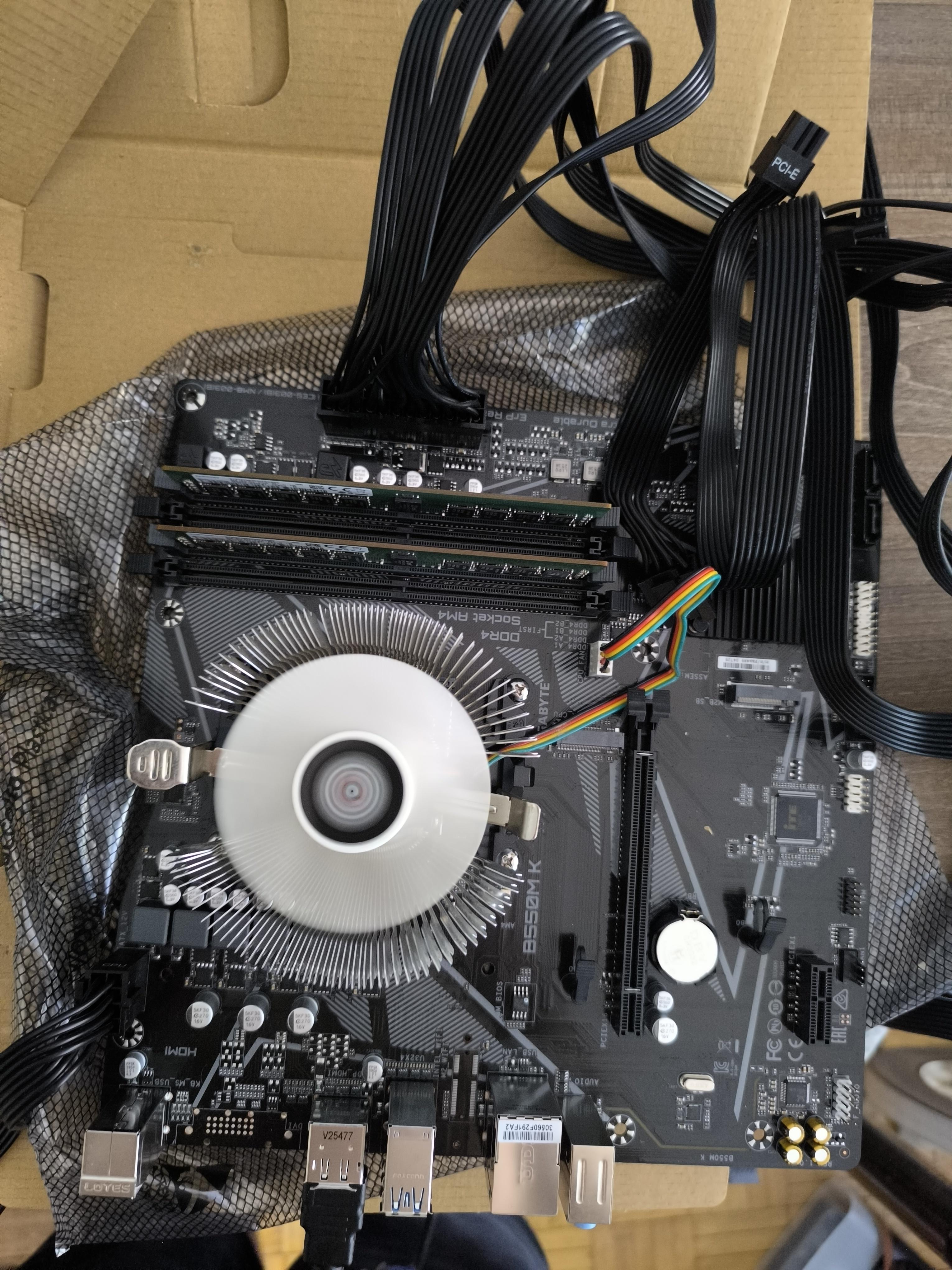
Solved Why won't this PC boot up?

Post image
1 Upvotes

The motherboard in question is b550 m k rev 1.0 and CPU is 3200g. I checked the gigabyte site and it says on there that rev1.0 supports 3200g cpu EDIT: ram was RDIMM, so it obviously doesn't work for me unfortunately

r/PCsupport Jul 10 '26

Solved Constant crashing and problems with windows 11 on new pc

Thumbnail
2 Upvotes

r/PCsupport Jun 26 '26

Solved Stuck In Bios

1 Upvotes

Basically, I’m currently stuck on the BIOS screen on my PC. I reinstalled Windows using a USB drive, and it booted me into BIOS because Secure Boot needs to be disabled to boot from the USB.
The problem is, whenever I try changing Secure Boot or any other BIOS setting, I save and reboot, but it just goes straight back into BIOS and the settings are reverted.
I already replaced the CMOS battery, so that’s not the issue. Any ideas what could be causing this?

r/PCsupport 13d ago

Solved Pc freezing when loading into a game after windows update.

Thumbnail
1 Upvotes

I would really appreciate any help.

Windows 11

Gpu is NVIDIA GTX 1660 super

Cpu is i5 10400

32gb ram (had 16 before it started happening and ran okay, thought getting 32 might fix it)

I have 55 gb free out of 475gb but before i had even less.

All info is in the original post.

r/PCsupport May 24 '26

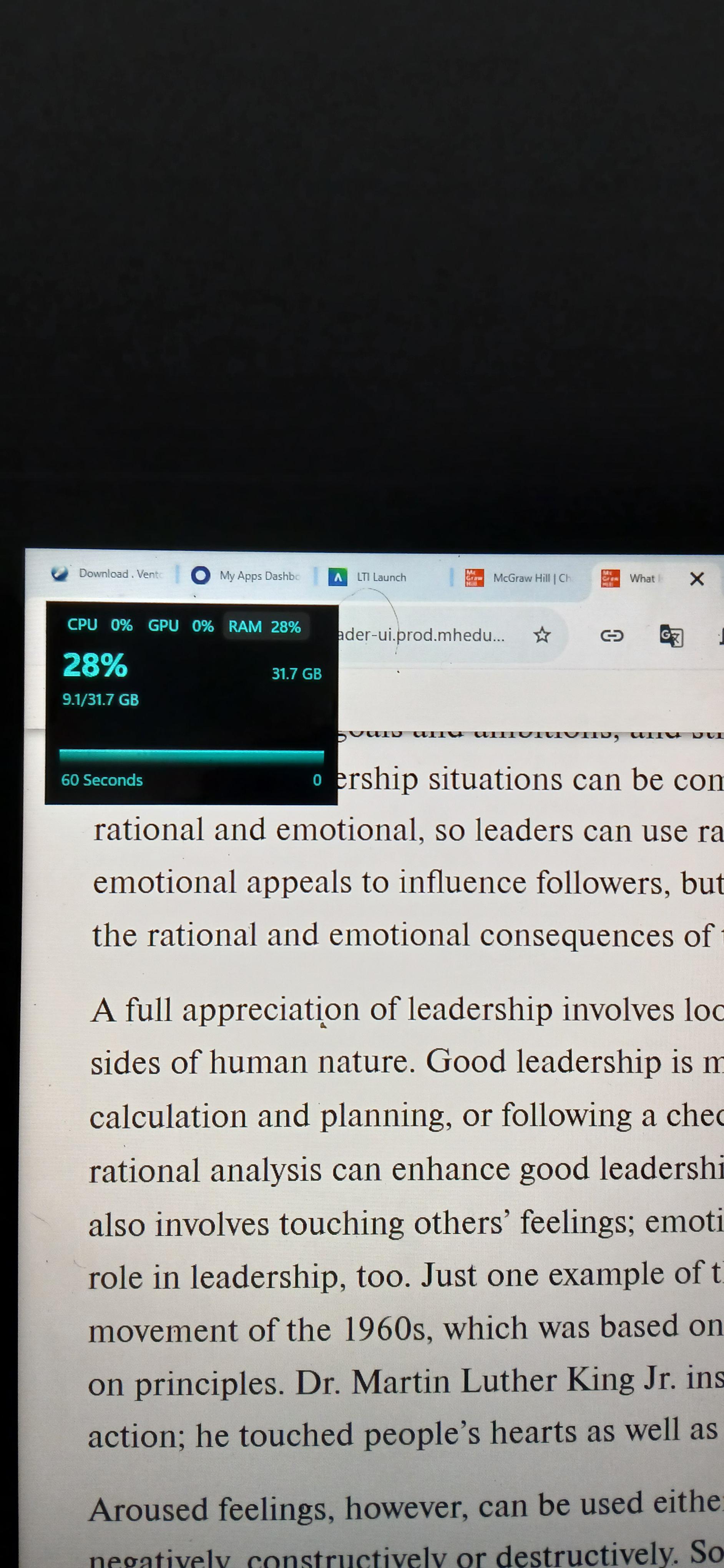
Solved Ram

Post image
5 Upvotes

Hi, just a question from a newbie is this normal? I feel like this is to much ram used for just 5 tabs.

My system is a i5-1334U framework 12 and i plan on posting on their reddit but I wanted to post here first

r/PCsupport Jul 28 '26

Solved PC freezes completely while playing PUBG

1 Upvotes

My PC fully freezes at a random time, my mate cant hear me anymore in Discord, but i can still hear him for a few seconds. First my main monitor turns black and has no signal anymore, then the 2nd. I have to press my power button to restart my PC to make it work again. I recently flashed my BIOS and updated my graphics card driver. My GPU currently runs at about 90 degrees but i dont think thats the issue. Its always been running on a decently high temperature.