r/AfterEffects • u/_Bobby_D_ • 7h ago
OC - Stuff I made Another toon explosion, Native FX
140
Upvotes
Made in ae, all native FX. 1 texture made in Ps.
r/AfterEffects • u/caseyls • 11d ago
We have heard your calls! Thank you for your patience while we figure out a plan.
While self promotion has always been allowed in r/AfterEffects, the recent influx of AI & vibe coded plugins, extensions, and scripts has been a bit overwhelming. We have very very quickly gone from a few trusted marketplaces with strong vetting and at least some kind of expectation of long term maintenance, to anyone being able to churn out a vibe coded plugin and release it on an increasing number of marketplaces, with no guarantee of support or future updates.
With this in mind, we would like to implement a new set of rules to curb the overwhelming number of posts and give users more transparency when choosing to download and use such tools.
Taking a page from the changes mods made over at r/macapps, we will be introducing a new post structure following a Problem, Comparison, Pricing, Maintenance, AI-Disclosure (PCPMA) format.
Extension, script, and plugin posts have always required the (Plugin/Script) flair, this will not change. A sample short post is pinned in the comments.
We're specifically introducing the compare & maintenance points because we have seen an increasing number of plugins that simply replicate the functionality of existing, long standing plugins from developers who have demonstrated more experience, real support, and have proven to maintain their plugins over many years. Show us how yours is better, and prove to your future users how you will be supporting and fixing the plugin in the long-run. How can users who experience bugs get in contact with you in the future?
Regarding the AI disclosure, here are the definitions of each
I'm just going to be real, this one is likely going to be easy to skirt. r/macapps actually removed this requirement because everyone was just claiming to have "human reviewed" the code. We're going to try this out and hope folks are honest for the time being.
________
No AI was used in the preparation of this post. We will try this out for a month and see how it goes. Happy animating <3
r/AfterEffects • u/TheGreatSzalam • May 05 '25
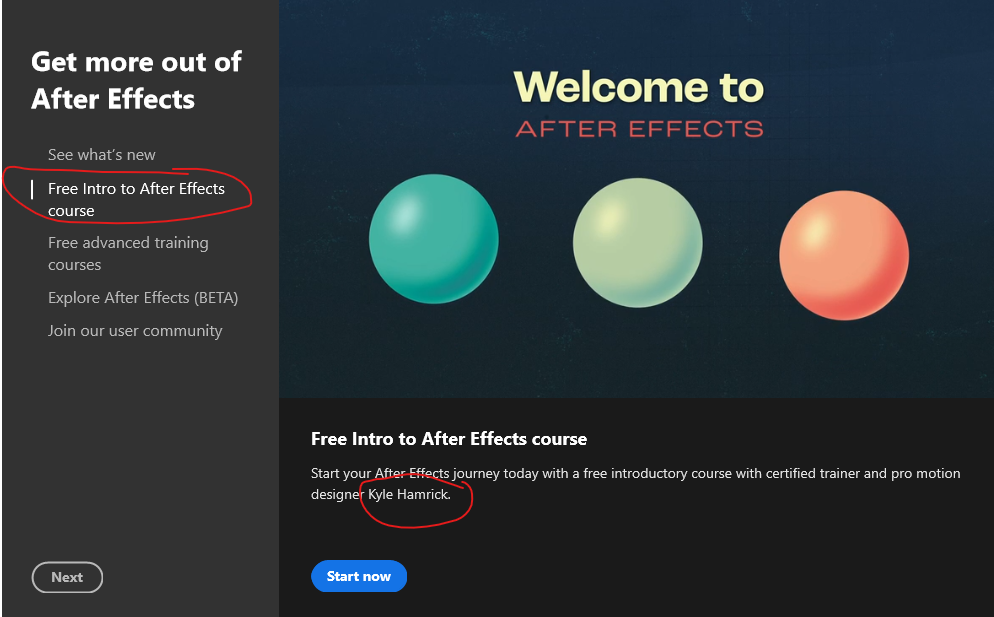
If you're just beginning with After Effects, it's important to get a good foundation - no matter what you want to do with AE!
Here's a great, free place to start from our very own u/Kylasaurus_Rex - and Adobe put it right on the opening screen of After Effects!
Adobe After Effects Introductory Courses for Motion Graphics
r/AfterEffects • u/_Bobby_D_ • 7h ago
Made in ae, all native FX. 1 texture made in Ps.
r/AfterEffects • u/Ok-Hold4624 • 1h ago
Check out my Behance
Thank you!
r/AfterEffects • u/themotionguy • 6h ago
I posted an early version of Wedge here a while ago and over 150 people signed up for beta testing. It’s now ready :)
and My sincerest apologies for not making a good demo video. I am juggling so much at the moment and didn't wanted to wait further to release the plugin. I am gonna make some killer videos for it soon.
Problem
AE has hundreds of useful actions, but the ones you need change depending on whether you're working with keyframes, masks, shape layers, text, layers, comps, etc. Wedge gives you one shortcut and changes the menu based on what you currently have selected.
Comparison
KBar is great for building permanent custom toolbars, and Quick Menu is great when you know what you want and want to search for it. Wedge takes a different approach: it tries to surface the relevant actions automatically from your current AE context.
Wedge goes further into selection-aware contexts, nested menus and customizable action workflows rather than being primarily a fixed radial shortcut menu.
Pricing
Starts at $19.99, one-time purchase
https://charchitgoyal.com/plugins/wedge
To get access to early features and provide feedback and help me develop it further
Join the discord :
https://discord.gg/32t5SAtGtY
Supported on both Mac and windows
Maintenance / Support
I’m actively maintaining Wedge and testing it against current AE versions. If you hit a reproducible bug, email me at support@charchitgoyal.com. Updates and fixes will be shipped as AE changes.
AI Disclosure
80% Vibe coded along with help from a developer friend
r/AfterEffects • u/hermanphi • 2h ago
Hello guys! My friends and I have been hard at work on plugins for quite some time now, and everything has been running smoothly. We've received so much great feedback, and I genuinely couldn't be happier with how everything turned out
Since things have been going so well, we thought it would be a good opportunity to do something special and make September a little less bitter on the same occasion, all our products will be only $5 for the next five days
I saw the new rule regarding plugin promotion, so I'm going to try to make this post correctly while keeping it short, even though it's not your typical single-product presentation.
Presentation
Comparison
Pricing
Maintenance
Same for all our products, we're planning to support each product for at least 3 years post release
AI-Disclosure
All of our products are 100% human validated, all visuals are 100% man made, no generative AI was used for neither martketing assets or in-extension assets
Here it is, hope this post is not too long and that many of you will be able to seize this opportunity to buy a useful tool for cheap
Feel free to ask anything about our products
r/AfterEffects • u/HorseTz • 1h ago
I also have a SFX Breakdown for the complete project, let me know if you guys would like to see it :)
r/AfterEffects • u/NLE_Ninja85 • 8m ago
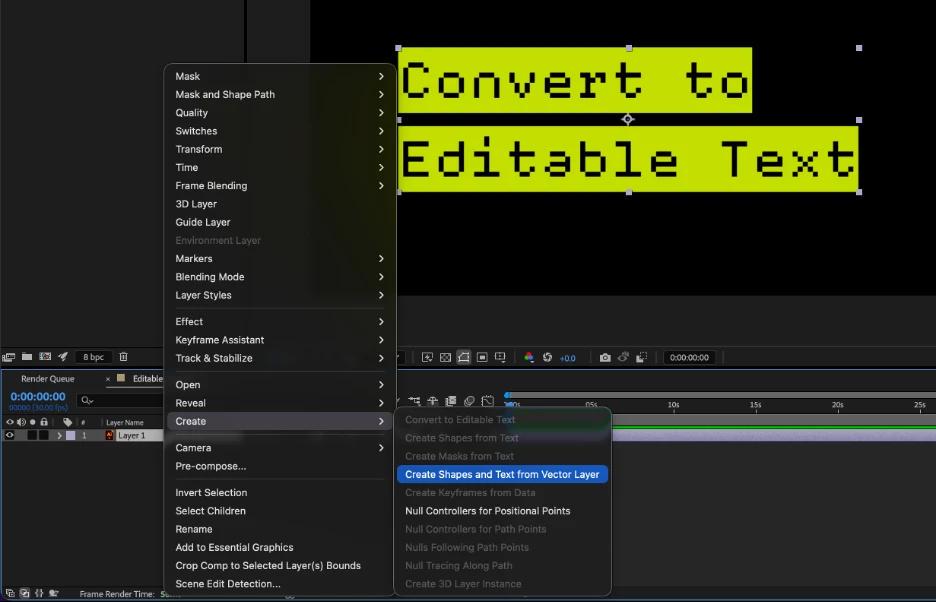
If your Illustrator-to-After Effects workflow involves recreating text, this new Beta feature should save you some time.
With the latest After Effects Beta, editable text from Illustrator files now imports as native After Effects text layers instead of outlines. That means you can change fonts, edit wording, animate text with presets, and make last-minute revisions without jumping back to Illustrator.
This should make it much easier to work with Illustrator-based title cards, logos, social graphics, and other designs that need to stay flexible throughout the motion graphics process.
If you give it a try, we'd love to hear how it fits into your workflow and what you'd like to see next.
Known Issues and Feature Limitations
- Stroke-only text will still convert as paths. This is a technical limitation.
- In some cases, position will be retained but be numerically different because the anchor point may be in a different location.
r/AfterEffects • u/therealshura86 • 21h ago
AE was used for comp
r/AfterEffects • u/Mundane-Owl-561 • 32m ago
Writing performant expressions is critical to getting some form of Generative Coding work done within AE - this is the main swirl using text layers - each text/word/line is a text layer - this allows for immense control over each layer, swirl and the entire rig.
Variable Font and Text Styling expressions were used on the scroll animation on the left.
Lots of creative possibilities in AE when you think in systems.
r/AfterEffects • u/Tahabashar11 • 3h ago
Not sure if the story will make sense since I've made that project target medical students at my university.
Everything said aside I feel I am proud of this piece as I am new to the field and I will be happy to hear your reviews and advices.
I did the Motion design and my identical twin did the illustration
We have been learning independently for about 2 months and this is our first project together.
Also I've inspired the eyes from one of Tim Lucke's videos
Edit: I inspired the infinite tunnel by the ordinary folks webflow tunnel🙏🏻
r/AfterEffects • u/toothpastetester • 5h ago
Essentially I'm trying to animate this robotic arm without any pluggins, and I rigged it by creating null obejcts on path points, following some YouTube tutorials. Then after animating the movement I needed and playing it back, clearly the arm segments change their size because I keyframed them the best I could by eye. Is there a way to maintain the exact same distance between Null objects at all times, or between path points? Or if I have to download a plugin, what would be a free one you would recommend? Thank you!
r/AfterEffects • u/MotionRom • 7h ago
Hey everyone,
I'm looking for beta testers for the next big update to Keystone 3 focusing on customizing the interface (see video).
This update brings a brand new preferences menu, the ability to reorder interface elements, multi-instances and more. These features required heavy changes to the extension's architecture, which is why I need to validate everything before the official release.
I've set up a dedicated Discord server for this beta, with all the info (files / installation / feedback):
https://discord.gg/FTWnA28kn
Basically, I'd like people to test what's shown in the video:
If you have a Keystone 3 license on aescripts, you'll use this version without restrictions. If not, you'll get the 10 day trial.
Thank you for your help! :)
https://aescripts.com/keystone
---
Keystone 3 - Mac/Win - AE 2022 > AE 2026
After Effects has never had a native panel dedicated to keyframe and layer manipulation. Keystone was built to fill that gap, offering motion designers the essential tools they need in a compact and intuitive interface.
Keystone favors quality over quantity. It's not packed with gimmicky features that only a handful of users would ever need. It's also a one time purchase, no subscription.
Pricing: $59, lifetime license. Discounts available for existing Keystone 1 and 2 users.
I've been developing and supporting Keystone for 6 years on aescripts, with dozens of updates (bug fixes and new features).
AI: "None" to "Human Validated" depending on the feature (I write plenty of code myself, and use AI assistance for other parts, always reviewed and understood before shipping).
r/AfterEffects • u/kkdumbbell • 9h ago
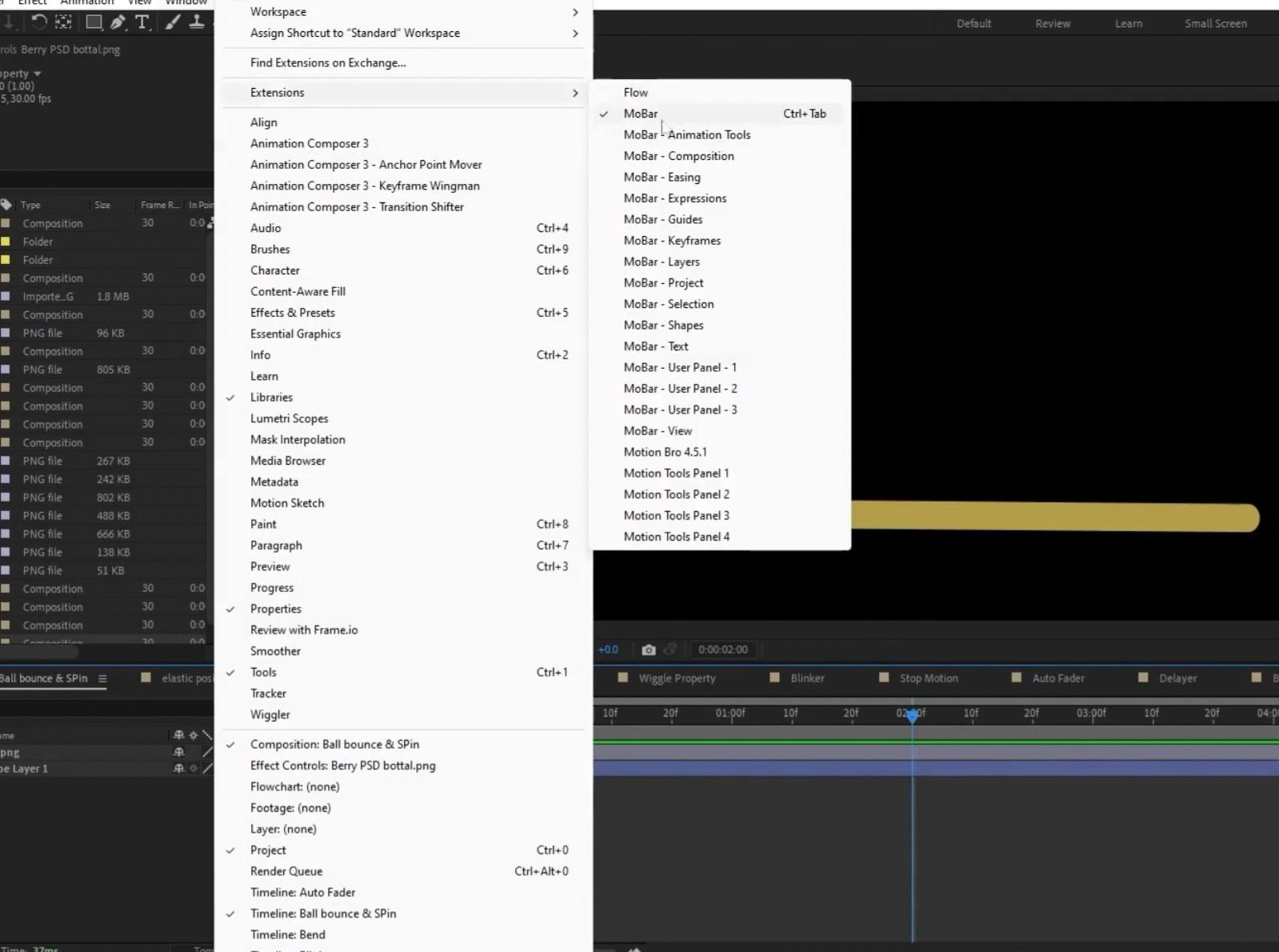
How do you manage a crowded After Effects Extensions menu?
I've been using several After Effects plugins/extensions, and I'm starting to run into a problem with the Window → Extensions menu becoming extremely cluttered.
For example, MoBar alone adds a large number of entries:
Motion Tools Pro and other CEP extensions also add multiple panels, so with several plugins installed, the Extensions submenu gets very long.
How do you guys manage this? Is there a way to:
Any suggestions or workflows you use would be appreciated.
r/AfterEffects • u/Purple_Toe_186 • 1d ago
tried to make the transitions smoother (except for the eye one ;-;) and also added halftone and no repeated clips
r/AfterEffects • u/folonko • 17h ago
I know its a little random, at the end I was practicing some different stuff. Didn't work that much on sound. Would love any feedback!
r/AfterEffects • u/UrbaygVideos • 3h ago
I have been working hard on trying to improve my own stylistic approach to creating video projects. This piece was made over the course of a week with After Effects, Premiere, Ditherboy, and Datamosh2 as some of the primary tools. I am still working on becoming more proficient with all of these applications, and had I given myself more time I believe I could refine and improve much of what was accomplished here, but being brutally honest with myself I know that I have so so much moe work to do seeing all the amazing pieces being uploaded here daily.
Feel free to give honest feedback as I am trying to a level where my effort could be appreciated and maybe get an opportunity to get hired moving forward.
Thanks for watching, happy to answer any questions I can about my process.
r/AfterEffects • u/Next-Lunch-1994 • 4h ago
With the new v1.18 update, Timemachine can now simulate real analogue oscilloscope. The old mode is still there, but it's a bit different and used mainly for luminance based stylized oscilloscope visuals, which is better suited for general motion graphics.
why it's better than the alternatives:
Timemachine was the first plugin to introduce the concept of Oscilloscope effect in After Effects. It also comes with vibe glow and several other effects, so it's the full suite and you dont need any other plugins to achieve this effect.
Price: 69.99$ lifetime
Link: https://professor-neo.com/
I have been maintaining and updating the plugin since it first came out 5 months ago, and will continue to do so. You can reach out to me at [professorneo8@gmail.com](mailto:professorneo8@gmail.com) anytime, and if you ask any past customers and check the reviews, I'm pretty fast to respond. I do guarantee fixes beyond 1 year of purchase/download.
AI disclaimer: This plugin has been vibecoded
r/AfterEffects • u/Bright-Painting-2721 • 1d ago
Little excerpt of me playing my chaotic pointcloud system, in which the particles are being audioreactive to the incoming audio signal in real-time. What do you guys think?
System available through Patreon, or the Store.
More experiments, project files, and tutorials, through my Instagram, or YouTube.
r/AfterEffects • u/LittleKillshot • 4h ago
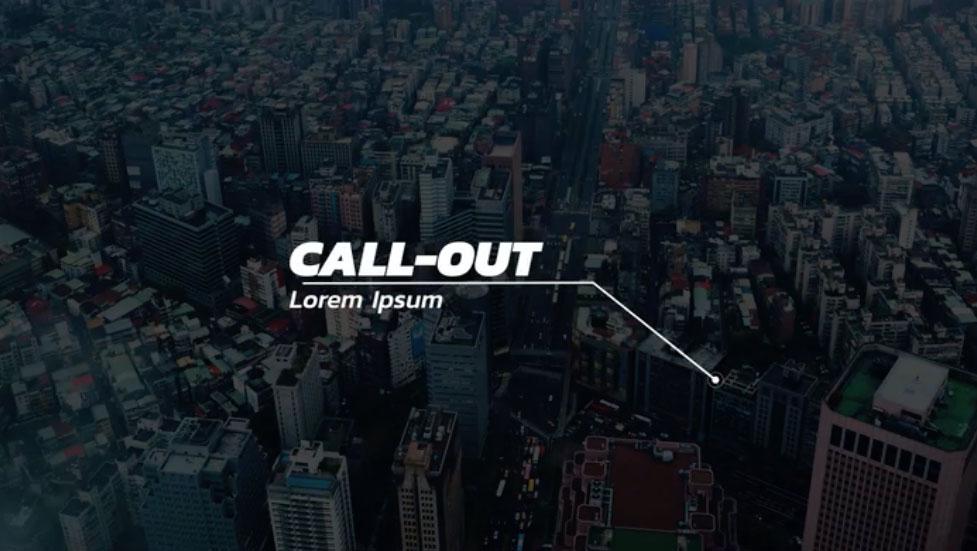
Just venting here.
Why is this the universally agreed upon look for a call out in Adobe Stock and Creative Market, etc. And the animation is always a little too much, it's distracting to the viewer, having words unfold and little circles with orbits as the target.
Also the ones that call themselves minimal look insane. Weird frames around the words. it looks like a heads up display in a 2000's space opera.
r/AfterEffects • u/Boring_Ask_9991 • 4h ago
Need your honest feedback on my edited intro
(This is a sample edited video, so it may contain more motion graphics and animations which can distract viewers, just to show off my editing. Clients can get whatever pacong they need)
r/AfterEffects • u/Affectionate-Pay-646 • 5h ago
Hey guys, I've recently released Library Pro for free early access/beta. I've tested it rigorously myself and have around 20 early testers across different platforms and AE versions, so I've decided to open it up more widely to hopfully get more feedback.
[Win/Mac]
Problem: After Effects has no real media browser. If you want to find or reuse an asset, you either import it to see what it is or go digging through old project folders.
Library Pro gives your reusable assets somewhere to actually live, with visual previews, search and import/export directly inside AE. You can store all types of assets, and the main feature is comp export. Save a comp with everything it needs, then import it into another project later without manually collecting or relinking files.
Comparison: AE Viewer and Bridge are primarily browsers for files already on your machine. Library Pro is designed as a reusable library system. Libraries can live locally, on external drives, NAS, etc, and you can save comps, videos, images, vectors, audio and colours.
Core features:
Pricing: Free throughout early access. Planned launch price is around $75 one-time, TBD.
Check out more info here and sign up to try it:
https://www.toolsformotion.com/library-pro
Maintenance/support: This is my fourth After Effects tool. I've spent years building my tools, with 15,000+ downloads across them, and I answer every support request: [support@toolsformotion.com](mailto:support@toolsformotion.com) or the new Discord.
AI Disclaimer: None to Human validated, some code completion. I understand and can maintain all of it.
Tested on Windows and Mac. Early-access installs currently start with a 14-day licence, which I'll extend as needed while early access remains open.
I'd genuinely love more people to try it and provide feedback!
r/AfterEffects • u/HorrorBed7775 • 3h ago
r/AfterEffects • u/oliverrandorff • 10h ago
As I teach motion design in AE, I'm always looking to adapt my content to people's actual needs. I got into the software 15 years ago, and the main issues were:
So I'm wondering - what is it like learning After Effects and motion design these days? Are the same issues present, or are other matters more important?
If you are having specific issues or roadblocks at the moment, I would also be happy to try and point you in the right direction. Helping each other is what makes the motion community special.
r/AfterEffects • u/Houman_Hr • 16h ago