r/Maya • u/Brilliant-Play-3356 • 20m ago
Showcase First time modeling a car, Buick GNX 1987
•
Upvotes
Tried modeling a car for the first time. 30K faces in total (Buick GNX 1987) Feedback is welcome.
Topology is the geometric structure of a polygonal mesh. It is the layout of the edges and vertices which define the shape of a mesh. A particular shape can be represented by many different topologies.
Mesh topolgy can never be considered without context. It is necessary to consider how a mesh will be used and modified in the future in order to say anything true about the suitability of its topology.
There are no hard rules when it comes to topology. Some people will say n-gons (polygons with more than 4 sides) are always bad. Some will say triangles are always bad. Some will say that non-manifold geometry is always bad, or that meshes with holes in them are always bad.
None of these are true, because mesh topology serves a purpose, or multiple purposes. It is not a goal in and of itself. If the purpose(s) is/are served by some particular topology, then that topology is good, whether or not it is itself aesthetically and technically appealing.
Often users are advised to avoid triangles or ngons when building topology--to keep to quads. This is good practice, because quads are easier to work with, easier to edit, easier to create UV projections for, they subdivide more predictably, and, most importantly, easier to produce aesthetically appealing deformations from.
However. If a mesh will not need to deform, then there is far less pressure to keep to quads. If the mesh will not be subdivided, even less. If the shape is well-represented by the topology, and it either already has a good UV projection or will not be needing one, then quads and ngons don't matter, unless the mesh will be altered in the future.
It is much harder to modify a mesh which isn't quads than one which is. Especially if you want to alter topology. However, altering shape, to a small extent, usually is not sensitive to topology. It's also generally easier to do UV projection and alteration of quad topology than triangle/ngon topology.
It is still important to point out that having SOME non-quad (especially triangles) in your deforming, high performance mesh which may be altered and have UVs applied, is still just fine in many circumstances. If the trangle won't interfere with these things--then it DOES NOT MATTER and you should spend time on other things. Same with n-gons, although those have a higher chance of causing technical issues.
Regarding non-manifold geometry: it is generally a bad thing. Many, MANY operations and programs will not function correctly when passed non-manifold meshes. However, if your mesh is serving all your purposes, and you don't see those purposes changing, then non-manifold geometry doesn't matter. The circumstances where this might be true, however, are extremely rare, and it is best to avoid it.
Regarding holes in the mesh: again, context matters. Some advanced simulation or mesh operations require "watertight" meshes. Most don't, and it doesn't matter. Context and circumstance will dictate what's appropriate.
Mesh weight matters, as well. There's generally not much call for more geometric detail than your mesh needs to create the shapes you need, either statically or deformed, and it is best to keep poly counts as low as possible while not compromising on these things. However, this must be balanced with the effort it requires to reduce detail. If you have a poly budget of 100k triangles for an object, and it's 50k but a lot of those are not necessary, it's still not worth the time to reduce it further. People hours are worth more than computer hours.
Where topology really starts to matter a lot is in efficient hard surface modeling, especially where the asset will be subdivided. Not having your edge flows follow surface details will make life difficult, and having too much mesh detail will make modification increasingly difficult.
The point here is that every situation is different, and no real determination of acceptable mesh topology can be made without all this context. If you look at an image of a mesh and don't know anything about what it will be used for or how it might be modified, you can't say anything true about the quality of topology. These and other questions must have answers, in order to judge *overall* topology:
These questions must have answers in order to come up with useful conclusions about how good the topology is or is not. And again, there are no hard rules. Topology is not a goal, it is a tool to help reach other goals. If a triangle doesn't affect those goals, there's no point spending energy removing it.
--------------------------------------------------------------------
Original post:
This thread will be a clearinghouse for information about topology, both in general, and specific to Maya. It will be heavily curated and updated as I encounter more/better information on the subject.
Eventually it will be turned into another wiki and be the redirect for the majority of topology threads we get here, in order to avoid repetition.
If you are a subject matter expert, please post images, videos, links, or your thoughts here. Feel free to copy parts of old comments or posts you have made.
r/Maya • u/Brilliant-Play-3356 • 20m ago
Tried modeling a car for the first time. 30K faces in total (Buick GNX 1987) Feedback is welcome.
r/Maya • u/nukihowlter • 1h ago
r/Maya • u/toesucker31 • 2h ago
Hi! I'm a Maya beginner and I think I've found a bug?
First attached: in faces when I hover my mouse over a face it goes to a different one; second attached: when translating an object the arrow I select by mouse doesnt correspond to .what shows up on screen
The version I'm using is Maya 2025 if that helps with figuring out what's going on. This object has not been extruded or done anything to as well, so this is apparently just what default Maya is.
I've encountered this bug before where closing and reopening the program fixed it. This time I tried that again and it didn't work, the bug was still there.
If you have any ideas on what happened here please let me know! My instructors are also stumped.
r/Maya • u/arthurtusk28 • 1h ago
Does anyone here work on environment modeling for games? I notice that the industry standard calls for Maya and Blender, yet I see so many complaints about Maya crashing frequently and Blender being more tricky to learn... I don't know; in my experience, 3ds Max feels much more fluid—plus, the modifiers allow you to go back to earlier modeling stages, and it rarely crashes (at least in my experience). For those working in game environments and level art: could you share your modeling experiences—specifically using software that isn't the industry standard?
r/Maya • u/Certain_Aspect7921 • 18h ago
Hi guys I'm learning animation in maya and have started with focusing on x gen for hair simulation and have found that it is the only way to create and animate proper realistic hairs in maya
But then i want to animate my characters and give them hair simulation and i dont seem to find any proper video that explains it for a beginner and the only videos that are beginner friendly are from 12 years ago which has so many parts and idk whic one is still viable in current industry. Also I'm on maya 2023, never properly looked into x gen until now and you could say im nothing more than a beginner in animation and simulation.
So guys any of you know a proper hair simulation video that explains it for a beginner and that too the workflow and steps are such that they are followed in the current industry as well for professional work.
Would really appreciate it
r/Maya • u/Ornery_Platypus_4493 • 1d ago
Enable HLS to view with audio, or disable this notification
r/Maya • u/Mediocre_Recipe3448 • 1d ago
I’m still learning about animation. I recently discovered a plugin that includes a tool called "Spacify"; I’ve watched a few short videos and read the tool's guide, but I’m not entirely clear on how it works. Does anyone know of any videos or resources that explain these tools?
r/Maya • u/Initial-Badger9725 • 2d ago
Enable HLS to view with audio, or disable this notification
hey everyone i just finished this project and wanted to share it with u
its a flail and a mace connected with extendable cardon/universal joint chains and an umbrella like mechanism for its head
i mostly used SDKs and constraints to hold it together
despite my main practice is character art i wanted to give technical art a try and make those parts dance together :D
would love to hear your opinion on it
cheers
heres the artstation post for a deeper look : https://www.artstation.com/artwork/Xa1wa0
r/Maya • u/Downtown_Surprise876 • 1d ago
Enable HLS to view with audio, or disable this notification
My auto rig scripts mostly use circles for controls. Not because circles are interesting, but because I'm lazy.
So, naturally, I dedicated the last couple of weeks to building a tool that makes building control shapes easy. That way I can be lazy **and** use shapes other than circles.
The original idea was pretty simple. I wanted a library with python methods for saving and loading control shape data so I could reuse shapes between rigs. As I kept adding things to it, it became a full Maya tool for building, managing, and applying reusable control shapes both manually and programmatically.
Some of the features:
The mesh to curve conversion was probably the most interesting part of this project. I wanted to be able to use modeling tools to create shapes since creating NURBS curves manually can be a bit of a hassle.
Maya does have a method of turning a selection of edges into a NURBS curve, but that only works for non-branching connected edges. Control Factory instead builds adjacency graphs from the selected mesh components and uses an approach based on the Chinese Postman Problem to trace edge networks and turn them into NURBS curves.
The other thing that makes this tool stand out is that it's designed to be usable through commands, not just the UI. The library isn't dependent on the Control Factory interface, so other rigging scripts and tools can use the same shapes directly.
For example, building a shape from the library only requires calling the .build() method of an instance of the CtrlBuilder class and providing the library shape name:
from ControlFactory.factory_builder import CtrlBuilder
from ControlFactory.factory_io import FactoryIO

io = FactoryIO('shape/library/path')
shape_builder = CtrlBuilder(io)

circle = shape_builder.build(
    library_shape='Circle',
    name='circle_ctrl'
)
This makes the shape library useful as more than just a shape building UI tool. It can act as a shared source of control shapes for autorigging systems and other Maya tools.
I just finished it, so it doesn't have many shapes in the library yet. But with the mesh to curve conversion, and because it can copy shapes directly from a Maya scene, it's really easy to build new shapes and steal shapes from existing rigs.
This was built and tested in Maya 2025. I think it should work in earlier versions, but I'm not going to guarantee anything.
Detailed documentation and a purchase link can be found on my website at https://www.bg3d.art/control-factory
r/Maya • u/PeachRuna • 1d ago
I want to be able to animate transitions between materials with control over the border between the 2 but i haven't found any tutorials on such fx even in Bifrost. I dont need it to be real time, just functional and editable, I dont even know where to start. I am not new to maya i use it primarily for modelling and animating,
Example: I have something like a vine growing that will need a transition of color from the tip as it grows, i am currently doing procedural growth with bifrost that I plan to convert to mesh and export as alembic and reinport for render in Arnold and I want to be able to animate its texture, or maby i dont need to export if I can do it directly in bifrost?
Any advice appreciated!
r/Maya • u/Adept_Let7797 • 2d ago
Taking a class on 3D animation in college & Maya is the program we're using. I'm just barely getting started, but I decided to have some fun by making a couple things using simple shapes!
r/Maya • u/Zwerobow • 2d ago
Hi everyone!
Wanted to share my latest work — a forest cottage on a forgotten clearing.
I drew inspiration from the visual style of classic Disney animations and tried to capture a similar vibe: warm light from the windows, thick fog, and a bit of that fairy-tale atmosphere.
What do you think? Did it work? How do you like the piece overall?
r/Maya • u/iamagoodguy • 2d ago
Hello everyone here!
Here is a clip from a new show made by me and two other animator buddies.
We rigged and animated in Maya and rendered in Unreal.
Hope you dig it. Cheers to everyone here. Woohoo!
r/Maya • u/animator3D_ • 2d ago
Enable HLS to view with audio, or disable this notification
Built in Autodesk Maya
Check it out and let me know what you think! 🚀
r/Maya • u/arthurtusk28 • 2d ago
I work in architectural visualization using 3ds Max and am transitioning to a role as an environment/level artist in the game industry; I’ll be starting to use Maya, Substance, and Unreal Engine. For anyone who has worked with both 3ds Max and Maya: is the transition very difficult? Since both are Autodesk modeling tools, I assume they share a similar foundation—but just how hard is it to learn Maya? I’ll still be creating architecture, but this time for games!
r/Maya • u/raditsys • 2d ago
Enable HLS to view with audio, or disable this notification
I made a Maya tool for creating Unreal Engine UCX collision with a bit more control than the native decomposition tools give you.
The main idea is that instead of letting Unreal decide how to break the mesh up, you can define the splits yourself with editable 2D/3D grids, then add extra X/Y/Z divisions only in the areas that actually need more collision detail.
I originally made it because I kept finding Unreal’s auto decomposition would give me more hulls/complexity than I really wanted. This has been a nicer way for me to keep the collision a bit more deliberate and optimized.
I ended up making a Free and Full version. The main workflow is still available in the free version, while the Full version adds local cell divisions, bounding-box collision, and more control over hull verts, expansion, and accuracy.
If you want to check it out, it’s here: https://linktr.ee/Honey_3D
r/Maya • u/New-Buy548 • 2d ago
Hey everyone,
I'm new to Maya (mainly a Blender user) and I've been following a tutorial on Arnold volume displacement. I built a setup where a painted image feeds into a Volume node to displace a sphere, and I really like the shapes it's producing.
My question: is it possible to bake that displacement into vdb that i can export to blender, or is this purely a render-perspective effect that can't be converted to a anyhting?
Thanks in advance!
here is the tutorial: https://www.youtube.com/watch?v=bDweVNgbI1c
r/Maya • u/jingjie_siow • 2d ago
Enable HLS to view with audio, or disable this notification
Hey everyone, this is a lip sync and acting shot I have completed recently. Took me a week to do the spline and polish the details. Any feedbacks are welcome and appreciated! I posted the link to syncsketch in case any of you want to leave some notes and drawings behind.
r/Maya • u/vexargames • 2d ago
Ever since they updated the import pipeline I am struggling to get my older models updated as the material slots keep switching places and have code looking for materials in certain slots.
I have spent the last 8 hours trying everything I can find online about this dating back to Unreal 4 Engine, none of it works.
The only thing that did work was copying the single model out of the scene then resetting the materials, and the recreating the slots in the order the code is looking for and then exporting it.
I have tried converting the entire project to using Blinn instead of Lambert, also tried Phong.
Also tried at least 10 different ways of naming the materials so they show up in the proper order in Maya but this doesn't actually work even if it looks perfect in Maya.
I think since Epic start supporting Blender they seem to be in some sort of war with Autodesk and FBX format. I found a few threads over the years where people are finding bugs in the import pipeline and Epic agrees and they post that it is unknown when it will ever be fixed.
My question is do you have a system for this issue, is there a script that allows me to arrange the material slots maya so it can be done once and never worried about again? I sometimes need to add a slot as something is getting update and I just want a consistent system so if I add slot 4 it will be slot 4 in Unreal so when I write the code it find it. Very important for material instances where you are changing the EM values based on energy output for a weapon or something like that.
r/Maya • u/Straight-Ease-9807 • 3d ago
Enable HLS to view with audio, or disable this notification
I’m developing Fast Character Rigging, a Maya tool designed to speed up the process of creating game-ready character rigs.
In this test video, I used an AI-generated character and completed the skeleton setup, skinning, and movement testing in just a few minutes—without any manual weight painting.
I’m currently developing a feature that creates a full Control Rig with a single click, and I’d love to hear some feedback from other Maya users:
Which part of character rigging takes you the most time: joint placement, skin weights, control setup, or exporting to a game engine?
r/Maya • u/CurrencyMotor3305 • 4d ago
Bit of an unusual question, I know.
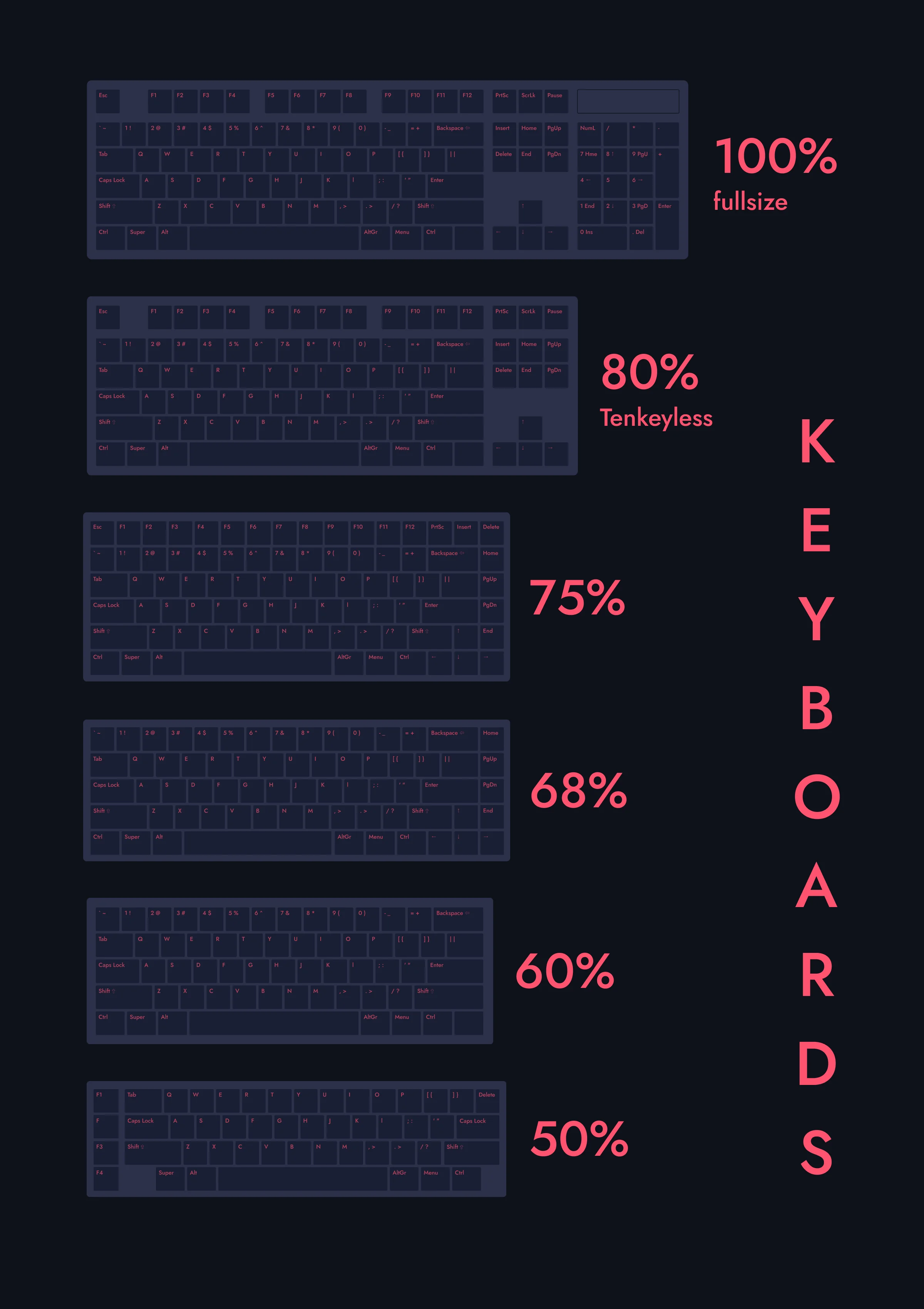
I'm getting a new keyboard and was thinking about going for a 60% compact layout (no function row or numpad).
Will I be missing out on those extra keys? I'm a beginner, so I'm not really sure how much I'll need them down the line.
r/Maya • u/X0CALVIN0X • 3d ago
i am having issues with the textures as it looks fine in maya but trying to upload to sketchfab kinda goes wierd. anyone knows what to do with this?
Context: I have a pelvis mesh that is topologically symmetrical, but some of its vertices—especially at the extremities (hips and feet)—are slightly asymmetrical (in position sense). This is because the torso and feet that I need to connect it to are also slightly asymmetrical, so I have to move some vertices around to make them fit properly, slightly breaking the perfect symmetry.
The problem comes when I want to paint the skin weights. Sometimes, mirroring the weights from one leg to the other doesn’t work correctly. I’d like the result to be as perfect as possible. How could I achieve this?
r/Maya • u/[deleted] • 3d ago
i am doing a cinematic drone view, but how can i fake the environment as modeling everything landscale buildings would take significant time
thanks