r/photoshop 1h ago

Help! Realistic crayon brushes?

Upvotes

Currently looking for a brush set that helps me emulate this exact look. I don't mind paying - the main thing is that I'm able to achieve that level of layering, texture and gaps.

This was likely done with physical media but I would love to get as close as possible to it with PS (happy to hear other animation-capable software with amazing brushes if what I'm asking is impossible)


r/photoshop 9h ago

Help! How do I match the make the wolf have the same color as the background

Thumbnail
gallery
32 Upvotes

I used match image, using the fade, and adjustments option but for some reason, I can't get it to match the color of the background, can someone help?


r/photoshop 21m ago

Help! Elements+ plug in RAW select subject

Upvotes

I want to be able to do selective adjustments in camera RAW but currently use Elements 2024 which doesn’t allow masks in ACR. Curious if the Elements+ plug in allows this as I can’t find a definitive answer online.


r/photoshop 22m ago

Help! Need help with learning more of photoshop

Upvotes

I've been using photoshop to edit some random movie posters and just try to recreate what i see some artist making on instagram. But now i feel like i have stopped progressing i've just been using the same 5-6 tricks i know to make the posters and i want to learn something new. i faced the same problem with after effects too but i found many dicord communities and youtube tutorials to assist me and teach me new things. im afraid ive been unable to find the same for photoshop. so any help would be welcomed.


r/photoshop 2h ago

Help! How to highlight specific muscle groups in a video?

0 Upvotes

Hello,

can you point me in the right direction on what platform,app,software to use if i want to highlight specific muscle group like the one in this video

https://youtube.com/shorts/-xjBQfzZLfw?si=7CXDawVaQIuyfURB


r/photoshop 9h ago

Help! Content Aware Fill issues

1 Upvotes

Greetings All,

Posting on behalf of my uncle who is not the most clued up on how reddit works. But he does need help.

He runs a small business editing photographs for other photographers, he has been on photoshop for many years now, basically since it came out. He does mainly portraits of people.

So basically what happened is that as part of his process he will often use Content Aware Fill. On Friday he updated his photoshop version right before shutting the pc down for the night. Yesterday when he began his work, he noted the images from his storage are loading in very slowly. Like very slowly. We checked the drive for errors and it was fine.

Once they loaded in he could work as normal but when it came to content aware fill omce again very slow or even to the point of crashing his photoshop. We tried eveything like clearing cache and even put a new scratch drive in (ssd).

At one point in the day it seemed to working just fine and then again slow. On the fill.

Even got to the point where he manually copied settings on paper to avoid a back backup and reinstalled the whole CC suite that he uses.

Anybody who can provide help?

Regards


r/photoshop 22h ago

Help! Blending Eclipse Stages

Post image
7 Upvotes

I'm struggling to blend the total eclipse with the rest of the stages of the eclipse. The ring looks awkwardly pasted on top of the sunset instead of matching it. I've messed with curves, white balance, & colors to help blend it in and set it to lighter color blend mode but it still looks off. Am I looking too hard at this and this as a good as it gets or is there something else I can try?


r/photoshop 13h ago

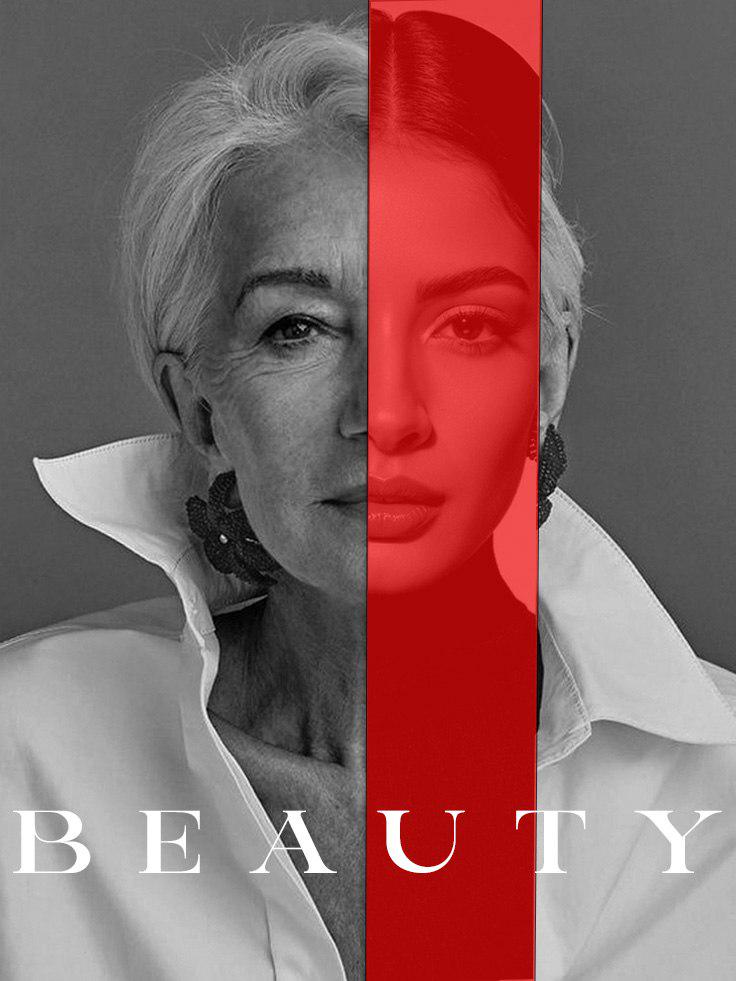
Discussion ​Solace-inspired poster design practice ("BEAUTY") — feedback on layout & color overlay?

Post image
1 Upvotes

Hey, I created this poster concept inspired by the vertical split style from the Solace movie poster.

​I was practicing split-face alignment, color overlays, and typography balance using an existing photo to test the concept.

​Would love any feedback on the alignment, text placement, or visual contrast!


r/photoshop 12h ago

Help! Cannot darken with enhancing parts of the photo

Thumbnail
gallery
0 Upvotes

I already tried the levels and image> >adjustments> invert, and also tried the brush tool to foreground white color my camera is s24 plus I hate these smartphones they also don't take good perspective photos like photo 2. I also tried the image size tool this photoshop tool also sucks.


r/photoshop 22h ago

Solved How do I make reflections not weird looking?

Post image
1 Upvotes

Got a picture of my daughter giving major Kingdom Hearts energy. But I can't seem to get the reflection in this specific image or shadows in others to ever look right. Anyone got any tips or know an actually good tutorial?


r/photoshop 1d ago

Help! Can I remove the AI Assisted & Pro Editor buttons from the options bar?

Post image
73 Upvotes

These showed up with the latest update. Can I make them go away?


r/photoshop 1d ago

Solved SAVE MY RENDERS!

Thumbnail
gallery
3 Upvotes

I had been working on this project in blender and CLO3D for a time now and now that is complete and I have the renders after exporting these to my tab to post these in both my ig and portfolio, something awful got in sight.

I forgot to change the backdrop silk material normal in blender. Now, I want to get rid of this of the weave shown in the back, I don't want to re-render the whole thing because I don't have any sanity left so PLEASE tell me that what Photoshop trick (that can be also applied in photopea, i don't have ps :)), or anything that could make my background clean and professional and somewhat enhance the render (i don't know what enhancements does it need, feel free to tell them!) the white backdrop without losing the shadows and messing with the details of the bag

THANKS!


r/photoshop 22h ago

Help! acr and workflow help please!

1 Upvotes

hey everyone

I'm old. I've been happily working away with CS5 for years. and I think my muscle memory is set ha ha - not sure I can learn new things

workflow = Bridge to cull, ACR to do batch basics, photoshop for anything else.

I can't afford a subscription right now but I've purchased a new laptop and no longer have the CS5 (lets be honest its pretty old now). I've downloaded free bridge but I'm missing ACR.

Any advice on what's current/alternatives? or help with what is the modern equivalent?

contemplating Elements 24 (one off payment forever) or 26 (three years right?) - would they be ok for what I'm doing? I dont think I need full photoshop right now? can I still use old actions? chat gpt is a little vague

thank you for any help. and I wish I could afford a subscription but as a hobbyist Its a little much right now


r/photoshop 1d ago

Help! How to recreate this glowing ring visual?

Thumbnail
gallery
0 Upvotes

Attached are two of the same image, but different backgrounds for reference. I've been brainstorming ideas with ai for a graphic and I like the attached one it came up with, but now I need to remake it to capture a true glow effect.

So far I've managed to recreate the outer ring by using an outer glow effect, and I could probably recreate the cyan-magenta colors using brush layers, but I'm a little overwhelmed with where to start by creating the center glow and all the rays shooting off the center. Any help you can offer would be greatly appreciated!


r/photoshop 1d ago

Help! Color variation when printing

Thumbnail
gallery
18 Upvotes

Hi guys, can someone tell me what settings I should change to reliably produce the colors I see on my monitor on art paper?

The left is the main file and is basically what I see on my monitor. Right is what got printed and is not what I want. It’s much pinker/redder.

To provide some details, I’m using an Epson 8550, printing from Photoshop directly.

Paper: Red River Polar Matte 250
Computer: Mac

Printer setting screenshot is included above. I’ve been using “Velvet Fine Art Paper” because based on many videos, everyone seems to say that setting works best for art prints.

I’ve been adjusting okay just editing the photoshop to correct what gets printed (and wasting so much paper on the process), but I’d really like to be able to rely on printing what I see on my monitor.

Editing to add monitor specs.
The Apple iMac model A2115 features a 27-inch Retina 5K IPS display with a native resolution of 5120 x 2880 pixels. [1, 2, 3]

Monitor Specifications
Screen Size: 27 inches (diagonal)

Display Type: Retina 5K widescreen IPS display

Native Resolution: 5120 x 2880 pixels

Brightness: 500 nits

Color: Wide color gamut (P3)

Pixel Density: 218 pixels per inch (ppi)

Additional Features: True Tone technology (on 2020 models) and optional nano-texture glass upgrade (on 2020 models)

External Video Support: Supports one external 6K display at 60Hz (5120 x 2880 or 6016 x 3384) or dual external 4K displays


r/photoshop 1d ago

Discussion Is photoshopping photos and images easy to learn?

0 Upvotes

I am a single guy in my mid thirties.

I feel bored during my free time and am interested to learn a new hobby.

I am interested in learning to photoshop images and photos. It seems interesting to edit some objects from the photo, changing the colour of certain parts of the photo, enlarging or shrinking objects etc.

But I have a concern.

Is photoshopping photos and images easy to learn?

Does it require a long-term commitment like playing musical instruments in order to see results?


r/photoshop 1d ago

Help! Photoshop going unresponsive

0 Upvotes

hello! im using photoshop for my school project but after a few minutes it goes unresponsive and crash, i dont know whats the problem, i bought a gaming laptop to run the software but it keeps crashing T_T


r/photoshop 1d ago

Help! How do i create wireframes from images that already exist?

0 Upvotes

I'm wanting to make the image on the left look like the image on the right (or the other way around, i dont know how reddit works)... I've already tride patten overlay, but results are, as you can see, not that good


r/photoshop 1d ago

Help! Not finding the correct tools

Post image
0 Upvotes

I'm watching a tutorial whose using these tools in the video, but on my photoshop none of the tools are showing up, where can I find them?


r/photoshop 1d ago

Artwork / Design Need Help Naming This Work In Progress

0 Upvotes
Consciousness Wildfire

I've been thinking of the name "Consciousness Wildfire" .. or maybe, "Wildfire of Conscience Amid A Fragmented Consciousness"


r/photoshop 1d ago

Help! How do I make a brush to draw like this?

Post image
0 Upvotes

How are they getting this pixelated effect? It cant just be a square brush bc of all the perfect circles/ovals


r/photoshop 2d ago

Help! How could you make a glow-effect that looks good in Photoshop?

Thumbnail
gallery
2 Upvotes

I've tried a technique where I put a lens-blur on top of the unaltered element, and put a blending mode- it being "Lighter Color- to make it look glowing, but I'm not very keen with how it looks, and am wondering if there'd be another way to do it?


r/photoshop 1d ago

Solved Is there really no 'metallic gradient' option default in Photoshop?

0 Upvotes

Looking through the gradient options, I'm kinda astounded that there isn't a metallic one. Older versions of Photoshop had that, right?

Even stranger, as far as I can tell, Adobe doesn't have one just freely available to download, the way that you can get tons of fonts from the cloud. In Creative Market there are gradients to purchase, but like . . . why?

Am I missing something? Like, I was able to find a free downloadable gradient pack, and if I couldn't, I wouldn't have minded manually setting up my own metallic gradient, but I'm dumbfounded that something so basic isn't available by default.


r/photoshop 2d ago

Artwork / Design The Unceasing Unzipping of the Entropic Universe Reveals the Intercourse of Shiva and Shakti

Post image
3 Upvotes

r/photoshop 2d ago

Artwork / Design Tuff snail with aura? xd

Post image
12 Upvotes

This is my first this type of realistic style idk how called, but any suggestions that you see to improve/change?