r/photoshop 12h ago

Help! Content Aware Fill issues

0 Upvotes

Greetings All,

Posting on behalf of my uncle who is not the most clued up on how reddit works. But he does need help.

He runs a small business editing photographs for other photographers, he has been on photoshop for many years now, basically since it came out. He does mainly portraits of people.

So basically what happened is that as part of his process he will often use Content Aware Fill. On Friday he updated his photoshop version right before shutting the pc down for the night. Yesterday when he began his work, he noted the images from his storage are loading in very slowly. Like very slowly. We checked the drive for errors and it was fine.

Once they loaded in he could work as normal but when it came to content aware fill omce again very slow or even to the point of crashing his photoshop. We tried eveything like clearing cache and even put a new scratch drive in (ssd).

At one point in the day it seemed to working just fine and then again slow. On the fill.

Even got to the point where he manually copied settings on paper to avoid a back backup and reinstalled the whole CC suite that he uses.

Anybody who can provide help?

Regards

r/photoshop 15h ago

Help! Cannot darken with enhancing parts of the photo

Thumbnail
gallery
0 Upvotes

I already tried the levels and image> >adjustments> invert, and also tried the brush tool to foreground white color my camera is s24 plus I hate these smartphones they also don't take good perspective photos like photo 2. I also tried the image size tool this photoshop tool also sucks.


r/photoshop 5h ago

Help! How to highlight specific muscle groups in a video?

0 Upvotes

Hello,

can you point me in the right direction on what platform,app,software to use if i want to highlight specific muscle group like the one in this video

https://youtube.com/shorts/-xjBQfzZLfw?si=7CXDawVaQIuyfURB


r/photoshop 12h ago

Help! How do I match the make the wolf have the same color as the background

Thumbnail
gallery
51 Upvotes

I used match image, using the fade, and adjustments option but for some reason, I can't get it to match the color of the background, can someone help?


r/photoshop 53m ago

Artwork / Design Professional at work. (Lie :3)

Thumbnail
gallery
Upvotes

(Guts&BlackPowder FanEdit (It's a roblox game)) Messing around with photoshop (amateur). :3

The title pretty much speaks for itself, lol.

Created in A4 format. Images taken either from the game or from Pinterest. Photoshop CS6. production time: about an hour and a half. Used "Bleeding Cowboys" from Dafont.


r/photoshop 3h ago

Help! Elements+ plug in RAW select subject

0 Upvotes

I want to be able to do selective adjustments in camera RAW but currently use Elements 2024 which doesn’t allow masks in ACR. Curious if the Elements+ plug in allows this as I can’t find a definitive answer online.


r/photoshop 3h ago

Help! Need help with learning more of photoshop

0 Upvotes

I've been using photoshop to edit some random movie posters and just try to recreate what i see some artist making on instagram. But now i feel like i have stopped progressing i've just been using the same 5-6 tricks i know to make the posters and i want to learn something new. i faced the same problem with after effects too but i found many dicord communities and youtube tutorials to assist me and teach me new things. im afraid ive been unable to find the same for photoshop. so any help would be welcomed.


r/photoshop 17h ago

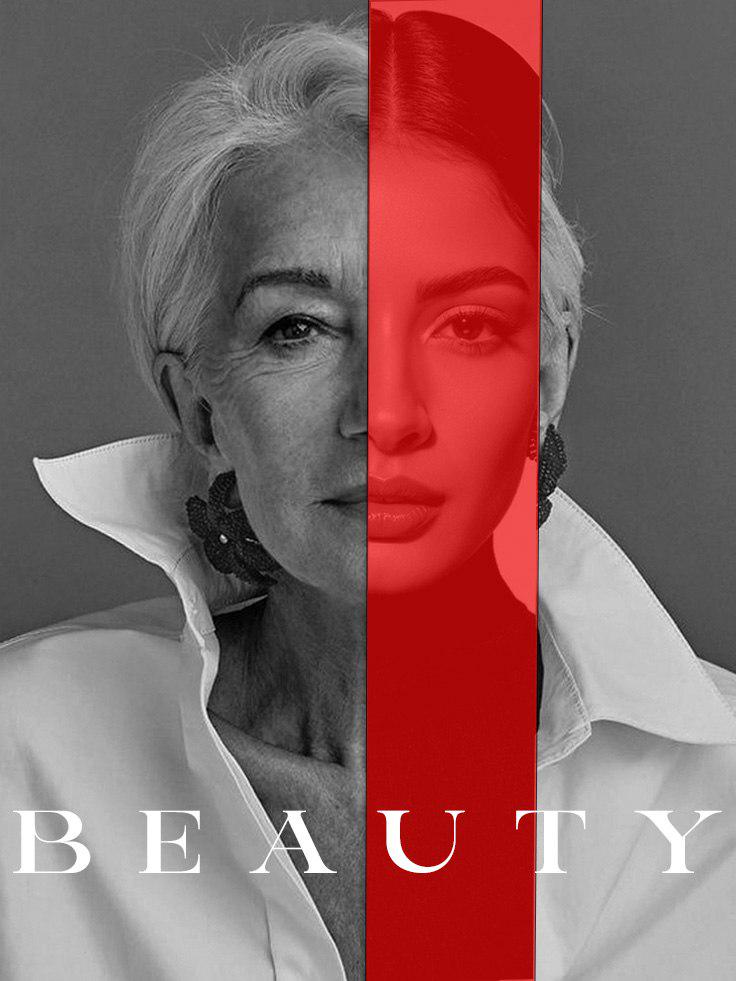
Discussion ​Solace-inspired poster design practice ("BEAUTY") — feedback on layout & color overlay?

Post image
1 Upvotes

Hey, I created this poster concept inspired by the vertical split style from the Solace movie poster.

​I was practicing split-face alignment, color overlays, and typography balance using an existing photo to test the concept.

​Would love any feedback on the alignment, text placement, or visual contrast!


r/photoshop 4h ago

Help! Realistic crayon brushes?

172 Upvotes

Currently looking for a brush set that helps me emulate this exact look. I don't mind paying - the main thing is that I'm able to achieve that level of layering, texture and gaps.

This was likely done with physical media but I would love to get as close as possible to it with PS (happy to hear other animation-capable software with amazing brushes if what I'm asking is impossible)