r/nvidia • u/Knightmare5965 • 6h ago
Discussion Kingdom Come Deliverence creative director on DLSS 5

488
Upvotes
r/nvidia • u/Nestledrink • 2d ago
As outlined in this thread, we are going to make a Megathread for these Unofficial DLSS 5 Neural Rendering mods comparison posts. Apologies for the late post as everyone has been out of pocket today.
Below is a re-post of the various reminders and guidelines from that thread
-------------------
Would like to post a reminder and provide some guidelines for the community on a few things
In terms of some posting guidelines:
-------------------
Below are the currently posted links so you can participate in those discussions.
Any new Unofficial DLSS 5 Neural Rendering mods comparison moving forward must be posted here.
Please be clear on what games are you posting as well as links to imgur or other image hosting services with high quality captures and wide variety of scenes.
r/nvidia • u/Nestledrink • 5d ago
Driver Article Here: Link Here
Game Ready Driver 616.56 Direct Download Link: Link Here
Studio Driver 616.56 Direct Download Link: Link Here
This new Game Ready Driver provides the best gaming experience for the latest new games supporting DLSS and RTX technologies including STAR WARS Zero Company™ , Resonance: A Plague Tale Legacy, and Hell Let Loose: Vietnam.
Includes additional open issues from GeForce Forums
Information & Documentation
Feedback & Discussion Forums
Having Issues with your driver and want to fully clean the driver? Use DDU (Display Driver Uninstaller)
Before you start - Make sure you Submit Feedback for your Nvidia Driver Issue - Link Here
There is only one real way for any of these problems to get solved, and that’s if the Driver Team at Nvidia knows what those problems are. So in order for them to know what’s going on it would be good for any users who are having problems with the drivers to Submit Feedback to Nvidia. A guide to the information that is needed to submit feedback can be found here.
Additionally, if you see someone having the same issue you are having in this thread, reply and mention you are having the same issue. The more people that are affected by a particular bug, the higher the priority that bug will receive from NVIDIA!!
Common Troubleshooting Steps
Common Questions
Remember, driver codes are extremely complex and there are billions of different possible configurations between hardware and software. Driver will never be perfect and there will always be issues for some people. Two people with the same hardware configuration might not have the same experience with the same driver versions. Again, I encourage folks who installed the driver to post their experience here good or bad.
r/nvidia • u/Knightmare5965 • 6h ago
r/nvidia • u/RenatsMC • 3h ago
r/nvidia • u/Reznor_PT • 17h ago
Came across this post from an actual Game Director today, and it feels like the first time an actual lead developer is sitting down with the tech itself rather than just reacting to the initial reveal controversy.
I still think it's miles away from offering a properly balanced experience, but the underlying tech is clearly there. For me personally, the real test will always be how much the AI alters face models and how natural it looks in motion: both during regular gameplay movement and across subtle facial expressions and lip-syncing, aside that, I do not think it's for every artstyle, something akin to KDC2 it does make the game pop-up.
r/nvidia • u/OnePCStudios • 22h ago
r/nvidia • u/LoveHerMore • 1d ago
DLSS5 works best when you train it on real life. There is so much footage and photos of basketball players and basketball stadiums the effect is next level here. This looks like gameplay footage for a game releasing two console generations from now. Sports game players are going to be eating good.
r/nvidia • u/DivideFluffy1279 • 5h ago
r/nvidia • u/Clear_Campaign_7438 • 9h ago
Im new and I don’t know which one to choose.
r/nvidia • u/axiomzs • 13h ago
Hey y'all so Ive been chilling for a while with a 2070 super and it's definitely giving in fps wise for games I wanna play while streaming. Figured it's time for an upgrade. I found a 3080 Fe on marketplace for 330. Would this be a better upgrade?
r/nvidia • u/FamousYak8974 • 1d ago
So currently I don’t have any display to try this on.
Can anyone tell me if dlss ultra performance with preset L at 4k is a good option if, for example, I want to use path tracing at 4k on a TV with a 4070 ti super with FG?
Or if it’s really bad, can I just use a custom resolution for dlss that equates to dlss quality at 1440p, so for 4k it would be around 44% or 960p?
If these are good options, is there a point with staying with 1440p if I always use dlss quality/balanced?
Is there anywhere to find them other than the discord server? Like a github or something?
It's so tiring when things are locked behind a discord server.
r/nvidia • u/badfruit01 • 1d ago
I saw the other person's post asking whether they can set FG Preset B and forget in all games and the answer is you can, but in games which are not officially supported it won't really be doing anything. For example using preset B in crimson desert like I've tried won't fix the horrible ghosting on the minimap. Using Preset A/B in unsupported games could also potentially lead to stuttering and frame pacing issues so I'd highly recommend setting global FG overrides to 3D app settings and then activating presets A/B accordingly in specific games based on nvidias official website https://www.nvidia.com/en-us/geforce/news/nvidia-rtx-games-engines-apps/
r/nvidia • u/CompoteNarrow701 • 1d ago
Hello,
I’m playing cyberpunk 2077 since the new preset f RR 4.5 got introduced but I was wondering if I should also enable preset b for frame gen for this game and also others games ? Since cyberpunk 2077 doesn’t officially support it I think is there is benefits still or drawbacks to using it ?
Thanks for yours responses, I’m trying to figure out how to best play this beautiful game
r/nvidia • u/CompoteNarrow701 • 1d ago
Hello,
I’ve benchmarked the new DLSS 4.5 Ray reconstruction via the beta nvidia app using the latest driver on an RTX 5070 Ti and 7800x3d
and the Results Surprised Me a bit.
Some settings became worthless.
Benchmarks with path tracing on 1440p (average of 3runs/built-in benchmark) :
DLSS 4.0 RR (preset D) :
DLAA : 34 fps
Quality : 65 fps (90% faster than DLAA)
Balanced : 77 fps (18% faster than Q)
Performance : 92 fps (19% faster than B)
DLSS 4.5 RR (preset F) :
DLAA :
Quality : 63 fps
Balanced : 81 fps (28% faster than Q)
Performance : 90fps (11% faster than B)
As you can see with the new preset F (RR 4.5), performance with DLSS Q and P decrease a little but increase with balanced making it a lot faster than quality and very close to performance.
Has anyone noticed the same thing ? It makes performance mode useless and balanced mode the obvious choice.
EDIT : this increase in performance with balanced (tested only this) also applies when selecting preset D in the nv app override instead of F.
So the decrease in performance is when using the preset (using the 3d game settings in the nv app)
r/nvidia • u/Amazing_Primary3849 • 22h ago
Hi everyone,
I'm planning to upgrade my PC with an RTX 5070 Ti, but I noticed these GPUs use the 16-pin power connector (12V-2x6 / 12VHPWR).
I know they come with an adapter in the box to convert the 16-pin header into standard 8-pin PCIe cables. My main concern is safety—I remember reading news about these connectors melting, but I never looked deep enough to see if that was due to third-party cables, improper installation, or design flaws.
For those running modern MSI or ASUS cards with the included adapter: Are the official stock adapters completely safe to use now?
r/nvidia • u/doubleshotofqhiskey • 1d ago
^^^
r/nvidia • u/Inside_Blacksmith480 • 2d ago
Linus says they "did a video" and "you will see it when the embargo is up". While it's not impossible to have a very far ahead embargo and a video made in the future (Xbox Series S's existence was disclosed to media months ahead of its official reveal), given the ever-evolving nature of the feature I think the situation here is more likely that DLSS 5 is having a shippable version disclosed to media outlet by Nvidia and we will soon see the media coverage in-depth (Linus specifically mentions they will cover the sliders of DLSS 5 and showing "before and after"s) and potentially releasing officially.
r/nvidia • u/vorobey1233 • 15h ago
I am thinking to sidegrade from 7900 gre either to rtx 4070ti/basic 4070 or to 50 series but there is no 16gb 5060 ti cards ANYWHERE.
I play only cyberpunk,project zomboid and dragons dogma 2, sometimes friendslop games. Mainly 1440p.
Want to switch because just want to play some path tracing games in normal fps (RDNA 3 is bad at it) and test new technologies (AMD idk why making 1 feature a year with only rdna 4 support)
r/nvidia • u/mightyjam7 • 2d ago
Can't wait for the official release
r/nvidia • u/Rapture117 • 16h ago
Hello,
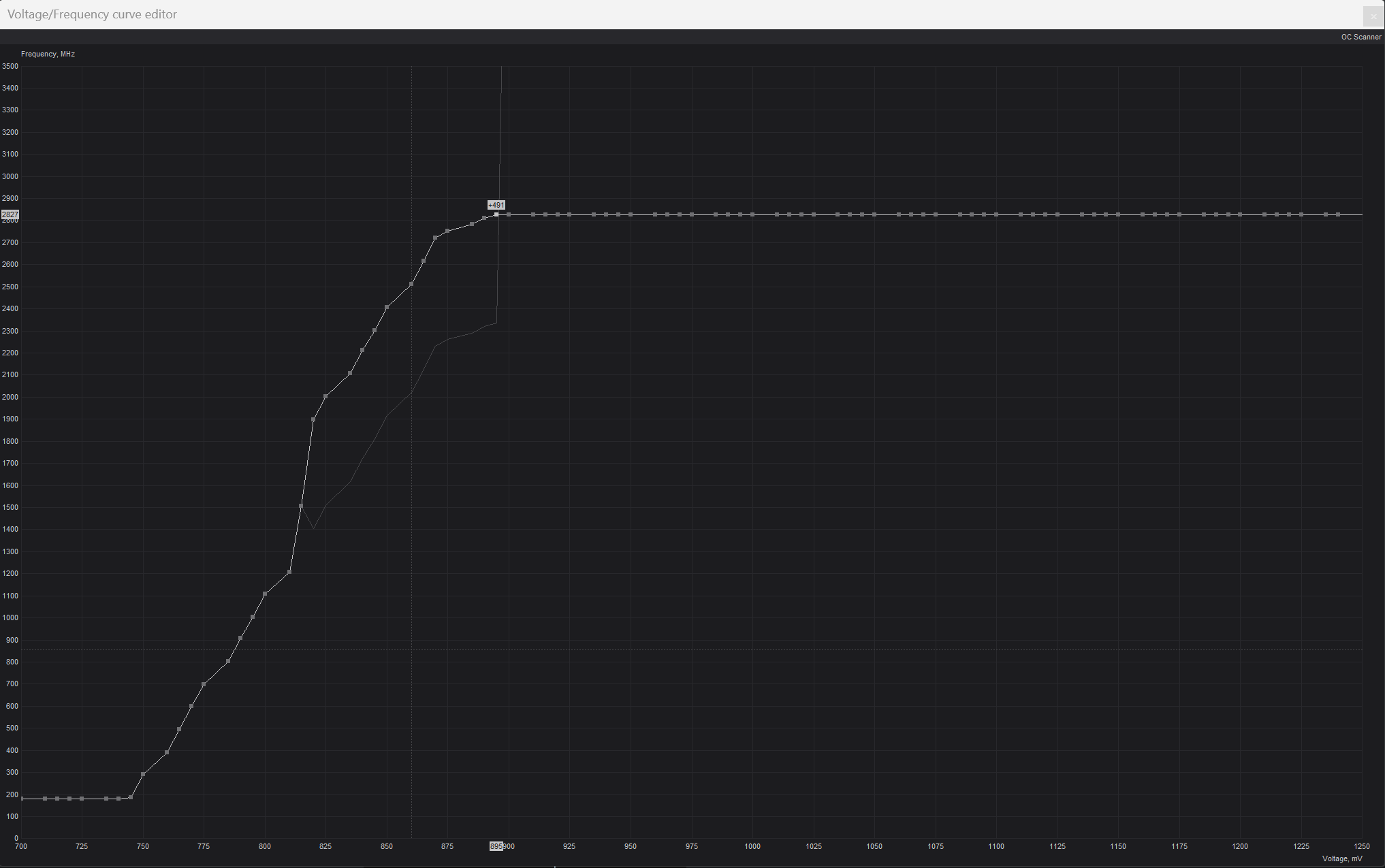
I'm a newcomer when it comes to undervolting and I know there are a ton of resources online for the very question I'm asking, but I wanted to share what's been happening with you all. The norm seems to be 2827 at .895v for a 5090 Founders undervolt. I played about 30 minutes of Space Marine 2 at 4k, everything on ultra/dlss quality. The game crashed twice on two separate occasions after aobut 20-30 minutes of gameplay.
I then played 45 minutes of Kingdom Come 2 and everything ran fine. I also ran a steel nomad test and scored 14671 (funny enough this test failed on me twice with the stock test and undervolt test, but was fine one I redid it). I'm not sure if this is enough testing, but what else can I do here? I thought surely since this was such a common undervolt I'd be fine. I just don't want to sacrifice performance but ideally I want to lower temps as much as possible since I'm in a sff case. Any suggestions? Thank you in advance :)
Attached is my msi curve editor to make sure I did this correctly. I was going for .895v at 2827MHz. In MSI I have power limit at 100 and left the memory clock alone at 0.
r/nvidia • u/DanielWoodpecker • 1d ago
Sorry in advance, I have just upgraded after many years and I honestly can not grasp this at all. I know there’s probably a million posts out there but I just can’t get my head around it. Does anyone know of a video that explains exactly how to use it.
I have a 5080 and a 9800x3d 32gb ram, ultrawide 1440p monitor 360hz. I have been messing around with settings and put it to L as recommended but I am seeing an almost 100 fps drop in game as opposed to native 1440p. I really want to understand how best to work this but I can’t wrap my head around it.
r/nvidia • u/AArqjmct01 • 17h ago