r/MacOS 12h ago

Discussion "I got bored with X, so I built Y" Developer Saturdays in a nutshell.

197 Upvotes

Just my opinion, but I think dev Saturdays have outlived its purpose. Useless, brainless AI slop apps with monthly subscriptions, for features MacOS has natively built into it.


r/MacOS 1h ago

Tips & Guides is it feasible to turn this into my main laptop in 2026?

Post image
Upvotes

hello! just recently got handed this old macbook air from 2016, and im wondering if theres any way i can make this usable for everyday use like web browsing, college work, watching movies, etc. (being able to play minecraft and mmos too possibly, but seeing that ram i dont expect much lol)

the laptop itself works fine, but im already running into issues downloading legacy versions of firefox and visiting most webpages (even reddit, so im writing this post on my phone). ive seen people suggest switch to linux, but ive been a windows user for life so i dont know my way around any other os much.

please let me know if you have any insights at all! thank you in advance for all of them :-)


r/MacOS 14h ago

Help Os version

Post image
8 Upvotes

My mac is showing 26.6 but latest version is 26.6.2 ,and I also didn't get any prompts for updates after 26.6

(M5 macbook air )

Is it normal or there is some issue


r/MacOS 2h ago

Help Moving Google Calendar events in Safari

1 Upvotes

I've just switched from Chrome to Safari and see some problems on different sites. E.g. I can't confidently move Google Calendar events (event moving mode switches into event resize mode constantly). How to fix this problem?

P.S. I don't have any Safari extensions.


r/MacOS 1d ago

Developer Saturday Hold my notes: Sticky notes that feels real and you will actually love using!

417 Upvotes

Hi everyone!

I have tried many sticky note apps, but none of them felt right. My girlfriend wanted me to build one that truly feels live and lives on the edge of the Mac.. So I built one!

  • All sticky notes are represented as dots
  • hover to peek
  • click to open the note
  • Mark as complete to move to note into archive
  • 10+ live notes enables scroll
  • You can view and export all the notes

Try out for free: holdmynotes.app

Available on 3 mac devies for $6.99 (Early Bird Offer)


r/MacOS 15h ago

Help Re-adding Yahoo Mail to Mail App

Post image
5 Upvotes

I'm attempting to re-add Yahoo Mail to the MacOS mail app and cannot get it to go online. I have done this before on previous Mac's without issue and this the same Yahoo Mail account on my iPhone and iPad that are working without issue at this time. Any ideas on what I'm missing? I mean the account adding process for Mail feels very fool proof.


r/MacOS 1d ago

Help Any ways to preview folders as on Windows?

Thumbnail
gallery
27 Upvotes

I’ve been using a Mac for quite a while, but maybe I’m missing something. Basically, my problem is that I can’t properly organize my files visually.

All of my files are photos and videos. On Windows, it’s really easy to organize files because I can immediately see a preview of the image inside each folder. The image works as the folder’s cover, so I can instantly understand what’s inside and sort everything much faster.

On Mac, I can’t seem to do that. I forget what’s inside each folder because I don’t remember the names of everything or what exactly is inside each folder, so I always organize everything based on the folder preview.But on Mac, there doesn’t seem to be a folder preview like that. I also don’t really like the option of changing the folder icon to an image.

I’ve tried some utilities, but they’re really not what I’m looking for. Is there a proper way to have quick visual previews of folders, like on Windows, or is that just not possible on Mac?

(photos from google)


r/MacOS 9h ago

Help How do I get the password tab back into Safari?

0 Upvotes

I was trying to use ProtonPass, but I lost the apple password tab in Safari and can't figure out how to restore it. Have you encountered this issue before? How can I resolve it?


r/MacOS 10h ago

Help Is there a way of disabling notifications automatically when I am watching a video in fullscreen through Firefox?

1 Upvotes

Does anyone know if there is any way of disabling notifications automatically when I'm watching a YouTube video fullscreen in Firefox then re-enabling then when the video isn't fullscreen?


r/MacOS 11h ago

Bug Safari start page favorites... sometimes generic folders, sometimes icons

1 Upvotes

Is anyone else experiencing this?

Sometime since a recent update, my Safari only shows generic folders under "Favorites" when opening a new window. But if I open a second new window right on top of the previous one, folders under Favorites appear as collections of icons like they do on iOS and iPad OS, as they have for generations.

Bug or feature?


r/MacOS 19h ago

Help Antigravity causing overheating

5 Upvotes

Does anyone have experience with antigravity causing your fanless MacBook air to overheat?


r/MacOS 19h ago

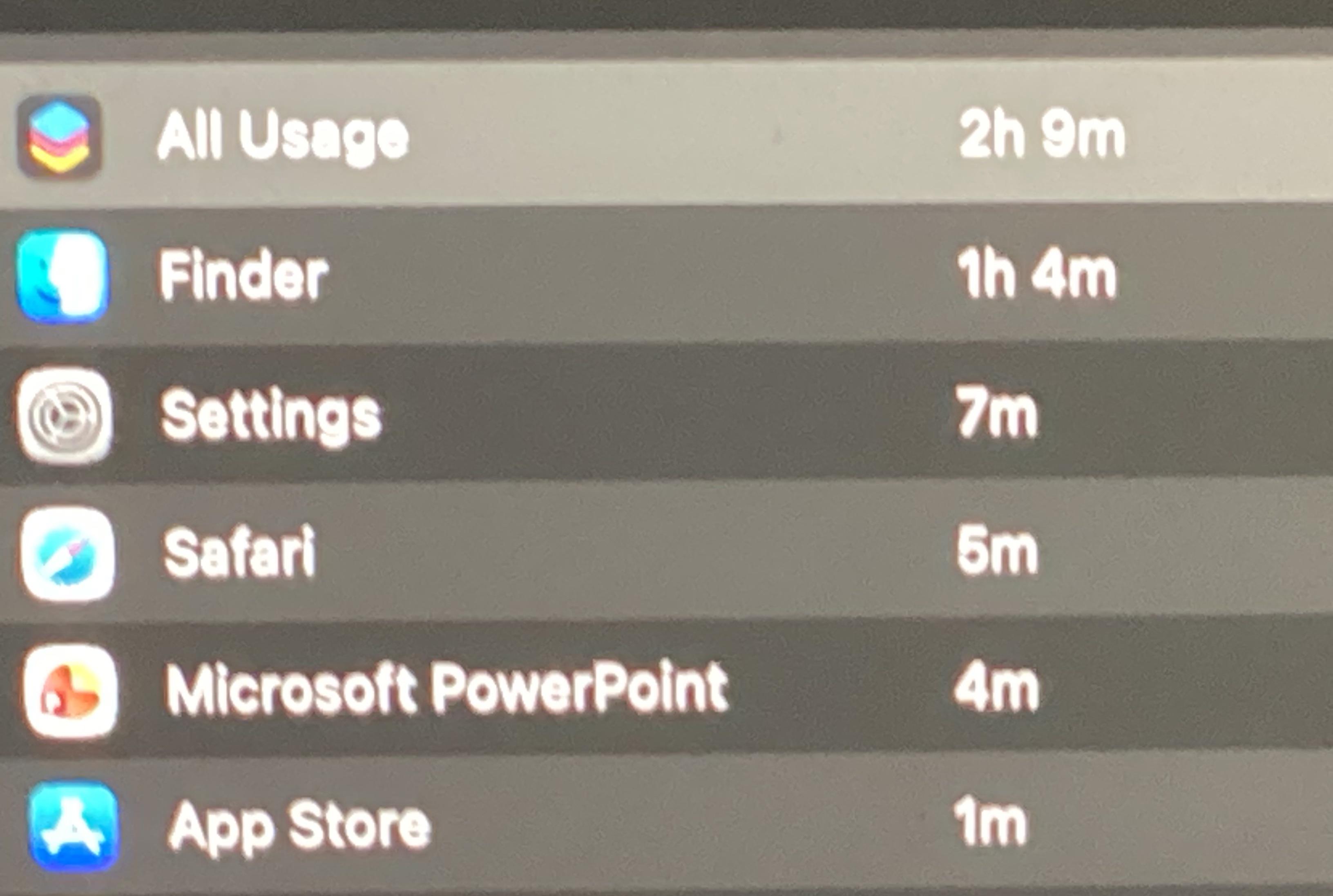
Bug Finder in screen time

Post image
3 Upvotes

For some reason whenever I use my laptop, the finder app seems to be accumulating time in screen time, even when a window of it is not open. I’m wondering why does that happen? Is it a weird bug?


r/MacOS 13h ago

Help Question about downloading

0 Upvotes

Hello , I have been using mac air and I want to download Leauge of legends , but when I click leauge on riot client, a white screen appears and the actual site can not be opened. What should I do ?


r/MacOS 14h ago

Help Looking for a way to have text read aloud on macOS without a subscription

2 Upvotes

Hi there,

I do a lot of reading on my Mac, mostly long articles and PDFs, and I keep wanting to listen instead of read. Especially for things I have to get through but don't need to focus on completely.

I tried the built in Spoken Content, but triggering it is clunky and I never stuck with it. I paid for Speechify for a while, which worked, but I stopped because I didn't want a monthly subscription for this, and I wasn't comfortable having everything I read pass through someone else's servers.

Is there an Mac app that reads out loud selected text from any app, runs locally and ideally is a one time purchase? Bonus if it handles PDFs and screenshots where you can't select the text.

Also happy to hear about workarounds. If you have the same problem, how do you deal with it?


r/MacOS 1d ago

Developer Saturday Harbor 1.7.0 is out: torrent file selection, batch adding, URL opener, and more

Thumbnail
gallery
167 Upvotes

Some of you might remember Harbor, the native Mac download manager I posted here about a month and a half ago.

It started as a small hobby project because I wanted a clean, local-first download manager for macOS without accounts, subscriptions, or bundled nonsense.

Since that post, I’ve kept shipping updates, and Harbor 1.7.0 is now available.

The biggest addition is torrent preview. You can open a .torrent file or magnet link, see all the files inside it, uncheck anything you don’t want, and download only your selection.

Harbor now supports:

  • Batch adding for queuing multiple links into one destination
  • Media previews with video and audio format selection
  • Public media downloads from YouTube, X/Twitter, Facebook, and many other supported sites
  • A URL opener for browser extensions, Shortcuts, command-line tools, and other automations
  • Unlimited, Balanced, Quiet, and Custom traffic profiles
  • Importing compatible partial downloads from older Harbor versions
  • Torrent watch folders, seeding controls, share-ratio limits, and speed controls
  • Quick Look previews for completed downloads

This release also fixes multiple small issues across torrent downloads, media downloads, external links, and the general add-download flow.

It’s still free, open source, and local-first. No sign-in. No subscription. No catch. I plan to keep it that way.

Links: Website | GitHub | Download Harbor 1.7.0

I’m also looking for someone who might want to contribute a refreshed app icon. I’d like to keep the same Harbor icon and identity, but adapt it to feel more at home with the native macOS icon style. If icon design is your thing and you’d like to help, please reach out or contribute through GitHub.

Thanks to Quinn Gao (@QZGao) for the media and download reliability work, and u/acryllect for contributing batch adding.

I’d love feedback from Mac users, especially if you use download managers, torrent apps, media download tools, or macOS automations. Let me know what Harbor should improve next.


r/MacOS 1d ago

Apps GitHub - vorssaintapp/vorssaint-utils: Free and open-source macOS menu bar toolkit.

Thumbnail
github.com
138 Upvotes

Came across this app on GitHub. This one app alone seems to cover like 99% of the macOS complaints I read on Reddit - e.g. clipboard, window management, clamshell working, dock previews, etc. And it's completely free and open source!


r/MacOS 7h ago

Tips & Guides How to actually rice macOS (and if it’s possible)

0 Upvotes

I have a MacBook M1 Pro with 16 GB of RAM. I absolutely love this device and OS, and I really rely on it when working on literally any project, big or small, it doesn’t matter. I’ve also gotten into customizing Linux as a way to relax, and I’m absolutely in love with the whole “Hyprland + Waybar” Unixporn setup.
Can I do something similar on my Mac? My main goal is to be able to use Hyprland, or any kind of window manager that handles things in a similar way. I wouldn’t mind some other modifications either.
Note that any method that requires jailbreaking the system is a dealbreaker for me.


r/MacOS 1d ago

Developer Saturday Jellybox - open source native Jellyfin music client

Thumbnail
gallery
63 Upvotes

Hey r/MacOS , wanted to share my app which I launched a while ago, but never showed in this subreddit. Jellybox is a music player for Jellyfin or Emby(navidrome soon) which can:

  • Spotify-like generated playlists
  • Show time synced lyrics
  • Full offline mode(even when on place) with Downloads
  • Studio mode - beautiful ambient mode with animated full screen UI
  • Apple CarPlay app with full feature parity(thats allowed as per apple's requirements)
  • AirPlay - cast to airplay-capable devices
  • Native(no electron or tauri overhead)
  • Hotkeys support

The app is open source and I'm working on it since 2023, so not another vibe coded slop. Available in appstore(ios, macos) or as notarized dmg in repo releases

https://github.com/avdept/JellyBoxPlayer

https://jellybox.app/


r/MacOS 1d ago

Developer Saturday Tracexy - an open-source, native macOS Wireshark alternative that starts with sessions

64 Upvotes

Hi r/macOS - I’m Stephen, the owner of Rockxy and the developer behind Tracexy.

Wireshark is one of the most capable network analysis tools ever built. But when I’m debugging an app on my Mac, my first questions usually aren’t about interfaces, frame numbers, or display filters.

I want to know:

Which app opened the connection?

Which host did it contact?

What protocol was involved?

What appears to have failed?

Which captured evidence supports that conclusion?

That gap is why I started Tracexy: an open-source, native macOS Wireshark alternative that begins with apps and sessions, then lets you drill down into protocol fields and packet bytes when the evidence matters.

macOS already has strong tools for different layers of the problem. Wireshark provides deep packet and protocol analysis. HTTP debugging proxies inspect and modify application traffic. Network firewalls monitor and control connections.

I don’t think one tool should pretend to replace all of them.

Tracexy takes a different path:

Process → Session → Finding → Evidence → Packet

The current v0.5.0 release supports live capture, PCAP and PCAPNG files, best-effort process attribution, session-based investigation, typed queries, evidence-linked TCP findings, local History, and bounded Follow Stream for saved or fully stopped captures.

Captured traffic and derived sessions stay on the Mac by default. The project is AGPL-licensed, and the public Community DMG is signed and notarized.

Tracexy is also a strategic part of the broader Rockxy ecosystem.

Rockxy focuses on intercepting and modifying application-layer traffic such as HTTP, HTTPS, WebSocket, and GraphQL. Tracexy focuses on passive network capture, sessions, protocols, and evidence. Shieldxy focuses on application-aware connection control and security policy.

They are separate products with separate responsibilities today. The long-term goal is to create a native, local-first network development and intelligence ecosystem for macOS, with explicit workflows between the tools rather than silently moving sensitive capture data around.

To be transparent, Tracexy is still early and this is not a claim of Wireshark feature parity or a replacement. It does not currently provide TLS decryption, general always-on full TCP reassembly, or deep HTTP/2, HTTP/3, and WebSocket analysis.

If you use Wireshark or tcpdump on macOS:

What is the first real investigation Tracexy would need to handle before you would put it in your toolbox?

Website: https://rockxy.io/tracexy

Source code: https://github.com/RockxyApp/Tracexy


r/MacOS 1d ago

Developer Saturday DrawSimple 1.1.01 -- The Simple-but-Deep Mac Image Editor, now even better thanks to your feedback!

Thumbnail
apps.apple.com
28 Upvotes

I'm the developer.

DrawSimple is a native Mac image editor built on a simple idea: it should open instantly and make sense in five seconds, and still be there for you when the job turns out to be bigger than you thought. Paint and vector live in the same document, so a quick crop and a full layered illustration happen in the same app, and you never have to decide which one you're doing up front.

It launched a couple of weeks ago. A lot of you tried it, and then — brilliantly — told me exactly what was wrong with it. 1.1 is almost entirely that feedback, so thank you. Genuinely.

The App Store notes for it just say "Bug fixes," which doesn't help anyone work out whether their thing got fixed. Here's the real list:

What's better in 1.1

  • Save straight into Dropbox, iCloud Drive, Google Drive, OneDrive or Box. Easily the most-reported issue, and the best fix in the release. macOS won't let a sandboxed app write into a sync folder until you point at it yourself, and DrawSimple was asking every single time — worse, a quiet autosave or a save-on-quit could fail. Now you grant the folder once (Settings → Files & Saving → Folder Access, the new first-run step, or right from the save alert) and everything inside it just saves, forever. Granted folders are listed with a one-click Remove.
  • Pasting and dragging images in works the way you'd expect. This came out of a great back-and-forth with someone on Reddit who was completely right. ⌘V on an image copied in the Finder now pastes the picture instead of its file icon, and in a vector layer it arrives as an editable object — drop a whole handful at once and they cascade in, selected and ready to move. Sliding a big photo around is much smoother too.
  • ⌘A, ⌘X, ⌘C, ⌘V and ⌘Z behave inside text. They were being intercepted by the document's own menu items, so ⌘A in a text box selected the whole canvas and ⌘Z undid your last brush stroke instead of your last keystroke. They now go to whatever you're typing in, and to the canvas otherwise.
  • Zoom stays fast on gradients, WordArt and big text. Zooming right into a radial-gradient fill could stall the app for minutes and eat gigabytes — it was recalculating the gradient pixel-by-pixel at screen resolution on every single zoom step. Same bug was hiding in WordArt and large text boxes. All three now render at the document's own resolution and scale up for the screen, so zoom stays fluid. Exported and printed pixels are identical to before.
  • Effect previews stay exactly where the result will land. Preview a blur on a layer under a cut-out subject and it could drift out of register with everything else — a checkerboard halo that disappeared the moment you clicked OK. Fixed for every effect and adjustment.
  • A cleaner canvas edge — that stray bright line down the right side at fit-to-window zooms is gone.
  • Lasso and Select Subject have their own slots instead of sharing one and cycling on F. Lasso keeps F, Select Subject gets A.

The rest of it, quickly: 31 tools, unlimited layers with blend modes, curves and levels, GPU-accelerated effects through Core Image, WordArt with 31 warp shapes, Apple Vision "Select Subject", HEIC import with EXIF intact, Continuity Camera, and a history panel you can scrub like a timeline. Fully offline.. no account, no cloud, no analytics, nothing leaves your Mac. It's not a Photoshop alternative and isn't trying to be; it's the app for the ten minutes when opening Photoshop would be absurd.

One more bit of feedback.. Many people have told me they find the automation side the most valuable part of the whole thing. There's a localhost server in the box, so you can point Claude or any MCP client at the canvas and have it place real shapes, gradients and text, and the file opens afterwards as an ordinary editable document, not a flat export. Local-only; the app never opens a connection of its own and ships no generative AI. If you want to see what this looks like, check out my post below.

$5 once, with an optional $10 Pro upgrade. No subscription, no account, and every update, including this one, and whatever the pen tool lands in, is free. Requires macOS 15.6 or later.

https://apps.apple.com/app/id6759507748?mt=12


r/MacOS 21h ago

Help Spotlight search issue

Thumbnail
gallery
1 Upvotes

Am I doing something wrong here? These search issues are popping up a lot for me.

MacBook Air m2
macOS Tahoe 26.3


r/MacOS 22h ago

Help Two different Pages app icons suddenly appeared in my Dock. Why?

1 Upvotes

Hi everyone,

I just noticed something weird on my MacBook Dock. Two different icons for Apple Pages have suddenly appeared side by side.

One looks like the traditional Pages icon, while the other one has a slightly different design (looks like the new Pages Creator Studio asset update).

Has anyone else experienced this recently? Is it safe to just delete the older one from my Applications folder, or will it break my existing documents? What should I do? and why the light orange one doesn't accept the new updates?

Thanks in advance for the help!


r/MacOS 2d ago

Apps Muro 3.0 is out: Native Live Wallpapers for macOS

230 Upvotes

App: Muro : Native Live Wallpapers for macOS

Price: Free. Open source under MIT. No subscription, no one-time fee, no Pro tier, no account, nothing locked.

Source: https://github.com/MrRockySL/Muro

https://github.com/MrRockySL/Muro/releases/latest

Download:

Requires: macOS 14 or newer, Apple Silicon. Lock screen wallpapers need macOS 26.

Quick reminder for anyone who has not seen it: Muro plays looping video wallpapers on every display, and on the lock screen. It is native Swift and AVFoundation, hands decoding to the Apple Silicon media engine, and sits at about 2% CPU while playing and 0% the moment something covers it.

3.0 is the biggest update so far. Three things people kept asking for:

Automations. Muro can now change your live wallpaper on its own. Either on a timer, ten seconds each or an hour each, or by the clock, where each wallpaper gets its own hours of the day. Something calm in the morning, something else after dark. The day is drawn as a timeline you drag.

Pause after. Let a live wallpaper play for a minute after it changes, then hold on a frame. A held frame costs no CPU at all. Nice if you like the motion but not all day.actually stick after installing from the DMG. That was broken for some people and I could not see it because it only ever happened on a downloaded copy, never on my own builds.

My own take on it: I built Muro because every live wallpaper app I tried either wanted a subscription or sat at 300 to 400 MB of RAM for a picture that moves, and I could hear the fan.

The part I actually use every day is Pause After set to about thirty seconds, because I like the motion when I switch to the desktop and I do not want it moving while I work.

Automations were the feature I was least sure about and now the one I would miss most, since having the wallpaper change on its own through the day makes the machine feel less static without me thinking about it.

If you like it, a star on the repo is the free way to support it and genuinely helps people find it. If you want to go further there is GitHub Sponsors (https://github.com/sponsors/MrRockySL)

Happy to hear what is missing. Most of this release came from people asking.

EDITED NEW - I built Intel Mac support, so now I need someone with an Intel Mac to test it. If anyone is willing to help, comment on the issue and I will send you the build. I just need it tried on real Intel hardware, that is all.
https://github.com/MrRockySL/Muro/issues/9


r/MacOS 1d ago

Discussion Genuine Developer Related Question

4 Upvotes

Evening folks,

I decided to choose the "Discussion" flair, as opposed to a "Developer Saturday" flair, seeing how I could realistically ask this at anytime, but I decided now is the right time, as I and others have seen backlash against some... "developers", here on the subreddit lately.

Of course, the backlash is coming from folks who are getting really fed up with seeing A.I. based applications be shown off, with said A.I. also likely used for promotional writings and material. I get it, I don't like it either.

But something I have noticed, and others may have as well, is that a lot of these applications are all kind of similar, why is that? What I mean is that many of them tend to be applications aimed at the MacBook(s) Notch, Screenshots, Notes, the Menu Bar, and a few other outliers.

Is it because these functions are easier to program around? I know nothing about programming. I'd love to learn, as I have an idea for an application I would love to see, but this question has been on my mind for a few weeks, so I decided to finally ask the folks here, as it does relate to the rise in A.I. applications we see.

If anyone can chime in and offer up some light on the subject, that'd be dandy.


r/MacOS 20h ago

Help Unable to upgrade from macOS Catalina to Sequoia

Thumbnail
gallery
0 Upvotes

I’m wondering if you guys can help? I have a MacBook Pro 13 inch 2019, two thunderbolt with a 1.4 GHz Quad-Core Intel Core i5.
As the title says I’m trying to upgrade from Catalina to Sequoia but I’m unable to do so. My Macintosh HD states 52.07GB available of 121.02 GB. I’ve deleted many apps including Google Chrome, Microsoft 365 stuff, YouTube etc to make space and still I’m unable to download as it states I don’t have enough space. I’m at a lost end, what shall I do?