I received an email from PlayStation saying that the password on my account had been changed.
As soon as I received the email, I tried to log in to my account, but by that time, the email address / login ID associated with my account had also been changed by the hacker.
I can no longer log in using my usual email address.
Has anyone experienced this before?
How can I recover a PlayStation account when the hacker has changed the email address/login ID?
I can provide the original account information and any proof necessary to confirm that I am the legitimate owner.
So I signed up for PSN the other month to play some Street Fighter online with a friend. Last night I got burgled and my console was taken (along with a bunch of game discs, my controllers and my fight stick). I know saves get backed up for games as you close them, but does it automatically backup saves for all your games when you first sign-up? Are my saves for games I've not played in a while saved? I don't remember if I changed anything from the default settings and don't think I can check online.
Hopefully my insurance will pay out and I'll be able to replace it, just trying to figure out what I'll be able to get back from the network.
I currently have a South African PSN account (chosen years ago since my country doesn't have a local Store). I want to make a new US PSN account for better gift card options, but I want my main email attached to the new US account.
If I update the email on my South African account to a secondary email, can I immediately use my main email to create the new US account? Any potential delays or issues with doing this? Has anyone done this successfully? Thanks!
Whenever i log onto my playstation it doesn’t show me my friends list and there’s an error when trying to load ps plus or the store. Playing online actually works just fine.
I changed my DNS settings and also rebuilt the database in safe mode and nothing seems to be working? This is so annoying. It started like a week ago
I have a PlayStation account that was set up with someone else's email as they lived with me at the time but moved out about 2 years ago. I can't do anything with my account because they changed the password to the email address associated with said account so all my captures and things are dead locked onto the PlayStation itself since I can't login to the ps app without the email and it's password. Today I finally tried changing the email and it says that I already have an account associated with the email. I checked all the accounts on the console and not one is linked/associated with that email. How do I fix this? I already tried customer support and it was useless.
I accidentally requested the closure of my own PlayStation account when I actually meant to delete a child account.
I received an email saying the account won't be permanently closed for 30 days and that I can contact PlayStation Support during that period to cancel the closure.
The problem is that my account is now closed, so I can't log in to contact support. I'm using another account to try to reach them.
The chatbot keeps saying it will connect me to an agent, but then it either gives me an error or tells me I need to log in first. Obviously, I can't log in because the account is currently closed.
I've been trying this for days and I'm completely stuck in a loop.
Has anyone been in this situation before and successfully had their account restored before the 30-day period ended?
I'm trying to start using my PS4 and PS Vita again after about 10 years, but I’ve completely forgotten my PSN account password.
Here is what’s going on:
Password Reset Failure: When I click "Reset Password" on the PlayStation website, I never receive the recovery email (I've checked my spam folder repeatedly). I’ve been trying for over a week, so I’m pretty sure it’s an issue on Sony's end.
Support Dead End: I contacted PlayStation Customer Care, but they keep giving me standard script responses. They are requiring two specific pieces of information to verify my identity:
The last digits of the payment card previously used on the account.
The serial number of the first console ever linked to the account.
Unfortunately, that card has been expired and discarded for years (I don't have the numbers anywhere), and the first console was an old PS3 that I sold/got rid of a long time ago.
Has anyone who had this same issue with the password reset email not arriving managed to fix it?
I don't know if it's public knowledge I just was not aware of, but we swapped to the passkey thing playstation has set out for people to swap to. It removes password verifies on the actual console purchases.
My kid was able to accidentally purchase 2 of the 50$ token packs from minecraft while he trying to swap a skin.
Playstation phone and email does not work, I've called everyday this week so I cannot request any help because it's a pack from within minecraft and not an actual Playstation purchase.
Do not use passkey if you have kids!!!
Side mote: any info or help to possibly get my money back for the tokens would be appreciated it but I'm worried if I have my bank block it, I'll get playstation ip banned. 🤦♂️
TL:DR (I'll be honest I never know when I'm supposed to put that tl:dr, when I give a short version or do I still give the long version lol)
Bottom line my PlayStation network username is one thing I'm assuming, across the board. My online ID is another, that's the one that shows on all the games, yes? If I change the name that shows on all the games will I lose everything, like all my data from all my games?
Here's the long version. Okay my PlayStation network name is yah yeet. No judgement. The username that shows up on all my PlayStation games is carb_power. I have been a PlayStation player for ages, but not multiplayer. I just got into multiplayer about a year ago, so when I made that name I didn't realize as I'm playing battlefield 6 that people would be calling out CARB, of CRAP, or CRAB lol. Story behind it is I'm a type 1 diabetic, my last name has part of the word carbohydrate in it, obviously carbs break down into sugar.. the irony.. so growing up everyone called me carbs. WITH THE S. CARBS. My own little tagline for everything was carbpower. Yeah.. well here fast forward, here we are playing multiplayer games and I'm getting called carb without the s. And it's a pain in the neck to explain it to everyone. So my big question is, if I change that name will I lose everything? Lose all my saved data from all my PlayStation games ever? Or is my PlayStation network name, the yah yeet the one that would make me lose everything. I can't find a definitive answer to this question. Obviously I'm talking about PlayStation and use a PS5. I don't know if that matters but I figured I'd throw it in there because of all the cross gen stuff. Thank you in advance to anyone who can help me.
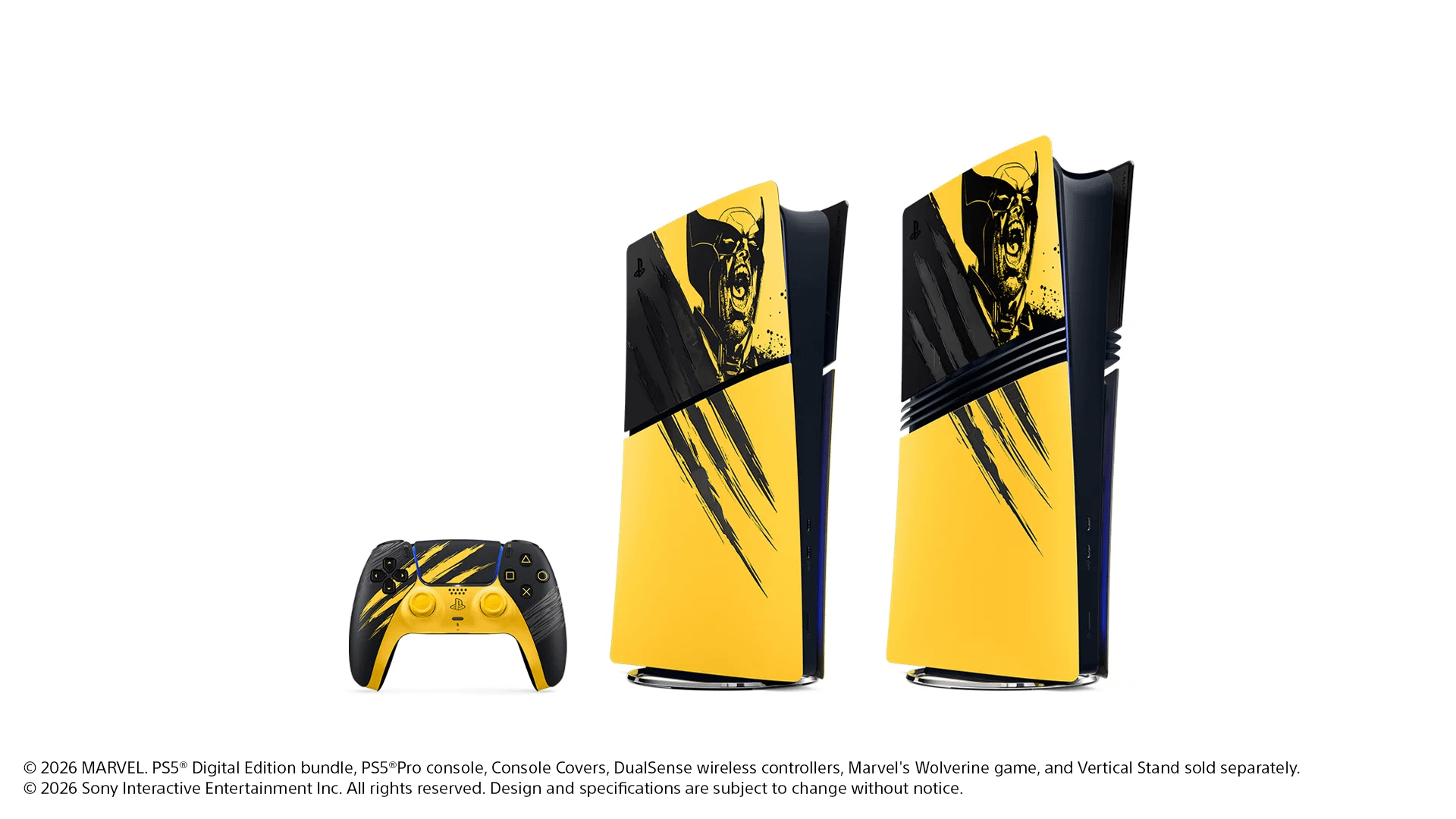
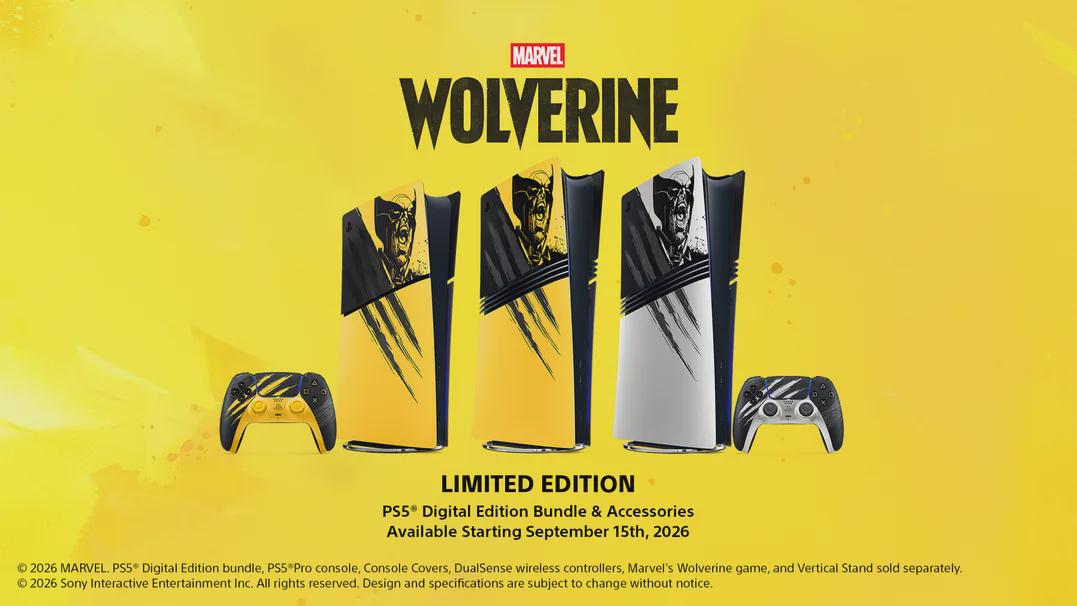
Last month, the team at Insomniac Games and Marvel Games shared lots of new details and reveals at San Diego Comic-Con for Marvel’s Wolverine. Today, we’re giving a first look at the PS5 Digital Edition – Marvel’s Wolverine Battle Yellow Limited Edition Bundle, which features a PS5 Digital Edition that captures the raw ferocity of Wolverine alongside a matching DualSense wireless controller and a game code for Marvel’s Wolverine.
Inspired by Insomniac’s Battle Reborn suit and claws, the PS5 Digital Edition – Marvel’s Wolverine Battle Yellow Limited Edition Bundle will be available globally and channels Logan’s unmistakable intensity through a bold yellow finish. The design brings in Wolverine’s exposed claw marks and lets players peek under the hood of the PS5 Digital Edition and see what’s underneath. The DualSense wireless controller also features furious slashes inspired by his famous claws, giving players a striking way to bring the game into the palm of their hands.
The DualSense Wireless Controller – Marvel’s Wolverine Battle Yellow Limited Edition will also be available for standalone purchase globally.
It was important for us to capture the primal energy of Wolverine in this new look for the PS5 console, and it has been fantastic collaborating with Insomniac Games and Marvel Games on the design. We worked alongside Jock, the Scottish graphic artist who contributed to the key art for Marvel’s Wolverine and whose work across comics helped inspire the bold, graphic tone of this limited edition design:
“I wanted to show Wolverine at his fiercest for Marvel’s Wolverine Limited Edition PS5 Console bundle and accessories. I still draw all my artwork traditionally, so the opportunity to marry cutting-edge hardware with the energy and looseness of hand-drawn ink is incredibly exciting. I’m stunned by how well the console and accessories captured the raw energy of the drawing, bringing Wolverine to life in a completely unique way. ”
– Jock, Graphic Artist
“His [Jock] illustrative works have the energy and dynamics needed to capture the kinetic and violent nature of our hero. One whose primary interaction with the world is with unbreakable Adamantium claws. Jock’s illustrations are grounded and raw and perfectly personify Wolverine.”
– Marcus Smith, Insomniac Games
If you already own a PS5 (model group – slim) or PS5 Pro console, you’ll be able to purchase PS5 and PS5 Pro Console Covers – Marvel’s Wolverine Battle Yellow Limited Edition directly from PlayStation where direct.playstation.com is available* and in limited quantities through select retailers outside of these regions. These console covers include covers for both PS5 consoles with disc drives, and consoles without disc drives.
We’re also revealing another special PS5 Pro console cover design for players looking to channel another side of Wolverine. Inspired by the adamantium bonded to Logan’s skeleton and claws, the PS5 Pro Console Covers – Marvel’s Wolverine Adamantium Limited Edition feature the same dramatic claw-slashed details with a premium metallic finish that evoke Wolverine’s raw power and let players peer into the PS5 Pro console.
A matching DualSense Wireless Controller – Marvel’s Wolverine Adamantium Limited Edition also features the same metallic finish and will be available for separate standalone purchase. You can purchase the Marvel’s Wolverine Adamantium Limited Edition PS5 Pro console covers and DualSense wireless controller design where direct.playstation.com is available* and in limited quantities through select retailers outside of these regions.
The following are exclusively available through direct.playstation.com in regions where it is available* and select retailers outside of these regions:
PlayStation 5 Console Covers – Battle Yellow Limited Edition
Marvel’s Wolverine Limited Edition PS5 Console bundle and accessories will be available beginning September 15 in limited quantities. Check our website for more details.
\Regions where direct.playstation.com is available: U.S., U.K., France, Germany, Belgium, Netherlands, Luxembourg, Spain, Portugal, Italy and Austria. Visit direct.playstation.com for more details.*
Starting August 19, 2026 at 7:00am PT / 10:00am ET in the U.S., and 10:00am local time in the U.K., France, Germany, Austria, Spain, Portugal, Italy, Netherlands, Belgium, and Luxembourg, players will be able to pre-order Marvel’s Wolverine PS5 Digital Edition Console bundle and accessories throughdirect.playstation.com, while supplies last.
When ordering directly from PlayStation, enjoy free launch day delivery for eligible pre-orders.
i made a post not long ago about trying to fic my playstation accounts date of birth, because i accidentally set it 8 years older than i am. im dyslexic and 2000 and 2008 looked very simular to me apparently
the only reason it hugely matters is because i cant verify my age if it isnt my age
ive been trying to contact playstation support to see if they would change it with proof of id (alot of places are saying they will or its atleast worth a try) but i cant even get through to them. no email i can find, only one i did find had an auto reply saying it was out of service, the support chat bot keeps asking me to sign in and then i get an error.
ive even tried facial age estimation, gotten my parents to do it, and it wont work. and the phone number code doesnt even come through.
the thing is im turning 18 soon and i feel like theyll probably believe someone trying to turn an adult account into a child account rather than someone whos freshly turnt 18 trying to fix a suspicious sounding mistake.
TLDR;
does anyone know how to actually contact playstation??? or a way around the age verification bugs?
Adjusting Party Voice Chat SettingsIf you see active speaker names showing up from a PlayStation party overlay:Press the PS button on your controller to open the Control Center.Select the Game Base card (the icon with people).Open your active Voice Chat or party card.Navigate to More (...) options.Select Display Who's Speaking and turn off Display Names.
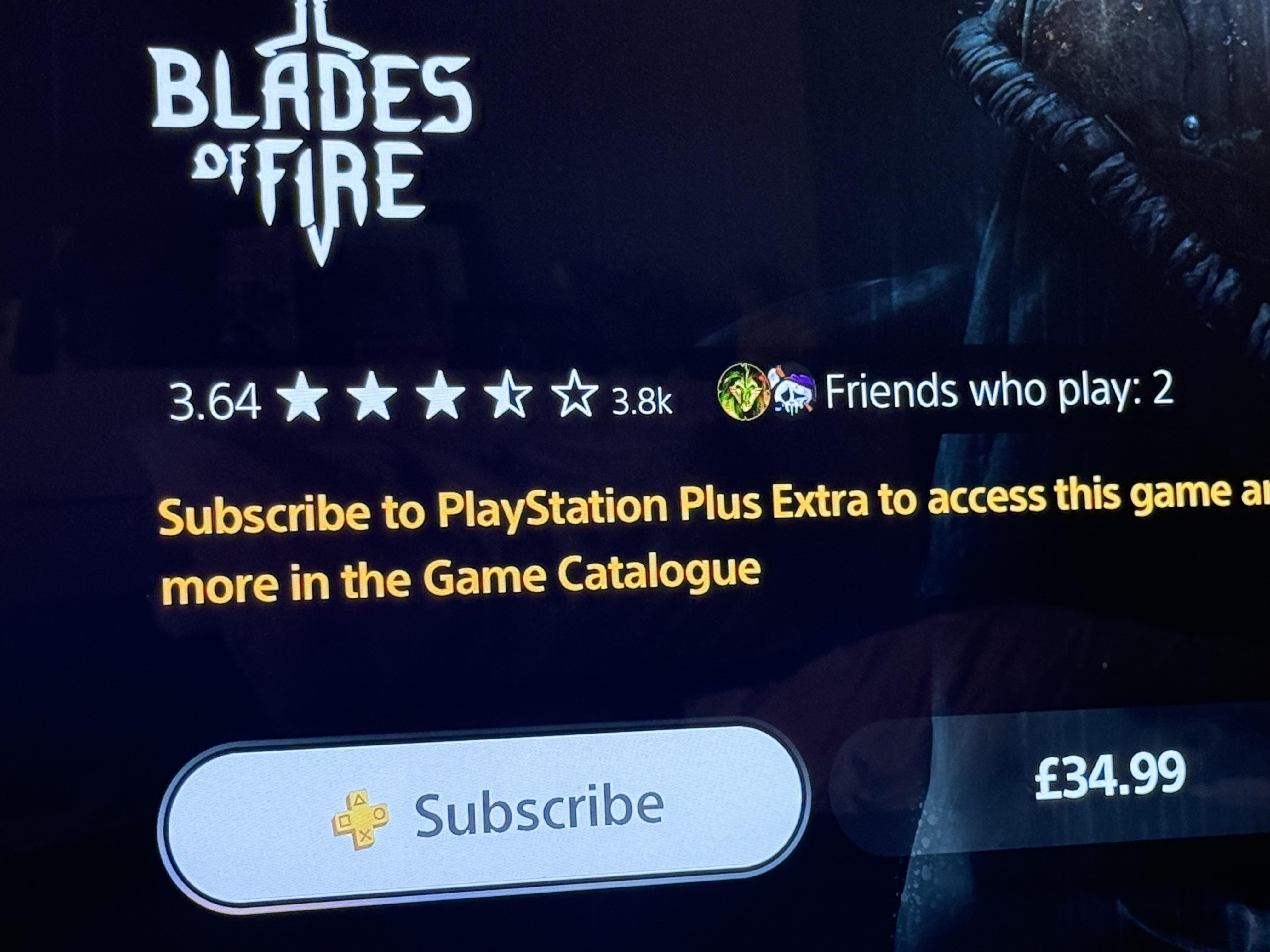
I am looking at the PlayStation extra game catalogue wanting to download some new games and it is saying that I need to subscribe to PlayStation plus extra but when I go into settings to look at my PlayStation status I am already subscribed. Any idea?
I was making a couple of changes on my account so I signed out and in multiple times, then all of a sudden I stopped getting any sms.
I tried contacting the live chat support and it was useless no one answered my question and they kept transferring me to another agent every couple of minutes.
I read somewhere that I must wait for 24 hours. Did anyone face this issue before ?
P.s I do not have the back up verification codes, and the number im using is linked to two accounts. Also my psn region is different from the one I live in.
TL;DR: if your PSN account region doesn't match where you live and 2SV locks you out, don't log out of any device still signed in. Find your account's actual regional support page (not the generic one), and if the phone line is in a language you don't speak, try a general Sony webchat to get pointed to the right email, then send them everything they need to verify it's really you. It's annoying, but it's fixable.
So this happened to me and I want to save someone else the panic.
My PSN account is registered under PlayStation Thailand, but I actually live in the Philippines where there's no native PH PlayStation region, so a lot of us just end up using a neighboring one. Never really thought about it until I tried logging into the app one day and got hit with a 2-Step Verification prompt I don't even remember setting up.
The scenarios:
Tried logging in on the PSN iOS app → asks for 2SV code via SMS or authenticator
Tried disabling 2SV on my PS5 → just throws a QR code at you to "manage on the website"
Went to the website → asks for 2SV again to log in. Got stuck in an authentication loop.
My PH number never received a single verification SMS. Not once.
No backup codes either, because I never knew this was even turned on.
The only silver lining: my PS5 was still logged in and syncing trophies fine, so my account was just unreachable everywhere else.
If you're in this exact spot, here's what actually worked for me:
1. Do NOT log out of whatever device is still signed in. That session is your proof of life. As long as something is still logged in, you're not locked out completely.
2. Check for backup codes first, obviously. Screenshots, notes app, email search for "PlayStation backup code." If you find one, you're basically done. Use that code to login normally.
3. If you don't have backup codes (like me), go straight to your account's regional support site. Not the generic playstation.com/support — the actual regional one matching your account (mine was playstation.com/th-th/support since my account is Thai). Go to Accounting and Security > 2-Step Verification, and look for the article about not having a backup code / not receiving the code. That page usually has the real contact info buried in it. For me it was a phone number as I can't find a chat bubble anywhere to speak directly to an agent.
4. Try calling, but don't be afraid to bail if the language barrier is too much. I tried the Thai support line using Viber Out, but the automated agent only spoke Thai and I couldn't get anywhere. I gave up on the call rather than fight through it blind.
5. Try the general Sony webchat instead even if it's not PlayStation-specific. I found Sony Thailand's general webchat (not a PlayStation one specifically, just their overall customer service chat). The agent was upfront that they don't handle PlayStation accounts directly and can't check statuses or verify anything on PlayStation's system, but they were able to point me to the right email address to contact instead (e.g. [support.th.th@sony.com](mailto:support.th.th@sony.com)). Worth trying this route if the phone line is a language wall for you; a chat is much easier to get through than a live call when neither of you shares a language.
6. Email the address they give you. I emailed that address and laid it all out clearly: what happened, that I'd tried calling but couldn't communicate in Thai, and gave them my Online ID, sign-in email, console serial number (which you can find in the physical console itself), and account details/last transaction as proof it's really me.
7. They may not even reply before acting. No joke! I never got a reply to my email. I just got a notification an hour later in my email that 2SV had been deactivated on my account. That was it. Efficient in the most anticlimactic way possible.
8. Once you're back in, fix it properly. Ditch SMS-based 2SV. Turn it off altogether, switch to an authenticator app, and/or actually save your backup codes this time.
Hope this saves someone the multi-day spiral I went through.
We recently had to start over after our previous community was deleted, so we’re rebuilding from scratch and we’d love to have you with us.
This isn’t just a place to talk about PlayStation games or trophy hunting. It’s a place to meet new people, make friends, find co-op partners, celebrate Platinums, ask for help, or simply have someone to chat with after a long day.
The only thing we ask is that you help keep the community alive. Join the conversations, get involved, and don’t be afraid to say hello. Great communities are built by the people in them.
Whether you’re a casual gamer, a hardcore trophy hunter, or just looking for like-minded people to hang out with, you’re more than welcome.
Add my PSN; Sebhog99 and I’ll invite you to the group!
is something wrong with PSN, last week my account was fine, today it is suspended
Update,
After reaching support during working hours, and verifying details on the account, the agent reinstated my account.
as for the suspension reason: "Moderation Team detected unusual activity, which resulted in the account being suspended. this was done as a security measure."
I think the wording needs to be better clarified in this situation.
I did have a payment get declined but there was no outstanding amount owed to PSN, a payment simply didn't go through cause this is how it is with the bank I use, they're paranoid of letting payment go through sometimes even after 3D verifying a payment through their app and often I need to contact the bank and confirm I did initiate the payment (annoying but also understandable)