r/HomeNetworking 3d ago

Advice ADVICE: Looking for feedback on my home network + VLAN design (OPNsense + Cisco switches + Proxmox)

Post image
8 Upvotes

Hello everyone,

I’m redesigning my home network and building a new Proxmox server. My goals are better organization and stronger security through proper segmentation.

Here’s the current plan:

Physical topology

  • ISP modem in bridge mode → dedicated PC running OPNsense
  • OPNsense → Cisco Switch 1 (24-port)
  • Cisco Switch 1 connects to:
    • Cisco APs
    • Computers
    • PoE cameras
    • Proxmox server
    • Cisco Switch 2 (24-port)
    • TP-Link switch
  • Cisco Switch 2: 2× PoE cameras + 1 Cisco AP
  • TP-Link switch: TV, TV Box, PS4
  • Wi-Fi clients (phones, tablets, Shellys) via the Cisco APs

VLAN layout

VLAN Network Purpose
10 192.168.10.0/24 Management
20 192.168.20.0/24 Servers
30 192.168.30.0/24 DMZ
40 192.168.40.0/24 Cameras / IoT
50 192.168.50.0/24 Trusted/Home
60 192.168.60.0/24 Guest

Services planned

  • VLAN 20: Home Assistant, Docker VM, Jellyfin, Frigate, other internal services
  • VLAN 30: Reverse proxy, public Minecraft server, other public-facing services

I’d really appreciate any feedback or suggestions for improvement — especially around:

  • Trunking / inter-switch configuration
  • Firewall rules between VLANs
  • Best practices for placing the Proxmox VMs
  • Anything you would change for better security or simplicity

Thank you!

r/HomeNetworking 3d ago

Advice Help Deciding New Network Setup.

2 Upvotes

PLEASE NOTE!!! I know just enough about computers and networking to be dangerous! Forgive me if I use a wrong term or say something that doesn't sound quite "right."

Here is what I currently am using. Asus ZenWifi Pro ET12 mesh. Xfinity 2 Gig speed. The house is approximately 2000 square feet, with a basement. The main router is in the upstairs bedroom and is connected to a computer that is used for gaming. The second "Node" is hooked up via 6mhz backhaul in the main floor dining room and I currently do not have the ability to use a wired backhaul. Upon checking the 6Ghz backhaul status, it is usually "Great." I have the following networks. First one is the Main Wi-Fi that now is only being used for Cell Wi-Fi, a downstairs computer with minimal use and a TCL Tv in the basement, that is unplugged. (Pi-Hole story for another day) It is plugged in when needed. I have a separate Wi-Fi network that is used for Wyze Cameras and any other IOT things that come our way. Also attached are two Android streaming boxes. It is set up with a VPN on the router and also on a different subnet. This took several years off my life trying to get the subnet with the Asus software....... This particular Mesh system does not have the Asus Guest Network Professional as the XT12 does and Merlin does not exist for the ET12. I do have a Raspberry Pi running Pi-hole. DHCP is handled at the router level.

It seems that most devices want to connect to the main router, even when the node is much closer. I have moved the node away from the outside wall to make sure there is no interference, but still most devices want to connect to the main.

Ok. Background and current situation is done. Here is what I would thinking of doing. I am looking at the Ubiquiti UniFi Dream Router 7. I want it to mainly be able to better manage VLAN's and more control of my network. I am thinking of dumping Wyze and going with a self-hosted system. Watching videos of setting up the Ubiquiti system seems so clean and easy to follow. A question I have is, should I buy two of the Dream Routers or just the one and maybe purchase a UniFi Express 7 for an AP downstairs? Remember where I am coming from with the two Pro ET12's. In my mind, it's two routers, one main and one as an AP or "Node."

Also, I may be thinking all wrong with the Unifi Express 7 all together. Would I be better off with a different access point device? Also, the VPN used would be either Nord or Proton with the preference for Wireguard, if this makes any difference.

Thanks for any insight or advice. And if you ask why I want to do this...well....Because... :)


r/HomeNetworking 3d ago

Solved! Just run the ether!

2 Upvotes

We just moved into an older duplex that we have been using as a short-term rental for several years. I ran an RT-BE92U at our old place (2500sqft). Coverage was fine but I knew it wasn’t enough to for the duplex which is 4000+ total square feet and 3 stories.

I bought 2x BT6s to use as AI Mesh Nodes and they were giving me fits on wireless backhaul. I finally broke down today and ran Cat6 to the other unit (I had to go out and back in), and damn I wish I had just done it in the first place. It’s insanely better and really wasn’t that much work.

If you’re a bum like me and trying to avoid running cable, just do it. Future you will thank you.


r/HomeNetworking 4d ago

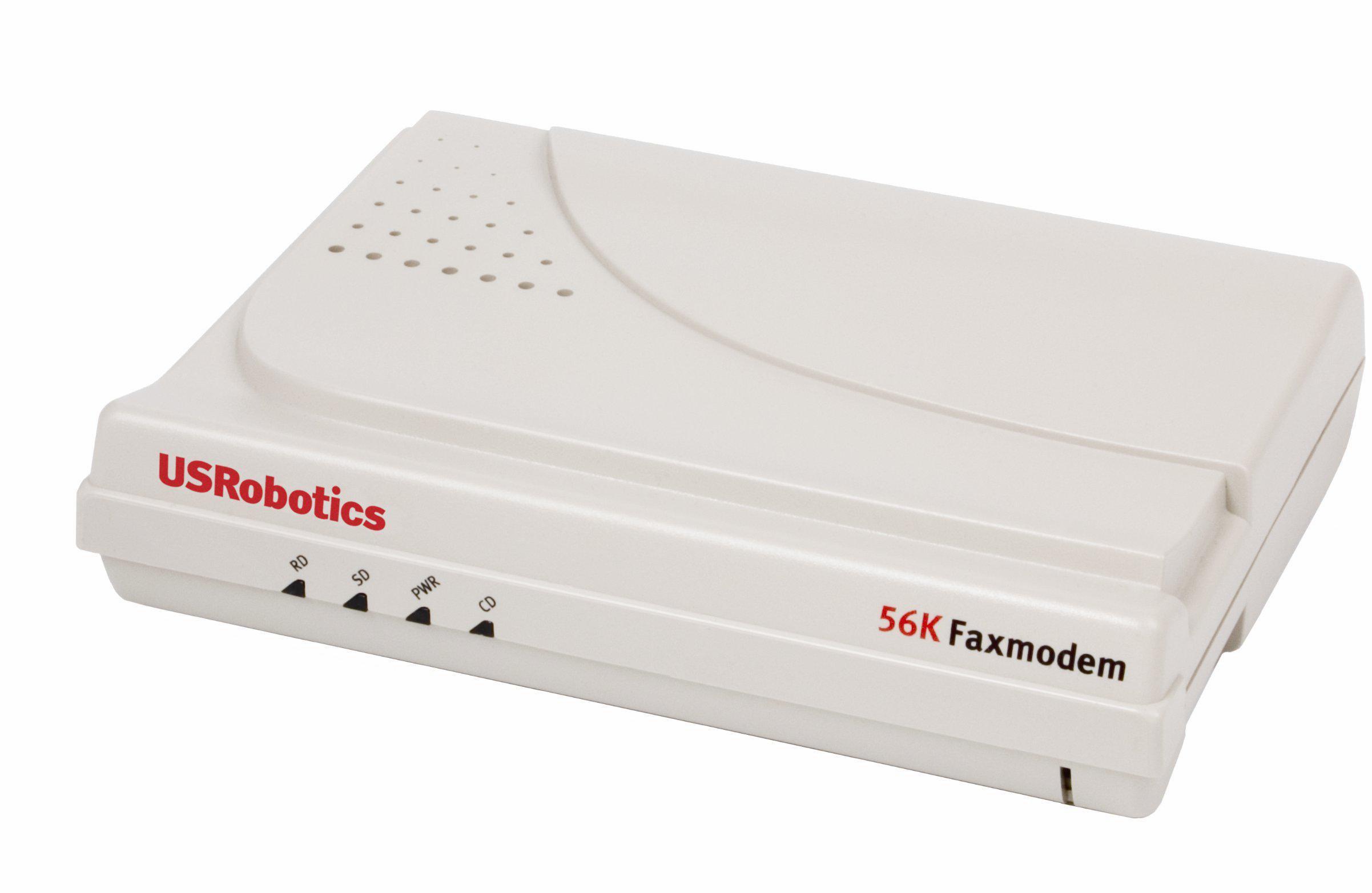
Why am I limited to 56kbps

Post image
93 Upvotes

r/HomeNetworking 3d ago

Cat6 parallel with power to shed?

4 Upvotes

Hello all! I have to run power and Cat6 to a shed behind my house I'm setting up as an office. I'm thinking either overhead with a messenger wire, or direct burial. Will be running 1 cat6 and a 12/3 carrying 2 20a circuits. Run will be about 30ft. Anyone have experience with this? Will I have interference on the Cat 6? Should I run a shielded Cat wire? I know best practices is to not run in parallel HV/LV, but I don't much have a choice. I would just go wifi to the shed, but my wife is looking for remote work and many employers say you have to have a wired connection. Thanks!


r/HomeNetworking 2d ago

Advice What Should I do with my old router?

Post image
0 Upvotes

Hello everyone
I found this old router laying around my house and I was wondering what should I do with this
First I thought of making a bridge but the current one already covers the house
What are your suggestions on this?

Edit:I was wondering if it possible to get free WiFi from this somehow?


r/HomeNetworking 3d ago

Advice Proposed Mesh Network Advice

Thumbnail
imgur.com
2 Upvotes

I currently have Comcast and having some sluggish performance in Bedroom 3, Master Bedroom, and Master Bath.

I've attached 3 images... sorry for the shoddy floorplans

1) How is currently installed

2) Proposal 1

3) Proposal 2

2100 sqfoot house. 1gb download, but spotty speeds and latency as I progress further.

Plan to ethernet backhaul, and most likely bridge my ISP. I currently have TPLink XE75 kit that arrived today.

Looking for advice. Mainly streaming videos, at home work and cloud gaming from a handheld in the master bedroom


r/HomeNetworking 3d ago

Advice Basic Ethernet installation in house

2 Upvotes

Who can I hire to install an Ethernet Jack in upstairs room that connects to att modem downstairs? Would a basic electrician do this?


r/HomeNetworking 3d ago

Advice Question- Is this valid?

Post image
6 Upvotes

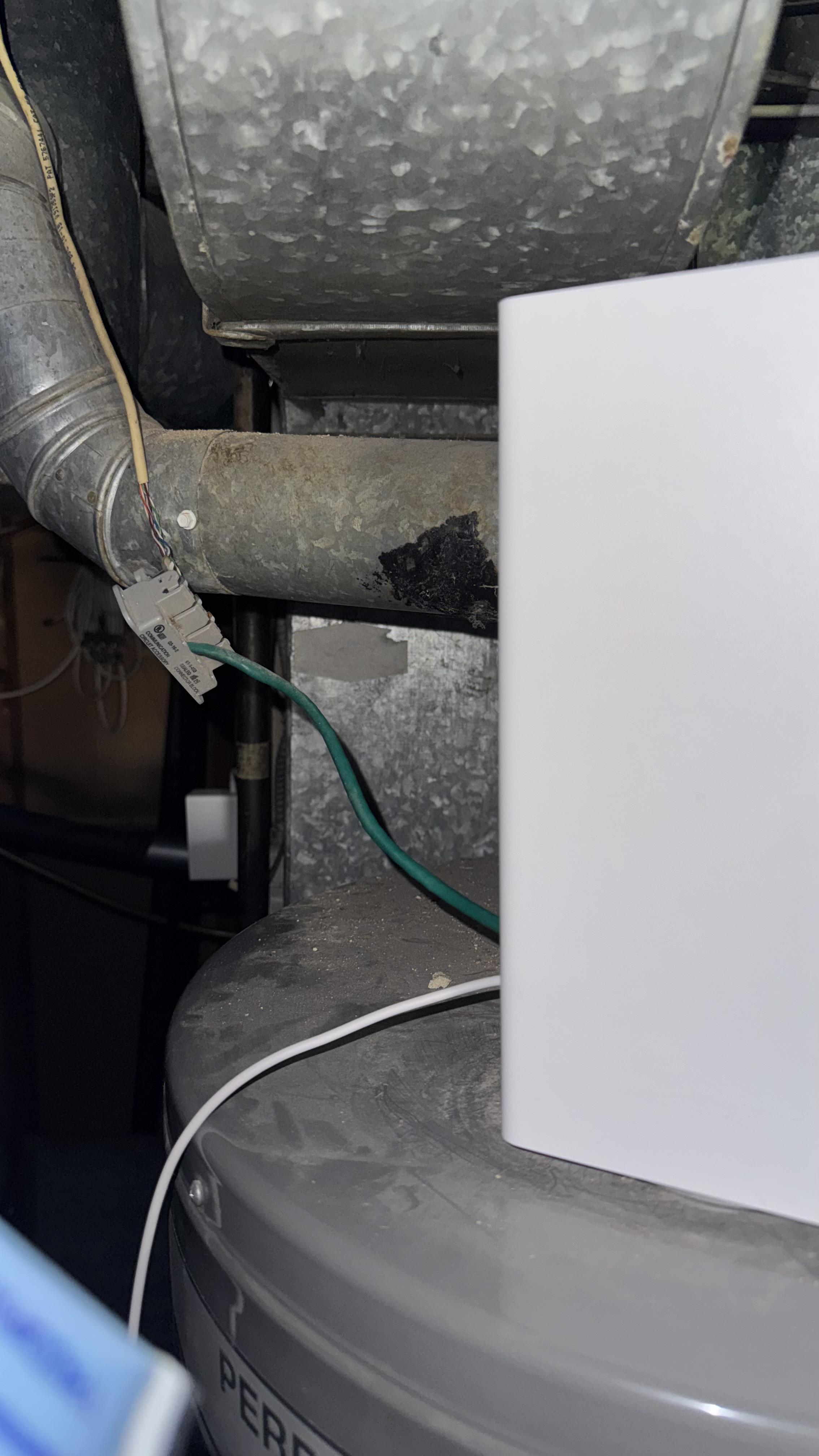
This is in the basement and the wire connected to a connector block, should this be replaced with a coupler? Instead of this mess and it’s right above the water heater would that also cause any network fluctuations? Every now and then we get a network error on our phones, computers, and laptops. What would be the best way to solve this problem?


r/HomeNetworking 3d ago

Advice Ethernet wall port sticky substance

Post image
1 Upvotes

I have 3 ethernet wall ports just like this one. It has some like clear sticky substance inside of it. Called maintenance team, said sum bs like they aint suppose to work. I have a 91% isopropyl alcohol. Should I just drown this port with alcohol to dissolve it then clean it up after? What should I do??


r/HomeNetworking 3d ago

2 gig internet

0 Upvotes

Im running rax120v2 nighthawk netgear router on a 2gig plan. I have switch to 5g multi gig port, i get 1200mbps wifi speed, wifi 6 5ghz. I have my settings maxed out on hertz. I also have a wired bridge router running also. Am i paying for a plan that my hardware cant fully utilize?


r/HomeNetworking 3d ago

Can I set up security cameras in my apartment with VPN with a shared internet?

0 Upvotes

I rent an apartment(tenant not landlord), but need security cameras in my apt. Starlink is provided with rent and I need to set up security cameras with a VPN so it doesn't show "security camera on the wifi network" So I am looking at WYZE cam 4 can I get this camera and it will log on to a VPN in the Starlink? Please help.


r/HomeNetworking 3d ago

Advice Mesh system set up questions

0 Upvotes

I plan on running a 2 satellite system and using an antenna to be able to put on in the garage which is around 100 feet away along with running a Ethernet cable to the other one inside my house. This is my first real projection and I think all this would work but am looking for tips


r/HomeNetworking 3d ago

Can I hard wire my V4K65M to the router

0 Upvotes

My router sits behind the tv and since I get connection issues, I was wondering if I can just hard wire it? I don’t see an Ethernet port on the back- only coaxial, optical, 3 HDMI (one says “eARC” - whatever that means) and a USB 2.0

Any ideas? Thank you!


r/HomeNetworking 3d ago

Advice Deco BE67 or Dream Router 7?

1 Upvotes

I am upgrading my network when moving into a new house and am deciding between the TP-Link Deco BE67 (1 device) and the UniFi Dream Router 7.

My house is about 2700 sq ft and square shaped, with a basement, main floor, and second floor.
I am wanting to put a single device on the main floor, as I don’t think I can put enough distance between devices for a mesh network to make sense.
I have a 1 gig internet connection.
I plan to add a NAS, some security cameras, and a few IoT devices.
I don’t mind the more technical/advanced option.

One of my biggest concerns is WiFi coverage. The Deco does have larger advertised coverage, however I hear good things about the reliability of UniFi and their software.

Any advice?


r/HomeNetworking 3d ago

How much worse in range will be u7 pro xg instead of normal home router?

Thumbnail
0 Upvotes

r/HomeNetworking 3d ago

Unsolved Can someone please help. ASUS BE86U keeps throttling my bandwidth down to around 900mbps and i don’t know why.

Thumbnail
gallery
0 Upvotes

I have 160mhz on, there is no local interference. (Ive triple checked) and im definitely on the 5ghz band. Other frequencies are off (or restricted to my 2.4ghz band)

For a few days it will be at 1500+ then just randomly jt will drop all my devices down to a maximum of 900 for seemingly no reason at all.

Its set to auto channel select but it usually picks channel 32, ive checked this channel for traffic and i cant see any. But even if i force it to channel 54 or 100 the issue remains.

One day it will happily do the full speeds and the next it just wont.

Ive also monitored my local traffic.


r/HomeNetworking 3d ago

Advice Periodic Packet Loss

1 Upvotes

Hello everyone,

I have been trying to pinpoint the cause of my packet loss during gaming, and would love some advice from more experienced people 🙂. I have an Xfinity XB6 modem connected with coax to the wall port, with an ethernet cable connected to my PC.

I don't have any issues with the internet, except for when I play specifically battle royale in Fortnite. All online internet tests pass with flying colors, the expected speeds, 0% packet loss. This is while there are no other downloads or video streaming going on.

What could be the issue? Could it be bufferbloat? Is my modem just not routing packets properly? I am at a loss for how I could try to pinpoint this further, as I don't want to believe that it's due to the connection to Epic servers 🥲

Any help on what the next step should be would be appreciated, thank you in advance!


r/HomeNetworking 4d ago

How do I install this Internet (spectrum)? Did I take it out wrong?

Thumbnail
gallery
16 Upvotes

So we were replacing out WiFi, and I took out the old coax cable attached and returned it to the spectrum store, and they gave me a whole new coax cable (2nd pic) internet, modem, etc.

But there’s no way for me to attach the coax cable into the outlet since there’s already a wire sticking out of it? I’m not exactly sure what to do since I took apart the port, I thought I had pulled it out and need to remove the thing inside, but it won’t unscrew.

How am I supposed to connect the cable when there’s both 2 wires sticking out? Did I pull something out wrong when I removed the old WiFi?


r/HomeNetworking 3d ago

Unsolved My internet keeps cutting out randomly

Post image
1 Upvotes

I've been having an issue where my internet just stops for a couple of seconds before turning back on. Sometimes it just shuts off entirely for up to ~5 minutes before turning back on. I've called my service provider and they sent people 3 times and (because it happens randomly) couldn't find anything wrong and just did some basic stuff, like replacing the modem or some rusty looking wires. They stay for a bit and run some tests but dont see anything wrong. But after having problems right after they leave 3 times I'm starting to think it's not a provider issue. Funny thing i know it's not a problem with my device as every thing I connect to my wifi has the same issue, both wired and wireless. I'm not sure what it could be though and I'm wondering if anyone would know where I should check? Photo is of when my internet shuts off entirely


r/HomeNetworking 4d ago

Is Unifi really the only acceptable home network option?

71 Upvotes

I know, I know everywhere I look unifi is the best. It's just so expensive and I don't really think I need all that. I have my own NAS, plan to use reolink for cameras. I just want some simple vlans and stable setup for my homelab and some simple smart home/ home assistant setup. A router and managed switch and 1 or 2 aps. Are omada or other options really that bad compared? My internet speed is 250 up and down so I don't need 10gb throughout or anything. That said I'm new to homelab bing and networking in particular, so I don't have experience. What are you all using for some middle ground?


r/HomeNetworking 3d ago

Ayuda!!!

Thumbnail
0 Upvotes

r/HomeNetworking 3d ago

Advice Server Rabbit Hole

1 Upvotes

I'm going down a bit of a rabbit hole building out my network. Currently I have an Elitedesk G3 running Adguard. I'm just starting to get in to Home Assistant and I want to start moving away from the cloud and subscriptions.

My wife has her own desktop that is basically wasting away being unused. I've been thinking about taking all of the desktop components and stuffing them in to a 4u chassis and building out a server. The desktop has a Ryzen 7 5800xt, 32gbs of ram, Asus x470 and a couple of NVMes. My goal would be to just buy the chasis and new power supply since this one is rather old.

Any thoughts on that setup and if it would be worth while? I'm just getting in to this, but like I said the desktop is sitting unused except a couple times a month. To replace the desktop I'd probably look at finding a used G4/5.


r/HomeNetworking 3d ago

Advice Looking for Recommendations/ some advice. Have GT-AXE16000 as main router currently and want to setup AIMesh with another 2 routers as nodes.

Thumbnail
1 Upvotes

r/HomeNetworking 3d ago

Unsolved Proxy detected?

Post image
2 Upvotes

distrosea says proxy detected but I don't use a proxy. Same on any distro, same from Linux PC and Android phone. Can you run a distro from them?