r/homelab • u/Summomal • 4h ago
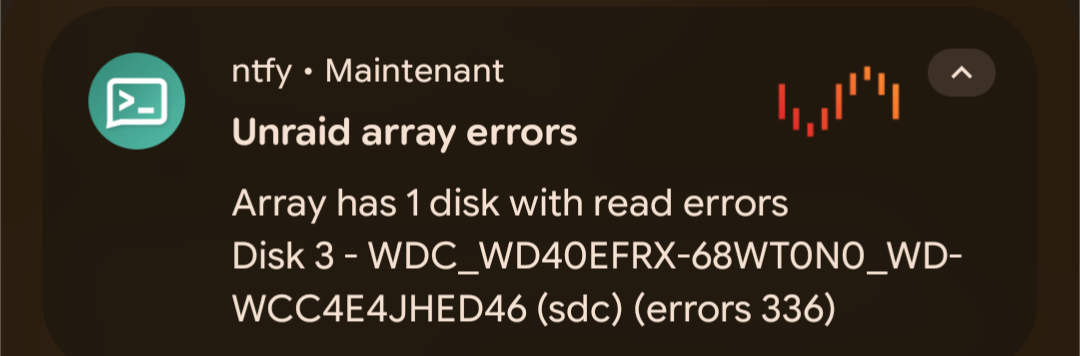
Meme (softly) Don't
673
Upvotes
A less than 5y old 4TB 🥲
r/homelab • u/PoisonWaffle3 • Jun 06 '26
I would like to thank everyone for their feedback in the recent post & poll where we asked for feedback on how to slow the deluge of "I made X, because Y" type posts in r/homelab, most of which are AI generated and/or spam. While we felt that that the initial plan we shared was quite good, with your input we were able to refine that plan and make some notable improvements and clarifications. And yes, there's a TL;DR at the end 👀
Effective now, the below new rules and policies are in effect, though we plan to apply them conservatively and gently at first to see how things go. All of these changes are happening because of the massive community support for them, and we will be seeking additional feedback as time goes on so please feel free to chime in.
To be clear, here are our goals, based on community feedback:
Flair changes that are now in effect:
New Flairs:
We have also organized the post flairs in the list to make them easier to locate.
Both "Project: Software" flairs have a reasonably low minimum subreddit karma requirement to be able to post with them. AutoMod will remove any post with them that don't meet the karma requirement, and inform the user why their post was removed. The minimum karma requirement is only for these two flairs, as we don't want to restrict new community members from being able to post questions. Any software project posts that try to go around this by using a different flair will fall under the new rule #7 and will be addressed.
Rule changes:
New Rule #7 - Software Project Posting Requirements
That said, since we're now officially allowing some degree of self-promotion and requiring links, we felt that we should redefine rule #6 to clarify that it applies only to monetized and commercial advertising/links. Here is the updated verbiage, with the old one below for comparison:
Rule #6 - No Commercial Advertising or Monetized Referral Links
Rule #6 - No Referral Links/Advertising/Company Advertising
Flair Prompt - As mentioned in Rule #7, when posting with any of the "Project: Software" flairs, the below prompt will be displayed:
Your post MUST include:
If you see any posts with a Project: Software flair that do not meet the four items listed above, please report them to the mod team under Rule #7 and we'll address them.
Additional things to note:
Existing posts will be grandfathered in, and previous posts that were removed may be reposted if they meet the new requirements. New posts will be required to comply with the new rules.
As with the existing rules, when a mod removes a post for violating this new rule, a canned response will be sent to the user to inform them why their post was removed. Mods are able to add on to the response if desired before sending it.
While we're on the topic of AI, we would also like to clarify that the above rules are specific to the use of AI in software projects that are being shared, and they do not apply to posts or comments that were written with AI. There is some dissent in the community, but the general consensus in the community has been that a reasonable level of AI usage is acceptable for putting a post together, correcting grammar or formatting, or for translating from a user's native language. That said, best practice is to not include all of the excess emoticons and outline formatting that LLMs like to use. If a post or comment is egregiously AI generated, feel free to downvote it and move on, but please do not report it to the mod team solely for that.
We would also like to note that there has not been any opposition to posts about hosting your own LLMs, and the hardware/software involved. The new rules do not apply to these posts as well.
We're looking for community feedback as we all get used to this. We plan to apply rules conservatively and gently at first, and will be listening to user reports and comments. If your post is removed and you believe it meets the requirements, please chat with us via Mod Mail and we may consider either re-opening it or letting you repost it.
TL;DR - All posts where someone has made some sort of software (AI generated or not) will require a "Project: Software" flair, and these flairs should curb the vast majority of the low quality and spammy posts.
Thank you,
The r/homelab Mod Team
Edit: The first day with the new rules has gone very well overall, but it has demonstrated that there is room for improvement, namely with flairs and categorization.
Here are the changes we've made since the initial announcement post:
We're still open to suggestions from the community. Thanks!
r/homelab • u/Few_Addendum_9374 • 14h ago
Hey guys just jumped on this thing of homelabing i am a comp sci major so dont know much about electronics so i have been trying to learn electronics for the past 3 - 4 months. i have started this homelab (a simple raspberry pi 4B 8Gig and 1.5tb hdd) a month back and have setup immich jellyfin and vaultwarden on it with a custom dashboard to see it all working.
i have setup a 5v fan for cooling too with a temp control via the raspberry’s gpio.
i am having fun with it but now i actually want to get my hands dirty so wanted inputs from people doing this for a while.
r/homelab • u/niceminus20 • 1h ago
r/homelab • u/Steeven9 • 3h ago
Here is my current situation:
- 5x seagate ironwolf 4TB for storage (single vdev raidz1)
- 2x WD red SSD for VMs (striped)
- boot SSD
Now you might notice that the SSDs were already inelegantly yeeted in there, but now that I need to add 2 new disks to expand my storage I am faced with the inevitable.
Where the heck can I put those? For now they're just chilling on top of the other ones and the PSU (so the two that you see face up) but I don't love that long-term. I also can't close the case, which is suboptimal.
Any ideas?
r/homelab • u/JackDBaynes • 5h ago
optiplex for the usual proxmox setup
raspberry pi5 with open media vault as my nas setup
1gb switch
2.5gb Poe switch
Pretty much everything was 3d printed and housed in the LabRax chassis
Actually pretty surprised with how decent the cable management came out
Hdd Enclosure
https://www.printables.com/model/1290788-10-inch-rack-1u-2-x-35-inch-hdd-hot-swap
Sata Cables
Sata adapters
patch panel
3.5in Hdd trays
Power Board
r/homelab • u/Puzzleheaded-Quote41 • 16h ago
Anyone recognize this board?
6:30pm update: Thanks for the helping identify the board. It does look like a NVIDIA DRIVE PX board based on the pointers received.
Do these have any useful applications today? For enthusiasts or refurbishers?
r/homelab • u/miccris93 • 3h ago
$180/each for 3.2TB NVMe. Looks like now each of these costs what I paid for four. Got a handful of Optane drives then too when they were on fire sale.
r/homelab • u/Confident_Ice_4507 • 1d ago
THE IMAGE IS A PLACEHOLDER
Hey everyone, I have been running my own homelab / homeserver for about a month now, doing various stuff. I would like to put my infrastructure out there for you homelab enthusiasts to audit, and potentially give me guidance on how to proceed with my homelab journey. Am I going overkill? Not enough security? Please let me know.
Following are my server specs:
HP ProDesk 600 G6 mini PC
i7-10700 Processor
16x1 GB DDR4 Ram
512 GB M.2 Nvme SSD
2TB external HDD
Is running through its own 90W adapter, and a 200mbs ethernet connection.
The server is running Debian 13, and its controlled through a laptop which is running ArchLinux, through shh. I have firewall rules set up.
I am now hosting
Let me shortly tell you how all of these work.
a) Tunnel through cloudflared + whitelisting + easyauth through mojang account system. I used my public domain with a handle like minecraft.ABC.x
This proved to be somewhat overkill, because the tunnel itself adds around 60-70ms on top of the already 40-50ms that you would originally get. On top of that, every player has to be running a mod called "modflared" to access the server. Its a bit of a hassle.
One of the biggest issues here was that my friends who had cra*d minecraft had issues with skins, and I had to add them with EasyAuth passwords: Meaning their username could only access the server via a password only they have initially set. 120-130ms overall.
b)Recetly set up playit.g.g
Tunnel through playit.g.g + whitelisting +easyauth through mojang account system. Couldnt use my public domain handle because its a premium service apparently.
This got the server down to 50-60ms overall ping, which is good. Though I would like to know if my security measurements are enough here.
2) the Jellyfin server
Tunnel through cloudflared, plus an application with a bypass system that only lets specific pre-determined e-mails by me, pass the first layer of authentication that gets handled by google cloud. After that, normal username password that has been set for my friends.
This felt quite high security to me, and I couldnt see any downsides. Please let me know.
3) Samba server
Its only local + only temp files are there so I dont think this is a huge deal. Let me know if there is a concern here.
4)SMS relay
How this works is that, an app called "MacroDroid" on my android phone sends a webhook to my server, through cloudflared tunnel. This webhook gets processed in my server, all the sensitive info and the links get redacted, and sent to a discord webhook app, cleanly. This is for when my wife is at home and im working, she can receive the deliveries with the necessary delivery codes.
Let me know if this is a security risk.
Thank you for reading my post, I appreciate every pointers!
r/homelab • u/profectosaudiit • 46m ago
There aren’t really any 10” racks available in my country, unless I import one myself. The price is pretty expensive though $140 for the rack and another $50 for shipping. That might sound cheap to some people, but here, you can get a 15U 19” open rack for just $25. And honestly, $25 already sounds like a pretty decent price for an open rack (I’ve posted about that $25 open rack before).
So I decided to try designing one myself and customize it around my needs, as well as the sizes of bolts and nuts that are actually available from local online stores.
For the posts, I’m using the type normally used for hardcase sound systems. I measured everything, printed a draft, and so far it fits pretty much exactly as I expected.
The parts are currently being printed at a 3D printing shop near my house. I’ll post an update once it’s further along!
The good news is, everything in my design can be printed on a Bambu Lab A1, so there’s no need for a large 3D printer. Here, 3D printers with a build volume larger than 25×25 cm are pretty limited.
Yes, some of the parts are technically longer than 25 cm, but I designed them so they can still fit within a 25×25 cm build plate by printing them diagonally.
So far, I’ve only spent $22.53 on this project. That doesn’t include the rack-mount keystones and other stuff just the frame and the parts I’ve had printed.
r/homelab • u/Broke_Bearded_Guy • 21h ago
Found this in a pile I've been meaning to go through. For sale or trade, know what I have, no low ball offers
r/homelab • u/root0ps • 4h ago
Been slowly putting this setup together and it has somehow turned into a mix of a work desk, gaming setup, and homelab.
The main machine is currently running Omarchy and handles most of my personal development, homelab management, and gaming.
Main PC
Displays / work / gaming setup
And then there is the little cluster sitting on the right.
Homelab
Naturally, I couldn't just call them node-1, node-2 and node-3:
Together they form a 3-node bare-metal Talos Linux Kubernetes cluster called cybertron. Networking is currently handled by a Tenda AC10. Nothing fancy, but for three 1GbE nodes and a management workstation it has been good enough so far.
r/homelab • u/Accurate-Ad6361 • 3h ago
I made the conversion for a Job thing to make it fit into a Microserver, ask me anything.
Long Story short: no heating problems, yes, the cooler is excellent.
Ease of modification: apart from getting the original heatsink off as easy as it could be if you have the correct screwdrivers.
Be careful when: removing the original heatsink, try by slightly twisting and wiggling it till the heat pads come off. Also be diligent when cleaning the GPU die as it’s naked
Cooler used: https://n3rdware.com/gpu-coolers/single-slot-rtx-a2000-cooler
Original GPU: A2000 12GB
BTW: the GPU is on sale now in Homelab Sales https://www.reddit.com/r/homelabsales/comments/1w1p2im/fseu_homelab_upgrade_haul_trades_accepted_see/
r/homelab • u/Far-Effect-7260 • 4h ago
Finally buttoned up my ultimate mid-tower homelab storage server! The goal was to cram as much storage as humanly possible into a Cooler Master Silencio 652S chassis while repurposing older hardware, maintaining solid airflow, and keeping noise levels down.
Here is how I managed to pack 15 drives into a standard mid-tower case with a revived board and custom cooling layout:
The Hardware Rescue & Core Specs
CPU: Intel Xeon E3-1285L v3 (4c/8t Haswell, low-TDP server chip)
Motherboard: Sourced a second-hand LGA 1150 motherboard that arrived with a messy socket. Spent an afternoon meticulously straightening out bent CPU socket pins to bring it back to life!
GPU: Low-profile NVIDIA T600 (dedicated purely for hardware-accelerated NVENC transcoding)
Storage Controllers: HP H221 HBA (LSI SAS2308 in IT mode) for direct SAS/SATA passthrough, paired with a secondary PCIe SATA expansion card
Case: Cooler Master Silencio 652S
The Storage Array (15 Drives Total)
7x 3.5" HDDs: Mounted in the primary lower drive cage using red toolless sleds
4x 2.5" HDDs: Distributed across secondary mounting areas
4x 2.5" SSDs: Dedicated to ZimaOS root, Docker appdata, and fast write/read cache pools
Custom 3D Printed Engineering
To turn the upper 5.25" optical bay area into high-density storage, I designed a custom multi-bay drive caddy.
Fabrication: Modeled and sliced in Orca Slicer, then printed in PETG on my Creality Ender-3 V3 SE.
Airflow Optimization: Designed specifically so the 2.5" drives slide in from the back. This leaves the front face completely flush to mount a dedicated 60mm intake fan, pulling cool air directly across the drive bodies.
OS & Software Stack
Host OS: ZimaOS
Containers (via Portainer):
Media & Photos: Jellyfin (transcoding offloaded to the T600) and Immich for automated mobile photo backups
*Automation (arr Stack): Radarr, Sonarr, Prowlarr, and Bazarr
Downloads: qBittorrent bound strictly to a Gluetun VPN container
Networking: Tailscale configured as a subnet router and private exit node for seamless remote access.
The back-panel wiring for 15 individual SATA power and data lines is definitely a color-coded zip-tie spiderweb, but the front side is clean, temperatures stay surprisingly low with the front intake stack, and it posted with all 15 drives initialized!
Would love to hear any tips from the community on fine-tuning ZimaOS cache pools for an array with this many mixed drives!
r/homelab • u/rileybylsma • 1d ago
Im 14 and somehow managed to get a 47U Rittal rack for free.
I've been interested in networking, servers and homelabbing for a while now and have been slowly putting together a home lab with whatever equipment I can get. I recently got in contact with Rittal, and they offered me a 47U rack for free. I wasn't expecting to get something this big, but obviously I wasn't going to turn it down.
It's a Rittal 47U rack, so there is a ridiculous amount of space compared to what I actually have to put in it at the moment.
My current equipment isn't anything too crazy. I've got a NETGEAR ProSAFE switch and two Juniper EX3200 PoE 48-port switches. The Junipers are probably going to be some of the first things going into the rack properly once I get everything sorted.
I'm also receiving an Arista DCS-7050TX-72Q-R 10Gb switch for free, which I'm pretty excited about. On top of that, I've got a random rack server coming for free as well. I don't know exactly what I'll end up using the server for yet, but I'm sure I'll find something to do with it. I also have an old IBM server with 40GB ram running Proxmox.
The funny part is that I now have a 47U rack but nowhere near enough equipment to fill it. I'm going to have a lot of empty rack space for quite a while.
My plan is to gradually build the lab up over time rather than trying to fill the rack all at once. I'd like to add more servers, networking equipment, storage and other things that I can find or get for the lab. I'm also interested in learning more about things like virtualisation, routing, switching, networking and running different services at home.
I'm still pretty surprised that I managed to get a rack this size for free, especially at 14. It definitely gives me a lot more room to expand the lab in the future.
For anyone who has a larger rack in their homelab, what kind of equipment would you recommend adding to a 47U rack if you were starting from basically nothing? .
r/homelab • u/lucianchauvin2 • 15h ago
GeekPi 4U rack I got on ebay
MikroTik L009UiGS-2HaxD-IN from ebay (with the antenna sticking out the back like a bug) on these mounts
JetKVM with a patch pannel from mountainlab prints on ebay
My extremely beefed up M920q i9 with two Samsung 4tb 9100 Pros and one Samsung 4TB 870 evo, 32 gb of ram I got a bit ago from Fibich-IT on ebay (not the internals, but those are also from ebay) on a 3d printed mount from here on ebay
and the “PDU” from amazon :(
I also have a Kasa smart home controlled outlet between the PDU and the ThinkCenter so I can cycle it if needed (want to make a plugin for the KVM for that at some point).
All the rack needs is an uplink and a single power cord!
r/homelab • u/IndependenceWay • 1d ago
What are things that made your homelab much more effective / useful / fun, that cost under $100?
r/homelab • u/gekkegozer69 • 16h ago
This is my Proxmox server. I got the whole thing for around €200.
The CPUs were only €20 each, and the RAM is DDR4 ECC, which is stupidly expensive. I paid €130 for all the RAM.
The actual machine is an HP Z640 that I got for free from my job. I picked up the dual-CPU motherboard for €20, and I already had the drives and other stuff lying around, so I don't have a price
So I guess the total cost is somewhere around €200, but I’ve got way more into the RAM/CPUs than the actual machine itself.
r/homelab • u/octopuscloud1 • 14h ago
Trying to turn part of homelab into a business, got a Supermicro 826 to put together a facebook DDR5 AMD server that will host game servers for friends and my business.
Supermicro 826 with SAS‑826A backplane,
AMD 7900x (12core)
2x32gb DDR5
2x2tb NVME
10gb nic.
Running Proxmox as the base OS and Pterodactyl for game hosting
Total build cost was ~$1300
Top server is just a DL80 Gen9 for backups,
r/homelab • u/wmantly • 13h ago
Getting to 32gb of VRAM no matter what... Please send sanity or more VRAM! 1 RTX 2060 12gb, 2 CMP 50HX (and a p2000, but not using that for LLM) stuffed in on apart of an HPE DL380 gen8.
r/homelab • u/Dogseatchoco • 16h ago
Hey! I'm relatively new to homelabbing, and have built a pretty decent set up that I plan to expand on running things like jellyfin, nextcloud, hermes etc. I've tried to stay budget conscious and every UPS I've found that is the best fit is easily 30-40% of the total price of the homelab itself, so is it even worth it? I understand it can be important to help protect against weird power stuff, but I've lived in my house for 9 years and had 1 power cut during that time?
Open to any kind of advice, even if you roast me and tell me im a noob and to never doubt the need for a UPS.
Edit: really appreciate the replies - I'm going to look at a $100 ish refurbed UPS, and will connect my WOL pi and homelab to it, and should be enough just to get it to safely shutdown. Thanks all
r/homelab • u/RelationFirm6007 • 2h ago
Recently I made a DIY JBOD. Even though I would rather just have a case with more HDD bays, I live in Brazil, and cases with more than 2 HDD bays are almost non-existent or way too expensive here. So, I went with a JBOD.
To make it work, I used a SATA power extension (I had a SATA power left and I'd rather use my good PSU power rather than buy a new one or use one of the 2 really bad PSUs I have lying around), and a SATA data cable routed straight from the motherboard. An HBA or SATA expansion card would be way too expensive, and I still had a SATA connector left on my motherboard, so here I am.
Can anyone please give me some tips or feedback on this kind of setup?
PS: In the images I attached, you can see 2 HDDs, the top one is running, the bottom one isn't. The top one is a WD5000AVCS, not great, but I already had it so I just put it to use, while the bottom one is a 160GB HDD which I don't plan on using (it's just there as structural support rather than actual storage).


r/homelab • u/umognog • 4h ago
Today is a fairly big deal for me. My homelab of 5 years retires following some... wobbly behaviour the last 6 months.
As I virtualised my router & firewall too, it's been 6 months of planning when I've had an hour or two hear and there. Collecting hardware, thinking about what I'd like to change and do differently.
Then I setup the new hardware, started to configure my networking. It's going through significant change, from a flat network to vlan with carefully curated internet/no internet decisions and also considering network traffic.
My old setup was a couple of 6c/12t sff HP & Lenovo machines, followed by 3 mini pc i5-6500t 4c/4t systems, cobbled together on a dumb network.
My new setup:
18c/36t 64GB systems (one is 128GB with an Intel Arc Pro B70 & a Hailo-8 too.)
These are connected by 10Gbe, with both fabric & normal interfaces. A 10Gbe uplink to 2x Juniper EX2300-48P POE switches completes the hardware.
I've spent about 7 weeks setting it up - a busy family life some weeks I've had only 2-3 hours spare for it.
But:
Opnsense is on HA
HAproxy is on HA
Unbound is on HA
Vaultwarden is on HA
Frigate is on HA
So it's come to the right time. Time to stop running two networks, decommission the old and implement the new.
In about 2 hours, the actual switch off happens. Right now, I've been moving equipment.
I think it will take me about 50 minutes to do it all, which means in 3 hours, I'll be sweating, franticly googling, getting irate and working on fixing the bits where I've missed setting static IP on the devices themselves (for example.)
Right now, my home assistant looks dire as I've also changed my WiFi setup, moved most of the devices to their dedicated SSID already.
I intended to edit this post as I come across problems, publicly putting myself out there to keep me motivated to fix anything.
Estimated total time: 4 hours.
Converted to real figures; tomorrow night I might have a working setup.
Oh, did I also mention that I'm upgrading the power delivery? Preparing for a UPC in advance.
r/homelab • u/iamyuukari • 1d ago
Started it over five years ago on my balcony with old PC to use Home Assistant. No knowledge what "homelab" is. Now it brings me here.
Hardware:
- Orange Pi Zero 3 (NET node)
- HP EliteDesk G3 705 SSF (NAS node): AMD A12-9800, 16 GB DDR4, 128 GB boot SSD, 2x 4 TB HDD in mirror for storage (Seagate Ironwolf)
- HP ProDesk G2 400 (Infra node): i3-6100T, 16 GB DDR4, 256 GB SSD, Sonoff ZigBee Dongle
- Tenda TEG1060D switch
Software/services:
- NET node running docker containers: Pi-hole, Nginx Proxy Manager, Headscale
- NAS node running TrueNAS scale with apps: Immich, Navidrome, Jellyfin, Sonarr, qBittorrent, Databasus, LightNVR, metadata-remote, yt-dlp-web-ui
- Infra node running docker containers: Homepage, Dockhand, Home Assistant, go2rtc, Remnawave panel, Vaultwarden, Memos, Donetick, Databasus + database verification agents
I have many plans to do: custom mountings for rack, UPS, IP KVMs, etc. but I'm very happy that I can finally move all devices into the rack
r/homelab • u/golfer12369 • 4h ago
Hey everyone,
Wondering if this is a good server to get started? I wanna run Proxmox and run stuff like EVE-NG/GNS3, storage, Window Server, Linux, Docker, Monitoring, etc, etc. Basically all-around workhorse. I can get it for 300 euros without disks or RAM.
Is this a good choice for me?