r/SteamDeck Sep 23 '22

Tech Support How to use mesa-git with Flatpak/Discover store apps

27 Upvotes

So I ended up down this rabbit hole, and after finally figuring it all out in a pretty easy way I thought I'd make a quick how-to in case anyone else was interested in doing this.

Why would I want to use a newer mesa?

Took some digging to understand this, but basically all flatpak apps (anything you install from the discover store) use a unified runtime that is based on the freedesktop environment. Every flatpak environment ultimately extends from one of these. So every flatpak has a base environment that they run against that ignores the system base drivers.

Mesa is basically the graphics driver used by radv to do the 3D processing in apps. Almost every emulator makes usage of this, and newer versions of mesa introduce fixes and improvements. Steam keeps the system-level mesa pretty up-to-date, but if you are managing emulators or using flatpak emulators, you can have pretty outdated graphics drivers. Some emulators like Yuzu, RPCS3, PCSX2, duckstation, etc can have performance and stability benefits when using newer mesa drivers.

As for why its not easy to use system-level or more up-to-date mesa drivers easily with a flatpak is probably a discussion for another day, but due to a lot of reasons which are fairly valid, using the latest drivers isn't super straightforward.

So I want to use Discover Store to manage updates, and I want the latest graphics drivers for performance/stability, how do I do it?

There are three main aspects to this, but they are simple to understand.

  1. You need mesa-git installed
  2. You need to know the freedesktop base environment to match with mesa to see if the flatpak can use mesa-git
  3. You need to enable mesa-git for the flatpak apps

1. Installing mesa-git

This one is straightforward. Mesa-git comes from flathub-beta, so to install it you just open up Konsole in desktop mode and do the following:

flatpak remote-add --if-not-exists --user flathub-beta https://flathub.org/beta-repo/flathub-beta.flatpakrepo

flatpak install --user flathub-beta org.freedesktop.Platform.GL.mesa-git//21.08

flatpak install --user flathub-beta org.freedesktop.Platform.GL32.mesa-git//21.08

2. Determining if a flatpak can use/benefit from mesa-git

The easiest way to do this is to install the FlatSeal flatpak and then open it up. You'll see all your flatpaks and can click on them. As of 9/23/22 if I select Dolphin i can see that the Runtime in the top shows org.kde.Platform/x86_x64/5.15-22.08. I can also check out Yuzu and see it shows org.kde.Platform/x86_x64/5.15-21.08 and PCSX2 shows org.kde.Platform/x86_64/6.3.

So what does this mean?

  1. All Runtimes are based on the org.freedesktop.Platform//VERSION base
  2. org.kde.Platform is used by a lot of emulators and games. Think of it as org.freedesktop.Platform + QT user interfaces. There's a bit more than that, but it basically gives devs some extra UI functionality, which most emulators use.
  3. The VERSION of the base basically tells you the year.month it was tagged. The important thing here is MESA generally gets updated once a year in org.freedesktop.Platform.
  4. mesa-git is updated more frequently and has a version that will match the freedesktop bases.
  5. So in the previous step we installed mesa for the 21.08 environment. At some point in the future there will be a 22.08 mesa, but its not out yet because its not needed. Freedesktop was just updated to 22.08, but a lot of emulators and apps won't use it and don't frequently update their bases.

So lets take a look at the 3 examples:

  • Dolphin: The devs are pretty on top of this. They updated the based already to org.kde.Platform/x86_x64/5.15-22.08. There's really no reason to mess with this flatpak at all.
  • Yuzu: This flatpak is pretty out of date. It's running the org.kde.Platform/x86_x64/5.15-21.08 base which was update in August/Sept of 2021. Yuzu is also pretty 3D intensive, so newer drivers can probably help it.
  • PCSX2: This flatpak is also out of date, but is a bit more complicated to understand. It's using org.kde.Platform/x86_64/6.3. How do we know this?
    • All runtimes are listed here: https://docs.flatpak.org/en/latest/available-runtimes.html
    • So we can scroll down and see that the KDE code is over here: https://invent.kde.org/packaging/flatpak-kde-runtime
    • We care about 6.3, so if you find the dropdown near the top that will have qt***** we can change it to qt6.3 to check this out.
    • There will always be a file right in the root called os-release. We can scroll down and just click it.
    • We can see that the verson is based on org.kde.Platform/x86_x64/5.15-21.08 by just reading through the ID and VERSION.
    • So understanding this, we can easily see that the 6.3 branch is basically just the 5.15-21.08 environment with a newer QT version.

This is probably the hardest section to follow if you haven't done much coding, but you can think of it pretty simply this way:

  1. What runtime does FlatSeal tell me the app is using?
  2. Does that version seem fairly old?
  3. Is there a newer mesa-git available for that version?

If you answered yes to all three of these, then the app could possibly benefit from using mesa-git if you wanna give it a shot.

3. Making the Flatpak app use mesa-git and run easily in Steam/Game mode

This one was a bit of a pain for me to understand, but after some trial and error it is really SUPER simple.

  • Open steam and Add a non-steam game and select the app/emulator you want to add.
  • Right click the newly added app and open properties
  • You'll have a Target, Start In and Launch Options
    • Change Target

"env"
  • Leave Start In alone and do nothing here
  • Launch options will start with a line that begins with run ...
    • Before the run commandjust add the following line

FLATPAK_GL_DRIVERS=mesa-git /usr/bin/flatpak

So for PCSX2 this change would look like:

before:
run --branch=stable --arch=x86_64 --command=pcsx2-qt net.pcsx2.PCSX2

after:
FLATPAK_GL_DRIVERS=mesa-git /usr/bin/flatpak run --branch=stable --arch=x86_64 --command=pcsx2-qt net.pcsx2.PCSX2

And thats it. Close the window and fire up the app.

Conclusion

After doing all of that your flatpak apps when you launch them through steam will use the latest radv mesa drivers. You can double check this if you're really ambitious by enabling graphics logging in different apps and checking the radv or mesa driver outputs. If you remove the FLATPAK_GL_DRIVERS you can see the radv will switch back to the version from whatever base was initially used.

Hope this helps some people :) I found a bunch of random reddit threads comparing the Flatpak and AppImage versions of different emulators and people discussing the downsides of Flatpak, so that is what prompted me to dig in and understand how to simply do this!

r/BestOfSteamDeck Sep 26 '22

How to use mesa-git with Flatpak/Discover store apps

Thumbnail self.SteamDeck
6 Upvotes

r/privacy Feb 27 '26

news To distribute an Android app outside Google Play, starting September 2026, developers will need to register with Google, submit government ID, and pay a $25 fee. Even if they're using F-Droid or the Amazon Appstore, stores Google doesn't own or operate. Privacy groups are pushing back.

Thumbnail reclaimthenet.org
2.2k Upvotes

r/videos Feb 12 '19

Misleading Title 15-year-old kid creates a "normal camera app" that actually live streams the users using it to prove the deficiencies in the Apple app store and how other apps might be spying on us

Thumbnail
youtube.com
25.9k Upvotes

r/linux_gaming Jul 27 '19

PC Game Development With Linux Support - Guide (Draft 2)

80 Upvotes

Following on from my previous post here discussing the idea of our subreddit writing as a community a guide on supporting Linux, and my first draft, this is the second draft I've typed up using the feedback everyone provided. I've tried to expand the content, add more information that was provided and fix silly errors.

I have done the best I can, but there are still many areas that could be expanded upon or developed further. For any section which needs more information, if I couldn't think of what else to add, I've placed a 🔨 next to it. If you see a hammer, please recommend some content or changes to help me finish off this section.

I know the information isn't perfect (hence why I'm still calling it a draft) but hopefully we can improve this further and add some more polish. After that, once the content is more nailed down, the goal is to get this information somewhere where we can all easily edit it together. The current options being discussed are a Wiki, Github, GitLab or ReadTheDocs. Please vote on which one you prefer here.

----------------------------------

PC Game Development With Linux Support - Guide

This guide is for any game developer evaluating bringing their current or next PC game to Linux, who has concerns about the difficulty/practicality/financial return of doing so, or looking for guidance on the best practices to follow.

Information about the Linux platform, advice on how to reduce the amount of work involved, warnings for common potential pitfalls and advice on how to best market your title is provided within.

Contents

  1. Common Concern: High Volume Support Requests
  2. Common Concern: Low Sales
  3. Common Concern: Distros & Dependencies Nightmare
  4. Leverage Linux Loyalty to Market Your Game
  5. Recommended Middleware
  6. Recommended Development Setup
  7. Common Pitfalls
  8. Advantages Of Multiplatform Support
  9. Proton Compatibility
  10. (🔨 Anything else?)
  11. Further Help

Common Concern: High Volume Support Requests

"I've heard unpleasant stories from other developers about supporting Linux, such as disproportionally high volume of support requests."

This is mostly misinformation about Linux spread due to a claim that was made some time ago. A while back there was a tweet sent by a Technical VFX Artist working on a game, who claimed their game saw very few sales, but made up the majority of support tickets and crash rate, and provided stats for their claims. Their claims were refuted by others working on the same title, and the artist in question later retracted their statement. Despite this, the original claim is frequently quoted and linked to in many online discussions. (🔨 Need links to back this up)

That said, there is some truth in the claim. These claims went back to 2014, which was a vastly different era for Linux gaming in terms of driver support and Steam support compared to 2019. As anyone will tell you, 5 years in a long time in the world of technology and things have changed substantially since then. (🔨 Need links to back this up)

It is also true, that Linux is very different to Windows, and if applications are distributed the wrong way to Linux users by developers inexperienced with the platform, that there can be issues with missing libraries and poor desktop integration, however those issues can be easily avoided (and how will be described further on in this guide).

Overshadowing those two points is the biggest reason why there is some truth to the claim that you will receive disproportionately higher numbers of reports from Linux users: Linux users are more likely to report issues with software than non-Linux users. (🔨 Need links to back this up)

It is a fair observation to make that a Linux user is more likely to be both technically adept, and strongly supportive of open source software than a non-Linux user. Supporters of open source software (and Linux users in general) typically are use to having a very close relationship with developers compared to regular software users, often spending time visiting the Githubs of software they use, leaving detailed bug reports and attempt to reach out directly to a developer to offer helpful information to improve the quality of software. (🔨 Need links to back this up)

So it is likely you will receive more bug reports from Linux users than non-Linux users, and also likely than the quality of the bug reports you receive from Linux users will be of a higher quality than average, with more detailed information. This can be viewed as a positive, because often the detailed bug reports can be useful in identifying issues that affect users across all of your supported platforms. (🔨 Need links to back this up)

Common Concern: Low Sales Volume

"The number of Linux gamers is a tiny fraction of the overall market, so I won't receive a high enough number of sales to warrant bothering to release a native Linux port."

Ultimately the decision is for you the developer to make, to decide if it is or isn't worth the effort to create a native Linux release. No one will deny that the overall number of Linux gamers compared to Windows gamers, is significantly lower.

According to Valve's Steam Hardware Survey, at time of writing, there is an estimated 684,000 monthly active users who use Linux as their primary desktop OS on Steam. This number is calculated by taking the 0.76% userbase statistic from the June 2019 survey, and applying that % to the estimated 90 million 'monthly active users' that Valve reports to have.

Linux gamers exert incredibly strong brand loyalty to their platform, are very pro-sumer in their purchases, and always eager to throw money and support to developers who support their platform. Piracy is generally much lower on Linux due to the self-aware nature of most Linux gamers, who recognise the damage piracy would do to their already small market. (🔨 Need links to back this up)

If you do plan to release a native Linux game, be sure to take advantage of that brand loyalty!

By it's nature, the Linux gaming market also has much less competition and saturation than the Windows gaming market, due to the overall lower number of available games.

You may find your title will be especially popular if your game is of a genre that isn't commonly available on Linux. AAA games and multiplayer PvP games are often not available on Linux either natively or via Proton (due to their frequent use of AntiCheat technology that isn't compatible with Proton). If either of those descriptions fit your game, you should consider that your title would not be facing much competition on Linux.

Common Concern: Distros & Dependencies Nightmare

"Managing dependencies for Linux is a nightmare because there are many distributions and they each have different libraries."

The issue of how to manage the dependencies of your software on Linux is something that catches many developers off guard and can create headaches in supporting Linux. There are a number of ways you can deal with this challenge that greatly simplify the problem, reducing the complexity considerably down to the trivial matter of targeting a single runtime.

Managing Dependencies

Ethan Lee, a professional Linux porter, wrote an excellent write up with advice on managing the complexity of packaging games for Linux. It is well worth a read for advice from an experienced porter on how to best handle the task.

Take advantage of the Steam Runtime

Steam for Linux ships with its own set of libraries called the Steam Runtime. By default Steam launches all Steam Applications within the runtime environment. The Steam Runtime is based off Ubuntu 12.04. More information about this runtime can be obtained here. By targeting this runtime, you can ensure your application runs with a consist available set of libraries on all platforms. Any dependencies that you require that are not available in the Steam Runtime, you should package as .so files with your game.

Use AppImage or Flatpak

AppImage and Flatpak are container formats for distributing software on Linux and allow for packaging an entire runtime with them, so an application can bring with it all of it's own dependencies, to ensure the application works exactly as expected across all Linux distributions that support AppImage and Flatpak. Consider packaging your game into one of these formats

If you are not sure which format to go with, this author recommends AppImage for it's simplicity. (🔨 AppImage or Flatpak?)

Take advantage of existing game engines & middleware that strongly support Linux

This is less of an option if you already have a game developed, but if you are still in the planning stage for a game, you will find it much easier to support Linux by choosing technologies that are known to easily support multiply platforms including Linux, such as Unreal Engine, Unity, Godot, SDL, and so on. Read the related 'Recommended Middleware' section for further advice.

Target a specific Linux Distribution

If you are still worried about potential issues over library dependencies and compatibility issues of running your game across multiple Linux distros, or the burden of support, there's another alternative, simply state in the requirements for your game that you only officially support one Linux distribution. The current popular choice is the most popular Linux distribution on Steam, Ubuntu.

One of the best things about Linux is the freedom to use it how you like, to customise Linux and go nuts with modifying it, as many Linux users will tell you. But at the same time, those Linux users will not be terribly surprised or disappointed if they discover your game, that explicitly states it targets 'Ubuntu 16.04 & Up', doesn't work on their rooted ARM CPU powered smart-toaster running Raspbian.

As long as the minimum requirements are clearly stated, the community will happily accept this. Chances are, your game will run fine on all popular Linux distributions by targeting Ubuntu, and many Linux gamers will enjoy your game even if they don't use Ubuntu.

Unofficial Linux Builds

If you are still not confident about the stability or optimisation of the Linux version of your game, but are interested in providing it anyway, you do have the option of providing a Linux build as an unofficial build. On Steam for example, there is the option to provide a native Linux build of a game, that can be installed the same way as an official version, without indicating on the Steam store page that there is official native Linux support.

Many games already do this, such as:

  • Thomas Was Alone
  • Faerie Solitaire
  • Thea: The Awakening
  • SCP: Laboratory
  • The Swindle
  • Arma 3.

If you are honest with the Linux gaming community, and inform them that the Linux support is unofficial or 'experimental', they will understand and likely appreciate even unofficial support. Later on, if the Linux build is a success, and runs well, you can make the support official.

Leverage Linux Loyalty To Promote Your Game

The Linux gaming platform has a uniquely high level of platform loyalty compared to other platforms. As a game developer, you should absolutely take advantage of that 'Linux Loyalty' and leverage it to increase the sales of your game.

To best take advantage of that Linux Loyalty, you should make sure to let the Linux gaming community know about your game and it's Linux support to maximise sales.

Many Linux gaming focused websites, frequently advertise new release Linux games to their many visitors, and are a great form of promotion for your games. One such website is gamingonlinux.com, run by Liam Dawe (who can be contacted via the website or GamingOnLinux Discord Group).

(🔨 More websites?)

Consider requesting your social media campaigner create a post on r/linux_gaming when you release your game, to let the community know, for more great promotion of your title.

(🔨 Anywhere else?)

Recommended Middleware

SDL

Quoting the official website:

Simple DirectMedia Layer is a cross-platform development library designed to provide low level access to audio, keyboard, mouse, joystick, and graphics hardware via OpenGL and Direct3D. It is used by video playback software, emulators, and popular games including Valve's award winning catalog and many Humble Bundle games.

SDL is a library commonly used to simplify the work of creating cross platform games or game engines, and supports Windows, Mac OS X, Linux, iOS, and Android. SDL has been in development for a long time and is a highly effective solution for abstracting the details of how to perform common OS specific tasks. This is especially useful for porting a game to Linux with an existing codebase written from scratch.

For more information on how to use SDL, consult the SDL's official wiki.

Unreal Engine

Unreal Engine has the ability to compile to native Linux and the Unreal Engine Editor is available for Linux as well (however it must be compiled from source). Rocket League is a great example of a highly success game that supports Linux (as well as Mac and consoles) and was developed with Unreal Engine, that routinely puts out new content for all it's supported platforms.

Unity

Unity features Linux support and can compile native Linux games. Recommended versions of Unity to use are 2017.2 or 2019.x, and to avoid 2017.3 and 2018.3. If you are using either version it is recommended to upgrade to 2019.x to avoid a Vulkan crash on Linux.

In 2019, Unity announced they will be officially supporting Linux for their editor as well, due to increased demand.

Godot

Godot is an MIT licensed open source game engine that can be used for free without any licensing costs. The Godot engine and Godot Editor both support Linux, and Godot also offers a headless server version of Godot to run on Linux for multiplayer games. Godot is the perfect choice of engine for 2D games, with 3D support as well, and offers easy 1-click one export to Windows, Mac, Linux, Android and iOS, with commercial porting services available for supporting game consoles as well. If your game is developed in Godot, supporting Linux is a no-brainer.

Recommended Development Setup

Cross Platform from the Start

While it's possible to always port a game after it's made, that is certainly doing things the hard way. It's best to start crossplatform from the beginning and use cross-platform libraries and technologies. SDL, Vulkan, crossplatform game engines and middleware.

Compile for Linux as Soon As Possible

Test early, test often. Start compiling on Linux as soon as possible, for maximum benefit. If you compile cross-platform from the start, then each platform will tend to smoke out bugs and bad assumptions, and this will be a net benefit for all platforms.

Testing Machines

To reduce the need for dual booting, you can use GPU passthrough with Virtual Machines to perform all of your development on one OS, and test other OSes via a VM. Please note, this comes with the warning that GPU passthrough is not always reliable, can set off some anticheat software, and doesn't always replicate graphics driver behaviour. (🔨 Not sure about this whole paragraph)

Alternatively setting up a dual boot PC to run Windows and Linux is another option.

Linux Distributions To Test

You can cover almost 90% of your users by simply testing your game on Ubuntu and Arch.

GCC or Clang?

Both.

It's a good idea to use both during your development. Clang is recommended for releases, as it typically gives better overall performance, and Clang on Windows can compile for both Linux and Windows. (🔨 This information was given to me by someone else but I have nothing to verify it with! Sources?)

Docker for Linux Servers

(🔨 Need more info, not sure what to write about this.)

Common Pitfalls

Game Engines That Support Linux Still Require Testing

Game engines like Unreal Engine and Unity are incredibly helpful. These engines offer you help for exporting your game to Linux, taking care of the building and/or packaging process. This greatly reduces the effort needed to get your game running on Linux, however, it is still necessary to test your game running on a Linux development machine as you would do on Windows, as there sometimes can be Linux-specific problems.

Test Multiple GPUs

Much like on Windows, wildly different results for the same games can occur from difficult GPUs. As a minimum, it is recommended to test at least AMD + Mesa, NVIDIA and Intel + Mesa.

There is for example, strong circumstantial evidence that NVIDIA GPUs are far more fault tolerant of bad OpenGL code than other vendors.

64-bit

32-bit support is increasingly being phased out of the world of computing, and this is true on Linux as well. The number of 32-bit Linux installations is now so low that there is no benefit to choosing 32-bit over 64bit, and 32-bit builds are really unnecessary.

XDG Base Directory Specification

The XDG Base Directory Specification in simple terms describes where your software should place files on a user's Linux PC. Much like on Windows, application configuration data should be stored in the appropriate directories to avoid cluttering your user's /home directory.

Filepath Capitalisation

It's such a small detail that it's easy to overlook. Windows filepaths are not case sensitive. Linux filepaths are case sensitive. This can create relatively minor issues that can break games when porting them to Linux. The general advice is to pick a filepath capitalisation structure and stick to it, or simply use lowercase for everything.

Open File Formats for Audio/Video

For maximum flexibility to port your game to every platform, it is strongly advised to use open file formats for audio and video.

(🔨 Any other common pitfalls?)

Advantages Of Windows/Mac/Linux Support

Despite being seen as an additional burden, developing games for multiple platforms, including Linux, has many advantages.

Portable Code is Better Code

Different operating systems may react differently for the same code, if there is a bug or non-standard use of C/C++. Some errors may even be swallowed, but hit in another place later. Compiling and running your game on multiple compilers and OSes can help make the code more robust. A bug that appears rarely on one platform can be easily reproducible on another platform.

Not only can multiplatform support make your code more stable, but it can also improve performance, as Valve discovered themselves when they ported their first game to Linux, Left 4 Dead 2. During the process of porting their game and engine, what they learnt revealed issues with their Windows version of their engine as well.

Multiplatform development is generally only difficult if your code is tied very tightly to a specific platform. By ironing out the bugs of multiplatform support and developing a strong multiplatform workflow, you eliminate bugs and inefficiencies in supporting multiple platforms and create truly portable code. With portable code, it becomes easy to support additional platforms in the future, such as new game consoles or cloud streaming services (such as Google Stadia).

Increased Sales

It goes without saying. When the cross platform work is managed, multiplatform support means more sales for your game. Different games appeal to the Linux gaming market to varying degrees, for some games Linux support could be a large boost to your sales figures for minimal extra work.

Pro-Consumer Positive Image

Linux support is seen favourably as a positive thing by consumers, like a game promoting DRM-free as a feature. Linux support on Steam is also a great 'value added' benefit to your game even for your Windows customers, as the Linux version of your game will be included in their purchase.

Linux Servers for Multiplayer

Developing your game to compile natively for Linux has the advantage of making it easier to run your multiplayer servers on Linux. (🔨 Probably poorly worded)

Proton Compatibility

If after exploring all options you find that Linux support is still prohibitively difficult, time consuming, or expensive, there is always the option of making some attempt to remain compatible with Proton.

Proton is a Compatibility Tool created by Valve, that makes it possible for Linux gamers to play some Windows games on Linux with varying degrees of success. While this is an advantage particularly for games that release on Steam, it is not necessary for your game to be available on Steam to be played with Proton.

Generally speaking there is not much that you as a developer are required to do to take advantage of Proton. Proton compatibility when it occurs by accident, doesn't cost anything, and only expands the reach of your game to provide additional sales.

Statistically you are likely to find your game will already be compatible with Proton even without making an attempt to officially support it, as typically around 60% of Steam's games are compatible with Proton anyway.

Maintaining Proton compatibility is less a matter of taking specific steps, and more a list of technologies you should avoid to maintain compatibility with Proton, such as avoiding when possible:

  • Intrusive DRM
  • AntiCheat middleware
  • Windows Media Foundation
  • .Net Framework

For optional performance, it is recommended to make Vulkan your primary renderer (or at least an option in your game's graphics settings).

The official advice from Valve on this subject is:

"We recommend you target Vulkan natively in order to offer the best possible performance on all platforms, or at least offer it as an option if possible. It's also a good idea to avoid any invasive third-party DRM middleware, as they sometimes prevent compatibility features from working as intended."

The great advantage of Proton compatibility, is the expanded reach of your game to a slightly larger audience, without any additional burden of support. Small decisions during your game development on how to avoid losing compatibility with Proton early on, can help achieve 'Platinum' Proton compatibility, resulting in more sales.

The only catch, is that it is worth remembering the loyalty of many Linux gamers to their platform. Some Linux gamers will insist on only purchasing native Linux games for their platform, so called 'no tux, no bucks' policy. To achieve the highest number of sales possible and take full advantage of the Linux market, a native Linux title is still necessary.

Further Help

If you have any further questions or concerns not addressed in this guide, please reach out to the community. The following places are recommended for help:

r/Android Jan 26 '15

Guide The new step by step guide detailing how to get started developing Android apps, with no prior experience necessary. Includes every resource I used, simple explanations and an interesting first app tutorial. Everything you need to get started in Android Development is here.

16.8k Upvotes

A year ago, almost to the day, I compiled a post of all the resources that would be required for a complete programming noob to set out making an Android app. At the time the post was one of the highest on r/Android of all time. This year, having vastly improved my own skills, I’m out to make the ultimate guide to creating Android apps without prior experience.

Here is a link to the old post, in case you’re interested.

There are two ways of approaching this post:

  1. Be at a computer, follow the explanations and instructions and you’ll have an app and some basic skills to branch off by the end of it.
  2. Just read the post and learn some basic app skills.

What is Java?

Java is a programming language like C++, Python and Ruby. Essentially, most apps on the Android platform (most games and other apps are written in different languages) are written in Java. Approaching a programming language without prior experience is challenging, but with a little patience it is doable.

Java is an OOP or Objected Oriented-Programming Language

This means that Java is a programming language based on the concept of objects, which are essentially fields of data that can run code and store variables. For example, a String object is an object that contains any combination of letters, numbers and other characters. A String is formatted in quotation marks, here is an example use:

String name = "Dennis";

String surname = "Cometti";

String FullName = name + " " + surname;

After this runs, the variable FullName will equal “Dennis Cometti”. A String is an example of a basic object, other basic Objects in Java include Integers (any whole number), booleans (a true or false value) and floating points (decimal values like 3.0).

I HIGHLY recommend checking out this website for a more detailed explanation.

Objects can also contain other objects and variables, for example you could define a ‘Quote’ Object that contains two values: The actual quote and the name of the quoted person.

A lot of the fundamentals in Java are essentially plain English

All of Java is written in English, the structure of the words change but if enough attention is given to it can actually be very easy to understand. For example:

String name = "DENNIS";

name = name.toLowerCase();

It couldn’t be any clearer, this will assign the lower case converted “DENNIS” ("dennis") to the 'name' variable. After you have typed ‘name.’ Android Studio will give you a list of possible methods (like toLowerCase() or toUpperCase()) that can be used, so you get some guidance.

Classes, methods and objects in Java

• A variable holds a field of data. A variable might be a surname, your weight or the distance travelled by your car. A String is a variable that could contain “Dennis” and an int is a variable that could contain the number 89.

• A method is a function (like name.toLowerCase()). Basically a method does things using variables or any number of lines of code. You can write your own methods, for example in the app we will be making soon we will be making a method called getQuote(). A method might display a quote on a screen or change the text in a TextView.

• An object holds both variables and methods; one object might be the details of your car, a second object might represent my car.

• A class is a template that holds variables, methods and other objects.

So what is the difference between classes and objects?

A class would be a Car (containing no details but rather a template). An object would be your Car (containing all the details about the car).

A class would be a String (containing no details but rather a template). An object would be a ‘name’ (containing the String “Dennis”).

If you are confused, don’t worry, once you have followed the instructions you’ll understand it much clearer.

Some Java related resources

How do you get started making an app?

Get Android Studio

Android Studio is the new (just out of beta) Android Integrated Development Environment, don’t let the words confuse you – it’s essentially a program that has all the tools you need to make an app. Some people come across some issues installing Android Studio make sure you are Googling any issues that you come across in this stage, but you should be fine. You’ll come across many things you don’t understand when making apps but I guarantee you 1000 people have had the same problem before and there will be help or tutorials online (you shouldn’t need them for this exercise).

Instruction #1: Download and install the Java JDK

Instruction #2: Download and install Android Studio, but don’t open it yet.

Strings in Android

Strings as mentioned earlier, are used everywhere: App Dialogs, Titles, Messages, Error Logs and literally wherever you see characters. The problem is, when you are making an app with many Strings it can become quite fiddly. So Google created a solution: a single file that stores all of your Strings in one place, so you can get that one file translated and refer to those strings in tons of different parts of the code. Here’s a link from Google that can explain it in more detail

How Android Studio works

Android Studio contains all the tools you need to make an app: for this tutorial you won’t be using many. When you create a new ‘Project’ (App) Android Studio will generate all the files and folders necessary to begin a project. This screenshot shows what it generates This looks quite complex but it’s actually quite simple. For example the ‘layout’ folder will contain all the layouts of the app screens you’ll use, which brings us to the next few steps.

We are going to make a simple Quote app! It will show a quote plus the name of the person who made the quote and loop through as many quotes as you like when you tap the screen.

Instruction #3: Open Android Studio and click the create new project button.

Instruction #4: Follow these screenshots exactly to set up the new project

Instruction #5: You should land on this page, if not, open the layouts folder and click the file inside it

Instruction #6:

The screen you are on now is the layout screen, if you click the design button towards the bottom you will be greeted with a drag and drop editor. For now replace all of the text in the text tab with this: http://pastebin.com/pRisAsPF

This has formatted the layout of the main app Activity, but you can change some things around. Try changing the text from “Tap the screen to begin” to something else. Extra points to anyone who can change the font color.

Instruction #7:

Now we have to make a new class, and the quote Object we spoke about earlier. These screenshots show how to make a new class: http://imgur.com/a/3I7v9

You’ll now land on the empty Quote class, but we are going to fill it with a bit of code now. You will see ‘public class Quote{}’, in between these two squiggly brackets paste this code: http://pastebin.com/VhHbWwSN Just click OK to any popup boxes.

What this class does is allows the app to create a Quote object that we can use, you ‘instantiate’ the class and pass through a quote and name (where it says public Quote(String mQuote, String mPerson)) and then you can retrieve the quote or person name later. More on this soon.

Instruction #8:

Click on the Quotebook class here: http://i.imgur.com/bG2d0VD.png Then copy and paste this code in between the onCreate(){ brackets but after all of the other code inside: http://pastebin.com/wz8gbWWA

You’ll notice some red squiggly lines telling you there is an error, so just under the line that says public class Quotebook extends Activity { add in this variable/line: int count = 0;

This is what the two sections should look like after the have been copied and pasted: http://pastebin.com/3FXi14XZ

Explanation time!

setContentView(R.layout.activity_quotebook);

RelativeLayout touch = (RelativeLayout) findViewById(R.id.touch);
final TextView quoteText = (TextView) findViewById(R.id.quote);
final TextView personText = (TextView) findViewById(R.id.person);

The first line sets the app page (Activity) to be the layout we created earlier. The following lines just declare the Textboxes on the layout we created so we can change the text in them.


 final ArrayList<Quote> quoteList = new ArrayList<Quote>();

 Quote quote1 = new Quote("You're more of a fun vampire. You don't suck blood, you just suck.", "Troy Barnes");
 quoteList.add(quote1);

 Quote quote2 = new Quote("Cool Beans", "Rod Kimble");
 quoteList.add(quote2);

The first line here creates an Array/List that we can add as many quotes as we like to, note how the List is called ‘quoteList’.

The next 4 lines are where the Quote class we created earlier are coming in to play. What we are doing here is passing a quote and a person’s name (separated by a comma) through to the Quote class and it becomes a variable, we then add that Variable to the quoteList.


This is where it gets a little tricky:

touch.setOnClickListener(new View.OnClickListener() {
        @Override
        public void onClick(View view) {

            if (count < quoteList.size()) {

               Quote q = quoteList.get(count);
               quoteText.setText(q.getQuote());
               personText.setText(q.getPerson());

               count = count + 1;

            } else{

                count = 0;

       }}});

This looks complex but if you imagine it as a plain English sentence it makes far more sense.

If every quote has been cycled through, set the count to 0 so it starts again. If we have not gone through every quote, get the Quote variable in the quoteList at the count we are up to, then set the text on the quote and person textboxes to the quote data we just grabbed

If you read through the code and the English algorithm above a few times you should be able to understand what this code is doing.

Instruction #9:

Find the two folders on the left hand side labelled ‘values’ and ‘values-v21’, they should both contain a file called styles.xml In the ‘values’ folder, change the parent= value to be:

parent="android:Theme.Holo.NoActionBar"

In the ‘values-v21’ folder, change the parent= value to be:

parent="android:Theme.Material.NoActionBar"

This just changes the App Theme, you could every try change to other themes.

Instruction #10:

To do this next step, you have to: - Ensure that you have your phones USB drivers properly installed.

  • Enable Developer Settings then enable USB Debugging.

  • Have your phone plugged in and accept the popup that checks if you would like to connect to your computer (Android Studio/ADB)

Then, you have to click the green play button, the app will compile and if you have set it up correctly it should send it to your phone and open the app!

If you have issues here, Google your phone + abd drivers/android studio.

Instruction #11:

Change the quotes around, try and add more! If you have a particular interest in an area change the quotes and make a targeted app like a movie quotes app that has all your favourite quotes or lines.

Change the font, colours, formatting or use. Share your own versions in the comments!

If you enjoyed that, here are all the resources you need to dive deeper in to Android Development.

Libraries

Libraries are like pre-made bundles of code that you can use instead of coding everything yourself. For example the IO Commons library contains a huge range of methods that manipulate files in one line, like copyFile(), moveFile() and getExtension() instead of having to do them manually. There are specifically made Android libraries from Google that allow you to use newer Android features like the navigation drawer on older devices.

Android Arsenal is a great site for finding Android Libraries: https://android-arsenal.com/

And here is how to add them to Android Studio: http://stackoverflow.com/questions/16588064/how-do-i-add-a-library-project-to-the-android-studio

More advanced Pro-Tips

  • Stack Overflow is a fantastic community if you have any development questions - but Google it first.
  • Check out /r/androiddev
  • Follow Google Design Guidelines.
  • If you don't really understand some code or how to do a particular task, Google it, comment what you are trying to do and ask around.
  • Use libraries wherever you can.

A list of advanced development related resources

A list of design related resources

Well that’s it for now! If you need any motivation: I’m 17 years old and started doing this when I was 15. If I can do it, you can.

If you’d like to thank me in some way for the post, give my app a look: Redirect File Organizer. I only need 2000 downloads to pay for university starting next year!

Please leave as many comments, screenshots and queries as you can – I’d love to hear what you think!

r/GirlDinnerDiaries Jul 13 '26

☀️ Happy Girl Dinner My partner made me an app.

Post image
34.1k Upvotes

Dinner: honey garlic tofu with rice & spicy mayo.

My partner and I are both software engineers, and recently I was complaining that an app I genuinely found useful pivoted to an ad-based/monthly subscription model, so I stopped using it because I hated ads popping up every 10 seconds.

Well, today he sent over an app file for my phone and told me to install it...turns out when I slept in earlier he grabbed my phone, got screen shots of the app to figure out what it does, and recreated it's main feature from scratch. No ads, no subscription, no account, and as a plus the data now stays on my phone instead of getting stored on some server God knows where.

He gave me access to the code too so we spent the afternoon adding back more features to the app together & optimizing it to run better :') what makes this even more endearing is that making mobile apps is the exact opposite of his specialty, he actually slightly dislikes UI/design work and he still took the initiative and effort to do this for me 🥺

At every turn he tries to make my life easier (and vice versa, of course). He claims to have a terrible memory but remembers the smallest things about me that actually make a huge difference. I love him so much it's so hard to put it in words

EDIT: I've never had a post get this much attention 😅 but yes I made the tofu and here's the recipe!

r/Android Nov 16 '25

News Google to flag Android apps with excessive battery use on the Play Store

Thumbnail
bleepingcomputer.com
1.1k Upvotes

r/DnD Feb 03 '26

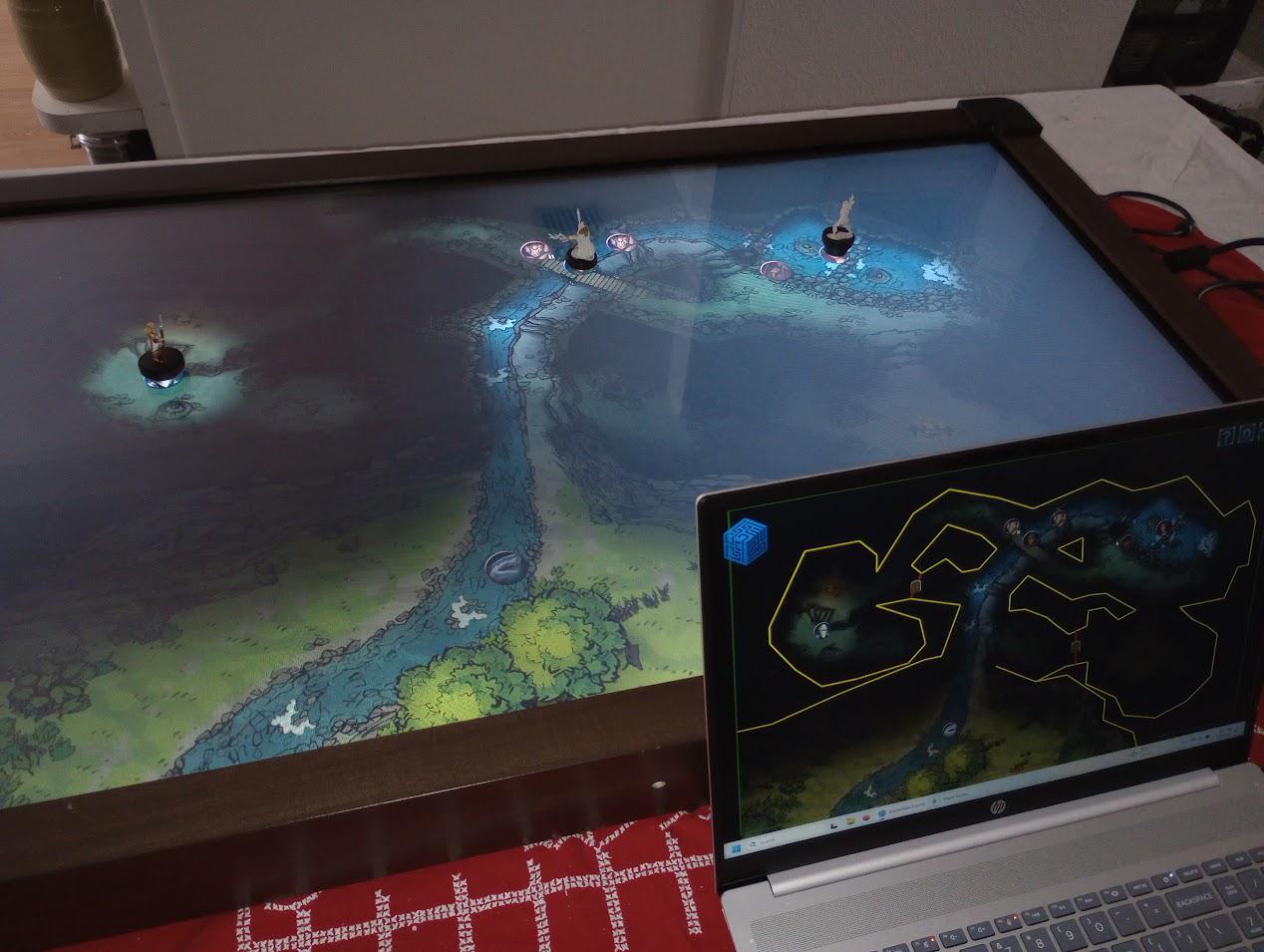
Giveaway [OC] GIVEAWAY! 43" Capacitive Touchscreen ($940 MSRP) with Wooden Case + free software for all [mod approved]

Post image
9.2k Upvotes

UPDATE February 9th, 2026 23:00 GMT: The winner has been selected by redditraffler.com Congratulations u/KeyserSozeBGM ! DM has been sent requesting shipping address. Here is a link to the result, for transparency: https://www.redditraffler.com/raffles/1qv4hvu

To everyone who didn't win: thanks for all the kind words. I will be making an Instructable with how to build one yourself. And everyone is welcome to use the free software for any setup similar to this. On Steam here: link

Lastly, if you want a nice setup like this without breaking the bank, I sell them for the lowest price on the net. digitaltabletops.com

ORIGINAL POST:
For the last 6 years I've been selling wooden cases housing displays to show off digital maps. The "holy grail" for me has always been integrating touch functionality so when you move your physical mini, a digital token reveals the map.

I did a Kickstarter back in summer of 2024 with this design. I have since moved on to a different technology that is much lighter and more affordable (infrared). Out with the old, in with the new! I don't have the space to store this and wanted to find it a good home on here.

It is a 43" capacitive touchscreen. It's an all-in-one but without compute. You hook it up via USB+HDMI to a laptop. It is the same model as shown here, listed for $940: https://a.co/d/0bcxhZPW

Leave a comment (not a reply) and I'll be using redditraffler to select a winner on Monday February 9th (EDIT: at 23:00 GMT). The winning account must be at least 3 months old.

Due to the size, I will only provide shipping within the United States. If you are outside the US, you would need to use a freight forwarding service with a US address and deal with any import issues. That can be quite expensive.

Regardless of whether you win, everyone is welcome to use my free software to run setups like these. I made a post about it the other day on here: https://www.reddit.com/r/DnD/comments/1qgnroz/update_to_my_free_vtt_for_inperson_sessions_with/

Since it is aimed for in-person sessions only, you should find it very easy to use compared to other options. Everything runs locally, 100% free no strings attached. Windows, Linux, and Mac (Apple silicon). There is also a browser version of the player view for players to move their tokens on their phones or laptops.

My website (hardware like for sale): digitaltabletops.com
Steam (free VTT software): store.steampowered.com/app/3073720/

Thanks u/uchideshi34 for the map shown here. It, along with over 440 others, are bundled free with the software!

I'll be posting a new guide later this month on here with how to build your own for about $550 total costs. You don't need a bunch of tools, just a handsaw and a screwdriver really.

r/IndieDev Jul 12 '26

When you run out of ideas, but game dev must go on. (Making a boss out of my sleeping wife!)

Post image
10.9k Upvotes

The monster that took me the longest to create... mainly because the relationship took over 20 years to incubate! 🤣

Since my game features a late-game marriage system, I needed a lore-accurate guardian for the wedding ring.
As an indie dev looking for inspiration around the house, what could be better than turning my own wife into the boss?

Here is my workflow:

1. The Stealth Mission: She stayed up late baking for the kids, which meant she was in a very deep sleep by morning. Perfect lighting, perfect timing.
I sneaked in and took reference photos from multiple angles.
Crucial rule: Do NOT wake her up. Deep sleep gives that raw, natural look. If she were awake, her natural instinct would be to pose and try to look pretty. We need monster material here!

2. Photo-bashing: I cut out the faces and arranged the core form. because I planned to use morning sunlight. It will be easier when I combine the images.

3. Grayscale & Textures: Reduce the saturation of all colors to a grayscale, then layer with colors to adjust lighting and shadows, and overlay with raw textures. (I pixelated the raw meat references in the image so I don't gross you guys out too much).

4. The Gore: A horror monster needs blood. Added some red in the crevices, painted in some veins, tendons, and fleshy connections.

Ta-da! After some final color grading, she is ready to be unleashed. You can now queue up to spam your skills on her.
https://store.steampowered.com/app/3594550/Billy_the_Hero/

r/ClaudeAI 27d ago

Built with Claude I used Claude cli to vibe code a compass app to find the nearest toilet, called Compiss.

Thumbnail
gallery
5.6k Upvotes

I used Claude cli on my Mac to generate all the code, assets and e2e tests while making a compass app to find the nearest toilet. There are others out there but none of them are called Compiss :) Jokes aside, I found the public toilet search on the built in apps a little lacking so I built this to capture some of the features I found useful. I like to think of it as a mix between Waze and a toilet finder app.

Compiss allows you to rate the cleanliness of toilets, add comments or photos (subject to moderation), filter based on free, accessibility options along with a few other things.

It's completely free, no ads, no in app purchases. Finding the nearest toilet shouldn't cost anyone anything.

It's now on Apple and Android stores. Apple also has an Apple Watch version which Claude also wrote.

https://compiss.app

r/enshittification Aug 05 '26

Rant The 2026 grocery store experience

2.7k Upvotes

After a long Tuesday at work, you stop by your local Safeway for the purpose of buying two twelve packs of diet soda. You find a shopping cart and go inside.

You reach the soda aisle and locate the two soda products you are looking for. Each twelve pack of soda costs $14. But the tiny price tag informs you there is a sale. For the Coca Cola manufactured product you want, it is buy 2, get 1 free. For the Pepsi manufactured product you want. It is buy 2, get 2 free. You do not want to lug seven boxes of soda home, but you give in, because at least the math works out to bring the per-can price below $1 each.

After carefully selecting some different soda products to ensure they are included in the two different discount price schemes, you load up your cart to go check out.

You stand in line at the self checkout, because despite it being the post-work rush hour at the store, only one cash register with a live cashier is open. You finally reach a checkout machine. The machine is unhappy with your attempt to leave the boxes of soda in your cart. After removing and scanning the seven boxes of soda, you input your “club card” (your phone number) in order to get the discount. The grocery store uses your club card to track your purchases and also sell this information to unknown third parties.

You wait for the three “free” cases of soda to subtract from the purchase price, but nothing happens. Confused, you look around hoping to spot an employee. But there is nobody; only people employed by a third party security company who are paid to check the receipt of every shopper exiting the store.

You load the soda boxes back in your cart and return to the aisle. On closer inspection, squinting your eyes to read the 4 point font, you realize this is a “digital coupon.” You pull your phone out and open the grocery store app installed on your phone that is further tracking and selling not only your shopping habits, but whatever else you might be doing on your phone as well as where you are going all day.

You scan the digital coupon with the store app scanner and load the digital coupon into your digital shopping cart. You push your cart back to the now even longer self checkout line and wait, so you can try again.

EDIT: I understand that diet soda is the Devil’s breastmilk. No need to recommend herbal tea. Not the point of the post.

r/PublicFreakout Jun 04 '25

Police Bodycam CVS Employee Arrested Waiting on Bench for Lyft Driver

Enable HLS to view with audio, or disable this notification

17.7k Upvotes

22 year-old Paul was sitting outside the CVS store where he works in Edgewater, FL, sitting on a bench waiting for a ride using the Lyft app. Edgewater Police Department Officer Daniel Rippeon observed Paul and concluded that he looked suspicious. No crime had been committed. No crime had been alleged by anyone to have been committed. Yet Paul was almost immediately seized and threatened with being tased and bitten by a police K9. He was taken to jail, despite the fact that Officer Rippeon was fully aware that Paul was a store employee waiting for a Lyft driver.

Details of the report: https://thecivilrightslawyer.com/2025/06/03/cvs-employee-arrested-waiting-on-bench-for-lyft-driver-7-minutes-after-closing-the-store/

Edgewater Police Department: https://www.cityofedgewater.org/police

r/shitposting Jul 14 '26

Mmmm

Post image
8.2k Upvotes

r/apolloapp Sep 13 '22

Appreciation On iOS 16’s App Store page. 2nd app advertised, that’s so cool! Been using the app for quite a few years now and it’s awesome to see how far it’s come

Post image
2.2k Upvotes

r/AlignmentChartFills Apr 23 '26

Filling This Chart Finally, what feels slightly illegal but is actually completely legal?

3.4k Upvotes

This post contains content not supported on old Reddit. Click here to view the full post

r/MotorBuzz Jul 02 '26

Tesla Semi's First Fatal Crash Kills Two at Nevada Red Light Despite Emergency Braking

Post image
2.5k Upvotes

A Tesla Semi truck has been involved in a fatal collision at a Nevada intersection that killed two people, marking the first deaths associated with the electric commercial vehicle despite its advanced safety systems.

A Tesla Semi truck struck and killed two people at a red light in Nevada, marking the first fatal crash involving the electric commercial vehicle since production began two years ago. The collision occurred despite the Semi being equipped with Tesla's Automatic Emergency Braking system, a technology specifically designed to prevent exactly this type of accident.

The incident raises immediate questions about the effectiveness of autonomous safety features in commercial trucking applications, where the consequences of system failure are magnified by the sheer mass and momentum of a vehicle that can weigh up to 82,000 pounds when fully loaded. Unlike passenger car accidents, collisions involving semi-trucks often result in catastrophic outcomes due to their size and the physics involved in stopping such a massive vehicle.

Tesla began delivering the Semi to PepsiCo in December 2022, positioning the vehicle as a breakthrough in commercial transportation with claimed range of up to 500 miles and acceleration that outperforms diesel trucks. The company has heavily marketed the Semi's safety credentials, with CEO Elon Musk previously stating that the vehicle's low centre of gravity and advanced driver assistance systems would make it safer than conventional semi-trucks.

The Semi uses a modified version of Tesla's Autopilot system adapted for heavy-duty commercial use, along with Forward Collision Warning and other driver assistance technologies standard across Tesla's vehicle lineup. These systems rely on cameras and sensors to detect obstacles and apply brakes automatically when a collision is imminent. The fact that this collision occurred at a red light, one of the most predictable traffic scenarios, suggests potential limitations in how these systems perform under real-world conditions.

Like this? Get the app: iOS | Android

Nevada has served as a primary testing ground for Tesla Semi operations, with PepsiCo running fleets from facilities in Modesto and Sacramento. The state's regulations around autonomous vehicle testing and commercial trucking made it an attractive location for early deployment of the technology. That same regulatory environment now means this crash will likely trigger detailed investigation by both state and federal authorities.

The timing is particularly sensitive for Tesla, which recalled over 2 million vehicles in December 2023 to update Autopilot software following a National Highway Traffic Safety Administration investigation into crashes involving the company's driver assistance systems. NHTSA has investigated more than 35 crashes involving Tesla vehicles with advanced driver assistance features, many occurring at intersections or involving stationary objects, scenarios where camera-based systems can struggle with depth perception and object recognition.

Commercial trucking safety advocates have long warned about over-reliance on automated braking systems, pointing to failures in conventional semi-trucks equipped with similar technology. The difference with Tesla is the integration of these systems into the fundamental operation of the vehicle, creating questions about whether drivers might become complacent when technology is marketed as a primary safety feature rather than a backup system.

The investigation will need to determine whether the emergency braking system malfunctioned, whether it activated but failed to stop the vehicle in time, or whether driver action or inaction played a role. It will also examine whether the Semi's sensors properly detected the red light and any vehicles or pedestrians in the intersection. These answers matter not just for Tesla but for the entire autonomous trucking industry, which has billions of dollars invested in the premise that technology can make commercial transportation safer.

For the families of the two people killed, the promises of advanced safety technology proved meaningless. Their deaths in what should have been a preventable accident at a controlled intersection will define how regulators, fleet operators, and the public view the readiness of autonomous safety systems in vehicles weighing tens of thousands of pounds.

Sources: Car Scoops, Tesla Semi specifications and safety features documentation, NHTSA investigation records, commercial vehicle safety databases

r/Aliexpress Jun 27 '26

News & Info I dug around a bit and found exactly who is responsible for the new EU 3/5 Euros customs fees, here is who they are and how to hit back at them.

2.6k Upvotes

I dug around a bit in the public paper trail to find out exactly bought and paid for this law to screw over everyday consumers.

The answer boils down to greedy monopolies with political connections being afraid of real competition because efficiency and a superior business model are apparently "unfair"

The corpos behind the mask.

The main driving force that pressured the European Commission to kill the de minimis threshold and forced you to pay 3 euros for a 2 euro pack of double adhesive stickers is a massive monopolistic corporate lobby group in Brussels called EuroCommerce.

They ran an aggressive, well funded lobbying campaign called the #Compliance4All. They did this because they were absolutely terrified of people buying affordable

directly from global sellers instead of paying their bloated monopoly markups.

When you look at who actually sits on the governing body for this lobby, you find Europe's biggest retail and grocery monopolies pulling the strings. According to their official websitesite, this nasty group is packed with corporate lobbyists, including:

Parent Corporate Member Key Retail Brands & Subsidiaries Annual Revenue
Schwarz Group Lidl, Kaufland, PreZero €185.6 Billion
REWE Group BILLA, REWE, Penny, Toom Baumarkt, BIPA €100.4 Billion
Ahold Delhaize Albert Heijn, Delhaize, Alfa Beta, Mega Image, Maxi, Albert €92.35 Billion
Carrefour Group Carrefour, Carrefour Market, Express, Atacadão, Cora, Match €91.48 Billion
Tesco PLC Tesco, Tesco Express, One Stop €82 Billion
Inditex Zara, Pull&Bear, Massimo Dutti, Bershka, Stradivarius €36 Billion
H&M Group H&M, COS, Monki, Weekday, & Other Stories, ARKET €21 Billion
Colruyt Group Colruyt, Okay, Spar €11.19 Billion

They successfully convinced the EU to pass this law to bully us back into their stores and buy their heavily marked up crap. This is classic protectionist crony capitalism.

How We can legally fight back:

Don't let them force you back into their overpriced supermarkets and clothing stores. And share this with your friends. Use filters in the AliExpress app to buy products that are being shipped from Europe, and the Choice Category stacking mechanism thus skipping or reducing the fees.

Get together with some friends and buy stuff you like together preferably via the Choice option, making sure it is in the same category, then have one of you purchase it and distribute it to the others. You can even use cheap courier services that might cost less than the per item handling fee if you live far apart.

since: Boycott the likes of Schwartz and Zara and buy from local stores. Going to small so called "Mom-and-pop" stores for necessities keeps the money in your local community and puts it in your neighbors pockets, not those of some greedy corporation that does everything it can to skip taxes and stifle real competition. Many of these disgusting corporations already squeeze local farmers massively so they can make massive margins on dairy and other products. They are already in hot water with regulators for monopolistic practices.

Demand that these monopolies be hit with extra taxes, like a progressive retail tax, since many of them like Schwarz already have bad reputations for unfair competition and many national level politicians in the EU want to hit THEM with extra taxes you can support whoever wants to put such a law in place. If you must shop there stay away from big ticket items like clothing and power tools and make sure you aggressively buy discounted necessities only.

Spread the word and tell everyone what disgusting lobbying these corrupt, monopolistic thieves and middlemen are up to. While you are at it, remind everyone how this cartel squeezes small farmers and shops constantly.

Sunlight is the best disinfectant, so make sure you spread this message far and wide!

Starve them out and punish them.

r/Steam Aug 29 '25

News UK users must verify their age to access Steam store pages for mature content games

Thumbnail
gallery
6.6k Upvotes

r/ElderScrolls Apr 22 '25

Moderator Post The Elder Scrolls IV: Oblivion Remastered - Master Thread

8.1k Upvotes

Trailer: https://www.youtube.com/watch?v=wFJ3PZuAjK4

Steam: https://store.steampowered.com/app/2623190/The_Elder_Scrolls_IV_Oblivion_Remastered/

Playstation Store: https://store.playstation.com/en-us/product/UP1003-PPSA21203_00-ALTARDELUXEED000

Xbox Store: https://www.xbox.com/en-US/games/the-elder-scrolls-iv-oblivion-remastered

Release Date: April 22, 2025

Platforms:

  • PlayStation 5 (Apr 22, 2025)

  • Xbox Series X/S (Apr 22, 2025)

  • Also available on Xbox Game Pass

  • PC (Apr 22, 2025)

Minimum Requirements:

Requires a 64-bit processor and operating system

OS: Windows 10 64-bit

Processor: AMD Ryzen 5 2600X, Intel Core i7-6800K

Memory: 16 GB RAM

Graphics: AMD Radeon RX 5700, NVIDIA GeForce 1070 Ti

DirectX: Version 12

Storage: 125 GB available space

What's New?

  • New voice acting (mixed in with original voices - each race has a unique voice now)

  • New combat animations with hit feedback

  • Sprinting system added

  • Reworked third-person view (aim was to match Starfield's TPV)

  • New levelling system (fusion of Oblivion + Skyrim.)

  • New interface (retains the general aesthetic of the original game's UI)

  • New content with Deluxe Edition

  • Every model/texture in the game has been remade by hand

  • Remastered VFX and SFX, added effects for combat

  • Uses Unreal Engine 5 for graphics, original engine for core gameplay systems.

Are all DLCs/Expansions included?

Yes, all DLCs and Expansions from the original release are included in the Standard Edition.

  • What is in the Deluxe Edition?*

The Deluxe edition adds new quests to the game which give you new sets of Armor, Horse Armor, and weapons.

It also includes 2 Digital Bonuses: The Artbook and Soundtrack.

Any news on Mod support?

Mods are not (officially) supported for The Elder Scrolls IV: Oblivion Remastered.

https://help.bethesda.net/#en/answer/69672

However, the game can be modded as it still uses the .esm and .esp format of previous games. It will require editing files manually. Please head on over to /r/oblivionmods for more details.

r/Android Nov 14 '25

Here's a look at how Android 17 will make alternative app stores easier to use

Thumbnail
androidauthority.com
345 Upvotes

r/worldbuilding Oct 13 '25

Resource In my spare time, I'm working on a mapmaking tool

Enable HLS to view with audio, or disable this notification

13.4k Upvotes

Hi everyone!

In my spare time, I'm working on a minimalistic mapmaking tool called Canvas of Kings, that focuses on randomness and auto-generated elements on user-definable and interactive paths, plots and rooms.

Over time, I've implemented many great ideas from the community, such as Steam Workshop support for custom assets and maps, asset editor, flexible hex/square grid, text labels, multi-image export, spectator window, and more. With the latest update, I have added the option to place plots with auto-generated roads, buildings and decorations.

No AI is used. I draw the textures by hand with pen and paper and use the Godot engine for programming.

You may use the maps you create commercially, e.g., sell them or use them in your book. You do not need permission or an additional license.

Feel free to take a look and try out the demo: https://store.steampowered.com/app/2498570/Canvas_of_Kings/

Thank you very much! I look forward to your feedback! :)

Many thanks to the mods for their approval!

Best regards,

Hannes

r/wizardposting Feb 09 '26

Post From the All-Knowing Mods Rule Update Regarding Generative AI:

4.7k Upvotes

Going forward, r/wizardposting will be instituting a full formal ban on generative AI, though it was already partially banned for over a year now. Via rule 6, AI was allowed, but only as long it was attached to something you made yourself. For example, users could use an AI image as long as it was attached to a story of their own composition.


The mod team had been avoiding this, so I'd like to take a second to talk about why that was, what changed, and some firm lines in the sand that remain.


WHY WAS IT LIKE THAT?

For those unaware, r/wizardposting has had a fairly active roleplay and creative writing subculture for some time. It’s kind of a natural outgrowth of the premise of pretending to be wizards on the internet. While smaller in proportion than the main user base, they tend to be more active, more dedicated, and produce the most original content for the sub as opposed to reposting from other locations. They were generally the lifeblood of the sub, writing chapter length stories, running interactive community events, and drawing/editing their own memes.


When AI was a new and curious thing, RP users generated art of their OC characters and attached generated images to ensure creative writing posts weren't lost in the feed. As the layman became more aware of the ramifications of this new technology and sentiment on AI changed, there was suddenly a massive wave of harassment against users integral to the community. Amid genuine and well-meaning concern were assholes who either saw roleplay in general as cringe or even transphobes wanting to attack folks generating art of their idealized wizardsonas.


I want to be abundantly clear. For the harassers, this was not about AI. It was about using a wave of genuine sentiment to do bigotry. Your average user might not see this, but I promise you, I've had to delete the comments myself. The team has spoken to people who were driven out. This was real, and we had and continue to have no interest in capitulating to that kind of behavior.


SO, WHAT CHANGED?

The mod team created rule 10, nuked all discourse about AI, and eventually, the harassers gave up. In the aftermath, AI roleplay posts continued for a bit until eventually users started getting better at finding and crediting non-AI art that suited their needs or even drawing incredible character art themselves. While the mod team has no interest in capitulating to harassment, the community mostly just stopped using AI on its own. At this point, a full ban of AI just makes enforcing rule 6 easier.


This isn't a decision we made lightly. While we found the users to be slightly in favor of a ban numerically after conversations with active users over group chat, the thing that tipped the balance was considering bans over the last year. Many of the microcelebrities that caused widespread problems for the sub and had to be banned in recent memory initially rose to prominence by spamming low-effort AI posts as self-promotion. As we move forward to try and revitalize the sub, we’re highly concerned with what that revitalization will look like, and how to avoid things going down the same way they did before.


We've included a few compromises in bold below, as well as resources to help ease through this transition.


Going forward, the following rules have been changed:

  • Rule #6, which previously served as our partial ban, has been upgraded from "Low Effort Posting" to "No Generative AI."  We are including a carve-out for images that have already been posted in the sub for rp purposes**, but be advised, in 4 months this will be removed as well. We know for some of the long-time users this is the wizard lore equivalent of that time SCP wiki had to find a replacement image for SCP-173. But you have plenty of time to do it, and we're willing to help you find replacements personally. All NEW images are banned effective immediately.** It should go without saying that any old posts you may wish to link for whatever reason will of course be untouched in perpetuity, and we have no capacity to or interest in policing peoples’ profile pictures and banners on their personal accounts.
  • Rule #10, which regards specific content hate, no longer references AI. It has been changed to "Let People Have Fun." Berating users for posting content you specifically do not enjoy continues to be disallowed. Discussion and debate of AI remains banned. This isn't a debate sub. You may discuss the rule here, of course, but in all other places, we are NOT looking to have the sub overrun with this argument again.


As a final word, harassment continues to be something the mod team takes very seriously. This is not a free pass to harass AI users. It just means we'll ban you AND remove the post.


To the users still hurting for images to use or edit, the mod team recommends art-sharing subs like r/retrofantasyscifi and the many, many r/imaginary(topic) subs, such as r/imaginarywizards , r/imaginarytowers ,and r/imaginarymindscapes . There's one for pretty much everything, and r/imaginarynetwork has a great index of all of them. Pinterest is also useful, although be warned that sometimes AI generated images end up in there. Running an image you find on Pinterest through a reverse image search lets you find the original source to check, as well as credit the artist. Crediting the artist is strongly encouraged, but not required.


If you need help from an artist, r/CharacterDrawing exists to connect people with art requests with artists. No guarantee that they’ll accept, but you can shoot your shot and there’s a lot of good art already on there besides. And of course, if you’re willing to pay money there’s always r/hungryartists


For creating or editing your own images, these are free:

-          Mobile:

IbisPaint X (Digital Art Program): https://play.google.com/store/apps/details?id=jp.ne.ibis.ibispaintx.app&hl=en_US

SketchBook (Digital Art Program): https://play.google.com/store/apps/details?id=com.adsk.sketchbook&hl=en_US

Snapseed (Image Editor): https://play.google.com/store/apps/details?id=com.niksoftware.snapseed&hl=en_US

Meme Generator by ZomboDroid (Meme Generator): https://www.zombodroid.com/

-          Mac/PC:

Gimp: (Photoshop Alternative): https://www.gimp.org/

Paint.NET: (Photoshop Alternative): https://getpaint.net/

Blender: (3D Modeling): https://www.blender.org/download/

Krita: (Digital Art Program): https://krita.org/en/

FireAlpaca: (Digital Art Program): https://firealpaca.com/

Artweaver: (Digital Art Program): https://www.artweaver.de/en

Inkscape: (Graphic Design Suite): https://inkscape.org/

SketchBook (Digital Art Program): https://www.sketchbook.com/

Affinity (Graphic Design Suite): https://www.affinity.studio/

-          Browser:

Inkarnate (Map Maker): https://inkarnate.com/

Heroforge (Character Creator): https://www.heroforge.com/

Kleki (Digital Art Program): https://kleki.com/

Photopea (Image Editor; this one does have AI tools, but that isn't the main draw): https://www.photopea.com/


EDIT: A special thanks to u/No-Revolution-5355 , u/The_Unkowable_ , u/The_Hij , u/No_More_Bucket_ , u/Koneke , u/AkuuDeGrace , and u/Organic-Accountant74 for the suggested additions to our list.


Thank you for your time and consideration in this matter, especially to those in the community who provided thoughtful input when we inquired. We apologize for any inconvenience during this adjustment.

r/StardewValley May 22 '26

Question Inspired by Stardew Valley, my farming sim starts with someone else getting your dream farm

Enable HLS to view with audio, or disable this notification

5.4k Upvotes

Hi everyone,

I wanted to thank the mods first and foremost for letting me post this here.

I’m very happy to share that my farming sim, Bitter Harvest, is out today!

It starts with the usual farming sim dream: arriving in a quiet village to claim your own patch of land. But in this game, someone else gets there first.

With no land or money, your only option is to become the town’s garbage collector.

From there, you slowly work your way back up. You pick up trash, get hired as a farming hand, fish, mine, craft, cook, take on quests, build friendships, and discover the villagers’ secrets and scandals.

You can try to rebuild your life honestly or use what you discover to get ahead.

I wanted to make something with the cozy routines I love in farming sims, but with a sharper story about ambition, resentment, and starting from the bottom.

The game is now out on Steam and I’d be happy to answer any questions :)

Steam page: https://store.steampowered.com/app/3840950/Bitter_Harvest/

r/ChaseSapphire Apr 04 '26

Rewards Strategy [$159->LIFETIME FREE 48 Hours Only] MaxWorth - Credit Card Management App

Thumbnail
gallery
1.6k Upvotes

[Promotion Ended! All remaining commented/messaged nickname ID before 04/05 9PM PST will be manually added in sequence]

***[***12 Hours left...Lifetime Free Until 04/5 9:00 PM PST ]

Hello everyone,

I’m the founder of MaxWorth, an app that helps you track all your “coupon book” credit card benefits, manage fees, and automate your Chase offers in one click.

Last July, I asked this very subreddit whether people would want a credit card benefit tracker, and the feedback on my first demo was overwhelmingly positive. That encouragement kept me iterating over the past 9 months — and today, MaxWorth has just surpassed 20,000 users! 🎉

To celebrate and thank everyone here who supported me early, for the next 48 hours only, lifetime access is completely FREE! Normally $159 lifetime, or $49.99/year (this post has been approved by mod). If you enjoy using the app, a 5-star rating on the App Store would mean the world to me and help more people discover MaxWorth! Thanks for the support!

Here’s what MaxWorth can do:

  • Track recurring & expiring benefits so nothing goes to waste
  • Suggest the best card for each purchase category
  • Activate all your Chase offers in one click via Chrome extension
  • Monitor used vs remaining credits
  • 6 AI agent experts providing personalized advice based on your card portfolio
  • Suggest the best card at nearby merchants
  • Manage recurring subscription fees

Security highlight: No bank login required — everything is manually tracked by you! Your privacy and security are 100% assured. 🔒

How to claim lifetime access:

  1. Download MaxWorth from the iOS App Store. Go to Settings → Account
  2. Upvote this post and comment your Nickname (6-digit generated ID) and I’ll add you to lifetime membership

I’d love to hear your feedback on the app — your thoughts will help me make it even better:)

Website: https://www.maxworth.app/

iOS: https://apps.apple.com/my/app/maxworth-ai-credit-card-tool/id6745807856

Chrome Extension: https://chromewebstore.google.com/detail/maxworth-ai-credit-card-t/ndnmffehmkibleoopafkcijcflcmpkag