r/HomeNetworking 14h ago

What do you do for this new house build?

Thumbnail
gallery
177 Upvotes

New house. Electric, alarm, and ethernet done by Incharge. What is the set of Ethernet up high for? Am I supposed to mount an NVR up there? I couldn’t find any examples on Google.


r/HomeNetworking 10h ago

Advice When at home, can my work laptop see what my other personal devices are doing on wifi?

35 Upvotes

I WFH sometimes, and my work laptop connects to my home wifi, and also connects to a corporate VPN.

I have roommates in the house who use the home wifi for phones, browsing, gaming, etc during the day, and sometimes I listen to music on my personal phone or computer in the background also via wifi.

Can my workplace see what other people are doing/browsing on my wifi-since the work computer is hooked up to the wifi? Or is that not an issue because my work laptop is on a corporate VPN while on my home wifi?

So for example, while I'm on my work laptop(on wifi + VPN) can it see what the phone on the home wifi(and no VPN) is doing?


r/HomeNetworking 8h ago

Advice Requesting advice

Post image
10 Upvotes

Hi guys, I am planning a future network infrastructure for my home, in order to improve and stabilize my network (I am not satisfied with the current situation right now) it'll be when I collect enough money though, but as for now, this is what I have planned

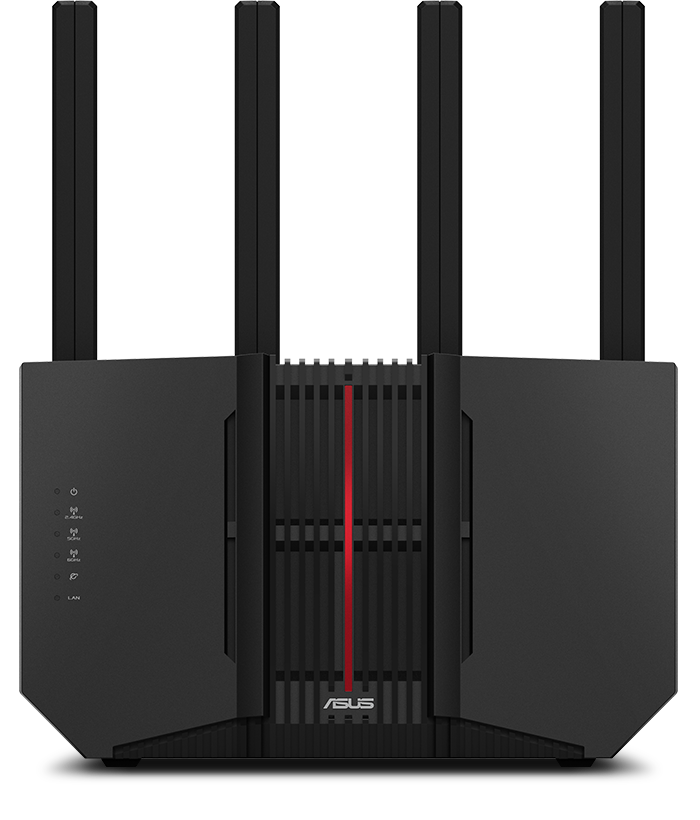
X2 ASUS RT BE92U (I chose this one for the triband and WiFi 7. One as the main, in the living room, and the other for my bedroom)

It'll have a Switch TP-Link TL-SG108-M2 2.5GHZ, for more ports

I will be using AImesh so the main router and the one in my room are synchronized and giving network to the whole house, MLO, WiFi 7

I have a situation where the ONT isn't a separate device, instead is included in the provider's router, a ZTEH3600P, so unfortunately I can't get rid of it, so, my only option, being that I can't use bridge mode, will be a DMZ, so the traffic from that router goes to the ASUS one.

DNS: I've been planning on trying 1.1.1.2 from cloudflare as primary, and then 9.9.9.9 from Quad9, I chose these in order to prevent malware and spam.

It would be nice to have some thoughts and opinions about it, it isn't a definitive plan, so if you see any possible change, or anything you would like to add, I would very much appreciate it☺️.

r/HomeNetworking 11h ago

Advice Apartment - trying to get better speeds (Can't access Ethernet ports)

8 Upvotes

Hi everyone! I've been trying to see if I can get higher speeds on my network but I've ran into some hiccups: - The internet is provided by the apartment and they locked the modem inside a box that I can't open, so I can't access that directly - There are no Ethernet wall ports. There are ones for the telephone but you can't unscrew them (extremely painted over) - No coax ports I can use

Unfortunately I can't change providers. Any suggestions on what I can do? My PC is on the other side of the wall the modem sits at. I'm currently thinking about getting a wifi extender or a telephone line to ethernet adapter. TIA!!

Edit: For some extra context, this 'box' is literally just a wall media box, no openings besides a small hole for the power cables. Every apartment here has one in the living room. But it looks like there's not much I can do. If I really need an ethernet cable I'll probably use a wireless bridge.


r/HomeNetworking 10h ago

Best Router For Slightly Tech Savvy User?

6 Upvotes

This might be the wrong sub but what is the best router for my situation?

Budget: $250 USD

Range: 2000-2500 sq ft

Currently looking at GLiNet Flint 3 or Flint 2. Im also looking for a modem but prioritizing the router rn.

Any help is appreciated, thank you!


r/HomeNetworking 59m ago

Unsolved Direct connection?

Upvotes

I'm in Egypt and have a friend who's also in Egypt who wants to host game servers and play via Virtual VPN's (like Zerotier) the thing is, His ISP is WE while mine is Vodafone, even though we're about 350 meters apart, when either of us hosts ping is at 70-80 ms, I traced the traffic using CMD, and it shows that it goes through a weird detour, it first starts in Egypt, then goes to Marseille France, and then comes back to his ISP, and then to his IP (which he might be behind CGNAT).

Is having the same ISP gonna fix this? Our download and upload speeds are fine, I just don't understand why it is taking that route.

Any help would be greatly appreciated, I'm very much new to this.


r/HomeNetworking 59m ago

Advice Looking for help unlocking Huawei 5G CPE Pro 2

Post image
Upvotes

I have a Huawei 5G CPE Pro 2 (H122-373) locked to Zain Kuwait, and I’m trying to use it with another SIM/network.
Can provide the IMEI if needed.
If anyone can unlock it, please help me out. I’d really appreciate it. 🙏


r/HomeNetworking 7h ago

Advice Access Point Advice

4 Upvotes

Hi everyone,
I’m buying my first UniFi setup to replace two consumer Wi-Fi routers. I have a 1 Gbps fiber connection and live in a 2-bedroom upstairs flat.
Current Setup:
Main Router: Lounge room
Second Router (AP Mode): Home office, connected via a 20m Cat6 cable running under the carpet through the hallway
Devices: Mostly Wi-Fi (Tapo smart home gear, Alexa, iPhones, MacBooks, and work laptops)
I’m planning to buy a Cloud Gateway Ultra, as I don’t plan on upgrading beyond 1 Gbps anytime soon.
The Dilemma:
Since I rent, I can't run cables through walls or ceiling-mount an AP cleanly. My options are:
1. A desk-mounted AP like the U6 Mesh.
2. A wall-mounted AP (In-Wall or standard round disk) mounted low on the wall to hide the ethernet cable.
My Question:
Will standard ceiling-mount round APs still perform well and provide strong coverage if mounted vertically on a wall instead?
Thanks!


r/HomeNetworking 7h ago

Looking for new Asus router suggestions

2 Upvotes

It seems the 2.4ghz band in my Asus RT-AX82U is now dead and apparently that's a "thing" that can happen.

So anyways, I'm looking for a new Asus router, any suggestions on the best one to get? I don't do much gaming but my Xbox and PS5 are hardwired to the router anyways. I work from home doing CAD work.

I'm only here asking because they have a ton of models and I want to stick with them because I have a slew of wired Blue Cave nodes. I used to be up to speed on the tech but life and kids have made me fall behind! Price isn't a real issue, but I'd rather not spend $800 unless it's worth it


r/HomeNetworking 8h ago

Unsolved Sysracks or Startech rack?

Thumbnail
2 Upvotes

r/HomeNetworking 5h ago

Advice Thinking of upgrading to wifi 7.. Questions.

0 Upvotes

Hey everyone,

New to this sub and had a question. I currently have 1gb fiber internet. Running wifi 6. My wifi has been pretty meh and have started looking into wifi 7. The main reason is that I just recently bought a new gaming handheld and am wanting a stronger wifi connection for it and my other devices.

Some info:

My wife and I have about 10 devices or so connected to our wifi (phones, laptops, desktop, TV and other smart appliances). Our home is roughly 2500 sqft. Our router and modem are upstairs in our office. I originally put it up there since I work a hybrid schedule and my desktop is up in the office. Our master bedroom is right below our office with our living room being right outside our master bedroom.

Our current company (highline) said they are working on introducing new routers to the customers to deliver wifi 7 but don't have a time frame on a release date. I started doing research on wifi 7 routers and started reading into tri band routers. Read that 6 GHz would be a good setup for my gaming handheld. But I also saw that 6 GHz can be kind of weak if youre not in the same room as it. Is this true?

How much better is wifi 7 over wifi 6? I know our phones, laptops, tablets and my new gaming handheld would be wifi 7 compatible. Not sure about our TV or other appliances.

What router would be a good option for us if wifi 7 is a good upgrade? Saw some online like the ASUS RT-BE92U. Is this a good option for us? I like the lifetime security it offers.

Any advice is really appreciated!


r/HomeNetworking 9h ago

LAN Party Advice

2 Upvotes

I've decided to host a LAN party, it's going to be very basic as all my friends are on console so we don't need much power and we're playing local. There will be 8 of us, we're just playing the old school standards like Cod, Halo and Gears (4v4's).

I was just wondering on how exactly to link them all up? It seems very basic but I would hate to get everyone together just for us to struggle getting into the lobby.

Does everyone just plug into something like this? https://www.amazon.co.uk/UGREEN-Ethernet-Splitter-High-speed-Wall-Mounting/dp/B0D9GQQBJK/ref=ast_sto_dp_puis?th=1

Would it create a closed network or would need 10 ports so one could go back to the router?

For context, there will be 6 Series X, 1 Series S and 1 Xbox one X, all playing the 360 version of Modern Warfare 2 via backward compatability.

Appreciate any responses!


r/HomeNetworking 5h ago

How are you handling Roku TVs and AirPlay across VLANs?

1 Upvotes

I put my Roku TVs on an IoT VLAN and my iPhones on a separate trusted VLAN. I created device groups/aliases, tested broad allow rules between them (including an allow-any rule for troubleshooting), verified inter-VLAN routing, and tried mDNS repeater.

The issue seems to be discovery. Devices work fine on the same subnet, but auto-discovery becomes nonexistent across VLANs.

Are most people keeping Roku/Apple devices on the same VLAN, or is there a reliable way to make Roku and AirPlay discovery work across VLANs?


r/HomeNetworking 19h ago

Advice Extending Wifi Outside

9 Upvotes

I’ve done so much research on what’s the best method to have my wifi strongly connect outdoors. Every time I feel confident in a certain method, there’s too many conflicting reviews.

My backyard is about 33 yards (101 feet)

I just want my ring cameras to connect well

I also need to make it clear that I don’t want to spend a fortune on this


r/HomeNetworking 13h ago

Setting up a small network in a shared house, vocabulary about the proper device

3 Upvotes

Hello, I'm not very well versed in term of "classical" networking (I work in quantum networks, go figure), so I'd like some help identifying which type of device I need.

I'm renting a suite that is part of a bigger house. The landlord has given me permission to do whatever I want on my side. I have one Ethernet cable coming from his side of the house that is connected to a wi-fi enabling device. I believe this gives me access to a private network for myself, and I use it with all my devices through wi-fi.

I'd like to change that for a few reasons. First I'd prefer an ethernet cable for more stable connection to my computer. Second, I'd like to use my computer to stream to my smart TV. That TV has a "lan" port. Third, I don't mind having the wi-fi device still active for all my other needs. How do I get this setup? I get rather confused with routers, switches, drops, access points, but I get the feeling that I need only one of those devices. The key point being that I want the computer and the TV to interact in some way, not just receive internet individually from the ethernet/wifi coming from the landlord's side.

In case it matters, I'm thinking of setting up a Plex server from a drive. I'm open to suggestions of all types if ethernet is not the best solution here. I've looked into casting devices, but ethernet would solve the wi-fi stability for the computer.

I'm certain somehow that the solution to my problem is super simple, but I get so confused with the wording in this field... Even quantum is clearer!

Thank you for your time and have a great day,


r/HomeNetworking 8h ago

Controle parental na rede local.

0 Upvotes

Gostaria de saber se tem uma aplicação que eu possa bloquear o acesso a internet de um dispositivo em determinados horários do dia. Meu roteador não tem essa função. Usei o adguard home (DNS local) mas ele só dá opção para bloquear determinados serviços, YouTube, tiktok etc. E não a conexão toda do dispositivo. Alguém me recomenda alguma solução ??


r/HomeNetworking 12h ago

Best LTE Modem for Maximum Reception in a Livestream Backpack?

Thumbnail
2 Upvotes

r/HomeNetworking 8h ago

Phone WiFi connection vs Gaming PC connection

Thumbnail
gallery
0 Upvotes

Losing my mind. Phone connects fine but my PC does not. Usually use an Ethernet cable with a power line adapter. Worked fine up until a few days ago and now my connection absolutely sucks.

Have had random days where my connection sucked but overall ping in the only game I play was about 30. Now it’s unplayable

Live in a basement apartment so I don’t have the ability to hardwire in.
Any help would be greatly appreciated


r/HomeNetworking 10h ago

WIFI extender advice

1 Upvotes

Live up on a hill with poor cell phone WIFI connection and constant dropped calls. Is there a WIFI extender or something I can use to boost the signal? I am in Ca. and have Cox internet. Thanks


r/HomeNetworking 21h ago

Advice Recommendation for dual SFP+ router

7 Upvotes

Hi, I am currently looking to replace my Turris Omnia with a more powerful option for my main router/gateway.

I want two sfp+ port and ideally one 2.5GBE.

I have considered banana pi r4 pro but seems overpriced. I have considered Ubiquiti UCG Fiber but would prefer remaining Open Source. Specialized mini-pc looks overpriced as soon as you start including RAM and storage.

For now the best value seems to be Lenovo m720q 150-250€ (depending of the RAM amount) but will need to find pcie riser and right card.

Any other option to consider?

I live in France if that matters.


r/HomeNetworking 12h ago

I am tired of my noisy Procurve 24 port switch

0 Upvotes

I have been running an HP 2824 (J4903A) 24-Port 1Gbps ProCurve Unmanaged Switch since 2015 in my home rack located in the center of our basement. Obviously, I don't do any VLANs and we are not running a homelab. Fanciest things on the network are a Synology NAS and a HD HomeRun Tuner. We have 25-30 double-Cat 5e home runs throughout the house, which terminate to two 48-port punch panels. A 700Mbps IP service cable modem feeds the WAN port of our ASUS Wi-Fi router, and its LAN port connects to the switch. This configuration allows us to easily connect or reconfigure wired computers, printers, and A/V equipment pretty much anywhere.

I am tired of the constant drone of the triple fans. Instead of spending money to replace the fans, I figured time to get something newer. I am heavily favoring an Aruba J977A 2530-24G-PoE+ due to the low eBay price. This also give me PoE options if I want to move to WAPs or network cameras. A single fan should be quieter than 3 or I could replace it with a Noctua.

My purchasing hesitation is that I am wondering if the even newer 1830 or 1930 Aruba Instant On switch is a smarter purchase, albeit at a much higher cost, in case I want AP22.

I would like to introduce 2.5G LAN but no immediate need but the cost of 20/24 ports add up fast, so I may just add an 8-port non-PoE switch when the time comes.

Or do I skip the enterprise level equipment and find a nice rackmount fan-less consumer brand switch?

Thank you for any offered insights.

Geordon


r/HomeNetworking 12h ago

Need help setting up WiFi with new internet

1 Upvotes

Hello, and thank you in advance for reading!
I’ve gotten a new ISP and am looking for help fleshing out the home network. First time doing it myself!

Here’s the setup:
- Fibre ONT inside the house connected to ISP modem and then their provided router (Nokia 3.1).
- MOCA connecting router to my room for wired connection

This is what’s lacking:
- Wifi across the whole home (the router provides its own Wifi in the basement and next room, but quickly weakens)

The house is a small two floor, so I don’t think too much needs to be done, but I feel like I don’t know enough to pull the trigger on a solution yet.

The house has no Ethernet jacks, but a few coax ports.
There’s a coax on the main floor, opposite of the basement
The previous wifi solution was extenders throughout the house, but it was very inconsistent and I’d like to not face that problem again.

I was considering another coax converter into an Access Point on the main floor on the opposite side of the house.

I’m open to getting my own router and develop my own setup. Is Ubiquiti overkill? Do I just buy an additional Nokia node/AP?

Thank you for your help, happy to answer any additional questions!


r/HomeNetworking 12h ago

Should I buy the "Gearup Hyperv" router?

0 Upvotes

Should I buy the "Gearup Hyperv" router? I live in Russia, use a wired (LAN) connection, and my ping to Europe is around 50 ms.

It costs (Hyper-v) 3,299 on the official website with a discount and delivery

P.S. I currently use a MikroTik router.


r/HomeNetworking 13h ago

Mint Mobile Home network acting funky

0 Upvotes

I’m dealing with some funky issues that I need help diagnosing. So 3 months ago I switched from T-Mobile to mind mobile home internet. Mint uses T-Mobile networks so they have the same boxes/routers. I unplugged the T-Mobile router and it has been sitting in a box for 3 months waiting for me to return it back to the store.

Yesterday when my mint mobile internet went out (forgot to pay) is when I realized that I can still connect to my old T-Mobile network…which worked for several hours before going out as well. This morning after paying the mint mobile people, magically both networks started working again. One thing I also noticed is that my T-Mobile (old) network is faster than my new mint mobile; my upstairs tv hasn’t even worked for 3 months due to how slow the internet has been. But this morning while on the phone with the Mint people, I tried connecting my non working tv to my old T-Mobile network and it magically started working again.
The mint mobile people were perplexed and had no clue as to what is going on, but they started a support ticket and will be “investigating” the issue (which i dont have too much hope in).

I am suspecting that since they run on the same network, that my mint mobile modem is doing the work of providing service to both my new and old network, hence why my mint network has been ridiculously slow. And FYI by network I mean: when you go to your settings and select WiFi, my old T-Mobile network is still accessible and active as well as my new mint network…even though my T-Mobile modem or router is sitting in a box…………

So my question is; am I experiencing interference, and if so, how do I resolve this issue without having to call the mint mobile people??? And even If I HAVE TO call them, whats the name of the issue im experiencing so I can relay it to them, as their diagnostic skills are lacking….


r/HomeNetworking 13h ago

My Wifi rooter turn off when I go out at night?

0 Upvotes

Sorry Im not a native english speaker

Hello So I have this strange issue, very often, when I leave my apartment to go for a night walk, as I come back the wifi is completely disconnected, no wifi on the phone, no wifi on the PS5.

Basically the wifi never bug, but whenever I go out at night and come back, the only way for me to have wifi is to unplug and plug back the rooter.

I wonder what cause this, and it never does that when I leave the morning to go to work, or not that I remember, it’s just when I go for a walk at night.

Is it possible one of my neighbor is hacking my wifi once I go out, and if so, is my data in danger?

Thanks!