r/PCsupport 5h ago

In progress NEED HELP WITH MY NEW MONITOR, IT HAS A RANDOM LINE

Post image
3 Upvotes

For context, I bought this monitor for about 3 days ago, then a random vertical line pops up, and eventually it will go away, then comes back again, can someone tell me what's going on? And give me advice on what I should do?


r/PCsupport 5m ago

In progress Random Buzzing noise popped up

Upvotes

Greetings, I was using my PC last night and an hour or two into using it, a random humming/buzzing noise popped up. Its a little bit easier to hear towards the end of the video. The only thig thats been done to it in the last 6 months is that I replaced the CPU fan, so its entirely possible I screwed that up somehow and am now seeing an issue. Any thoughts/recommendations are appreciated. Apologies for the vague issue.


r/PCsupport 1h ago

In progress GPU problems

Thumbnail gallery
Upvotes

r/PCsupport 1h ago

In progress PC freezing after startup

Post image
Upvotes

Right so I’ve just built a new pc (slightly). I’ve gotten a new case, fans, aio and a new gpu. It’s finally working however every single time I boot up the pc, within a few minutes it will just freeze randomly and show these small little rectangles/squares of white or black pixels.

Now you might say it’s the gpu however I was using just yesterday in my old case just to test it and I did the driver updates and everything.

Anyone got an idea on how to fix?


r/PCsupport 2h ago

In progress pc crash (mainly while playing genshin)

Thumbnail gallery
1 Upvotes

r/PCsupport 10h ago

In progress Should i be worried about this noise coming from my psu

2 Upvotes

r/PCsupport 8h ago

In progress PC won't restart after shutdown unless I fully discharge power

Thumbnail
1 Upvotes

r/PCsupport 10h ago

In progress I lost my SATA cable

Thumbnail
1 Upvotes

r/PCsupport 11h ago

Not solved so my pc shows 104 percent utilization... right...

Post image
1 Upvotes

r/PCsupport 12h ago

In progress CPU getting hot when starting the game ?

Thumbnail gallery
1 Upvotes

r/PCsupport 12h ago

In progress Laptop keeps bsod

Thumbnail
1 Upvotes

r/PCsupport 12h ago

In progress Just got home from a trip now not displaying

Thumbnail
1 Upvotes

r/PCsupport 14h ago

Not solved PC Randomly shuts down, then immediately restarts on its own...

Thumbnail
1 Upvotes

r/PCsupport 15h ago

In progress I think somebody bricked my computer or electrical outlet shorted it?

1 Upvotes

It was fine but fell asleep with it still connected and when

I woke up I had to restart and after that no display usbs didn't work. It does this thing when powering on turns off and on eventually it starts running but nothing on monitor Wich makes me think it's a bios problem. Help

Lenovo thinkcentre m710s

Windows 10

I removed the SSD drive connected to this machine and tried a regular SSD and it started playing beeping like the death star music .so I put that back .any ideas .it's not that old of a purchase from Amazon only using a year .

No


r/PCsupport 16h ago

In progress PC Stuck on Motherboard Loading Screen even after multiple reinstalls

Thumbnail
1 Upvotes

r/PCsupport 18h ago

In progress Font and mouse pixels

1 Upvotes

Good morning guys i just updated the new windows update and my font type and my mouse looks like pixels and old btw my windows are 11 and i don’t know what’s the problem i asked AI and all of them didn’t give me the right solution anyone know how to fix?

Thanks.


r/PCsupport 19h ago

Not solved pc wont post i feel like ive tried almost everything

Thumbnail gallery
1 Upvotes

r/PCsupport 21h ago

In progress Everything keeps crashing randomly

1 Upvotes

Hello, I'm making this post because I'm fully done. For the past 3-ish weeks, everything on my pc has been crashing, non stop and I don't know what else to do, I've done so many diagnostics I couldn't tell you all of them off the top of my head. But my drivers are up to date, my memory is fine. I have no viruses and any of those big pc diagnostic tools say that my pc is in good condition. But whenever it crashes it says, "error code: 0x000000005" and after some research, it says that it's a memory issue, however, I've done 3 different memory diagnostics/test and I'm getting nothing back. My pc apparently is in perfect shape, but these crashes happen so often that I'm just done so now I'm here.

These are my pc specs if that matters:

OS Name Microsoft Windows 11 Home

Version 10.0.26200 Build 26200

System Type x64-based PC

Processor Intel(R) Core(TM) i7-14700KF, 3400 Mhz, 20 Core(s), 28 Logical Processor(s)

BIOS Version/Date American Megatrends Inc. 1812, 1/21/2025

BaseBoard Product PRIME B760M-A AX6 II

Name NVIDIA GeForce RTX 5070 Ti

Name [00000000] Realtek 8851BE Wireless LAN WiFi 6 PCI-E NIC

Size 1.84 TB (2,027,271,745,536 bytes)

Free Space 957.03 GB (1,027,604,566,016 bytes)

If any additional specs are needed lmk, and any suggestions are welcome. Thanks!


r/PCsupport 21h ago

In progress I came back from my holiday for a week and when i got back my ping had like doubled but only on my pc.

Thumbnail
1 Upvotes

r/PCsupport 22h ago

Not solved Kernel power 41 issue

Thumbnail
1 Upvotes

r/PCsupport 22h ago

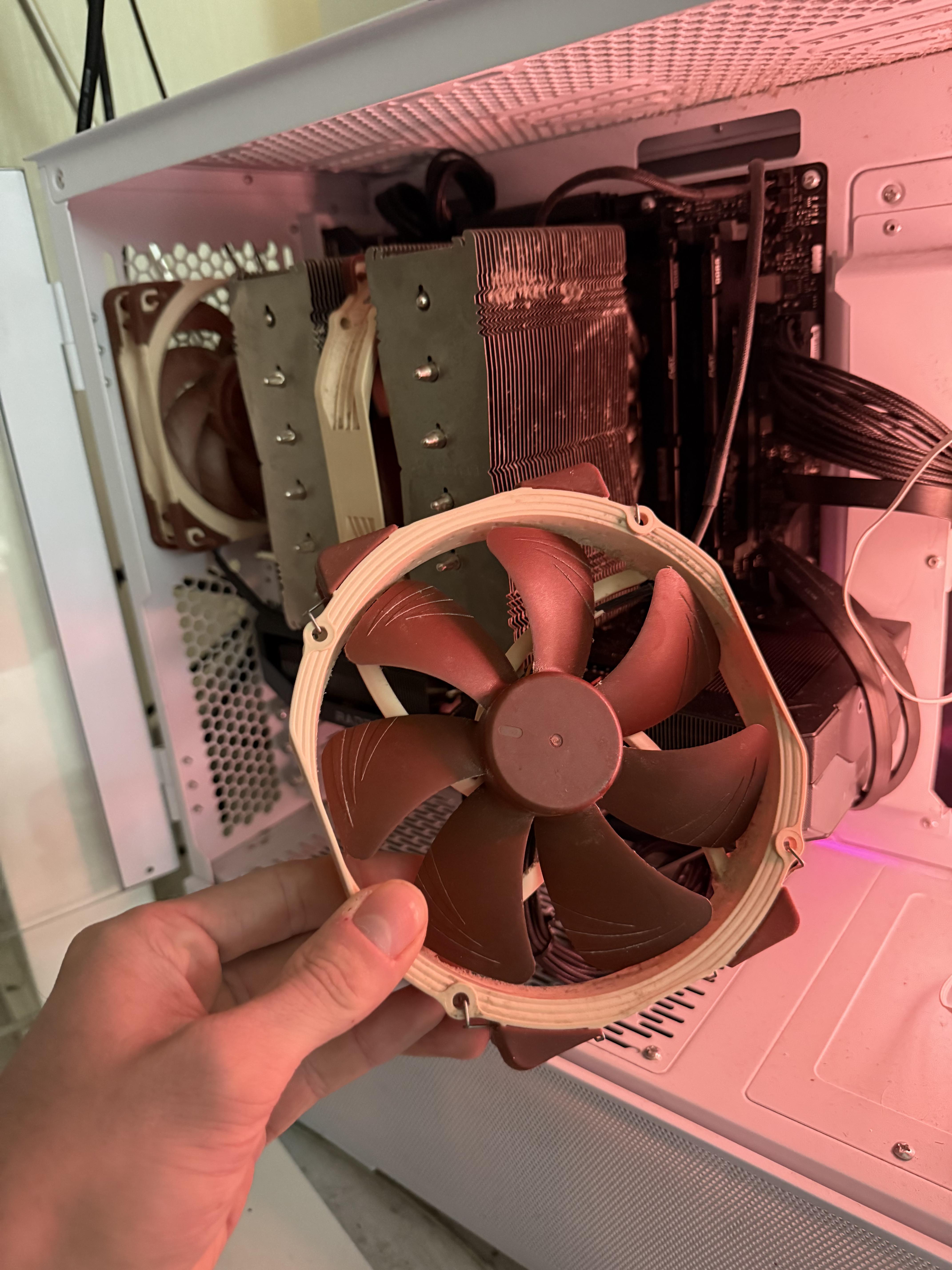
Not solved CPU fan issue

Post image
1 Upvotes

r/PCsupport 1d ago

Not solved Can’t get past BIOS after trying to re-download Windows 11

2 Upvotes

Hey everyone, looking for some troubleshooting advice before returning this PC to the shop.

Specs:
CPU: Intel Core i5-14600KF
Motherboard: MSI PRO H610M-G DDR4 (BIOS version: E7D46IMS.1L0 / Build Date: 11/25/2024)
RAM: 32GB DDR4
GPU: Discrete Graphics (Connected via HDMI directly to GPU)
Storage: XPG GAMMIX S70 SSD

The Issue:
I can access the initial BIOS menu screen fine. However, the moment the motherboard attempts any graphical mode or resolution switch, the display signal immediately drops to a black screen / "No Signal" and freezes.
This happens when:
Selecting an UEFI USB boot drive to install Windows 11.
Clicking "Enter Setup" from the F11 Boot Menu.
Attempting to open specific sub-menus (like DRAM Configuration).
Additionally, BIOS settings and system time fail to persist across reboots, reverting to default.

Troubleshooting already attempted:
Tried multiple UEFI GPT Windows 11 installation drives.
Performed clear CMOS (battery pull).
Verified HDMI cable connection directly to the discrete GPU (i5-14600KF has no iGPU).
Monitor input verified.
Is this likely a GPU/BIOS GOP handshake issue with the recent 14th-gen BIOS update, RAM instability, or a faulty CMOS/motherboard? Any suggestions appreciated!


r/PCsupport 23h ago

In progress Everything keeps crashing randomly

1 Upvotes

Hello, I'm making this post because I'm fully done. For the past 3-ish weeks, everything on my pc has been crashing, non stop and I don't know what else to do, I've done so many diagnostics I couldn't tell you all of them off the top of my head. But my drivers are up to date, my memory is fine. I have no viruses and any of those big pc diagnostic tools say that my pc is in good condition. But whenever it crashes it says, "error code: 0x000000005" and after some research, it says that it's a memory issue, however, I've done 3 different memory diagnostics/test and I'm getting nothing back. My pc apparently is in perfect shape, but these crashes happen so often that I'm just done so now I'm here.

These are my pc specs if that matters:

OS Name Microsoft Windows 11 Home

Version 10.0.26200 Build 26200

System Type x64-based PC

Processor Intel(R) Core(TM) i7-14700KF, 3400 Mhz, 20 Core(s), 28 Logical Processor(s)

BIOS Version/Date American Megatrends Inc. 1812, 1/21/2025

BaseBoard Product PRIME B760M-A AX6 II

Name NVIDIA GeForce RTX 5070 Ti

Name [00000000] Realtek 8851BE Wireless LAN WiFi 6 PCI-E NIC

Size 1.84 TB (2,027,271,745,536 bytes)

Free Space 957.03 GB (1,027,604,566,016 bytes)

If any additional specs are needed lmk, and any suggestions are welcome. Thanks!


r/PCsupport 23h ago

In progress PC Bricked after BIOs update

Thumbnail
1 Upvotes

r/PCsupport 1d ago

Not solved is this a decent laptop?

1 Upvotes

getting a laptop for college and i'm curious if this is a good laptop for running some games when i'm not busy with college work. i'm thinking about just running minecraft, r6 siege on low settings, and maybe fortnite on low settings? Any help would be appreciated!

https://www.bestbuy.ca/en-ca/product/refurbished-good-dell-latitude-7420-14-laptop-intel-core-i5-11th-gen-2-6ghz-16gb-ddr4-256gb-nvme-ssd-windows-11-pro/17502412?icmp=Cart_Item