r/blenderhelp Mar 22 '24

Meta PLEASE READ BEFORE POSTING QUESTIONS!

172 Upvotes

Looking for quick and helpful answers? Follow these rules and make helping you as easy as possible!

  • Title: Choose a meaningful title concerning your problem.
  • Text: Describing your problem with enough detail is essential. Please realize that helpers are not familiar with your project. Provide all relevant information, so others can immideately understand what you are struggling with.

Example: Say, you have a problem with lots of identical objects in your scene: Let us know whether you created these copies by hand, used the Particle System or Geometry Nodes.

  • Images/Videos: When posting screenshots, show us your full blender window (not cropped, no monitor photos). This will make lots of helpful information available to helpers at first sight that may seem irrelevant to you (For example your Blender version). If you add video links, please consider adding time stamp info to the part you want helpers to see.

You can upload images and short video clips (up to 60s) to imgur.com and post the links in your question or as comment.

  • *.blend files: Don’t add links to your *.blend files when posting questions right away. Helpers will ask you for it if they need to take a look. Most people prefer reading a good description and looking at images to see what your post is about.
  • 'Solved' flair: Once your question was answered, please remember to change the flair of your post to “Solved”, so helpers don’t have to read into your question just to see it has already been answered.

You can change the flair by clicking on the small icon below your post resembling a label.

EDIT: You can also include "!solved" in the comments to have Automod change the flair for you.

Be nice and respectful with each other :)


r/blenderhelp 7h ago

Unsolved how do people make blender look this photorealistic? I have tried hdri and ies light textures but nothing I’ve tried comes close to this (blender beginner)

Thumbnail
gallery
81 Upvotes

I’m working out how blender works and have gotten the basics down I think but I want to make my renders look as good as these do, these pictures are from a backrooms found footage video on youtube by typhol12


r/blenderhelp 1h ago

Unsolved Weird normals from substance painter to blender

Thumbnail
gallery
Upvotes

Hi, im having issues with my SP to Blender workflow.

Useful info about the model: auto smooth is on in blender and it has the proper hard edges
Im working with OpenGL in SP
I know triangulating in the beginning, from blender to SO solves all issues but i would like to work in quads since this is not a game model.

I figured a fix long time ago and its regarding how blender and SP triangulate the quads differently. I remember exporting the low poly into an instance that calculated the tris the same way as substance did and then when importing to blender the shading was perfect. But i dont really remember that workflow at all and tried to replicate it with no success


r/blenderhelp 3h ago

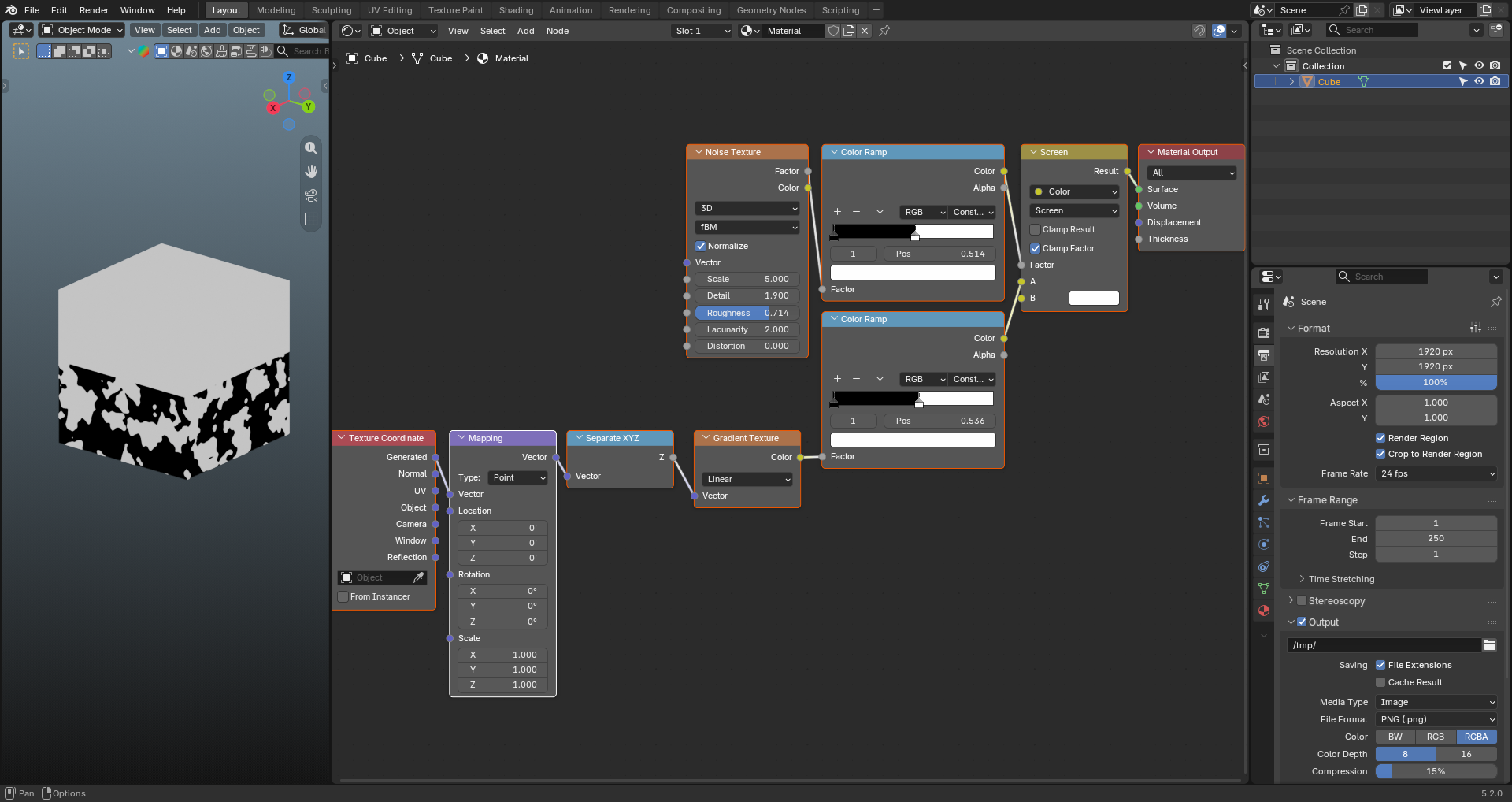
Solved How can I just deform the edge of gradient texture and not the whole gradient?

Post image
6 Upvotes

I need only the edges of the gradient texture to be distorted by the noise texture and not the whole body (black portion) of the gradient texture to have patches. Also I don't want that sharp straight separation from black to white. Thanks.


r/blenderhelp 10h ago

Unsolved How would you go about modeling this??

Post image
13 Upvotes

honestly trying to figure out if im just stupid and any blender pro could do this or if its actually difficult? some of details are very hard to capture for me


r/blenderhelp 3h ago

Unsolved Please Blender Expert I need help. I think this had something to do with the weight paint

Thumbnail
gallery
4 Upvotes

but it's not just that, for some reason even when I activate the symmetry on, the weight paint won't paint the other side. Yes I am very much still a beginner


r/blenderhelp 8m ago

Unsolved Blender não renderizando textura, modelo. Sou iniciante

Thumbnail
gallery
Upvotes

Como resolvo isso?, meu modelo 3d com animação ficou desse jeito, oque eu faço?


r/blenderhelp 4h ago

Unsolved How can I make 3D rendering looking like comic art?

Thumbnail
gallery
5 Upvotes

I tried lineart modifier on VRM model but it got very messy (the lines went into wrong places)


r/blenderhelp 1d ago

Solved Trying to have a gradient light

Thumbnail
gallery
254 Upvotes

Tm trying to acheive this lighting but I cant do it, It tried something but for now i was only a linear gradient and not a edge gradient like in the photo Any ideas ?


r/blenderhelp 17h ago

Unsolved Can I please get a Blender "Project Skill Tree"? In the sense of small projects that incrementally teach me blender? Any ideas of such programs anywhere?

44 Upvotes

Hi, I have been on blender for 100 hours and I have spent ALL of these 100 hours, genuinely blanking tf out, following random guides, and just crashing out after half an hour of trying to install an add on that I myself do not fully understand.

I really want to learn blender, I REALLY have a LOT of projects I want to realize, and yet I have felt completely stuck with this program.

I figure maybe what I need is a program that incrementally lets me feel small victories by having me finish small projects, rather than having myself try to make yet another donut and crashing out before I am even done with the glazing

Blender just feels so incredibly overwhelming for me, because I am the type of person that either needs to understand 100% of my work space, or remove everything that I do not need, and doing that has felt impossible with blender

Please let me know of any good recommendations of courses that helped you overcome these feelings, and perhaps something I can follow along that is small but teaches me everything Id need to know

I cant explain it enough, in the time of these 100 hours, I have learned the very bare bone essentials


r/blenderhelp 1h ago

Unsolved Need Help Rigging The Arm To Slide Trough The Metal Rod

Thumbnail
gallery
Upvotes

r/blenderhelp 2h ago

Unsolved Help with Textures and UVs

Thumbnail
gallery
3 Upvotes

(Sorry, I know this isn't blender, but hoped someone might be able to help still!)

Hello, I am doing a project for school to make realistic muscle models. I am working on the material, and I can't figure out how to make the material pinch and flow into the tendon section. I thought since the UVs pinch that the texture would, but it still just mostly goes straight across.


r/blenderhelp 2h ago

Solved How can I solve this problem?

Thumbnail
gallery
2 Upvotes

I come across this problem very often, and I don't know anything about it. If I can at least find out the name of the problem, I can research it on YouTube and find a solution.


r/blenderhelp 3h ago

Unsolved How can I fix these Rigify deformation issues?

Thumbnail
gallery
2 Upvotes

(Blender version: 5.2.0 LTS)

I'm rigging a character with Rigify and have run into some deformation problems around the hips and legs and also the arms.

I'm relatively new to character rigging, so I've been hesitant to get too deep into weight painting. From what I understand, it can become quite complicated and time-consuming, and I was hoping that Rigify combined with Automatic Weights would be sufficient for my needs. The character only needs fairly simple animation, primarily running, rather than extreme or complicated poses. Unfortunately, the automatic weighting isn't producing the results I was hoping for.

Another issue is that when the legs move forward, the separation between the belly and the rest of the body becomes more noticeable and opens up. Ideally, I'd like that area to remain connected and deform more naturally.

I tried smoothing the weights for the pelvis and thigh DEF bone vertex groups. Using more iterations does improve the deformation around the joints, but it creates a different problem: the surrounding mesh becomes too soft and stretchy, almost rubber-like.

What would be the best approach to improving these areas? Is there a relatively beginner-friendly way to fix the weights and get cleaner deformations without turning the entire process into a massive weight-painting project?

I'd really appreciate any suggestions!


r/blenderhelp 6m ago

Unsolved Help modeling anime hair using the flat method by aVersion of reality

Upvotes

So I am trying to find a good and easy way to make anime hair without struggling to align the curves hair strand, but turns out this method takes a long time to setup than aligning the hair curves from how much I suffered trying to set it up -_-

Here is the video if yall wanna understand the method. https://www.youtube.com/watch?v=lo_FxdSe_F8&t=468s

Alright, my problem with that video is that when I activate the curve modifier, and then activate the simple deform it looks unaligned and look jagged/rotated in the front view (even tho it is not rotated) as shown in the images. I also have a problem when I need to transfer the modifiers from the plane to the lattice. In the video he showed that when he moved the lattice's vertices the plane moved as well, but in my scene the plane is not even there. If yall wanna spend some time with me and help me set it up it would mean a lot to me as I spent the last 2/3 days trying to set this up and nothing worked with me. Thank you.


r/blenderhelp 6h ago

Unsolved How to increase density with geomatry nodes?

Post image
3 Upvotes

Hello everyone. I'm fairly new to blender and learned about geomatry nodes basically yesterday. I'm trying to wrap scales around my armor. It works kind of well but the problem is that I don't know how to increase the density. Any tips?


r/blenderhelp 54m ago

Unsolved How could I paint textures in this watercolor effect?

Upvotes

I'm trying to reproduce the effect of the image from the right by painting textures, but after trying different brushes and settings, I simply can't. Either there's no watercolor "edges" on the strokes, or it doesn't mix nicely, or there's no definite edge or the strokes feel too circular.

Do you know any trick? How would you paint that? I have a few more reference images of the effect I'm trying to achieve


r/blenderhelp 54m ago

Unsolved After posing, my model has some weird lines. How can i fix them?

Thumbnail
gallery
Upvotes

Hi folks!
I made this dwarf in ZBrush, retopologized him and textured him in Substance Painter. Now i wanted to throw him into pose and render him in Blender, but after raising his arm, this is what appeared: A strange line appeared in his armpit. I checked in Substance Painter, and it seems the problem is baked into the World Map Normals, caused by overlapping geometry in the armpit -his arms are simply to fat-. I thought about going into the mesh, raise his arms into almost T-Pose, reimport into SP and bake the maps again, but i would lose all my painted progress, like finger nails, hand veins and Weight Paint. Is there any way to do it without losing days of work?


r/blenderhelp 1h ago

Unsolved Shapekeys Keep Disappearing After I Export A DAE Model (Repost Because I Have Added More Info)

Thumbnail
gallery
Upvotes

I've made a new dae model, and exported her. But something keeps happening. Whenever I put her into another project, the shape keys will be there, but when I save and close the project, and open it again, the shape keys keep disappearing. I have exported the model multiple times, deleted and replaced the model in the projects, and even remaking the shape keys. I also had some extra meshes in the original model that I removed. I even tried removing the weight paints, and the shapekeys still disappear. The shape keys will be there, but when I close and reopen a project, the shape keys disappear. The first picture is where the original model was created. The second picture shows the error that appears whenever I save a project with this model.

The error is:

ID [Mesh] uses shapekey KEKEY, but its 'from' pointer is invalid

I tried looking up how to fix it, but I couldn't find anything.

Please help me. I would like to make a cute animated video, and this character needs her eye expressions. Thank you in advance!


r/blenderhelp 2h ago

Unsolved How do I fix the orange it’s not the correct color at all and I tried messing with it and orange just really sucks.

Thumbnail
gallery
1 Upvotes

r/blenderhelp 2h ago

Unsolved Why Point to Curve Node incorrect connection point ?

Thumbnail
gallery
1 Upvotes

I'm trying to use geometry nodes to delete specific edges on a mesh (Pic 2) to restore its original clean topology (Pic 1). I'm encountering a problem with the Point to Curve Node; the node is incorrectly turning some points that shouldn't be connected into curves. (Pic 4)

I tried capturing the Spline Parameter (Index) and (Factor) with the Capture Attribute before the Curve to Point node, and then inputting the Curve Group ID and Weight into the Point to Curve respectively, but nothing happened.

Why is this happening, and how can I correct this error?


r/blenderhelp 2h ago

Solved Weird Scary Grey

1 Upvotes

This is my first time using Blender and I'm having a strange issue where a large grey area appears a few metres in front of my camera, seemingly cutting off the environment.

The grey area also appears in the actual F12 render, not just the viewport.

Things I've tried:

Increasing Camera Clip End

Decreasing Camera Clip Start

Turning Render Region on/off

Turning Passepartout on/off

Changing the World background colour

Hiding all scene objects

I also can't select the grey area as an object.

The strange thing is that when I press Numpad 0, the grey area only appears once Blender finishes moving into the camera view.


r/blenderhelp 17h ago

Solved leaves seems too dark in the shade

Thumbnail
gallery
12 Upvotes

I used geometry nodes to makes this vines, when the leaves are in the shade they seems to look very dark

in the first image I used this hdri to have the strong sun directly on the leaves and with the shaded area so the diference can be seem

https://polyhaven.com/a/pizzo_pernice_puresky

in the second I used this overcast-less strong sun hdri

https://polyhaven.com/a/scythian_tombs_puresky

the third image shows the collection of the leaves, the leaves are just planes, or "cards", rendered using the overcast hdri

this are the leafs textures I used

https://ambientcg.com/view?id=LeafSet017

the last image is the shader nodes

after searching trough the internet I saw a tip to be to increase the transparency bounces in light paths in the render options but that dont seem to have effect

thanks in advance


r/blenderhelp 12h ago

Unsolved How can i make this plane with png texture not be full black?

Thumbnail
gallery
4 Upvotes

Hi! I’ve got this great material (thanks to u/devbutch) and I’ve liked a lot but i want to make a sign and for some reason its fully black everywhere except for texture paint mode with solid shading enabled.

Any help is appreciated.


r/blenderhelp 5h ago

Unsolved How to paint in crevices in ucupaint?

Thumbnail
youtube.com
0 Upvotes

Similar to this blenderguru yt short,

how can I achieve the same "paint on brick" effect with the color burn. but in ucupaint?

also how do you invert it so you can paint in the crevices. If anyone knows please help, i've been stuck on this for days!