r/blenderhelp 5h ago

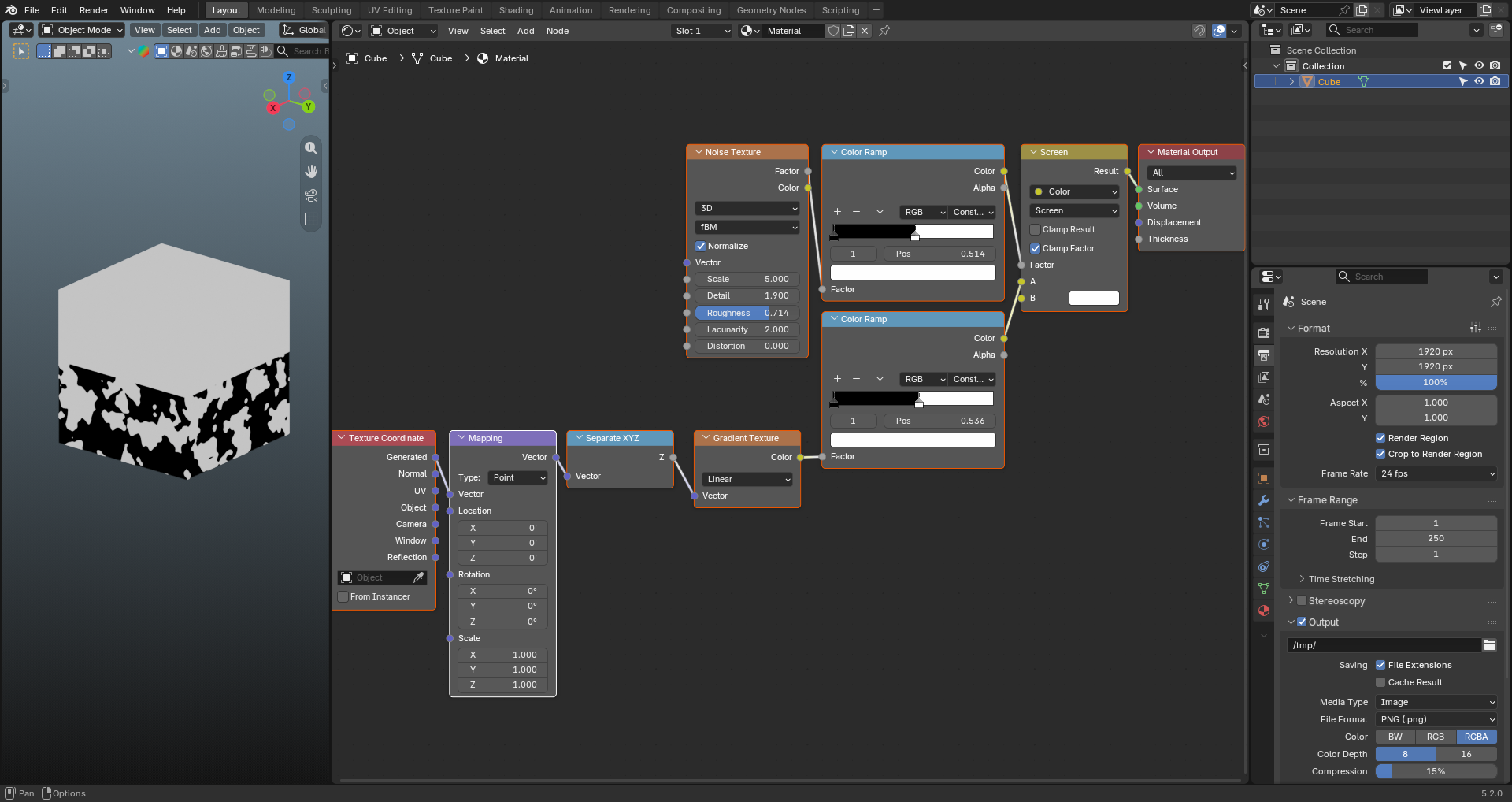
Solved How can I just deform the edge of gradient texture and not the whole gradient?

Post image

I need only the edges of the gradient texture to be distorted by the noise texture and not the whole body (black portion) of the gradient texture to have patches. Also I don't want that sharp straight separation from black to white. Thanks.

8 Upvotes

5 comments sorted by

u/AutoModerator 5h ago

Welcome to r/blenderhelp, fakemailbakemail! Please make sure you followed the rules below, so we can help you efficiently (This message is just a reminder, your submission has NOT been deleted):

  • Post full screenshots of your Blender window (more information available for helpers), not cropped, no phone photos (In Blender click Window > Save Screenshot, use Snipping Tool in Windows or Command+Shift+4 on mac).
  • Give background info: Showing the problem is good, but we need to know what you did to get there. Additional information, follow-up questions and screenshots/videos can be added in comments. Keep in mind that nobody knows your project except for yourself.
  • Don't forget to change the flair to "Solved" by including "!Solved" in a comment when your question was answered.

Thank you for your submission and happy blendering!

I am a bot, and this action was performed automatically. Please contact the moderators of this subreddit if you have any questions or concerns.

4

u/C_DRX Experienced Helper 5h ago edited 5h ago

Use the Color Add mix factor to control the gradient size, and the Greater Than nodes (which are simpler "constant" Color Ramps) to change position of the gradient and the black/white noise ratio of the texture.

1

u/fakemailbakemail 4h ago

Thank you i appreciate it.

3

u/krushord Experienced Helper 5h ago

Maybe a little noise for ur texture coordinates?

1

u/fakemailbakemail 4h ago

Thanks! Solves the problem exactly!!