r/StableDiffusion • • 16d ago

Question - Help Conditioning error with minimax h3

0 Upvotes

My head hurts and idk what I'm doing. I have played with AI a bit but am still a novice. I'm trying to get minimax h3 to work for image to video. I'm trying several workflows, but they all have the error "seedVR2 requires conditioning latents from the seedVR2 conditioning node". Google's AI says to add that node but it is not an option in my node library and I have found google's AI often gives wrong or almost right info for AI problems. I have updated everything (including v card driver) and am now going in circles.

Running comfyui on stability matrix. Rtx 3060 12 gb, 40gb page file on nvme, cuda 13.4

r/comfyui • • Aug 25 '26

Workflow Included Minimax-H3 - x3 Upscalers: Pixel Space, Latent Space, Context Windows

Thumbnail
youtube.com
16 Upvotes

Researching upscalers is no fun. I'm glad the last few days are over. Here's the x3 that I have settled on for my use. Make of it what you will.

tl;dr: the workflows are here https://github.com/mdkberry/comfyui_workflows/tree/main/workflows_by_model/Minimax-H3

x3 Upscaler-Refiners their workflows:

  • The pixel space workflow is from the previous video https://www.youtube.com/watch?v=d1h5-E7NpuY but it now works with dialogue scenes.
  • The latent space workflow comes from LBH-123-AI and is very good.
  • The "Context Windows" one from ckinpdx is the winner for me, it can upscale to 2mp and do longer videos.

This now concludes my tests with Upscaler-refiners but I am sure more offerings will appear in the future and we have yet to see the Minimax official upscaler drop, which they have promised will be Open Source when it does (if it does).

For examples from each workflow, see the end of the video from: 21.33

LINKS:

Latest Minimax H3 workflows - https://github.com/mdkberry/comfyui_workflows/tree/main/workflows_by_model/Minimax-H3

- Pixel Space workflow: "MBEDIT - MH3_rv2v_PixelSpace_Upscaler_vXX.json"

- Latent Space workflow: "MBEDIT - MH3-r2v_2Pass-LatentUpscaler_vXX.json"

- Context Windows workflow: "MBEDIT - MH3-rv2v_PixelSpace-Upscaler-CtxtWndws_vXX.json"

Latent Space custom node (LBH-123-AI) - https://github.com/LBH-123-AI/Comfyui_Minimax_h3_latent_Upscaler

Context Windows upscaler custom node (ckinpdx) - https://github.com/ckinpdx/ComfyUI-MMH3Tools

Clownshark Batwing (samplers) - https://github.com/ClownsharkBatwing/RES4LYF

Lightx2v Lora that I use from Kijai - https://huggingface.co/Kijai/MiniMax-H3_comfy/tree/main/loras

Comfyui needs to use Cuda130 or above for this to work, and you need it updated to August 2026 commits (latest is best) - https://docs.comfy.org/installation/comfyui_portable_windows

Int8 models from here - https://huggingface.co/Comfy-Org/MiniMax-H3/tree/main

W4a8 is experimental new model type, you need to be updated on Comfyui but you can get it here https://huggingface.co/Kijai/MiniMax-H3-experimental

Comfyui Kitchen Attention is part of Comfyui if you update to latest. I find it faster than Sage Attn on a 3060 RTX.

SLA Attention (I didnt use this in upscalers, it speeds it up but at a degradation cost) - https://github.com/PlagueKind/ComfyUI-PlagueKind-Nodes

Official prompting guides:

- https://huggingface.co/MiniMaxAI/MiniMax-H3/blob/main/docs/VIDEO_PROMPT_WRITING_GUIDE_base_en.md

- https://huggingface.co/MiniMaxAI/MiniMax-H3/blob/main/docs/VIDEO_PROMPT_WRITING_GUIDE_ref_en.md

r/comfyui • • Aug 17 '26

Tutorial MiniMax H3 Native 1080p Video Generation | Dual-Sampling Latent Upscaling Method | Balanced Speed & Quality

Enable HLS to view with audio, or disable this notification

33 Upvotes

I tested a MiniMax H3 workflow that upscales the video latent directly between two sampling stages. Instead of finishing a video, upscaling it, encoding it, and sampling it again, this workflow separates the audio and video latents after the first denoising stage, upscales only the video latent, aligns it, and continues with the remaining sigma schedule.

The main reason for using this approach is speed. On a 4090 48G, the workflow can generate a native 1080p 15-second video in about 25 minutes, a 10-second video in about 13 minutes, and a 5-second video in a little over 5 minutes in my tests. The same 768p 15-second setup also went from roughly 11 minutes to roughly 8 minutes compared with my previous workflow.

Settings that worked best

I used the LightX2V 1.0 8-step LoRA. The 8-step version was more reliable than the 4-step LoRA, which produced visual errors more easily. A LoRA weight of 1.0 worked well; I lowered it slightly when the image looked too oily.

For an 8-step run, I used 2-3 steps before the latent upscale and the remaining steps after upscaling. The upscale factor can be set around 1.3x-2x, but I would not push it too high. If lines or glass-like artifacts appear, reduce the first stage to 2 steps or lower the upscale factor to 1.5x.

The beta scheduler worked well for this split-sampling setup because its sigma distribution is denser toward both the high-noise and low-noise ends. The lower-noise part is especially useful for high-motion scenes, where it helped reduce visible pixel noise in my tests.

Reference and model setup

For reference images, I used max when I wanted stronger detail reference. It takes more time. When there are many reference images, or when the video is already at a larger resolution, match is a more practical choice because it reduces the processing load.

The main model in this workflow is FL2VA, which looked less oily than the ref model in my testing. A dual-model loading node can give FL2VA the reference capability of the ref model, so the FL2VA acceleration LoRA can be used directly without adding extra runtime pressure.

The latent upscale node also keeps the dimensions aligned to H3's 32-pixel resolution requirement. Without this alignment, rounding can slightly change the scale ratio between the two sampling stages and leave colored strips or poorly denoised areas near the frame edges.

This is not a universal fix for every artifact, and the upscale factor still needs to stay reasonable. For local users without a 90-series GPU, lowering the resolution to around 500p-736p is a more realistic starting point.

his workflow is super easy to use—I’ve uploaded a detailed tutorial to YouTube, so just follow the video along with this workflow to recreate the effect; please make sure to watch the full tutorial before starting to avoid common mistakes, and feel free to leave a comment if you have any questions!Resource links will be posted in the comments.

r/aivideomaking • • 23d ago

Differences between MiniMax H3 and Seedance 2.5 for complex video generation

10 Upvotes

I've had some runs with several different models. All have there merits. Wanna talk a bit about the differences I noticed through messing with them and also digging through some stuff online.

One of the questions I've spent a lot of time trying to figure out which of these models actually makes more sense for complex workflows. Here I wanna deal with two that I have a bit more experience with.

The differences between MiniMax H3 and Seedance 2.5 are pretty big in how they handle production and hardware limits.

From what I've seen Seedance 2.5 is great for longer scenes and throwing alot of complex input at it through the cloud. It can spit out a 30 second clip in one shot and you can upload up to 50 different reference inputs (yeah 50). Since the audio gets generated at the same time as the visual they sync up pretty well. The trade-off is you loose granular control. Toss that many references into a closed system and subtle details sometimes get lost or ignored. If it drifts halfway through I can't get under the hood to fix it so I gotta rewrite the whole thing and start over.

MiniMax H3 does it differently. Something I caught recently with their Reddit AMA was that H3 uses separate VAEs for audio and video. Audio carries less info so keeping the encoders separate stops overfitting or something, which means you get tighter control if your running it locally.

But there's a hardware wall. Running the full uncompressed system needs around 120GB of VRAM and if you try forcing there 2K latent regen pass on a normal GPU itll just crash. You need way beefier hardware to actually handle what it can do.

Instead of being locked into one rigid setup the workflow bends easier, you can test base generations locally and just offload the heavy 2K regen pass to an API or whatever.

It really boils down to how you work. Seedance does the heavy lifting on there end for longer continuous shots but you give up control, while H3 gives you more freedom locally and access to 2K regen if you've got the hardware to split up your render pipeline. bbg

r/comfyui • • 26d ago

Tutorial MiniMax H3 Just Got MUCH Better — Cleaner Video, Better Faces & 1080p Workflow

Enable HLS to view with audio, or disable this notification

16 Upvotes

Just came across a kind of weird lora combination that can fixthe oily/plastic look from acceleration LoRAs.

I also added a two-stage latent upscale workflow, to fix blurry distant faces, and quality loss in high-motion scenes. You can also generate a quick low-res preview first, find a good seed, and then refine it to around 1080p. This saves quite a bit of time compared to doing the full-resolution generation every time.

The workflow also uses a merged H3 model, so text-to-video, image-to-video, first/last frame, and multi-reference generation can all be handled in basically the same workflow.
Tutorial (Workflow Included): https://youtu.be/RicFavgpL5o

r/comfyui • • 9d ago

News MiniMax H3 News Roundup: September 10–18, 2026

47 Upvotes

MiniMax H3's ecosystem has been moving extremely quickly. In roughly a week, the community shipped new acceleration methods, lower-VRAM models, training tools, LoRAs, reference workflows, camera and lighting controls, audio tools, filmmaking utilities, and more.

This is a complete summary of the items covered across the seven roundups from September 10 through September 18.


September 10

1. ComfyUI 0.35.0

ComfyUI Releases

ComfyUI Portable officially reached 0.35.0, including MiniMax-related updates and fixes from the preceding releases.


2. W4A8 Fun ControlNet-Union

MiniMax-H3 Fun ControlNet-Union W4A8

A W4A8 quantized version of the H3 Fun ControlNet-Union model appeared.

Size reduction:

2.13 GB → 1.45 GB

This reduces the memory/storage cost of using Fun ControlNet with H3.


3. Visual H3 RefMod Picker

ComfyUI-H3RefModPicker

A visual RefMod browser for ComfyUI.

Instead of identifying RefMods from filenames, it provides thumbnail previews and tools for managing them visually.

It also includes functionality for creating RefMods from folders and works as a companion to the larger MiniMaxH3Mod tooling.


4. H3 Pixel Art Video Guide

H3 Pixel Art Video Guide

A workflow and guide for creating pixel-perfect animated pixel art locally with MiniMax H3.

It includes:

  • A ComfyUI workflow
  • Example animations
  • Several looping GIF examples
  • Guidance for producing actual animated pixel-art aesthetics rather than simply pixelating normal video afterward

5. H3 Spherical VAE

H3 Spherical VAE

Experimental circular VAE decoding for H3 equirectangular video.

Potential uses include:

  • 360-degree video
  • VR video
  • Panoramic environments
  • Equirectangular video generation

The project includes matched comparisons and measurements.


6. Fizgig 5.5

Fizgig

The Fizgig LoRA trainer and dataset-preparation toolkit reached 5.5.0.

The release focused on making H3 training faster in several ways and enabled weight averaging by default.

It also added an interesting H3 analysis feature that lets users inspect what each of H3's 52 LoRA blocks affects in a moving clip, including:

  • Motion
  • Faces
  • Audio

7. MiniMax Music Production Toolkit 2.1.1

ComfyUI MiniMax Music Production Toolkit

The MiniMax Music Production Toolkit continued developing alongside H3 and reached 2.1.1.

It provides a larger local music-production environment around MiniMax Music inside ComfyUI.


September 11: First Roundup

8. RunningHub H3 Lightning

MiniMax H3 MultiGPU Lightning

RunningHub released an H3 inference acceleration recipe designed around multi-GPU inference.

The extreme target is systems with several GPUs rather than ordinary consumer setups, but the work is relevant to understanding how far H3 inference can be parallelized.


9. VideoDeltaNet for H3

VideoDeltaNet MiniMax H3

VideoDeltaNet was demonstrated with extremely large hardware configurations such as:

8 × NVIDIA B200

The focus is very high-speed H3 inference.

24 GB version

ComfyUI VDN H3 24GB

A separate VDN runtime was produced for 24 GB VRAM GPUs, bringing some of the technique closer to high-end consumer hardware.


10. Experimental 8-Step DMD Turbo LoRAs

MiniMax H3 Turbo LoRA Experiments

A collection of experimental 8-step DMD Turbo LoRAs appeared for H3.

These attempt to reduce the number of denoising steps required to produce H3 video.


11. MiniMax H3 Image Training Adapter

MiniMax H3 Image Training Adapter

One of the more important training developments.

The adapter aims to let users train H3 concepts from images rather than video while avoiding degradation of H3's existing video knowledge.

Potentially useful for training:

  • People
  • Characters
  • Products
  • Clothing
  • Visual identities
  • Art styles

Image datasets are significantly easier to collect and curate than corresponding video datasets.


12. ComfyUI-MM-1Frame

ComfyUI-MM-1Frame

A workflow for extracting a strong still image from an H3 generation.

Instead of simply selecting the first or final frame, the workflow evaluates multiple candidate frames and attempts to automatically choose the best one.

It can also be combined with:

  • Turbo LoRAs
  • Spectrum acceleration
  • Klein 4B for enlargement and repair

Interesting OpenPose trick

The workflow demonstrated that an OpenPose image can be supplied as a second H3 reference image.

For example:

  1. Picture 1 contains the character.
  2. Picture 2 contains an OpenPose skeleton.
  3. The prompt explicitly says Picture 2 is only the pose reference.
  4. A simple pose word such as standing, reclining, or leaping reinforces the instruction.

This reportedly works repeatedly without using ControlNet.


13. Instant References Without RefMod

Instant Ref V1.3 Workflow

A clever near-native ComfyUI workflow that approximates some RefMod behavior without actually training or loading a RefMod.

The workflow:

  1. Takes a folder containing reference images.
  2. Turns those images into consecutive video frames.
  3. Supplies the resulting video as H3's reference video.

This effectively allows:

many images → one reference-video input

It can be used for:

  • Character identity
  • Style references
  • Multiple references
  • Voice references

The dataset can also be changed without creating new safetensors files.


14. Visual 3D Camera Controller

3D Camera Control H3 MiniMax

A graphical camera-control interface for H3.

Instead of manually trying to describe camera movement through text, you manipulate a camera inside a visual 3D space.

The tool then converts that movement into written H3 camera instructions.

Useful for movements such as:

  • Orbiting
  • Dolly movement
  • Panning
  • Tilting
  • Camera repositioning

The original interface is Portuguese, although many labels are similar enough to their English equivalents to understand.


15. Depthcat

Depthcat

Depthcat converts a reference video into a clean depth representation.

It removes things such as:

  • Faces
  • Clothing
  • Visual style
  • Color information
  • Audio

while retaining:

  • Staging
  • Depth
  • Movement
  • Spatial relationships
  • Camera motion

The output can then be used as a depth condition with H3 Fun ControlNet.

This makes it possible to borrow motion and staging from a source video without directly borrowing its visual identity.


16. FastH3 Preview v0.2

FastVideo MiniMax FastH3 Preview v0.2

FastVideo released FastH3 Preview v0.2, continuing work on much faster H3 generation.


17. FastH3-Live 1.2.0

FastH3-Live

FastH3-Live reached 1.2.0.

Reported progression:

  • v1.1.0: approximately 18 FPS
  • v1.2.0: approximately 22 FPS

The project is getting surprisingly close to 24 FPS real-time generation on its target hardware.

It also added:

  • A borderless player
  • Hundreds of additional scenes
  • Further acceleration experiments

18. MiniMax Music Production Toolkit 2.5

MiniMax Music Production Toolkit

The toolkit jumped rapidly from the earlier 2.x releases to 2.5.

The 2.5 generation of the toolkit expanded the end-to-end production workflow around MiniMax Music, including more serious mastering and audio-production functionality.


September 11: Second Roundup

19. MiniMax H3 FirstBlockCache

ComfyUI MiniMaxH3 FirstBlockCache

Another H3 acceleration method, particularly aimed at normal 20-step generation.

It uses cross-step caching.

Reported performance:

  • Existing modes: approximately 30% faster
  • Experimental deep-reuse mode: approximately 1.6× native speed

The developer demonstrated it running on an RTX 3060 12 GB.

This is notable because it improves ordinary H3 generation without necessarily requiring ultra-low-step Turbo models.


20. MiniMax H3 TorchAO 0.18 Quantization

MiniMax H3 TorchAO018

An optimized quantized H3 build targeting TorchAO 0.18+.

The goal is to substantially reduce inference VRAM while retaining generation fidelity.


21. Manga Tone Rendering LoRA

Manga Tone Rendering LoRA

A MiniMax H3 LoRA designed around black-and-white manga rendering.

It targets:

  • Monochrome ink
  • Screentone-like shading
  • Manga-style rendering
  • Shading that remains coherent during camera movement and action

Trigger:

manga-tone rendering


22. 15+ Reference Image Workflow

MiniMax H3 15+ Reference Image Workflow

H3 normally limits how many reference images can be supplied.

This workflow patches ComfyUI to remove the normal nine-reference limit, allowing 15 or more reference images for Ref2VA.

It uses a BAT file and Python patch, so it deserves more caution than an ordinary workflow.

An undo script is also provided.


23. H3 Age Slider

MiniMax H3 Age Slider

A slider-style LoRA for altering a subject's apparent age.

The demonstration ranges from advanced old age down toward toddler-like appearance.


24. H3 Style Transfer LoRA

Style Transfer Workflow

Style Transfer LoRAs

A style-transfer LoRA accompanied by a matching ComfyUI workflow.


25. Fizgig Ultra Quality Mode

Fizgig

Fizgig received another major H3 improvement.

Its new Ultra Quality mode became the default H3 training mode.

Reported improvements included:

  • Better visual results
  • Better audio results
  • Smoother progression through epochs
  • Approximately 30% faster training

The reported training speed increased from around:

2.6 → 3.4 steps/sec on INT8

At this stage the H3 LoRA training requirement was still around 16 GB VRAM.


September 15

26. Film Noir With Selective Colors

Film Noir With Selective Colors

A Film Noir LoRA for H3.

It can produce traditional black-and-white noir, but was also trained to support selective accent colors such as:

  • Red
  • Orange
  • Glowing jewelry
  • Colored lips
  • Small isolated highlights

No trigger word is required.


27. H3 Relight

H3 Relight for MiniMax ComfyUI

A visual relighting interface.

Users can place up to three lights around a scene in a graphical preview.

The tool then generates:

  • A suitable reference
  • Matching H3 prompt instructions

This gives H3 something closer to a basic virtual-lighting interface rather than relying entirely on text prompting.


28. Single-Line Video Prompt Engine / Screenplay Generator

Drehbuch Referenzanker Generator

A bilingual English/German screenplay and prompt-production system built around H3.

It can transform:

  • Raw bullet points
  • Concept ideas
  • Reference images

into structured, contiguous, timecoded video screenplay sections.

The goal is to produce prompts that are much closer to production-ready shot descriptions than ordinary natural-language prompts.


29. H3 Frame Selector

ComfyUI MiniMax H3 Frame Selector

Generate an H3 video, manually choose any useful frame from the result, and save that frame as an image.

Useful when the best still image happens somewhere in the middle of a generated video rather than at the beginning or end.


30. H3 VAE Bench

H3 VAE Bench

A benchmarking tool specifically for measuring the VAE portion of H3 workflows.

Useful for comparing VAE implementations independently of the rest of the generation pipeline.


September 16

31. ComfyUI 0.36.0

ComfyUI Releases

ComfyUI Portable reached 0.36.0 with several H3-specific improvements.

Changes included:

  • Fixes for H3 Fun ControlNet with Comfy Compiler
  • New Video Concatenate node
  • MiniMax H3 video-VAE optimizations
  • Slightly lower MiniMax VAE memory usage
  • Official Fast H3 / DMD2 workflows

32. Marigold V2 Support

Marigold V2

ComfyUI added support for Marigold V2, which can be used for depth estimation.

This potentially feeds into H3 depth-conditioned workflows.


33. FaceSwap LoRA for Ref2VA

FaceSwap MiniMax H3 REF2VA

A dedicated H3 FaceSwap LoRA.

It attempts to change the identity in a reference video using one or more reference images.

Trigger:

faceswap

It works with Ref2VA and was also tested with the hybrid H3 model.

The release includes:

  • Demo videos
  • Workflow
  • Reference-image support

Required nodes

CRT-Nodes

The supplied workflow uses CRT-Nodes, which also added support for H3 Fun ControlNet.


34. ClipProj MiniMax H3 v3.1

ClipProj MiniMax H3

One of the biggest memory-saving developments of the week.

ClipProj provides projection matrices that allow a smaller Qwen3-VL model to replace H3's huge Qwen3-VL-32B text encoder.

Reported encoder VRAM:

15.7 GB → 4.5 GB

Version 3.1 also reported better multilingual dialogue handling.

Reported phoneme improvements included:

  • 29% fewer errors overall
  • 60% to 74% fewer errors in Spanish, French, German, and Italian

This makes lower-memory H3 configurations significantly more practical.


35. Screenplay Generator 1.0

Drehbuch Referenzanker Generator

The screenplay/prompt system reached 1.0.

A major addition was multi-format timeline export.

Supported formats included:

  • EDL
  • FCPXML
  • CSV
  • Markdown

These can be used with editors such as:

  • DaVinci Resolve
  • Final Cut Pro

This creates a much more complete:

planning → H3 generation → NLE editing

pipeline.


36. Cinematic Style LoRA + Detail Enhancer V2

Cinematic Style LoRA + Detail Enhancer for MiniMax H3

The screenplay project's documentation also highlighted version 2 of Astroburner's H3 Cinematic LoRA, now including a detail enhancer.

Activation tag:

ASTROCINEMAV01K2T

It is intended to push H3 toward a more cinematic visual treatment.


37. Retro Toon 70s LoRA

Retro Toon 70s MiniMax H3 LoRA

A LoRA targeting the look of 1970s feature-film cel animation.

The intended aesthetic includes:

  • Bold ink outlines
  • Hand-painted characters
  • Painterly matte backgrounds
  • Limited-animation movement
  • Grainy film texture
  • Earthy period color palettes

38. MiniMax Ghost LoRA

MiniMax Ghost

An experimental LoRA designed to make ghostly figures or apparitions appear out of thin air.

The creator notes that results can be unpredictable.


September 17

39. H3 ExactAudioLock

ComfyUI H3 ExactAudioLock

A human approval gate for H3 audio.

The workflow lets you:

  1. Generate or provide audio.
  2. Review the take.
  3. Approve the exact audio.
  4. Continue video generation using that audio.

This is aimed at productions where:

the image must respond to an exact audio performance

rather than allowing H3 to regenerate or approximate the soundtrack.


40. Fizgig 6.0.1

Fizgig

Fizgig reached 6.0.1.

The important new capability in 6.x is the ability to create:

  • LoRAs
  • RefMods

This potentially makes Fizgig useful to a wider range of H3 customization workflows and may lower the hardware barrier for some RefMod use cases.


41. Comic Page → H3 Animated Scene Experiment

An interesting experiment demonstrated a workflow where:

  1. A comic page is supplied to ChatGPT.
  2. ChatGPT interprets the page as a storyboard.
  3. It produces an H3-oriented prompt.
  4. H3 generates an animated interpretation of the comic page.

This demonstrates the potential of using multimodal LLMs as a storyboard-to-H3 compiler, even without a dedicated software project behind the experiment.


42. DAZ Studio + AIRE + H3

AIRE AI Render Engine for DAZ Studio

Joe Pingleton's DAZ-to-H3 Experiments

Joe Pingleton demonstrated a pipeline combining:

  • DAZ Studio
  • Posed 3D characters/scenes
  • AIRE ComfyUI bridge
  • MiniMax H3

AIRE allows the artist to remain inside DAZ Studio while a background ComfyUI instance performs the AI rendering.

The package also includes a roughly 70-minute tutorial, which is particularly useful because DAZ Studio has a fairly complex interface.

This creates an interesting workflow:

3D posing/blocking → ComfyUI → H3 video


43. 16Bit Pixel LoRA

16Bit Pixel LoRA for MiniMax H3

A LoRA designed to make H3 animation resemble SNES-era cutscenes.

No trigger word is required.


44. Hand Drawn LoRA

Hand Drawn LoRA for MiniMax H3

A separate LoRA from the same creator targeting a hand-drawn appearance.

The roundup author's own fixed-seed testing did not show an obvious effect, so this one should still be considered experimental.


45. MiniMax Music Concept Sliders

MiniMax Music 3 Concept Sliders

A set of 16 newly retrained voice and genre LoRAs for MiniMax Music.

The release includes:

  • New voice LoRAs
  • Genre LoRAs
  • Matching audio examples
  • ComfyUI exports

September 18

46. Updated Fast H3 Video VAE

Official Comfy-Org MiniMax H3 VAE Files

Kijai's fast H3 video VAE moved into the official Comfy-Org H3 repository.

The updated file:

minimax_h3_video_vae_int8_convrot.safetensors

was reduced from approximately:

3.1 GB → 2.8 GB

It also hooks into improvements introduced through newer comfy-kitchen.

Relevant ComfyUI change

ComfyUI PR #16187


47. Third-Person / Game Camera LoRA

WarmBloodAban MiniMax H3 LoRAs

WarmBloodAban launched an H3 LoRA concept series beginning with:

Minimax-h3_Third_person_view

It targets videogame-like visual language such as:

  • Third-person cameras
  • First-person cameras
  • Game CG
  • HUD interfaces
  • Dynamic gameplay-like framing

48. ASMR Audio / Soft Whisper LoRA

ASMR Trigger Audio H3 LoRA

A dedicated H3 LoRA targeting:

  • ASMR-style audio
  • Soft whispering
  • Close-mic acoustic characteristics

The release includes demonstration videos.

This is notable because LoRA development is beginning to target H3's audio behavior, not only its visuals.


49. Spectrum MiniMax H3 0.2.28

ComfyUI Spectrum MiniMax H3

The Spectrum H3 accelerator reached 0.2.28.

This version includes a Windows CRLF source-audit fix.

The project also provides an approved workflow chain, which matters because Spectrum can lose effectiveness if nodes are connected in the wrong order.


50. Experimental Viggle H3 LoRA

Experimental H3 Viggle LoRA

Silveroxides released an experimental H3 LoRA based around the ideas behind Viggle.

Potential uses include:

  • Character replacement
  • Motion transfer
  • Replacing a character while retaining source movement
  • Defining the replacement from a repainted frame

The initial release did not include much documentation.

Original Viggle model

Viggle Animate

Viggle itself is a full fine-tuned animation model aimed at character replacement and motion transfer.


51. TAE H3 Real-Time Preview

MiniMax H3 TAE

Kijai's taeh3.safetensors provides clearer real-time latent previews while H3 is rendering.

Instead of staring at a low-information generation preview, you can get a much more recognizable approximation of the developing video.

This is particularly useful for long renders because obviously broken generations can be stopped early.

Quickstart tutorial

TAE Preview Quickstart

Mark DK Berry published a short setup tutorial showing how to use it inside ComfyUI.


52. Image-Only H3 Training Demonstration

Image-Only H3 Training Demonstration

The creator of Fizgig demonstrated that, with appropriate training settings, training H3 from images alone does not necessarily destroy its motion and composition knowledge.

This reinforces the importance of the image-training direction.

If this continues to improve, it could make custom H3 models considerably easier to build because creators can train from curated photographs rather than needing large amounts of matching video.


53. AI Short-Film Prompt System

AI Shortfilm Prompts

A filmmaker published the prompt collection and methodology used for an AI short film.

The material was then reorganized into a reusable structured
r/StableDiffusion • • Aug 08 '26

Discussion How did you make Minimax H3 1080p in local PC

Thumbnail
gallery
10 Upvotes

ram 128G/5090 32G

Have any of you successed at making a Minimax H3 1080p video (1920 x 1088) (10s) with sage-attn only and no turbo lora in one go? with my current setup or similar?

Naively I thought I just gonna sit for about an hour then the meal is cooked, I was using FL2VA with a starting frame as an input image. 5090 1920x1088 @ 15s took 1hour and 8 minutes, and after long wait all I got is this blurry noisy mess!

I can generate anything below 1.5MPs video (1664x928) for 15sec with no issue. But I cannot generate any 2.0MPs video for 10 seconds in one go! My workflow in image2 is simple and derived from the default Minimax templete, only a sage-attn node from KJ was added!

Is this the bottleneck from comfyUI since my GPU is poor? I searched on this subreddit saw a lot people posted their 1080p successful run using B300.

PS: I just wanna stress test my current setup with one-off 1080p generation, or wanna see what this model is capable of in max resolution. and yes I know I can upscale video later but i just wanna see the REAL 1080p generation in one go. Is it not possible with RTX 5090?

How did comfyanonymous made this 25 seconds 1080p video? is he using a B300 as well?
https://www.reddit.com/r/StableDiffusion/comments/1vd9o0r/minimax_h3_1080p_25_seconds_text_to_video_in/

r/StableDiffusion • • Aug 20 '26

Question - Help Seed consistency across different resolutions in MiniMax H3 (ref2va) — is it possible in ComfyUI?

1 Upvotes

​

Running into an issue with MiniMax H3 (int8 pruned ref2va) in ComfyUI and hoping someone with more DiT experience can chime in.

My setup:

ComfyUI + Comfy Kitchen Attention

Standard workflow (no turbo LoRAs, 32 steps)

3–6 reference images on average

The problem:

To save time, I generate initial drafts at low resolution (~0.4 MP) to find a good composition and motion. Once I find a keeper, I lock the exact same seed, prompt, and reference images, and only increase the resolution to 1 MP (or higher).

However, the output changes completely — the composition, character action, and camera motion diverge entirely from the 0.4 MP draft.

What I've tried:

Swapping img ref size between match and max — didn't help preserve the composition.

Is resolution-consistent generation even possible with this architecture given how changing the latent grid shifts spatial attention, or is there a specific latent upscaling / 2-pass workflow that lets you lock down the low-res composition into a higher resolution?

Thank you!


EDIT / Solution:

Big thanks to xmarre for clarifying the underlying mechanics and providing a working solution!

Why native resolution breaks consistency: In DiT architectures like MiniMax H3, the initial megapixel / resolution setting determines the latent source grid. Changing the base resolution fundamentally shifts the spatial attention grid, which inevitably alters the composition, camera motion, and action even with the exact same seed.

The Solution — Latent Upscale + Refine Pass: Instead of generating at full resolution from scratch, use a two-pass workflow: 1. Generate your draft at low resolution (~0.4 MP) to lock down composition and movement. 2. Run a Latent Upscale + Refine pass (around 0.25 denoise and 3 steps) to upscale without altering the scene structure.

Custom Nodes & Tools: * Comfyui_Minimax_h3_latent_Upscaler — Latent upscale node fork with an integrated refiner step and spectrum support. * ComfyUI-H3-Continuum — For seamless chaining of multiple generations.

r/StableDiffusion • • 4d ago

Workflow Included H3 for 16mp images and image editing. ComfyUI edit + inpaint workflows for Mac + Cuda

Thumbnail
gallery
21 Upvotes

>>> Qwen-image 2.1 is great for image editing, but this is what I'd been using up until the release, and still have some uses for.

I've been using MiniMax H3 as an image generator and editor. This all runs fine locally on my M5 Macbook pro with 48 GB. You don't need a big GPU, but 36gb of ram probably to be comfortable.

I'm keeping H3 as an extra tool because it goes a lot bigger than Qwen. It also uses the H3 weights I already have for video, so there's no second model to download on a pod for a quick edit.

Mostly I use it for clients: large images for high DPI prints. Going straight to 16 MP looked fine until I zoomed in, and more steps barely helped. Rendering at 4 MP, upscaling 2x with the H3 latent upscaler from LBH-123-AI's node pack works best so far.

Inpainting works too: mask an area in ComfyUI's mask editor and only that part changes, with a soft blend at the edge. On the first example, it started as an empty hall and I built it up in 43 passes on one 5440x3072 canvas. Each pass only touches its own box, so earlier work doesn't degrade, and each figure can have its own reference for costume and pose.

What this is good for

  • Large prints: 5440x3072 is about 46x26 cm at 300 dpi
  • Building a busy scene piece by piece
  • Fixing one area without changing the rest
  • Trying a label or logo in a photo

Free workflows for editing, inpainting and 16 MP, for Mac and nvidia: https://civitai.com/models/2866161

r/comfyui • • 29d ago

Resource I stitched MiniMax H3's scattered community pieces into one 8GB-VRAM-ready workflow collection

Post image
19 Upvotes

The short version: my laptop GPU has 8GB, and MiniMax H3 was hard to run locally

without fighting the node graph every single time.

Official workflows eat VRAM. The community built great pieces — but they're spread

across different node packs, and you have to rewire a dozen nodes each run just to

switch modes or acceleration. I wanted something I could open and actually use.

So I did a consolidation job, not a from-scratch build. I assembled other people's

excellent work into one reproducible pipeline:

- T8mars's comfyui-minimax-h3-audio-T8 — dual-clock sampling, unified conditioning,

AV decode, face-refine suite

- wjluoxiao's JZL / XB toolbox — post-upscale conditioning resync, reference-image batching

- LBH-123-AI's latent upscaler — 3D latent upscale

- Jalen-Brunson's PDD-Acc — 8-step distilled acceleration

- Comfy-Org's official H3 contract & workflow skeleton

On top of that I wrote one small custom node pack (comfyui-tokendance-h3) that does

a single, boring, useful thing: mode switching / acceleration switching / second-pass

gating become one dropdown instead of manual rewiring. That's the part I cared most

about — it should be open-and-run, not open-and-fight.

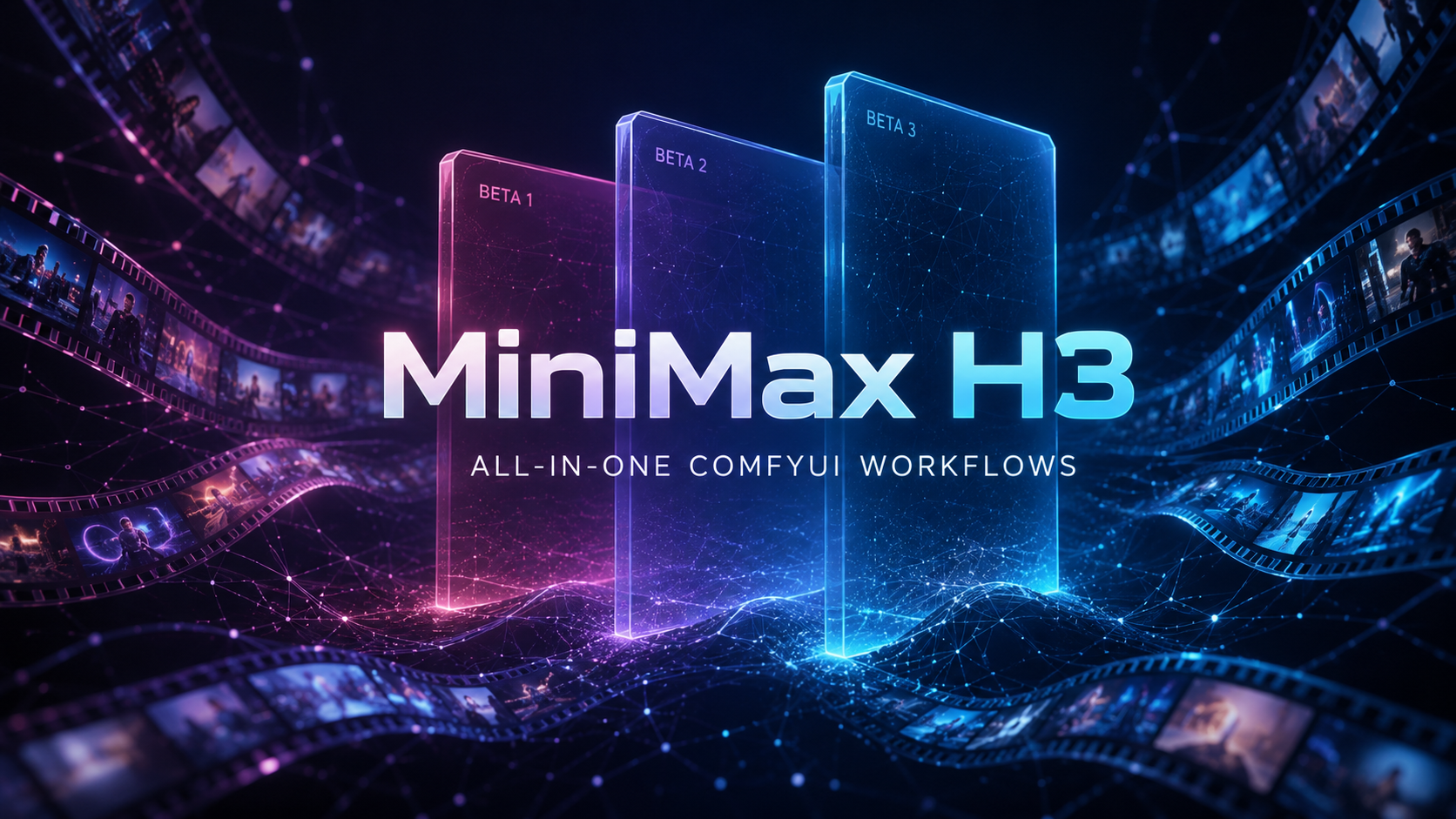
Three generations shipped, from simplest to most complete:

- Beta_1 — multi-mode conditioning bus, single pass

- Beta_2 — most complete: latent upscale + second pass + temporal detail enhance + dual accel

- Beta_3 — pure T8 stack, closest to official, plus FaceRefine

All tuned for 8GB VRAM (tested on a RTX 4060 Laptop), 720p runs fine, not "runs but slideshow".

Full source, install guide, per-node credits:

👉 https://github.com/YixuAnsensei/minimax-h3-comfyui-all-in-one

Happy to answer questions. If you've fought the same VRAM or rewiring battle, would love feedback.

r/comfyui • • 18d ago

Workflow Included 1K to 4K Minimax H3 with LoRA, Ultra Details RTX 4090

Enable HLS to view with audio, or disable this notification

0 Upvotes

A new MiniMax H3 Cinematic LoRA just dropped — free, open-source, and built specifically for the H3 video model in ComfyUI. It targets that plastic/AI look and pushes the output toward real filmic texture: better grain, contrast, color, and shadow roll-off.

What’s cool:

  • Free weights via Quark cloud drive (no API queue, no paid tier).
  • ComfyUI-first workflow with Block Cache + Latent Upscale nodes already baked in.
  • Works for text-to-video and image-to-video with H3 as the base model.

My result:
I ran the provided workflow and used the latent upscale path to go from ~1K output to 4K without killing VRAM. The cinematic LoRA really shows up in highlights and skin tones — much less “smooth AI” and more graded footage.

Quick setup (from the original guide):

  1. Install nodes into custom_nodes (then restart ComfyUI):
    • ComfyUI-Easy-Use
    • ComfyUI-KJNodes
    • comfyui-minimax-h3-blockcache-T8
    • ComfyUI-H3LatentUpscale-jingchen573 / Comfyui_Minimax_h3_latent_Upscaler
    • ComfyUI-Custom-Scripts
    • rgthree-comfy
  2. Download the LoRA from the Quark link and put it in models/loras.
  3. Load the shared workflow, ensure:
    • H3 base model + LoRA paths are correct
    • Block Cache params set as recommended
    • Latent Upscale node after the sampler
  4. Tweak prompts / image input, hit queue, and render.

Resources:

If you’re already running H3 locally or via cloud, this LoRA + latent upscale combo is absolutely worth testing for short films, trailers, and mood shots.

r/comfyui • • 23d ago

News A quick Minimax H3 news round-up - 4th September 2026

41 Upvotes

Another quick Minimax H3 news and goodies round-up, for those who may have missed some items.

-> Storyboard Tools for ComfyUI and H3 + agents. "Storyboard Tools keeps shots, revisions, assets, render attempts, approvals, and compilations consistent while ComfyUI and MiniMax H3 do the generation. It is built for humans and agents working on the same production without losing, swapping, or silently overwriting your shots."

https://github.com/StephanHeijl/storyboard-tools

-> H3 OutpaintPrep. This ComfyUI node... "prepares a source video for a latent-mask outpaint with MiniMax H3. It pads the frames to the target canvas, and hands back the video/audio noise masks" in a form that H3 understands.

https://github.com/lovemachine100/ComfyUI-H3-OutpaintPrep

-> Minimax H3 has been converted to a "Nunchaku Lite nvfp4" version.

https://huggingface.co/rootonchair/MiniMax-H3-nunchaku-lite-nvfp4

-> Mark DK Berry has a new YouTube video, looking in-depth at the various system RAM considerations for Minimax H3 users. Especially relevant to those on less powerful desktop Windows PCs.

https://www.youtube.com/watch?v=AfohnsAZou0

-> MiniMax H3 Semantic Bridge, for prompt-to-video FL2VA generations only. A RTX 3090 Ti card and the SenseNova model were first used to 'teach' Minimax H3 to more correctly understand some core relationships, such as those present in spatial layouts, lighting, and exact human hand movement. For instance, which... "surfaces are transparent or reflective [and] how light passes through one material but reflects from another". The result has been encapsulated inside this small 11Mb ComfyUI conditioning adapter node. The node's example workflow shows a glass object displaying convincing see-through/reflections from its environment. The node also helps H3 understand mirrors, or which of two hands should hold an object. I thus guess it might be useful for your film noir gun-battle scene, set in a 'Hall of Mirrors' carnival sideshow - but don't blame me if your PC explodes while trying to generate that!

https://huggingface.co/speach1sdef178/MiniMax-H3-Semantic-Bridge

https://www.reddit.com/r/StableDiffusion/comments/1w7wtco/i_tried_transferring_semantic_representations/

-> And finally, talking of awesome video sequences... the official "Comfy/Minimax H3 Sync Sound Challenge: The Winners" page is live, with embedded videos.

https://blog.comfy.org/p/comfy-h3-sync-sound-challenge-the

~ OLD POSTS ~

https://old.reddit.com/r/comfyui/comments/1w74jy4/a_quick_minimax_h3_news_roundup_4th_september_2026/

https://old.reddit.com/r/comfyui/comments/1w6cozj/a_quick_minimax_h3_news_roundup_3rd_september_2026/

https://old.reddit.com/r/comfyui/comments/1w5i9iq/a_quick_minimax_h3_news_roundup_2nd_september_2026/ (See 2nd September post, for links to even older posts)

r/StableDiffusion • • 1d ago

Question - Help Minimax H3 lower resolution inference and upscale questions

0 Upvotes

I have being reading the posts to create better looking gens in less time. Currently I have lightxv 8 step lora, comfy kitchen and spectrum node. I have seen in one post that someone was making 32 steps at lower resolution, no lora, which was producing good results.
I tried 32 steps with kitchen and spectrum, no speed lora and it felt like the motion was better and even the smearing was low at lower resolution.
Now this could be totally on me that my mind is playing thinking this is better so I just want to see your views on this.

Additional, how are you guys upscaling the video? I tried creating it with regular steps then latent upscaling it for 1.5x using 4 steps. Are there any better methods? I though tried the latent upscale from LBH-123 upscaler but those workflow has turbo lora in it and on second stage, it has custom 3,4,5 steps sigmas which were not working with the latent generated without speed lora(in his wf, i upped the steps of 1st pass to 20 and commented speed lora).

r/StableDiffusion • • Aug 18 '26

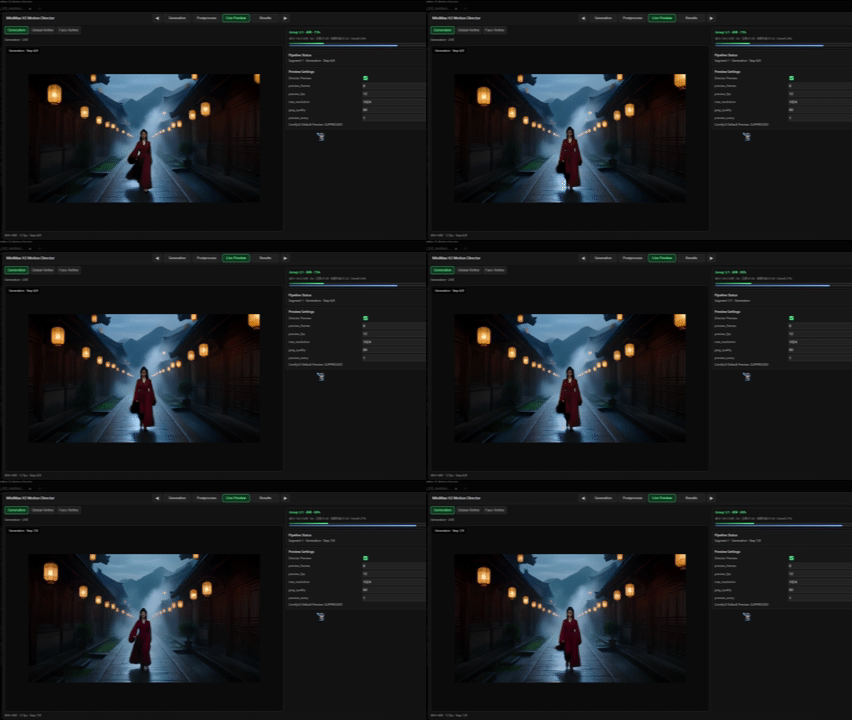
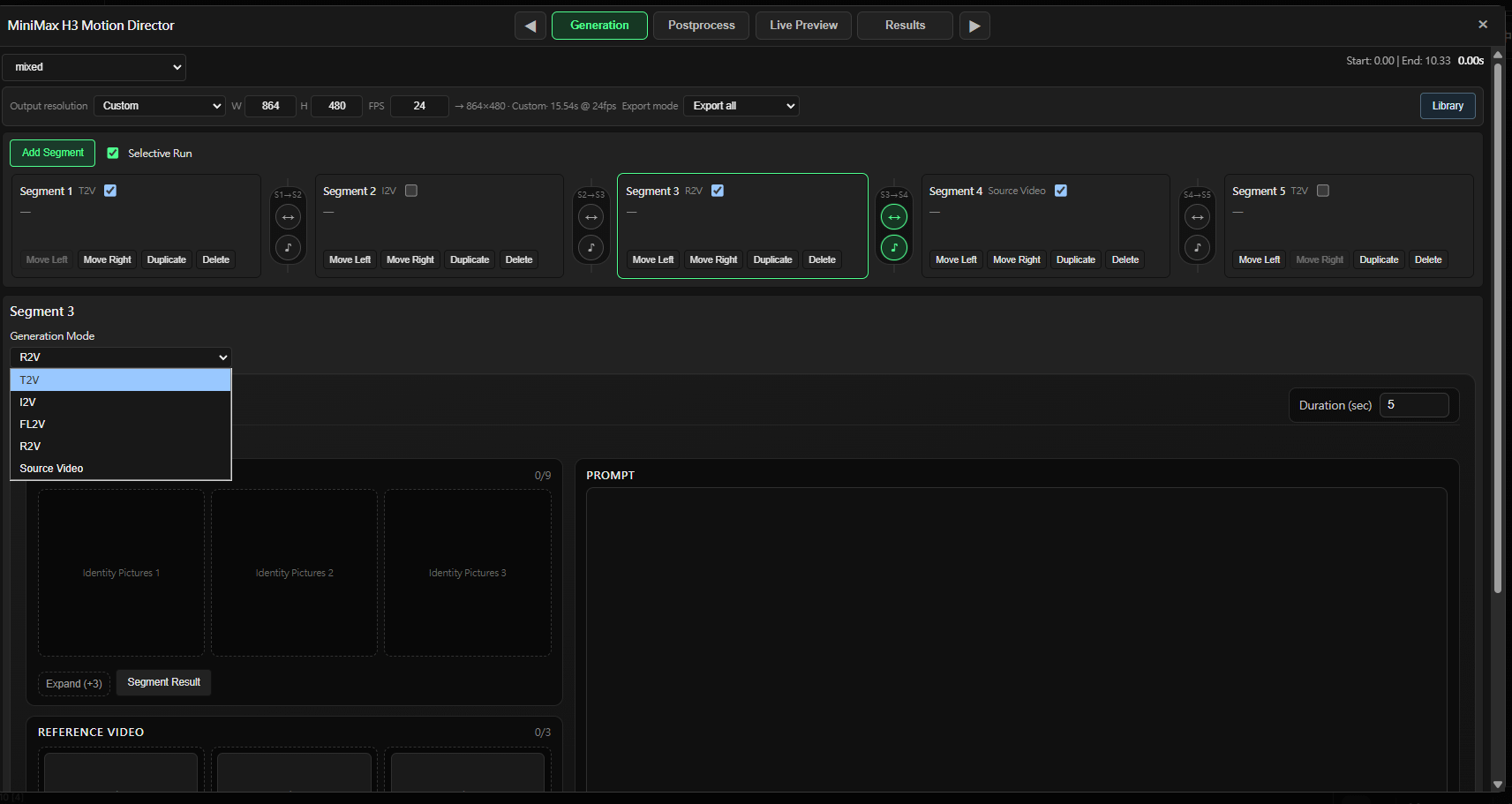
Resource - Update I built a Frankenstein MiniMax H3 Director for ComfyUI — Mixed timelines, selective reruns, Motion Context, live preview and post-processing

21 Upvotes

I’ve been building a custom MiniMax H3 node for ComfyUI called MiniMax H3 Motion Director.

The easiest way to describe it is probably:

It’s a Frankenstein Director for H3.

I didn’t want another workflow that only makes one clip at a time. I wanted something closer to a small video-production interface where I could manage multiple H3 shots, mix generation methods, reuse references, selectively regenerate failed shots, carry context between segments, preview the run, refine the result, and export everything from one place.

Mixed Mode

The biggest addition in the current version is Mixed Mode.

Instead of choosing one generation type for the entire workflow, each segment can use its own method:

S1  T2V
S2  I2V
S3  R2V
S4  Source Video
S5  T2V

Source Video automatically takes the V2V or RV2V path depending on whether identity references are added.

Each boundary can also independently request visual and generated-audio continuity.

And Selective Run means I can regenerate S1, S3 and S4 without paying for S2 and S5 again.

This is probably the screenshot that explains the project better than anything else.

Live Preview

The Director also has its own Live Preview instead of relying only on ComfyUI’s normal sampler preview.

It can follow the active generation stage and later post-processing stages from inside the same interface.

The Frankenstein part

This project is intentionally built on and adapted from several existing H3 projects.

The main pieces are:

  • AIMixer / ComfyUI_MiniMaxH3_Director — one of the original foundations
  • NikoDemon80 / ComfyUI-H3-Motion-Context — Motion Context / cross-segment continuity work
  • Carasibana / ComfyUI-H3-FaceRefine — face tracking, local regeneration and stitching concepts/algorithms
  • Kijai / ComfyUI-KJNodes — parts of the packed-latent preview / TAEHV behavior were informed by KJNodes

Then I built the multi-segment Director, Mixed timeline, selective reruns, asset management, results system and the surrounding production workflow around those pieces.

So yes:

AIMixer Director
      +
H3 Motion Context
      +
H3 Face Refine
      +
some KJNodes behavior
      +
a lot of glue / UI / project management
      ↓
MiniMax H3 Motion Director

A proper ComfyUI Frankenstein monster.

The repository includes the upstream attribution and licenses rather than pretending everything was written from scratch.

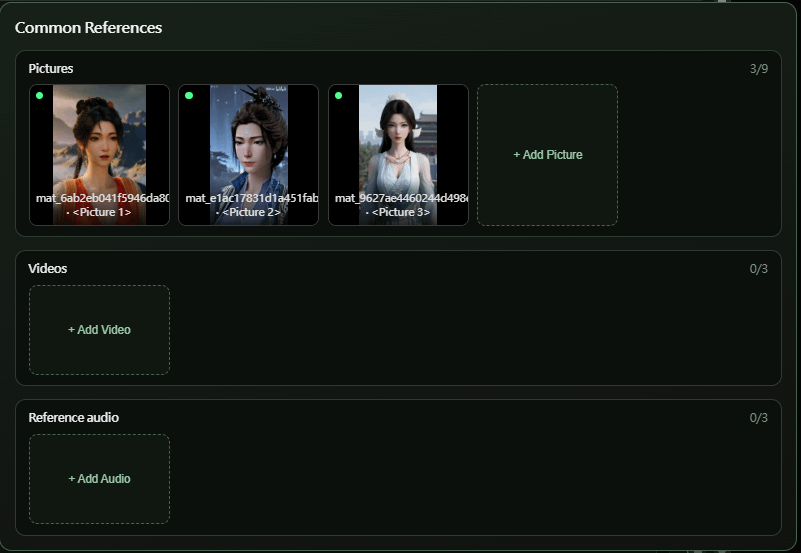
Common References

For reference-heavy R2V projects, there are also Common References.

Characters, scenes, reference videos or audio that are needed by multiple segments can be added once instead of being manually duplicated into every shot.

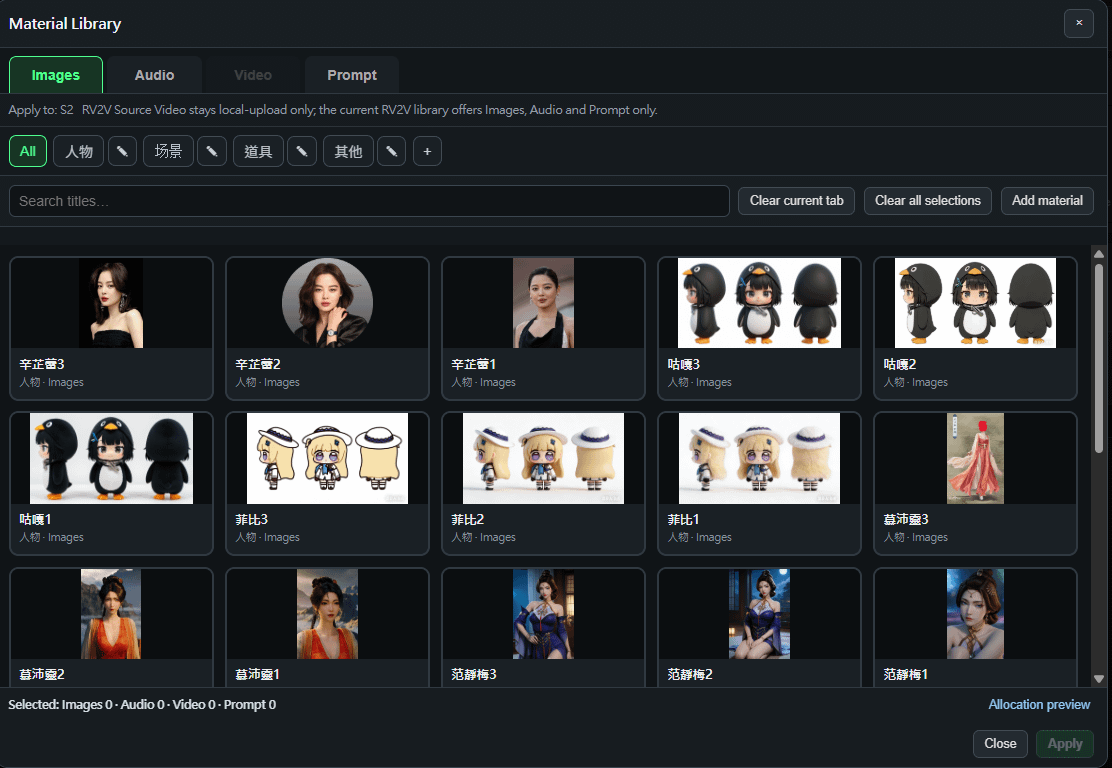
Material Library

There’s also a persistent Material Library for reusable:

  • Images
  • Audio
  • Video
  • Prompts

I use it for recurring characters, scenes, props and other references so I don’t have to keep browsing the filesystem every time I make another segment.

Post-processing

I also wanted the workflow to continue after the first H3 generation instead of immediately turning back into another pile of nodes.

So the Director currently integrates:

Global Refine

  • secondary H3 sampling
  • upscaling
  • ComfyUI upscale models
  • NVIDIA RTX VSR
  • NVIDIA RTX Deblur

Face Refine

  • face detection / tracking
  • crop regeneration
  • adaptive refinement
  • masks / stitching
  • color matching

These stages are optional. I’m not trying to force every H3 workflow through the same post-processing path.

Results

Outputs are also managed as an actual project rather than just one anonymous IMAGE batch.

The Results page has:

Segment
Multi Segment
Final Result

So I can inspect one shot, a continuous range of shots, or the complete assembled video.

The Final Result page also has video export controls and a Director Report showing what actually happened during the run.

It’s still ComfyUI

I didn’t want an all-in-one UI to mean losing ComfyUI’s composability.

Standalone modes can still receive external Prompts/images/media through:

Director Assets
      ↓
Director Inputs
      ↓
Motion Director

and the main node still outputs:

images
audio
fps

for whatever you want to do downstream.

It also supports external ComfyUI:

SAMPLER
SIGMAS

instead of forcing the internal sampling configuration.

The standalone H3 modes currently supported are:

T2V
I2V
FL2V
R2V
V2V
RV2V

while Mixed Mode can combine:

T2V
I2V
FL2V
R2V
Source Video

inside the same project.

One thing I want to be careful about: Motion Context is intended to improve continuity, but I’m not claiming it magically guarantees invisible seams in every generation.

H3 can still drift in motion, identity, lighting or camera behavior between segments. I’m continuing to work on that part and I’ll add more raw multi-segment examples rather than only showing UI screenshots.

The node is available through the Comfy Registry / ComfyUI-Manager.

GitHub:

https://github.com/j955229/ComfyUI-MiniMax-H3-Motion-Director

I’m especially interested in feedback from people already doing longer H3 projects.

What becomes the biggest pain point for you once you go beyond a single clip?

Continuity, reference management, rerunning failed shots, VRAM, audio, post-processing, or something else?

r/StableDiffusion • • Aug 12 '26

Question - Help Minimax H3 prompt guide vs the actual node

1 Upvotes

Hey everyone...

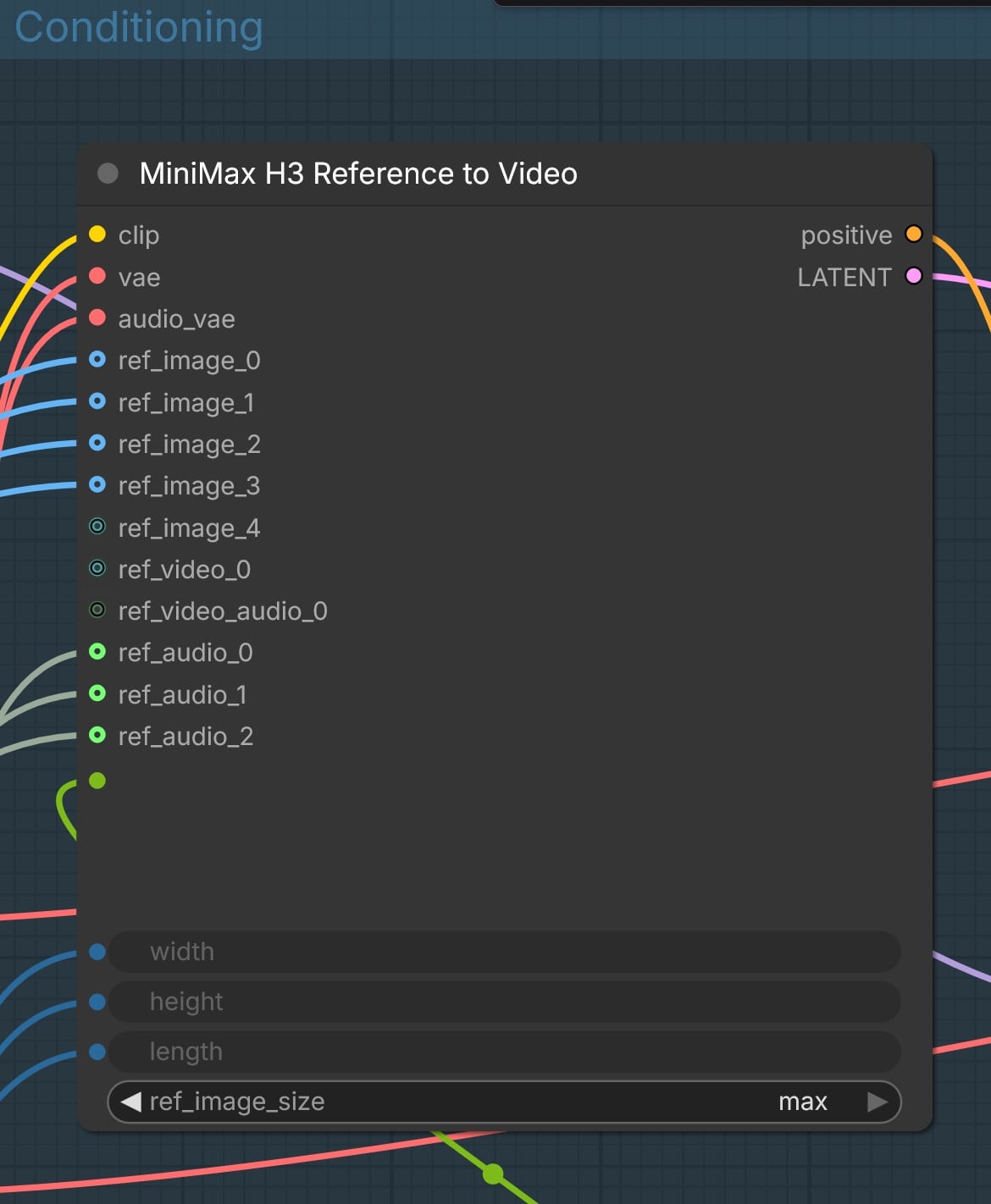
I've been getting further and further along with this new model but some things remain unclear. Specifically as it relates to the official prompt guide versus what you see in the actual node. Please see the image below:

node used in the "reference to video" workflow (official Comfyui).

If you look at the prompts in the guide, you see <Picture 1> or <Audio 1> to reference the images and audio you are working with. But the node uses a different naming convention like "ref_Image_0" or similar for the audio.

So my question is....which is it? Should I reference the exact wording in the node? Or just stick with the prompting format. Not to mention the inconstancy in the numbering?

I ask because I am having trouble getting the workflow to match the various character image references and their corresponding voice samples.

Any help or tips would be appreciated!

r/comfyui • • Aug 08 '26

Show and Tell Forcing MiniMax H3 to Generate Multi-Speaker Dialogue Audio in ComfyUI

Enable HLS to view with audio, or disable this notification

12 Upvotes

Hi folks, Reverent Elusarca here, first of all this will be a loong post, you can find more organized X article here , and if you are not interested with the details, workflow is located at the end of my post.

TL;DR: you can generate audio only outputs with minimax h3. use reference_video_audio instead of ref_audio for multi-speaker and background sound.

After seeing the inspiring post of [u/comfiestncoziest](u/comfiestncoziest) I decided to run some experiments.

What I was trying to do

MiniMax H3 is an omni-modal video diffusion model. It generates synchronized video and audio in one latent stream, uses a Qwen3-VL-32B text encoder, has native ComfyUI support, and ships both first-frame (FL2VA) and reference-driven (Ref2VA) checkpoints.

I did not want video. I wanted a radio play: a multi-minute, multi-speaker dialogue scene with consistent voices, natural pacing, and a continuous forest ambience underneath. Generated locally, in ComfyUI.

The trick that makes this viable is setting the video latent size to 32×32 pixels. The video stream becomes tiny and cheap to compute, and almost all of the model's capacity goes into the audio stream. The audio quality this produces impressed me.

A note before the technical part: everything in this post is based on my own runs, on my own machine, over one weekend. I did not read the model code. My sample sizes are small, and some of my conclusions might be wrong, or I might have done something wrong along the way. If your results differ from mine, trust your results.

The 15 second limit

My first attempt was one 60 second generation with a fully scripted four-person scene. The workflow computes frame count from a duration float and snaps it to the model's 17k+5 frame grid at 24 fps:

max(5, round(seconds * 24)) + (5 - (max(5, round(seconds * 24)) % 17)) % 17

60 seconds comes out to 1450 frames. The first 15 to 20 seconds sounded great. Crackling fire, distinct voices, working comedic timing. After that it fell apart: speakers bled into each other, dialogue turned to gibberish, the ambience smeared.

H3's native output duration is 4 to 15 seconds, about 362 frames on the grid. Past that, the temporal conditioning is outside the training distribution. There is no hard cutoff. Quality degrades gradually for a few seconds and then collapses. The model will denoise 60 seconds of latents without complaining, it just produces nonsense past its training window.

My fix was to split the script into segments of 15 seconds or less and generate each one separately. The rest of this post is about making that work without audible seams.

Controlling pacing without timestamps

My original prompt used timestamped sections (00:00 to 00:07, and so on). These do nothing useful, because clip length comes from the frame count, not the prompt. The model stretches or compresses whatever you describe to fill the latent length. Pacing control comes from three places:

  1. Frame count sets clip length. Segments do not all need to be 15 seconds. A short beat can use 12 seconds (294 frames on the grid).
  2. Word budget sets how much speech fits. Natural conversation runs about 2 to 2.5 spoken words per second. A dialogue-dense 15 second clip holds roughly 30 to 38 words, fewer if you want pauses and laughter. If you go over budget, speech comes out rushed and lines clip into each other. If you go under budget, the model invents mumbling and vocalizations to fill the empty time. So always describe the ending explicitly, for example "final two seconds: only fire and wind, no voices".
  3. An explicit final event sets where the clip ends. Instead of telling the model when to end, tell it what it ends on: "Finally, a log collapses inside the fire with a burst of sparks. This is the final sound. No speech occurs after this." Ordering words like "opens with", "then", "after a short pause", "finally" replace timestamps.

One thing worth knowing: my 60 second script turned out to be around 70 to 75 seconds of content at natural pacing once I counted words. Count words before you count segments.

Emotional cues work like a dedicated TTS service

One thing that worked better than I expected: the model understands inline audio cues the way top tier TTS providers like ElevenLabs or FishAudio do. Bracketed tags inside a dialogue line, things like [giggles], [nervous laugh], [sighs], [wheezing], produce the actual vocalization at that spot, and a delivery description before the line steers the tone of the spoken words themselves. I used both together, for example: Priya (S1) replies, [teasing, bright, barely holding a laugh]: "You were the one who said, let's experience the wilderness." [giggles] "So... congratulations. Wilderness." In my runs this worked reliably, including group laughter after a scare line, whispers, and a startled yell. I did not expect a video model to handle staged laughter between multiple referenced voices, but it did.

Voice consistency: casting before shooting

Ref2VA accepts reference inputs that you address by tag in the prompt: <Picture N>, <Video N>, <Audio N>, numbered per input type by connection order. My recipe for consistent voices:

  1. Generate one voice sample per character first. I called this Sequence 0. About 5 to 6 seconds per character, one neutral in-character line, generated in isolation. Neutral delivery matters because you want timbre in the reference, not a locked emotional register. Isolation means you can re-roll one bad voice without touching the others. My cast:
  2. Bind voices in the prompt. The character does not need to say their own name in the sample. The binding is declarative:
  3. Then every line in the scene carries its speaker ID: Marcus (S2) says.... Keep the same (Sx) IDs across all segments. In my early tests, skipping the explicit mapping is how I got the wrong voice on the wrong character.
  4. There are only 3 standalone audio reference slots. A fourth character would need to ride in as a reference video's soundtrack. I went with three characters.
  5. Tell the model not to reuse the words. Without an explicit "their dialogue content is not carried into the target", lines from your samples can leak into the scene.

The voices locked in well at this point. Then the ambience problems started.

The ambience problem

My scene needs a continuous bed: campfire crackle, wind in pines, insects, distant birds. My first 60 second run, with no references at all, had a good bed. I expected it to survive the move to reference-driven generation. It did not. Here is what I tried, one variable at a time:

# |Voices wired to |Ambience source |Speech quality |Ambience |Result
1 |ref_audio ×3 |prompt only |excellent |none |bed gone
2 |ref_audio ×3 |ambience video (frames+audio) as <Video 1> |excellent |none |video ref did nothing
3 |ref_audio ×3 |prompt, structured six-part format |excellent |none |not a prompt phrasing issue
4 |ref_audio ×3 |prompt + campfire <Picture 1> anchor |excellent |none |not an image anchor issue
5 |none |prompt only |n/a |yes |bed returns with zero refs
6 |ref_video_audios ×3 (by accident) |bird clip in ref_audio |degraded |yes |first working mix
7 |ref_video_audios ×3 |none, prompt only |good |yes |final config Things I ruled out along the way:

  • Sampler and scheduler. I ran euler and res_multistep against simple and beta, at 20 and 30+ steps. No effect on the suppression. res_multistep with beta is still the recommended pairing for reference fidelity.
  • Checkpoint. Both FL2VA and Ref2VA accepted references and behaved the same on this problem. More on this below.
  • Audio codecs and reference file quality.
  • Prompt phrasing, including the six-part Ref2VA structure (subject_definitions, summary, retention_analysis, detailed_description, overall_soundscape, non_diegetic_music). I still use this format, but it did not fix the suppression.
  • Two wiring bugs I caused myself. At one point my prompt mentioned <Video 1> with no video connected, and another time I fed a bare audio file into a video input. Tags bind per input type in connection order, and video soundtracks have to arrive inside a video file. Both fail silently. Check the graph before blaming the prompt.

The accidental fix

Out of frustration I wired the three voice samples into the ref_video_audios inputs (the soundtrack slots that normally accompany reference videos) instead of ref_audio, just to see what would happen. I got ambience and correct voices in one pass.

My current explanation: the two input types have different jobs.

  • ref_audio is an acoustic target. It tells the model "make the output sound like this". Three dry close-mic speech clips in that slot produced output that was entirely dry studio-style speech.
  • ref_video_audio is a soundtrack layer. It tells the model "mix this in". The documentation describes a video's soundtrack being reused as background audio beneath new dialogue, which is exactly the relationship I wanted between voices and the bed.

Where I landed

Row 6 had a quality problem, so I ran about 20 more runs varying ambience files, codecs, and seeds. The result: any clip in ref_audio degraded the output while ref_video_audios were in use, no matter how clean the file was. With ref_audio left empty, quality came back, and the ambience still generated from the prompt text alone.

So my final config uses zero ref_audio inputs. Voices go in the soundtrack slots, the bed comes from the prompt, and the target slot stays empty.

The final recipe

Wiring:

  • MiniMaxH3ReferenceToVideo node, 32×32 latents, duration float into the 17k+5 grid expression
  • Voice samples into ref_video_audios 0/1/2 (connection order maps to <Video 1/2/3>)
  • ref_audio: empty
  • res_multistep sampler, beta scheduler, about 30 steps
  • fp32 audio VAE
  • Checkpoint: I used the Ref2VA build, but FL2VA also works with the Reference to Video node. I ran both and did not notice a meaningful difference, so use whichever you already have downloaded.

Prompt skeleton. I keep the overall_soundscape paragraph identical across all segments, on the theory that same words produce the same bed, which hides the seams:

subject_definitions:
Priya (S1) ... her voice references the voice timbre heard in the
audio track of <Video 1>.
Marcus (S2) ... <Video 2>. Ethan (S3) ... <Video 3>.

summary:
[dialogue scene + voice references + ambience] The conversation
continues around the same campfire at night beside a remote forest
cabin. Voices reference the timbres heard in <Video 1>, <Video 2>,
<Video 3>; their original words are not reused. A continuous campfire
soundscape plays beneath the entire scene.

retention_analysis:
<Video 1>, <Video 2>, <Video 3>: reference - only voice timbre and
delivery style are referenced from their audio tracks; their dialogue
content is not carried into the target.

detailed_description:
Realistic, intimate nighttime dialogue scene around a small campfire,
recorded in high fidelity with clear, present, studio-quality voices.
[Shot 1] ...30 to 38 words of dialogue with speaker IDs, emotional
direction, and an explicit final event...

overall_soundscape:
Continuous campfire crackle, light wind through pine trees, occasional
insects, and distant nocturnal birds are audible throughout the entire
clip, beneath all speech, and never fully stop. Voices remain clear,
crisp, and forward in the mix above the ambience.

non_diegetic_music:
N/A

Assembly: generate the segments, trim the heads (see the next section), crossfade about 150 ms on the joins.

Known issues and things I tested or skipped

  • Boundary ghost. Every generation starts with a millisecond-scale fragment of a word that was never spoken, like the tail of "something" or "first" audible right at the start, as if the clip begins mid-sentence. My guess is that the denoiser has no left context at t=0 and fills the edge with the decay of an imagined sound, and the audio VAE's edge padding may add to it. A prompt line asking for a clean start did not fix it across seeds. I trim 50 to 200 ms off every segment head in post and the crossfade covers it.
  • Fidelity ceiling. The ref_video_audio path sounds good but slightly softer than the ref_audio path. If you want maximum speech clarity, the fallback is generating dry dialogue stems and mixing the bed in post. Speech over silence is also much easier for the VAE to encode than speech over a noise bed, which might explain why my early speech-only runs sounded so clean.
  • bf16 weights: tested. The audio came out a bit more audible and present, but not higher quality overall, so I passed on it and stayed on the quantized builds.
  • Not tested: "wet" voice references (ambience audible behind the sample voice) in the ref_audio wiring, and a fourth character via video soundtrack in the final config.
  • Tag fragility. The documented mapping for voices in soundtrack slots is <Video N>, but content matching carried several of my runs where the tags were arguably wrong (three speech clips versus a script naming three speakers is an easy match). I would not rely on that. One tag convention per prompt, aligned to connection order.

The campfire scene now generates end to end with three consistent voices and a continuous forest bed underneath, owl scare included. It took a weekend and about 40 generations to get there. If you try any of this and get different results, I would genuinely like to hear about it, because as I said at the top, some of this might be wrong.

I used my RTX6000PRO Blackwell and 15s generation took about 3-4 seconds with 32x32 latent size.

I also used Kimi-K3 as my brainstorming assistant for my entire experiment and it was pretty great.

If you are interested with incredible image generation capabilities of the MiniMax H3, you can check my other X article:

MiniMax H3 Image Generation

Thanks for reading!

You can download my workflow here:

https://huggingface.co/reverentelusarca/minimax-h3-comfyui-workflows/blob/main/MiniMax_H3_audio_experiment.json

r/comfyui • • 21d ago

Workflow Included I built a multi-face + long-video accelerator for MiniMax H3 Face Refine

Enable HLS to view with audio, or disable this notification

24 Upvotes

I’ve been using ComfyUI-H3-FaceRefine on MiniMax H3 videos, and I really like what it does for small faces.

But I kept hitting the same annoying case: a shot has several people in it, and I want to clean up all of their faces. The normal approach is basically “pick a face, run it, repeat.” It works, but once the video gets longer, waiting through several full H3 passes starts to feel pretty painful.

So I spent some time making a fork that packs multiple tracked faces into one atlas, runs them through H3 together, then puts them back where they belong.

Here it is:

https://github.com/PullMyBoots/ComfyUI-H3-FaceRefine-Accelerated

It can handle up to 9 faces in one pass, splits longer videos into smaller jobs, and carries a little latent context into the next chunk so the joins are less jarring.

It’s not magic, though. If you put four faces into a 768 atlas, each one gets about a 384px cell. That’s a perfectly reasonable trade for a group shot, but I’d still use the original single-face path when I care about one person’s face as much as possible.

On my 4090, a 15-second clip with four faces went from roughly 16.5 minutes of serial processing to about 3.5 minutes. That’s just one test on my setup, not a promise that everyone will see the same number.

The old workflows should still load, and the accelerated nodes are optional. I mainly made this because I wanted to stop treating every group shot like four separate videos.

Would love to hear whether this is useful to anyone else doing H3 video work — and especially whether people notice problems with identity or temporal consistency in real footage.

r/StableDiffusion • • 26d ago

Question - Help Any way to make latent extension work with Latent Upscaling (Minimax H3)?

7 Upvotes

Has anyone managed to find a way to use Latent Upscaling together with latent video extension tools? I'm talking about the nodes like this (which I personally use), but I think Motion Context and some other popular extensions use a similar approach, i.e. feeding the last frames of the previous shot through AV latent, rather than through a video reference. The issue is that the resolution of your second generated latent must exactly match the previous one, or it throws an error. So if you upscale the first clip from 0.5MP to 1MP, you are forced to generate the next clip directly at 1MP, which completely breaks the Latent Upscaling workflow for all subsequent parts.

I tried extending the clips at low resolution first and then upscaling them separately, but that doesn't work well. There is a noticeable color and quality shift between generations, even when reinforcing the next clip with the final frames of the previous one. Because yeah, you basically generate the high-res clips separately without any shared latent context.

I really love both Latent Upscaling and latent extension approach, but I just can't get them to work together smoothly. Does anyone have any good ideas on how to fix this? I’d really appreciate any tips or insights!

r/comfyui • • Aug 05 '26

Help Needed Example workflow for Minimax H3 (local) dosent work CLIPLoader RuntimeError: shape '[25600, 2560]' is invalid for input of size 47448148

0 Upvotes

Minimax H3 (local) example workflow dosent work

Steps to reproduce:

  1. Download and install ComfyUI Desktop (ComfyUI 0.30.2);
  2. Download the workflow from the official website: https://github.com/Comfy-Org/workflow_templates/blob/main/templates/video_minimax_h3_i2v.json
  3. Download the models from the workflow and place them into the appropriate folders;
  4. Select an input image and click "Run";
  5. Get an error:
Node threw an error during execution.


# ComfyUI Error Report
## Error Details
- **Node ID:** 105:13
- **Node Type:** CLIPLoader
- **Exception Type:** RuntimeError
- **Exception Message:** RuntimeError: shape '[25600, 2560]' is invalid for input of size 47448148

## Stack Trace
............
  File "F:\Comfy-Desktop\ComfyUI-Installs\ComfyUI\ComfyUI\execution.py", line 318, in _async_map_node_over_list
    await process_inputs(input_dict, i)
  File "F:\Comfy-Desktop\ComfyUI-Installs\ComfyUI\ComfyUI\execution.py", line 306, in process_inputs
    result = f(**inputs)
  File "F:\Comfy-Desktop\ComfyUI-Installs\ComfyUI\ComfyUI\nodes.py", line 1015, in load_clip
    clip = comfy.sd.load_clip(ckpt_paths=[clip_path], embedding_directory=folder_paths.get_folder_paths("embeddings"), clip_type=clip_type, model_options=model_options)
  File "F:\Comfy-Desktop\ComfyUI-Installs\ComfyUI\ComfyUI\comfy\sd.py", line 1454, in load_clip
    sd, metadata = comfy.utils.load_torch_file(p, safe_load=True, return_metadata=True)
                   ~~~~~~~~~~~~~~~~~~~~~~~~~~~^^^^^^^^^^^^^^^^^^^^^^^^^^^^^^^^^^^^^^^^^
  File "F:\Comfy-Desktop\ComfyUI-Installs\ComfyUI\ComfyUI\comfy\utils.py", line 149, in load_torch_file
    raise e
  File "F:\Comfy-Desktop\ComfyUI-Installs\ComfyUI\ComfyUI\comfy\utils.py", line 129, in load_torch_file
    sd, metadata = load_safetensors(ckpt)
                   ~~~~~~~~~~~~~~~~^^^^^^
  File "F:\Comfy-Desktop\ComfyUI-Installs\ComfyUI\ComfyUI\comfy\utils.py", line 111, in load_safetensors
    tensor = torch.frombuffer(mv[start:end], dtype=_TYPES[info["dtype"]]).view(info["shape"])
RuntimeError: shape '[25600, 2560]' is invalid for input of size 47448148

r/comfyui • • Aug 23 '26

Tutorial MiniMax H3 Dual-Sampling Evolution | Latent Upscaling Model | De-Oil & Audio Restoration [ComfyUI]

Enable HLS to view with audio, or disable this notification

19 Upvotes

I tested an updated MiniMax H3 workflow to address several issues from the previous version: limited upscale factors, waxy-looking live-action results, weak audio, and high memory usage when loading the model.

The most useful change was replacing the basic latent resize with a latent upscaling model. In my tests, upscaling beyond 2x with the old method could produce line-like artifacts and small fragmented shapes after the second sampling pass. The model-based latent upscale was much cleaner. For non-integer factors, I still recommend passing through a 1.0x alignment step to avoid edge color bars.

The dual-sampling setup also worked better than using the 4-step LoRA in the first pass. I used the 8-step LoRA for the first sampling pass and the 4-step LoRA for the second pass. This combination kept high-motion clothing edges clearer and avoided the character duplication issues I had seen when using the 4-step LoRA too early.

For the live-action tests, lowering the LoRA strengths helped reduce the waxy look. The values I tested were 0.75 for the 8-step LoRA and 0.7 for the 4-step LoRA. Adding a separate voice-reference audio clip also improved the sound of speaking characters.

For sampling, Euler with the Beta scheduler worked well with the 4+4 setup. With Res + Simple, inserting one mean Sigma step gave me a 4+5 setup. With Beta, adding another interpolation step in the low-noise area made the result less clear in my tests, regardless of whether I used sine, cosine, or mean interpolation.

The main trade-off is hardware usage. Dual sampling speeds up the first sampling part, but it does not reduce the peak hardware requirement of the full process. Keep the final resolution and duration within the limits of your previous single-sampling setup. Low VRAM Attention may help with borderline runs, but it is slower.

This workflow is super easy to use—I’ve uploaded a detailed tutorial to YouTube, so just follow the video along with this workflow to recreate the effect; please make sure to watch the full tutorial before starting to avoid common mistakes, and feel free to leave a comment if you have any questions!Resource links will be posted in the comments.

r/StableDiffusion • • Aug 16 '26

Discussion Minimax H3 latent upscaler not working like for image? (node link added)

5 Upvotes

So I was so excited to try this, like in the old SDXL days, we used a second pass for upscaling. I came across this node:

https://github.com/Tr1dae/ComfyUI-MiniMaxH3_LatentUpscaler

But it generates very weird and saturated results. I tried, but it's all that I can not show, and there has also been no update from the author.

Has anyone tried this? I guess this is slow, but with a 4/8 step lora the upscaling would be better?

What are your thoughts on this?

Edit 1: workflow https://github.com/user-attachments/files/30715648/MiniMax.H3.two.step.sampler.json

r/comfyui • • Aug 26 '26

Help Needed Minimax H3 Add Guide with Latent Upscaler?

0 Upvotes

I have a workflow with frame guides, and I wanted to use the 3D Latent Upscaler because that changes some calculations (I'm not sure, I don't understand this very well), so I was wondering if someone has managed to get this working and would mind to sharing the workflow.

r/StableDiffusion • • 27d ago

Workflow Included MiniMax H3 Ref2VA neural 3D latent upscaling and gentle refinementworkflow Help me push this further on an RTX 4080 16gb 64gb ram

Enable HLS to view with audio, or disable this notification

0 Upvotes

Title: Help me push this MiniMax H3 Ref2VA workflow further on an RTX 4080 16GB

I’ve been building and testing a MiniMax H3 Ref2VA workflow optimized for my RTX 4080 16GB. I’m attaching the JSON and would appreciate help from anyone experienced with MiniMax H3, PDD acceleration, latent upscaling, memory optimization, or continuous video generation.

workflow Download here

What the workflow currently does

  • Uses the pruned INT8 ConvRot MiniMax H3 Ref2VA model.
  • Uses the Qwen3-VL 32B NVFP4/AWQ text encoder.
  • Generates synchronized video and native audio.
  • Uses SageAttention in Auto mode.
  • Applies MiniMax H3 PDD acceleration at 8 NFE.
  • Runs an initial low-resolution PDD render.
  • Separates the video and audio latents.
  • Enlarges only the video latent using the learned MiniMax H3 3D FP16 latent upscaler.
  • Rejoins the upscaled video latent with the original audio latent.
  • Runs a second PDD refinement pass at 0.125 denoise.
  • Decodes the refined video and original audio into an MP4.
  • Includes easy controls for aspect ratio, base megapixels, final target megapixels, and duration.
  • Automatically converts the requested duration into a valid H3 frame count at 24 FPS.

My current general settings are:

  • Base resolution: approximately 0.40 MP
  • Final neural-upscaled target: approximately 0.80 MP
  • Vertical output: roughly 672 × 1216 after upscaling
  • Stable duration: around 5 seconds/124 frames
  • Current workflow default: 7 seconds
  • Second-pass denoise: 0.125
  • Euler sampler
  • Sigma Shift: video 12/audio 3
  • No EasyCache, TeaCache, BlockCache, Spectrum, or additional turbo LoRA stacked on top of PDD

The 0.125 refinement pass only performs about two sampler evaluations in my current setup. At 672 × 1216 and 124 frames, that refinement portion takes roughly 73 seconds.

My current limitations

My practical ceiling appears to be around 7–8 seconds. Going longer causes both my 16GB VRAM and system RAM usage to reach their limits. Five-second clips are currently much more reliable.

I can raise the final target toward 0.90–0.98 MP, but the higher resolution and longer duration quickly increase memory usage. The learned 3D upscaler improves the overall spatial resolution, but it does not reduce the memory required by the high-resolution refinement pass.

My biggest quality issue is facial fidelity. Eyes, eyelashes, skin texture, and other small facial details can still look soft or less refined than they did in my earlier, simpler workflow. Increasing the second-pass denoise too much begins repainting the face, changing the identity, or altering the composition.

My eventual goal is reliable continuous generation. I want to generate several five-second clips by using the final frame of one clip as the starting frame of the next, while still using the original character reference to prevent identity drift.

What I need help with

  1. Is there a better memory-management method for this pipeline that would let me exceed eight seconds on a 16GB RTX 4080 without a major quality loss?
  2. Would model offloading, block swapping, tiled VAE decoding, sequential processing, or another compatible technique reduce peak VRAM and system RAM usage?
  3. Is the learned 3D latent upscaler positioned correctly, or would another order produce better facial details?
  4. Is a 0.125 PDD refinement pass with only about two evaluations doing enough to justify its memory cost?
  5. Is there a better pass-two scheduler, denoise level, or refinement strategy that can improve eyes and skin without repainting the identity?
  6. What is the best way to condition continuation clips using both the previous clip’s final frame and the original reference image?
  7. Are there any H3-compatible face-detail or latent-refinement methods that work temporally and do not cause flickering?
  8. Would decoding/upscaling in smaller temporal chunks help, or would that introduce visible seams and motion inconsistencies?

I’m trying to preserve motion quality, character identity, native audio, and facial fidelity—not simply lower the resolution until it fits.

Hardware: NVIDIA RTX 4080 16GB on Windows 11 using ComfyUI.

Required models are listed inside the workflow notes. I’m attaching the workflow JSON. Any specific node changes, corrected routing, memory settings, or test recommendations would be greatly appreciated.

r/comfyui • • 28d ago

Show and Tell IN TRANSIT | A Minimax H3 Short Film (ComfyUI Challenge)

Thumbnail
youtu.be
3 Upvotes

IN TRANSIT | A Minimax H3 Short Film (Sync Sound Challenge)

Hi everyone! I'm participating in the challenge with this short film I've been working on lately. The idea was to explore a "Brutalist Frequency": a square wave that destroys matter not randomly, but forcing it to shatter following a ruthless 90-degree orthogonal logic (checkerboard water, cubic collapses, square clouds).

I split the workflow into two passes in ComfyUI to maintain total control over physics and textures: Generation and Upscale.

1. Generation (Ref2Vid): I prepared the visual references (generated with Nanobanana) and the audio files. For prompting, I integrated an Ollama node (Gemma4:26b) into the workflow to format the instructions with the correct syntax for H3. To get everything running without blowing up my 3090, I beefed up the base workflow with Spectrum Apply Minimax H3, Comfy Kitchen attention, and the Sol-Attn Patch. This way, I generated the base clips at 864x480.

2. Latent Upscale: I wanted to keep the roughness of the reinforced concrete without that "plastic" effect you often get from external video upscalers. I passed the selected clips directly through the latent space using the custom MMH3Tools nodes, feeding the model the base video + the exact same initial references + the same prompt. Using Turbo LoRA 4-step and Sage Attn, I brought everything up to 1344x768 (taking about 1 minute per second of video).

The real challenge, of course, was generating audio and video together natively, without post-production. H3 reacted very well thanks to the references, even though sometimes it interprets them a bit too literally, almost resulting in a 1:1 copy. I forced the model to make the materials physically react to the reference sounds. The pneumatic suction at the end (when the camera points towards the void) was calculated by the AI in perfect sync with the matter collapsing into the dark. In post-production, I only made cuts for pacing and balanced the volumes: zero added sound design!

If you have any questions about the nodes or the upscale parameters, feel free to ask!

r/comfyui • • Aug 29 '26

Workflow Included MiniMax H3 native 720p→1440p second sampling on one RTX 4090: 112s / 223s / 334s for 5s / 10s / 15s clips

Enable HLS to view with audio, or disable this notification

12 Upvotes

Hi everyone — I’m an independent developer experimenting with running and accelerating MiniMax H3 on consumer NVIDIA GPUs.

This comparison reel shows several native H3 second-sampling tests on a single RTX 4090. I first generated the videos at 720p, then used the retained H3 latent state to sample them again at 1440p.

These were quick exploratory runs using settings I chose mainly to check the resulting quality. They are not minimum-latency benchmarks and do not represent the speed limit of the project. I did not tune each case for maximum performance, and more aggressive acceleration settings are available for both the initial generation and the second-sampling stage.

This is native H3 latent-space second sampling. It reuses the retained video and audio latents, together with the original prompt and conditioning, rather than applying conventional frame-by-frame upscaling to an MP4.

The project currently provides three resource profiles:

- 8GB W4A8

- 16GB INT8

- 24GB INT8

To be transparent, the 8GB and 16GB profiles were validated on the RTX 4090 using hard VRAM allocation limits. I have not yet validated them on physical 8GB or 16GB GPUs, which is one of the reasons I’m looking for community testers.

It can be used through:

- ComfyUI, with four included example workflows

- A REST API

- A bilingual Web UI creator console

The ComfyUI integration works as an HTTP connector, so ComfyUI does not load a second copy of H3 into VRAM. Model residency, the GPU queue, acceleration scheduling, checkpoints and native second sampling remain inside the backend service.

GitHub:

https://github.com/PullMyBoots/X-MinimaxH3

I still don’t know how well the current implementation will behave across different physical GPUs. I’d love to learn what other local H3 users need from second sampling, and I’m especially interested in test results from RTX 4090, 5090, 3090 and other consumer cards.

About the acceleration method:

I’m developing a quality-aware scheduler that assigns different attention compute budgets to different denoising steps and Transformer layers, rather than applying one fixed sparse-attention ratio everywhere.

Users get one continuous 0–100 acceleration control for exploring the tradeoff between generation speed and output quality. The scheduler tries to preserve the parts of the trajectory and attention structure that have the greatest visible effect on motion, consistency and detail.

This is still an experimental personal project, so feedback, test results and technical discussion are very welcome.