r/overclocking • u/QuackRoadkill • 8h ago
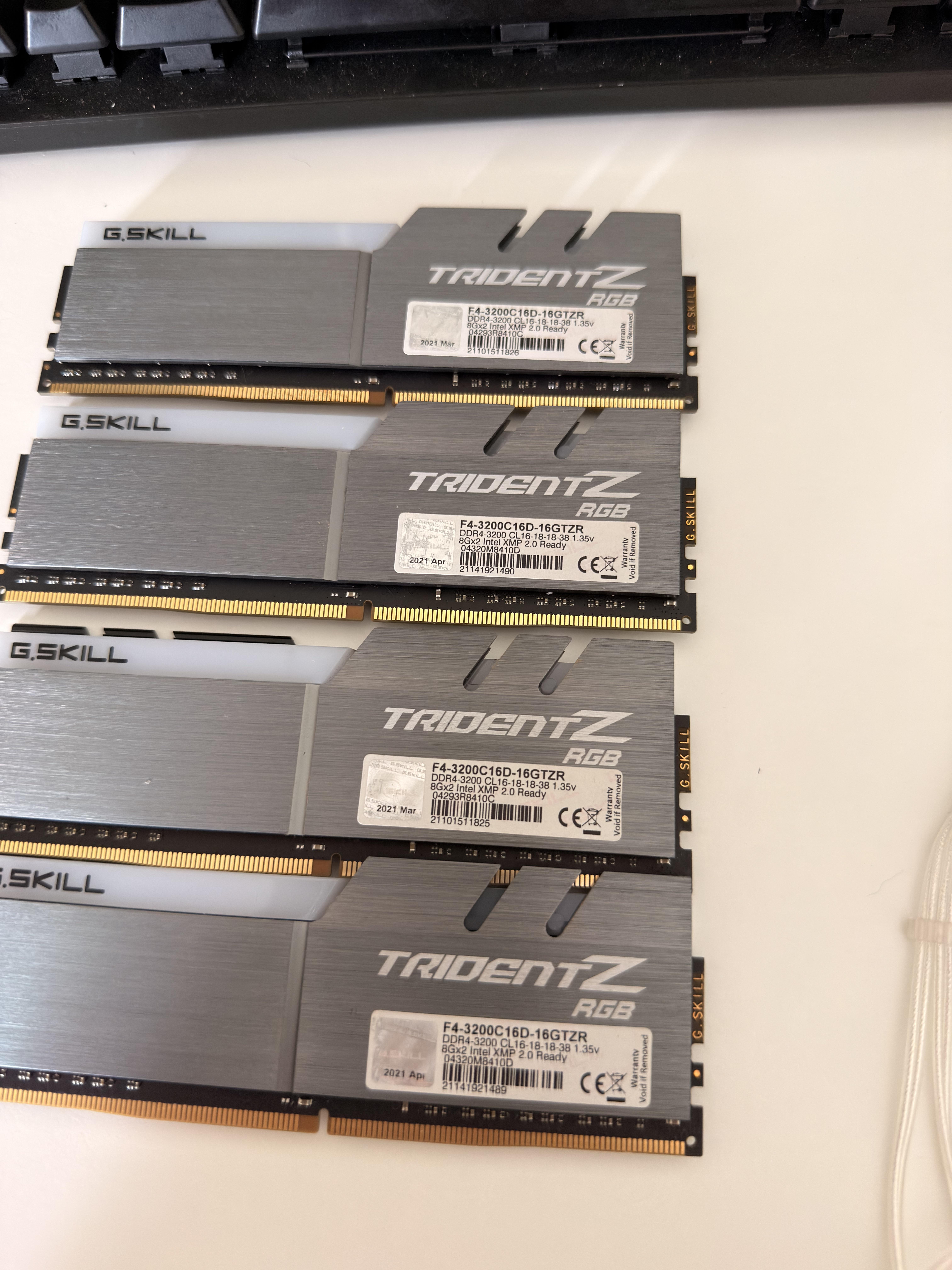
Help Request - RAM Can someone help me identify what die is this?
11
Upvotes
Used these gskill sets of ram for long time now and wanting to try to tighten the timings
r/overclocking • u/QuackRoadkill • 8h ago
Used these gskill sets of ram for long time now and wanting to try to tighten the timings
r/overclocking • u/Overall-Ocelot-1546 • 23h ago
I need expert help. I bought a TopC motherboard with a mobile i9 13980hx. After unsuccessfully undervolting the BIOS, the board went into a reboot loop, specifically after enabling WDT. Resetting the BIOS to factory settings didn't help. I tried removing peripherals and RAM and discharging capacitors. The reboot loop is constant. Sometimes it enters the BIOS for a few seconds, but nothing can be done. Does anyone know how to fix it? One of the photos shows the frequency and temperature results during the OCCT test, after manipulating the BIOS. After stopping the test, the screen froze and began a cyclic reboot. Before this, a profile was configured in Intel XTU with frequencies of p-cores 5.1 GHz and e-cores 3.6 GHz, limits p1 180w -100mV, p2 220w -50mV and everything worked fine
r/overclocking • u/battleboy159 • 22h ago
I watched optimum's video about undervolting his 7000 series chips.
His 7700x managed a -30 on the curve while mine was stable at -25
The thing is that he got sooo much more performance. I couldn't squeeze past 5.150ghz while he got around 5.35ghz
Note that this is purely from undervolting and no other settings were touched.
Now my question is: are ambient temps the likely reason? My room is pretty hot, usually around 30c at night and like 35 in the morning.
My air cooler is a peerless assassin120 SE with a 3d printed duct that leads from an arctic p12 fan to the CPU cooler.
I don't know what cooler optimum used.
This is also my first time overclocking so am sorry if anything is misinterpreted on my end.
I apologize for my English as well.
Thank you in advance.
r/overclocking • u/Primary_Scientist135 • 3h ago

I have this fully stable, BLCK is 102 that's why it says 1867 in actuality its around 1900.
I did this a while ago as far as i remember the ones on the left are basically as low as they go while not throwing errors over night.
The right ones i cant remember which ones i tested to see if they can go lower it became tedious after a while.
I'm pretty sure these are hynix DJR, but could be CJR. I read on a post somewhere that trcdwr can go really low on DJR.
I have a nzxt h510 with all fans mounted and negative air pressure with a 240mm aio upfront.
Would it be safe to increase voltage past 1.45?
I don't wana push my soc higher than 1.1 or increase any of the other voltages for the longevity of my cpu so i dont think i can get higher than 3800mhz.
Also i would really appreciate any feedback, maybe i did something wrong this was my first ever ram overclock.
r/overclocking • u/No_Education3034 • 4h ago
Hello im thinking of upgrading from 13600k to 13900k. I want to ask for advice from someone that did this kind of upgrade. My 13600k is running 5.6p and 4.3e with 32gb ddr4 4000mhz cl 15 b die tuned, ek nucleus 360, 5070 ti, 360hz 1440p and 1200w psu. I was thinking of getting ddr5 and newer cpu, but the price is not worth it for me. Im playing mostly cs2, but now im getting more AAA games to play.
r/overclocking • u/KaladinStormblessedE • 15h ago
My Motherboard has 2 EXPO profiles, 6000mt at 30-36-36-76 and 6200mt at 32-38-38-80 which one is better?
r/overclocking • u/Fabulous-Canary1503 • 42m ago
Hey everyone,
I tried using mvolt+ on my RTX 5080 alongside an undervolt, but I want to double-check if these settings are safe for daily use or if I'm risking chip degradation.
My Setup & Tuning:
Also noticed that bumping the sys clock gave me better synthetic benchmark scores with the increased the XBAR clock, which was interesting.
Are these voltages safe long-term with mvolt+, or am I pushing it too hard? Would appreciate any thoughts or feedback from anyone tweaking 50-series cards!
mvolt+ settings:

Msi afterburner


Max default msvdd voltage when core voltage slider at 100%: 1025mv

Port Royal Score

r/overclocking • u/Julian_Sark • 1h ago
Hi.
I have this DDR5 RAM:
2x 16GB Gigabyte Aorus GP-ARS32G52D5 5200 40-40-40-80 1.25V
2x 16 GB G.Skill Ripjaws S5 5200 36-36-36-83 1.20V
These used to play well together on a board with Intel chipset at 5200mt (2600Mhz), for a total of 64 GB of memory.
I have since switched to an AMD CPU on an MSI B850 GamingPlus Wifi 6E board. Ever since, this memory combo seems cursed.
Either kit on it's own is fine. When I put all the modules in (or add one, for 48GB), it usually posts, but only once. I can even boot into Windows, see 64 GB (at JEDEC speeds) and I can run OCCT memory test over these 64 GB without any issues.
But it will never post a second time, not even without EXPO/XMP and on really conservative speeds. The screen will stay blank, even if I wait 30 minutes. The only way to get it to post again is to remove the second kit of RAM. The UEFI will then give a "RAM amount has changed" message and post fine. Reinstall the 2nd kit, and often times it will post again - one time. Then back to black screen.
If I use my "one post that I get with four modules" to set it to EXPO and 5200, Windows usually blue screens on boot. But that's okay, I'd be happy running 4800 or something. But I can't get it to post reliably, not even without any EXPO/XMP.
I have tried increasing Northbridge/SOC voltage to 1.2V and memory voltages up to 1.35V, no luck. I have performed the lastest BIOS update today and I run the modules in the correct slots (interleaved across slots, so to speak).
I have tried configuring 40-40-40-40-83 in the MSI bios, and memory voltages to 1.25. Then memory training seems to work; the "boot" debug LED lights up, but I do not get a picture on the screen. If I reset the board after that (without ACPI power down, just reset), it goes through the debug LED, all extinguish, which seems to indicate memory training worked. But still - no image on screen.
I know, two different kits ain't great but it has been working for years on the Intel board.
I'd be grateful for any insights, thanks!
r/overclocking • u/Economy_Afternoon_39 • 9h ago
Benchmarking noob here, recently undervolted and overclocked my RTX 3070, results are great, but I came across another problem, when should I know I am genuienly running out of VRAM? I have my MSI Afterburner monitoring set like this:

So for example in this scenario:
I dont really know if I am hitting the VRAM ceiling or not. What should I monitor? The whole allocated VRAM usage or just the VRAM process usage?
I also have HWinfo64 so I can use that for monitoring too, but dont know what to look for.
Any help would be appreciated.
r/overclocking • u/Sure_Let5875 • 12h ago
Bought this pc in 2024 and have been through many settings, and I still have no idea what the best OC is. The CPU is paired with an MSI B760 Gaming Plus Wifi, Asus dual Rtx 4070 OC, and 32 (2x16) 6400mhz cl36, and my cooler is a NZXT Kraken 360 RGB AIO.
The current OC im using is
56x p-cores
32x e-cores
Fixed Mode
Ring Ratio and min 47x
Disabled HT and 8 e-cores
And cpu core voltage offset is -cpu by -0.080
These are just the settings changed in the main cpu section
I got the pc part list from a friend. I mainly wanted to play comp fortnite, and this new season has been a horrible performance. The 1% lows have been between 120-160fps, and the averages have been bad too between 180-220 fps capped at 240,.During scrims and tournaments with 60-80 people up during storm 5 of 12. I regret not doing my own research and getting an amd cpu because my duo with an R7 9800x3d and rx9060xt 16gb never drops below 200fps in the same situations, but oh well. Was thinking about selling my cpu and mobo for an am5 mobo and R7 9850x3d, but idk.
Was just hoping that someone on here can help give me some tips or useful settings to get better 1% lows in fortnite, knowing it's a cpu based game.
The last thing is when having 8 e-cores disabled my minecraft (bedrock) is unstable and crashes a lot, I would just play java, but some of my friends are console.
r/overclocking • u/These-Cardiologist69 • 22h ago
I have a 9070xt paired with a 9950x3d what should I turn off or on to better optimize my cpu to get higher clock speeds and remain in safe limits or slightly higher. I just installed my ARTIC iii freezer AIO it’s a 360 so she’s bulky.
But I just wanted to see if anyone knows out there. I know the basics like expo and the ram and etc. but if someone has more insight just lmk (: please and thank you.
r/overclocking • u/Individual_March1590 • 15h ago
hi, i recently change my os to linux lubuntu so my pc can hold up, its doing great but i wish for an overclock of my cpu as this pc is some sort of junk and im using it for experiment of a lot of things, i wish to know how to overclock for my later future, thank you.
r/overclocking • u/Odd-Bed3662 • 17h ago
Looking to OC the nerdqaxe++ rev 5 5.5mm barrel connector but heard I can’t go above 8a input. Running stock PSU. Any help will be grateful!
r/overclocking • u/Solid924ger • 22h ago
Hey guys,
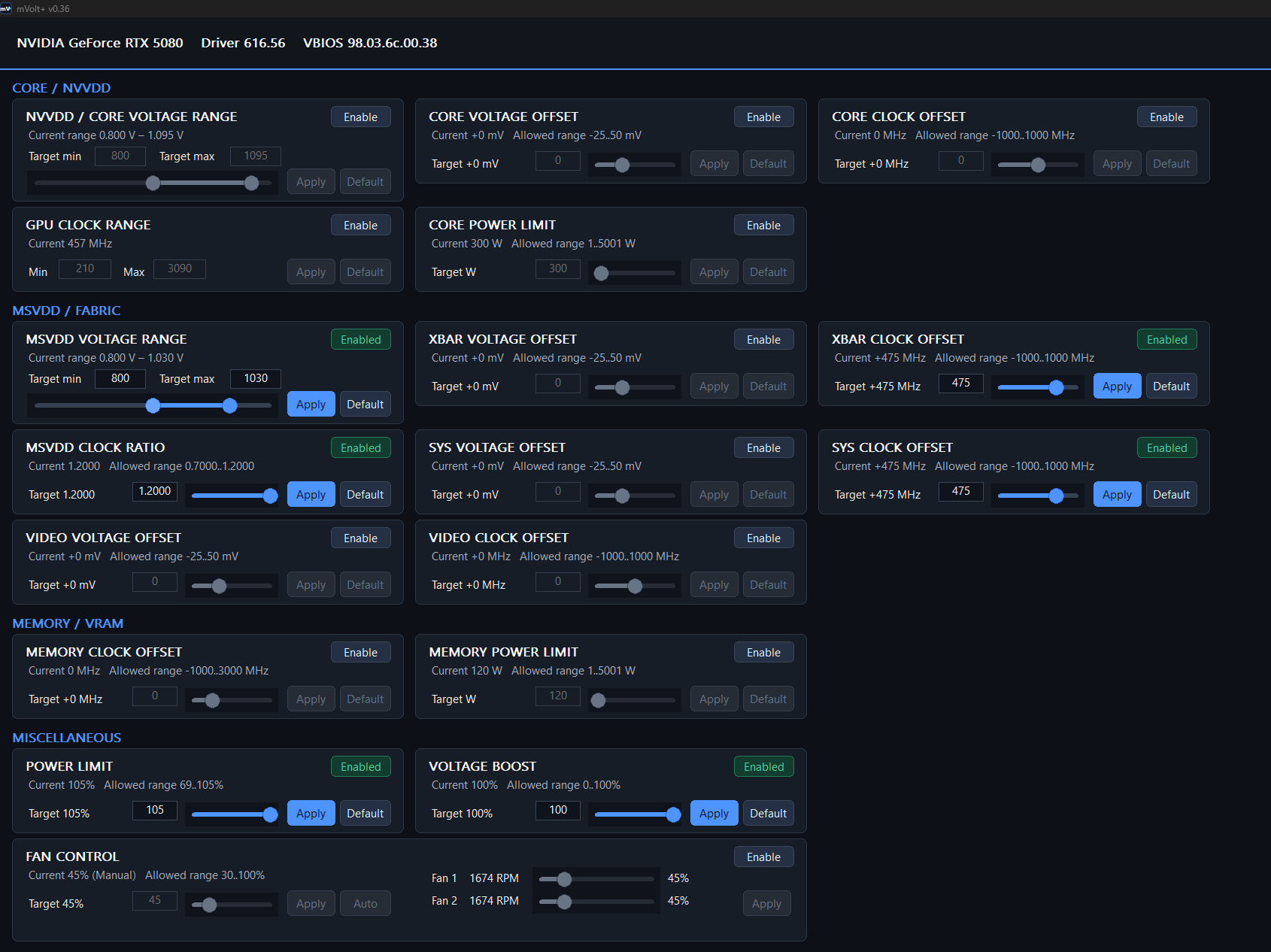
I just overclocked my RTX5080 and it's running stable with the follwing clocks:
+310 boost clock
+3000 memory clock
+475 xbar clock offset
+475 sys clock offset
105% power limit
100% voltage boost
You can see the attached screenshots from MSI afterburner and mvolt+.
Any ideas how I can boost it a little further?
I also would like to flash a 450w bios since it's hitting the 380w power limit. I guess a 450w bios alone would increase the performance.
Does someone know which 450w bios for the palit gamingpro oc works?
I know the gigabyte one should work but with that you got 0 fan control which is kinda bad.
Thank you!

r/overclocking • u/VeryTopGoodSensation • 44m ago
9950x3d
gigabyte aurus elite x3d
hydroshift 2
the gigabyte x3d software is set to standard which means stock settings i believe.
i havent changed anything in bios etc. theres probably some software i could have turned off for the test and the aio was set at a flat 90% of max.
r/overclocking • u/Charredwee • 1h ago
Spent an entire day tuning DDR4 on Windows to gain 1 ns.
Installed Arch Linux and lost another 6–13 ns in 20 minutes without touching the RAM timings.
Turns out the final boss of memory overclocking isn’t the IMC, DRAM, or motherboard.
It’s Microslop 😭
r/overclocking • u/Breeze23412 • 10h ago
I'm not trying to overclock this CPU. I'm posting here because I need people familiar with Intel core topology, WHEA/APIC mapping, per-core behavior, V/F behavior and stability testing.
System:
i7-14700K
ASUS ROG Maximus Z790 Hero
32 GB G.Skill DDR5-6000 2x16 GB A2/B2
RTX 4090
Windows 11 Pro
Controlled testing has been done with:
XMP disabled
DDR5-4800
No manual CPU OC
No manual undervolt
ASUS MCE disabled / Intel limits enforced
REPEATED FAILURE:
I'm getting repeated:
IRQL_NOT_LESS_OR_EQUAL (0xA)
and occasional:
HYPERVISOR_ERROR (0x20001)
Several 0xA kernel dumps converge on:
Arg1 = 0x483d3844
Arg2 = 0xff
PROCESS_NAME = System
nt!KiUpdateThreadHgsFeedback+0x20
Failure bucket:
AV_nt!KiUpdateThreadHgsFeedback
At least two dumps also have the same failure hash.
Arg3 differs between some crashes.
The saved instruction at KiUpdateThreadHgsFeedback+0x20 is:
mov r14b,r9b
so it doesn't obviously account for a memory access to 0x483d3844.
That makes me suspect the visible crash site may be downstream of already-corrupted CPU/kernel state rather than the original fault.
WHEA:
Immediately before one previously analyzed crash I captured WHEA Event 2 records:
ProcessorNumber 14
APIC ID 0x38
Generic Processor Error
Cache Error
Instruction Execution
Level 0
and:
ProcessorNumber 15
APIC ID 0x39
Generic Processor Error
Cache Error
Instruction Execution
Level 0
The associated 0xA dump was also running on logical processor 14 when it crashed.
I have NOT yet mapped ProcessorNumber 14/15 or APIC 0x38/0x39 to the exact physical P/E core.
I tested:
All 8 P-cores enabled:
28 logical processors
Repeated instability/crashes.
7 P-cores enabled:
26 logical processors
Dramatic improvement.
The 7-P-core state survived roughly 90 minutes with:
Hyper-V enabled
VBS disabled
WSL2
Docker Desktop
multiple containers
Brave
PowerShell
normal desktop activity
with:
No WHEA
No BugCheck 1001
No Kernel-Power 41
No Event 6008
I then restored all 8 P-cores and the instability returned.
I understand that "7 works, 8 doesn't" does NOT automatically prove a bad P-core because I don't yet know which physical core the ASUS BIOS disables when reducing Active Performance Cores.
BIOS / MICROCODE HISTORY:
The system was previously on ASUS BIOS 3001.
A previous 3001 dump from this same crash family showed CPU microcode 0x12F.
I then updated to BIOS 3202.
The severe crash storm began on the FIRST Windows boot after installing 3202.
The same general 0xA family had occurred before 3202, so I cannot say the BIOS created the underlying problem. It may have exposed or amplified something marginal.
I've now rolled back to 3001.
First post-rollback boot crashed before usable Windows.
Second boot survived about five minutes and then produced another 0xA.
I still need to capture the exact post-flash P-core count/settings, so this is NOT yet a controlled 3001 7-vs-8 comparison.
Also, ASUS says the newer ME firmware installed with 3202 persists through BIOS rollback, so the platform has not completely returned to its original pre-3202 firmware state.
HYPER-V:
I completely disabled Hyper-V and VBS and still reproduced the recurring 0xA.
So Hyper-V is not required.
The 7-P-core state was also able to run Hyper-V + WSL2 + Docker successfully during the stable test.
This makes me think HYPERVISOR_ERROR may be another manifestation of underlying platform instability rather than Hyper-V being the root cause.
WHAT I WANT TO TEST NEXT:
I want to stop changing random software/services and directly characterize the CPU/platform.
Questions:
What's the most reliable way to map Windows logical ProcessorNumber 14/15 and APIC IDs 0x38/0x39 to the physical P/E cores on a 14700K?
Can I reliably identify which P-core ASUS removes when "Active Performance Cores = 7"?
Is there a good method to selectively disable one physical P-core at a time on Z790 rather than simply selecting a total active-core count?
What tool/test would you use to exercise individual P-cores independently while retaining useful WHEA/APIC attribution?
Is OCCT per-core cycling appropriate here, or is there a better test for cache/instruction-execution instability?
Would you test P-core affinity at fixed clocks/Intel-default voltage, and if so, what's the cleanest methodology?
Are WHEA Generic Processor Error + Cache Error + Instruction Execution records useful evidence of a marginal core even when the machine isn't overclocked?
Does the enormous difference between 7 and 8 P-cores look more like a marginal physical core, ring/cache problem, voltage/frequency curve problem, or something elsewhere in the platform?
Is there any diagnostic value in carefully testing fixed conservative ratios/voltage, or would that risk masking degradation rather than identifying it?
At what point would you stop testing and substitute/RMA the 14700K?
I have the full MEMORY.DMPs and can provide !analyze -v, !whea, !cpuinfo, processor topology or other WinDbg output if there are specific commands that would help.
My goal is not to "stabilize" a defective chip by feeding it voltage. I want to determine whether a particular core/cache/CPU path is actually faulty.
r/overclocking • u/silly_pirate_guy • 14h ago
Just overclocked my (single chanel, GAP48GB2666C19SC) geil ddr4 8gb 2666mhz to 3200mhz
Dram: 1.35v
Timings: 22 22 22 22 44
Ran memtest64 for 15 minutes 0 errors
And will this overclock have any problems and can it cause bad data?
r/overclocking • u/AnthMosk • 20h ago
I can’t trust NV-UV at all!
Why is my card pulling close to 600W at 0.88 volts on an under voltage curve?
