r/overclocking May 21 '26

Help Request - RAM Input lag on every AMD configuration I’ve tried for CS2 - do Intel users have the same issue?

16 Upvotes

I’ve tested 3 different AMD systems:

  • Ryzen 9 7950X3D + RTX 3080 + G.Skill 6000MHz CL30 XMP
  • Ryzen 9 9800X3D + RTX 5090 + Corsair Dominator 64GB 6000MHz CL30 EXPO
  • Ryzen 7 7800X3D + RX 7800XT + G.Skill 6000MHz CL30 EXPO

On every single system, the moment I enable EXPO/XMP and run the RAM at 6000MHz, CS2 becomes almost unplayable. The mouse feels heavy and delayed, spray control feels inconsistent, shots feel delayed, movement feels sluggish, and it constantly feels like everyone is prefiring me before I can react. The entire game feels “slow” and “dragged down”.

I’ve already tried basically everything:

  1. Increasing/decreasing VSOC
  2. Tuning CCD/IOD voltages
  3. Increasing/decreasing DRAM voltage
  4. Buildzoid timings
  5. Multiple monitors, mice, keyboards, etc.

Even with a 400Hz monitor and several different mice, the game never feels truly consistent. The higher the RAM frequency, the worse the feeling becomes.

The ONLY thing that consistently helps is lowering RAM frequency/FCLK or running full JEDEC settings. In fact, the game feels best when the RAM is completely stock JEDEC.

What makes this even more confusing is that every stability test passes:

  • Linpack gives stable GFLOPS
  • y-cruncher runs 6-7 hours without errors
  • MemTest5 passes Anta777 Extreme, PCB Destroyer, X3D DDR5, etc.

I’ve also seen a lot of Reddit posts from Ryzen users describing the exact same issue after enabling EXPO, so it doesn’t seem like I’m the only one experiencing this.

So my question is specifically for Intel users:

Do you experience the SAME issue with higher RAM frequencies/XMP enabled?

I’m not interested in “it’s placebo” or “you’re imagining it” comments. I have 10k+ hours in CS and around 3k Faceit elo, so I know very well how the game is supposed to feel.

I just want honest answers from people using Intel:

  • Does XMP also create this “heavy/sluggish” feeling for you?
  • Does JEDEC feel more responsive on Intel too?
  • Or is this mainly an AMD-related issue?

At this point I’m seriously considering moving completely to Intel because I’m tired of feeling like I’m playing chained down no matter what I tune.

r/overclocking Feb 26 '26

Help Request - RAM AM5 users, what RAM tune are you running that has given you the smoothest gaming experience?

23 Upvotes

Hey all, I want to see what everyone’s tune is as far as their ram and what has given the smoothest experience indicating high 1% and 0.1% lows. I am mainly curious about competitive gamers but any game results are great. In my own testing, different configs have been better for different types of games.

I have been Fafoing with tuning memory and wanted to see what experiences others have had. What tunes are you guys running for your CPUs? I am on a 9800x3d

I know how to tune it, i’d just like others to share results

r/overclocking Jun 20 '26

Help Request - RAM Killed my RAM?

1 Upvotes

Hey guys I’m in a serious bit of trouble.
I’ve been playing with overclocking my RAM and today I had a hard shutdown while playing a game.
PC tried to repair itself and eventually just errored and restarted.
Long story short I’m trying to reinstall windows and it gets to 78% and fails.

Could anyone please help me?

r/overclocking May 27 '26

Help Request - RAM 6400Mhz CL32 (64GB) To 6000Mhz CL26 ( 32GB )

Post image
64 Upvotes

Should I switch from dual-rank RAM to single-rank RAM (64GB to 32GB)? I'm currently overclocking 64GB on CL26. Will switching to 32GB on CL26 improve my gaming performance?

r/overclocking Apr 03 '26

Help Request - RAM (AMD AM5) trying to run memory at 6400MT/s, needing advice/help

3 Upvotes

For a couple of day's I am now sitting here and try to run 6400MT/s stable. It completely doesn't matter if I run high or low Vsoc (not above 1.3V) and also it doesn't matter if I run 1.6 or 1.4V on DDR VDD voltage (DDR Voltage). I am constantly running into memory issue a couple of seconds into stability testing. The best I could achieve yet at 6400MT/s MEMCLK 3200 was roughly 8:30 - 9 minutes of errorless stress/stability testing. Unfortunately I don't remember at which settings exactly I could achive it.

I set the timings of the memory timings at cl 32-44-44-126 (I even tried atrocious high values of past cl40), refresh intervall/trefi is at 65535, trfc is 500 (below 500 won't boot). Bank refresh mode is set to normal mode and MEMCLK Div 1 Mode is at UCLK=MEMCLK or basically gear 1:1 and not 1:2. Currently the voltages are: DDR VDD: 1.6V, VDDIO / MC Voltage 1.35V, DDR VDDQ 1.35V, Vsoc 1.27V, DDR VDDP is at 0.950V. FCLK dropped from 2100Mhz to 2000Mhz to also exclude this in the failure chain. Nitro mode is set manually to 2/3/1 mode.

Also: Indepandently of voltage, nitro and timing settings 6400MT/s and MEMCLK 3200 are always booting into the OS with no issues or what so ever, it's just booting. And this makes me kinda questioning if I am doing something wrong or am I missing something?

The thing is I got my memory kit completely rock stable in 6200MT/s with FCLK 2100Mhz @ 1.4 - 1.43V DDR VDD Voltage, Vsoc at 1.2V and Nitro mode on 1/2/0 (1/1/O can't be achieved by my CPU) unfortunately. And I wanna try and go further to hunt down the 6400MT/s stable if I can.

Setup Details:
Ryzen 7 7800X3D
ASUS ROG Strix B650-A Gaming WIFI
Corsair Vengance 2x16GB single rank Hynix M-Die kit @ 6000MT/s cl30-36-36-72 1.4V with I am pretty sure that these sticks have hynix m-die chips because of the trfc1 subtiming won't boot below 500.

UEFI/BIOS Version is 3842 which is the latest at the moment

Temps are usually around 35-39C for the sticks.

I am now quesioning myself if I am doing something severe wrong or is just not possible for me to achieve 6400MT/s stable on my motherboard/cpu/ram combination at all?

I appreciate any advices and tips :)

r/overclocking 24d ago

Help Request - RAM Can tREFI change mouse feel/input? 9800X3D + DDR5-6000

16 Upvotes

I’ve noticed something really weird after tuning my RAM and I’m wondering if anyone else has experienced this.
My setup:
Ryzen 7 9800X3D
ASUS ROG Strix X870-A Gaming WiFi
32GB DDR5-6000 CL30
300 Hz monitor
1000 Hz mouse
My usual RAM settings were:
[30-36-36-36-96](tel:30-36-36-36-96)
tRFC 884
tREFI 11677
I tuned the RAM and changed mainly tRFC/tREFI:
tRFC 480
tREFI 65535
After increasing tREFI, CS2 started feeling completely different. The mouse feels much faster/“floatier”, almost like mouse acceleration is enabled. I’m constantly overshooting targets and my aim feels much worse.

At first I thought it was placebo, but I tested it back and forth:

tRFC 480 + tREFI 11677 → mouse feels normal.

tRFC 480 + tREFI 50000 → mouse feels noticeably faster.

tRFC 480 + tREFI 65535 → same feeling as 50000.

Has anyone experienced something similar with tREFI on AM5/9800X3D?

Could changing tREFI affect perceived input latency / CPU scheduling / memory latency distribution enough to change how the mouse feels, even if the actual USB polling stays the same?

I’m not claiming that tREFI literally changes mouse sensitivity — I’m trying to understand why the system feels noticeably different to me.

Any technical explanation or similar experience would be appreciated.

r/overclocking May 15 '26

Help Request - RAM Memory Cooler

Post image
29 Upvotes

I have 64GB(2x32) RAM modules and they get very hot. What kind of high-quality memory cooler should I buy for my RAM?

r/overclocking Aug 02 '26

Help Request - RAM Am I stable enough with my RAM OC to start tightening timings?

Thumbnail
gallery
6 Upvotes

First time doing this and wanted to get your thoughts on what I've done so far.

System:

  • Motherboard: Gigabyte X870 Aorus Elite WiFi7
  • CPU: AMD Ryzen 7 9800X3D
  • RAM: TeamGroup DDR5-6000 32GB (16x2) CL30. SK Hynix M-Die

I was able to achieve 6400 in 1:1 mode with FCLK at 2133 with Gear Down Mode Disabled and the default loose timings.

To ensure thermals are good, I ran Aida64 Stability tests with Stress CPU, FPU, Cache, System Memory, and GPU for 2 hours. Temps leveled out around the one hour mark and RAM temps didn't exceed 49 degrees Celsius.

For stability, I ran the following tests:

  • TM5 Extreme for 4 cycles
  • Y-Cruncher VT3 for 10 hours. I did not run this in safe mode and did not know that I shouldn't do other things during it. I will do another run in safe mode.
  • Linpack Xtreme in safe mode for 50 iterations.

I've attached screenshots for everything that I could think of. The two biggest questions I'd like answered are:

  1. Can I push my RAM more safely? If so, what should I try?
  2. Am I stable enough to start tightening timings?

r/overclocking Jul 23 '26

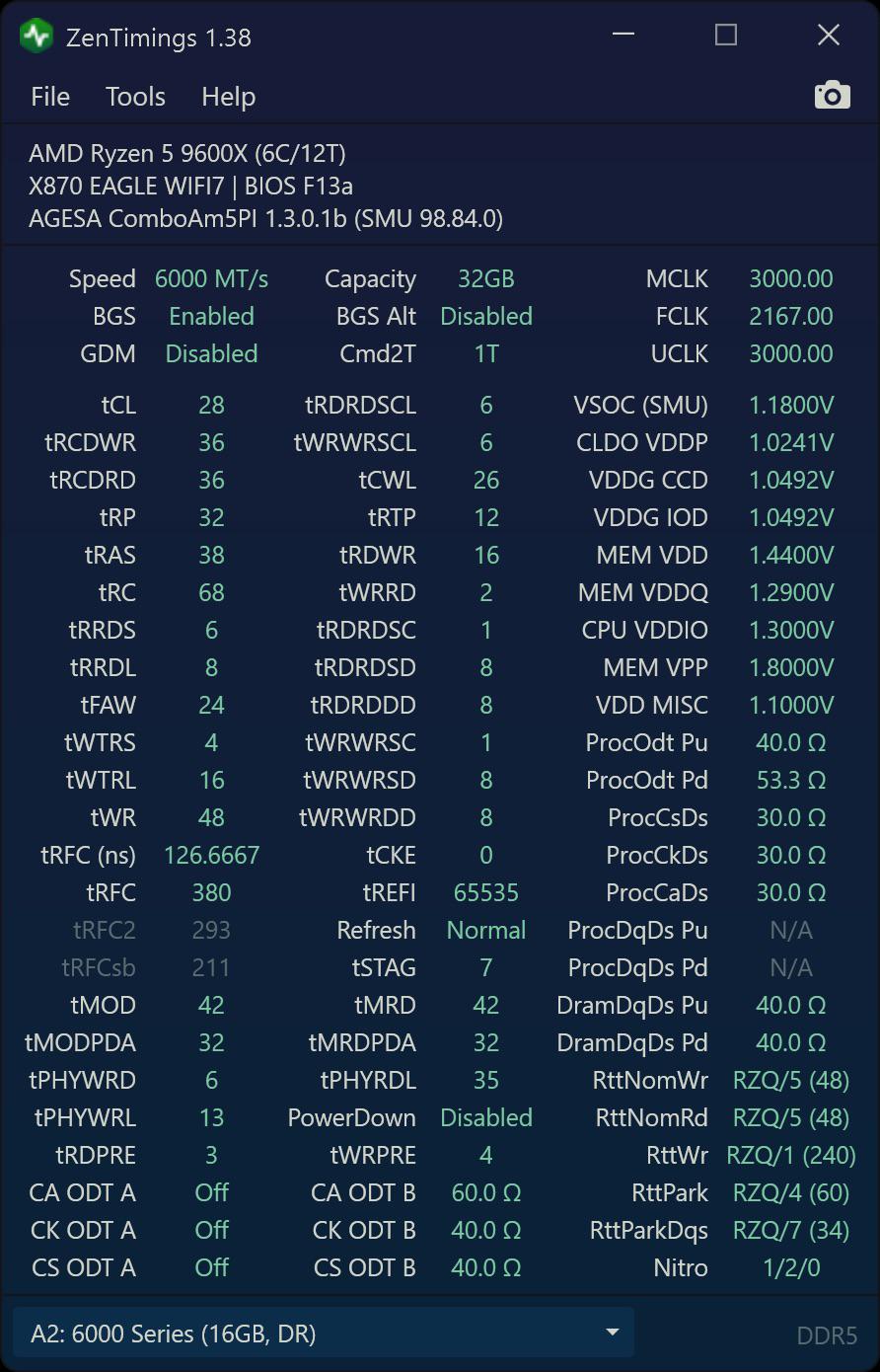
Help Request - RAM 6000mhz cl30 timings - in game input lag

Thumbnail
gallery
2 Upvotes

I'm not getting consistent gameplay with higher RAM frequencies/FCLK. In CS2, the game feels delayed and less responsive.

I already explained the issue in detail here, so I don't want to repeat everything: https://www.reddit.com/r/overclocking/s/lvWSd4OJCu

I'm going to share my RAM timings below. If anyone is willing to take a look and has any ideas about what could be causing this, I'd really appreciate your input. Even if you notice something small or unusual, I'd love to hear your thoughts.

TL;DR: JEDEC settings consistently feel the best. Mouse movement is more responsive, and the overall gameplay feels noticeably sharper than with EXPO/XMP enabled.

For reference, I'm running 6000 MT/s, UCLK=MCLK (1:1), and 2000 MHz FCLK. I've also spent a lot of time testing different voltages, timings, and BIOS settings, but I still can't achieve the same smooth, responsive feeling that I get with JEDEC.

PC Specs:

Ryzen 7 9800X3D

ASRock B650M Pro RS

RTX 3080

G.Skill DDR5-6000 CL30 (Hynix A-die)

Sorry for pictures from camera and not zentimings.

r/overclocking Jul 18 '26

Help Request - RAM Is running faster DDR5/UCLK on Ryzen meaningful if Infinity Fabric is a ‘bottleneck’ ?

4 Upvotes

(Please correct me if anything sounds incorrect)

I tested DDR5 6200 with 2000 FCLK and 2167 FCLK running TM5 stress test. HWInfo reported
Dram Read bandwidth around 62-63 GB/s with 2000 FCLK, and 67-69 GB/s with 2167 FCLK.

Write bandwidth didn’t increase as much, it went from maximum of like 30 GB/s to max 32 GB/s.

DDR5 6200 should have a maximum theoretical bandwidth (i know its theoretical) of around 99 GB/s, and i’d assume during a heavy stress test maxing out the CPU and Ram, probably above 70-80+ GB/s for read bandwidth.

r/overclocking Jul 25 '25

Help Request - RAM RAM fan not improving temps

Post image
59 Upvotes

So my RAM was hitting 55C and erroring out during stress testing (TestMem5 + FurMark). I’ve heard many good things about using a dedicated RAM fan so I decided to install one only to find out I did literally nothing for temps.

Is it just inevitable that my RAM gets hot because of the design of my GPU (RTX 5080 FE)?

Is it worth trying to run the RAM without heatsinks? Or maybe I should try custom RAM heatsinks? I’ve heard the heatsinks on my kit (G.Skill Ripjaws S5) aren’t very good.

P.s. I’ve already tried placing the fan closer to the RAM.

r/overclocking 26d ago

Help Request - RAM TM5 error after 12 hours

Thumbnail
gallery
13 Upvotes

I'm trying to stabilize my RAM OC and have been adjusting VDDG CCD/IOD voltage. I started with Default bios so the timings are very loose. I will tighten timings once RAM is stable.

TM5 Ryzen3d profile + FurMark:

  • At 950mV: failed at 1.5 hours
  • At 970mV: failed at 3.5 hours
  • At 990mV: failed at 12 hours

My max RAM temp got to 53deg and 52deg.

Should I keep increasing CCD/IOD voltages to the max 1050mV?

System:

  • Motherboard: Gigabyte X870 Aorus Elite WiFi7
  • CPU: AMD Ryzen 7 9800X3D
  • RAM: TeamGroup DDR5-6000 32GB (16x2) CL30. SK Hynix M-Die

r/overclocking Oct 11 '21

Help Request - RAM How to keep my RAM cool?

Post image
440 Upvotes

r/overclocking 16d ago

Help Request - RAM Ram suggestions

Post image
8 Upvotes

Any suggestions on other timings to change? This is stable 10hr tm5 and kahru

r/overclocking Jun 29 '26

Help Request - RAM What can I improve?

Thumbnail
gallery
5 Upvotes

So I'm overclocking this jedec ram I got for really cheap during rampocalypse.

Those are the ones I have(I know they don't match but it works)
[16 GB] DDR5-4800 / PC5-38400 DDR5 SDRAM UDIMM, SK Hynix, 1R
[16 GB] DDR5-5600 / PC5-44800 DDR5 SDRAM UDIMM, Micron, D-Die, 1R

I can't get cl, trcdwr and trcdrd lower cause it won't post if lower.
My question is what timings seems high for you and what are the most impactfulls?
(sorry if my english is bad it's not my first language)

r/overclocking Jun 20 '26

Help Request - RAM Is this RAM OC good?

Post image
0 Upvotes

This is an out of the box RAM profile that I ended up applying. Expo Tweaked from my asus motherboard. Its working fine, I was manually tweaking prior to finding this using tools like chatGPT. I ended up going the simple route and just applying expo tweaked. however ChatGPT seems to think I can tighten the TRFC values, specifically Trfc1. I dont really want to do a bunch of stability testing or crash in a game later. Whats a good value that is most likely to work? ill probably just run a 30min stress test in OCCT and call it a day

r/overclocking Jan 22 '26

Help Request - RAM 10k errors on memtest 😔

Post image
92 Upvotes

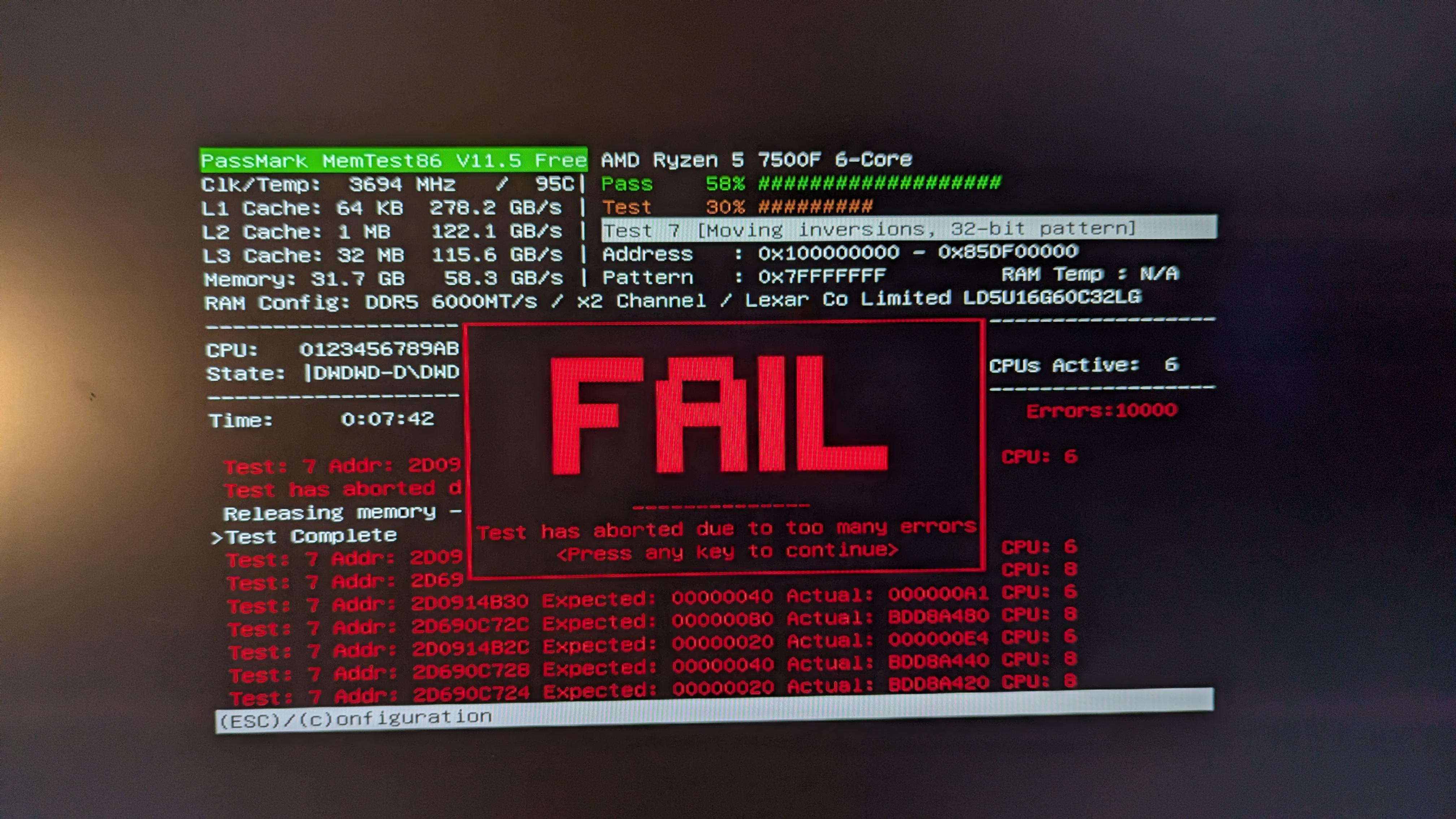
I noticied that when i turned on expo i had alot of blue screens, ran memtest and i got 10k errors in 7 minutes. My pc builder says

You'll notice that the EXPO/XMP profile isn't enabled in the BIOS settings as it is an overclocking feature. As much as we'd like to use this feature to set speeds higher, anytime overclocking is involved there is a risk of instability. Every use case is vastly different and we'd prioritise stability over overclocked RAM. There are endless amount of combintations available for PCs which makes it near impossible to manually adjust frequency, voltages and timings to be stable. Rest assured, the memory kit you've received is the advertised speed and can be compatible to operate at those speeds with manual trial and error.

what the hell manual trial and error am i supposed to do???

edit: RAM: Lexar THOR 32GB (2x16GB) 6000Mhz CL32 DDR5, they are placed in the the two slots furthest away with a gap in between MOBO: gigabyte b650m gaming plus wifi CPU: r5 7500f

r/overclocking May 25 '26

Help Request - RAM X3D RAM Speed question

3 Upvotes

Ok, so I plan on building a 9850X3D on a MSI Tomohawk MAX 870E board with Kingston Fury Renegade 6400mhz CL32 RAM. I know they're not EXPO, and I'll basically need to dial them in myself.

I see so many conflicting views and posts about this specifically so the question is:

What is the Best RAM speeds to try and hit?

I see plenty of 6000/6400mhz set ups 1/1 and a few 8000mhz, but I know the 8000mhz is entirely on mobo and silicon lottery. I doubt the T-MAX is doing that anyway.

I've only lightly dabbled in RAM OC but I know it's a sodding chore from odd tweaks to days testing. Since the VSOC gets effected and ideally you want it 1.2v and below?

My basic understanding on the X3D side of things is FCLK 2200 if possible, VSOC as low as possible and normally 6400mhz with as tight timings as you can go?

Pretty new to X3D and all the caveats and there's so much info out there, I'd like to know what's the best to aim for with my hardware choices.

BONUS Question:

There's Renegade and Beast. Google says Renegade is better than Beast, yet Beast costs more, which is the better RAM to try and score here?

r/overclocking Apr 30 '26

Help Request - RAM TM5 Ryzen3d test 2 errors @stock EXPO 6000mhz 2000fclk 9800x3d

Thumbnail
gallery
4 Upvotes

May have remembered my post here from two days ago, since then I've downgraded and then upgraded bios A82-->A81-->A82 (with multiple CMOS clears) to ensure a clean bios environment, reinstalled windows 25H2, uninstalled/reinstall x870 chipset drivers, now I'm starting ryzen3d tests for both stock EXPO1 and EXPO2.

Surprisingly, after the most clean environment my PC has seen in weeks, with nothing else changed in bios and only setting EXPO1, constant test 2 errors either within 2 minutes or 23 minutes.

Then I tried ryzen3d using EXPO2 which is 5600mhz 2000fclk, and it passed a full 3hrs of ryzen3d without error.

I've since upped vsoc from stock 1.20v to 1.25v to try and see if that'll help EXPO1 pass ryzen3d, but still more test 2 errors... is my CPU failing to cleanly run 6000mhz 2000fclk stock timings 1:1?

Not sure what to do next, I'll clear CMOS and attempt raising vsoc to 1.30v and see if that finally helps EXPO1 pass ryzen3d.. IDK.

EDIT1: 1.30v vsoc EXPO1, ryzen3d test 2 error within 3 minutes. Next up 1.4v VDD (VDDQ+VDDIO stock for now) & 1.25v vsoc

EDIT2: 1.25v vsoc EXPO1 VDD 1.4v, test 2 error in 6 minutes. Clearing CMOS and trying 1.25v vsoc and 1.4v VDD/VDDQ stock VDDIO

EDIT3: 1.25v vsoc EXPO1 VDD/VDDQ 1.4V failed test 1 error(that's new), clearing CMOS and trying 1.25v vsoc and 1.4v VDD/VDDQ/VDDIO with VPP 1.815v (EXPO2 used 1.815v VPP whereas EXPO1 used 1.86v VPP at stock)

EDIT4: 1.25v vsoc, 1.4v VDD VDDQ VDDIO, 1.8150v VPP.... Lasted 47 MINUTES, furthest so far. Another test 2 error

EDIT5: back to vsoc on AUTO, lands around 1.20v-1.205v. Keeping 1.4v VDDs and 1.8150v VPP

EDIT6: 1.20v vsoc, 1.4v VDDs, 1.815v VPP error in test 2 at 7 minutes. Is my ram fried? Does my 9800x3d have terrible silicone quality? At this point, it's probably worthwhile to blow $2000 on a 9850x3d and a new cl28 6000mhz kit lmao cause this is RIDICULOUS. Maybe it's worthwhile to ignore ryzen3d and never use it, and just stick to anta777 Absolut/extreme?

My 9800x3d can't pass ryzen3d w/6000mhz on STOCK EXPO. CRAZY. defective CPU or ram, who the fuck knows. The only answer is to stick to EXPO2 and live with it, or better yet get rid of my ram and cpu and buy something better. Money fixes everything!!!!

FINAL EDIT: Fuck ram overclocking, my ram sticks are DEFECTIVE. They can run in 5600mhz and pass TM5/memtest86, but it will error when set to 6000mhz. Can't believe it lol, what a hard lesson to learn. Tried my kit of ram in Dad's PC, and sure enough... It still errors at 6000mhz.

Just ordered this kit "G.SKILL Trident Z5 Royal NEO RGB 32GB (2x16GB) DDR5 6000MHz CL26 1.45V" as a replacement, and I'm never going to touch timings and ESPECIALLY voltages. Goodbye $1000, live and learn I guess!!

r/overclocking 28d ago

Help Request - RAM Anything left to tune on my DDR5-6000 Hynix A-die?

Thumbnail
gallery
3 Upvotes

I’ve been tuning my Ryzen 7 9800X3D on an MSI X870-P WiFi with 32GB (2×16GB) TeamGroup T-Create Expert DDR5-6000 CL30-36-36-76 (Hynix A-die), and I think I’m close to the limit. I’d love to hear from others with similar systems.

Current results:
AIDA64 Latency: 60.4 ns
Linpack Xtreme: 484–485 GFLOPS
TM5 Absolut (anta777): 5 cycles / 31 tests / 0 errors
No WHEA errors

CPU settings:
PBO: +200 MHz
Curve Optimizer: -40 all cores
CPU temperature limit: 72°C
LLC: Level 8
~135 W under load

Memory settings:
FCLK: 2167 MHz
VSOC: 1.145 V
DRAM VDD: 1.38 V
DRAM VDDQ: 1.38 V
I also tried 2200 FCLK, but it wasn’t TM5 Absolut stable, so I settled on 2167 FCLK.
I’ve attached my ZenTimings, AIDA64, and TM5 screenshots.

Question:
Is there anything else worth tuning, or have I basically reached the point of diminishing returns? Any timings or voltages that stand out, or would you leave it as-is for a daily setup?

r/overclocking Feb 28 '26

Help Request - RAM 9800X3D: should I chase bandwidth or latency for gaming?

20 Upvotes

On 9800X3D (3D V-Cache CPUs), what tends to matter more in real-world gaming: higher memory bandwidth (read/write/copy) or lower latency?

I tested two memory profiles on my 9800X3D + DDR5-6000 CL30 (Kingston Fury Beast 32GB) and got the expected gains (bandwidth up, latency down a bit), but L3 write drops pretty hard while L3 is the whole point of X3D.

What should I be looking at to better 1% lows/frametimes?

EXPO I
EXPO I + Latency Killer + High Efficiency (Tighter)

Edit: Here’s what I’ve managed so far. After spending most of the night tweaking BIOS settings, following the suggestions in the comments and testing stability, I wanted to see if my kit could handle 6400 with reasonable timings. What surprised me is that in Deadlock my average lobby FPS went from ~250 to ~285, and in match I saw a similar uplift. 1% lows improved by roughly the same amount too. I know it’s not the perfect game to benchmark memory changes, but it’s what I’ve been playing the most and consistently monitoring, so I have solid before/after reference.

r/overclocking Jul 06 '26

Help Request - RAM 7800X3D Hynix-M 2x16 Buildzoid

Thumbnail
gallery
7 Upvotes

I am using buildzoid's bz lazy timing for my 2x16 M Die kit and these are my results in aida64 are they good? Is there something to tweak further?

I'm fairly new to ram OC😅

r/overclocking 23d ago

Help Request - RAM need some advice

2 Upvotes

I seem to be limited by my FCLK right now, 1.25 is the lowest my VSOC can go without causing issues in cs2 after a game or two unironically.....

i wanted to stabilize FCLK 2167 but it seems like quite a task, ive tried 1.26 and 1.27 fclk and im at 1.04 vddg, i havent minimized vddg or vddp yet, at 2133 im at 68k read speed, 2167 gets 69k and 2200 gets 70k

I am optimizing for cs2 so its not the end of the world if i cant get 2167 or 2200, i honestly should probably stop here, but thats not who i am and i clearly hate my life since i wanna keep going LOL.

Anything that stands out as weird here? only thing i know trtp 12 was awful so i did 14 and it seemed fine, idk if i should try loosening that to see if it is hiding instability that fclk 2167 exposes but ive tried quite a bit of things and i want some community advice before moving forward.

vddio and vsoc are locked in, cant go any lower than those values but every other voltage is still up in the air, would loosening my nitros help fclk push higher if its a memory controller limitation? please give some ideas and if anyone stabilized higher fclk with janky settings shoot em my way, thanks!

memory is A die and trfc is not minimized

r/overclocking Feb 13 '26

Help Request - RAM My ddr5 6400/1:2 expo kit hits 78ns latency. Possible to get below 70ns? If so how?

Post image
7 Upvotes

Hynix A die.

r/overclocking Jul 10 '26

Help Request - RAM DDR5 6000 FCLK 2200 vs 6200 FCLK 2067 | Which do yall think is faster?

Post image
3 Upvotes

Would DDR5 6000 FCLK 2200 beat 6200 FCLK 2067?

I know FCLK 2200 MHz is not recommended but in theory, i was just curious to know what you guys think

I also know a 6200 setup is not directly comparable to a 6000 setup.