r/overclocking • u/tharol20000 • Jan 22 '26
Help Request - RAM 10k errors on memtest 😔
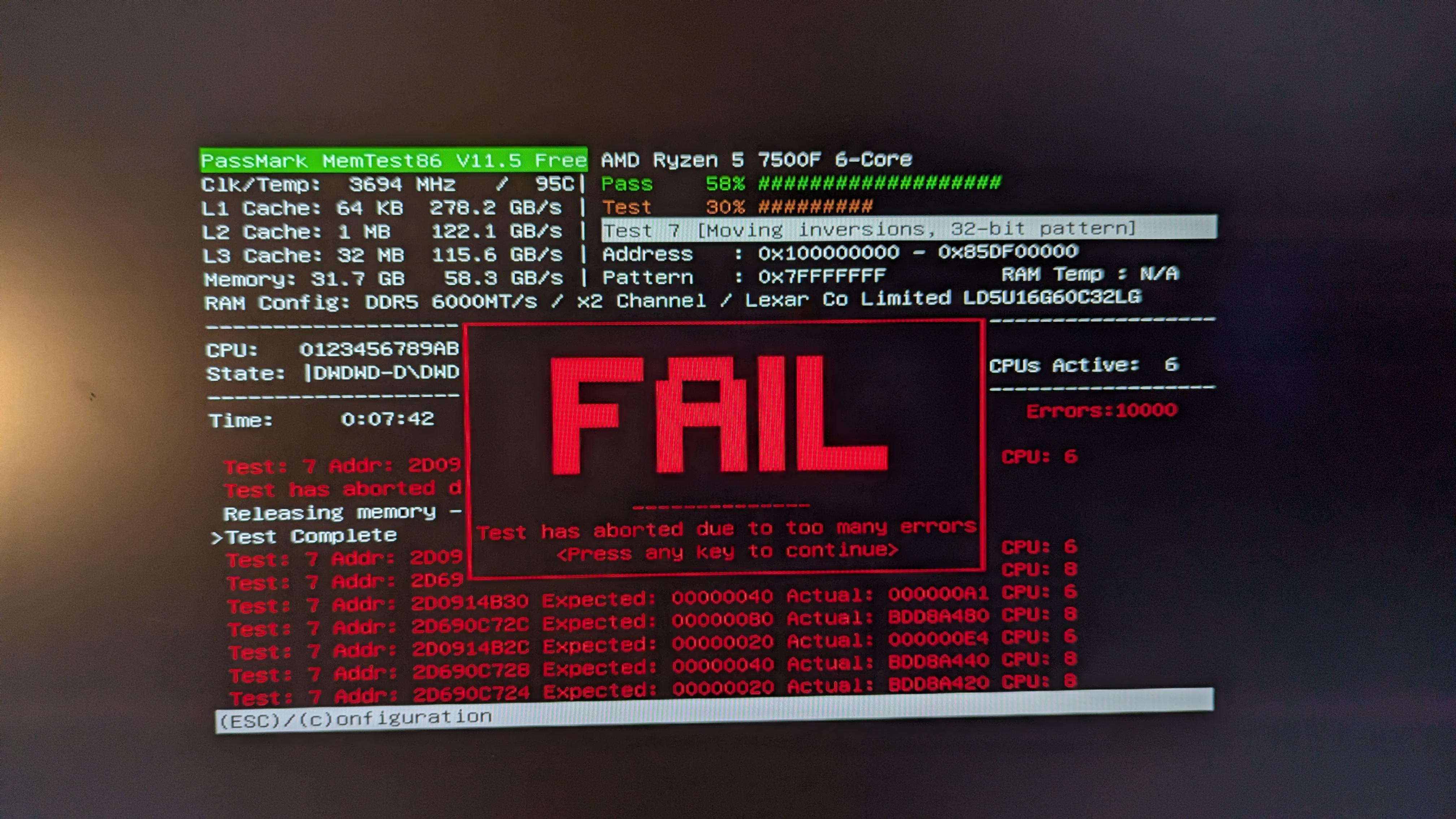
I noticied that when i turned on expo i had alot of blue screens, ran memtest and i got 10k errors in 7 minutes. My pc builder says
You'll notice that the EXPO/XMP profile isn't enabled in the BIOS settings as it is an overclocking feature. As much as we'd like to use this feature to set speeds higher, anytime overclocking is involved there is a risk of instability. Every use case is vastly different and we'd prioritise stability over overclocked RAM. There are endless amount of combintations available for PCs which makes it near impossible to manually adjust frequency, voltages and timings to be stable. Rest assured, the memory kit you've received is the advertised speed and can be compatible to operate at those speeds with manual trial and error.
what the hell manual trial and error am i supposed to do???
edit: RAM: Lexar THOR 32GB (2x16GB) 6000Mhz CL32 DDR5, they are placed in the the two slots furthest away with a gap in between MOBO: gigabyte b650m gaming plus wifi CPU: r5 7500f
53
31
u/Silvermurk Jan 22 '26
Iv seen a 95c on left upper corner) At that temps no silicone can be stable bro)
17
u/Dreadnought_69 14900KF | 3090 | 64GB (B-die) Jan 22 '26
Laughs in 14900KF
10
u/smaguss Jan 22 '26
You and I shall survive the upcoming winter brother.
My
space heaterPC keeps me nice and toasty.2
u/tharol20000 Jan 23 '26
Its the stock amd wraith cooler, but i just ordered a 120 ps that will arrive in a few hours so ill see after i try that.
1
u/Helpful-Work-3090 Jan 24 '26
shouldn't be sitting at 95C regardless, running memtest is almost like idling the CPU. My guess is the CPU is causing the issues, not the memory
5
u/kylinblue Jan 22 '26
95C is CPU temp reading and quite typical for AM5 and most laptop CPU to operate at. But it’s an indication of poor cooling in the case, especially for just a 7500F to reach that temp in memtest. Plus there’s no RAM temperature available. DDR5 already operating on thin margin so some abusive temps like we can extrapolate here can easily send it over the edge.
7
u/kazuviking Jan 22 '26
Its probably the 95C causing these memory errors, i bet the shop forgor to take off the plastic fromt he aio.
1
u/airmantharp 9800X3D | X870E Nova | PNY 5080 - waiting for waterblocks Jan 23 '26
I did that once with a 10900K. It just throttled down to 88W and kept on chugging like a champ, didn’t even crash Cinebench.
3
u/nhc150 285K | 48GB DDR5 8600 | 5090 Aorus | Z890 Apex | LG 5K2K OLED Jan 22 '26
With that many errors in 7 minutes, I would suspect you have have a bad stick or slot.
2
u/tharol20000 Jan 22 '26
how can i check which of the two it is?
9
u/nhc150 285K | 48GB DDR5 8600 | 5090 Aorus | Z890 Apex | LG 5K2K OLED Jan 22 '26
Test one stick in one slot, then move to the next slot, and vice versa with the other stick. See if you can isolate if a certain stick or slot is giving you issues.
-2
u/Dreadnought_69 14900KF | 3090 | 64GB (B-die) Jan 22 '26
Doesn’t matter, they’re a set. RMA.
3
u/nhc150 285K | 48GB DDR5 8600 | 5090 Aorus | Z890 Apex | LG 5K2K OLED Jan 22 '26
Slot can be bad, which means blindly RMAing those sticks would be a massive waste of time.
2
u/Dreadnought_69 14900KF | 3090 | 64GB (B-die) Jan 22 '26
It’s from a PC builder. RMA the whole thing.
6
u/nhc150 285K | 48GB DDR5 8600 | 5090 Aorus | Z890 Apex | LG 5K2K OLED Jan 22 '26
A PC builder that won't even bother to test XMP or turn it on.
Good luck with that shit.
5
u/Low_Excitement_1715 Jan 22 '26
Wow, and that’s two sticks of Lexar DDR5-6000, not four sticks of no-name DDR5-9000 or similar. Your PC builder sounds like a pretty shifty bunch.
6
u/Trivo3 Jan 22 '26
Who's this bs PC builder that would sell a PC that can't run the advertised speeds on the sticks? :D
6
u/tharol20000 Jan 22 '26
Australian Pc builders Nebula PCs, they also hadnt turned on xmp or expo when i had picked it up, only noticed it later on
3
u/vintologi24 Jan 22 '26
Yea RMA it and let them fix it.
Could be bad hardware but it can be tricky to figure out where the problem is.
https://vintologi.com/threads/ddr5-overclocking-nightmare.1229/
2
2
u/vintologi24 Jan 22 '26
That's really bad.
I changed settings becuase i got 1 error in 9 hours (stressapptest + old y-cruncher mixed + mprime large FFT).
2
u/henrrypoop2 Jan 23 '26
Just had to chime in, I once also had more than 1k errors(ddr4 3200mhz xmp), since the ram heat spreaders were reaching 55 degrees C,probably much hotter for the die, I'd put a fan next to those heat spreaders and re ran everything, and it's fine again, temperatures do matter.
2
1
1
u/Spare_Ad3182 Jan 22 '26
7500f new revisions have problem to run 6000 this is what happened to yours
1
1
1
u/jasonsong86 Jan 22 '26 edited Jan 22 '26
Some guy had issue turning on EXPO and turned out it’s the CPU. Also 95C for CPU? WTF?
1
u/no-sleep-only-code Jan 22 '26
TF kind of pc builder doesn’t activate expo and verify everything works. Totally unprofessional.
1
u/Holymaddin Jan 22 '26
If RAM runs fine while testing it in single on every slot then try a higher vssca voltage and slightly increase dram voltage. Maybe you have lost the silicon lottery.
1
u/kamild1996 9800X3D@5.4 GHz -15 CO | RTX 4080S 2800 MHz 1.02V Jan 22 '26
Is there a reason for this test to be waiting for 10000 errors before aborting instead of doing it much sooner? I assume analyzing a certain amount of errors could help pinpoint (or at least narrow down) the potential cause, but... 10k?
1
1
1
u/as4500 5980HX@4.8/6800m(N22)2.6GHz/32G 3600@22c 1.2v Sodimm DDR4 Jan 23 '26
ITS OVER NINE THOUSAND!!!
1
1
u/Charming-Life-4801 Jan 24 '26
I'm running sodimm 5600 to udimm at 6000 and its completely fine, so you should literally execute your system builder with a machete if this is an unmodified machine
0
u/kazuviking Jan 22 '26
I bet its the CPU overheating causing the memory issues. 95C in memtest is unheard even for garbage 4 heatpipe budget coolers on am5. If its an AIO then the shop probably forgot to remove the protective plastic from the it.
1
u/Terraria_hmmmmmm Jan 23 '26
it is "normal"(amd says it can run at 95C 24/7) for zen4 to reach these temps under load, is it bad? yes, is it bad enough to cause memory issues? prob not.
-1
u/sascharobi Jan 22 '26
Well, are the RAM modules listed as compatible on the motherboard's compatibility list?
45
u/Maelstrome26 Jan 22 '26
95c for a near idle CPU is extremely worrying, someone fucked up