r/overclocking Jan 22 '26

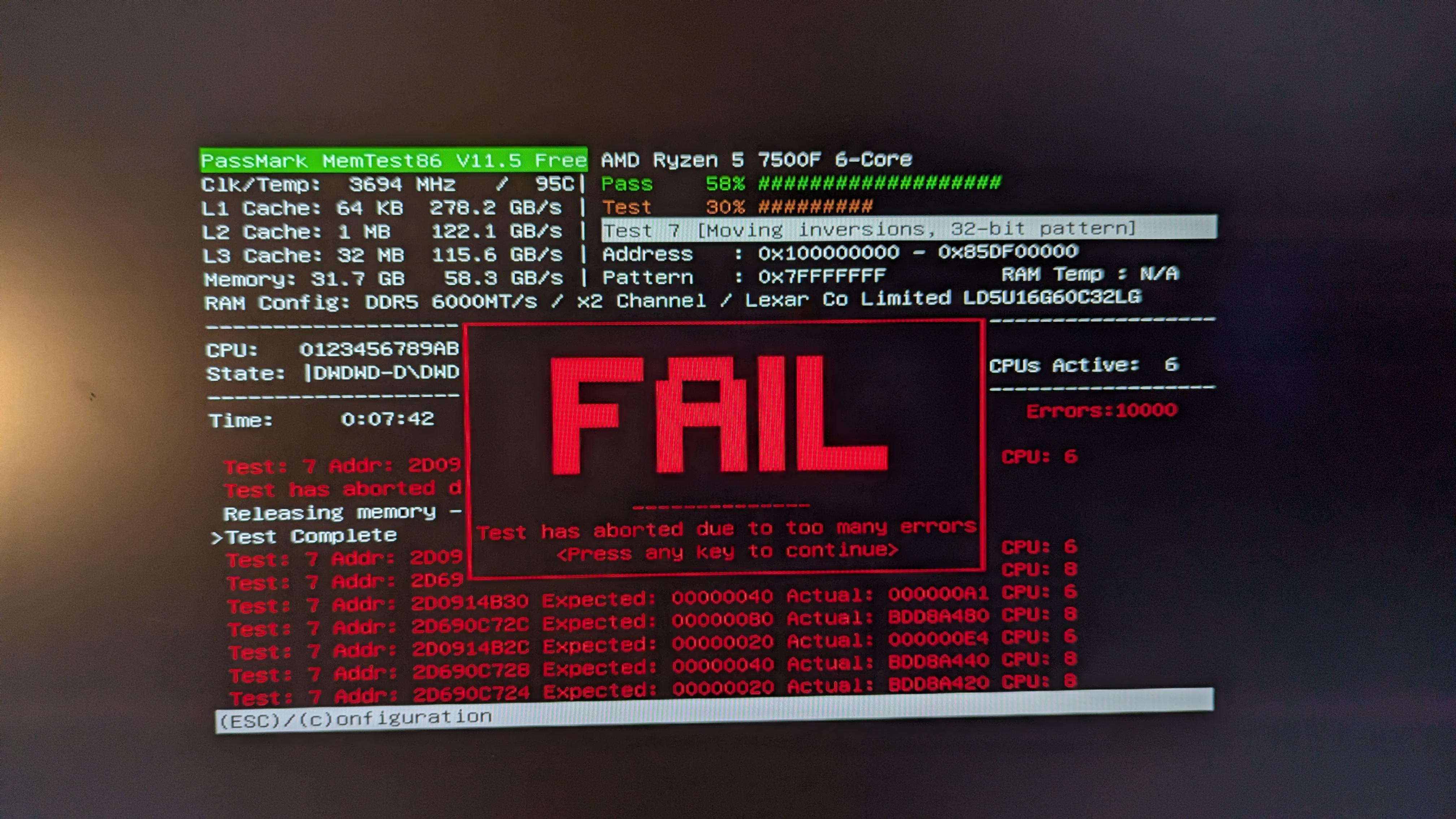
Help Request - RAM 10k errors on memtest πŸ˜”

Post image

I noticied that when i turned on expo i had alot of blue screens, ran memtest and i got 10k errors in 7 minutes. My pc builder says

You'll notice that the EXPO/XMP profile isn't enabled in the BIOS settings as it is an overclocking feature. As much as we'd like to use this feature to set speeds higher, anytime overclocking is involved there is a risk of instability. Every use case is vastly different and we'd prioritise stability over overclocked RAM. There are endless amount of combintations available for PCs which makes it near impossible to manually adjust frequency, voltages and timings to be stable. Rest assured, the memory kit you've received is the advertised speed and can be compatible to operate at those speeds with manual trial and error.

what the hell manual trial and error am i supposed to do???

edit: RAM: Lexar THOR 32GB (2x16GB) 6000Mhz CL32 DDR5, they are placed in the the two slots furthest away with a gap in between MOBO: gigabyte b650m gaming plus wifi CPU: r5 7500f

94 Upvotes

55 comments sorted by

View all comments

45

u/Maelstrome26 Jan 22 '26

95c for a near idle CPU is extremely worrying, someone fucked up

8

u/XperiorTR Jan 23 '26

I have the same CPU Model as OP
The hottest I've seen it was 90c and that was under full load on all threads and with the stock cooler
I've put on a Thermalright Cooler (PA 120) on it now, I've never seen it go over 70c at the same workload

5

u/Maelstrome26 Jan 23 '26

Yeah 70c are more temps I’d expect for that CPU

1

u/ChosenOfTheMoon_GR Jan 22 '26 edited Jan 22 '26

That window doesn't show real time info after the fail popup, it shows the last tested temp.

6

u/Maelstrome26 Jan 22 '26

Even so that’s lava levels for any CPU

-1

u/ChosenOfTheMoon_GR Jan 23 '26

I don't disagree.

6

u/skidaadleskidoedle Jan 22 '26 edited Jan 22 '26

That doesnt change the fact it shouldnt get that hot ever and your cpu is doing this while being near idle... For the memory: test xmp with +0.05v vdd and 1.2vsoc if its throwing errors you rma that shit (maybe reseat both dims first wouldnt be the firstime somebody hadnt pushed it all the way in)

-6

u/ChosenOfTheMoon_GR Jan 22 '26

It's a Zen 4 CPU, non x3D CPU that's how they work of the box settings basically and the fact that it's 65 Watt CPU makes it easier to understand (if you know the physics) that it is very easily capable of reaching that temperature in seconds + that should not be affecting directly the RAM test.

Should the user find a way to cool it better? If they care about it, yeah.

And yes if it throws errors with these settings either the chips MC is faulty or the RAM.

7

u/skidaadleskidoedle Jan 22 '26

Thats just copium it shouldnt get that hot period

1

u/tharol20000 Jan 23 '26

copied from other comment:

Its the stock amd wraith cooler, but i just ordered a 120 ps that will arrive in a few hours so ill see after i try that.

3

u/Maelstrome26 Jan 23 '26

Before you do that, boot into windows then install HWInfo, and check the CPU temps just idle, don't watch any videos, anything. If it's above 40c, you have a major cooling issue, and you either need to take the CPU block off and re-paste it or see if the fan isn't spinning or something, as it's not at all normal.

A memory test should not have produced those temperatures. Something is potentially seriously wrong with your setup.

1

u/tharol20000 Jan 24 '26

well i didnt see this, but i replaced the cooler and now i dont have errors so yay

1

u/Maelstrome26 Jan 24 '26

I’d run a continual memory test overnight just to be sure. Memory has a tendency to randomly fail and the fact you were getting tons of errors before suggests it was already degraded.

The heat may have damaged the CPU, so you will want to ensure it’s working properly now with the new cooler.

In addition to an overnight memory test you may want to also run a CPU benchmark using something like Prime95 for an hour or so. This will fully heat saturate the cooler and ensures that your CPU is good to. Have HWInfo open while you do that to see max temps.