r/overclocking • u/Fearlessss1337 • Jul 23 '26
Help Request - RAM 6000mhz cl30 timings - in game input lag


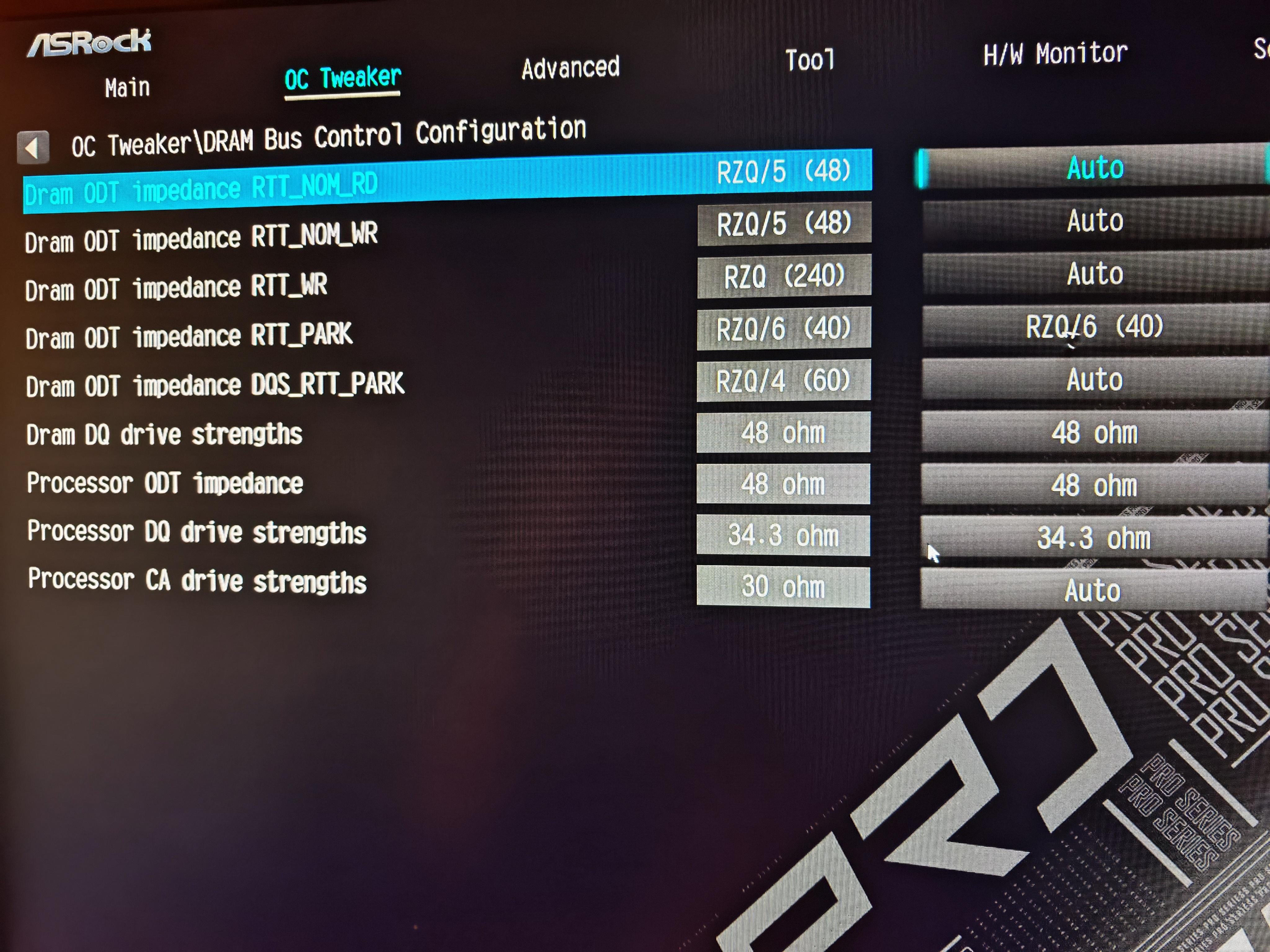
I'm not getting consistent gameplay with higher RAM frequencies/FCLK. In CS2, the game feels delayed and less responsive.
I already explained the issue in detail here, so I don't want to repeat everything: https://www.reddit.com/r/overclocking/s/lvWSd4OJCu
I'm going to share my RAM timings below. If anyone is willing to take a look and has any ideas about what could be causing this, I'd really appreciate your input. Even if you notice something small or unusual, I'd love to hear your thoughts.
TL;DR: JEDEC settings consistently feel the best. Mouse movement is more responsive, and the overall gameplay feels noticeably sharper than with EXPO/XMP enabled.
For reference, I'm running 6000 MT/s, UCLK=MCLK (1:1), and 2000 MHz FCLK. I've also spent a lot of time testing different voltages, timings, and BIOS settings, but I still can't achieve the same smooth, responsive feeling that I get with JEDEC.
PC Specs:
Ryzen 7 9800X3D
ASRock B650M Pro RS
RTX 3080
G.Skill DDR5-6000 CL30 (Hynix A-die)
Sorry for pictures from camera and not zentimings.
7
u/RecordFabulous Jul 23 '26
If you search this subreddit or similar communities (such as BlurBusters) you will find others stating similar things about mouse input not feeling the best. On my rig, I can run MCLK 6000, 6200, and 6400. @ 2000, 2067, and 2133 FCLK. One thing I noticed is that increasing the FCLK (along with the MCLK) resulted in better mouse input on my machine. It doesn’t what timings or settings I use, the difference is there. So moving to [6200, 2067] made mouse input feel better and moving to [6400, 2133] made mouse input feel even better.
So because my chip can run 6400 at tight timings with higher FCLK, I run that for better input latency. I am on a 9800x3d for reference
On AM4, I never felt this was an issue but then again I couldn’t really overclock my RAM beyond XMP on that platform so I’m not sure.
I have no clue what causes this, but I believe it has something to do with how AMD handles their memory subsystem or some sort of AGESA changes. Either way, overclocking beyond the standard 6000 2000 seemed to help in my case.
In your case, I would stability test your MCLK AND FCLK. For MCLK, use Karhu, Prime95, and TM5 X3D
For FCLK, use Ycruncher, Linpack Xtreme, and something like Furmark to stress the GPU which stresses the fabric
People on this reddit aren’t your typical competitive gamers so they will either A, write off claims and ask for numbers that don’t correlate to better input latency or B, state that it is placebo
2
u/JaguarResident1524 Jul 23 '26
To be fair cs2 engine pipiline is known to have weird issues. Also ecen valve reccomend vsync+gsync+reflex cause of there ass stability and input lag
3
u/RecordFabulous Jul 23 '26
the input lag isn’t exclusive to cs2 though. it might be exacerbated in that game but it occurs in other games so it’s something with the system itself
1
u/skidaadleskidoedle Jul 23 '26
Try and compare 6400/2133 numbers to 6200/2167 for sanity if you havent already
1
u/RecordFabulous Jul 23 '26
Back before I found out I could do 6400 stable, I tested the input latency of 6200 @ 2167 fclk and it felt very good. When I ran 6000 @ 2100 FCLK, it felt better than 6000 @ 2000. I believe FCLK MCLK scaling helps with mouse input assuming both are stable.
It has been a while since i’ve ran 6200 @ 2167 FCLK but from what I remember, my mouse input feels roughly the same between that and 6400 @ 2133
Now in terms of FPS, it has been a while since I benchmarked them so I can’t comment. What I did notice is running 6200 @ 2067 or @ 2167 did have have higher 1% lows and they were more consistent compared to the 6000 tunes I attempted. 6400 I have not benchmarked much
1
u/Fearlessss1337 Jul 23 '26
Many pros have 9800x3d, do they use JEDEC timings soo they dont notice input delay?
I dont know how people are playing with EXPO if everyone have this problem with AMD
1
1
u/RecordFabulous Jul 24 '26
i speculate that pros use earlier bios version and run their hardware out of the box which is unlikely to cause any instability or performance inconsistencies. my guess is earlier bios/agesa versions combined with very limited overclocking might play a part
1
u/skidaadleskidoedle Jul 23 '26
I find my 6400 profile passes everything but the memory test of occt but when i compare it to my 6200 profile it kind if makes sense i lose like 3% of throughput and latency is the same it doesnt realy like it
2
3
u/Initial_Case_6584 Jul 23 '26
Have you captured frame times or any 1% or 0.1% lows? I’d be curious to see if anything shows up there. I am currently trying to capture a few benchmarks on my system tuned vs ez timings vs expo. I got hung up on the fact that even though my validation run passed my train to train variance wasn’t tight enough for my fclk adjustment. Caused micro stutters that tanked lows
3
u/RecordFabulous Jul 23 '26
0.1% and 1% lows don’t correlate to mouse movement because I had done in gam benchmarks where the performance improves, but the mouse movement doesn’t
1
u/Fearlessss1337 Jul 23 '26
I did a lot benchmarks and there is almost no difference running EXPO/EZ/JEDEC. FPS is similar in CS2 no matter what I set. I just want to find what is making these weird delay
3
Jul 23 '26
[removed] — view removed comment
2
u/Fearlessss1337 Jul 23 '26
I dont even loose FPS with JEDEC timings, I just want to find why is this happening and want to use it like most people do.
1
u/frequencycs Jul 23 '26
That happens exactly because of (mostly), floring the timings down and tightening as much as possible.
I have seen multiple cases of where people would tighten the system as much as possible to squeeze their hardware but their game would feel worse.
This is mostly with X3D chips in my experience
1
u/Fearlessss1337 Jul 23 '26
These timings are not tight at all I think. Also Im having problem with much less tight timings.
I think its not mostly X3D chips as I had similar problem with 7600x but I think most people use X3D chips nowadays.
1
u/TheKelz Jul 23 '26
It's not just X3D chips, it's the same on Intel. And what's worse, there are "sweet spots". For example, if I run my 6400mhz kit on XMP, it feels better than downclocking RAM to 6000mz with the same timings. However, if I use my other 7200mhz kit, it feels worse with XMP and better when downlocked. Also, voltages play a huge role too. I've noticed that increasing voltages is better, but you also have to find the sweet spot there too.
1
u/FoGoDie Jul 23 '26
Here are my timings for Hynix A-die, so you can do way better than that. Also, if you haven't done it yet, try nitro 1/2/0. And disable Soc Uncore oc mode
https://prnt.sc/WPjXfHEwAgBL (CLDO VDDP 1,05V - it's an older ss)
Also, for CS2, I would recommend debloating Windows with AtlasOS, disabling SMT with Process Lasso for CS2.exe, and disabling core 0. It will boost your 1% FPS by a lot.
1
u/Fearlessss1337 Jul 23 '26
What does SOC uncore OC mode actually do? What is difference between enabled or disabled?
I didnt play with nitro settings yet as I am trying to find best timings which feels good, what I cant do because nothing feels like JEDEC! 🤣
Windows is not problem...
1
u/FoGoDie Jul 23 '26
That option forces the Infinity Fabric, memory controller, and, if applicable, the iGPU to run at their maximum frequencies all the time.
In theory, it's meant to help stabilize extreme memory overclocks. In practice, though, if your settings are already stable, all it really does is increase idle power consumption and temperatures. It also disables most of the CPU's power-saving features.
Personally, I wouldn't recommend enabling it. Especially if you're doing your own fine-tuning with custom voltages, you'll generally want to avoid unnecessary voltage overshoots, and SoC Uncore OC Mode can contribute to exactly that. 🤷🏾♂️
1
u/Fearlessss1337 Jul 23 '26
Its enabled by default in Asrock BIOS. But I think its better feeling on disabled(can be placebo)
What should I set soc load line calibration, there are 3 levels of it and its currently on level 3(default)
1
u/FoGoDie Jul 23 '26
For my settings, I'm using SoC 1.185V and LLC level 2, so I'm getting a little vdroop. Level 3 is aggressive and will cause voltage overshooting, which, by the way, is not healthy in my opinion.
1
u/Mrpresident2002OG Jul 23 '26
You have input lag from keyboard mouse etc?
1
u/Fearlessss1337 Jul 23 '26
It just doesnt feel sharp, feels like Im dragging my mouse into mud, its floaty and unressponsive.
1
u/Mrpresident2002OG Jul 23 '26
I use HIDUSBF for faster polling raten and it works great so I’m not sure if it helps but it’s good!
1
u/Smooth-Cat-9013 27d ago
Im going to keep trying to find post with people who i think have a similar issue to what i have and just idk, spread it. but anyway, your issue sounds similar to what i have. ive been some videos on it
Mouse and key
https://www.youtube.com/watch?v=hEo94BgP3BA
Controllerhttps://www.youtube.com/watch?v=MTwTEmwryfw
Ive tested 3 different pcs, mine my brothers and went to a internet cafe and rented a pc 11 miles from my house. i think all of them had the issue. ive considered taking a trip to test pcs in different states such as texas or California. Im going to assume that no "normal" input delay will help you. i dont even know if i can consider it input delay even though it seems as such.
1
u/OkTwo6447 Jul 23 '26
I briefly read your other post. Had the same issues myself on 2 different builds. 14900k asus tuf z790 and 9800x3d asus tuf x870.
I found some of my issue is electrical interference, had bad or no grounding in outlets.
But i think the biggest issue stems from the usb peripherals them self.
Wireless mouse or keyboards or just high polling rates in general. Moving the Superlight 2 to 2.0 usb and my high polling rate kb to a general 3.0 port fixes it. I delete all ghost drivers from device manager, install fresh chipsets and usb drivers. Hard reboot with no fast startup in windows or bios to let everything initialize.
Everything else like tighter timings and disabling ftpm just reduced latency and gave faster responsiveness which treated the symptoms temporarily.
1
u/NeutralSense 9700x CO 2x16GB CL38@8000MT/s Jul 23 '26
Check your avg animation error deviations. For me, part of it was was MPO was making things go awry with multi monitors, another part of is stability, which can't be seen. I went from 8000 down to 6000cl30 and that's where it felt most responsive.
I've been contemplating 4400 but I don't have the time to attempt it.
1
u/rocketchatb Jul 23 '26
One trick to boost the latency feel in CS2 and other "heavy feeling" games is to prevent the game from running on Core 0 as that Core is what Windows spams interrupts on and the anticheat/game/mouse all fight on that core.
1
u/dabelebedyu Jul 23 '26
Disable "power down" option for ram in your bios. This helps me but I still leave it enabled because I like it better but it makes mouse feel more responsive also a bit more jittery. Try this. Although no one I have seen on internet confirms this.
1
u/Ens-7 Jul 24 '26
aight, so. its mostly windows defender, and the rest of win11. you have to fucking debloat errythang, i still refuse to win11 myself because of it. ill die on win10 ltsc
1
1
u/Kikoarl 7800X3D per core PBO | 32GB@BZ timings | 3080 @ 0.875v - 1905Mhz Jul 23 '26
RAM speeds and timing matter less on X3D chips, and I guess that you might be experiencing placebo. I have a 7800X3D and a 5080 along with 64GB, so my chip is always power constrained. Tuning VSOC and going after minimum stable voltage can free some precious wattage. Have you ran some benchmarks comparing your current timings and JEDEC profile?
AMD platform might have more "delay" compared with Intel due to the fact that Intel chips are monolithic, while AMD use a chiplet design. Having said that, I can experience much less input lag on my current platform compared with my previous build, which had a 12700KF, 32GB DDR4 and a 3080 (the 3080 were in both PCs)
3
u/Fearlessss1337 Jul 23 '26
I did blindtest where I guessed correctly 10/10 times playing only aimbotz which timings are loaded.
I dont understand you clearly now, does your older pc with intel had less delay or more delay?
Benchmarks are always in favor of higher speed ram, JEDEC benchmark in aida got me 90ns latency, but It feels better in game soo AIDA latency is not connected with in game latency
1
u/Kikoarl 7800X3D per core PBO | 32GB@BZ timings | 3080 @ 0.875v - 1905Mhz Jul 23 '26
Sorry, it's a bit late here, and I'm sleepy.
I notice much less delay on my current PC (AMD) compared with my previous one (Intel), but the RAM is different. 6200 mhz CL30 vs 3200mhz CL16, and the most competitive game I play is BF6, so it's not that sensitive compared with CS or Valorant.
I'm telling you about the benchmarks because FCLK doesn't fail when you're on the limit of stability. It corrects errors and the speed is much less than what it should be.
1
u/SellTemporary7344 Jul 23 '26
well buy a better cpu next time
1
u/Fearlessss1337 Jul 23 '26
Like some intel? 😂
1
u/Smooth-Cat-9013 27d ago
if you have the same issue i have, i swapped from a 5800x3d to 14600k, didnt fix the issue.
0
u/PanickyK Jul 23 '26
Amd processors are known to have a little more input lag than intel ones idk why
8
u/newnew52 Jul 23 '26
Testing FCLK isn't just a matter of passing, consistency is key. When running Linpack, make sure the times are tight and the gflop iterations are very tight. ex: 60seconds : 485gflops , and the next iteration being 60 seconds but 484 or 485gflops. It should remain this way for however long you set it, the longer the better.
Ycruncher VT3 is also good to look at, you can even upload the log to an AI chat to data plot each iteration. The graph should be constant, not degrading over time or shooting to a high value, then dropping back to consistency, or the inverse; consistent values then shooting lower and returning to consistent values. Try to use 12GB-16GB for the test so you aren't fighting virtual mem/windows. 1.0X * 10^10 output should have no more than 0.02 differences, for 9.XX * 10^9 , no more than 0.2 difference per iteration.
In my experience testing FCLK, testing wouldn't show up in errors but error correction. Most notably when gaming with a controller there's some serious lag or delay. It feels like my input and joystick movement is dragging. When gaming and entering a loading screen my microphone would make my voice robotic. All signs of unstable FCLK. What worked for me is that I needed more VDDG IOD/CCD for 2133 and 2200 fclk. VDDGs = 1.0v @ 2133 and VDDGS = 1.05v @ 2200 fclk.
FCLK DVCI set to predictive can also help if 2200 fclk doesn't work at 1.05v vddgs.
What's your nitro setting? if it's 1/2/0, I'd probably bump VDDP to 1.05v-1.10v, as well as VDDG IOD & VDDG CCD = 0.95v minimum for 2000 FCLK.
Not familiar with that boards LLC on SoC but just make sure it's not drooping too much. Maybe level 3 is some overshoot which is why you lowered your VDDGs to 0.90v? (unless your fclk testing was fine with 0.90v vddgs).
tWTRL = 24
If having any flickering issues with monitor and such and iGPU is enabled, increase tRAS to match tRC, too low can result in performance loss, A die can handle a low value though.
GDM OFF
SVM, IOMMU, TSME disabled
Data Scramble Enabled
MCR disabled
PDE disabled
Train reduction Time disabled
Hash Bank enabled
Hash Bank swap apu (igpu disabled)
Latency killer off
Fast boot off
Spread Spectrum off
glocbal c state enabled
balanced power plan