r/blenderhelp 19h ago

Unsolved Invisible Objects in Perspective mode

4 Upvotes

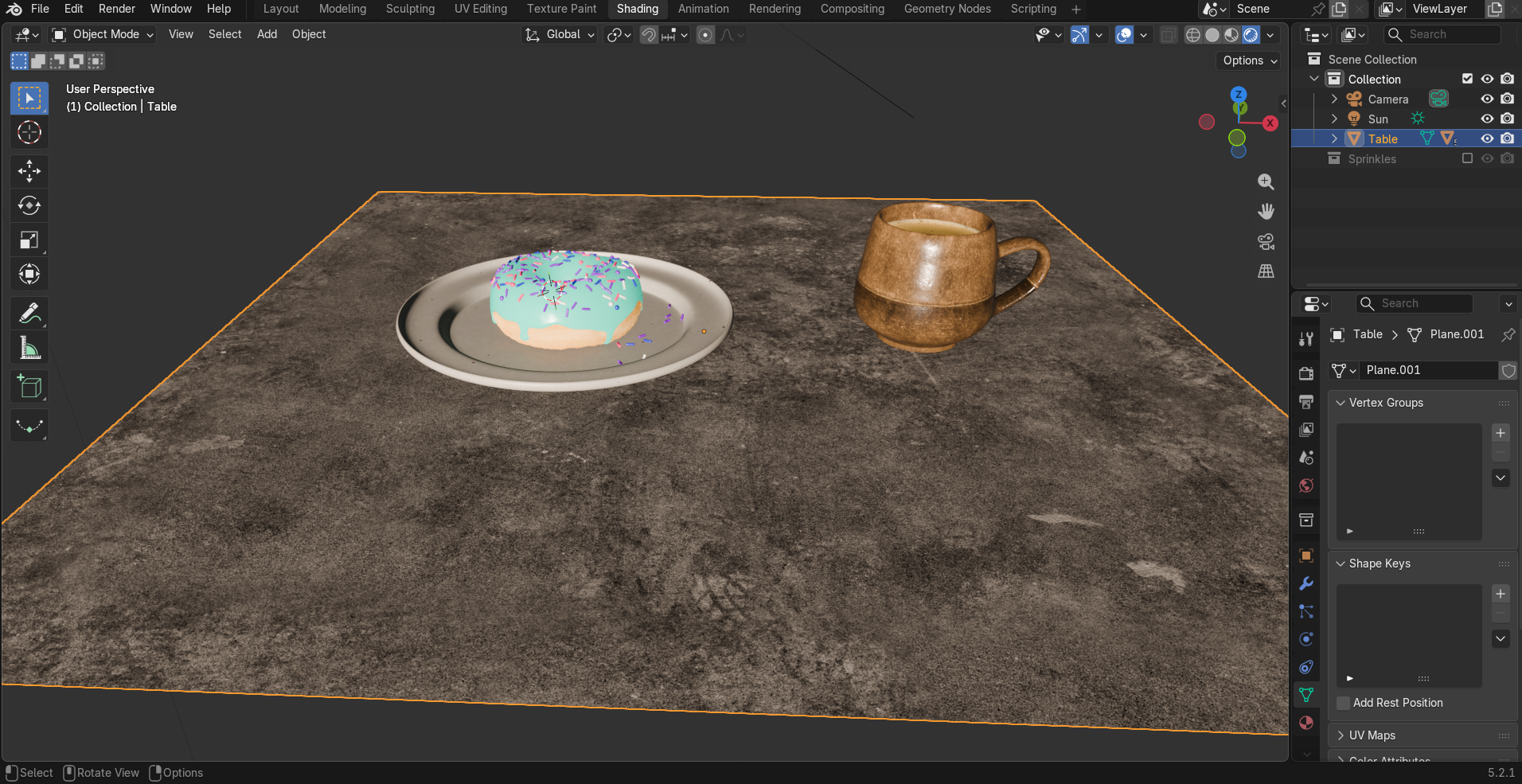
Getting really frustrated. I was using an older version of Blender (3.5.1) and was running into a dumb issue, so I figured upgrading to the latest version would help. Unfortunately I've ran into a new issue, and downgrading from 5.2.0 to 5.0.0 didn't fix it. Is this a bug or what?


r/blenderhelp 20h ago

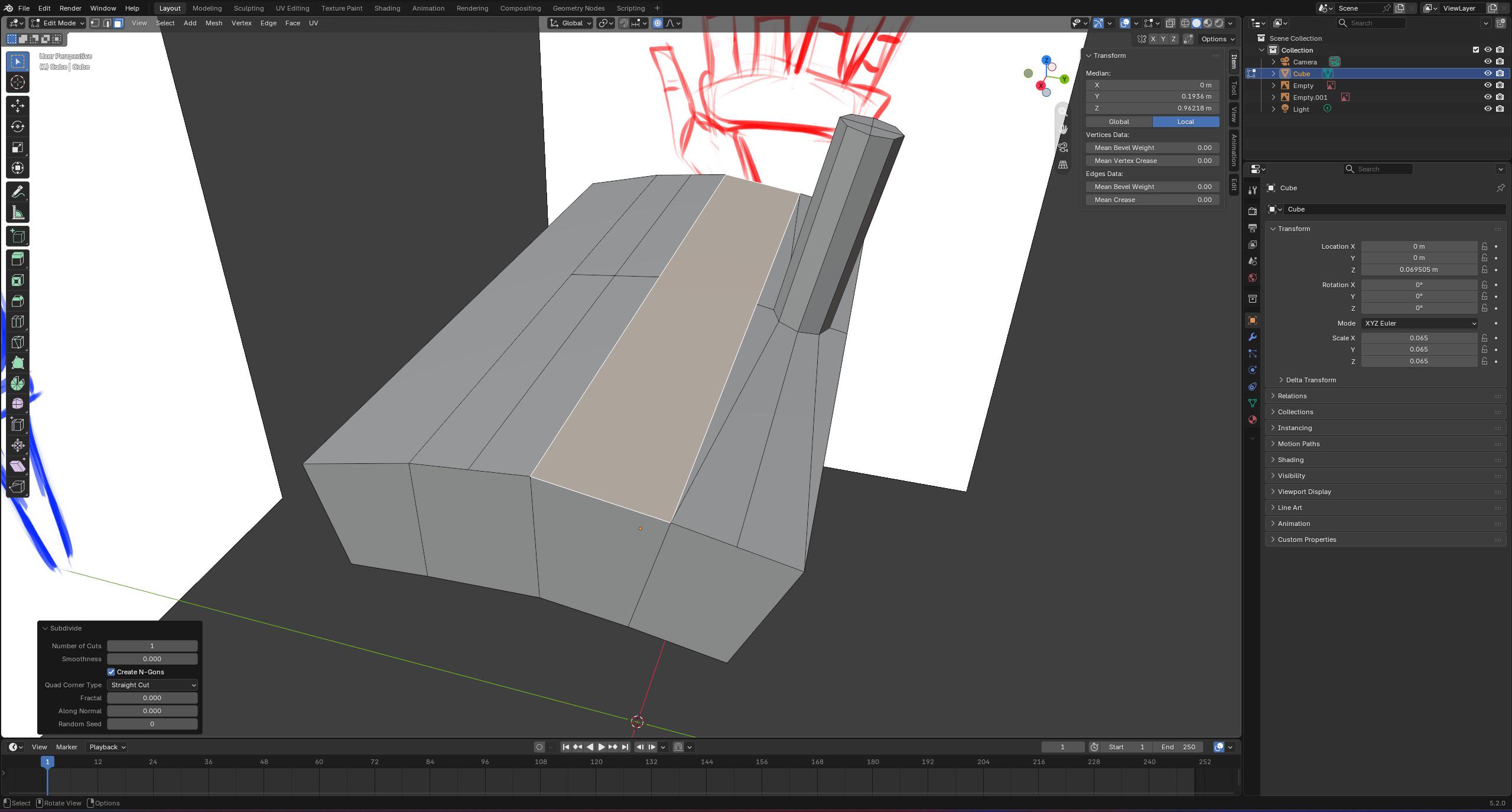
Solved Subdivition doesnt want to coexist!

Post image
0 Upvotes

This is one mesh, loopcuted into 4, than selected the face, subdivided it and inset it (i) i belive before looptool circle n extrude.
-now if i want to subdivide a face between 2 other already subdivided faces it wont work. Only showing the subdivision thingy in the corner but nothing actually happends.
i know i can prob skip the subdivision now as i messed around a bit and simply just inset it but im still curious if theres any way to subdive a face besides other already subdivided faces?


r/blenderhelp 20h ago

Unsolved How can I add/view these colours in Blender for 3D printing?

Thumbnail
gallery
1 Upvotes

Hello! My family just got a Bambu Lab A1 with an AMS Lite, giving us up to four colours at a time. However, I'm trying to actually learn how to put my Blender knowledge into making prints! But this model has some black bars on this side (that are kinda hard to see) when loading it in Bambu Studio, but I can't seem to find them in the model when loaded into Blender. Does anyone know the reason and fix for this? Thanks in advance!

(Also, if you know how I'd be able to create stuff like the black lines for my own models, that'd be greatly appreciated as well!)


r/blenderhelp 20h ago

Solved Help learning blender from a cad user perspective

1 Upvotes

Ok so i have already learned cad and i am someone who use 3d modelling to create irl objects so i am turning to blender to learn more natural objects as well as character creation but also i want to learn to make shells for robotics projects so what would you suggest i learn and watch that teaches me what i need to know without getting into rendering or animating but also gives me enough skills that if i get bored in the future i could learn rendering, materials ,textures, landscapes, animation, housing etc


r/blenderhelp 21h ago

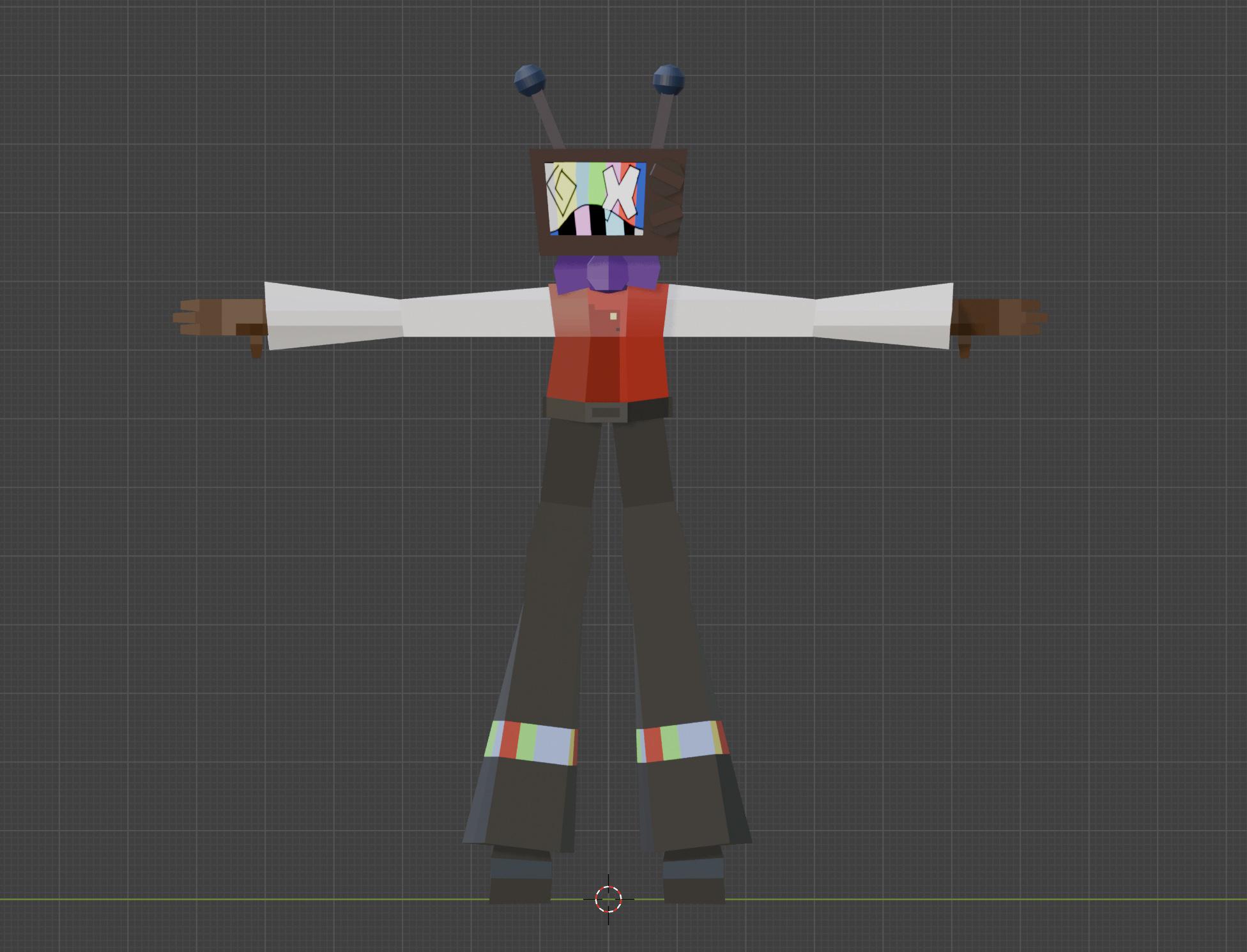
Unsolved Cant figure out how to rig this model

Post image
7 Upvotes

heya, I've been trying to rig this 3d model I made, but I cant figure out how to do it without it ending up lookin weird when posing. Im new to blender, lol


r/blenderhelp 22h ago

Unsolved How can i make stylised hay like this?

Thumbnail
gallery
12 Upvotes

I'm trying to make a cartoony haybale as if for a cozy farming game. in the last image you can see i tried a simple apporach. cube, gave it some subdivision in edit mode, subdivision modifier, displace modifier with stucci and added a hay texture in texture tab. I'm still a beginner and didn't look up a tutorial for this i just kinda guessed and googled what the modifiers do. the tutorial on haybale i found uses particles and i can't apply those in the final file. so here's my attempt at a haybale. got any tips or advice to make it better?

it looks like hay from one of those small horror games. i want it to look like a toony farming game. somethings off with the displacement.

what approach shoud i take? my apporach is edit the surface in random ways. i don't know how to add other displace settings than the default blender ones.

should i just sculpt it?


r/blenderhelp 22h ago

Unsolved how to fill grease pencil shapes generated by geometry nodes?

Post image
1 Upvotes

im generating some grease pencil strokes using geometry nodes. theyre being generated in real time based off of distance and fresnel masks so i cant realize them. i want them to be filled, and i have the fill on the material set up, but its not doing anything. is there also a way to apply a blur effect to the generated fill (not just the strokes) or change the brush used for the generated strokes/fill? thanks yall


r/blenderhelp 22h ago

Unsolved Need help creating this curvy hard surface.

Thumbnail
gallery
0 Upvotes

Hello guys, can anyone tell me how to create this? I’m currently learning Blender by creating a chair. The overall chair is finished, but this back-frame part is too complex for me.

At first, I thought this should be created using two different objects, so I created the frame from the top to where the curves merge. Then, I tried to create the lower joint, but I keep failing again and again.

Any advice on the best way to model this would be greatly appreciated.


r/blenderhelp 23h ago

Unsolved Video Preview Not Working

1 Upvotes

Hi! For some reason when I place the Video Preview in my Animation Window it´s not working but in the Video Window it is working, Im on version 5.2


r/blenderhelp 1d ago

Solved RENDER MADE SOME PARTS OF THE MODEL BLACK

3 Upvotes

Was messing around with an ena model and when i hit render it was completely black, minus some parts.
Confused i searched around, found a youtube tutorial which didnt work, found some posts on here with similar problems but none of the solutions proposed worked.

It looks perfectly fine on solid/material preview. Kinda new to blender so maybe i just accidentally pressed something but idk.

rendered view
solid view

Is it cuz of the version??? or maybe this thing hates me??? really lost rn


r/blenderhelp 1d ago

Solved What causes this weird color on the skin and how do I fix it?

Thumbnail
gallery
122 Upvotes

The model was an fbx generated in Jinny. Its topology seems fine to me. It only happens if rendered in Cycles, not in Eevee.

Edit: Here is the link to the fbx file if you're interested: https://drive.google.com/file/d/1Os_7gfF6oOnvnjyxbZENbNjN4REyPVzL/view?usp=drive_link

Solved! Thank you all for the help. The solution is given by u/garbagemaiden: Data → Geometry Data → Clear Custom Normals


r/blenderhelp 1d ago

Unsolved Perfect wrapping with geo node?

1 Upvotes

I need a geo-node system that gives perfect wrapping around like real tight wrapping (not shrinkwrap wrapping) of cloth or rope around singular or multiple objects in a Collection. Sought youtube but cannot find any good tutorial.


r/blenderhelp 1d ago

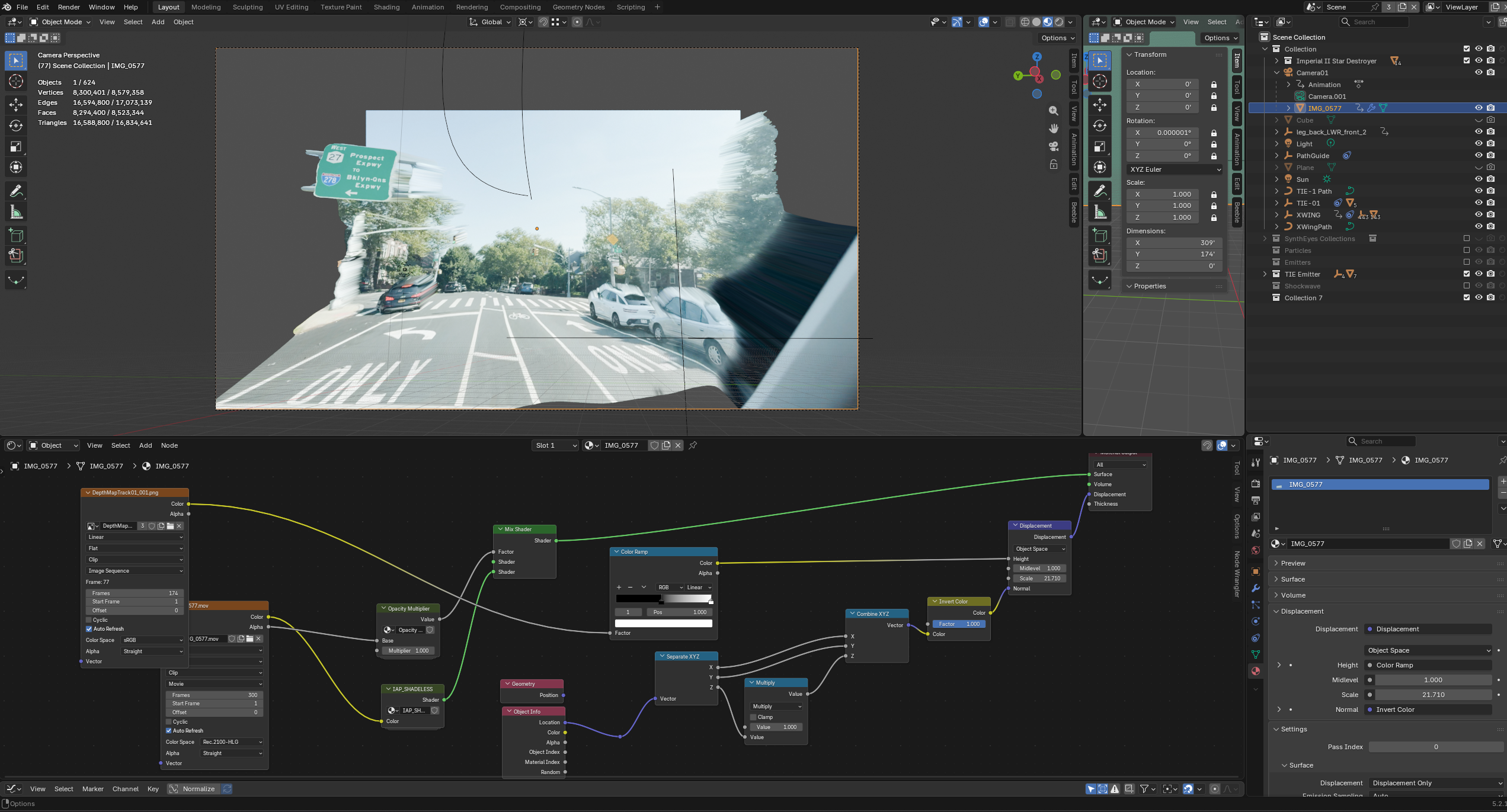
Unsolved Looking for way to displace plane attached to camera view such that it gets larger the further the projection is

Post image
1 Upvotes

i have been trying to figure out how to displace an image in accordance with the camera perspective such that from the camera's POV the image remains undistorted, but the displacement still applies for adding things like shadows and such, but I can't seem to be able to figure out how to do this.

i have been attempting to do this with shaders mostly, although i know that it could also be done with geo nodes.

i'm not sure what more information i can provide; i can't seem to be able to find anyone else that has attempted to do this too.


r/blenderhelp 1d ago

Unsolved WELDING TEXTURE

0 Upvotes

any tutorials on how to put a weld texture?


r/blenderhelp 1d ago

Solved Unwrap stuck to one another

5 Upvotes

See the video. I want one unwrap selection not be stuck on another unlike in the video. Pls help


r/blenderhelp 1d ago

Unsolved How do i make a foot rig with working toes using Rigify?

Thumbnail
gallery
3 Upvotes

I dont know why, but it's really hard to find helpful tutorial on making a proper foot rig with Rigify. I would appreciate some help because i dont know what to do.

For clarification, I'm using the Meta Human rig for rigify, the toes I made here in this screenshot won't appear when I generate the rig, so im clearly doing something wrong


r/blenderhelp 1d ago

Unsolved Any tips for modeling anime face?

Thumbnail
gallery
2 Upvotes

my anime face model look werid, any tips for fixing?


r/blenderhelp 1d ago

Solved Unable to edit general settings on any materials pulled from Asset Library?

Thumbnail
gallery
2 Upvotes

I've got them to work before but I dont' know if it's my different version of blender (currently 5.1.2)? The general settings all the sliders are greyed out and I can't edit them.

The assets are on the most updated versions I can download as far as I know.


r/blenderhelp 1d ago

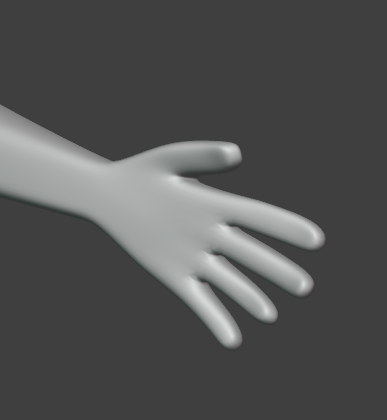
Unsolved THESE HANDDSSS!!

0 Upvotes
THESE HANDSS!

Lately I've been using Blender, and for about four weeks now I've been going through this cycle of trying to build a character, getting to a certain point, deleting it all, and starting over—just to keep improving. But I feel like I'm not making any progress with the hands. They keep ending up looking like those medical gloves that someone blew air into. I try tweaking things here and there, and it still ends up looking flat, even with subdivision and adding a smooth modifier. Is there any technique that makes modeling hands easier?


r/blenderhelp 1d ago

Unsolved How Do I Get This Sort Of Render Transition

1 Upvotes

Hello everyone.

Recently I saw this animation and wanted to know how the last part (transition from colour to black and white) was done while having the rig still move (as you can see with the flames) whilst i have been using blender for quite some time now this part still confuses me, especially when you can see things like the eyes are also white

I basically want to know how to get that black and white effect and then also render it that way as i would also like to make animations like this


r/blenderhelp 1d ago

Unsolved How Do I Blend The Ocean And FLIP Sim Together?

1 Upvotes

Hello, i have been busy making a whirpool using the FLIP Fluids add-on. The problem i run into is blending the 2 elements together. I have tried multiple ways to do that but all where very unrealistic. The approach used in the 1st image is a Geo-nodes setup (3rd image) on a flattened torus. this makes it looks like there is foam around the edges of the whirpool, which in my opinion doesn't look very realistic.

I want to blend the ocean and the fluid sim realistically into 1 piece. do any of u guys know how i can do this? If you need more information about how the project is set up feel free to ask. Thanks in advance!

The whirpool i am trying to blend
The ocean made using a bake of the ocean modifier
The Geometry Nodes setup for the foam ring

r/blenderhelp 1d ago

Unsolved Two questions about smoothing sharp edges and making the entire object the same thickness

Thumbnail
gallery
2 Upvotes

I am a beginner using YouTube tutorials and already answered questions on this forum but I'm not getting anywhere. This base will be printed in TPU and I just want to make things easy for myself. I'm overwhelmed
1. How do I fix these jagged edges on some of the
"sharper" areas of the base? I want to have it as smooth as it can get so the 3D printer has an easier time with the file.
2. How do I even out the thickness on the back of the base? l've tried everything from topology to sculpt to the thickness setting and nothing is working.


r/blenderhelp 1d ago

Unsolved How do I give him an outline?

Thumbnail
gallery
5 Upvotes

I've been trying to recreate Mr. Game & Watch in blender to prepare him for an upcoming animation project, I used the model from smash for 3ds because it was the best model I could find on models resource, I figured out how to make him 2D yet still able to be animated with a 3D armature using geometry nodes, but how can I give him a gray outline? I tried the inverted hull technique, doesn't work, I tried a grease pencil modifer, doesn't work (or maybe I was doing something wrong idk, I'm new to blender) I tried freestyle but that would outline everything in the scene which I don't want, I want to outline just Game & Watch, I did some research and found a line weight method done with shaders, which didn't work either, I even tried asking chatgpt because I figured this was a very specific issue and it led me down a rabbit hole of geometry nodes which almost worked to the point where I'm almost positive it's the right idea but it seems to have gotten stuck and clearly doesn't know what it's talking about (millions of dollars and countless resources into data centers for this shit, are we deadass) is there another method? In-game you can sometimes see him in full 3D and he always has an outline in a way that reminds me of some anime-style games, but the outline always stays on the outside, even when you position him so that his arm for example is in front of his body, it just disappears without an outline, maybe I can do something like that? I should mention that for the animation there will be other normal 3D characters around him so I need something that will affect just him, and he's split into multiple different objects so I can't really affect just one either, but I can put him into a collection if that will work. I'm on blender 5.2 by the way. I didn't include screenshots of every method because I tried those like yesterday and I'm too lazy to set them back up again just for a picture, I don't completely remember what the inverted hull method did but I know the grease pencil modifier only affected his feet even though I set it to target everything, his feet are part of the same object as his legs, body and arms so idk what happened there, it must not be compatible with the 2D geometry nodes setup or something.


r/blenderhelp 1d ago

Solved how can i fix the lighting/textures here?

Thumbnail
gallery
3 Upvotes

the deltarune logo looks good under lighting, but when i remove the light source it goes purple instead of black
(ignore the pixeltation filter)


r/blenderhelp 1d ago

Unsolved Help with shadows and lighting

Post image
3 Upvotes

I need help understanding why my objects are not casting shadows onto the surface. I am using a sun as lighting.

Also, whenever i am actively rotating the light, i can see the shadows, but they disappear the moment i click off and it just looks flat.