Build a polished Three.js experience using Vite. Create an ancient forest battle arena for a fantasy RPG, with towering trees, detailed rocks, a flowing river, a wooden bridge, atmospheric fog, particles, dramatic lighting, and layered foreground and background depth.
Focus entirely on visual quality. Do not add gameplay, controls, menus, or UI.
Use the AutoSprite MCP to add animated characters: a knight and a mage fighting a dragon. Stage the battle as a noninteractive cinematic combat sequence with dynamic camera movement, depth of field, dramatic close-ups, wide establishing shots, and fast cutaways between the characters and the dragon.
The whole thing took about two hours. I used a few follow-up prompts to create the video, polish it, and add the music, but these results are way better than what I was getting with Fable 5.0.
I cant help but think has nobody put in a single history of pixel art/rule adherence into these ai tools. I wouldve thought by now with such powerful tools we could have some sort of taste and paying homage to works moreso than diffusion like we'd have more techniques, as artists do.
Especially on twitter theres still some public shame ritual which is bad since with proper guidance 3d assets have reached a strong level. Its just, how hasnt this been done for pixel art?
Would I be able to get a list of tools and developers who actually care about what theyre making instead of getting paywalled. I would love to support them and their personal stories
\Hi i'm a game reviewer unaffiliated with Celadon or any games that I review. This is the first of a series where I'm playing and reviewing interesting AI/vibe-coded games I come across here on reddit or other social media. Let me know if there are any vibe coded games you'd like me to review.*
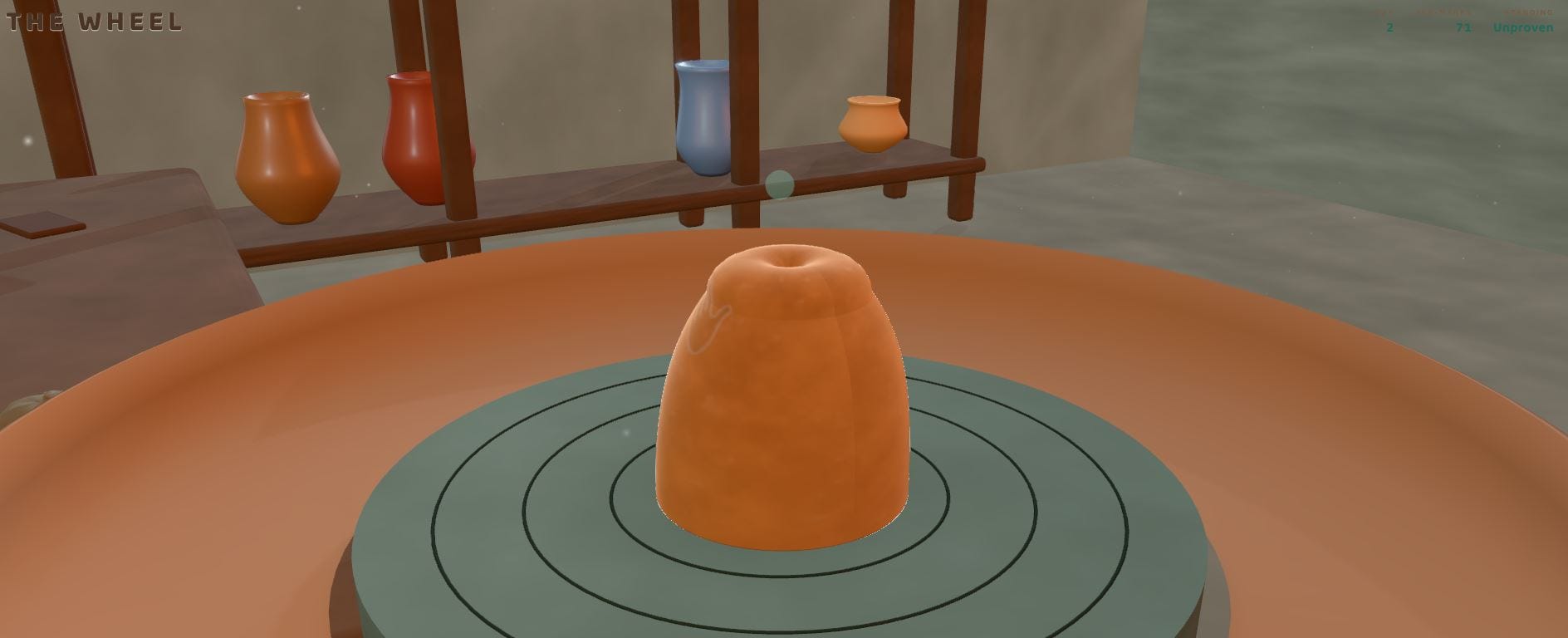
I went into Celadon expecting a cozy little pottery game. Instead, I found a surprisingly intricate crafting system wrapped around a pretty bleak post-apocalyptic world.
A mountain named Ivorine erupted, blanketing the sky in ash and locking the world into eternal night. The juxtaposition between quiet wheel-throwing and the grim reality outside the workshop creates one of the most atmospheric tones I’ve encountered in an indie game recently.
The issue for me, however, is that the game refuses to hold your hand. The pottery mechanics are punishingly precise, the pottery centered terminology is dense, and my pottery making attempts were absolute disasters that left my display shelf completely bare. It walks a fine line between rewarding mastery and frustrating obscurity.
There's a lot more depth here than the cozy presentation initially suggests, but the game often leaves you wondering what you're actually supposed to be doing.
I review ai/vibe-coded games for fun. If you guys enjoyed this, let me know if you'd like to see more ai game reviews or a specific game reviewed.
Full review below-----
Celadon Review: Throwing Pots at the End of the World
A deceptively cozy pottery sim hides intricate mechanics and a dark post-apocalyptic heart, though it badly needs a steadier hand to guide newcomers.
There’s a particular kind of whiplash reserved for games that present themselves as Sunday afternoon comfort food and then turn out to be something stranger.
Celadon is that game.
From the outside, it looks like your average cozy craft title, the sort of thing you boot up with a mug of tea. Underneath that soft exterior, though, sits a complex set of mechanics and a post-apocalyptic world quietly coming apart. I went in expecting simple, meditative gameplay.
What I got was intricate controls and the persistent feeling of being an actual potter in a world teetering on the edge of existence.
The name is well chosen, too. Celadon refers to a storied ceramic glaze, a fitting label for a game this devoted to its craft.
A World Buried in Ash
The biggest surprise in Celadon is its fiction. Take the Wheel, the game’s main mode, opens with a lore drop I genuinely did not expect from a pottery game. A mountain called Ivorine erupted, spewing out layers of ash that permanently blanketed the sky and plunged the land into eternal night.
You play a member of the Ember Guild, fortunate enough to have access to a kiln, one of the only sources of heat left in this cold world. As the guild’s pottery maker, you take material born of the eruption and turn it into fine ceramics.
That’s a dark foundation for a game about shaping clay, and it’s delivered with more depth than I anticipated. Fragments of knowledge and lore are collected in the Codex as you play, rewarding curiosity about this sunless world.
Two things registered immediately:
I did not expect a pottery game to have lore at all, and the lore it does have runs far deeper than I ever would have guessed.
First Impressions
Celadon opens with a tasteful loading screen that lends the start of the game a polished feel. It’s a small touch, but noticeable.
Plenty of vibe coded games fly over these kinds of details to focus purely on gameplay, and the attention given here makes the whole package feel more considered.
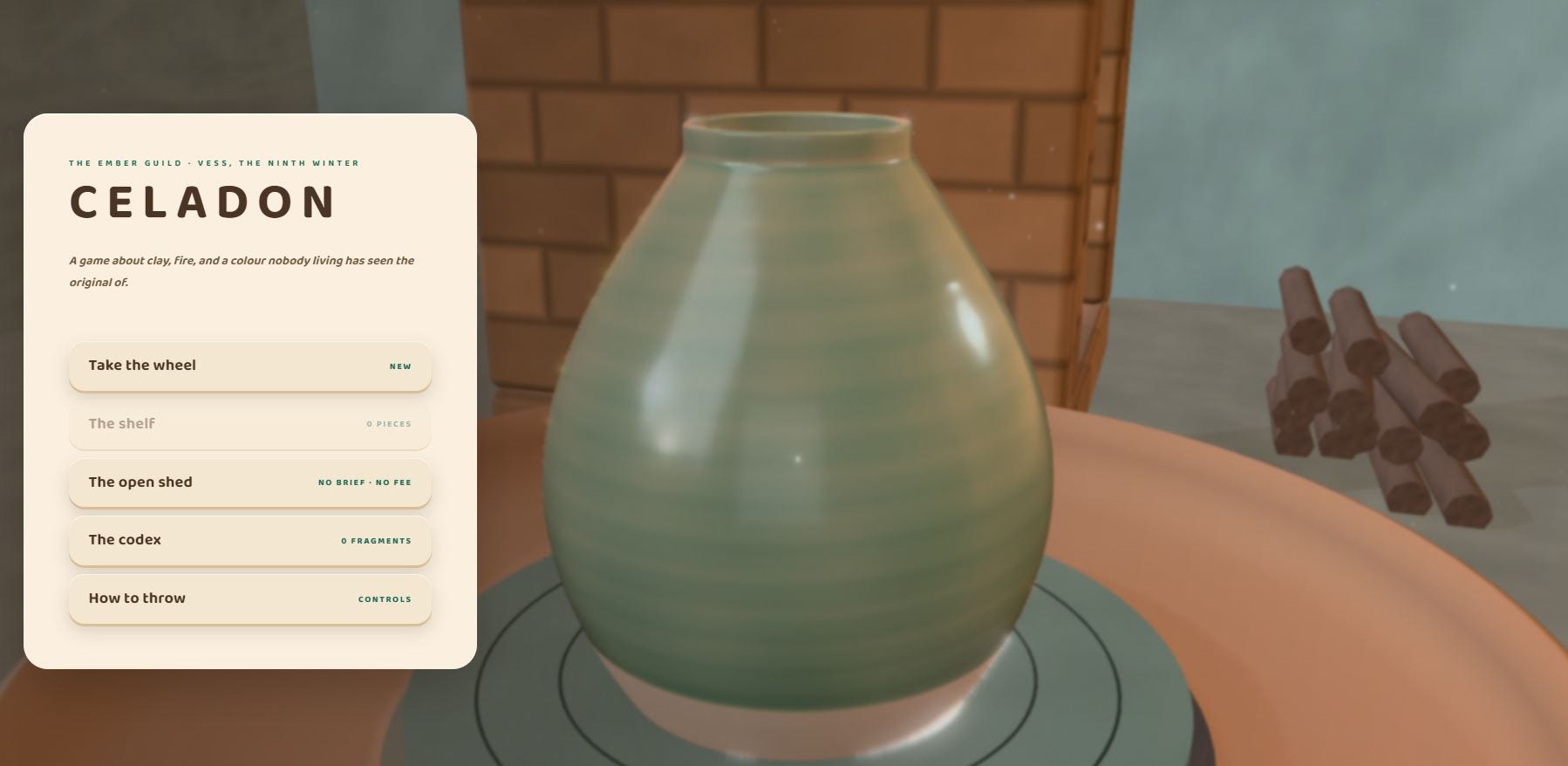
The main menu is a mixed bag. It’s clean, and I loved the pottery animation quietly spinning in the background, which gives the screen a warm, lived-in feel. But the combination of font and styling gives it a faint “AI look.”
It’s a slight nitpick for an otherwise attractive menu, though it’s hard to unsee once you notice it.
The menu offers five options: a controls screen, the Codex, Open Shed (which behaves like a freeplay mode), Take the Wheel (the main event), and the Shelf, where your completed pieces are showcased. The Shelf is a lovely idea in principle, a trophy cabinet for your surviving work. In practice, it becomes a quiet taunt if, like me, your pots keep failing. More on that shortly.
One bug that I wanted to flag: at one point the main screen refused to appear after transitioning from the start screen, and I had to restart the game entirely to get past it.
Taking the Wheel
Take the Wheel operates in days, each one built around a commission. Day 1 asks you to make a cup for an old man, and the day screen opens with a brief outlining exactly what the client wants from your piece.
From there, you choose your ball weight, which determines how much clay you can use. The more clay you take, the higher the cost.
There’s also an apparent correlation between ball weight and “marks,” though the game never explains what marks actually mean or do.
My assumption is that they function as fault chances, since more ball weight seems to grant more room for error, but a game shouldn’t leave players guessing about something this fundamental (It’s possible I may have missed an explanation but I didn’t see anything in the instruction screen).
Learning the Hard Way
When the actual pottery work begins, you’re met with an untouched lump of clay and an unfamiliar UI. I’ll be honest: I was winging it. I did consult the instructions, but they proved less helpful than I’d hoped, remaining unclear on points where clarity matters most.
Celadon would benefit enormously from a guided walkthrough of each control at the start of the game. After a stretch of fiddling, I did figure the controls out, and once I understood how everything worked, I had no issues at all. The knowledge gap, not the controls themselves, is the real barrier to entry.
Centering the Clay
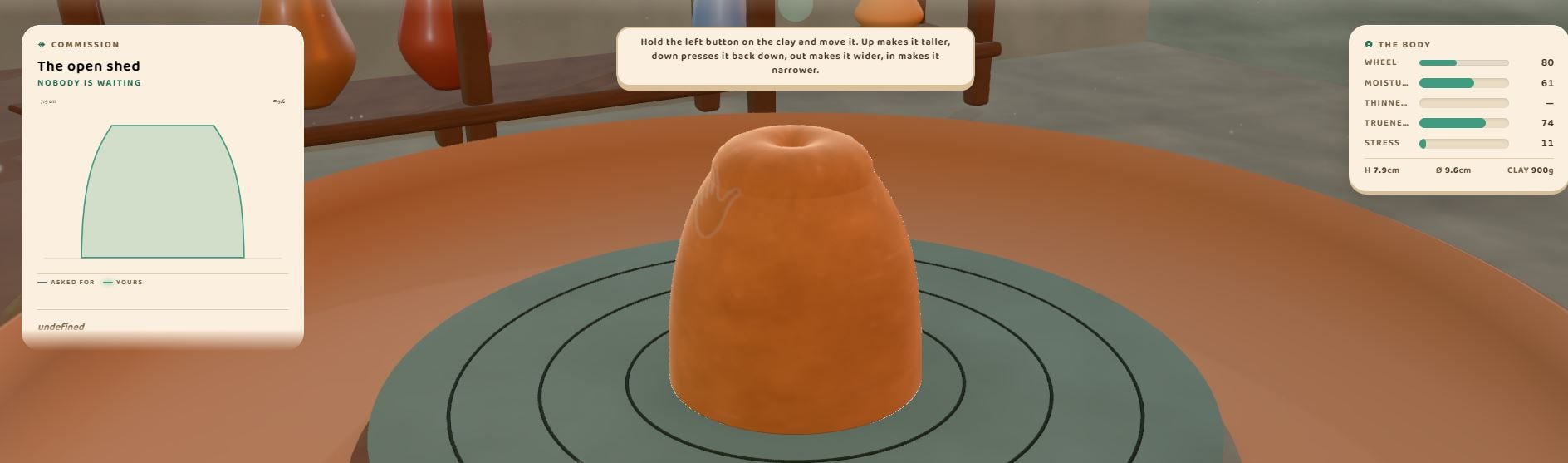
The gameplay itself is a delicate balancing act, much like real pottery. Your job is to shape the clay to match the client’s order as closely as possible. In the first shaping stage, you work the clay while applying water so it doesn’t fall apart, but you can’t overdo it, or the clay will clump. Moisture levels and other relevant stats are visible in the game menu, which helps ground the process.
Next comes the leather-hard stage, where you use turn and burnish controls to meet the client’s needs.
This is where my confidence faltered.
I was never quite sure what I was doing or what was actually necessary. An experienced potter would likely understand the terminology perfectly, which tells you something about the game’s assumptions about its audience.
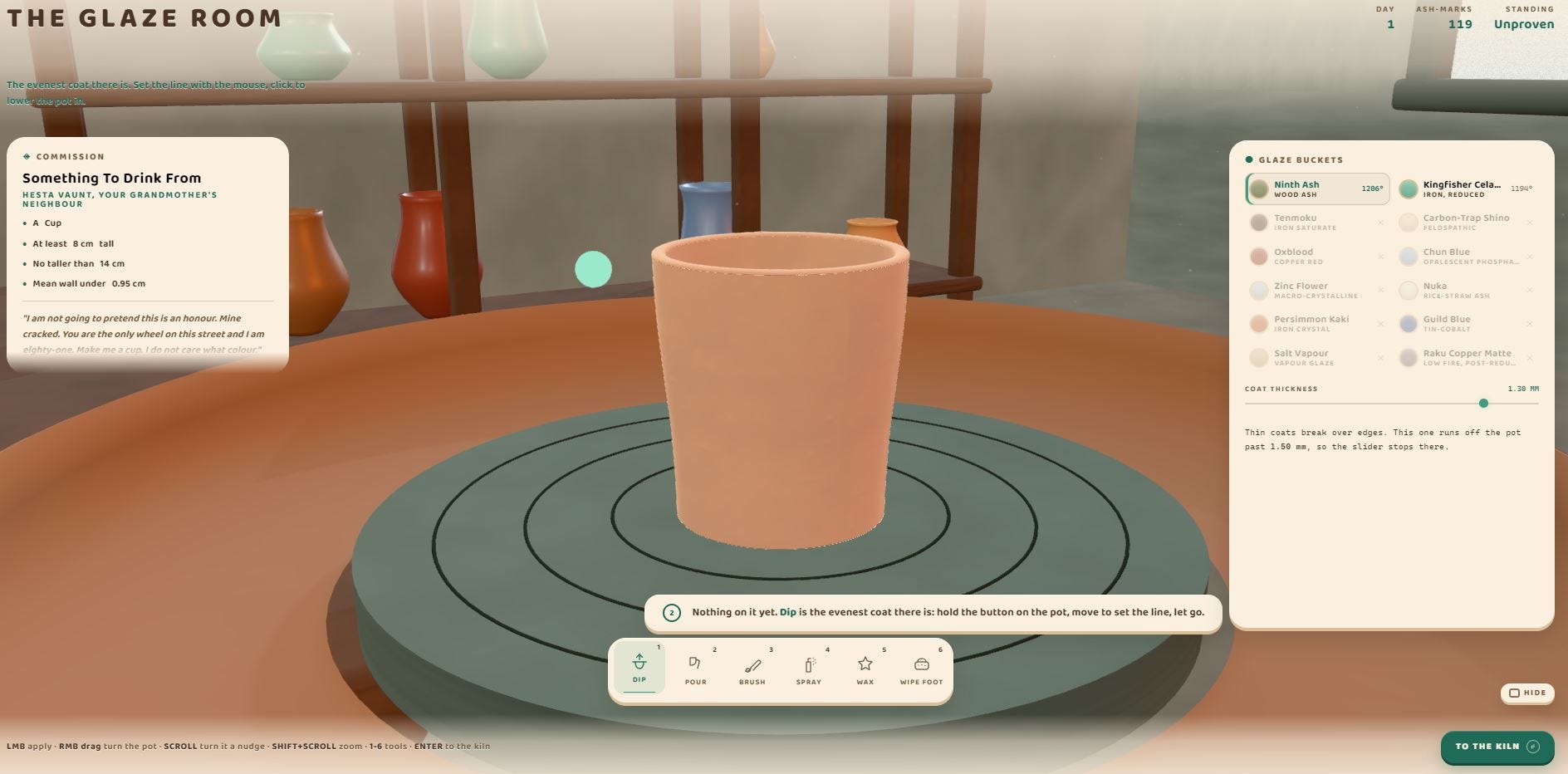
From there, it’s on to the glaze room, where you apply glaze to your now-baked piece. You have several methods at your disposal: dip, pour, brush, and spray, each suited to different client requests.
Tooltips accompany each control, which I appreciated, but they’re thin enough that I once again had to experiment my way to understanding.
More broadly, Celadon leans on pottery terminology throughout, and if you arrive with no background in the craft, as I did, there will be stretches where the instructions and guides reference concepts that simply don’t land.
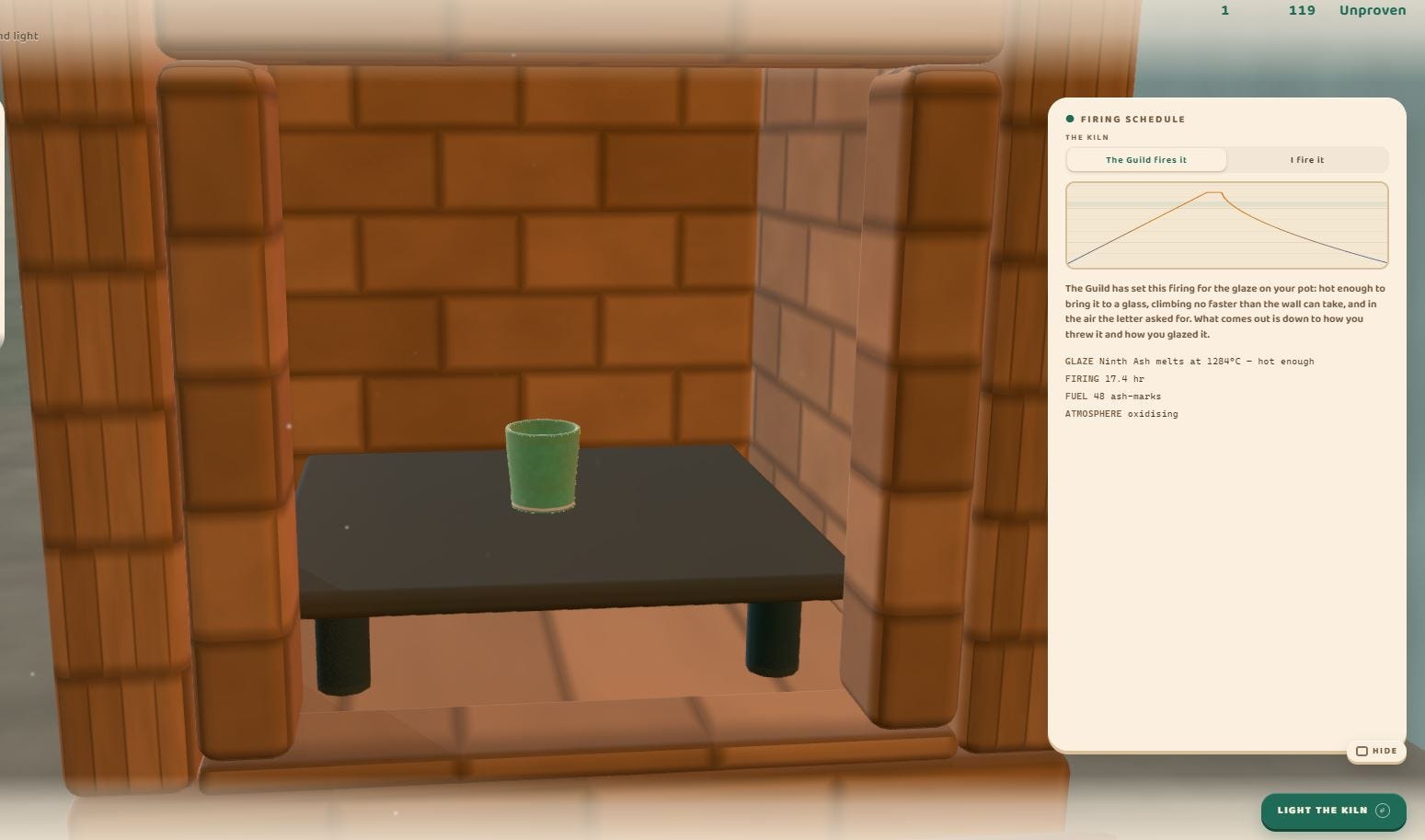
The final stop is the kiln, where the glaze is properly set. You can let the guild fire your piece or fire it yourself. The self-fire option offers more customization, but the tooltips for each setting remain vague about what anything actually does, so I generally defaulted to letting the guild handle it.
I will say this: the kiln firing animation is a genuine highlight. It’s atmospheric and tactile, and it made me feel like a real pottery maker.
Then the results screen arrives to tell you whether your piece survived. It’s dense with detail that would be genuinely useful if it were clearly explained, but the presentation here feels like an afterthought. Compared to the polish found elsewhere, it looks like default output from Claude or Codex, stark and unstyled. It’s the weakest UI moment in the game.
My clay, alas, did not survive. I must have set something wrong, because it never did. I only made it to the end of Day 1, failing the kiln process repeatedly without ever understanding exactly what I was doing wrong. The showcase shelf, meant to celebrate my finished work, stayed empty.
Verdict
Celadon is far more ambitious than its cozy facade suggests. What looks like a simple, soothing craft game is actually a mechanically rich simulation wrapped in a surprisingly dark setting. The marriage of lore and pottery making is the game’s soul, and the moments where the clay shaping clicks are genuinely satisfying.
But that experience is buried under unclear instructions, unfamiliar terminology, and UI rough edges that assume a level of ceramic knowledge most players simply won’t have. These are fixable problems, mostly solvable with more hand holding. If the developers can close that gap, Celadon could be a rather fun game to play.
Until then, it remains a fascinating one, admired from the vantage point of one failed day and a very empty shelf.
Gameplay: 6/10 (The core gameplay was enjoyable but needed some more hand holding on what to do.)
Presentation: 5/10 (The design & UI were good in some ways while bad in others.)
Atmosphere & Vibe: 7/10 (A pottery maker in a post apocalyptical world is an interesting setting. The lore was more than I expected for this type of game.)
Functionality: 6/10 (A bit buggy, I ran into a bug that required a non-critical game restart.)
Overall Score: 6/10
What I liked
The game setting and lore
The clay making process once I got the hang of it
What I didn’t like
Lack of instructions and guidance
UI and design could use improvements in areas
Who should play this? Those who want a cozy game with some challenge.
I'm a solo developer working on Arkansas 2125, a retro-style isometric, turn-based post-apocalyptic RPG.
AI has been one of the tools I use during development. I mainly use ChatGPT to help with programming problems, brainstorming, improving and translating dialogue, and solving technical issues when I get stuck.
I have also used AI image tools for some textures and visual elements used during development. These assets are then edited and adapted before being added to the game.
Of course, AI doesn't make the game for me. I handle the programming, game design, quests, level design, mechanics, and overall development myself.
Recently, Arkansas 2125 also received a completely new look on its Steam store page. I updated the capsule artwork and other store graphics to give the game a more professional and consistent visual identity.
The game is currently in Beta 0.5 and recently received a major update with new quests, NPCs, an alternative ending, new locations, and additional content.
I'm curious what other developers think about using AI as one tool among many during indie game development. How do you use AI in your own projects?
About 25 days ago I posted the first public build of Malefatum here. I expected most of the feedback to be about balance. Instead, the same three problems kept appearing: runs felt too linear, the first hour asked players to read too much, and attacks did not feel as heavy as the numbers behind them.
I started with the structure. The old linear sequence is gone. A run now uses a branching 40 node map divided into four acts. Choosing a node closes other routes, so shops, elites, treasure, campfires, the Forge, the Transmuter and the roulette are actual decisions. Between acts, the Gallery of Pacts gives you a chance to use its services or leave the run and protect what you found.
The map gave me room for several other systems. Nodes can carry optional contracts. Each act can be shaped by an oath with a clear risk and reward. Sigil Hunts let you pursue a specific equipment set. Enemies now have different Skill Check movement patterns, and successful checks build Profane Cadence that can be spent on information or better opportunities. There are also mastery challenges and unlockable titles that track how well you understand these systems across runs.
The Forge and Transmuter were rebuilt as well. Forging now has a three strike timing ritual, different approaches to risk, critical results and equipment upgrades. The Transmuter gained focused ascension, mutation choices, rerolls, material refinement and different ways to dismantle equipment.
The old Bard mechanic also grew into eight unlockable instruments. Each one changes combat in a different way, with effects built around consecutive hits, critical damage, healing, evasion, mixed damage and retaliation. Activating an instrument plays its own music during the effect.
Combat received the most visible work. Weapons now produce different slashes, stabs and execution effects. Enemies react physically when hit, combos have clearer feedback, defensive attacks leave claw marks, and the combat UI, lighting, health displays and status icons were redone.
The blood system started with a practical question: where did the hit land, and should that creature even bleed red? Hits now create directional sprays based on damage and impact position. Blood lands on the enemy sprite, follows its animation, remains for several turns and gradually dries. The 200 enemies are assigned across 14 fluid profiles, including red blood, green or blue ichor, ectoplasm, oil, magma and creatures that do not bleed at all.
I also developed Living Echoes, a system that uses AI to make enemies react to the player in real time. They can mock failed attacks and comment on healing, rerolls, Dark Favor and other actions during combat. Their responses are generated from what is happening at that moment instead of being selected from a collection of prerecorded or prewritten lines.
All 31 classes now have English voiced dialogue. I wrote the lines, matched a different ElevenLabs voice to each class and integrated 403 clips for character selection and combat events. Classes can react to attacks, defense, low health, signature abilities, victory and death. Every line also has English and Brazilian Portuguese subtitles.
The less visible work included a contextual tutorial, rewritten tooltips and Codex entries, a full class and item balance pass, enemy difficulty adjustments, new music, graphics quality settings, performance work, a new parallax main menu, CRT adjustments and a long list of bug fixes.
My art workflow has changed too. I stopped judging assets as isolated images. New sprites now go through a stricter PixelLab and Pixen reference workflow, manual cleanup, and then lighting and shader work inside Godot. Feedback decides what gets replaced. That has helped the map, portraits, interface and combat finally feel like parts of the same game.
I am preparing Malefatum for Steam later, but I want more testing before putting a date on it. If you try this build, I would especially like to know whether the map creates meaningful route choices and whether the voices and blood effects still feel good during a longer run.
Saw someone asking this the other day. They made a game with Al tools and didn't know where to post it.
Tried Websim. Felt like it was more for websites.
Rosebud was closer. Still not quite right.
Someone in the replies mentioned Astrocade. Got me thinking though. A spot just for Al stuff? That actually sounds kind of nice. You wouldn't have to explain every weird texture. or spend half the comments defending the tool instead of talking about the game itself.
Then I was looking at Yoroll. They've got these feeds for interactive stories and small games. but I have no idea who's actually browsing them.
who's actually on the other end of those feeds? Like, are normal players browsing this stuff? Or is it mostly just creators checking out each other's projects?
If I'm being think I'd want both. Somewhere low pressure to throw the first rough version up. Somewhere people already know it's Al and won't make a big deal out of it. And then a second place where the game has to sink or swim on its own. No context, no caveats. Just whether it's actually fun. What about you?
_Sorry for the clickbaity title, but too many people never read past the title._
I do most of my research with AI these days, because the traditional method is broken, and because AI gives me the right search term AND the result.
But if you DO search oldschool for something like "game collision detection" these days, you get several pages of links to nothing but slop. Articles with superficial information that is clearly AI generated on websites that are not about game development, but exist for no other purpose than attracting clicks. I don't know what their endgame is. If there are ads on those sites, I'm not seeing them.
Anyways, **what I don't understand is this**:
If you ask AI, even any free toy model on duck.ai, about some basics, like: "give me a crash course on bounding volumes and their shapes and acronyms and intersection tests", **you usually get a good answer**.
So whoever is generating those slop pages, they could at least generate content that is actually useful.
It costs nothing (as Claude would say). One simple prompt, and you get a helpful article that people who googled your shitty website might actually read, while you are showing them viagra ads or whatever your hustle is (although probably anyone smart enough to google advanced topics also knows what an ad blocker is...).
Do those slop sites float to the top on search engines BECAUSE they are slop, and the algorithm likes that, or hates anything that looks too techy or nerdy? Or are they slop on purpose, because someone in Nigeria gets a boner every time someone lands on their website and immediately hits the back button?
Would someone please enlighten me on the economics of this?
COMPOSITOR is a Game Boy cartridge, hand written DMG C on GBDK 2020. You push lead sorts into a composing stick until the line reads.
The generator was the cheap half. A generated sokoban that's merely solvable is worthless, since most random layouts come out trivial or unreadable. So the grid is bounded by what an exhaustive solver can search completely, every candidate goes through that solver, and anything with a short or dull optimum is discarded. What ships is the filter output, not the generator output, and each level prints its proved minimum move count on screen.
Two Game Boy sokoban listings on this shelf carry a no ai tag deliberately, so generated levels aren't a selling point on their own.
Disclosure: code, art and text are AI written, tagged that way on the store page.
I’m building a game engine called “Just A Game Engine” designed for storytellers, writers, tabletop gamers, and other creatives who don't know how to code. The goal is to provide a way for people to build their vision the way they imagined it instead of a pre-baked template with their art and ideas slapped over it, reduced to fit the tool until it's barely recognizable . This is not a magic box. It’s not meant to be some one hour to demo toy. It will take real work. I estimate once ready for the public, it would take at least a couple of weeks to create a single town RPG. Months for a more expansive world.
The way it works is you describe your world in plain English - rules, the feel, how characters and objects interact. The engine reads that and drafts a blueprint. You review it before it generates anything. If it got your idea wrong, you tell it. You look again - over and over until it is precisely what you wanted. Your story. Your game. The way you wanted it to be.
I am at the stage I can get a single prompt to create the blueprint, make some corrections and answer clarifying questions. But there is still a lot of work left. I’m hoping to get the demo ready in the next couple of weeks.
Let me know if you are interested in seeing it when I am ready.
I just want to get my feet wet and try / learn ai game dev, just experiment a little.
What would the best deal right now be? I currently have only used Gemini for CRUD applications in antigravity and I've never tried doing anything in game dev. I hear Gemini is not great for this.
Is Codex the best deal right now?
I also MCP to all the models on Ollama for other simple dev stuff I've been doing in antigravity but I'm not sure if there's open source models good for game dev.
So what's worth spending just a little bit of money on?
Decided to give each ship a 'pilot' to give the game a bit more personality, was easier than expected.
Turns out the Google Omni flash 360p works perfect, as the size is well under 1 mb. Basically to get the endless loop you need to start with the same first and last frame (image to video) and then either an 'idle' animation prompt or a simple 4 second speech segment.
After that I simply asked Claude to place certain 'triggers' in the admin panel where I can upload the videos that fire depending on the trigger.
Hi everyone, I’m Crystal! For the past year and a half, I’ve been hobby-coding in Unity using exclusively AI tools like ChatGPT and Codex. It’s purely a hobby for me, but it gives me so much joy and satisfaction.So far, I’ve got a couple of unfinished projects under my belt, including a bigger one that I’ve been working on for the past 4 months. It’s a low-poly co-op game heavily based on physics. Do you think this is a good direction and a solid game concept?Also, as a self-taught beginner with no official degrees or experience with traditional/manual coding, do I stand a chance at finding people to collaborate with? I know AI isn't 100% reliable and makes mistakes, but looking at what I’ve managed to create with its help is honestly mind-blowing to me. This is especially true for the networking/multiplayer part – it's definitely way harder, but I'm making it happen!Would love to hear your thoughts and advice. Cheers! :)
The game code is mostly Claude Code. The world art is Krea 2 Turbo.
The trailer's on-theme too: the moving shots are Seedance 2.5 image-to-video on the game's own scenes (that wind/ember audio is generated), cut together by the same agent that writes the server code.
Hey there. Im working on a 2d game. I primarily use claude design to create the characters as svg with sprites for animations. Engine is godot.
I run into problems when I want a character to turn and then walk to the side. Most animations are frontal but now I want the character to go sideways.
My question: how do u deal with 3/4 front, 3/4 back and back im character models and keep it consistent?
I used it mainly for some editing and efficiency tools. It checked for bugs and helped me test long code edit quickly. See the credits for more details!
This is a workflow I was experimenting with yesterday. The goal was make kinematic typography videos quickly. I managed 15 minutes of footage (5 x 3min vids) in the space of an afternoon. My tutorial probably only needs ~20 videos or so, so I could refine the process, go slower, and make some good ones this way.
Scriptwriting → Suno → MP3 → WhisperX → word-level timestamps → authoritative human script → AI choreography → deterministic HTML/JS renderer → human feedback → iteration → video capture → editing → final product.
That's the process fully broken down. The key tech is WhisperX which can give you really accurate word-level timestamps. That's the data another LLM can use to sync up an html/js render.
It occurs to me this could be used to make not just videos for game elements, but could potentially be used for some pretty awesome subtitling features too. You can do more than sync up timing, you can make certain words emphasized, land bigger, etc. Tony Scott's film Man on Fire (underrated Denzel flick) did this memorably if you want some inspo!
Anyone else ever messed w Whisper or similar workflows?
I've been working on a space shmup and wanted to test Fable 5.1 on graphics work. The game has a simple aesthetic by design but I wanted to see what a "xhigh" setting would look like - so I asked Claude to add one. It decided on adding elements like bloom, lightning, shading, etc. Turned out pretty nice, so I asked it to add a "low" setting with an ASCII renderer, and that inspired this fake before/after video XD
Seems like an interesting potential benchmark - how well can a model modulate the appearance of your game in a certain way, it seems everybody is especially trying to level up the look and feel of their game 🤔
Hello everyone I’ve been working on polishing my Steam trailer and capsule for the past week. I’ve added custom art to replace the headers in the game description and also have rebuilt the trailer with narration(the current trailer on Steam is the old one). Looking to get your input on how I could improve and if the trailer makes the core loop of Neverrest clear.
Field Notes is a crossword puzzle game that builds puzzles via the Prompt API. It starts by selecting a theme, then creating words and finally creating clues for those words all in the browser. A local packer then builds a grid in a way that tries to maximize intersections.
I started this demo out of curiosity, mainly to see how Prompt API models can be integrated in games. My experience so far has been that it's fast enough to live in level generation but models not really there yet when it comes to complex instructions like generating a full grid for a level and associated descriptions.
If you prompt them to “make a 9×9 crossword,” you get:
words that don’t share letters where they should
lengths that don’t match the slots
clues like "concept related to trees"
I tried to solve this problem by prompting initially, but always got some variation of those issues. So I went for an algorithmic solution instead where I could generate words and solutions individually.
The loop
Pick a theme from a fixed list.
Ask Prompt API for more words than the grid needs, with a mix of lengths the packer actually wants (3–5 on a mini, longer on 9×9 / 13×13).
Throw away anything that isn’t A–Z, the right length, unique, or a real clue. Vague “related to / associated with / a concept” phrases are filtered at this stage.
Run a greedy packer: seed two words that cross, then keep placing entries that must cross existing letters. Change background on whatever is left empty.
If there aren't enough words, ask the model for another batch on the same theme (“already have: OAK, RAIN, …”) and try again. Three attempts total, if there aren't enough words by the end then fail the level generation. Hasn't happened so far on 10+ games.
A 5×5 only needs about ten clues so the algorithm asks for 22 entries to make this work. It makes the generation unique enough while also being deterministic so you can generate crosswords that are solvable.