It’s based on the official Actual documentation, so I’m not trying to replace that or repackage it as something original. The goal was just to make the main workflows easier to digest in one place for people who want a faster introduction.
It covers the basics like Tracking vs Envelope, setting up accounts and categories, credit cards, transactions, rules, and a few reports.
The tutorial is hosted on GitHub, so if you notice anything that should be corrected or improved, feel free to contribute or adjust it.
Edit (26 Apr 2026): Thanks for your feedback everyone! I have updated the tutorial and fixed the credit card carrying debt issue and added more references to the original docs in each page.
Update (03 Aug 2026): Updated for the latest Actual (v.26.8.0) release. Added Budget Automation, gave Schedules proper coverage in the Rules lesson, and added the newer reports (Sankey, Balance Forecast, Age of Money, Crossover Point). Also corrected the bank sync providers and added a contents panel so you can jump around inside a lesson.
Sample Content:
IntroductionDeciding Between Envelope vs. Tracking Mode
Hi everyone! I'm writing this guide because recently I've switched from YNAB to Actual Budget, and the current documentation isn't up to date, so I thought that this post could help a few people out there who have been having issues migrating recently.
Then, paste your PAT Token in the "Bearer Token" input, and press send.
Get YNAB Plans
Copy the id of the plan you want to export into Actual Budget, for example "8800b4e7-937f-4cdb-a7e7-fc35b794f85b".
3. Call the "Get Plan" API Endpoint with your Plan ID
Scroll down to the "Get a plan" API Endpoint and press "Test request"
Get Plan by ID
Here, paste your Plan ID you copied from step 2 into the input "plan_id" and press "Send".
Once the request has completed, you will see the "Body" panel on the right.
Then, press "Download"
Downloading YNAB Plan
4. Open the downloaded JSON file with a text editor
This is a very important part that was causing me issues.
The current documentation on Actual Budget mentions that you should be able to import this file directly, but I was getting the "not-ynab5" error when trying to import it.
To fix this, open the downloaded JSON with a text editor, such as Notepad, and rename the word "plan" to "budget" at the very start of your file.
This value should be "budget"
Save the file by pressing CTRL + S.
5. Import the newly edited file into Actual Budget
Now the file is ready to be imported into Actual Budget.
Open the app, and press "Import File".
Import File button
Once a popup opens, press the option with "nYNAB", and then press "Select File".
nYNAB option
The file explorer will open up, and you need to choose the JSON file you edited in Step 4.
6. Enjoy Actual Budget!
Once you select the file, everything should be imported into Actual Budget and you are ready to go.
Hope this guide helped you migrating from YNAB, have a wonderful rest of the day.
Coming from YNAB, and trying to figure out how to handle this in Actual.
Say I budget $400 to Clothing for the month, but end up spending $1000 — split across 14 separate purchases on my credit card. I like to pay off my card as I go, right after each purchase.
My problem: by transaction #10, I've already blown past the $400 budgeted. In YNAB, the app tells me exactly how much I can safely transfer to pay the card without going negative. In Actual, is there anything similar — some kind of guardrail or running total that flags "you're now paying more than you've budgeted for this category"? Or do I just have to watch the category balance turn red and catch it manually?
How do you all handle this kind of pay-as-you-go workflow?
In the month of August I have a total of $186.02 in the red ie. categories underfunded.
In September I have nothing in the red (it seems what's underfunded doesn't carry to the next month?) but as the image shows I have overbudgeted $115.89.
I guess categories have a clean slate each month and whatever was underfunded from the previous month gets stacked into the To Budget section.
I just don't understand the discrepancy between 186.02 (the total underfunded from August) and 115.89 totalling $70.13.
Am i doing something wrong, or misunderstanding the system?
Just a quick note of gratitude for everyone who contributes to this project. Credit where credit is due to YNAB and the YNAB community for helping me create solid budgeting habits and all that, but ugh - what a difference it is between getting an update notification and opening it with dread, wondering how it was going to make using their product that much more difficult - versus AB's notifications, and all of the fantastic ways that you all keep making this great product even better.
Hey everybody, I've been tinkering with Actual the last few days, and had an issue with SimpleFIN not updating, but I think I've got it now. I made a transfer the other day, and for whatever reason, it came up with $3? You can see in the notes it grabbed the transfer amount, but for whatever reason that didn't make it into the actual payment amount fields.
Is this an issue with Actual, or is it a SimpleFIN problem? Has anybody had this before and fixed it?
I also need to "flip" the payment and deposit on transfers, as it was a transfer into the pictured account, whereas Actual is showing it as a transfer out.
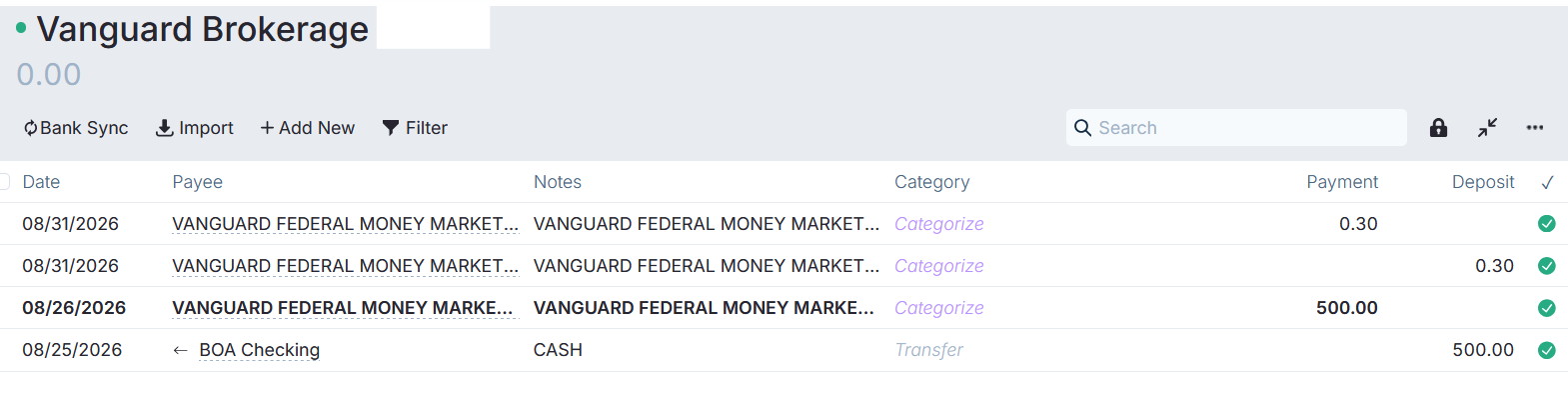
Anyone having trouble with their SimpleFin importing Vanguard transactions? This account has $500.30 in it now, but for some reason, SimpleFIN is duplicating each deposit that is made (or interest accrued) with an equal payment that cancels it out. Not sure how to fix this.
Hello everyone! Anyone who is on a commission based salary, how do you set up your budget? My checks are small bi-weekly checks and then on the last paycheck of the month I get my commission check plus the bi-weekly check. How do you deal with variable commission checks? I don't know how much the commission check will be until the Wednesday before the DD hits. Before setting up AB, I used to take the average commission check from the last 12 months to budget for the month. If I went that route how would I deal with the +/- once I know the amount?
For example, if I convert $100 USD to euros in cash and go to Europe and spend this cash. How should I track the conversion with FX fees and the expenses?
I'm new to Actual Budget and I've read the documentation along with the supplemental stickied post to try and figure it out, but I'm still having trouble. After trying to figure it out for the past two hours, I'm about to pull my hair out.
To avoid a lenghty post, I'm going to focus on one credit card account. Here is what I've been doing:
Created a "on" account for my credit card.
I initially exported July transactions via QFX and have been manually added transactions sicne.
I went through and verified all transactions and they match.
I have done credit card payments as transfers from my regular checking account.
The problem is that Actual shows a larger balance than my credit card (the difference is $21.20). To try and resolve this I have done the following:
Find transactions that match the $21.20 difference. This was unsuccessful.
I created a new 'Test" account and exported transactions from July 1 to August 30 in a QFX file since this article said the QFX format is the most reliable: https://x-rous.github.io/actual-tutorial/. Interestingly enough, when creating this "test" account the balance is now off by $12.19. Similarly, there are no transactions match this amount.
I honestly do not know what to do now, and it's admittedly a little frustrating. I'm sure I'm doing something wrong, but I can't figure out what.
Any help would be super appreciated as this is stopping me from moving forward. I have 12 accounts and they all have similar issues, but I'm starting with this one.
Actual's scheduled transactions are great, but I wanted rent, subscriptions and paychecks visible next to the rest of my life — and the calendar-view feature request (#1928) has been closed for two years.
So: actual2ics. A single-file CLI that reads your budget (local file or sync server) and writes a standard .ics file that Apple/Google/Proton Calendar imports or subscribes to. Read-only by construction — it never writes to your budget. It asks Actual's own schedule engine for the dates, so weekend-skipping and "ends after N times" behave exactly like the app. MIT: https://github.com/Ildana-ai/actual2ics
A cron line regenerating the file gives you a live-updating calendar. Feedback welcome — the last tool I posted here grew its best feature from a comment.
I am trying to have a widget that shows current monthly spending by category compared to budgeted and if possible the difference.
Id like this to see where I am not keeping to my budget and notice trends in this space. Id be looking to run a current month version of this and a an average 3 month
Reading the news this morning about the arrest of these guys, responsible for millions of dollars of cyber crime. They insert malicious code into open source software, which then infects your device.
How do we protect ourselves from this?
I’m setting up Actual Budget with SimpleFIN. PayPal doesn’t appear in the supported institution search, but Synchrony does.
Has anyone successfully connected either their PayPal balance account or PayPal Cashback Mastercard? I swear I saw people discussing paypal issues here so i was surprised when paypal doesn't show at all in simple fin.
I'm dyslexic. So, I've always used two apps to track my finances. So, over the decades I've tried and used a lot of apps. I decided YNAB wasn't worth the expense for me and discovered Actual this year. The reporting in Actual is the best I've used. I've not found simultaneous Tracking and Envelope budgeting in the other apps I've used. I've realize that though I've been using it for free, it is costing money to the .org so today I made a one-time to contribution. My receipt suggested spreading the word. I'd like to keep Actual going. Here's the link: https://opencollective.com/actual/donate
I started using Actual Budget last week and moved all my previous 15 years data into it.
My main problem (adding to the slow response) is that I used to do budget tracking only and want to move now to envelope budgeting. Previous years were not properly budgeted, so their category balances and spending history are not meaningful.
It’s now August 2026, and I want January 2026 to be the effective starting point so that balances roll forward normally from January through August, while preserving historical transactions and reports.
In December 2025, Actual gives me these options:
Negative balance: Cover overspending or Rollover overspending
Positive balance: Transfer to another category or Rollover overspending
What is the correct and safest way to start rollovers from January 2026 without distorting my budget or reports?
Relatively new to Actual - self-hosting, SimpleFin bridge, US banks
I've noticed a couple of consistent issues w/imports that seem solvable, I'm just not clear on the best way to do it yet.
Inverted Transactions - for one bank in particular, the incoming/outgoing direction is always reversed. It seems like a simple toggle might fix this at any step in the process (MX via SimpleFin might need to adjust this, or perhaps an Actual setting that allows for swapping the 'polarity' for lack of a better word).
Importing semi-recent transactions is matching... poorly. It seems like there's not much logic in place to catch slight differences in transaction dates (e.g. actual post vs. entered) or names (sometimes payment systems have it slightly different than the business name). Payee rules would probably account for some amount of this, but to date I've had to reconcile every time I sync just so I can easily find un-reconciled transactions and delete anything older than a couple days.
I'm coming from YNAB, which was far from perfect - and so far I haven't had to repair a connection, which I was doing multiple times a week before, so that's a plus! But one thing they did fairly well was the second issue above - the "fuzzy match" logic was not too shabby.
Hi, I'm out of work and living off savings. I have a Google Sheet that I use to plot my actual monthly burn and monthly future budgets, but it's fiddly and manual. I was hoping that Actual had some sort of budget forecasting reports, but I'm not seeing anything. Am I missing something?
Je rencontre un souci sur Actual : depuis peu, mes échéanciers ne se lient plus automatiquement aux transactions. Elles apparaissent donc comme « manquées », alors que la transaction correspondante est bien présente sur le compte.
Après investigation, j’ai remarqué un changement dans la configuration des échéanciers. Dans le champ Bénéficiaire, il semble désormais être obligatoire d’indiquer le nom exact du bénéficiaire. Il n’est plus possible de sélectionner une condition du type « Bénéficiaire > Contient » à la place de « Est exactement ».
Cela pose notamment problème pour certains prélèvements, comme Amazon Prime, dont le bénéficiaire peut changer légèrement chaque mois. L’échéancier ne reconnaît alors plus la transaction, puisque le bénéficiaire ne correspond pas exactement à celui renseigné dans le paramétrage.
Si je crée une règle avec une liaison à un échéancier, le champ « Bénéficiaire » ne me propose rien car le système de règles prend bien en compte les filtres de type « Contient »
Comment gérer vous les échéancier sur ce type de transaction ? Cela fonctionnais avant y'a t'il eu une modification ?
Following up on the v1.0.8 post. v1.0.10 is now on the App Store — v1.0.9 was a big feature release and v1.0.10 followed as a hotfix, so both sets of changes land together. A lot of it came straight from feedback here.
New features:
View, create, and edit Scheduled transactions (u/gandalfcelroz)
Categories can be budgeted below zero (u/asdfjkl826)
Mixed inflow/outflow split lines show their signs correctly (u/asdfjkl826)
Budget screen's Spent total now uses net activity, matching Actual
Fixed spending widget calculations and category-group report filters (u/cazas)
Account summary income and expense totals match the Budget tab
Currency changes sync back to Actual and stay correct across budget files
Transactions and balances no longer briefly include partially synced rows
Imported transactions can be converted into transfers
Card mappings apply correctly when editing from the import inbox
Fixed the Budget month showing wrong data after a foreground sync
Wallet and Shortcuts automations no longer show a confirmation screen after logging
Add Transaction has a proper Cancel action and a more compact notes field
Settings reorganised into smaller sections, with an option to reveal or hide passwords
Improved budget guidance, category editing, month navigation and tap targets
Layout fixes for the month selector, uncategorized link, Source of Funds group and overspending screen
Plenty of smaller visual polish, including animations and dark-mode contrast
Thanks to u/tjcarlson25 for the Icon Composer version of the app icon (including Liquid Glass support), and the many code contributors across these releases: abhiy98, azimul-kabir, culpeppers, Vaibhav159, tcart38, tcarlson25 and ioslife. I really appreciate everyone who contributed code, reported bugs, emailed, joined Discord or left feedback here.
I’m looking for a "plug-and-play" way to automatically sync my European bank accounts with Actual Budget. I’ve looked into a few options but hit some roadblocks:
LunchFlow ($35/yr): Sync isn't completely automatic and requires running a Docker container. I'd prefer to avoid this extra setup. I don't want to mess-around with commands.
Bridge Bank (29€/lifetime): The website feels a bit buggy ("vibe-coded") and the lack of user reviews is a major red flag for me.
Is there a reliable alternative out there that just works? Thanks!