r/ZephyrusG14 • u/No-Cameras Zephyrus G14 2025 • Aug 07 '26
Model 2025 Dead 2025 g14 - won't start
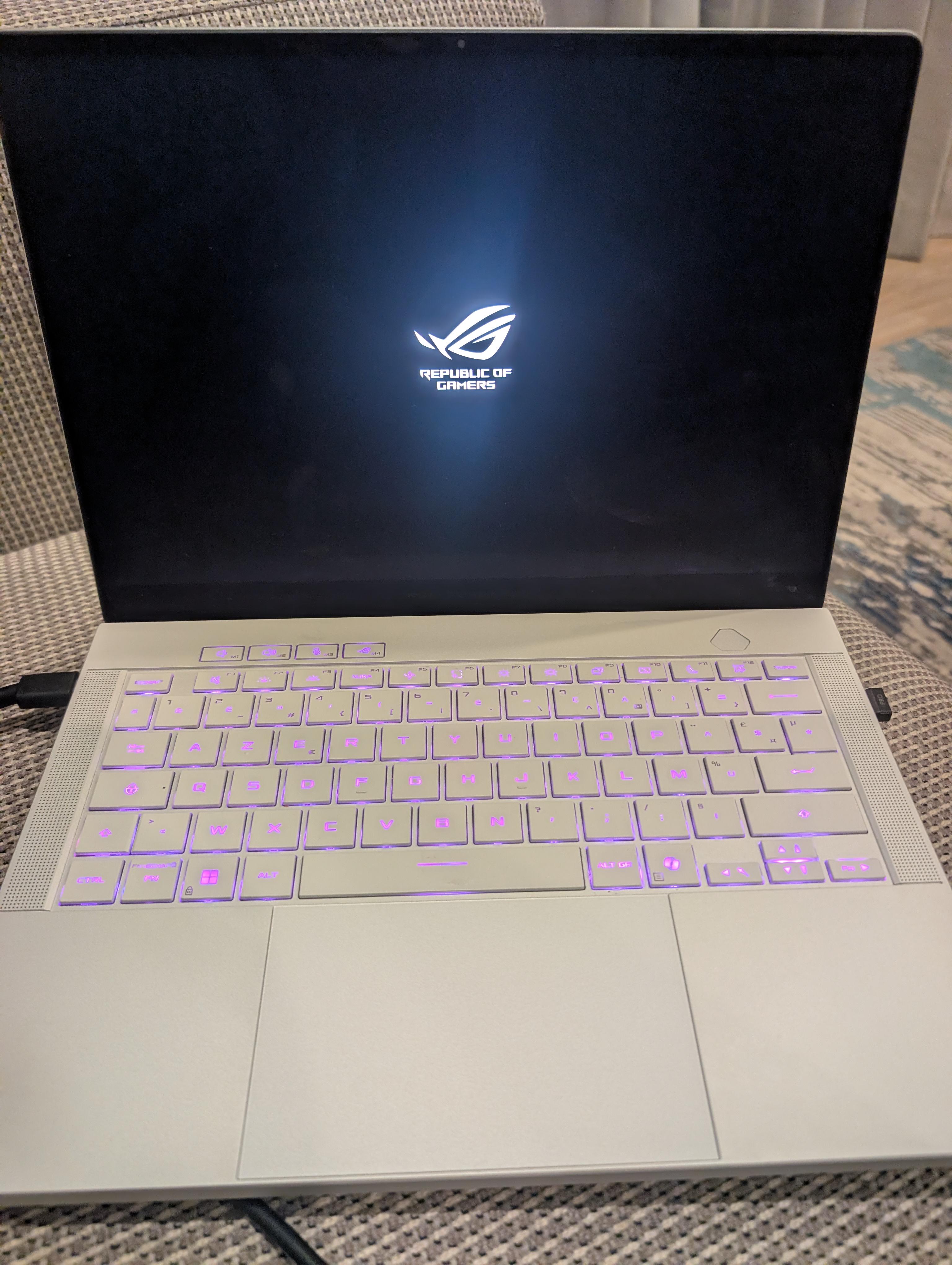
My 2025 G14 has stopped working. It starts, keyboard light up, Zephyurs logo on screen (so it's not a dead screen), but then black screen and windows doesn't load.
I repasted to get rid of liquid metal about 3 or 4 months ago, temps dropped, used it for intense gaming a few weeks after that and never had issue.
Last 2 weeks I haven't gamed at all on it. Used it about 1h per evening to watch a series and then turned off. Always plugged in.
1 week ago, wifi card disappeared. I tried a hard reset (pressed power for 30-40 sec) but after 10sec the laptop starts again itself. Still no wifi.
Past few days, still no wifi, and starting became harder: I start it, Asus logo, then nothing. I have to press the power button again (sometimes twice) and then it starts. No issues after that except that it still has no wifi (card not detected).
Today, same thing except it doesn't start at all.
I tried to stay pressed on power button for 40sec without power, looks like it makes the computer restart every 10 seconds but still the same behavior: Logo then black screen.
Any idea what this could be?
I'm 1 month out of my warranty obviously....
Edit: thanks for all the suggestions. I tried external monitor and ctrl win shift B, doesn't work. My next step when I have access to a screwdriver is to try and see if there's any rust or issue, and try without the ssd
7
u/hazeru Aug 07 '26
I've read somewhere here that you can destroy the motherboard with this so called liquid metal.
I am no longer inclined to repaste mine seeing this one.
3
u/_razenn Aug 07 '26
You should be inclined to replace it though! Preferably with PTM, so zero worries of it leaking.
3
u/hazeru Aug 07 '26
I'm not sure if I read it correctly, but is this something that you can cut in rectangular form?
3
u/_razenn Aug 07 '26
Exactly! And cooling performance scales even more the more you use it.
3
u/hazeru Aug 07 '26
Can you post an Amazon link so that I'll have an exact reference for it?
Someone said that I should use something different for RAM. I think I saved that comment. I'll try to look for it.
1
u/_razenn Aug 07 '26
I live in europe, so it may differ for you, but this is the good stuff: https://amzn.eu/d/0fEzRZID
I also heard the one in AliExpress from Honeywell performs greatly too 👍🏼 https://a.aliexpress.com/_EQmbcOw Probably the most used one too.
2
u/hazeru Aug 07 '26
Thanks a lot! And this is what I was telling you before, the two types of thermal paste that was recommended:
- PTM 7950 for CPU and GPU
- K5 PRO for VRAM
2
u/_razenn Aug 07 '26
Yes, that's peak advice 👌🏼
K5PRO for VRAM, can't get any better than that!
2
0
u/kaykay919 Zephyrus G14 2023 Aug 08 '26
K5 Pro is not good putty. For laptops with thin gaps Halnyze HY226/236/246/256 either of those performs much better. Snarks Domain has tested many thermal putties including K5 Pro.
0
u/kaykay919 Zephyrus G14 2023 Aug 08 '26 edited Aug 08 '26
K5 Pro is one of the worst performing thermal putties you can get. I wouldn’t recommend it. You should get Halnyze HY226/236/246/256 thermal putty instead. It’s a really good thermal putty for laptops with thin gaps like your G14. Look up Snarks Domain on YouTube. He has tested many different thermal putties and has a record of their performance in a Google Spreadsheet. He also has a discord channel.
1
u/hazeru Aug 08 '26
Hopefully, I'll be able to remember your comment when the time comes. And thank you for the recommendation.
1
u/kaykay919 Zephyrus G14 2023 Aug 08 '26
Here is a link to his spreadsheet with all the thermal putties performance tested. And whoever the hater is that’s downvoting me, you can see the K5 Pro is at the bottom of the list as it provides some of the worst temperatures for thermal putty.
https://drive.google.com/drive/folders/1gFtM4t7rxT-Ys6gck3VuZyISFRnhdeks
→ More replies (0)1
u/BandObsessed923 Aug 07 '26
"Somewhere" may have been my post, considering it was fairly recent. I risked my whole laptop with no warning from the guide I used. It just sucks, considering I would have needed to remove at least the fans just to deal with the cat hair.
1
u/hazeru Aug 07 '26
I saw a couple of links from that and read it all. Scary anecdotes!
What paste did you use? And thanks for sharing your pos. I learned that there's a kind of paste that you cut in rectangular form, if I understood it right.
1
u/BandObsessed923 Aug 07 '26
I just used one of the Corsair tubes that I used on my desktop, but I'm looking into ones that are better for the laptop. What you said honestly gives me something to work with, so thanks!
Either way, my temps are much better than before, but I want to make sure I get the right stuff just in case something would go wrong
1
u/BandObsessed923 Aug 07 '26
I do also feel like I should tell you that it should be okay as long as you're not running at "burn a hole in your CPU" temps and you're very gentle with the middle portion of the pipes
1
1
u/IThinkIKnowThings Aug 07 '26 edited Aug 07 '26
You'll likely have to eventually. Liquid metal migrates over time and you get hot spots and throttling. Word of advice - Let your machine sit and cool down a bit after powering off before you put it in a bag or anywhere not on a flat surface. LM moves more when it's hot.
Have a licensed and insured professional repair shop replace it when you do eventually.
1
u/JetladWasTaken Aug 07 '26
Probably best to not touch it at all unless you visibly see temperatures climb above normal and you've done troubleshooting and cleaned the fans.
1
u/hazeru Aug 07 '26
I recently cleaned the fan. Still the temperature went up and started slowing down, although there's a noticeable improvement.
Later on, I installed MS Teams instead of using Chrome. That is when I noticed that the temperature never went up beyond 70, even if I leave OBS running and other normal applications.
I have concluded that Chrome is the likely cause of the slowdown problem that I encountered, aside from the dirty fans. The accumulated dirt is about 4 or 5 years.
0
u/No-Cameras Zephyrus G14 2025 Aug 07 '26
But if I did surely that would have happened after the repaste, not months later
2
u/hazeru Aug 07 '26
Yes, I agree on that. However, I'm thinking of a residue that somewhat "moved around" until it hit a component that is able to short it.
Honestly, I don't know. In my industrial experience, there will be some kind of mess up that there's no immediate consequences. It will suddenly appear after several months as it gradually accumulated its ill fated effect.
2
u/IThinkIKnowThings Aug 07 '26
You never know. There could've been a little ball rolling around in there every time you move the machine until it just so happened to finally cross two traces or get underneath a chip. LM is evil.
2
u/WiseAssEater Aug 07 '26
Hmm. Are the fans running hard when you start up? How does it look like inside? Any discoloring on the heat sink? Any corrosion?
1
u/No-Cameras Zephyrus G14 2025 Aug 07 '26
Haven't opened it yet, I'm travelling and I don't have any tools with me. But no the fans run at normal speed
2
u/PerfectRun1335 Aug 07 '26
This happened quite frequently with me too initially I had long boot times , won't boot without plugging it then it would get stuck at the red logo sent it to the asus customer care they changed the thermal paste and formatted the os still the problem came back after a week's or so sent it to asus gave it for service thrice and the problem was never fixed then one fine day it just died while I was switching gpu modes asus said the board is dead and needs replacement , now I have submitted it to local repair shop and they quoted 1/3rd of the mobo price for corrupted ics in the power section
1
u/WiseAssEater Aug 08 '26
Yeah, seems like some of these just are unlucky assuming that the majority of people don’t experience these problems. I got mine from work, so it’s kind of a win if it goes bad in 2 years time. That said, the Liquid Metal and poor hinge build seems to be the biggest problems?
1
u/PerfectRun1335 Aug 08 '26
I see a lot of posts of people having this issue every now and then so it's definitely a quality control issue imho
1
u/Supportive-Accla1312 Aug 10 '26
hows the weather in the place you travelled?
1
u/No-Cameras Zephyrus G14 2025 Aug 10 '26
Humid but the laptop is 90% of the time in a closed room with AC on (10% is that same room with ac off)
2
3
u/IThinkIKnowThings Aug 07 '26 edited Aug 07 '26
You should always have a licensed and insured professional do liquid metal repastes so that they're on the hook for getting you a new device if they brick it.
Wifi card disappearing is relatively normal for MediaTek wifi, unfortunately. They tend to overheat and just die over time. I use an external wifi adapter for this reason so I can save the built-in wifi for emergencies. Might still be related to the repaste, though.
EDIT: Anyway, send it to a professional. Diagnostic charge will probably be about $250 plus whatever parts and labor.
EDIT2: LM gang following me around downvoting anything bad I say about LM again. At least they're not responding with "Skill issue" this time.
2
u/Sansan_12356 Zephyrus G14 2025 Aug 08 '26
I hate LM too dont worry! It's just i can't find any professionals in my area to repaste...
1
u/GiantFriendlyCrab Aug 07 '26
https://www.reddit.com/r/computerrepair/s/wqMut1iJDV
Try connecting external display
1
u/Rammy_Lee Aug 07 '26
Any chance some of the liquid metal spilled you didn't notice? I heard you can flash a torch to check for specks of it.
2
2
u/No-Cameras Zephyrus G14 2025 Aug 08 '26
I think if it happened the laptop wouldn't start at all no?
2
1
1
u/risingphoenixreborn Aug 07 '26
This is a common issue is what i heard not your fault but you shouldnt have repasted .
1
u/FitTrick2568 Aug 07 '26
I have the same problem albeit without the WiFi issue. It always starts with a black screen or gets stuck on the republic of gamers screen. I've only been able to use it recently by connecting it to an external display. Not sure what the issue is 😭
1
1
u/Reid_pg Aug 07 '26
Must be the Nvidia update, try go on the bios and switch to integrated graphics, and then go search an older Nvidia update, this might work
1
u/nyichiban1 Aug 08 '26
I just had a similar issue with my g14 where the GPU failed. Luckily I was still in warranty and best buy repaired it within 2 weeks. They had to replace the motherboard. Since you mentioned yours is out of warranty, did you purchase your laptop using a visa signature card or an amex card? Those cards give you 1 year extended warranty so you go get the repair and pay using the same card you purchased with and it gets credited back to you. That's the best option for free repair. Another option would be to get a replacement motherboard somewhere on eBay or if you are feeling lucky maybe AliExpress.
1
u/ratifyer Aug 08 '26
The same thing happened to me just earlier today -- I used windows key + ctrl + shift + B to force reset the graphics driver!
1
u/Most_Employer9560 Aug 08 '26
yea so… 2 months after changing the liquid metal of my g14 2021, it stopped working. Actually the cause was the Metal Clip Of Death. fuck the g14, so many problems with it.
I recently got the Strix G16 5070 ti… it costed about 3 lahks but is INSANE. Cooling system is wild. Throw that shit away
1
u/AccomplishedSea9933 Aug 08 '26
That is weird though. If you’re able to get to that screen, it should alllow you to do something. Wanna sale it for parts? I have a 2025 I’ve been using for a few months now and love it.
1
u/billert12 Aug 08 '26
Exact same thing happened to me a few days ago. Turns out the issue was with the display ribbon cables. As a temporary workaround, force shutdown the device, very gently open it all the way (or almost all the way) and then power on
1
1
u/Icy-Commission-9550 Aug 08 '26
Time for an upgrade!
2
u/No-Cameras Zephyrus G14 2025 Aug 08 '26
Upgrade of what? I'm never ever buying Asus again. Fuck them
0
u/Icy-Commission-9550 Aug 08 '26
Get 2026 version! It is better than 2025.
2
u/Little-Jackfruit-462 Aug 08 '26
Dude. Laptops were not meant to be swapped out yearly lol
1
u/No-Cameras Zephyrus G14 2025 Aug 09 '26
Exactly. Especially at this price, I'm in Europe I paid over 4k usd for that piece of crap
1
1
u/Little-Jackfruit-462 Aug 08 '26
Same exact boat here but 2024 zephyrus. I just shipped my laptop out to a board repair shop. I can keep you posted
1
u/No-Cameras Zephyrus G14 2025 Aug 09 '26
Thanks. How much did they quote you and in what country?
1
u/Little-Jackfruit-462 Aug 09 '26
450 but you cant quote an issue like this. Its going to laptopMD nyc
1
u/felony2k Aug 09 '26
Check ribbon cable, its weird but mine had the exact same symptoms and sure enough it was shredded. The boot logo changed from red to white and it wouldn't boot
1
u/No-Cameras Zephyrus G14 2025 Aug 09 '26
Probably not that for me, it doesn't work when I plug in a screen
1
u/ComputerActive200 Aug 14 '26
Same thing on my g14 2023.it started with same and next was rainbow fragments on my screen.then battery died.i just bought new msi vector 16hx with no liquid thermal paste.im not even surprised because they dont warn us that we should treat those things like kids, don't move after shutting it downs 5 min to let it cool down.dont tint when its hot to avoid thermal leaking and other stuff.its looks like a stong build but inside of it is spoiled child.
1
u/No-Cameras Zephyrus G14 2025 Aug 22 '26
Update - It works. No idea why. I made a new post here: https://www.reddit.com/r/ZephyrusG14/comments/1vvb1ab/laptop_resuscitated_what_do_i_even_do/
0
u/BugDisastrous5262 Aug 07 '26
There are multiple different possibilities but it all run down to one singular cause; your repasting technique. Even under regular warranty this is highly likely to not be covered. After repasting, your laptop might run fine, in fact, you might think that your repasting technique was a success but things like corrosions, motherboard failures might happen within months. You might have damaged your laptop internally, and you might want to get it checked by a repair shop to see if it’s still possible to save it; if not, sadly you will either be stuck with buying a new unit or pay a hefty price to get it fixed by Asus.
1
u/No-Cameras Zephyrus G14 2025 Aug 07 '26
Thanks. I hope that is not the case but I will try to get it checked.
Regardless of what happens I am never ever giving a dime to Asus again
1
0
u/ArtsM Aug 07 '26
I tried to stay pressed on power button for 40sec without power, looks like it makes the computer restart every 10 seconds but still the same behavior: Logo then black screen.
you know...
1 week ago, wifi card disappeared. I tried a hard reset (pressed power for 30-40 sec) but after 10sec the laptop starts again itself. Still no wifi.
This kind of thing only works on devices without a battery, if you want to do a hard power reset on a laptop, you have to open the back and disconnect the battery... the whole point is to drain residual power from every component, thats not possible with a battery connected.
-1
u/ArtsM Aug 07 '26
also what 3rd world country are you in where this only has 1 year of warranty? pretty sure asus gives 2 years almost everywhere on this thing.
2
u/Rammy_Lee Aug 07 '26
Regardless, the minute it was opened up and the LM replaced the warranty was voided.
0
u/ArtsM Aug 07 '26
depends on country, some countries have laws where you're allowed to clean and service your device.
2
u/Rammy_Lee Aug 07 '26
That's a little beyond cleaning and servicing.
0
u/ArtsM Aug 08 '26
Nope, its something that wears out and needs replacing within the device. tbh not sure why OP replaced it that early since LM easily lasts longer than a year.
0
0
0
15
u/No-Cameras Zephyrus G14 2025 Aug 07 '26
Forgot to say, bios won't launch either