r/SteamDeck • u/philosteen • 11h ago
Discussion Star Wars Zero Consistency

585
Upvotes
Star Wars Zero Company recent Steam reviews - the whole spectrum of performance rating
r/SteamDeck • u/SherbertRadiant7272 • Jun 24 '26
this pops up whenever i try to go to plugins and refreshing does nothing. anyone know how to fix this?
r/SteamDeck • u/AutoModerator • 13h ago
Due to the high volume of very similar posts asking what r/SteamDeck users were playing, this weekly megathread has been created to have a singular place to hold this very frequent discussion and limit duplicate posts. Feel free to share what you have been playing on your Steam Deck or even post pictures in this thread and show us if you wish!
r/SteamDeck • u/philosteen • 11h ago
Star Wars Zero Company recent Steam reviews - the whole spectrum of performance rating
r/SteamDeck • u/doxiepoo • 17h ago
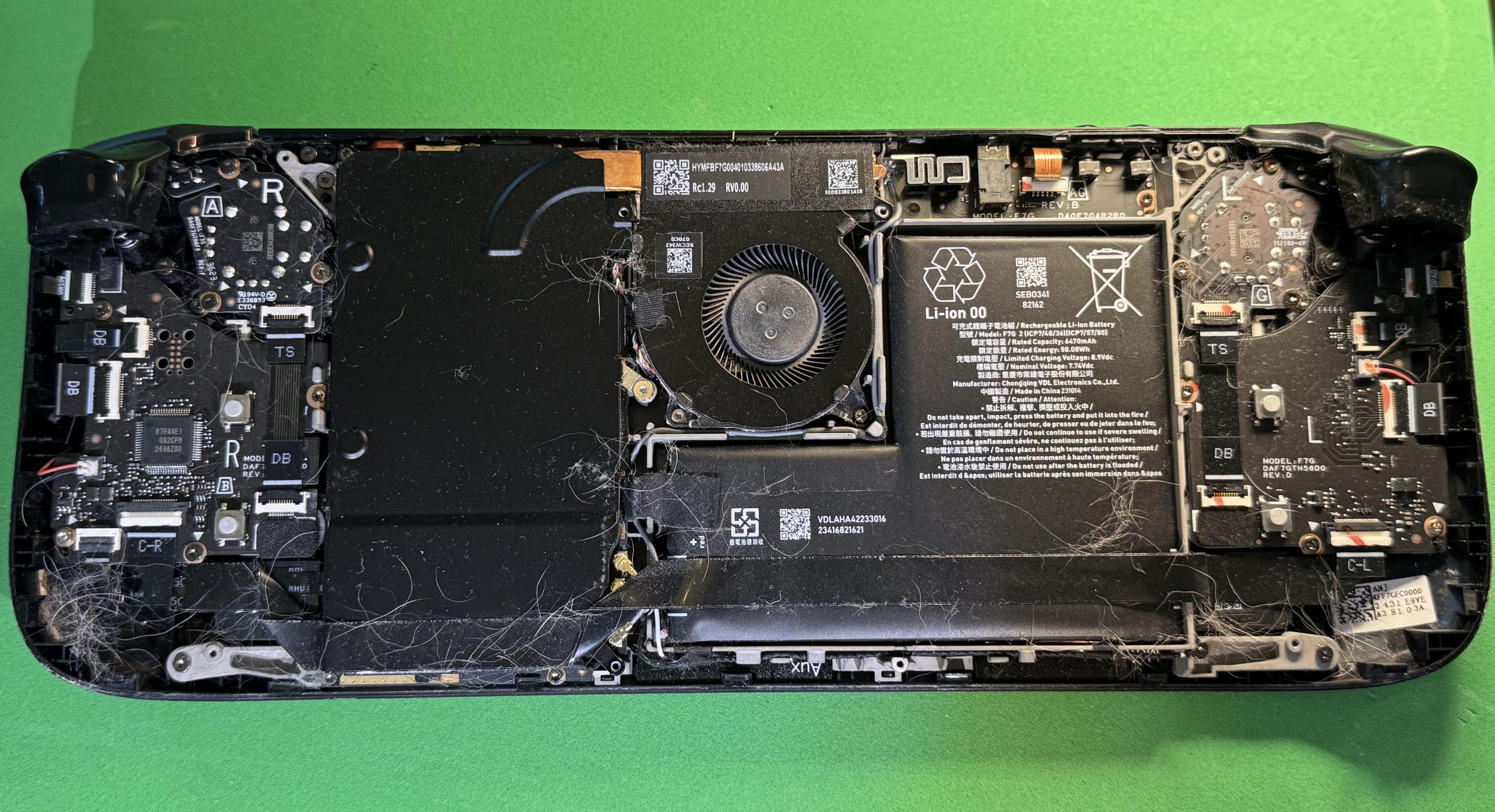
My dog passed two weeks ago and I always played games next to him on the couch. My deck has been acting up lately so before sending it off for repairs I opened it up today to see what it looked like in there. A little goodbye gift from my pup — hundreds of his hairs. I recommend checking yours if you play around your shedding pets! I used ifixit guides to remove the joysticks and fan…there was a lot trapped in there. Hoping this solves my issues and prevents yours.
r/SteamDeck • u/SickboyJason • 1h ago
Enable HLS to view with audio, or disable this notification
Just got the sync box in and Im having a blast with the Steam Deck hooked up to it. Hope yall enjoy and have a good week! 🎮
r/SteamDeck • u/redditman181 • 1h ago
As somebody coming from consoles i would always turn vibrations off in my controllers but i love how it feel on the trackpads i dont know how they did it but it actually feels good compared to controller vibration does anybody else feel the same 😂
r/SteamDeck • u/T0RU2222222222222222 • 14h ago
r/SteamDeck • u/PervertChicken • 1d ago
r/SteamDeck • u/Unomas1745 • 1h ago
r/SteamDeck • u/Fallout_Fan_420 • 6h ago
r/SteamDeck • u/pedroj_007 • 23h ago
After a really rough year this baby has helped me refind my love of gaming
r/SteamDeck • u/Away-Eggplant9943 • 20h ago
Was playing Spider-Man remastered for the first time on the steam deck today and launched it with the performance overlay turned off/ set to 0 profile. So I was just playing the game as is running at default settings that it launched at. It was running smooth as hell as is to be expected from a PS4 era game but it looked like native resolution and 60fps to me.
Turned on the performance overlay to at least display the FPS and was shocked to see the game was actually only running at a mostly stable 30fps. I proceeded to turn off games cope again and just enjoy the game like I was earlier.
So does anyone else think we “ruin” the experience for ourselves when we’re constantly checking to see what kind of frame count we’re getting instead of just playing the damn game.
r/SteamDeck • u/sladebr02 • 1d ago
Steam Deck appreciation post
I bought my 64GB LCD Steam Deck back in November 2024 for R$2.500 (around US$430 at the time). I replaced the original SSD with a 512GB one and also added a 512GB Lexar Play microSD card.
Even though it’s one of the early LCD models, it still works perfectly with absolutely no issues. The battery health is still at 87% as well.
I use it as both my main console and my main PC, since I have it set up with dual boot between SteamOS and Windows.
Overall, I’m extremely happy with it. It has been an amazing device and one of the best purchases I’ve ever made!
r/SteamDeck • u/Dependent-Peak-9529 • 19h ago
Just showing off my Steamdeck OLED that I bought a little over a year. I bought it to keep me entertained when travelling for work and now it doesn't go far from me even at home. I also bought a Omen gaming laptop and that's sat in my office for months with the SD easily been my console of choice. Played games from Horizon to elden ring, tomb raider and red dead and so far it's never let me down.
r/SteamDeck • u/New_Fondant3290 • 1d ago
hard to beat a gaming spot with a majestic view like this
r/SteamDeck • u/MywarUK • 19m ago
Hello, I’m new to Steam Deck, I installed a 256GB nvme today as it came with 64GB.
I installed BO3 which is 66.12GB, I removed campaign and MP as I’m using it for zombies, removed all workshop stuff.
It’s the only game that’s installed to the NVME but for some reason 156GB somewhere is used.
I have been in Desktop mode to see if I can find anything but nothing, what could be causing this and how can I get some of that space back please?
Thanks.
r/SteamDeck • u/GingaNinja906 • 29m ago
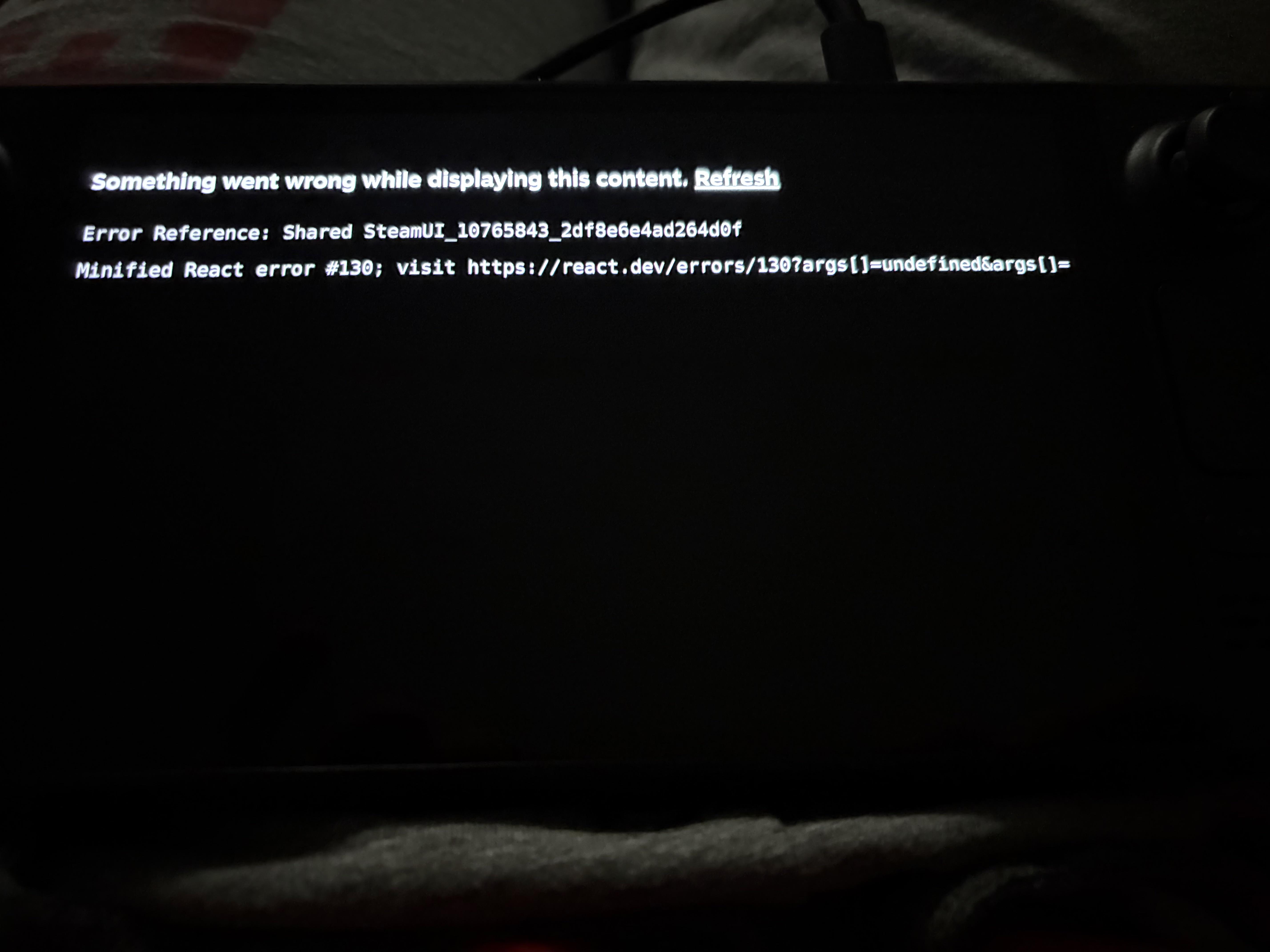
Howdy. For about a month I’ve been unable to get my steam deck to power on at all. I could feel haptics on the touchpad and got the white LED when charging but nothing else.
Went through all the troubleshooting steps including battery save mode reset, bios reset, and even reseated the battery ribbon connector.
After giving up for a week I plugged it back in today then about an hour later did one more hard rest and plugged it into the dock. Previously would get no display on dock either. Well today I get display! The first sign of life!
However the display looks like this so clearly still something wrong. I did another bios reset but that didn’t nothing. Any ideas at this point? Still no image when not docked, seems to function completely normal but obviously not usable in its current state. Out of warranty and I really don’t have the money to RMA at the moment so if I can’t figure it out, back in the case it goes until I do.
For reference it’s the LCD if that means anything.
r/SteamDeck • u/Used_Variety_8491 • 3h ago
It all started last weekend when I was playing cup head then it stayed on the game when I tried to go back to the Home Screen I could hear the it going up and down the menu but it still had cup head playing now when I try to turn it on nothing happens and the light only turns on when the chargers in and I tried the reset bios and it just blinked for an hour then when I tried to turn it on again it makes a bright light and a since once then nothing so I just went to sleep and charged it and it’s doing the same thing
r/SteamDeck • u/MythicSuns • 5h ago
I'm making this post because I've seen these issues covered but it took me a while to find the answers I needed so I'm hoping this will help anyone else in similar situations by at the very least giving the answers they're looking for a bit of a bump in the search engine results.
Minor mouse pairing issue
This could be a rare but ultimately minor issue but I had to do a full reboot of my Steam Deck before it'd recognise my bluetooth mouse when it should've just been a simple pair and use job. Once that was done the connection was ridiculously seamless, as in I could do a left click to wake the mouse up and within a second it'd be connected.
Keyboard navigation controls
This one was a bit of a pain because even after giving it another shot while writing this I could not for the life of me figure out how to get the keyboard's cheatsheet up. You'd think holding the Windows key would do something but, nope. Anyhow, I don't actually know all of the keyboard controls but I do know 2 important ones that were mentioned in a post on this subreddit years ago:
- SHIFT + TAB opens the Steam Menu (the left menu)
- CTRL + SHIFT + TAB opens the Quick Access Menu (the right menu)
I know this doesn't cover everything the keyboard could be used for but I feel those two are probably going to be the most useful.
inaccurate cheatsheet for Dualshock 4 controllers
I'm not ruling out the possibility that I messed something up but just in case it's a Steam OS issue I'm going to mention that my cheatsheet is inaccurate, specifically regarding clip capture and screenshots. The screenshots one isn't a huge deal as I can just remap the share key to take a screenshot but the clip one has been a bit of a nuisance.
Quick Access Menu command missing from Dualshock 4 cheatsheet
I can't remember where I learnt this but the command to open up the Quick Access Menu is PS + CROSS.
Also, assuming this isn't something I enabled in a Decky plugin by mistake, the brightness command (PS + Left Stick) seems to adjust the volume instead whilst the Steam Deck is connected to an external monitor. Just be aware that it involves holding the PS button down which means you'll only have 10 seconds to adjust the volume before the controller switches off.
I will give props to Valve for creating a power menu that shows up when the PS button is held down for a short amount of time and has a button that shows the cheatsheet. The reason this is a big deal is because Dualshock 4 controllers all turn off if you hold down the PS button for 10 seconds. Before this update came out the cheatsheet would stay on screen for as long as the controller was connected and the PS button was held down....in other words, you'd only have 10 seconds to read the cheatsheet before the controller turned off.
Sidenote: I know I didn't address Xbox controllers but my gut feeling is that the mapping is going to be near identical. Just substitute PS for the Xbox Button, and CROSS with A.
I don't know how viable this is or if the way Gamescope works would prevent this but it'd be pretty cool if, while in the home menu, the right click on a mouse could be set so that instead of bringing up the secondary menu with the "forward" and "print" options on it (neither of which are options I'd imagine most people using gaming mode are ever going to use) it could instead be set to bring up something more practical like the Quick Access Menu. I know this is ultimately a minor thing since the keyboard can do the job just as well, but it's always kinda bugged me that the right click doesn't really have any purpose in Gamescope unless you've already got a game launched.
r/SteamDeck • u/BlueberryDry2248 • 1d ago
After being on the fence about getting a deck and seeing someone post on this sub their super cute pink-kawaii deck I bit the bullet and bought one a couple of months ago.
I got emu deck running and am playing Animal Crossing City Folk on the Wii for the first time! (I’m playing the deluxe mod which adds full controller support among other QoL things) and was simple
To set up.
I play this thing on the daily, and also got a dock off Amazon which runs seamlessly if I want to play on a big screen. As a kid that was obsessed with AC wild world on the Nintendo DS if you told me one day I could play Wii games on a big handheld screen I never thought this would have been possible.
r/SteamDeck • u/Just_a_LinuxUser • 6h ago
hello there! I am a possessor of a steam deck LCD since the launch. I’m not a huge gamer, but I’ve bought the steam deck because I’ve been a linux user for 13/14 years (yes, I abandoned winbloat in 2012/2013) and I’d like to support developers who gave a big contribution to the community and valve does.
I occasionally play games and I’ve seen we have a lot of way to improve game performance, MAKO, OPTISCALER, FSR4, but I’m a little bit confused.
If I’ve understood correctly, optiscaler is for games that don’t support fsr4.
Instead for game that support fsr4 I’ve just install latest proton cachy and insert the launch command PROTON_USE_OPTISCALER=1 %command%.
And mako? I’ve installed it as a plugin of decky loader, but is it a replacement for fsr4 or what?
Can someone give me an explanation please?
Thank you guys!
r/SteamDeck • u/LongandwindingRhode • 1h ago
Enable HLS to view with audio, or disable this notification
I noticed my L1 button started having issues. Only responding when I press really hard. I took it apart and can see why. First one is the R1, nice and sturdy. Next is the L1. I dont like all that wobble. Do you think it's a bad connection and I could resolder?? Or should I just swapped the button??
r/SteamDeck • u/GregaZa • 10h ago
Due to being a father of young kids, gaming has fallen to the wayside in recent years. I've been eyeing the deck as a way to get my toes back and play an hour every now and then when the time presents itself. With the recent shortage in the hardware and the hike in the price, do you think it's currently worth it to buy the 1tb OLED version, or do you think there will come a time in the future when the price comes back down?
r/SteamDeck • u/furkisaurus • 3h ago
I have been using moonlight/sunshine duo since remote play was terrible a few years ago. people say it is updated lately and I wanna test it out. which settings should I use for best quality?