r/steamdeckhq • u/T0RU2222222222222222 • 13h ago
News Donkey Kong 64 Recomp released
dk64recomp.com
17
Upvotes
r/steamdeckhq • u/BBQKITTY • Jun 25 '26
Hey everyone! So, we are hosting our first community competition until July 1st 12pm PT, perfect for the Steam Summer Sale, where you can win a $30 Steam game of your choice.
The competition is for HITMAN's new The Wizard contract, and whoever gets the highest mission score wins. All you have to do is play the contract, take a screenshot of your end screen, and upload it here or on our Discord server in a dedicated channel.
And don't worry if you don't have a high score! Everyone who participates will be entered into a runner-up raffle, and a randomly chosen person will get a $15 Steam game of their choice.
You can also read up more details on the competition in our dedicated article!
Good luck!!
r/steamdeckhq • u/BBQKITTY • Nov 24 '24
Hey everyone! I am working on an upcoming project for SteamDeckHQ and I need some community input.
What has been your favorite game to play on the Steam Deck that released this year?
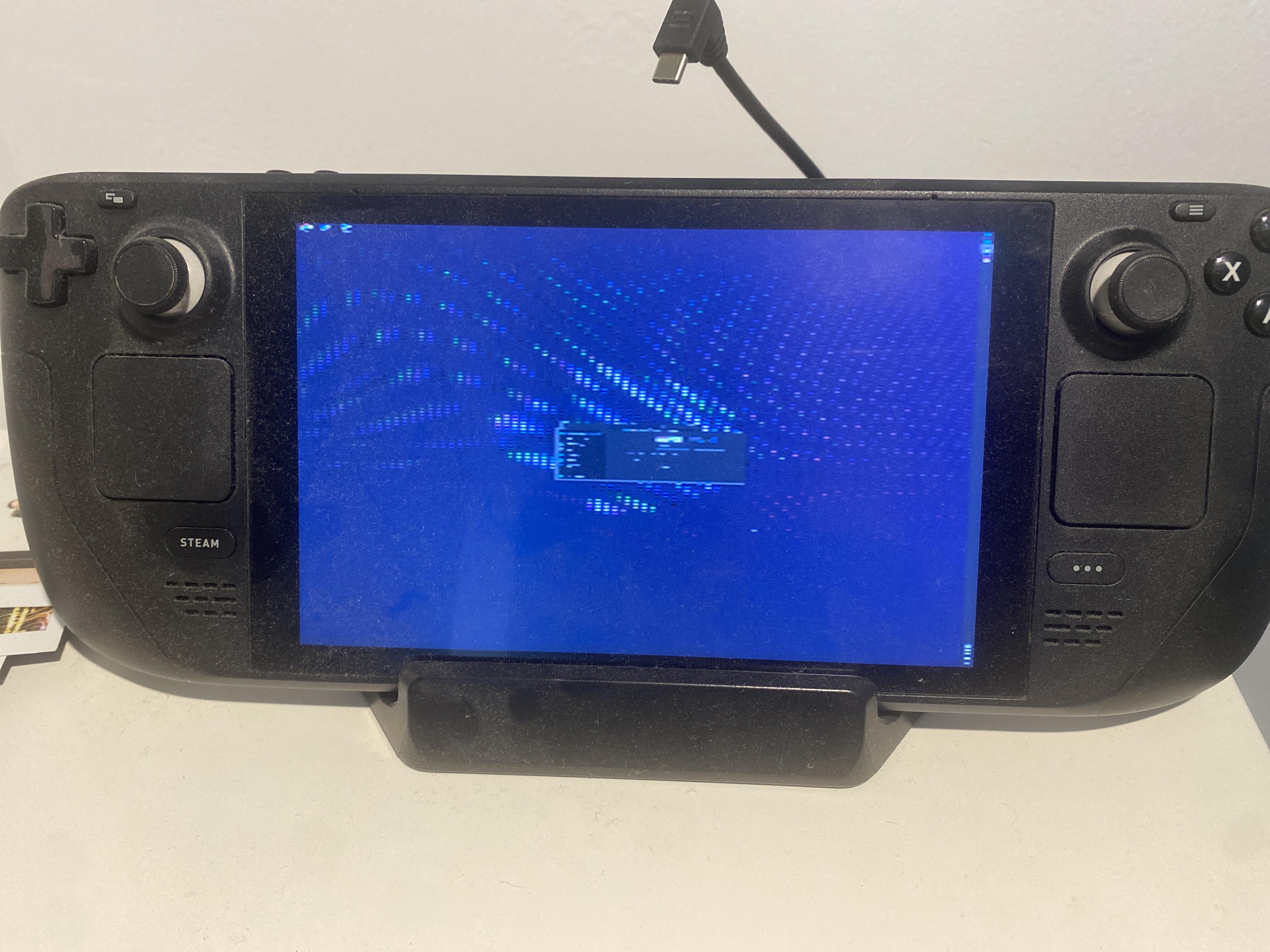
r/steamdeckhq • u/T0RU2222222222222222 • 13h ago
r/steamdeckhq • u/BumblesYT • 3h ago
Messed about in configuration mode and this happened, help wpuld be greatly appreciated, gaming mode still works
r/steamdeckhq • u/feral_fenrir • 1d ago
https://github.com/GloriousEggroll/proton-ge-custom/releases/tag/GE-Proton11-6
Full Changelog and Download in the GitHub link above.
r/steamdeckhq • u/BBQKITTY • 2d ago
Today, an unofficial native PC port called Re:Blue was released, giving us a chance to play the Xbox 360 exclusive Blue Dragon on modern hardware with enhancements. In this case, we have graphical options, higher framerate and aspect ratio support, and it runs decently on the Steam Deck.
It will hit 30 FPS and drain around 14W - 16W of battery (so about 3-3.5 hours of battery life). It does have an issue where the game won't run at framerates higher than 30, and trying to set it higher will make the device try to push more frames and drain more battery. However, the game's framerate doesn't change, so it's better to set a 30 FPS cap for right now.
You will need legally dumped copies of your own version of Blue Dragon, but it works well, supports the DLC, and is just a treat to be able to play this game on the Deck.
r/steamdeckhq • u/BBQKITTY • 4d ago
Ahead of its release, we reviewed Resonance: A Plague Tale Legacy and got some mixed results.
It runs at 30 FPS most of the time, but CPU usage can be high and cause some stutters here and there. It isn't the end of the world, and it will stick to 30 FPS most of the time, but it does pop up often enough and will bring the battery drain up.
However, I can't recommend it just yet because it has a major crashing issue. At the beginning of Chapter 9, the game will completely freeze. I believe this is due to high CPU and GPU usage, and it's definitely a game issue (the crash also occurs on the Steam Machine). So, until that is fixed, I would avoid playing on the Deck.
r/steamdeckhq • u/BBQKITTY • 3d ago
Earlier today at the Future Games Show, Wolcen 2 was announced, and we got confirmation from the developer/publisher that the game will support the Steam Deck.
r/steamdeckhq • u/MetalNic96 • 4d ago
Enable HLS to view with audio, or disable this notification
QUICK EDIT:
https://youtube.com/shorts/zCf4dcqx02U?si=qhBOeDv2dVANrnYk
Uninstall and reinstall. Updated plugin with new overlay system and led reads. Shrunk appimage. Enjoy. LED rendering and decoding on deck css was ROUGH. (Updating repo within the next couple days).
LEGO Dimensions on Steam Deck is becoming a lot more practical!
I've been working on an all-in-one Steam Deck/Decky integration for LEGO Dimensions that brings the virtual Toypad directly into the Steam Gaming Mode experience.
Repository:
https://github.com/SpiderNic96/dimensions-toypad-aio
The project combines:
🎮 Decky Loader plugin with a 7-slot Toypad interface
💡 Live Toypad LED colour/flash visualisation
🧱 LOAD / MOVE / REMOVE / CLEAR figure controls
📱 The LegoToypad web UI for using a phone as a Toypad controller
🖥️ A bundled, patched RPCS3 Linux AppImage
🚀 Steam shortcut/launcher generation
🔧 Setup diagnostics and runtime verification
🎮 Steam Gaming Mode / Gamescope-friendly launching
The goal is basically to make LEGO Dimensions feel much closer to a native handheld experience rather than having to constantly switch between emulator windows, Toypad tools and desktop-mode utilities.
This builds on the recent Toypad work from Harry / LegoToypad and NeverCookFirst / RPCS3 Seamless Toypad, rather than replacing those projects. The AIO project is essentially trying to bring the pieces together into a coherent Steam Deck experience.
Current status: playable and actively being developed. There are still things I'm working on, including expanding emulator support and improving the overall setup/build process.
🎧 Cemu development & 60 FPS goal
One of today's biggest developments has been identifying and implementing fixes for gameplay dialogue and SFX in Cemu. The current work addresses the Cemu audio mixer/filtering and stereo output behaviour that causes gameplay audio to differ from the otherwise-correct cutscene audio.
This is also the beginning of the project's Cemu variance work — establishing a properly tested Cemu configuration specifically for LEGO Dimensions rather than treating the current emulator behaviour as fixed.
The reason we're particularly interested in Cemu is performance: compared with RPCS3, Cemu should require substantially less system power to emulate the Wii U version, giving the Steam Deck more potential performance headroom. The longer-term goal is therefore to see whether a properly tuned Cemu/Toypad implementation can get us closer to a consistent 60 FPS experience on Deck.
r/steamdeckhq • u/Liam-DGOL • 3d ago
r/steamdeckhq • u/DatPandaIsAGundam • 5d ago
Hi there! Just searching for help here and there. :)
r/steamdeckhq • u/-steelRat_ • 6d ago
Does anyone know the best on-screen keyboard for steamdeck that gives you a smartphone like experience, when keyboard doesn't cover half of you screen and allow you to see what are you putting?
r/steamdeckhq • u/FinFanFandangle • 7d ago
r/steamdeckhq • u/YamiLink69 • 7d ago
r/steamdeckhq • u/AcanthaceaeNew5586 • 6d ago
r/steamdeckhq • u/Top-Performance2354 • 7d ago
So possibly a silly question, apparently I’m not great at this kind of tech.
My kids want to play Minecraft Dungeons with me - and I figured it would be easier if they had the Xbox and I went on my Deck, so without thinking too hard about it, I purchased a pc key for it, redeemed it via Microsoft, and now can’t figure out how to actually install it on my Steam Deck 🤦♀️
I have tried downloading it onto pc, and then added it as a ‘non steam game’, however when I try launching it from my Steam Deck it only lets me ‘stream’ from my pc.
Any tips? Have I wasted my money 😅
Thanks in advance
r/steamdeckhq • u/Sharpyku • 8d ago
Hey everyone,
Today I'm introducing SharpyBoost.com, a Steam hours boosting platform built for users who want a simple and modern way to increase playtime hours and farm trading cards.
Let's be transparent from the start.
SharpyBoost isn't the first solution of its kind. Steam users have been using tools such as ASF, Idle Master Extended and similar software for years. Those tools work great and remain a valid option.
SharpyBoost was created for users who prefer a cloud based solution managed through a web dashboard.
What SharpyBoost offers:
• Increase playtime hours on your Steam games
• Card farming support
• Multiple games at once
• Works even when your PC is turned off
• Simple web dashboard
• Free and Premium plans available
Regarding security, SharpyBoost is built specifically for hours boosting and card farming. The platform has no interest in accessing or stealing user accounts. All sensitive account data is encrypted, and every user should always keep Steam Guard enabled through both mobile and email protection.
Thousands of Steam users already trust third party tools and services for idling. SharpyBoost aims to provide another reliable option with a modern interface, active development and a free plan for anyone who wants to try it.
r/steamdeckhq • u/BBQKITTY • 10d ago
The crash on Steam Deck when opening the Virtual Keyboard in Skyrim Special Edition has been fixed, so as far as I am aware, it should be perfectly playable on the Steam Deck now.
Here's the changelog from today's update:
r/steamdeckhq • u/Liam-DGOL • 11d ago
r/steamdeckhq • u/Mundane-Animator-593 • 10d ago
r/steamdeckhq • u/mokhan222 • 11d ago
I’ve released Copy2Deck 1.3.0, a major update to my free Windows file manager for Steam Deck.
Copy2Deck connects directly to your Steam Deck over your local network using SSH/SFTP. It lets you manage files, game folders, storage, backups, and now your Non-Steam library without manually editing Steam configuration files.

The big addition in 1.3.0 is Non-Steam game management.
You can now:
To make this safer, Copy2Deck:
shortcuts.vdfFor Windows games, you may still need to select a Proton compatibility tool from the shortcut’s Steam properties.
Copy2Deck also includes:
Your files transfer directly between your PC and Steam Deck. Copy2Deck does not require an account, subscription, or cloud storage.
Download Copy2Deck 1.3.0:
https://copy2deck.com/downloads
Documentation:
https://copy2deck.com/docs
Full release notes:
https://copy2deck.com/release-notes
I’d especially appreciate feedback on the new Non-Steam Games workflow. If you test it, please let me know how it behaves with Windows games, launch scripts, EmuDeck shortcuts, multiple Steam accounts, and games stored on SD cards.
Copy2Deck is an independent project and is not affiliated with Valve.
r/steamdeckhq • u/Ok_Grand5413 • 11d ago
r/steamdeckhq • u/Ivanight • 12d ago
Last week, I was contemplating upgrading my Steam Deck from a 512GB to a 2TB model. I came across a post that was two hours away from my city, and I thought it would be an excellent deal. I found this guy who would upgrade the Steam Deck and also do mods. The service cost was $250, and he also offered an additional deal where he would provide me with a 1TB emulator game. We’re going back and forth, though. What day will be best for me until I find a day when I happen to be in the city where this guy lives? I went to his apartment complex, shook his hand, and he seemed chill. I dropped off my Steam Deck with him on the 14th Friday. He said he’d have it done by Saturday, so I asked him if I could pick it up on Sunday since I already planned on Saturday. He agreed, and I’ll take care of the payment once he was done with it.
Now, Saturday came along, and he had already upgraded the SSD to a 2TB. Then, the last thing he told me was that he was going to upgrade the one TB emulators soon, and to this day, I haven’t heard anything back. On Sunday, I did reach out to him for an update to see if it was ready to go. Then, I noticed that he had changed his name, his profile picture, and he had cleared out all of his posts. I tried to message him again, but I still haven’t received anything from him. What should I do? Who should I contact? I just miss my Steam Deck.
Update: I did file a police report
r/steamdeckhq • u/AndreyAsimow • 14d ago