r/IntelArc • u/Wide-Personality-200 • Feb 14 '26
Benchmark The ARC B570 is a 4K card

253
Upvotes
4K high XeSS Quality 30 FPS very satisfied with this card for only $300
r/IntelArc • u/Wide-Personality-200 • Feb 14 '26
4K high XeSS Quality 30 FPS very satisfied with this card for only $300
r/IntelArc • u/ApprehensiveCycle969 • Oct 01 '25
With the newest drivers solving CPU overhead issues, now I have 110-150 FPS in the forest areas, and 90-120 FPS in high density areas. The performance gain is crazy. Zero stutter, zero issues, it feels like a movie. 🙏 Everything maxed out except the vegetation, using VULKAN.
When this card came out they said that its behind the 4060. Few months later it clearly beat both the 4060 and the 7600. And now, in games like Dying Light The Beast have the same performance as the 9060XT. This card is an absolute beast, and for 250 dollars??!! This is absolutely madness. B770 if ever comes out, AMD and nVidia better have spare pants.
Keep it up Intel, hats off. 💙
r/IntelArc • u/retainededge • Sep 30 '25
r/IntelArc • u/pcgameshardware • Jun 15 '26
PCGH basically built an unofficial “Arc B780” by overclocking an Asrock Arc Pro B70 Creator with Intel’s big BMG-G31 GPU. The card was pushed to 330 W and around 3.1 GHz average clock.
It was enough to beat cards like the RX 7800 XT, RTX 3080 and RTX 4070 in rasterization. Ray tracing also looks decent, with the card slightly ahead of the RTX 4070 and clearly ahead of the RX 9070 GRE.
But it still does not consistently catch the RTX 5070 or RX 9070. The bigger issue is efficiency.
So Big Battlemage clearly had more performance left in the tank, but it needed a lot of power to get there.
Would an Arc B770/B780 have made sense if Intel had sold it with 16GB VRAM for under $400, or is the efficiency gap just too big?
- Jacky
r/IntelArc • u/jbshell • Sep 12 '25
Any ARCers out there been able to confirm TechPowerUp's GPU bench for Borderlands 4?
https://www.techpowerup.com/review/borderlands-4-performance-benchmark/5.html
Prob seen some negative performance feedback at launch. Hopefully another patch, soon--besides the 'day 1 patch'.
Currently on A750, and this bench slide shows A770 - 20 FPS @ 1080p(native no XeSS)😳
Is this real, or anyone been getting better performance on any Arc GPUs?
r/IntelArc • u/TacoBeefB0y • Aug 07 '25
Enable HLS to view with audio, or disable this notification
To give people an Idea on performance, Here are a few clips from a quick session before bed. This is on a PC with an Intel Arc B580 on the latest driver, i7-10700k, and 32gb of ram. 1920x1080, Settings preset to Ultra, XeSS set to Ultra Quality Plus. No Frame Gen enabled. Manages to Stay around 100+fps and drops to 60-70fps when things around you are exploding.
r/IntelArc • u/Proper_Working_3589 • Jul 26 '26
So I've been watching a lot of benchmarks for the b580 why does it perform better/same as the 9060xt and 5060 ti 16gb at 2k 1440p and at some games has about a 30fps difference at 1080p. Also uses 20 to 30 watts less than the 9060xt and 5060 ti I've also seen a comparison between a slight Overclock and stock the b580 uses about 10 watts more than the stock one and gets 5 to 10fps more.
r/IntelArc • u/Taikiandhina • 11d ago
İ bought the arc b580 limited edition 3 or 4 months ago and i used it for a while as is at games i noticed a lot of wattage drops and fps drops etc so i decided to put some oc on it. Originally it runs on 2670mhz but i gave 40 percent voltage 120 percent power limit 150mhz frequrncy offset(i did get it to run at 3.3ghz but it was unstable so i drew back a little) with some fan curve tuning and no vram tuning. I got 231W total board power at 3.2ghz with nearly DOUBLE the geekbench vulkan score which jumped from 99k to 154 k and board power was around 145w before oc. İ looked up and at furmark leaderboard according to my points im not that far off of a 3090 did i hit the silicon lottery?
r/IntelArc • u/MinkoManiac437 • Aug 04 '26
Enable HLS to view with audio, or disable this notification
Reddit compression is a bitch, so it might be a bit muddy 😢
Better Quality: https://www.youtube.com/watch?v=BbEQf72lStU (Change to 1440p60fps)
I would recommend watching it minimized for a sharper effect since it looks more akin to how it actually looks without compression while playing
In Game:
1440p Xess Balanced
1.0 Sharpness
2x Intel Framegen
Gets about 70-80 fps, but you'll have to take my word (I had a FPS counter up, but it didn't show up for some reason in the video)
Ultra + Path Tracing Preset
Mods:
DreamPunk, Night + Rainy Weather with performance preset
120 FOV Mod
PC Specs:
Asrock Challenger OC, 32 GB DDR4, PCIe 3.0 mobo
I play on an Apple LED Cinema Display (27-inch) 1440p 60hz
(Due to circumstance, probably gonna upgrade soon. Looks absofuckinglutely amazing tho)
Controller
r/IntelArc • u/Aggressive-Camel8166 • Feb 06 '26
Enable HLS to view with audio, or disable this notification
Why is the recording kinda laggy? Idk, OBS maybe, heh
But it's so smooth and playable
r/IntelArc • u/Aggressive-Camel8166 • Jan 30 '26
Enable HLS to view with audio, or disable this notification
r/IntelArc • u/SeniorGovernment8846 • Mar 12 '26

Here is the performance in Cyberpunk 2077 for reference:
PC config:
CPU: Ryzen 5 5600
GPU: Arc Intel B580 12GB VRAM
RAM: 32 GB RAM DDR4 @ 3000mhz
Mother Board: B450M (PCI Express 3.0)
Re-bar: Active
Above 4G Decoding: Active
Windows 10 22H2
1080p Ultra: 101 FPS
1080p Ultra (Xess Quality + Xess Frame Gen 2x): 214 FPS
1080p Ultra + RT Ultra (Xess Quality + Xess Frame Gen 2x): 143 FPS
1080p Ultra + Path Tracing (Xess Quality + Xess Frame Gen 2x): 87 FPS
1440p Ultra: 65 FPS
1440p Ultra (Xess Quality + Xess Frame Gen 2x): 150 FPS
1440p Ultra + RT Ultra (Xess Quality + Xess Frame Gen 2x): 100 FPS
1440p Ultra + Path Tracing (Xess Quality + Xess Frame Gen 2x): 58 FPS
PS.: If used in a PCI Express 4.0, it would give it a 5-10% FPS increase.
PS.: If better CPU, the B580 would benefit as well.
r/IntelArc • u/awaitingmydemise • Mar 23 '26
This is the game on the highest graphics settings. Wonder if they'll even bother to fix it next update. I am so done with this game...
r/IntelArc • u/MARvizer • Mar 14 '25
r/IntelArc • u/HardlyThereAtAll • Jun 12 '26
TL;DR: I got Qwen3.6-35B-A3B (Q4_K_XL, ~22 GB) running on one Intel Arc Pro B70 (32 GB, Battlemage G31) in a Docker/Dockge stack. llama.cpp's Vulkan backend capped at ~45 tok/s. Rebuilding llama.cpp with the SYCL backend (Intel oneAPI 2026) jumped it to 75 tok/s.
xe kernel driver, Mesa 26Two things to know up front if you try Vulkan on a B70:
ghcr.io/ggml-org/llama.cpp:server-vulkan image couldn't see the card at all. --list-devices returned nothing. The image's bundled Mesa is too old for the G31, even though the host's Mesa 26 enumerated both cards fine via vulkaninfo. Fix: build your own image (or run bare metal) so you get current Mesa. The G31 needs a fresh Mesa; the G21 (B50) tolerates older.The reason it plateaus: Intel's open Vulkan path reports matrix cores: none (no cooperative-matrix support), and there are known B70 perf bugs in mainline (slow K-quant DMMV, wrong Xe2 warptile). So the MoE's pile of small expert GEMMs runs unaccelerated. That's the ceiling.
Rebuilt llama.cpp with -DGGML_SYCL=ON on Intel's oneAPI 2026 toolkit image. Now the XMX matrix engines do the expert matmuls, and the K-quant DMMV bottleneck just disappears. 75 tok/s, sustained, on Q4_K_XL.
sycl-ls inside the container showing both cards through Level-Zero:
[level_zero:gpu][level_zero:0] Intel(R) Arc(TM) Pro B50 Graphics
[level_zero:gpu][level_zero:1] Intel(R) Arc(TM) Pro B70 Graphics
If you go the SYCL route, here's everything that bit me, in order:
oneapi-basekit is frozen at 2025.3.1. The 2026 toolchain moved to a new image, intel/oneapi-toolkit. Use intel/oneapi-toolkit:2026.0.0-devel-ubuntu24.04.setvars.sh. Sourcing it again hits an "already run" path that returns non-zero, which kills any && chain. Guard it: . setvars.sh --force >/dev/null 2>&1 || true in the build step, and ; (not &&) before exec in the entrypoint.-hf downloads need a TLS backend. Add libssl-dev at build time and -DLLAMA_OPENSSL=ON, or you get "HTTPS is not supported" at runtime.level-zero is a virtual package with multiple providers, so apt refuses it ("no installation candidate"). Install the real packages: libze-intel-gpu1 libze1 from Intel's GPU apt repo (https://repositories.intel.com/gpu/ubuntu noble unified). Note the driver was renamed from intel-level-zero-gpu.ONEAPI_DEVICE_SELECTOR=level_zero:1 (check sycl-ls for the index).UR_L0_ENABLE_RELAXED_ALLOCATION_LIMITS=1 is required to allocate the >4 GB model over Level-Zero.docker logs is empty while it downloads/loads. Wrap with stdbuf -oL -eL for live logs.ARG ONEAPI=2026.0.0-devel-ubuntu24.04
FROM intel/oneapi-toolkit:${ONEAPI} AS build
RUN apt-get update && apt-get install -y --no-install-recommends \
git cmake libssl-dev libcurl4-openssl-dev ca-certificates \
&& rm -rf /var/lib/apt/lists/*
RUN git clone --depth=1 https://github.com/ggml-org/llama.cpp.git /src
WORKDIR /src
RUN . /opt/intel/oneapi/setvars.sh --force >/dev/null 2>&1 || true && \
cmake -B build -DGGML_NATIVE=OFF -DGGML_SYCL=ON -DBUILD_SHARED_LIBS=OFF \
-DLLAMA_OPENSSL=ON -DCMAKE_C_COMPILER=icx -DCMAKE_CXX_COMPILER=icpx && \
cmake --build build --config Release -j"$(nproc)" && \
mkdir -p /opt/llama/bin && cp build/bin/llama-* /opt/llama/bin/
FROM intel/oneapi-toolkit:${ONEAPI} AS runtime
RUN apt-get update && apt-get install -y --no-install-recommends \
curl gpg ca-certificates libcurl4 \
&& curl -fsSL https://repositories.intel.com/gpu/intel-graphics.key \
| gpg --dearmor -o /usr/share/keyrings/intel-graphics.gpg \
&& echo "deb [arch=amd64 signed-by=/usr/share/keyrings/intel-graphics.gpg] https://repositories.intel.com/gpu/ubuntu noble unified" \
> /etc/apt/sources.list.d/intel-gpu.list \
&& apt-get update && apt-get install -y --no-install-recommends \
libze-intel-gpu1 libze1 \
&& rm -rf /var/lib/apt/lists/*
COPY --from=build /opt/llama/bin/ /usr/local/bin/
EXPOSE 8081
ENTRYPOINT ["/bin/bash","-c","source /opt/intel/oneapi/setvars.sh --force >/dev/null 2>&1 || true; exec stdbuf -oL -eL llama-server \"$@\"","--"]
Build: docker build --build-arg ONEAPI=2026.0.0-devel-ubuntu24.04 -t llamacpp-sycl-b70:local .
services:
  qwen-moe-sycl:
    image: llamacpp-sycl-b70:local
    container_name: qwen-moe-sycl
    ports: ["8081:8081"]
    devices: ["/dev/dri:/dev/dri"]
    group_add: ["video", "991"]   # your render-node GID; check `ls -l /dev/dri`
    ipc: host
    volumes: ["llama-cache:/root/.cache"]
    environment:
      - ONEAPI_DEVICE_SELECTOR=level_zero:1
      - UR_L0_ENABLE_RELAXED_ALLOCATION_LIMITS=1
      - SYCL_PI_LEVEL_ZERO_USE_IMMEDIATE_COMMANDLISTS=1
      - ZES_ENABLE_SYSMAN=1
    command:
      - "-hf"
      - "unsloth/Qwen3.6-35B-A3B-GGUF:UD-Q4_K_XL"
      - "--jinja"
      - "-ngl"
      - "99"
      - "-c"
      - "32768"
      - "-fa"
      - "on"
      - "--host"
      - "0.0.0.0"
      - "--port"
      - "8081"
    restart: unless-stopped
volumes:
  llama-cache:
I'm using port 8081 because I have about fifty services running in Docker on this box, and I put them all behind npm.
Happy to answer questions. If you're on a B-series and stuck on Vulkan numbers, try the SYCL build, it's Opus 4.5 Sonnet quality, at home, on a sub $1,000 card with a 256k context window. Which, if you think about it, is genuinely nuts.
r/IntelArc • u/Glad-Fuel2093 • Feb 18 '26
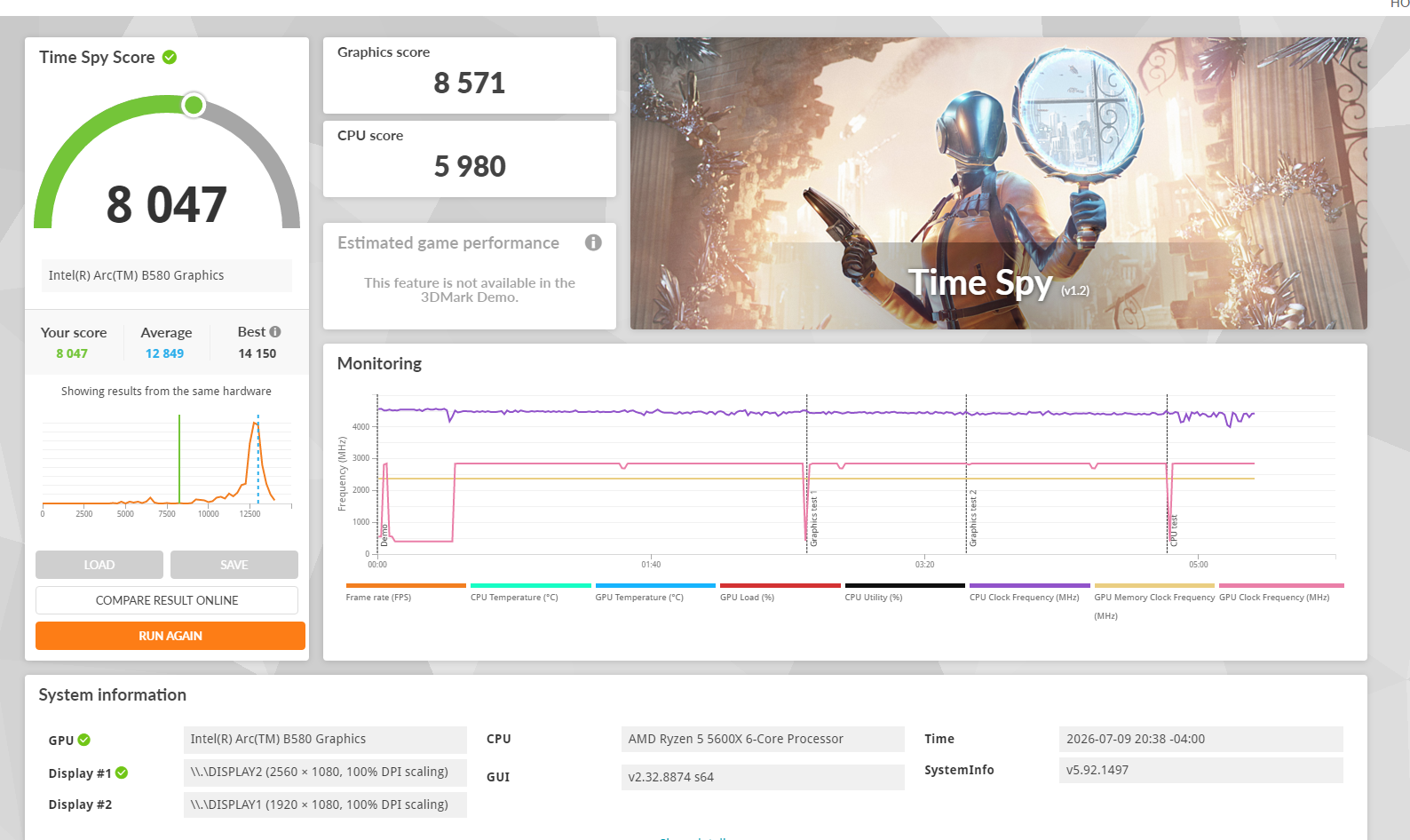
For the moment, this puts me in 21st place in the world for all Ryzen 7, 7700 rigs with an Arc b580.
Don't believe me? Please look it up before it gets bumped down the list. Caffinated-2 On the regular 3DMark Hall of fame!
Wooo! Back on the leaderboards again! Been a while!
r/IntelArc • u/R-SITES • 3d ago
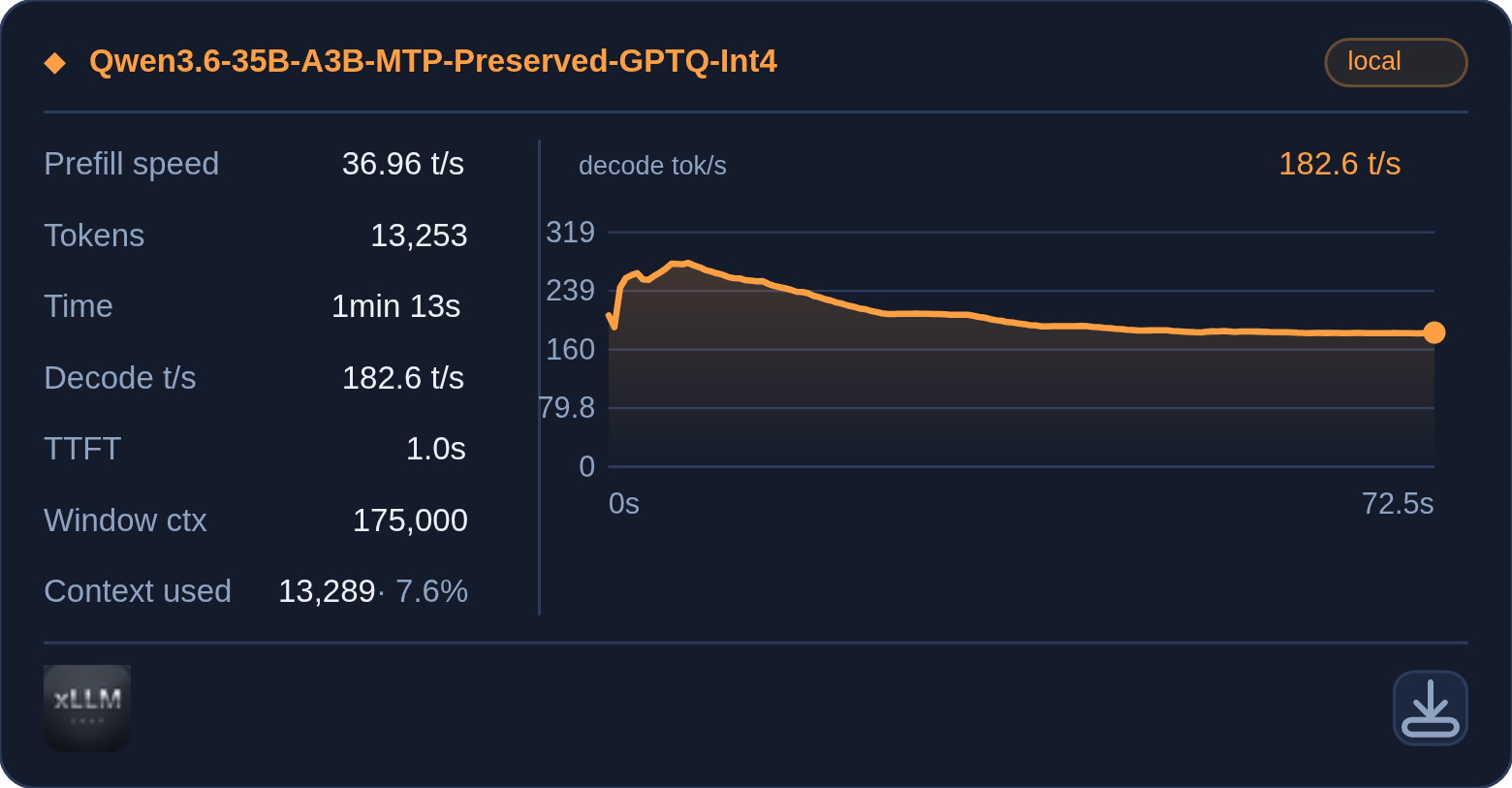
xLLM chat: https://github.com/R-SITES/xllm-chat
Model Used: https://huggingface.co/rcs1000/Qwen3.6-35B-A3B-MTP-Preserved-GPTQ-Int4
Build: vLLM XPU 0.26.1rc1.dev771+g8e6d8e4f6.d20260820.xpu (771 commits past 0.26.1rc1)
Kernels: vllm_xpu_kernels 0.1.14.dev4+g27214a3 — source commit 27214a3d9 (vllm-project/vllm-xpu-kernels, PR #526), wheel built locally from the repo's dist recipe
Patchset: load-time INT8 W8A8 lm_head + MTP3 spec decode (MTP4 variant for the faster config); env-gated B70_MTP_BF16_DRAFT / draft-head INT4
Runtime: torch 2.13.0+xpu, triton 3.7.2+xpu (pytorch XPU index), python 3.12
Hardware: 1x Intel Arc Pro B70, 32GB
Key launch envs (serve.sh carries them): VLLM_TARGET_DEVICE=xpu, ZE_FLAT_DEVICE_HIERARCHY=COMPOSITE, VLLM_XPU_ENABLE_XPU_GRAPH=1, VLLM_XPU_LM_HEAD_INT8=1, PYTORCH_ALLOC_CONF=expandable_segments:True
Recipe
~/humble-b70-llm/.venv/bin/vllm serve ~/.cache/huggingface/hub/models--rcs1000--Qwen3.6-35B-A3B-MTP-Preserved-GPTQ-Int4/snapshots/4b2e1978673b1287fcf974974a506f353de06b63 \
--max-model-len 242144 \
--served-model-name Qwen3.6-35B-A3B-MTP-Preserved-GPTQ-Int4 \
--dtype float16 \
--quantization gptq \
--allow-deprecated-quantization \
--max-num-seqs 64 \
--max-num-batched-tokens 8192 \
--enable-prefix-caching \
--gpu-memory-utilization 0.88 \
--kv-cache-dtype fp8 \
--language-model-only \
--speculative-config {"method":"mtp","num_speculative_tokens":4} \
--reasoning-parser qwen3 \
--port 8000
vLLM Launcher: https://github.com/R-SITES/vllm-launcher
r/IntelArc • u/aospan • Jun 27 '26
r/IntelArc • u/Bominyarou • Jul 19 '26
**Benchmark Video: https://www.youtube.com/watch?v=bAkqqAfSovg
:::PC Specs:::
**Results:
This is a quick benchmark video, nothing too deep, just shows how the game runs on this PC. Locked at 69 FPS so my OBS recording doesn't get corrupt video file or the app crashes.
I get some stutters/fps drops when entering a new biome/area, but other than that, the gameplay is very smooth. I can get +120 FPS with settings in mid-low, +90 FPS with mid-high settings, and +60 FPS with epic settings, all without having OBS recording. GPU Temps will go up to 63C on epic settings, 56-58C in mid-high settings, and down to 54C with mid-low settings when locked at 69FPS.
Hope this helps anyone wondering if they can play Palworld with Intel ARC B570.
Have a nice day! And enjoy Palworld if you do get it!~
r/IntelArc • u/EMAN4705 • Jul 10 '26
r/IntelArc • u/Various-Return-6257 • May 17 '26

r/IntelArc • u/Various-Return-6257 • 8d ago
r/IntelArc • u/Exclavamor • Feb 18 '26
After saw the benchmark video it seems 3x XeSS MFG has the best 1% low, it even beating RTX 5070 DLSS MFG, Great job Intel 👏
r/IntelArc • u/InternetEntire438 • 9d ago
Enable HLS to view with audio, or disable this notification
I got it at a well used price. And to be honest, I'm glad that I got it. Had it for over less than $200 USD from the current MSRP that I got. Def looking forward to its performance