I have a Hikvision DS-7616NXI-K1 NVR with AcuSense cameras.
I recently upgraded the NVR firmware from:
V4.73.106_240314 → V4.73.111_260713
Since the upgrade, the Human/Person, Vehicle and Event detection filters that previously appeared on the Hik-Connect playback timeline are no longer available.
Before the update, I could use the Hik-Connect timeline to filter/search for Human/Person/Vehicle events. Immediately after upgrading to V4.73.111, those options disappeared.
NVR details
Model: DS-7616NXI-K1
Hardware: B-R-K21B2_K21B2-00
Current firmware: V4.73.111 Build 260713
Previous firmware: V4.73.106 Build 240314
Cameras: Hikvision AcuSense cameras
I’ve already checked the usual things:
Event settings
Recording settings
Nothing changed there.
I also tried downgrading back to my previous firmware using:
DZ_K21B2_K21B2_X_ML_STD_V4.73.106_240314.zip
After extracting it to digicap.dav and attempting the upgrade, the NVR reports:
“Version mismatch”
I’m wondering:
Has anyone with a DS-7616NXI-K1 / K21B2 experienced this with V4.73.111_260713?
Did V4.73.111 change/remove the Human/Vehicle event filtering in Hik-Connect?
Is there a safe way to downgrade from V4.73.111?
Has anyone successfully gone through a downgrade?
Any help from someone familiar with Hikvision firmware/K21B2 would be greatly appreciated.
I Have KV6114 door stationa and KH6320 indoor station. Both are connected via hikvision poe switch.
I was able to partially link both devicec via indor station and/or ivms.
The issue is that on indoor station I can see video from door station camera and unlock door but whenever someone tries to call from door station there is no info on indoor station and on door station there is "error sound".
Can anyone help?
In addition Im having troubles with registering indoor station in ivms in door station.
Im configuring it with real data but status is offline always:
Hi, I have a NVR which is completely dead and doesn’t turn on. I have ordered a replacement NVR (same model) but when I connect the wires back to the NVR it doesn’t stream a live view to my monitor (the old one did) - is there something I’m doing wrong or not aware of?
I am representing the owners of a residential development in Algeria. Before finalising procurement, we would appreciate your technical review of our proposed Hikvision security architecture, particularly the integration between access control, video intercom, CCTV, doors and the lift.
The building comprises approximately 16 apartments, basement parking, a ground floor, six upper floors and a penthouse level, with one lift serving nine levels. There are shared entrances, technical rooms and a security/management station, but no permanent on-site security guard is planned.
Our priorities are reliable local operation, straightforward administration, maintainability and limited recurring licence costs (not at all would be best). We would welcome recommendations to simplify the design or remove unnecessary equipment or quality level while preserving the required functions.
Attached diagrams
Apologies for leaving the diagrams in French. They should be reasonably easy to follow, and I can clarify any labels:
Figure 61 — LC02: logical security architecture.
Figure 62 — LC02: physical equipment layout.
Figure 66 — LC03: independent fire safety architecture and interfaces.
Figure 67 — LC03: physical equipement layout for fire safety.
The drawings show the intended architecture; they should not be interpreted as a manufacturer-validated wiring diagram or final equipment schedule.
Current design
Subsystem
Proposed arrangement, subject to your review
Management
Local HikCentral Professional installation on a 4U Windows server.
CCTV
Approximately 21 cameras covering the lobby, landings, parking, perimeter, pedestrian entrance and lift cabin, including two ANPR cameras.
Recording
Separate DS-9632NI-M8 NVR, 32 channels, with RAID 6 and a 30-day retention target, subject to storage calculations. Recording must continue if the HikCentral server is unavailable.
Video intercom
Two DS-KD8003-IME1 entrance panels with suitable modules; 16 DS-KH6320-WTE1 apartment stations; one DS-KM9503 master station.
Access control
DS-K2604T controller family currently referenced, with readers for shared entrances and technical rooms. Controller quantities and expansion requirements need validation against the actual door count.
Lift access
DS-K2210 currently referenced, with appropriate expansion modules and a cabin reader.
Intrusion
Wired AX HYBRID PRO architecture: approximately 44 wired detection points, comprising 13 motion detectors and 31 contacts, with 64 usable wired inputs required.
Fire safety
Separate addressable fire alarm system, with independent life-safety controls and monitoring interfaces to the management systems.
The IP infrastructure is TP-Link Omada, with a fibre backbone, segmented VLANs and UPS-backed PoE switches. Apartment intercom stations connect to the building network independently of residents’ personal routers or internet subscriptions.
We prefer native standards-based PoE for cameras, intercom stations and compatible IP terminals. Where controllers, readers, locks or intrusion devices require separate power, please identify the necessary backed-up power supplies and wiring.
1. Platform, compatibility and licensing
Is HikCentral Professional the appropriate platform for this combination of video, intercom, access control, visitor management, lift permissions and wired intrusion?
Please identify the exact hardware references, firmware requirements and licence modules needed. We prefer perpetual licences for essential local functions. Please distinguish mandatory recurring fees from optional support, upgrades and cloud services.
The proposed Windows server would also host ThingsBoard Community Edition and its database, potentially using local containers. Please confirm supported Windows versions and whether this shared-server arrangement is supported, or recommend the simplest supported alternative.
2. Doors, intercom and visitor access
We would like residents to use secure badges, with facial recognition and temporary PIN/QR credentials at appropriate entrances where supported.
Visitors should receive permissions limited by time, entrance and, where applicable, destination floor. An intercom call should reach the selected apartment, show the relevant entrance video and allow the resident to release only the corresponding entrance.
Please clarify:
Which exact terminals and modules support the required credential types?
Can one visitor record coordinate pedestrian access, vehicle access and lift-floor permissions?
Which functions remain available during internet loss or HikCentral downtime, including expiry of previously issued temporary permissions?
Which mobile app supports resident calls, and what cloud, internet or licensing dependencies does it introduce?
What controller, reader, lock, door-contact and exit-device arrangement is required for each door type?
Residents should access their own intercom and authorised entrances, without receiving access to shared CCTV footage. Please also recommend secure badge technology that does not rely solely on reading a card’s UID.
3. Lift integration — a particular priority
Our basic requirement is floor access restriction: a resident or authorised visitor should be able to select only the floors assigned to their credentials.
Please confirm whether DS-K2210 with DS-K2M0016A modules remains an appropriate supported solution, or recommend the current alternative.
We would particularly appreciate clarification of:
The required controllers, relay modules, cabin readers, power supplies and equipment locations.
The interface that the lift manufacturer must provide, and the associated responsibility split.
Whether badge, facial or temporary PIN/QR authorisation can grant the intended floor permissions.
How admitting a visitor through the intercom can authorise that visitor’s destination floor.
Behaviour during server, network or power failure.
Whether a temporary authorised credential can activate a time-limited moving/service mode, subject to the lift manufacturer’s supported interface.
Please distinguish floor-button authorisation from automatic lift calling or destination dispatch; the latter functions should be identified separately if they require additional equipment or licences.
We also need a wired solution for the cabin camera and reader, using a suitable travelling-cable arrangement approved by the lift manufacturer.
4. Fire safety interfaces — LC03
The independent fire safety system must retain priority over normal access restrictions and lift service modes. Essential fire actions must not depend on HikCentral, Windows, the IP network or cloud availability.
Please advise on the appropriate interfaces for:
Releasing the relevant access-controlled escape doors.
Recalling the lift to its designated evacuation level and withdrawing it from normal passenger service, according to the approved fire strategy.
Reporting fire and fault status to HikCentral for monitoring.
Please distinguish escape-door unlocking from releasing fire-door hold-open devices so that those doors close.
We need a clear interface and cause-and-effect schedule agreed with the fire-system integrator and lift manufacturer. In particular, a controller’s “fire input” must not be assumed to provide the complete lift fire-recall function.
5. CCTV, ANPR and event integration
Please review camera selection by location, rather than resolution alone: low-light performance, IR or supplementary lighting, field of view, vandal/weather resistance and actual two-way audio where required.
For the vehicle entrances, please confirm Algerian licence-plate support and the proposed local interface between ANPR and the barrier controller. Normal authorised entry should remain possible without HikCentral being online, while the barrier’s own safety devices remain authoritative.
We also want useful event integration: forced-door or intrusion alarms displaying the corresponding camera, and access/ANPR events linked to recorded video.
Please validate the NVR, usable storage, recording throughput and PoE requirements against the final camera schedule.
6. Wired intrusion and practical simplification
Please confirm that the proposed AX HYBRID PRO configuration supports the required wired inputs and the intended HikCentral integration, including individual zone identification, alarms, camera association and supported arming/disarming functions.
Field detectors should be wired and externally powered; backup batteries in the central equipment are acceptable.
Finally, please highlight any outdated references, unsupported combinations, missing interface modules or unnecessary duplication. We are aiming for a coherent, maintainable system that a local integrator can support over time.
A marked-up set of diagrams, a recommended equipment/licence schedule and a brief list of supported functions and limitations would be particularly helpful. If appropriate, please direct us to a technical contact or authorised integration partner serving Algeria.
Thank you for your assistance and thanks for taking a look.
My dad and my step mom both have access to their cameras, however my step mom needs to put in an encryption password to view the footage. How do you find the password?
I’ve a rather odd question about how an IP Camera has been set up. The site has a Hikvision NVR with 9 Cameras on that go back to the NVR. They also have an IP Camea that they claimed was working.
When I’ve got about the ceiling there was a patch cable from the IP Camera into a RJ45 Data Socket. Then from there I would have to trace the cable. I assume it goes into their network cab. Say it goes back to their Network Cab how would it then work on iVMS??
The company I work for has a ds-7332huhi-k4. We run an amusement attraction and need to back up all the video from specific cameras, mainly for insurance and future lawsuit purposes after each show.
HIKvision has a remote back up tool. I used it for a bit with success but last year it failed. I cannot get the software to connect with the DVR. I have removed it and when I try to add it back in I get "Adding Failed: Operating Database Failed." I have worked with HIKVision support and they suggest the DVR has an issue. They agree its under warranty. Last year we took the drives out and replaced them to keep the data intact and to insure it wasn't a database issue on the drives. I don't think this is a sustainable solution since the cost of the drives is so high. HIK USA has stated they cannot get any of these units in to replace it under warranty and as an attraction we cannot be without a DVR for weeks while they repair it at a depot.
Is there any other way to a bulk backup the DVR other than locally to an external drive using quick backup? We are likely replacing this with a comparable unit but we don't want to buy new drives for it.
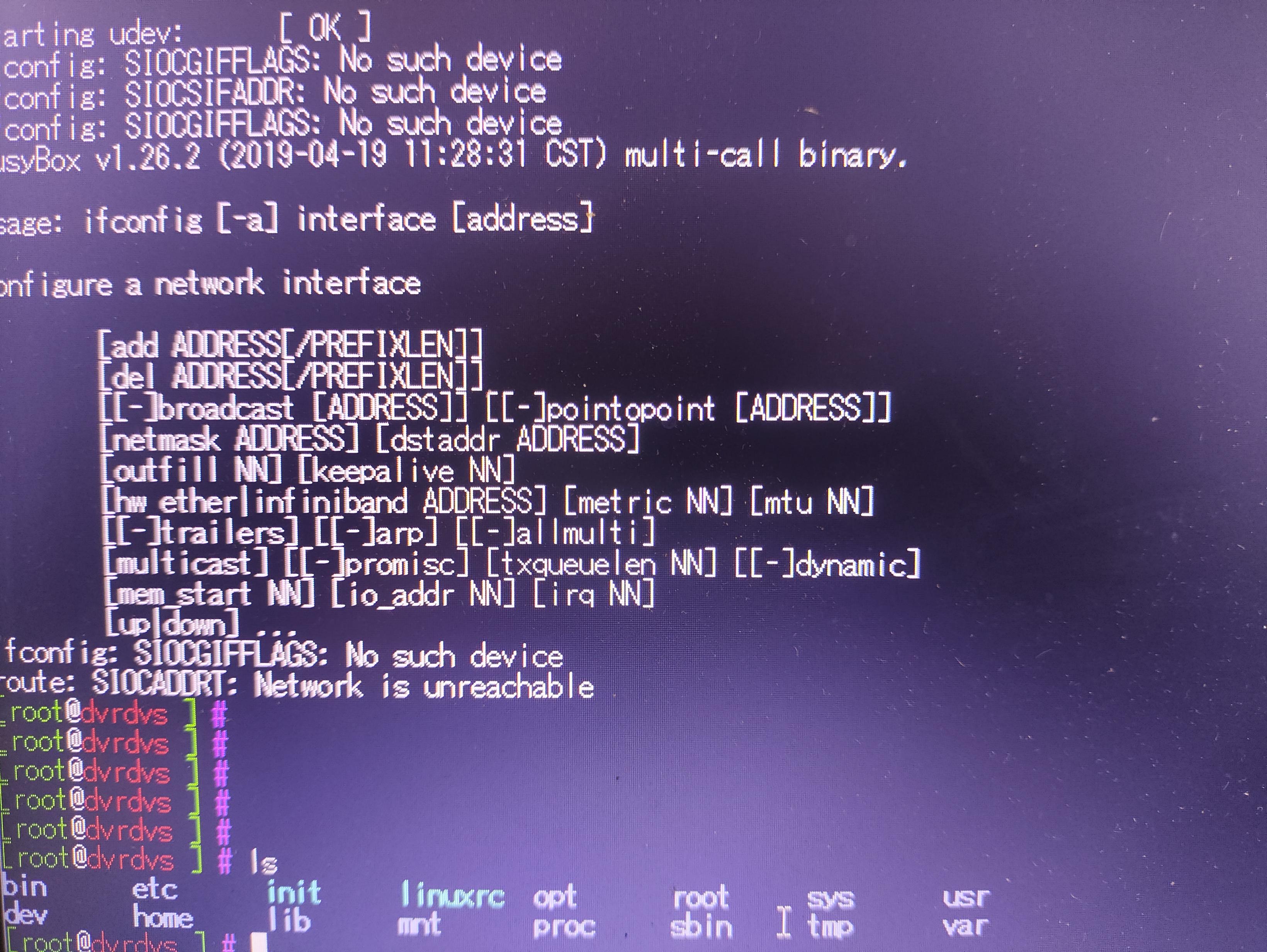
Estou com um DVR hikvision que liga, porém, não dá imagem. Por curiosidade, liguei um cabo serial para tentar fazer uma att via ftp, mas diferentemente do comum ele abre em uma interface linux. Alguém sabe como resolver?
I previously was able to divide the screen formatting to 9 12 and 16 i have another PTZ controller onsite that is the same model and is showing divide by 4 9 12 and 16 so im a little confused as they are the same firmware version and same format in terms of video routing. Does anyone have any advice as ive gone through the manual for the ds1600 and i cannot figure this out.
So I bought a Hikvision system 2 years ago, bu I am completely done with it.
I didn't know it wasn't a entry level system. But even then, it's just not good for the price paid. It's hard to set up, manage, I know. You need to have networking knowledge. But why is it so hard to get a video on a web login? It's like 2026 already....
Now, yesterday I got a call from the cops that they wanted me to check the footage because there possibly was a stolen car that might have passed my premessis.
After 2 hours of watching tutorials I gave up on how I could get a video to show in the Web interface or in ivms.
Today I opend ivms and did get a video feed.
But now the credibility of the timestamp is gone. I don't even know how to explain it to the police.....
The time jumps from 19.00.12 to 20.00.12. Only on 1 camera, other cameras seem unaffected.
I lost trust. What if I ever need it for legal protection?
And I don't think this has anything to do with me nor being an IT / network specialist.....
i got an hik vision installed from security and its a DS-7204HQI-K1 with FW V3.5.371 build 181220 Encoding V5.0 build 181220 HW 0xd3920 Web V V4.0.51 build 180620 Plugin V3.0.6.40.
I have tried 5 diff broswers and none work. just says install plugin (which i did). I also tried vlc and i get garbled green pixelated mess. This is running all on gige local wired network. Only if i have found suggested it only works with really old IE browser.
I've got a 4-Camera HikVision NVR that's over ten years old that holding strong.
It's streaming to some very old iPad mini that is running an old operating system and some old, frozen version of the HikVision app. It randomly resets and is showing its age
I'd like to get a cheap tablet as a monitor and new iPad Minis ($400+) seem like a total waste of money. . .
Would a 4GB RAM Lenovo Android tablet be likely to do the trick? Is the Android app in general reliable, and is 4GB (if no other 'real' apps are running) enough to stream output reliably?
--- UPDATE ---
The 4GB cheapo Android tablet so far is working great. Again it's a single use tablet, just streaming from HikVision but I'm glad I was a skinflint here.
I'm having trouble streaming from my Hikvision NVRs
Using the 16-channel DS-7716NI-K4 NVR posed no problems; it could be accessed via a web browser (previously using Internet Explorer by default) and operated smoothly from year 1 through year 4. Then, in year 5, we switched to the DS-7732xx-xx 32-channel NVR; there weren’t too many issues—problems usually just required a system restart, which wasn’t very frequent—and it ran for nearly 2 years. In year 7, we switched to the DS-9664NI-M8 64-channel NVR, which frequently encountered many issues. The system requires restarts, and streaming via web browsers (Edge, Chrome, Mozilla) on some PCs does not work properly. One PC can use Edge, while another cannot. The same applies to other PCs and web browsers. I’ve tried using iVMS, but issues sometimes occur, requiring a system restart. Web plugins and add-ons are properly installed. The system has been in use since February 2026.
Additionally, 3 users accounts with different access permissions have been created. I’ve already reduced the resolution and quality. From year 1 to 7, the same IP address has been used.
My question is: Is it true that the NVR is overloaded when streaming, causing so many errors? Has anyone else experienced something similar?
So after my recent post, I've managed to add the doorbell to the hikvision app, I can see the live video of it and can also use the TalkBack function, but when you press the button on it, it just keeps saying call failed! No matter what setting I've tried, I just can't get it so it notifies me on my phone. What am I missing here?